roof TOYOTA RAV4 2023 User Guide
[x] Cancel search | Manufacturer: TOYOTA, Model Year: 2023, Model line: RAV4, Model: TOYOTA RAV4 2023Pages: 574, PDF Size: 17.31 MB
Page 113 of 574
113
3
3
Before driving
Before driving
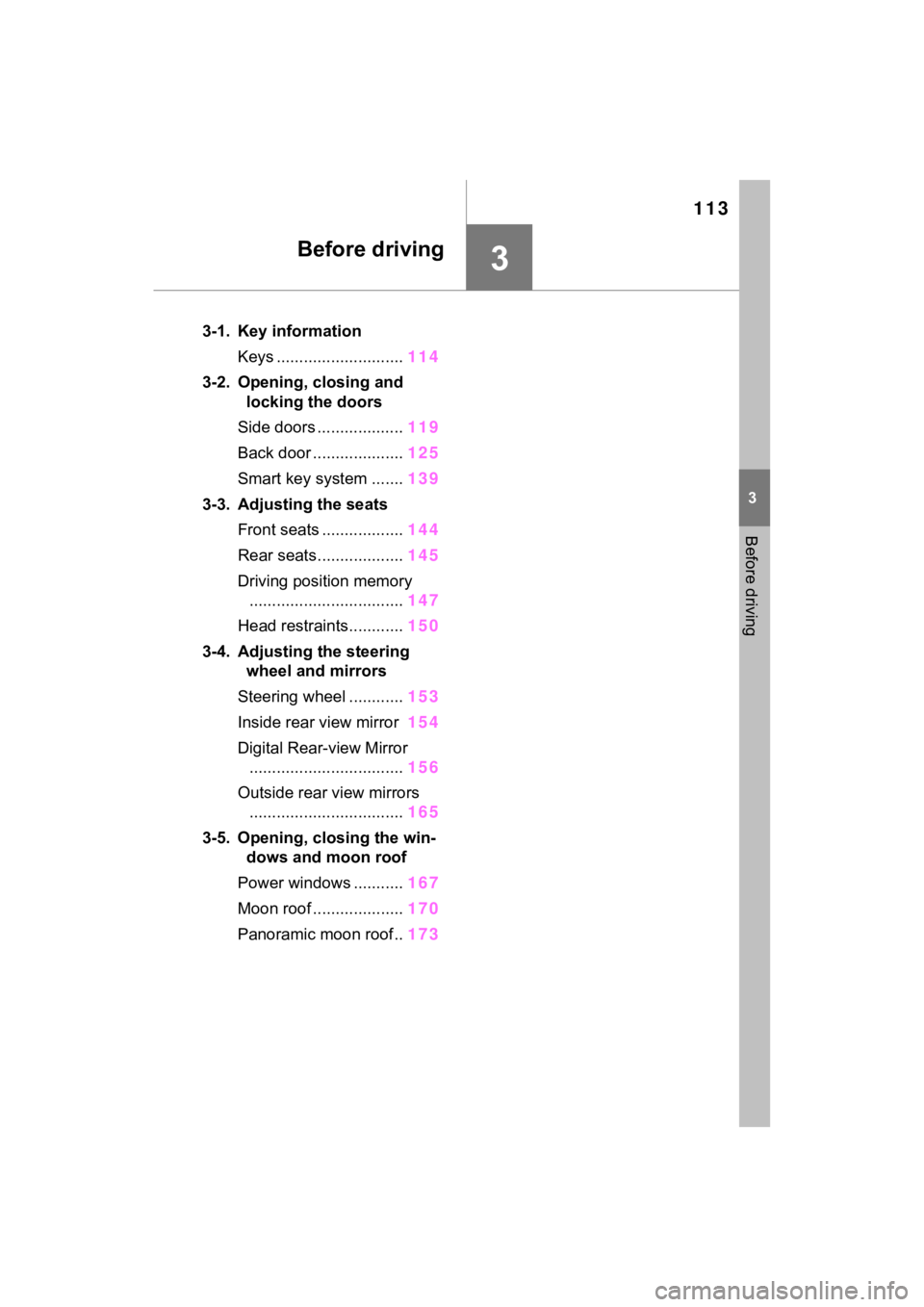
3-1. Key informationKeys ............................ 114
3-2. Opening, closing and locking the doors
Side doors ................... 119
Back door .................... 125
Smart key system ....... 139
3-3. Adjusting the seats Front seats .................. 144
Rear seats................... 145
Driving position memory .................................. 147
Head restraints............ 150
3-4. Adjusting the steering wheel and mirrors
Steering wheel ............ 153
Inside rear view mirror 154
Digital Rear-view Mirror .................................. 156
Outside rear view mirrors .................................. 165
3-5. Opening, closing the win- dows and moon roof
Power windows ........... 167
Moon roof .................... 170
Panoramic moon roof.. 173
Page 116 of 574
1163-1. Key information
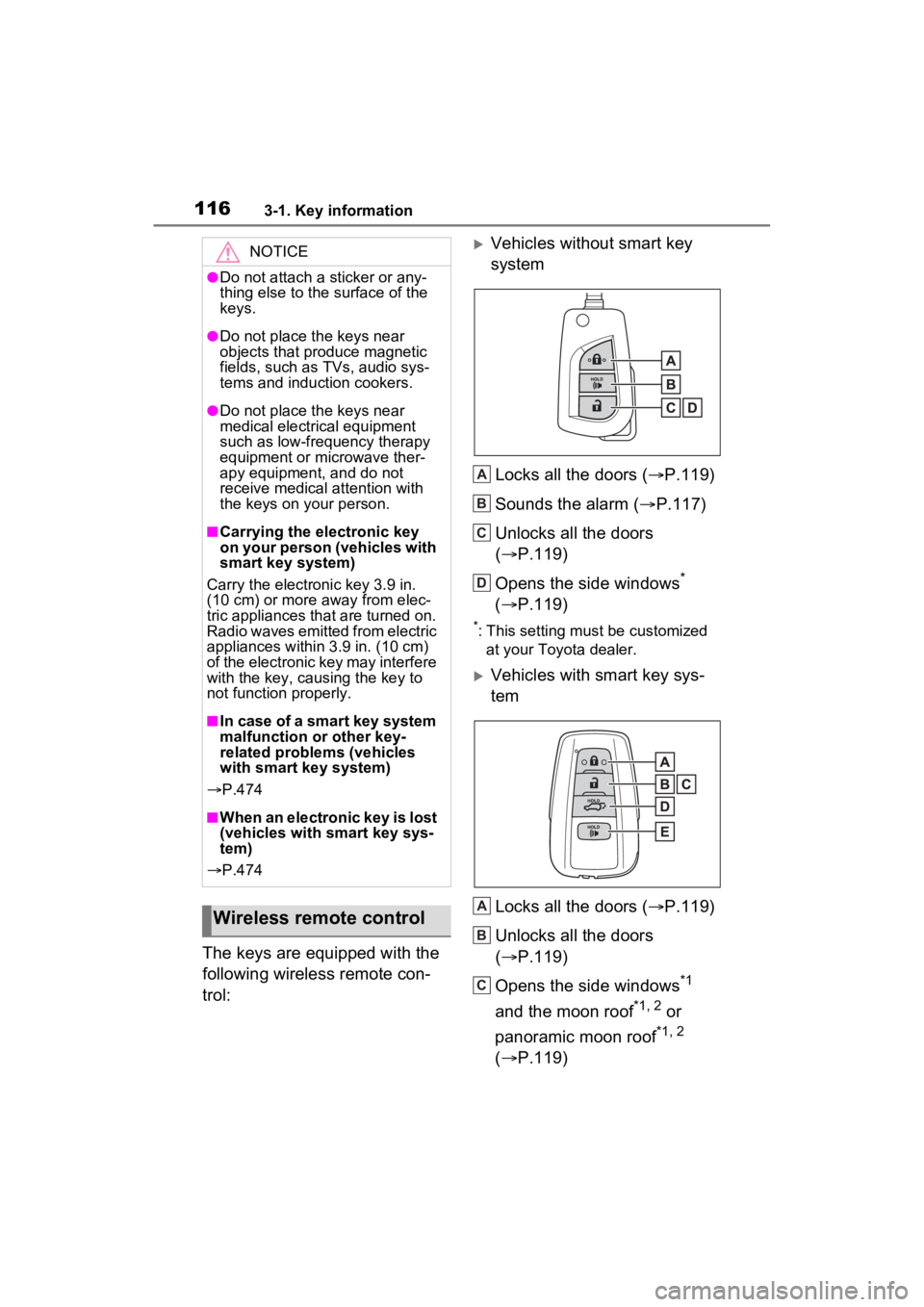
The keys are equipped with the
following wireless remote con-
trol:
Vehicles without smart key
systemLocks all the doors ( P.119)
Sounds the alarm ( P.117)
Unlocks all the doors
( P.119)
Opens the side windows
*
( P.119)
*: This setting must be customized
at your Toyota dealer.
Vehicles with smart key sys-
tem
Locks all the doors ( P.119)
Unlocks all the doors
( P.119)
Opens the side windows
*1
and the moon roof
*1, 2 or
panoramic moon roof
*1, 2
( P.119)
NOTICE
●Do not attach a sticker or any-
thing else to the surface of the
keys.
●Do not place th e keys near
objects that produce magnetic
fields, such as TVs, audio sys-
tems and induction cookers.
●Do not place th e keys near
medical electrical equipment
such as low-frequency therapy
equipment or microwave ther-
apy equipment, and do not
receive medical attention with
the keys on your person.
■Carrying the electronic key
on your person (vehicles with
smart key system)
Carry the electronic key 3.9 in.
(10 cm) or more away from elec-
tric appliances that are turned on.
Radio waves emitted from electric
appliances within 3.9 in. (10 cm)
of the electronic key may interfere
with the key, causing the key to
not function properly.
■In case of a smart key system
malfunction or other key-
related proble ms (vehicles
with smart key system)
P.474
■When an electronic key is lost
(vehicles with smart key sys-
tem)
P.474
Wireless remote control
A
B
C
D
A
B
C
Page 120 of 574
1203-2. Opening, closing and locking the doors
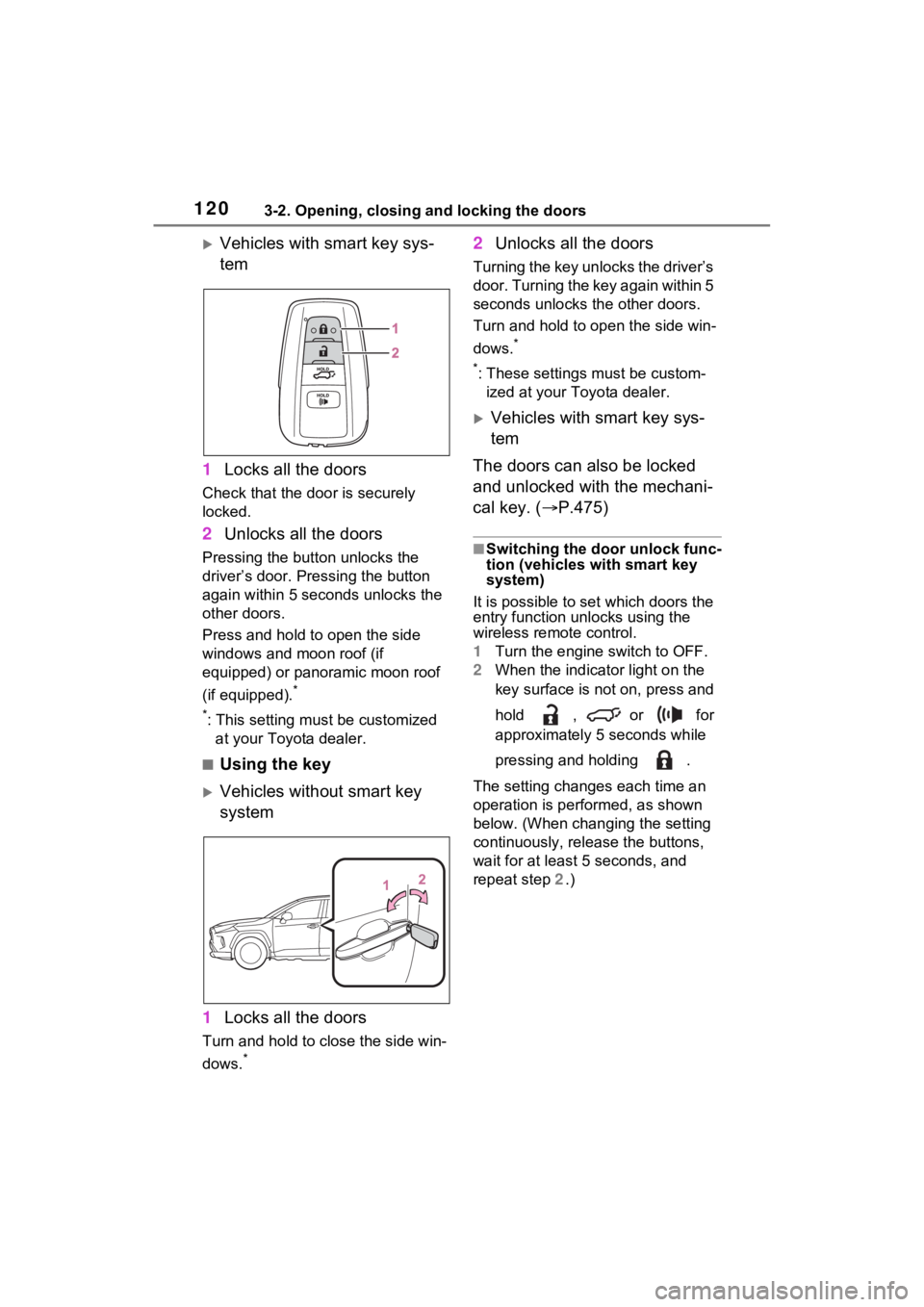
Vehicles with smart key sys-
tem
1 Locks all the doors
Check that the door is securely
locked.
2Unlocks all the doors
Pressing the button unlocks the
driver’s door. Pressing the button
again within 5 seconds unlocks the
other doors.
Press and hold to open the side
windows and moon roof (if
equipped) or panoramic moon roof
(if equipped).
*
*
: This setting must be customized at your Toyota dealer.
■Using the key
Vehicles without smart key
system
1 Locks all the doors
Turn and hold to close the side win-
dows.
*
2Unlocks all the doors
Turning the key unlocks the driver’s
door. Turning the key again within 5
seconds unlocks th e other doors.
Turn and hold to open the side win-
dows.
*
*
: These settings must be custom- ized at your Toyota dealer.
Vehicles with smart key sys-
tem
The doors can also be locked
and unlocked with the mechani-
cal key. ( P.475)
■Switching the door unlock func-
tion (vehicles with smart key
system)
It is possible to set which doors the
entry function unlocks using the
wireless remote control.
1 Turn the engine switch to OFF.
2 When the indicator light on the
key surface is not on, press and
hold , or for
approximately 5 seconds while
pressing and holding .
The setting changes each time an
operation is per formed, as shown
below. (When changing the setting
continuously, release the buttons,
wait for at least 5 seconds, and
repeat step 2 .)
Page 121 of 574
1213-2. Opening, closing and locking the doors
3
Before driving
*1: Vehicles with 7-inch multi-infor-
mation display
*2: Vehicles with 12.3-inch multi-information display
Vehicles with alarm: To prevent
unintended triggering of the alarm,
unlock the doors us ing the wireless
remote control and open and close
a door once after t he settings have
been changed. (If a door is not
opened within 60 seconds after
is pressed, the doors will be
locked again a nd the alarm will
automatically be set.)
In a case that the alarm is triggered,
immediately stop the alarm.
( P.71)
■Operation signals
Doors: A buzzer sounds and the
emergency flashers flash to indicate that the doors have been
locked/unlocked using the entry
function or wireles
s remote control.
(Locked: Once; Unlocked: Twice)
Side windows and moon roof (if
equipped) or panoramic moon roof
(if equipped): A buzzer sounds to
indicate that the side windows and
moon roof or panoramic moon roof
are operating us ing the wireless
remote control.
■Security feature
Vehicles without smart key system
If a door is not opened within
approximately 60 s econds after the
vehicle is unlocked using the wire-
less remote control, the security fea-
ture automatically locks the vehicle
again.
Vehicles with smart key system
If a door is not opened within
approximately 60 s econds after the
vehicle is unlocked using the entry
function or wireles s remote control,
the security featur e automatically
locks the vehicle again. (However,
depending on the location of the
electronic key, the key may be
detected as being in the vehicle. In
this case, vehicle may be unlocked.)
■When the door cannot be
locked by the lock sensor on
the upper part of the door han-
dle (vehicles with smart key
system)
If the door will not lock even when
the topside sensor area is touched,
try touching both the topside and
underside sensor areas at the same
time.
When gloves are being worn,
remove the gloves.
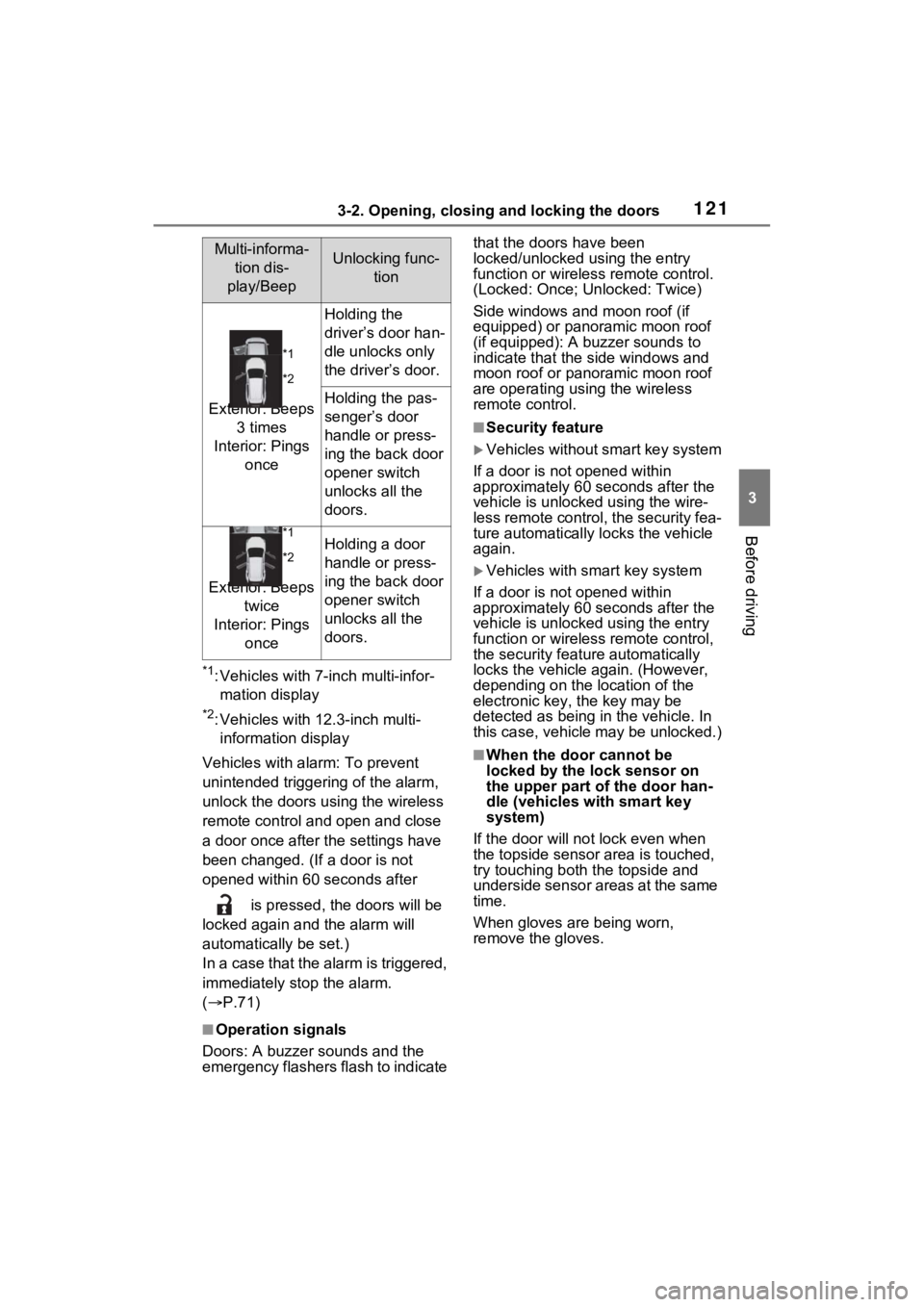
Multi-informa-
tion dis-
play/BeepUnlocking func- tion
*1
*2
Exterior: Beeps 3 times
Interior: Pings once
Holding the
driver’s door han-
dle unlocks only
the driver’s door.
Holding the pas-
senger’s door
handle or press-
ing the back door
opener switch
unlocks all the
doors.
*1
*2
Exterior: Beeps twice
Interior: Pings once
Holding a door
handle or press-
ing the back door
opener switch
unlocks all the
doors.
Page 123 of 574
1233-2. Opening, closing and locking the doors
3
Before driving
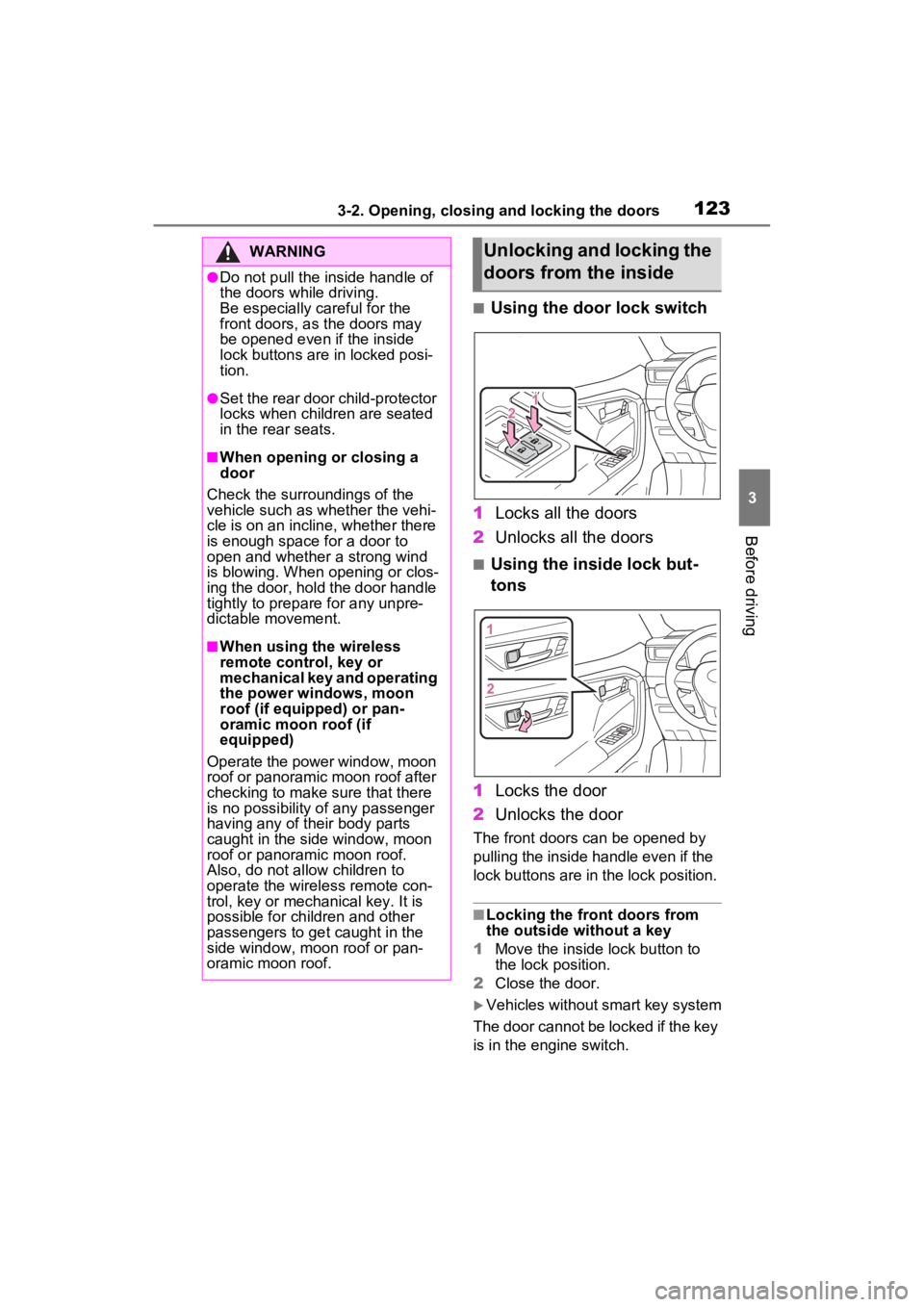
■Using the door lock switch
1 Locks all the doors
2 Unlocks all the doors
■Using the inside lock but-
tons
1 Locks the door
2 Unlocks the door
The front doors can be opened by
pulling the inside handle even if the
lock buttons are in the lock position.
■Locking the front doors from
the outside without a key
1 Move the inside lock button to
the lock position.
2 Close the door.
Vehicles without smart key system
The door cannot be locked if the key
is in the engine switch.
WARNING
●Do not pull the inside handle of
the doors while driving.
Be especially careful for the
front doors, as the doors may
be opened even if the inside
lock buttons are in locked posi-
tion.
●Set the rear door child-protector
locks when children are seated
in the rear seats.
■When opening or closing a
door
Check the surroundings of the
vehicle such as whether the vehi-
cle is on an incline, whether there
is enough space for a door to
open and whether a strong wind
is blowing. When opening or clos-
ing the door, hold the door handle
tightly to prepare for any unpre-
dictable movement.
■When using the wireless
remote control, key or
mechanical key and operating
the power windows, moon
roof (if equipped) or pan-
oramic moon roof (if
equipped)
Operate the power window, moon
roof or panoramic moon roof after
checking to make sure that there
is no possibility of any passenger
having any of their body parts
caught in the side window, moon
roof or panoramic moon roof.
Also, do not allow children to
operate the wireless remote con-
trol, key or mechanical key. It is
possible for children and other
passengers to get caught in the
side window, moon roof or pan-
oramic moon roof.
Unlocking and locking the
doors from the inside
Page 157 of 574
1573-4. Adjusting the steering wheel and mirrors
3
Before driving
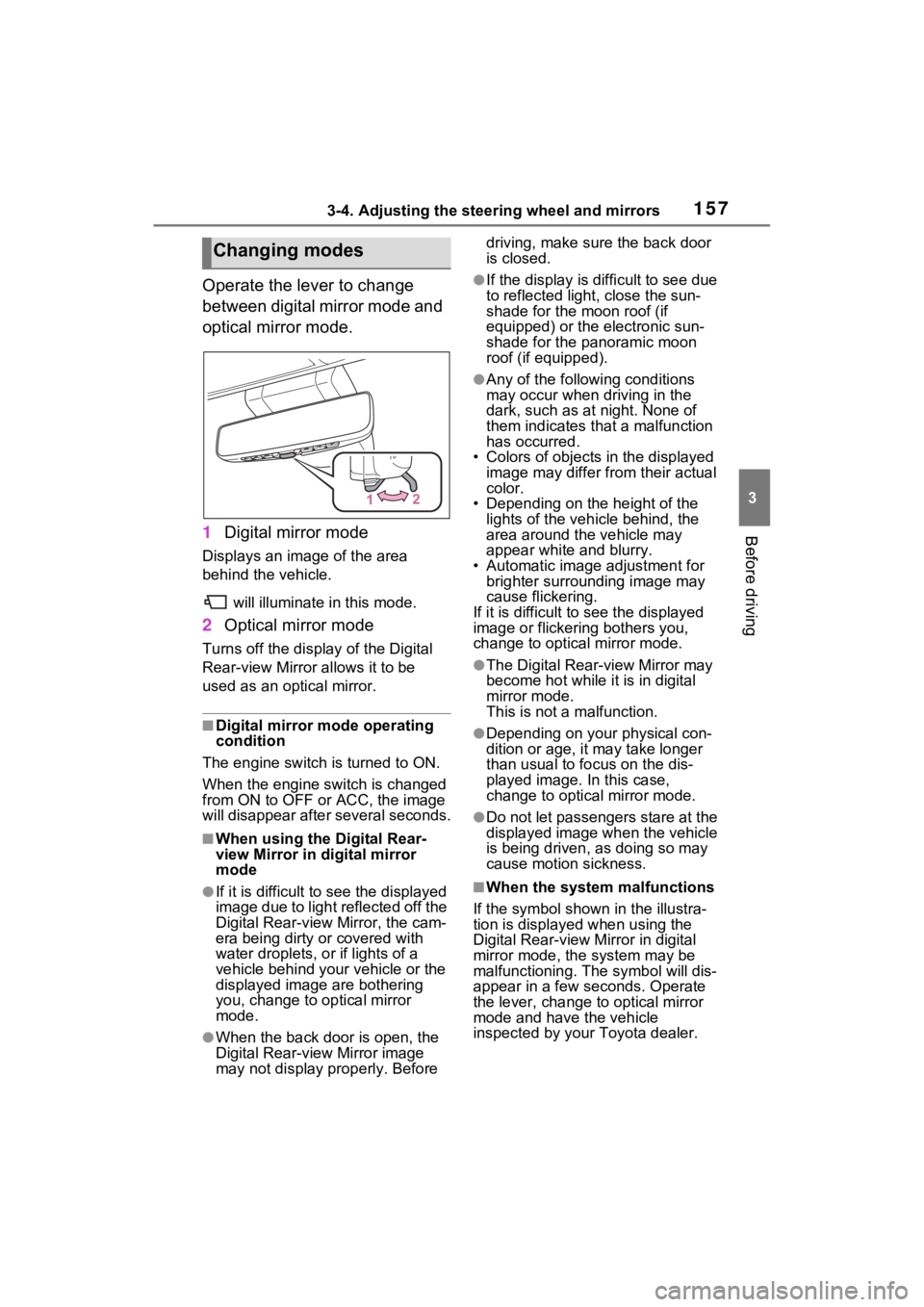
Operate the lever to change
between digital mirror mode and
optical mirror mode.
1Digital mirror mode
Displays an image of the area
behind the vehicle.
will illuminate in this mode.
2Optical mirror mode
Turns off the disp lay of the Digital
Rear-view Mirror allows it to be
used as an optical mirror.
■Digital mirror mode operating
condition
The engine switch is turned to ON.
When the engine switch is changed
from ON to OFF or ACC, the image
will disappear afte r several seconds.
■When using the Digital Rear-
view Mirror in digital mirror
mode
●If it is difficult to see the displayed
image due to light reflected off the
Digital Rear-view Mirror, the cam-
era being dirty or covered with
water droplets, or if lights of a
vehicle behind your vehicle or the
displayed image are bothering
you, change to optical mirror
mode.
●When the back door is open, the
Digital Rear-view Mirror image
may not display properly. Before driving, make sure the back door
is closed.
●If the display is difficult to see due
to reflected light
, close the sun-
shade for the moon roof (if
equipped) or the electronic sun-
shade for the panoramic moon
roof (if equipped).
●Any of the following conditions
may occur when driving in the
dark, such as at night. None of
them indicates that a malfunction
has occurred.
• Colors of objects in the displayed image may differ from their actual
color.
• Depending on the height of the
lights of the vehicle behind, the
area around the vehicle may
appear white and blurry.
• Automatic image adjustment for brighter surrounding image may
cause flickering.
If it is difficult to see the displayed
image or flickering bothers you,
change to optical mirror mode.
●The Digital Rear-view Mirror may
become hot while it is in digital
mirror mode.
This is not a malfunction.
●Depending on your physical con-
dition or age, it may take longer
than usual to fo cus on the dis-
played image. In this case,
change to optical mirror mode.
●Do not let passengers stare at the
displayed image when the vehicle
is being driven, as doing so may
cause motion sickness.
■When the system malfunctions
If the symbol shown in the illustra-
tion is displayed when using the
Digital Rear-view Mirror in digital
mirror mode, the system may be
malfunctioning. The symbol will dis-
appear in a few seconds. Operate
the lever, change to optical mirror
mode and have the vehicle
inspected by your Toyota dealer.
Changing modes
Page 162 of 574
1623-4. Adjusting the steering wheel and mirrors
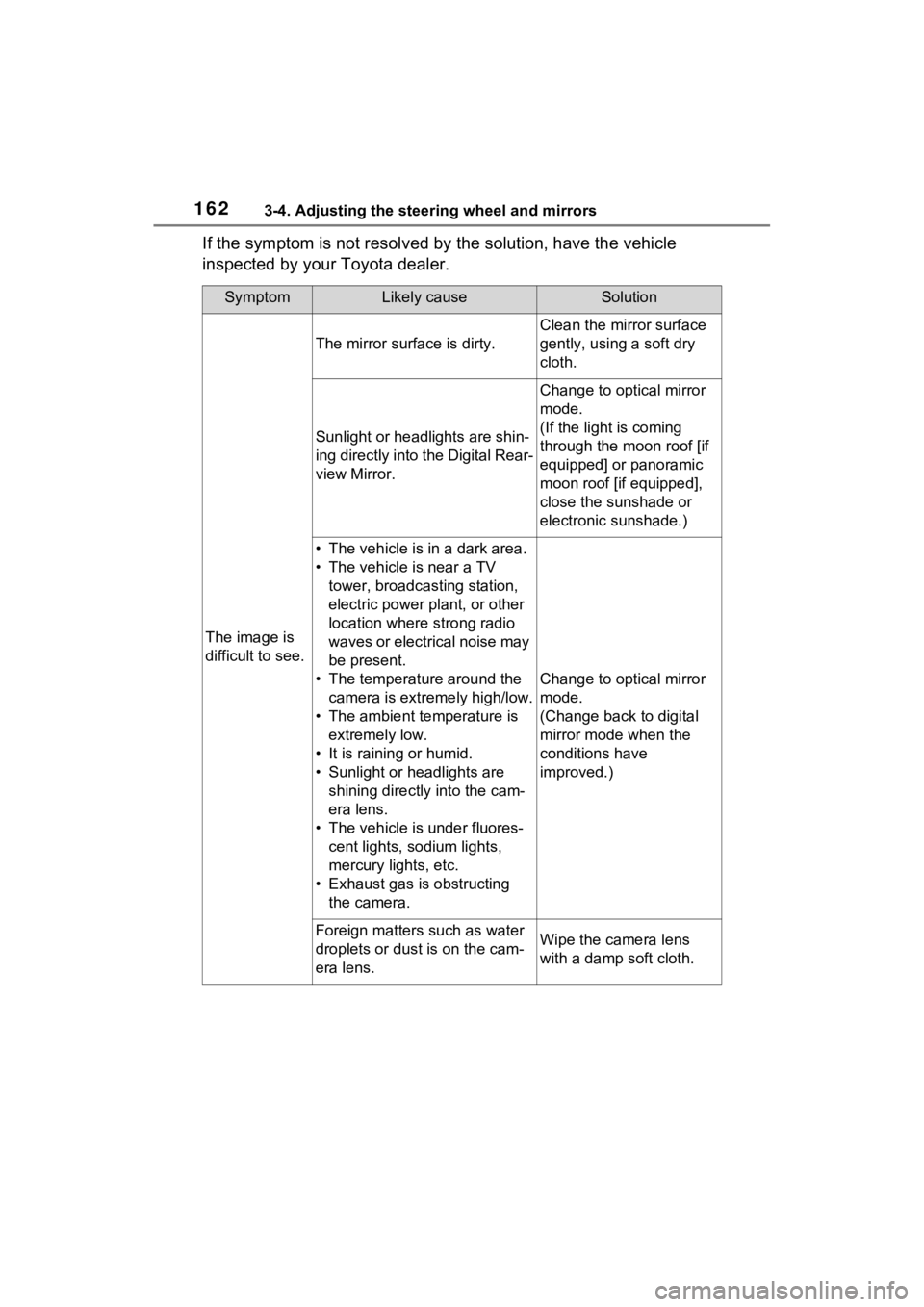
If the symptom is not resolved by the solution, have the vehicle
inspected by your Toyota dealer.
SymptomLikely causeSolution
The image is
difficult to see.
The mirror surface is dirty.
Clean the mirror surface
gently, using a soft dry
cloth.
Sunlight or headlights are shin-
ing directly into the Digital Rear-
view Mirror.
Change to optical mirror
mode.
(If the light is coming
through the moon roof [if
equipped] or panoramic
moon roof [if equipped],
close the sunshade or
electronic sunshade.)
• The vehicle is in a dark area.
• The vehicle is near a TV tower, broadcasting station,
electric power plant, or other
location where strong radio
waves or electrical noise may
be present.
• The temperature around the camera is extremely high/low.
• The ambient te mperature is
extremely low.
• It is raining or humid.
• Sunlight or headlights are shining directly into the cam-
era lens.
• The vehicle is under fluores- cent lights, sodium lights,
mercury lights, etc.
• Exhaust gas is obstructing the camera.
Change to optical mirror
mode.
(Change back to digital
mirror mode when the
conditions have
improved.)
Foreign matters such as water
droplets or dust is on the cam-
era lens.Wipe the camera lens
with a damp soft cloth.
Page 167 of 574
1673-5. Opening, closing the windows and moon roof
3
Before driving
3-5.Opening, closing the windows and moon roof
The power windows can be
opened and closed using the
switches.
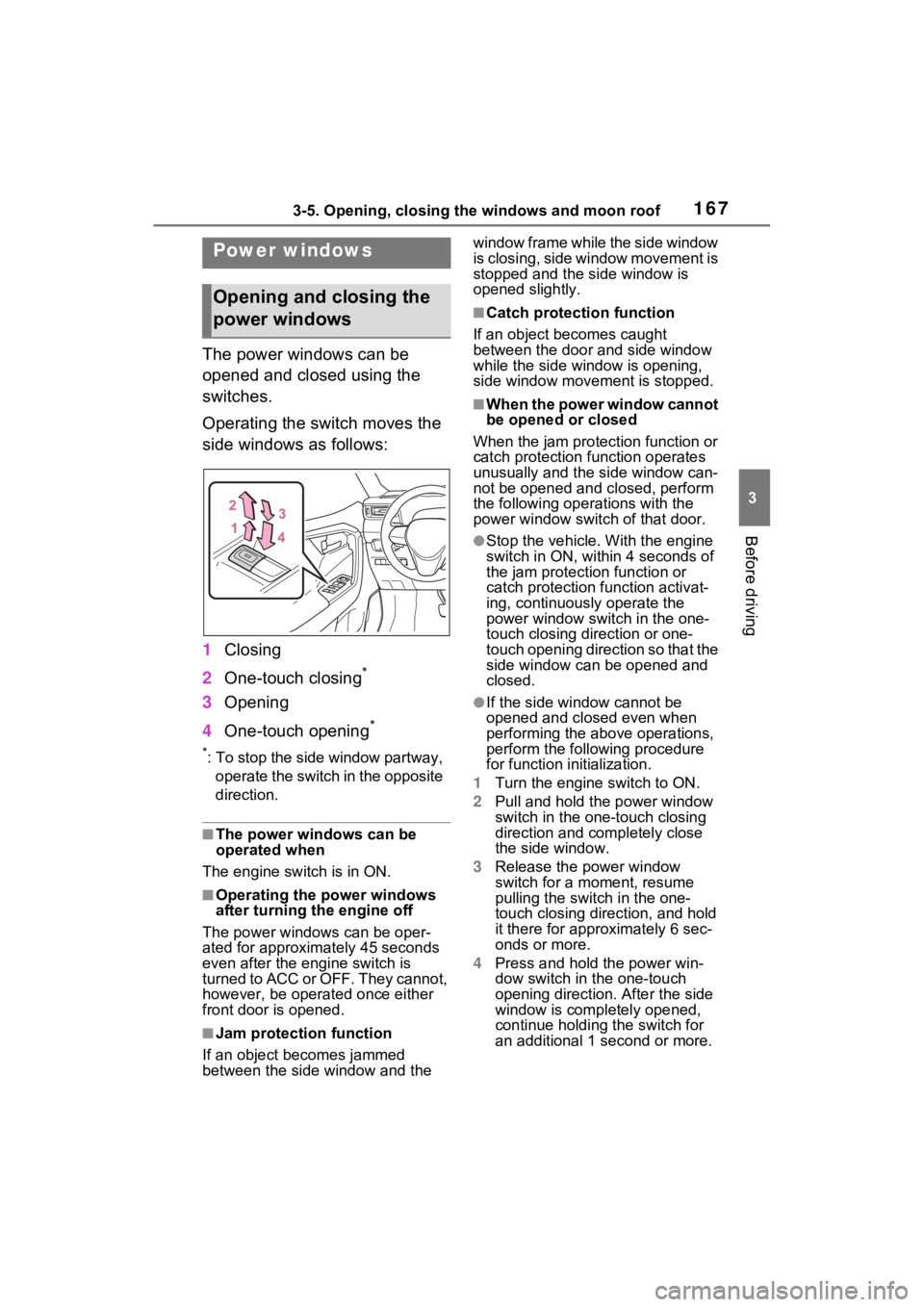
Operating the switch moves the
side windows as follows:
1Closing
2 One-touch closing
*
3Opening
4 One-touch opening
*
*: To stop the side window partway,
operate the switch in the opposite
direction.
■The power windows can be
operated when
The engine switch is in ON.
■Operating the power windows
after turning the engine off
The power windows can be oper-
ated for approximately 45 seconds
even after the engine switch is
turned to ACC or OFF. They cannot,
however, be operated once either
front door is opened.
■Jam protection function
If an object becomes jammed
between the side window and the window frame while the side window
is closing, side window movement is
stopped and the side window is
opened slightly.
■Catch protection function
If an object becomes caught
between the door and side window
while the side window is opening,
side window movement is stopped.
■When the power window cannot
be opened or closed
When the jam protection function or
catch protection function operates
unusually and the side window can-
not be opened and closed, perform
the following operations with the
power window swit ch of that door.
●Stop the vehicle. With the engine
switch in ON, within 4 seconds of
the jam protection function or
catch protection function activat-
ing, continuously operate the
power window switch in the one-
touch closing direction or one-
touch opening direction so that the
side window can be opened and
closed.
●If the side window cannot be
opened and closed even when
performing the above operations,
perform the follo wing procedure
for function initialization.
1 Turn the engine switch to ON.
2 Pull and hold the power window
switch in the on e-touch closing
direction and completely close
the side window.
3 Release the power window
switch for a m oment, resume
pulling the switch in the one-
touch closing direction, and hold
it there for approximately 6 sec-
onds or more.
4 Press and hold the power win-
dow switch in the one-touch
opening direction. After the side
window is completely opened,
continue holding the switch for
an additional 1 second or more.
Power windows
Opening and closing the
power windows
Page 168 of 574
1683-5. Opening, closing the windows and moon roof
5Release the power window
switch for a m oment, resume
pushing the switch in the one-
touch opening direction, and
hold it there for a pproximately 4
seconds or more.
6 Pull and hold the power window
switch in the one-touch closing
direction again. After the side
window is completely closed,
continue holding the switch for a
further 1 second or more.
If you release the switch while the
side window is moving, start again
from the beginning.
If the side window reverses and
cannot be fully closed or opened,
have the vehicle inspected by your
Toyota dealer.
■Door lock linked power window
operation
●The power windows can be
opened and closed using the key
(vehicles without smart key sys-
tem) or mechanical key (vehicles
with smart key system).
* ( P.120,
475)
●The power windows can be
opened using the wireless remote
control.
* ( P.119)
●Vehicles with alarm: The alarm
may be triggered if the alarm is set
and the power window is closed
using the door lock linked power
window operation function.
( P.71)
*: These settings must be custom-
ized at your To yota dealer.
■Power window open reminder
function
Vehicles without smart key system
The buzzer sounds and a message
is shown on the multi-information
display when the key has been
removed from the engine switch and
the driver’s door is opened with the
power windows open.
Vehicles with smart key system
The buzzer sounds and a message
is shown on the mu lti-information
display when the engine switch is
turned to OFF and the driver’s door
is opened with the power windows
open.
■Customization
Settings (e.g. linked door lock oper-
ation) can be changed. (Customiz-
able features: P.517)
WARNING
Observe the following precau-
tions.
Failing to do so may result in
death or serious injury.
■Closing the power windows
●The driver is responsible for all
the power window operations,
including the operation for the
passengers. In order to prevent
accidental operation, especially
by a child, do not let a child
operate the power windows. It is
possible for children and other
passengers to have body parts
caught in the power window.
Also, when ridin g with a child, it
is recommended to use the win-
dow lock switch. ( P.169)
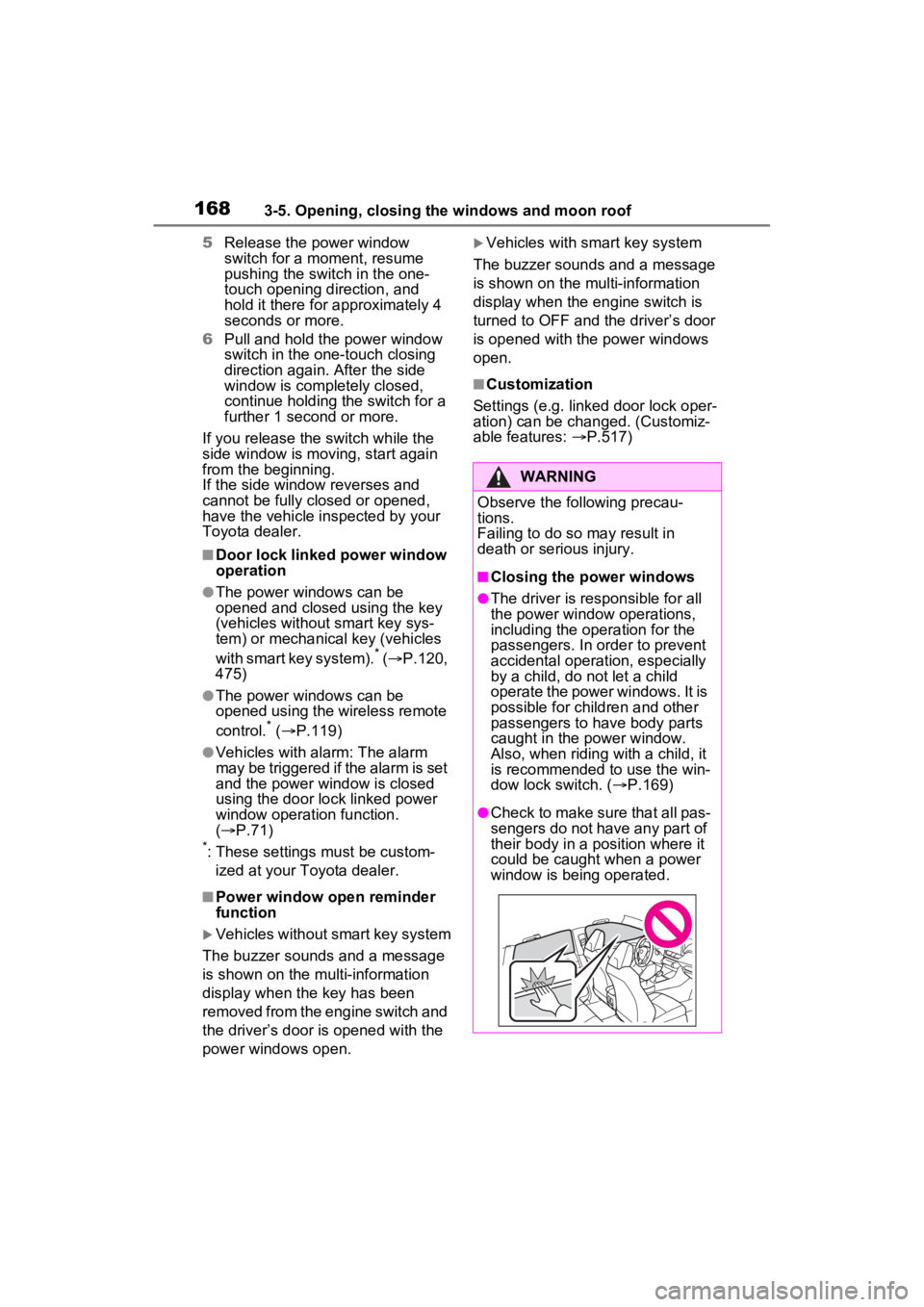
●Check to make sure that all pas-
sengers do not have any part of
their body in a position where it
could be caught when a power
window is being operated.
Page 169 of 574
1693-5. Opening, closing the windows and moon roof
3
Before driving
This function can be used to
prevent children from acciden-
tally opening or closing a pas-
senger window.
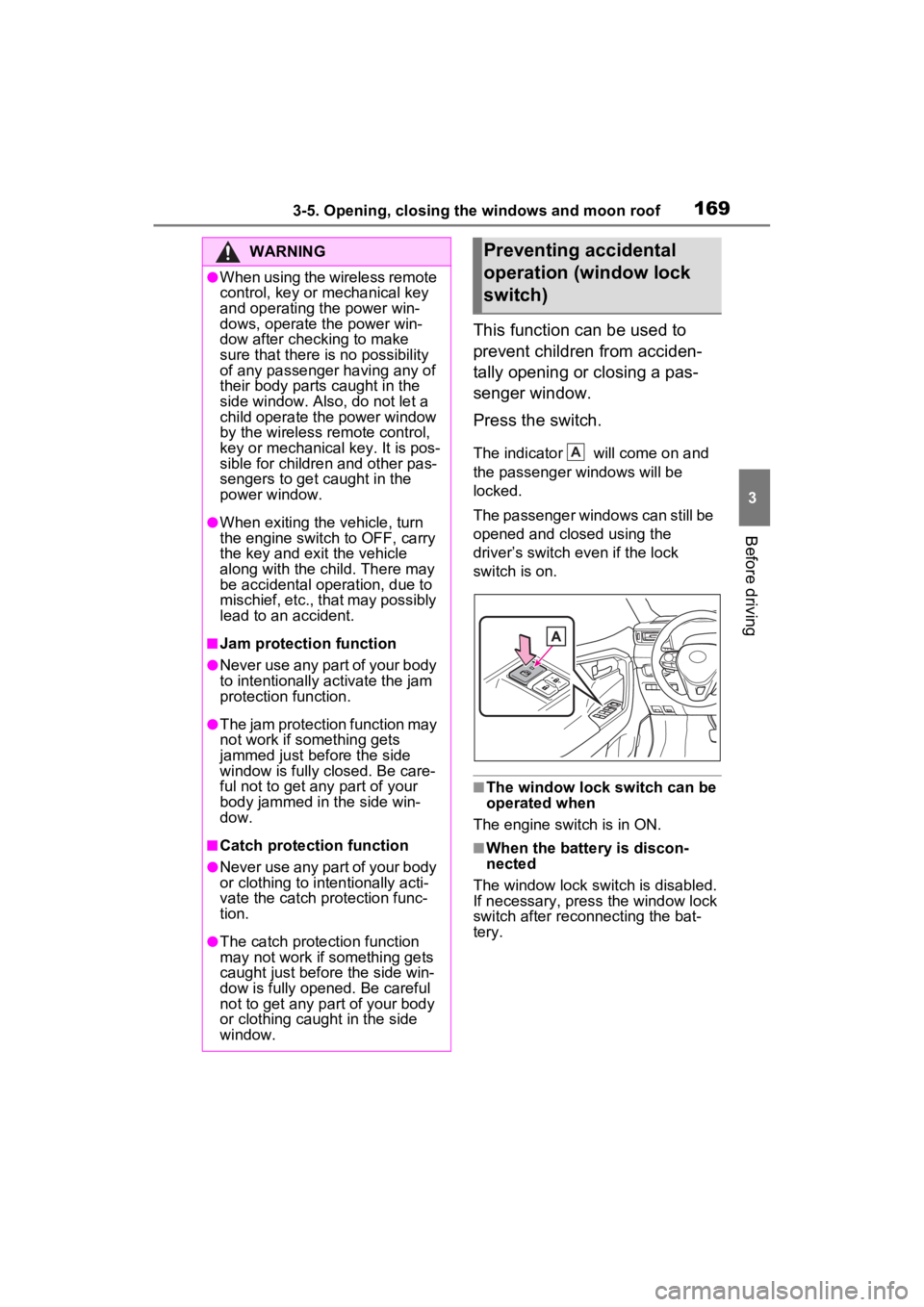
Press the switch.
The indicator will come on and
the passenger windows will be
locked.
The passenger windows can still be
opened and closed using the
driver’s switch even if the lock
switch is on.
■The window lock switch can be
operated when
The engine switch is in ON.
■When the battery is discon-
nected
The window lock switch is disabled.
If necessary, press the window lock
switch after reconnecting the bat-
tery.
WARNING
●When using the wireless remote
control, key or mechanical key
and operating the power win-
dows, operate the power win-
dow after checking to make
sure that there is no possibility
of any passenger having any of
their body parts caught in the
side window. Also, do not let a
child operate the power window
by the wireless remote control,
key or mechanical key. It is pos-
sible for children and other pas-
sengers to get caught in the
power window.
●When exiting the vehicle, turn
the engine switch to OFF, carry
the key and exit the vehicle
along with the child. There may
be accidental operation, due to
mischief, etc., that may possibly
lead to an accident.
■Jam protection function
●Never use any part of your body
to intentionally a ctivate the jam
protection function.
●The jam protection function may
not work if something gets
jammed just before the side
window is fully closed. Be care-
ful not to get any part of your
body jammed in the side win-
dow.
■Catch protection function
●Never use any part of your body
or clothing to intentionally acti-
vate the catch p rotection func-
tion.
●The catch protection function
may not work if something gets
caught just before the side win-
dow is fully opened. Be careful
not to get any part of your body
or clothing caught in the side
window.
Preventing accidental
operation (window lock
switch)
A