reset TOYOTA RAV4 2023 Owner's Manual
[x] Cancel search | Manufacturer: TOYOTA, Model Year: 2023, Model line: RAV4, Model: TOYOTA RAV4 2023Pages: 574, PDF Size: 17.31 MB
Page 206 of 574
2064-2. Driving procedures
1Stop the vehicle completely.
2 If the parking brake is in man-
ual mode, set the parking
brake. ( P.213)
Check the parking brake indicator
is illuminated.
3 Shift the shift lever to P.
4 Press the engine switch
shortly and firmly.
The engine will stop, and the meter
display will be extinguished.
5Release the brake pedal and
check that “ACCESSORY” or
“IGNITION ON” is not shown
on the multi-information dis-
play.
■Automatic engine shut off fea-
ture
●The vehicle is equipped with a
feature that automatically shuts off
the engine when the shift lever is
in P with the engine running for an
extended period.
●The engine will automatically shut
off after approximately 1 hour if it
has been left running while the
shift lever is in P.
●The timer for the automatic engine
shut off feature will reset if the brake pedal is depressed or if the
shift lever is in a position other
than P.
●After the vehicle
is parked, if the
door is locked with the door lock
switch ( P.123) from the inside
or the mechanical key ( P.475)
from the outside , the automatic
engine shut off feature will be dis-
abled. The timer for the automatic
engine shut off feature will be re-
enabled if the driver’s door is
opened.
NOTICE
■Symptoms indicating a mal-
function with the engine
switch
If the engine switch seems to be
operating somewhat differently
than usual, such as the switch
sticking slightly, there may be a
malfunction. Contact your Toyota
dealer immediately.
Stopping the engine
WARNING
■Stopping the engine in an
emergency
●If you want to stop the engine in
an emergency while driving the
vehicle, press and hold the
engine switch for more than 2
seconds, or press it briefly 3
times or more in succession.
( P.440)
However, do not touch the
engine switch while driving
except in an emergency. Turn-
ing the engine off while driving
will not cause loss of steering or
braking control, but the power
assist to these systems will be
lost. This will make it more diffi-
cult to steer and brake, so you
should pull over and stop the
vehicle as soon as it is safe to
do so.
●If the engine switch is operated
while the vehicle is running, a
warning message will be shown
on the multi-information display
and a buzzer sounds.
●When restarting the engine after
an emergency shutdown, shift
the shift lever to N and press the
engine switch shortly and firmly.
Page 307 of 574
3074-5. Using the driving support systems
4
Driving
ing system is operated (windshield
defogger switch, etc.).
• If the battery charge becomes low.
■When the hood is opened
●If the hood is opened while the
engine is stopped by the Stop &
Start system, the engine will stall
and will not be able to be restarted
by the automatic engine start
function. In this case, restart the
engine using the normal engine
starting procedure. ( P.203, 204)
●If the hood is closed after the
engine is started with the hood
open, the Stop & Start system will
not operate. Close the hood, turn
the engine switch t o OFF, wait 30
seconds or more, and then start
the engine.
■Air conditioning system opera-
tion while the engine is stopped
by the Stop & Start system
Vehicles with an automatic air con-
ditioning system: When the air con-
ditioning is in automatic mode and
the engine is stopped by the Stop &
Start system, the fan may operate at
a low speed in order to prevent the
temperature in the cabin from
increasing or decreasing or may be
stopped.
To prioritize air conditioning system
performance when the vehicle is
stopped, disable the Stop & Start
system by pressing the Stop & Start
cancel switch.
●If the windshield is fogged up
Turn the windshield defogger on.
( P.333, 340)
If the windshield fogs up frequently,
press the Stop & Start cancel switch
to disable the Stop & Start system.
●If an odor is emitted from the air
conditioning system
• Vehicles with a manual air condi- tioning system:
If the idling stop time setting is set
to “Extended”, change it to “Stan-
dard”. If an odor is emitted when the idling stop time setting is set to
“Standard”, press the Stop & Start
cancel switch to deactivate the
Stop & Start system.
• Vehicles with an automatic air
conditioning system:
Press the Stop & Start cancel
switch to deactivate the Stop &
Start system.
■Changing the idling stop time
with the air conditioning system
on
The length of time the Stop & Start
system will operate when the air
conditioning system is on can be
changed in of the multi-informa-
tion display ( P.98, 107). (The
length of time the Stop & Start sys-
tem will operate when the air condi-
tioning system is off cannot be
changed.)
■Displaying the Stop & Start sys-
tem status
After Start:
Displays the cumulative time that
the engine is stopped by the Stop &
Start system from when the engine
is started until the engine is
stopped.
This item is reset each time the
engine stops.
■Multi-information display mes-
sages
If the following situations,
and a message may be displayed
on the multi-information display.
●When the engine cannot be
stopped by the Stop & Start sys-
tem “Press Brake More to Acti-
vate”
• The brake pedal is not sufficiently
Page 386 of 574
3886-2. Maintenance
■Resetting the message indicat-
ing maintenance is required
(with 7-inch display)
After the required maintenance is
performed according to the mainte-
nance schedule, please reset the
reminder light or message.
To reset the reminder light or mes-
sage, follow the procedure
described below:
1 Press or of the meter
control switches and select
on the multi-information display.
2 Press or of the meter
control switches and select
“Vehicle Settings”. Then press
and hold .
3 Press or of the meter
control switches and select
“Scheduled Maintenance”. Then
press .
4 Select “Yes” and press .
A message will be displayed when
the reset proced ure has been com-
pleted.
■Resetting the message indicat-
ing maintenance is required
(with 12.3-inch display)
After the required maintenance is
performed according to the mainte-
nance schedule, please reset the
reminder light or message.
To reset the reminder light or mes-
sage, follow the procedure
described below:
1 Press and hold to display the
cursor on the content display
area (center) of the multi-infor-
mation display. 2
Press or of the meter
control switches to select
and then press .
3 Press or of the meter
control switch es and select
“ Vehicle Settings”. Then
press and hold .
4 Press or of the meter
control switch es and select
“Scheduled Maintenance”. Then
press .
5 Select “Yes” and press .
A message will be d isplayed when
the reset procedure has been com-
pleted.
You can perform some mainte-
nance procedures by yourself.
Please be aware that do-it-your-
self maintenance may affect
warranty coverage.
The use of Toyota Repair Manuals
is recommended.
For details about warranty cover-
age, refer to the separate “Owner’s
Warranty Informat ion Booklet” or
“Owner’s Manual Supplement”.
Do-it-yourself mainte-
nance
Page 411 of 574
4136-3. Do-it-yourself maintenance
6
Maintenance and care
• If the vehicle is driven in heavy traffic or another situation where
other vehicles are driven close by,
it may take time for the system to
recognize the tire pressure warn-
ing valve and tran smitters of your
vehicle over those of other vehi-
cles.
If initialization does not complete
after driving for 1 hour or more, park
the vehicle in a safe place for
approximately 20 minutes and then
drive the vehicle again.
●If the vehicle is reversed during
initialization, the data up to that
point is reset, so perform the ini-
tialization procedure again from
the beginning.
●In the following situations, initial-
ization will not be started or was
not completed properly and the
system will not ope rate properly.
Perform the initialization proce-
dure again.
• If, when attempting to start initial- ization, the tire pressure warning
light does not blink 3 times.
• If, when the vehicle has been driven for about 20 minutes after
performing initialization, the tire
pressure warning light blinks for
approximately 1 minute and then
illuminates.
If the inflation pressure of each tire
is still not displayed, have the vehi-
cle inspected by your Toyota dealer.
Every tire pressure warning
valve and transmitter has a
unique ID code. When replacing
a tire pressure warning valve
and transmitter, it is necessary
to register the ID code.
When registering the ID codes,
perform the following procedure.
■Registering procedure (with
7-inch display)
1 Park the vehicle in a safe
place, wait for approximately
20 minutes, and then start
the engine.
2 Press or of the meter
control switches on the steer-
ing wheel and select .
3 Press or of the meter
control switches and select
“Vehicle Settings”, and then
press and hold .
4 Press or of the meter
control switches and select
“TPWS”, and then press .
5 Press or of the meter
control switches and select
“Change Wheel”. Then press
and hold until the tire
pressure warning light starts
slowly blinking 3 times.
The change wheel set mode is acti-
vated and registra tion is started.
WARNING
■When initializing the tire pres-
sure warning system
Do not initialize tire inflation pres-
sure without first adjusting the tire
inflation pressure to the specified
level. Otherwise, the tire pressure
warning light may not come on
even if the tire inflation pressure is
low, or it may c ome on when the
tire inflation pressure is actually
normal.
Registering ID codes
(vehicles with tire pres-
sure warning system)
Page 414 of 574
4166-3. Do-it-yourself maintenance
• Vehicle is not parked for approxi-
mately 20 minutes or more before
driving
• Vehicle is not driven at approxi- mately 25 mph ( 40 km/h) or more
• Vehicle is driven on unpaved roads
• Vehicle is driven near other vehi- cles and system cannot recog-
nize tire pressure warning valve
and transmitters of your vehicle
over those of other vehicles
• Wheel with tire p ressure warning
valve and transmitter installed is
inside or near the vehicle
If registration does not complete
after driving for 1 hour or more, per-
form the ID code registration proce-
dure again from the beginning.
●If the vehicle is reversed during
registration, the data up to that
point is reset, so perform the reg-
istration procedure again from the
beginning.
●In the following situations, ID code
registration will not be started or
was not completed properly and
the system will no t operate prop-
erly. Perform the ID code registra-
tion procedure again.
• If, when attempting to start ID code registration, the tire pressure
warning light does not blink slowly
3 times.
• If, when the vehicle has been driven for about 20 minutes after
performing ID co de registration,
the tire pressur e warning light
blinks for approxi mately 1 minute
and then illu minates.
If the ID codes cannot be registered
even when performing the above
procedure, contact your Toyota
dealer.
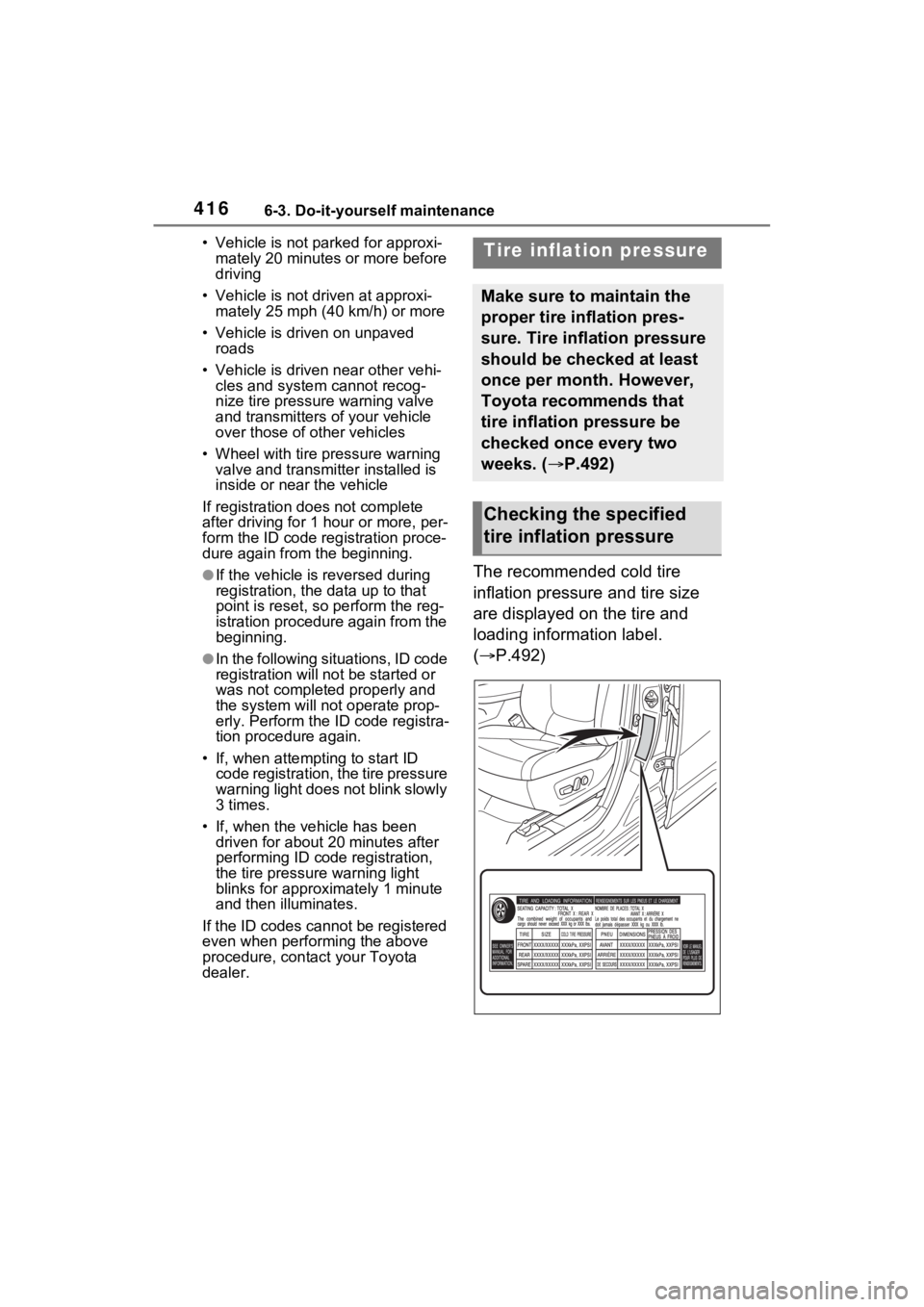
The recommended cold tire
inflation pressure and tire size
are displayed on the tire and
loading information label.
( P.492)
Tire inflation pressure
Make sure to maintain the
proper tire inflation pres-
sure. Tire inflation pressure
should be checked at least
once per month. However,
Toyota recommends that
tire inflation pressure be
checked once every two
weeks. ( P.492)
Checking the specified
tire inflation pressure
Page 459 of 574
4617-2. Steps to take in an emergency
7
When trouble arises
■If “Engine Oil Level Low Add or
Replace” is displayed
The engine oil level may be low.
Check the level of the engine oil,
and add engine oil if necessary.
This message may be displayed if
the vehicle is sto pped on a slope.
Move the vehicle to a level surface
and check if the message disap-
pears.
■If “Maintenance Required
Soon” is shown
Indicates that all maintenance
according to the dr iven distance on
the maintenance schedule
* should
be performed soon.
Comes on approximately 4500
miles (7200 km) after the message
has been reset.
If necessary, perf orm maintenance.
Please reset the message after the
maintenance is performed.
( P.388)
*: Refer to the separate “Scheduled
Maintenance Guide” or “Owner’
Manual Supplement” for the main-
tenance interval applicable to your
vehicle.
■If “Maintenance Required Visit
Your Dealer” is shown
Indicates that all maintenance is
required to correspond to the driven
distance on the maintenance sched-
ule
*.
Comes on approximately 5000
miles (8000 km) after the message
has been reset. (The indicator will
not work properly unless the mes-
sage has been reset.)
Perform the necessary mainte-
nance. Please reset the message
after the maintenance is performed.
( P.388)
*: Refer to the separate “Scheduled
Maintenance Guide” or “Owner’
Manual Supplement” for the main-
tenance interval applicable to your vehicle.
■If “Engine Maintenance
Required Visit Your Dealer” is
shown
The engine or an engine component
is malfunctioning. Have the vehicle
inspected by your Toyota dealer
immediately.
■If a message that indicates the
malfunction of front camera is
displayed
The following systems may be sus-
pended until the problem shown in
the message is resolved. (P.237,
449)
●PCS (Pre-Collision System)
●LTA (Lane Tracing Assist)
●AHB (Automatic High Beam)
●RSA (Road Sign Assist)*
●Dynamic radar cruise control with
full-speed range
*: If equipped
■If a message that indicates the
malfunction of radar sensor is
displayed
The following systems may be sus-
pended until the problem shown in
the message is resolved. (P.237,
449)
●PCS (Pre-Collision System)
●LTA (Lane Tracing Assist)
●Dynamic radar cruise control with
full-speed range
■If “Radar Cruise Control
Unavailable See Owner’s Man-
ual” is shown
The dynamic radar cruise control
with full-speed range system is sus-
pended temporarily or until the prob-
lem shown in the message is
resolved. (causes and coping meth-
ods: P.237)
■If “Radar Cruise Control
Unavailable” is shown
The dynamic radar cruise control
Page 511 of 574
5138-2. Customization
8
Vehicle specifications
*1: For details about each function: P.107
*2: The default setting varies according to country.
*3: The on/off operation of the widget can be changed.
*4: The setting may not be changed depending on currently selected meter
type.
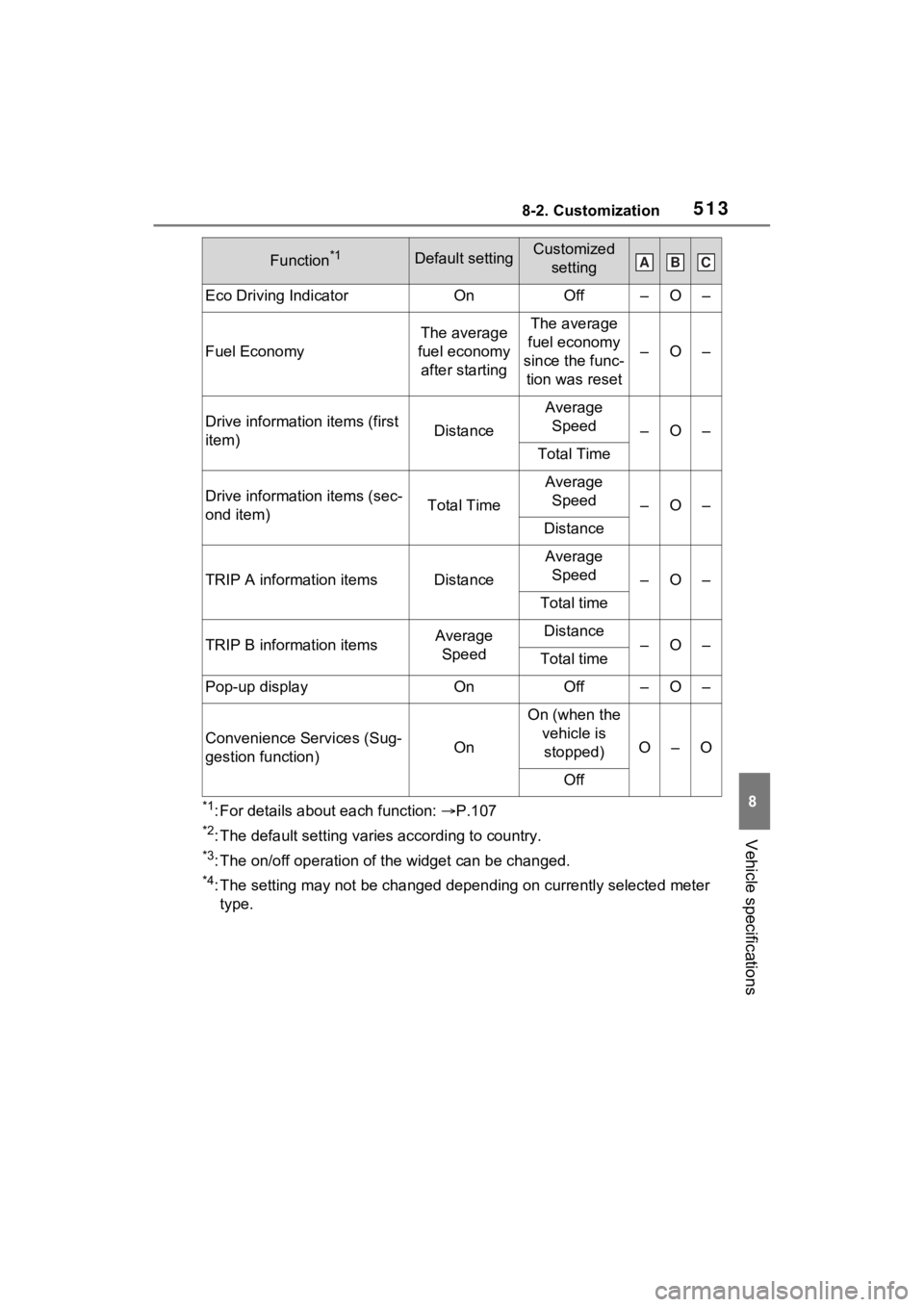
Eco Driving IndicatorOnOff–O–
Fuel Economy
The average
fuel economy after startingThe average
fuel economy
since the func- tion was reset
–O–
Drive informatio n items (first
item)Distance
Average Speed
–O–
Total Time
Drive information items (sec-
ond item)Total Time
Average Speed
–O–
Distance
TRIP A information itemsDistance
Average Speed
–O–
Total time
TRIP B information itemsAverage SpeedDistance–O–Total time
Pop-up displayOnOff–O–
Convenience Services (Sug-
gestion function)On
On (when the vehicle is stopped)
O–O
Off
Function*1Default settingCustomized settingABC
Page 550 of 574
552Alphabetical Index
Electronic key battery ........... 425
Fuses ................................... 428
Light bulbs ............................ 432
Tires ..................................... 463
Wiper insert .......................... 422
Wireless remote control battery........................................... 425
Reporting safety defects for Canadian owners ................. 527
Reporting safety defects for U.S. owners................................... 526
Resetting the message indicat- ing maintenance is required 388
Road Sign Assist .................... 261
Rock & Dirt mode ................... 312
RSA (Road Sign Assist) ......... 261
S
Seat belt reminder light . 455, 456
Seat belts .................................. 29 Adjusting the seat belt shoulder anchor height ....................... 31
Automatic Locking Retractor .. 31
Child restraint system installation ............................................. 54
Cleaning and maintaining the seat belt.............................. 384
Emergency Locking Retractor 31
How to wear your seat belt..... 30
How your child should wear the seat belt................................ 30
Pregnant women, proper seat belt use................................. 29
Reminder light and buzzer . 455, 456
Seat belt extender .................. 30
Seat belt instructions for Cana- dian owners ........................ 527
Seat belt pretensioners .......... 32
SRS warning light................. 450
Seat heaters ............................ 345
Seating capacity ..................... 188 Seat position memory ............147
Seats
Adjustment precautions 144, 145
Adjustment ...................144, 145
Child restraint sys tem installation
.............................................50
Cleaning ...............................384
Driving position memory .......147
Folding down the rear seatbacks ...........................................146
Head restraint .......................150
Properly sitting in the seat ......27
Seat heaters ....... ..................345
Seat position memory...........147
Seat ventilators.....................345
Seat ventilators .. .....................345
Secondary Collision Brake ....319
Sensor Automatic headlight system .220
Automatic High Beam system...........................................222
BSM (Blind Spot M onitor) .....276
Digital Rear-view Mirror ........160
Inside rear view mirror ..........155
Intuitive parking assist ..........280
LTA (Lane Traci ng Assist) ....250
Parking Support Brake function (rear-crossing vehicles) ......276
Parking Support Brake function (static objects) ....................280
Rain-sensing windshield wipers ...........................................228
RCTA (Rear Cross Traffic Alert) ...........................................276
Toyota Safety Sense 2.5 ......234
Service reminder message ....388
Shift lever ................................209 Automatic transm ission ........209
If th e s hif t le ver ca n no t b e s hif te d from P .................................210
Shift lock system ....................210
Side airbags ..............................33
Page 552 of 574
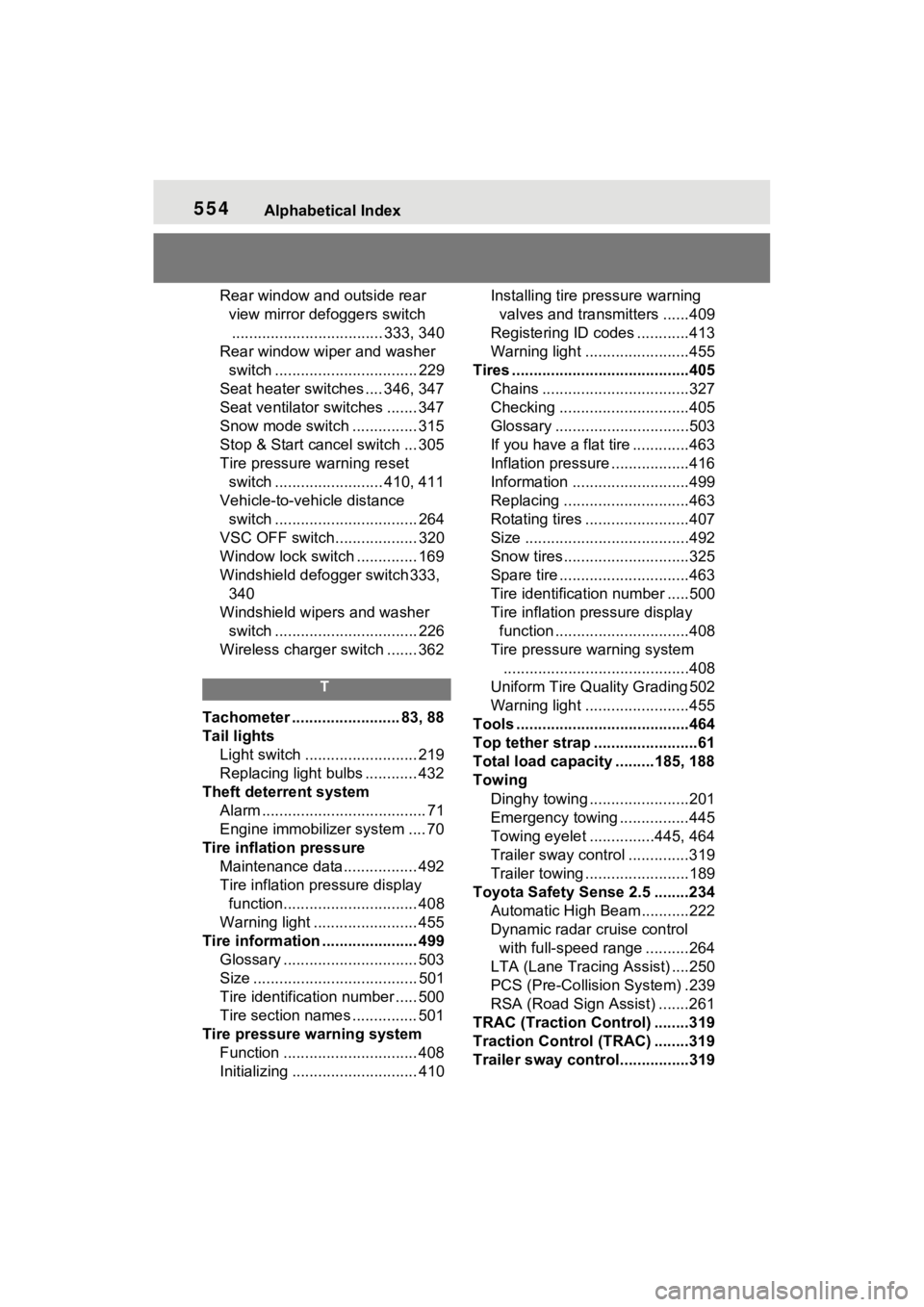
554Alphabetical Index
Rear window and outside rear view mirror defoggers switch................................... 333, 340
Rear window wipe r and washer
switch ................................. 229
Seat heater switches .... 346, 347
Seat ventilator switches ....... 347
Snow mode switch ............... 315
Stop & Start cancel switch ... 305
Tire pressure warning reset switch ......................... 410, 411
Vehicle-to-vehicle distance switch ................................. 264
VSC OFF switch................... 320
Window lock switch .............. 169
Windshield defogger switch 333, 340
Windshield wipers and washer switch ................................. 226
Wireless charger switch ....... 362
T
Tachometer ......................... 83, 88
Tail lights Light switch .......................... 219
Replacing light bulbs ............ 432
Theft deterrent system Alarm ...................................... 71
Engine immobilizer system .... 70
Tire inflati on pressure
Maintenance data................. 492
Tire inflation pressure display function............................... 408
Warning light ........................ 455
Tire information ...................... 499 Glossary ............................... 503
Size ...................................... 501
Tire identification number ..... 500
Tire section names ............... 501
Tire pressure warning system Function ............................... 408
Initializing ............................. 410 Installing tire p
ressure warning
valves and transmitters ......409
Registering ID codes ............413
Warning light ........................455
Tires .........................................405 Chains ..................................327
Checking ..............................405
Glossary ...............................503
If you have a flat tire .............463
Inflation pressure ..................416
Information ......... ..................499
Replacing .............................463
Rotating tires ........................407
Size ......................................492
Snow tires.............................325
Spare tire ..............................463
Tire identification number .....500
Tire inflation pressure display function ...............................408
Tire pressure warning system ...........................................408
Uniform Tire Qua lity Grading 502
Warning light ........................455
Tools ........................................464
Top tether strap ........................61
Total load capacity .........185, 188
Towing Dinghy towing .......................201
Emergency towing ................445
Towing eyelet ...............445, 464
Trailer sway control ..............319
Trailer towing ........................189
Toyota Safety Sense 2.5 ........234 Automatic High Be am ...........222
Dynamic radar cruise control with full-speed range ..........264
LTA (Lane Traci ng Assist) ....250
PCS (Pre-Collisio n System) .239
RSA (Road Sign Assist) .......261
TRAC (Traction Control) ........319
Traction Control (TRAC) ........319
Trailer sway contro l................319