lights TOYOTA RAV4 2023 Owner's Guide
[x] Cancel search | Manufacturer: TOYOTA, Model Year: 2023, Model line: RAV4, Model: TOYOTA RAV4 2023Pages: 574, PDF Size: 17.31 MB
Page 190 of 574
1904-1. Before driving
■Before towing
Check that the following conditions
are met:
●Ensure that your vehicle’s tires
are properly inflated. ( P.492)
●Trailer tires are inflated according
to the trailer manufacturer’s rec-
ommendation.
●All trailer lights work as required
by law.
●All lights work each time you con-
nect them.
●The trailer ball is set at the proper
height for the coupler on the
trailer.
●The trailer is level when it is
hitched.
Do not drive if the trailer is not
level, and check for improper
tongue weight, overloading, worn
suspension, or other possible
causes.
●The trailer cargo is securely
loaded.
●The rear view mirrors conform to
all applicable federal, state/provin-
cial or local regu lations. If they do
not, install rear view mirrors
appropriate for towing purposes.
■When towing a trailer
Disable the following systems, as
the systems may not operate prop-
erly.
●LTA (Lane Tracing Assist)
( P.250)
●Dynamic radar cruise control with
full-speed range ( P.264)
●PKSB (Parking Suppor t Brake) (if
equipped) ( P.294)
●BSM (Blind Spot Monitor) (if
equipped) ( P.275)
●Intuitive parking assist (if
equipped) ( P.280)
●RCTA (Rear Cross Traffic Alert)
function (if equipped) ( P.275)
Toyota warranties do not
apply to damage or mal-
function caused by towing a
trailer for commercial pur-
poses.
Contact your Toyota dealer for
further information about addi-
tional requirements such as a
towing kit, etc.
WARNING
■Trailer towing precautions
To tow a trailer safely, use
extreme care and drive the vehi-
cle in accordance with the trailer’s
characteristics and operating con-
ditions. Failure to do so could
cause an accident resulting in
death or serious injury. Vehicle
stability and brak ing performance
are affected by trailer stability,
brake setting and performance,
and the hitch. Yo ur vehicle will
handle differently when towing a
trailer.
■To avoid accident or injury
●Do not exceed the TWR,
unbraked TWR, GCWR, GVWR
or GAWR.
●Vehicles with towing package: If
the gross trailer weight is over
2000 lb. (907 kg), a sway con-
trol device with sufficient capac-
ity is required.
●Adjust the tongue weight within
the appropriate range. Place
heavier loads as close to the
trailer axle as possible.
Page 198 of 574
1984-1. Before driving
Please consult your dealer
when installing trailer lights, as
incorrect installation may cause
damage to the vehicle’s lights.
Please take care to comply with
your state’s laws when installing
trailer lights.
Your vehicle will handle differ-
ently when towing a trailer. Help
to avoid an accident, death or
serious injury, keep the follow-
ing in mind when towing:
Speed limits for towing a
trailer vary by state or prov-
ince. Do not exceed the
posted towing speed limit.
Toyota recommends that the
vehicle-trailer speed limit is 65
mph (104 km/h) on a flat,
straight, dry road. Do not
exceed this limit, the posted
towing speed limit or the
speed limit for your trailer as
set forth in your trailer owner’s
manual, whichever is lowest.
Instability of the towing vehi-
cle-trailer combination (trailer
sway) increases as speed increases. Exceeding speed
limits may cause loss of con-
trol.
Before starting out, check the
trailer lights, tires and the
vehicle-trailer connections.
Recheck after driving a short
distance.
Practice turning, stopping and
reversing with the trailer
attached in an area away
from traffic until you become
accustomed to the feel of the
vehicle-trailer combination.
Reversing with a trailer
attached is difficult and
requires practice. Grip the
bottom of the steering wheel
and move your hand to the
left to move the trailer to the
left. Move your hand to the
right to move the trailer to
right. (This is generally oppo-
site to reversing without a
trailer attached.) Avoid sharp
or prolonged turning. Have
someone guide you when
reversing to reduce the risk of
an accident.
As stopping distance is
increased when towing a
trailer, vehicle-to vehicle dis-
tance should be increased.
For each 10 mph (16 km/h) of
speed, allow at least one
vehicle and trailer length.
Avoid sudden braking as you
may skid, resulting in the
trailer jackknifing and a loss of
Connecting trailer lights
NOTICE
■Do not directly splice trailer
lights
Do not directly splice trailer lights.
Directly splicing trailer lights may
damage your vehicle’s electrical
system and cause a malfunction.
Trailer towing tips
Page 212 of 574
2124-2. Driving procedures
■Downshifting restriction warn-
ing buzzer
To help ensure safety and driving
performance, downshifting opera-
tion may sometimes b e restricted. In
some circumstances, downshifting
may not be possible even when the
shift lever is operated. (A buzzer will
sound twice.)
■If the “S” indicator does not
come on or the “D” indicator is
displayed even after shifting the
shift lever to S
This may indicate a malfunction in
the automatic tra nsmission system.
Have the vehicle inspected by your
Toyota dealer imme diately. (In this
situation, the transmission will oper-
ate in the same manner as when the
shift lever is in D.)
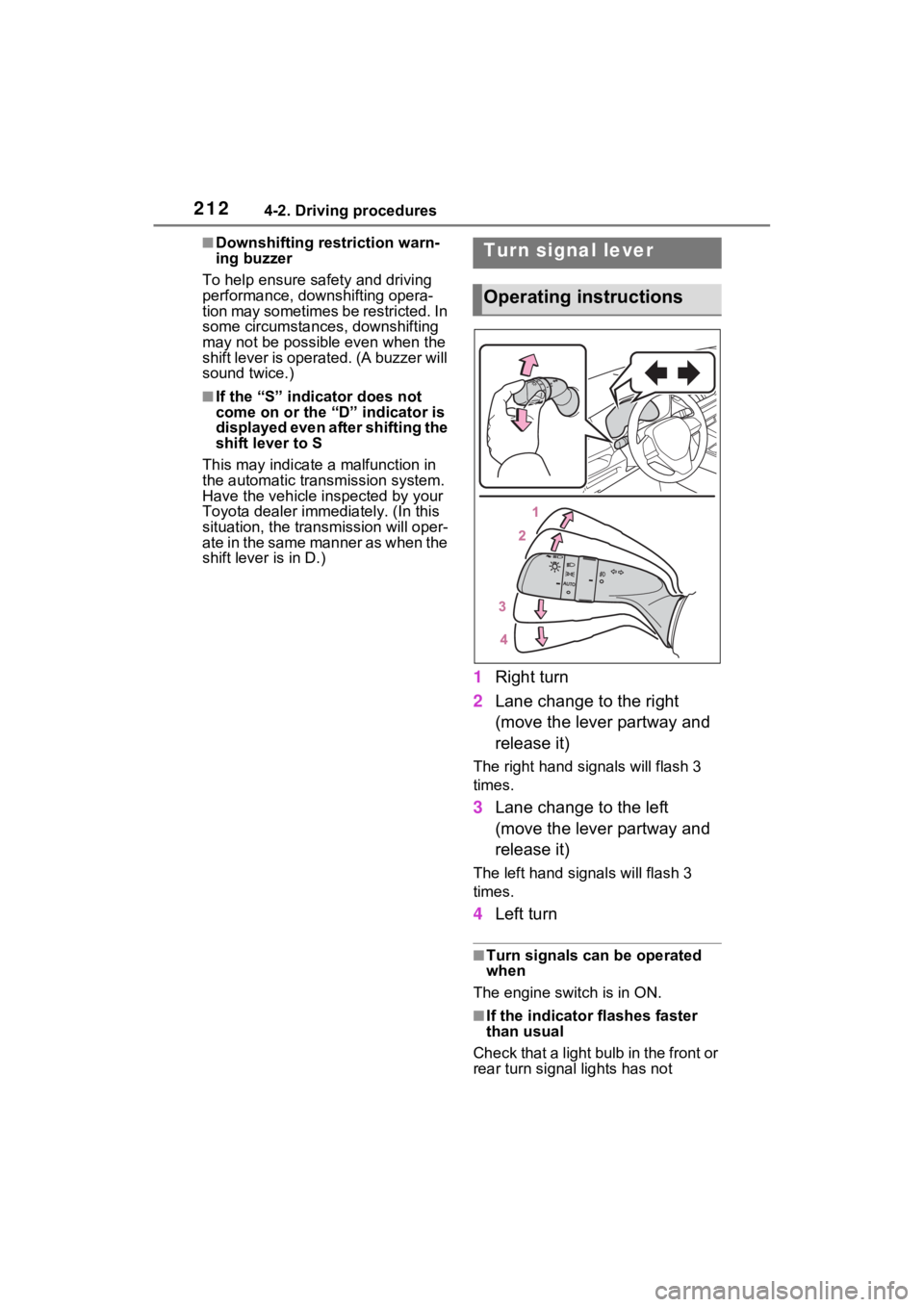
1 Right turn
2 Lane change to the right
(move the lever partway and
release it)
The right hand s ignals will flash 3
times.
3 Lane change to the left
(move the lever partway and
release it)
The left hand signals will flash 3
times.
4Left turn
■Turn signals can be operated
when
The engine switch is in ON.
■If the indicator flashes faster
than usual
Check that a light bulb in the front or
rear turn signal lights has not
Turn signal lever
Operating instructions
Page 219 of 574
2194-3. Operating the lights and wipers
4
Driving
4-3.Operating the lights and wipers
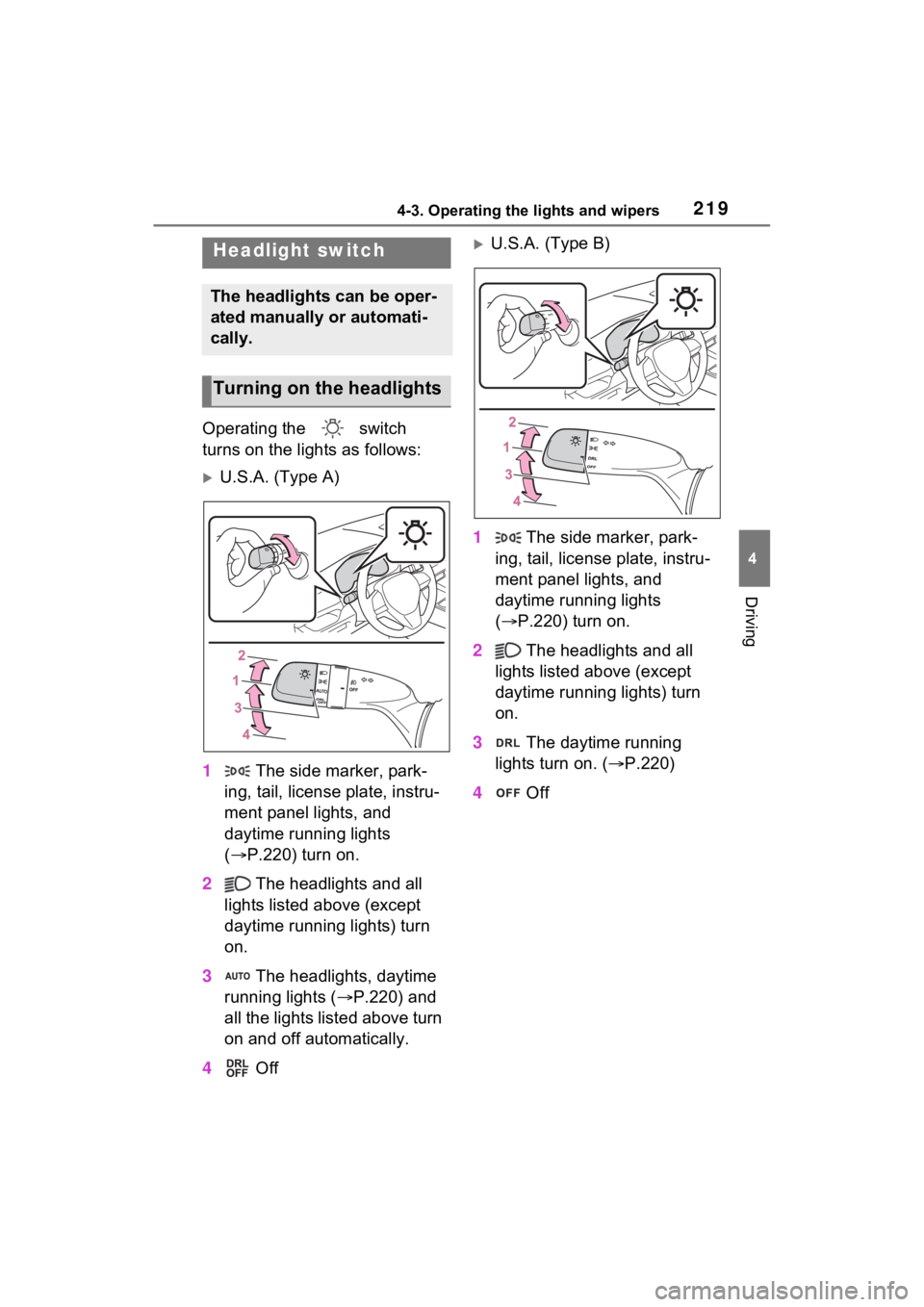
Operating the switch
turns on the lights as follows:
U.S.A. (Type A)
1 The side marker, park-
ing, tail, license plate, instru-
ment panel lights, and
daytime running lights
( P.220) turn on.
2 The headlights and all
lights listed above (except
daytime running lights) turn
on.
3 The headlights, daytime
running lights ( P.220) and
all the lights listed above turn
on and off automatically.
4 Off
U.S.A. (Type B)
1 The side marker, park-
ing, tail, license plate, instru-
ment panel lights, and
daytime running lights
( P.220) turn on.
2 The headlights and all
lights listed above (except
daytime running lights) turn
on.
3 The daytime running
lights turn on. ( P.220)
4 OffHeadlight switch
The headlights can be oper-
ated manually or automati-
cally.
Turning on the headlights
Page 220 of 574
2204-3. Operating the lights and wipers
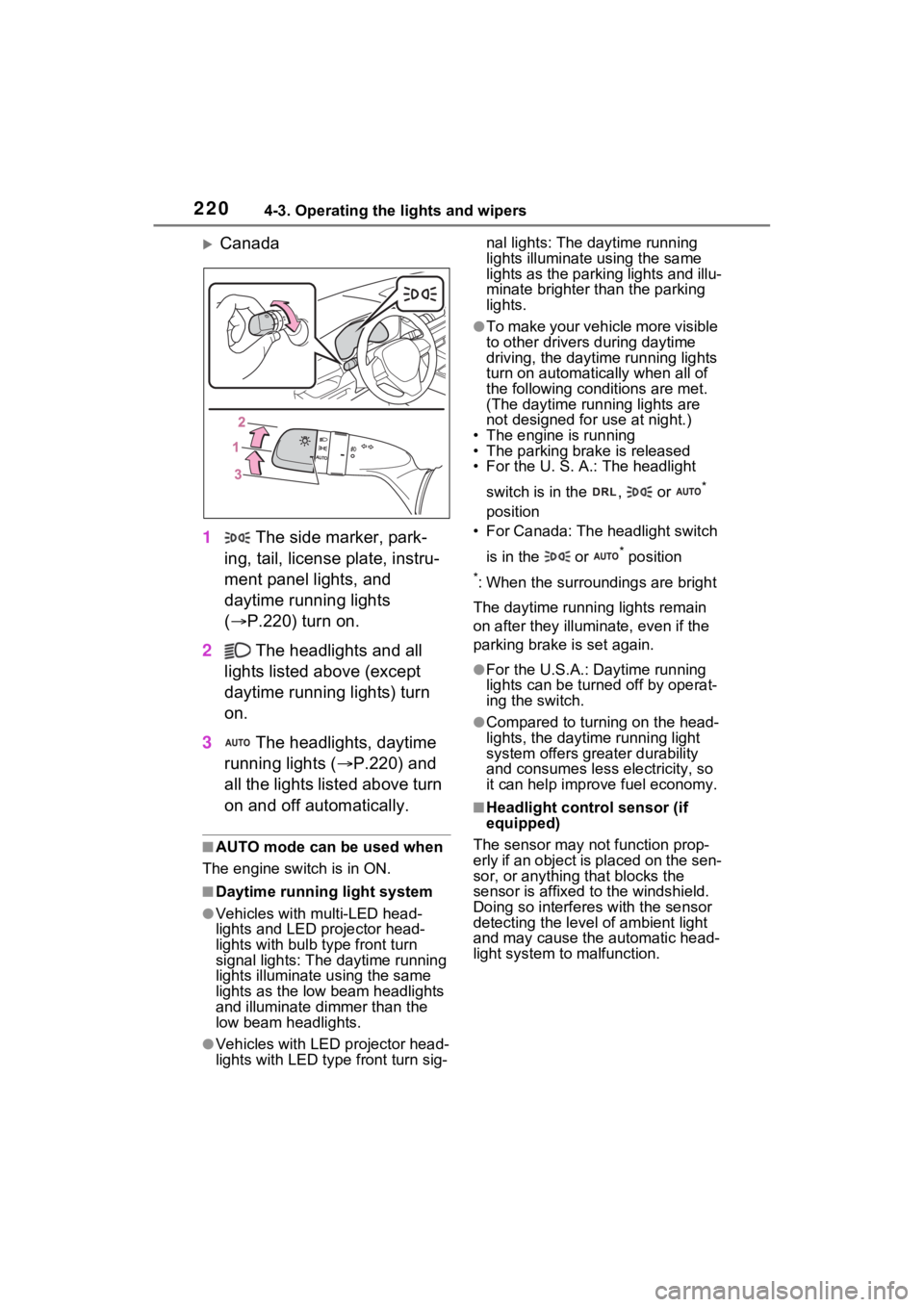
Canada
1 The side marker, park-
ing, tail, license plate, instru-
ment panel lights, and
daytime running lights
( P.220) turn on.
2 The headlights and all
lights listed above (except
daytime running lights) turn
on.
3 The headlights, daytime
running lights ( P.220) and
all the lights listed above turn
on and off automatically.
■AUTO mode can be used when
The engine switch is in ON.
■Daytime runni ng light system
●Vehicles with multi-LED head-
lights and LED projector head-
lights with bulb type front turn
signal lights: The daytime running
lights illuminate u sing the same
lights as the low beam headlights
and illuminate d immer than the
low beam headlights.
●Vehicles with LED projector head-
lights with LED type front turn sig-nal lights: The daytime running
lights illuminate using the same
lights as the parking lights and illu-
minate brighter than the parking
lights.
●To make your vehicle more visible
to other drivers
during daytime
driving, the daytime running lights
turn on automatically when all of
the following conditions are met.
(The daytime running lights are
not designed for use at night.)
• The engine is running
• The parking brake is released
• For the U. S. A.: The headlight
switch is in the , or
*
position
• For Canada: The headlight switch
is in the or
* position
*: When the surroundings are bright
The daytime running lights remain
on after they illumi nate, even if the
parking brake is set again.
●For the U.S.A.: Daytime running
lights can be turned off by operat-
ing the switch.
●Compared to turning on the head-
lights, the daytime running light
system offers greater durability
and consumes less electricity, so
it can help improve fuel economy.
■Headlight control sensor (if
equipped)
The sensor may not function prop-
erly if an object is placed on the sen-
sor, or anything that blocks the
sensor is affixed to the windshield.
Doing so interferes with the sensor
detecting the level of ambient light
and may cause t he automatic head-
light system to malfunction.
Page 221 of 574
2214-3. Operating the lights and wipers
4
Driving
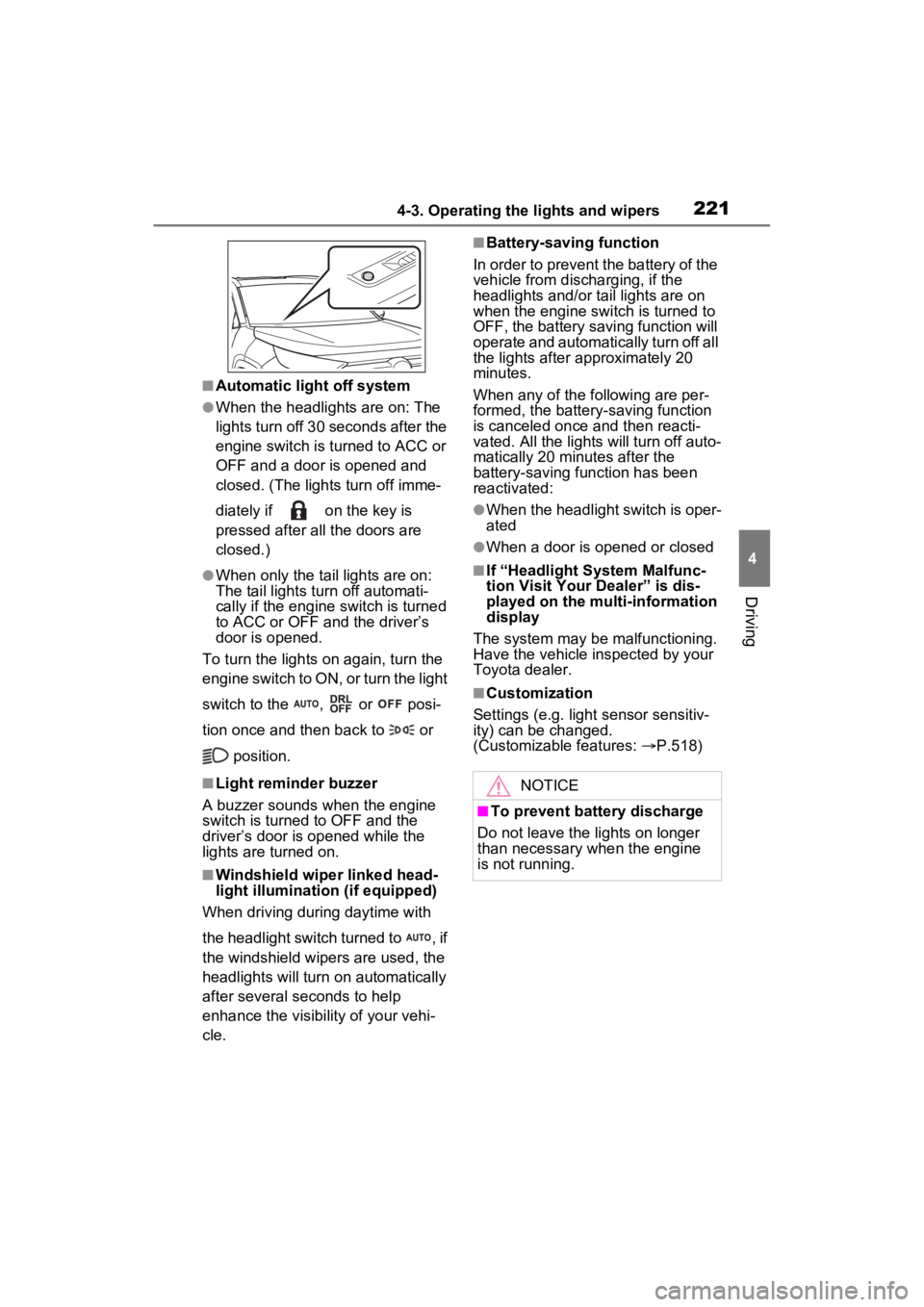
■Automatic light off system
●When the headlights are on: The
lights turn off 30 seconds after the
engine switch is turned to ACC or
OFF and a door is opened and
closed. (The lights turn off imme-
diately if on the key is
pressed after all the doors are
closed.)
●When only the tail lights are on:
The tail lights turn off automati-
cally if the engine switch is turned
to ACC or OFF and the driver’s
door is opened.
To turn the lights on again, turn the
engine switch to ON, or turn the light
switch to the , or posi-
tion once and then back to or
position.
■Light reminder buzzer
A buzzer sounds when the engine
switch is turned to OFF and the
driver’s door is opened while the
lights are turned on.
■Windshield wiper linked head-
light illumination (if equipped)
When driving during daytime with
the headlight switch turned to , if
the windshield wipers are used, the
headlights will turn on automatically
after several seconds to help
enhance the visibility of your vehi-
cle.
■Battery-saving function
In order to prevent the battery of the
vehicle from discharging, if the
headlights and/or tail lights are on
when the engine switch is turned to
OFF, the battery saving function will
operate and automatically turn off all
the lights after approximately 20
minutes.
When any of the following are per-
formed, the battery-saving function
is canceled once and then reacti-
vated. All the light s will turn off auto-
matically 20 minutes after the
battery-saving function has been
reactivated:
●When the headlight switch is oper-
ated
●When a door is opened or closed
■If “Headlight System Malfunc-
tion Visit Your Dealer” is dis-
played on the multi-information
display
The system may be malfunctioning.
Have the vehicle inspected by your
Toyota dealer.
■Customization
Settings (e.g. light sensor sensitiv-
ity) can be changed.
(Customizable features: P.518)
NOTICE
■To prevent battery discharge
Do not leave the lights on longer
than necessary w hen the engine
is not running.
Page 222 of 574
2224-3. Operating the lights and wipers
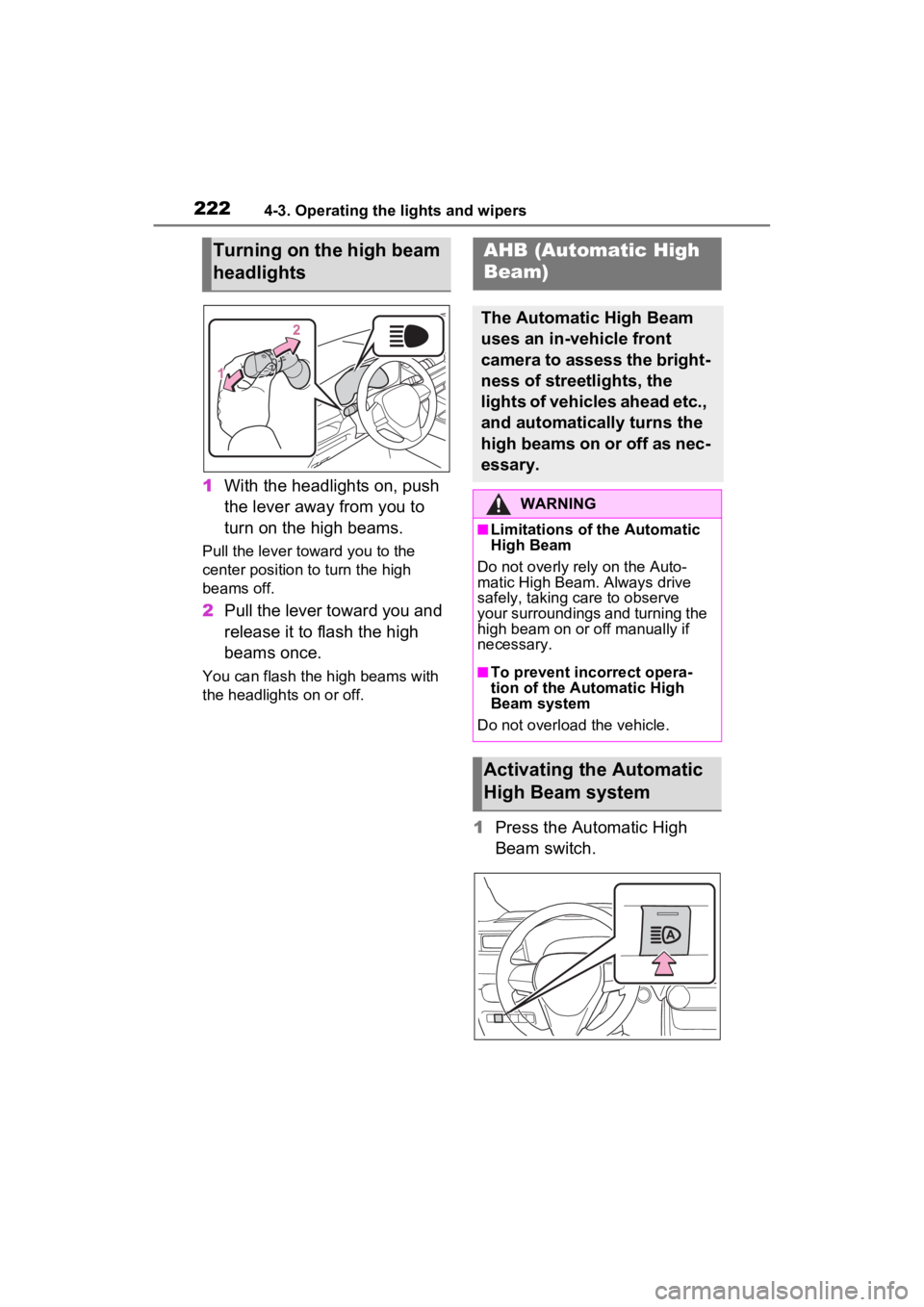
1With the headlights on, push
the lever away from you to
turn on the high beams.
Pull the lever toward you to the
center position to turn the high
beams off.
2Pull the lever toward you and
release it to flash the high
beams once.
You can flash the high beams with
the headlights on or off.
1 Press the Automatic High
Beam switch.
Turning on the high beam
headlightsAHB (Automatic High
Beam)
The Automatic High Beam
uses an in-vehicle front
camera to assess the bright-
ness of streetlights, the
lights of vehicles ahead etc.,
and automatically turns the
high beams on or off as nec-
essary.
WARNING
■Limitations of the Automatic
High Beam
Do not overly rely on the Auto-
matic High Beam. Always drive
safely, taking care to observe
your surroundings and turning the
high beam on or off manually if
necessary.
■To prevent incorrect opera-
tion of the Automatic High
Beam system
Do not overload the vehicle.
Activating the Automatic
High Beam system
Page 223 of 574
2234-3. Operating the lights and wipers
4
Driving
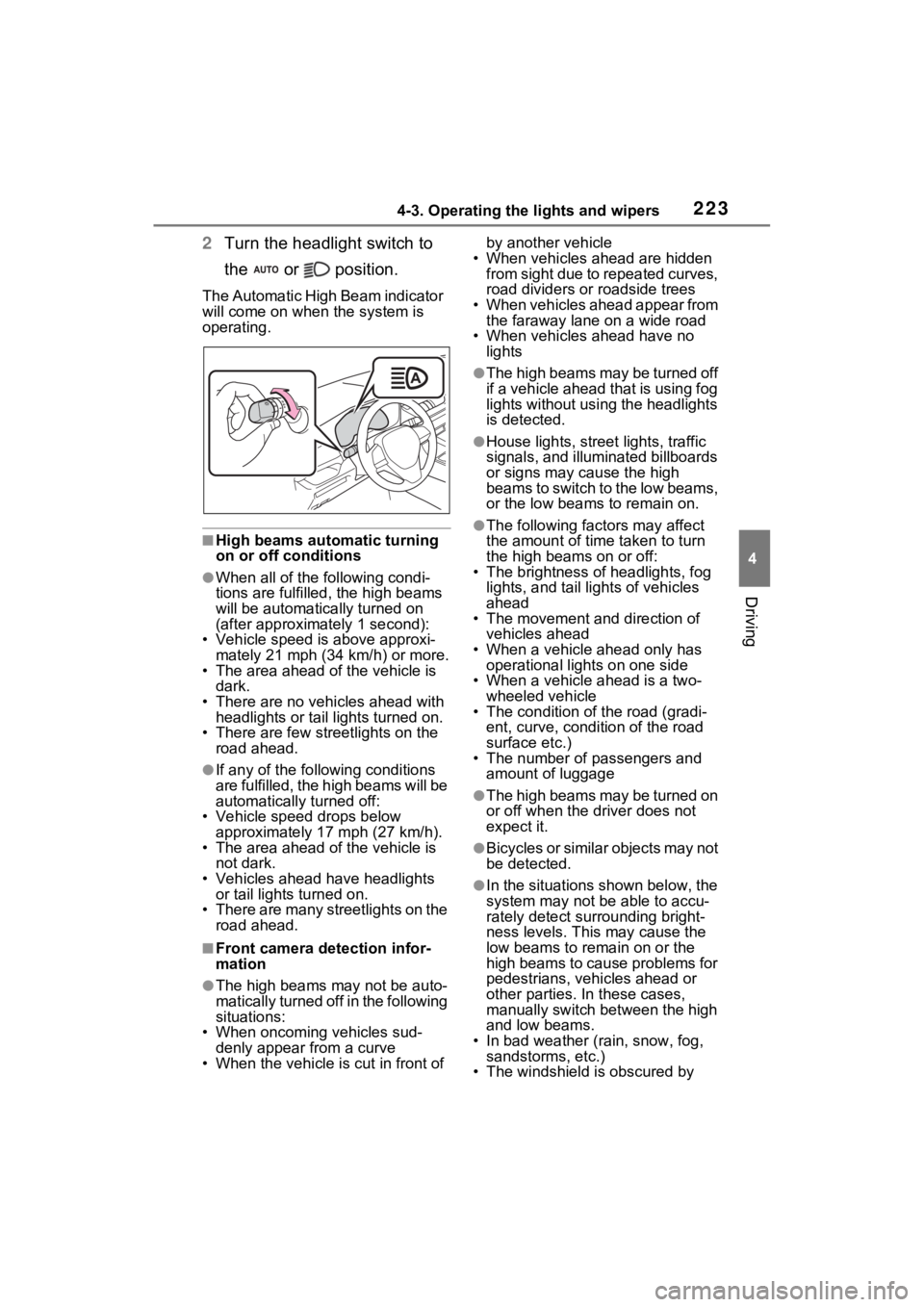
2Turn the headlight switch to
the or position.
The Automatic High Beam indicator
will come on when the system is
operating.
■High beams automatic turning
on or off conditions
●When all of the following condi-
tions are fulfilled , the high beams
will be automatica lly turned on
(after approximately 1 second):
• Vehicle speed is above approxi-
mately 21 mph (34 km/h) or more.
• The area ahead of the vehicle is dark.
• There are no vehicles ahead with headlights or tail lights turned on.
• There are few streetlights on the
road ahead.
●If any of the following conditions
are fulfilled, the high beams will be
automatically turned off:
• Vehicle speed drops below
approximately 17 mph (27 km/h).
• The area ahead of the vehicle is not dark.
• Vehicles ahead have headlights or tail lights turned on.
• There are many streetlights on the
road ahead.
■Front camera detection infor-
mation
●The high beams may not be auto-
matically turned off in the following
situations:
• When oncoming vehicles sud-
denly appear from a curve
• When the vehicle is cut in front of by another vehicle
• When vehicles ahead are hidden from sight due to repeated curves,
road dividers or roadside trees
• When vehicles ahead appear from the faraway lane on a wide road
• When vehicles ahead have no lights
●The high beams may be turned off
if a vehicle ahead that is using fog
lights without using the headlights
is detected.
●House lights, street lights, traffic
signals, and illuminated billboards
or signs may cause the high
beams to switch to the low beams,
or the low beams to remain on.
●The following fact ors may affect
the amount of time taken to turn
the high beams on or off:
• The brightness of headlights, fog
lights, and tail lig hts of vehicles
ahead
• The movement and direction of
vehicles ahead
• When a vehicle ahead only has
operational lights on one side
• When a vehicle ahead is a two- wheeled vehicle
• The condition of the road (gradi-
ent, curve, condition of the road
surface etc.)
• The number of passengers and
amount of luggage
●The high beams may be turned on
or off when the d river does not
expect it.
●Bicycles or similar objects may not
be detected.
●In the situations shown below, the
system may not be able to accu-
rately detect surrounding bright-
ness levels. This may cause the
low beams to remain on or the
high beams to cause problems for
pedestrians, vehicles ahead or
other parties. In these cases,
manually switch between the high
and low beams.
• In bad weather (rain, snow, fog, sandstorms, etc.)
• The windshield is obscured by
Page 224 of 574
2244-3. Operating the lights and wipers
fog, mist, ice, dirt, etc.
• The windshield is cracked or dam- aged
• The front camera is deformed or
dirty
• When the temperature of the front
camera is extremely high
• Surrounding brightness levels are equal to those of h eadlights, tail
lights or fog lights
• When headlights or tail lights of vehicles ahead are turned off,
dirty, changing color, or not aimed
properly
• When the vehicle is hit by water,
snow, dust, etc. fr om a preceding
vehicle
• When driving thr ough an area of
intermittently changing brightness
and darkness
• When frequently and repeatedly
driving ascending/descending
roads, or roads with rough, bumpy
or uneven surfaces (such as
stone-paved roads, gravel roads,
etc.)
• When frequently and repeatedly
taking curves or driving on a wind-
ing road
• There is a highly reflective object
ahead of the vehicle, such as a
sign or mirror
• The back of a vehicle ahead is
highly reflective, such as a con-
tainer on a truck
• The vehicle’s headlights are dam-
aged or dirty, or are not aimed
properly
• The vehicle is listing or tilting due
to a flat tire, a trailer being towed,
etc.
• The high beams and low beams
are repeatedly being switched
between in an abnormal manner
• The driver believes that the high
beams may be causing problems
or distress to other drivers or
pedestrians nearby
■If “Headlight System Malfunc-
tion Visit Your D ealer” is dis-
played on the multi-information
display
The system may be malfunctioning. Have the vehicle inspected by your
Toyota dealer.
■Temporarily lowering sensor
sensitivity
The sensitivity of the sensor can be
temporarily lowered.
1 Turn the engine switch to OFF
while the following conditions are
met.
●The headlight switch is in or
position.
●The headlight switch lever is in
high beam position.
●Automatic High Beam switch is
on.
2 Turn the engine switch to ON.
3 Within 60 second s after step 2,
repeat pulling the headlight
switch lever to the original posi-
tion then pushing it to the high
beam position qui ckly 10 times,
then leave the lever in the origi-
nal position.
4 If the sensitivity is changed, the
Automatic High Beam indicator
is turn on and off 3 times.
Automatic High Beam (headlights)
may turn on even when the vehicle
is stopped.
■Switching to the high
beams
Push the lever away from you.
The Automatic High Beam indicator
will turn off and the headlight high
beam indicator will turn on.
Pull the lever to its original position
to activate Automatic High Beam
system again.
Turning the high beams
on/off manually
Page 225 of 574

2254-3. Operating the lights and wipers
4
Driving
■Switching to the low beams
Press the Automatic High Beam
switch.
The Automatic High Beam indicator
will turn off.
Press the switch to activate the
Automatic High Beam system
again.
■Temporarily switching to
the low beams
Pull the lever toward you and
then return it to its original posi-
tion.
The high beams are on while the
lever is pulled toward you, how-
ever, after the lever is returned to
its original position, the low beams
remain on for a certain amount of
time. Afterwards, the Automatic
High Beam will be a ctivated again.
■Temporarily switching to the
low beams
It is recommended to switch to the
low beams when the high beams
may cause problems or distress to
other drivers or pedestrians nearby.