engine TOYOTA RAV4 2023 Service Manual
[x] Cancel search | Manufacturer: TOYOTA, Model Year: 2023, Model line: RAV4, Model: TOYOTA RAV4 2023Pages: 574, PDF Size: 17.31 MB
Page 112 of 574
1122-1. Instrument cluster
Average vehicle speed since
the engine was started.
Trip range
Elapsed time since the
engine was started.
■History screen
If a screen other than history
screen is displayed, press “His-
tory”.
Use the displayed average fuel
consumption as a reference.
Some screens may vary depending
on the type of multi-media display.
The image is an example only, and
may vary slightly f rom actual condi-
tions.
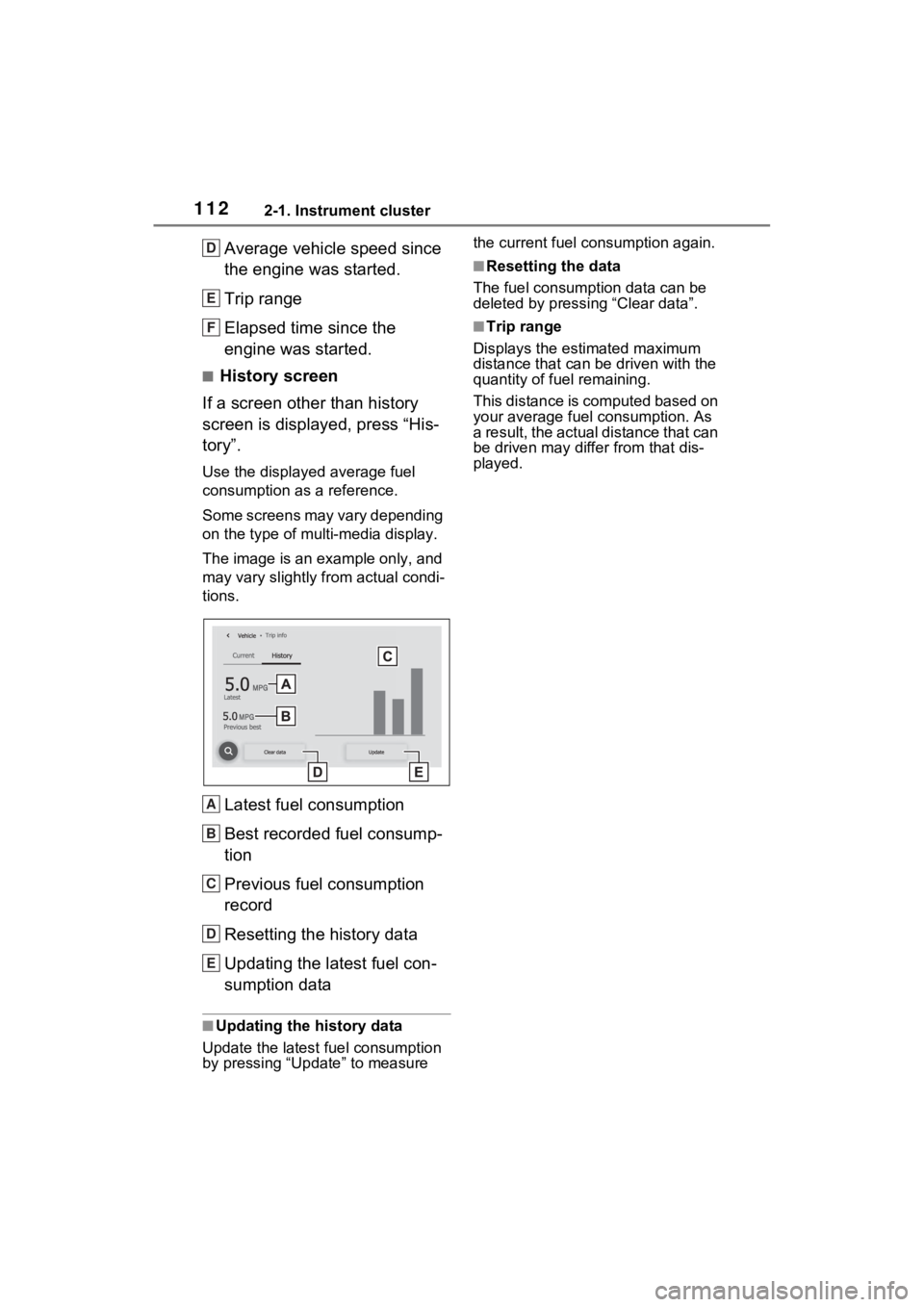
Latest fuel consumption
Best recorded fuel consump-
tion
Previous fuel consumption
record
Resetting the history data
Updating the latest fuel con-
sumption data
■Updating the history data
Update the latest fuel consumption
by pressing “Update” to measure the current fuel consumption again.
■Resetting the data
The fuel consumption data can be
deleted by pressing “Clear data”.
■Trip range
Displays the estimated maximum
distance that can be driven with the
quantity of fuel remaining.
This distance is computed based on
your average fuel consumption. As
a result, the actual distance that can
be driven may differ from that dis-
played.
D
E
F
A
B
C
D
E
Page 114 of 574
1143-1. Key information
3-1.Key information
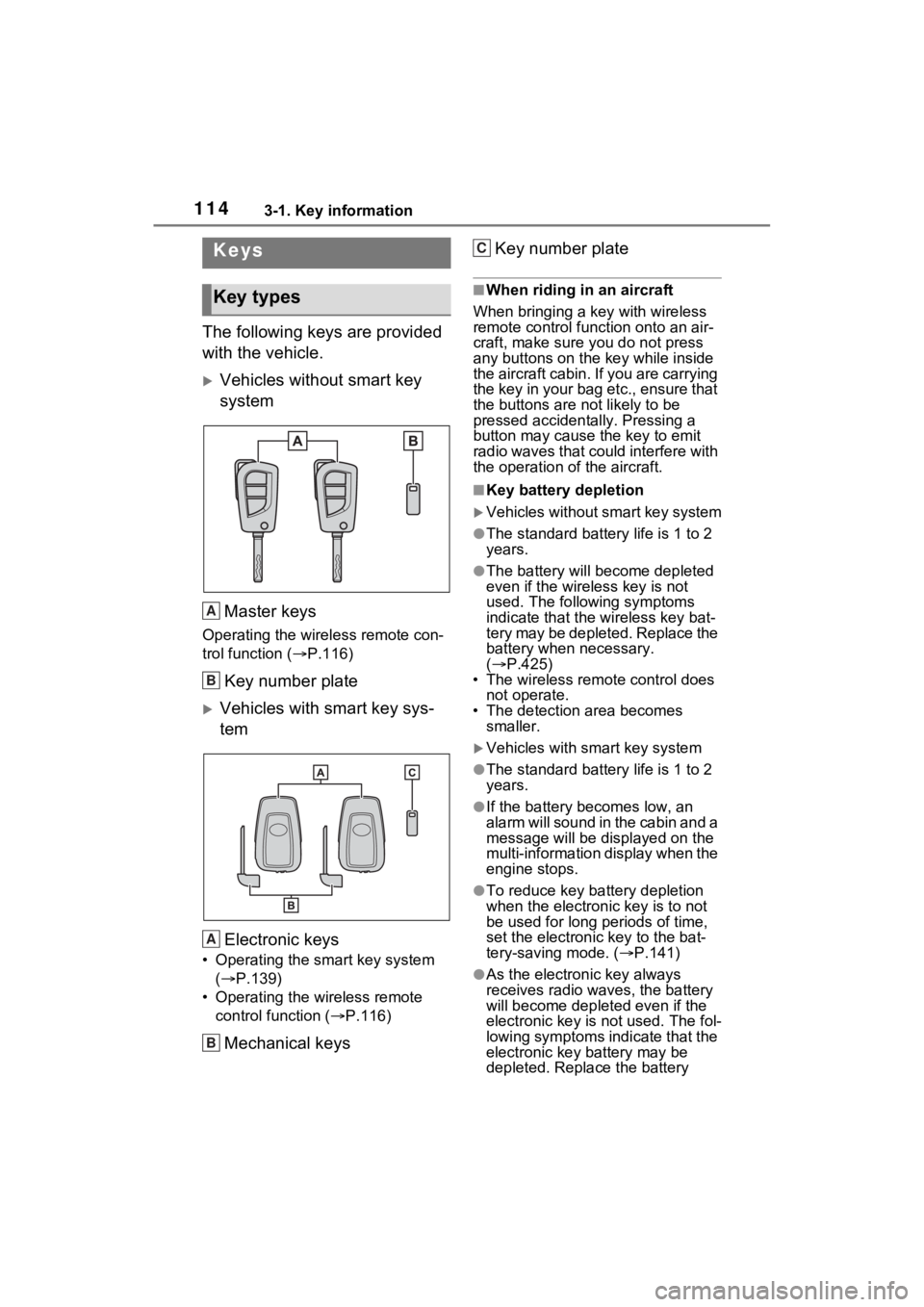
The following keys are provided
with the vehicle.
Vehicles without smart key
systemMaster keys
Operating the wireless remote con-
trol function ( P.116)
Key number plate
Vehicles with smart key sys-
tem
Electronic keys
• Operating the smart key system ( P.139)
• Operating the wireless remote control function ( P.116)
Mechanical keys Key number plate
■When riding in an aircraft
When bringing a ke y with wireless
remote control func tion onto an air-
craft, make sure you do not press
any buttons on the key while inside
the aircraft cabin. If you are carrying
the key in your bag etc., ensure that
the buttons are not likely to be
pressed accidentally. Pressing a
button may cause the key to emit
radio waves that could interfere with
the operation of the aircraft.
■Key battery depletion
Vehicles without smart key system
●The standard battery life is 1 to 2
years.
●The battery will be come depleted
even if the wireless key is not
used. The following symptoms
indicate that the wireless key bat-
tery may be depleted. Replace the
battery when necessary.
( P.425)
• The wireless remote control does not operate.
• The detection area becomes
smaller.
Vehicles with smart key system
●The standard battery life is 1 to 2
years.
●If the battery bec omes low, an
alarm will sound in the cabin and a
message will be disp layed on the
multi-information display when the
engine stops.
●To reduce key battery depletion
when the electronic key is to not
be used for long periods of time,
set the electronic key to the bat-
tery-saving mode. ( P.141)
●As the electronic key always
receives radio waves, the battery
will become depleted even if the
electronic key is not used. The fol-
lowing symptoms indicate that the
electronic key battery may be
depleted. Replace the battery
Keys
Key types
A
B
A
B
C
Page 115 of 574
1153-1. Key information
3
Before driving
when necessary.
• The smart key system or the wire- less remote control does not oper-
ate.
• The detection area becomes smaller.
• The LED indicator on the key sur- face does not turn on.
You can replace the battery by your-
self ( P.425). However, as there is
a danger that the electronic key may
be damaged, it is recommended
that replacement is carried out by
your Toyota dealer.
●To avoid serious deterioration, do
not leave the electronic key within
3 ft. (1 m) of the following electri-
cal appliances t hat produce a
magnetic field:
• TVs
• Personal computers
• Cellular phones, cordless phones and battery chargers
• Table lamps
• Induction cookers
■If a message regarding the state
of the electronic key or engine
switch mode, etc. is shown
(vehicles with smart key sys-
tem)
To prevent trapping the electronic
key inside the vehicle, leaving the
vehicle carrying the electronic key
on your person without turning the
engine switch to OFF or other pas-
sengers from unintentionally taking
the key out of the vehicle, etc., a
message that prompts the user to
confirm the state of the electronic
key or engine switch mode may be
shown on the multi -information dis-
play. In those cases, follow the
instructions on the display immedi-
ately.
■If “Key Battery Low Replace
Key Battery” is displayed on
the multi-information display
(vehicles with smart key sys-
tem)
The electronic key has a low bat- tery. Replace the electronic key bat-
tery. (
P.425)
■Replacing the battery
P.425
■Confirmation of the registered
key number
The number of keys already regis-
tered to the vehi cle can be con-
firmed. Ask your Toyota dealer for
details.
■If “A New Key has been Regis-
tered Contact Your Dealer for
Details” is dis played on the
multi-information display (vehi-
cles with smart key system)
This message will be displayed
each time the driver’s door is
opened when the doors are
unlocked from the outside for
approximately 10 days after a new
electronic key has been registered.
If this message is displayed but you
have not had a new electronic key
registered, ask your Toyota dealer
to check if an unknown electronic
key (other than those in your pos-
session) has been registered.
NOTICE
■To prevent key damage
●Do not drop the keys, subject
them to strong shocks or bend
them.
●Do not expose the keys to high
temperatures for long periods of
time.
●Do not get the keys wet or wash
them in an ultrasonic washer,
etc.
●Do not attach m etallic or mag-
netic materials to the keys or
place the keys close to such
materials.
●Do not disassemble the keys.
Page 120 of 574
1203-2. Opening, closing and locking the doors
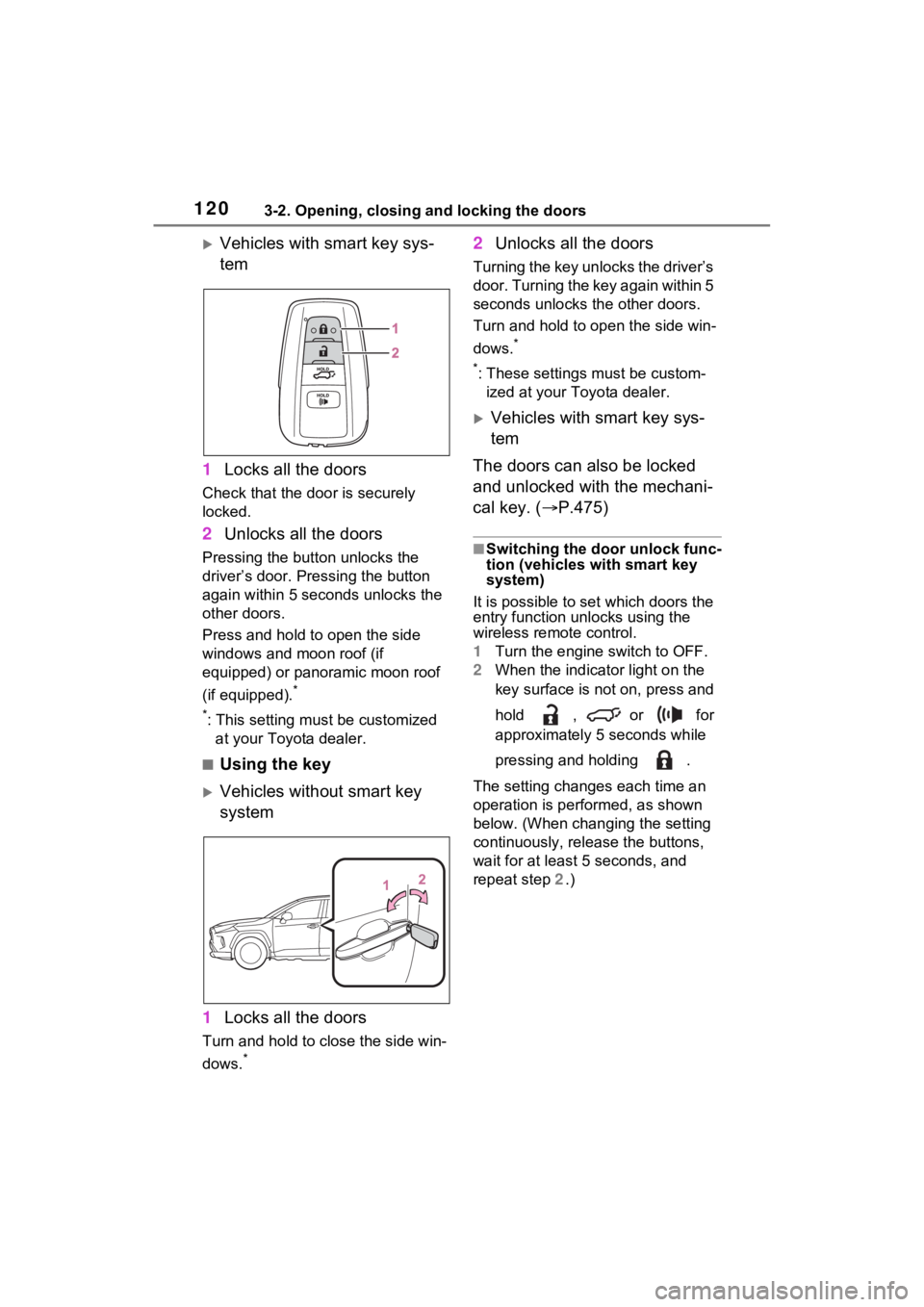
Vehicles with smart key sys-
tem
1 Locks all the doors
Check that the door is securely
locked.
2Unlocks all the doors
Pressing the button unlocks the
driver’s door. Pressing the button
again within 5 seconds unlocks the
other doors.
Press and hold to open the side
windows and moon roof (if
equipped) or panoramic moon roof
(if equipped).
*
*
: This setting must be customized at your Toyota dealer.
■Using the key
Vehicles without smart key
system
1 Locks all the doors
Turn and hold to close the side win-
dows.
*
2Unlocks all the doors
Turning the key unlocks the driver’s
door. Turning the key again within 5
seconds unlocks th e other doors.
Turn and hold to open the side win-
dows.
*
*
: These settings must be custom- ized at your Toyota dealer.
Vehicles with smart key sys-
tem
The doors can also be locked
and unlocked with the mechani-
cal key. ( P.475)
■Switching the door unlock func-
tion (vehicles with smart key
system)
It is possible to set which doors the
entry function unlocks using the
wireless remote control.
1 Turn the engine switch to OFF.
2 When the indicator light on the
key surface is not on, press and
hold , or for
approximately 5 seconds while
pressing and holding .
The setting changes each time an
operation is per formed, as shown
below. (When changing the setting
continuously, release the buttons,
wait for at least 5 seconds, and
repeat step 2 .)
Page 122 of 574
1223-2. Opening, closing and locking the doors
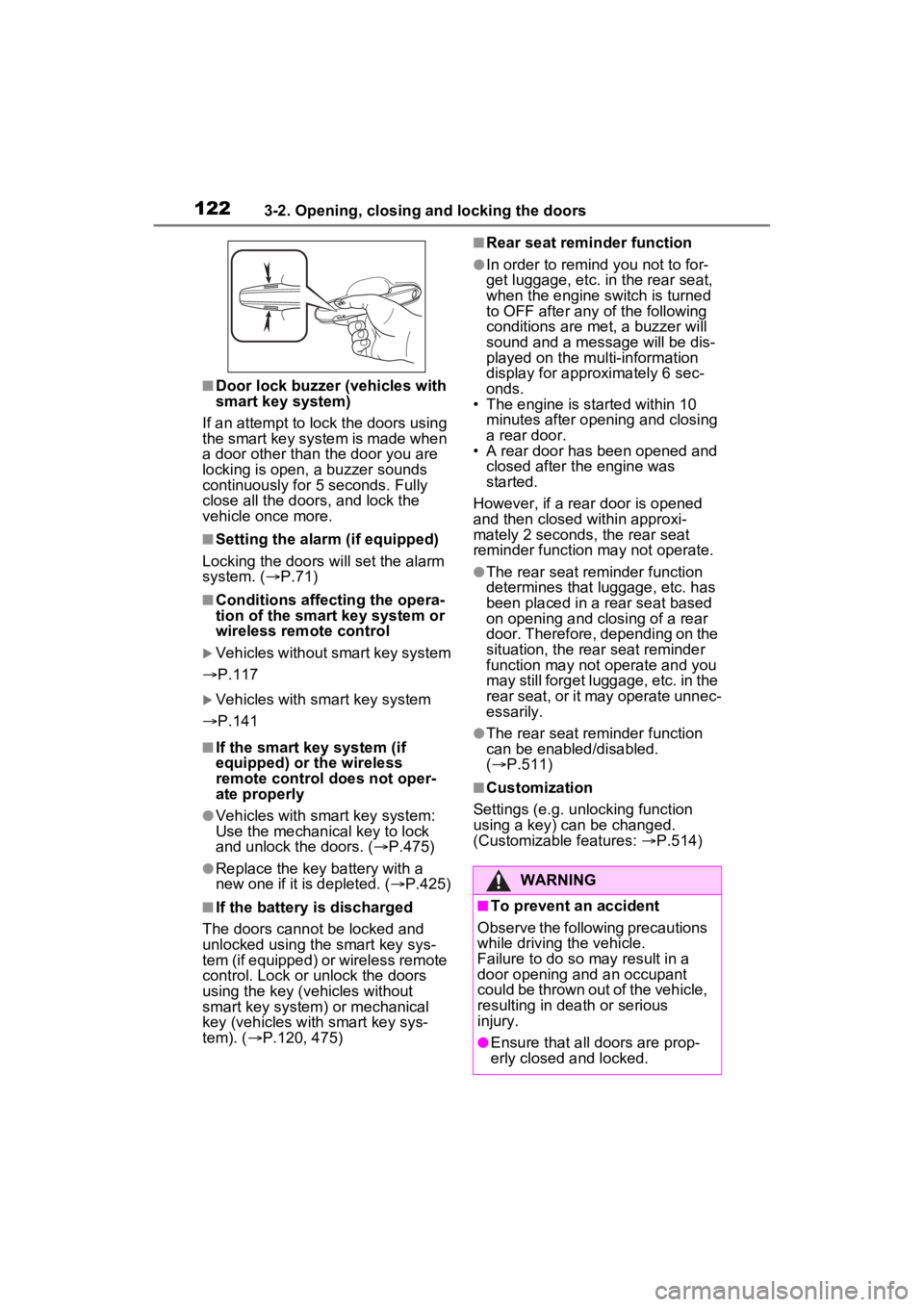
■Door lock buzzer (vehicles with
smart key system)
If an attempt to lock the doors using
the smart key system is made when
a door other than t he door you are
locking is open, a buzzer sounds
continuously for 5 seconds. Fully
close all the doors, and lock the
vehicle once more.
■Setting the alarm (if equipped)
Locking the doors will set the alarm
system. ( P.71)
■Conditions affecting the opera-
tion of the smart key system or
wireless remo te control
Vehicles without smart key system
P.117
Vehicles with smart key system
P.141
■If the smart key system (if
equipped) or the wireless
remote control does not oper-
ate properly
●Vehicles with smart key system:
Use the mechanical key to lock
and unlock the doors. ( P.475)
●Replace the key battery with a
new one if it is depleted. ( P.425)
■If the battery is discharged
The doors cannot be locked and
unlocked using the smart key sys-
tem (if equipped) or wireless remote
control. Lock or unlock the doors
using the key (vehicles without
smart key system) or mechanical
key (vehicles with smart key sys-
tem). ( P.120, 475)
■Rear seat reminder function
●In order to r emind you not to for-
get luggage, etc. in the rear seat,
when the engine switch is turned
to OFF after any of the following
conditions are met, a buzzer will
sound and a message will be dis-
played on the multi-information
display for approximately 6 sec-
onds.
• The engine is started within 10
minutes after opening and closing
a rear door.
• A rear door has been opened and
closed after the engine was
started.
However, if a rear door is opened
and then closed within approxi-
mately 2 seconds, the rear seat
reminder function may not operate.
●The rear seat reminder function
determines that luggage, etc. has
been placed in a rear seat based
on opening and closing of a rear
door. Therefore, depending on the
situation, the rear seat reminder
function may not operate and you
may still forget luggage, etc. in the
rear seat, or it may operate unnec-
essarily.
●The rear seat reminder function
can be enabled/disabled.
( P.511)
■Customization
Settings (e.g. unlocking function
using a key) can be changed.
(Customizable features: P.514)
WARNING
■To prevent an accident
Observe the following precautions
while driving the vehicle.
Failure to do so may result in a
door opening and an occupant
could be thrown out of the vehicle,
resulting in dea th or serious
injury.
●Ensure that all doors are prop-
erly closed and locked.
Page 123 of 574
1233-2. Opening, closing and locking the doors
3
Before driving
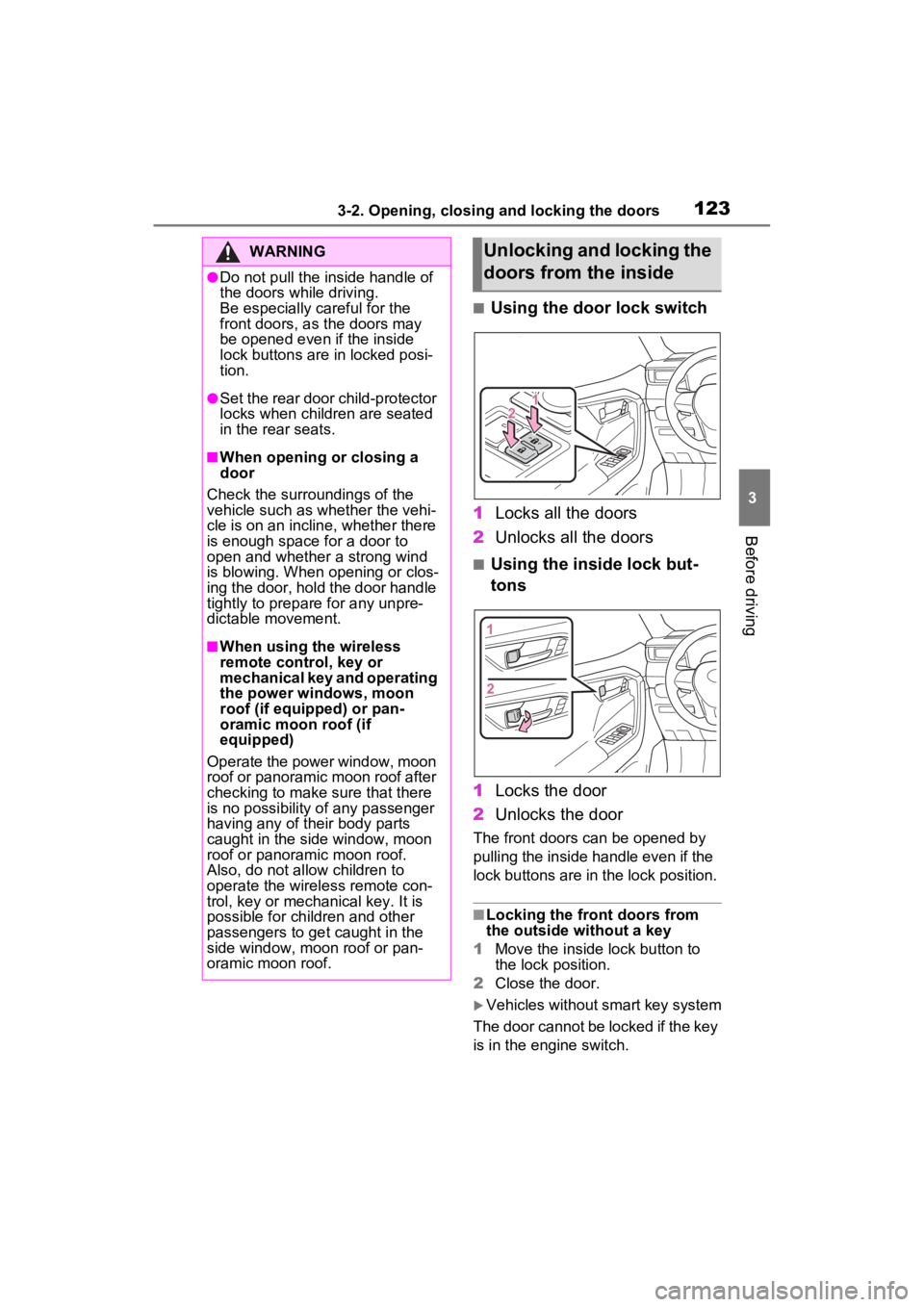
■Using the door lock switch
1 Locks all the doors
2 Unlocks all the doors
■Using the inside lock but-
tons
1 Locks the door
2 Unlocks the door
The front doors can be opened by
pulling the inside handle even if the
lock buttons are in the lock position.
■Locking the front doors from
the outside without a key
1 Move the inside lock button to
the lock position.
2 Close the door.
Vehicles without smart key system
The door cannot be locked if the key
is in the engine switch.
WARNING
●Do not pull the inside handle of
the doors while driving.
Be especially careful for the
front doors, as the doors may
be opened even if the inside
lock buttons are in locked posi-
tion.
●Set the rear door child-protector
locks when children are seated
in the rear seats.
■When opening or closing a
door
Check the surroundings of the
vehicle such as whether the vehi-
cle is on an incline, whether there
is enough space for a door to
open and whether a strong wind
is blowing. When opening or clos-
ing the door, hold the door handle
tightly to prepare for any unpre-
dictable movement.
■When using the wireless
remote control, key or
mechanical key and operating
the power windows, moon
roof (if equipped) or pan-
oramic moon roof (if
equipped)
Operate the power window, moon
roof or panoramic moon roof after
checking to make sure that there
is no possibility of any passenger
having any of their body parts
caught in the side window, moon
roof or panoramic moon roof.
Also, do not allow children to
operate the wireless remote con-
trol, key or mechanical key. It is
possible for children and other
passengers to get caught in the
side window, moon roof or pan-
oramic moon roof.
Unlocking and locking the
doors from the inside
Page 124 of 574
1243-2. Opening, closing and locking the doors
Vehicles with smart key system
The door cannot be locked if the
engine switch is in ACC or ON, or
the electronic key is left inside the
vehicle.
Depending on the position of the
electronic key, the key may not be
detected correctly and the door may
be locked.
■Open door warning buzzer
If the vehicle speed reaches 3 mph
(5 km/h), a buzzer sounds to indi-
cate that the door(s) or the hood is
not fully closed.
The open door(s) or hood is dis-
played on the multi-information dis-
play.
■When all the doors are locked
with the entry function (vehicles
with smart key system), wire-
less remote control or key
●The doors cannot be unlocked
with the door lock switch.
●The door lock switch can be reset
by unlocking all the doors with the
entry function (vehicles with smart
key system), wireless remote con-
trol or key.
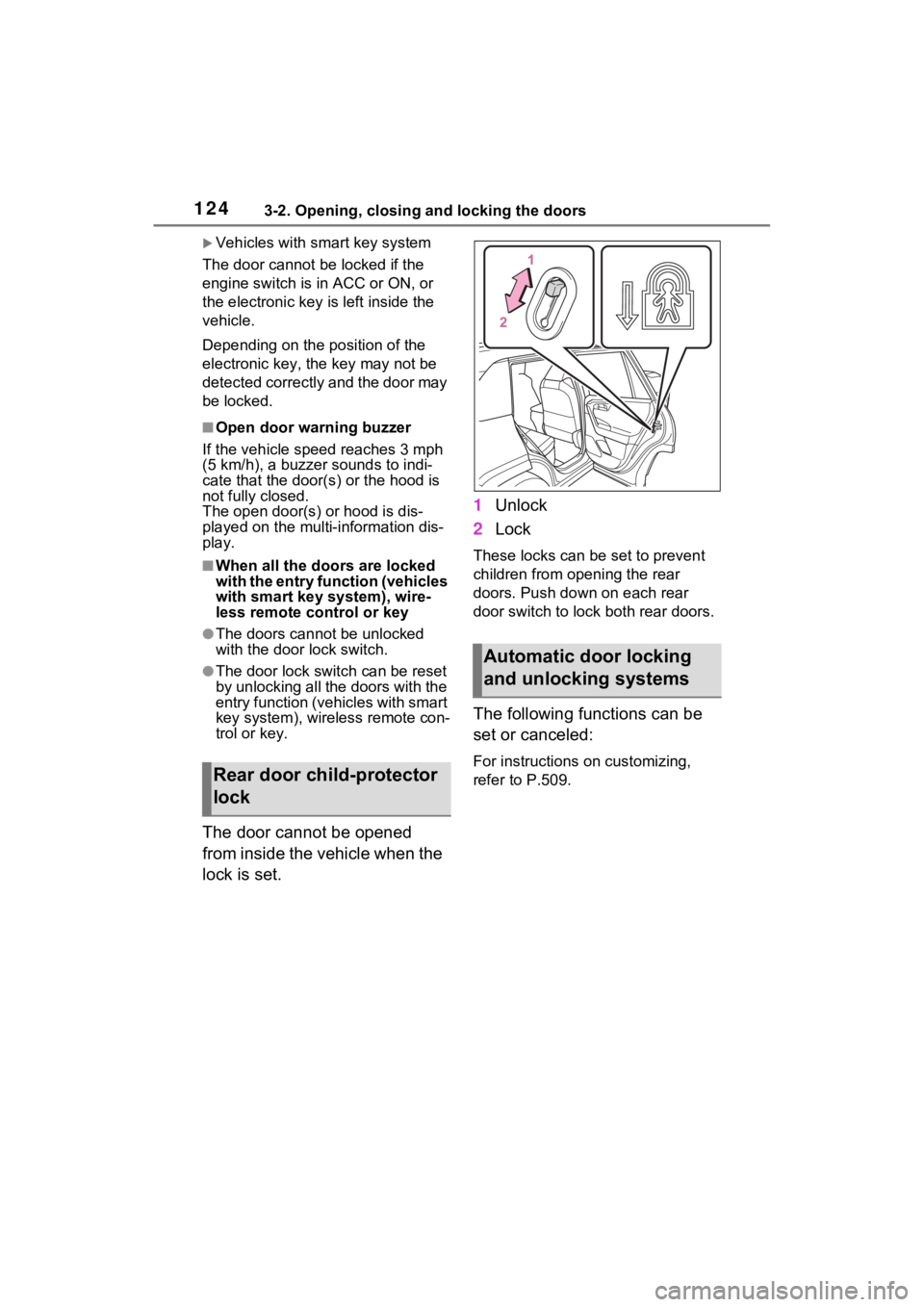
The door cannot be opened
from inside the vehicle when the
lock is set. 1
Unlock
2 Lock
These locks can be set to prevent
children from opening the rear
doors. Push down on each rear
door switch to lock both rear doors.
The following functions can be
set or canceled:
For instructions on customizing,
refer to P.509.Rear door child-protector
lock
Automatic door locking
and unlocking systems
Page 125 of 574

1253-2. Opening, closing and locking the doors
3
Before driving
FunctionOperation
Speed linked
door locking
function
All doors are
automatically
locked when
vehicle speed is
approximately
12mph (20 km/h)
or higher.
Shift position
linked door lock-
ing function
All doors are
automatically
locked when
shifting the shift
lever to position
other than P.
Shift position
linked door
unlocking func-
tionAll doors are
automatically
unlocked when
shifting the shift
lever to P.
Driver’s door
linked door
unlocking func-
tion
All doors are
automatically
unlocked when
driver’s door is
opened within
approximately 45
seconds after
turning the
engine switch to
OFF.
Back door
The back door can be
locked/unlocked and
opened/closed by the fol-
lowing procedures.
WARNING
Observe the following precau-
tions.
Failure to do so may result in
death or serious injury.
■Before driving
●Make sure that the back door is
fully closed.
If the back door is not fully
closed, it may open unexpect-
edly while driving and hit near-
by objects or luggage in the lug-
gage compartment may be
thrown out, causing an acci-
dent.
●Do not allow children to play in
the luggage compartment.
If a child is accidentally locked
in the luggage compartment,
they could get heat exhaustion
or other injuries.
●Do not allow a child to open or
close the back door.
Doing so may cause the back
door to operate unexpectedly,
or cause the child’s hands,
head, or neck to be caught by
the closing back door.
■Important points while driving
●Keep the back door closed
while driving.
If the back door is left open, it
may hit near-by objects or lug-
gage in the luggage compart-
ment may be thrown out,
causing an accident.
Page 128 of 574
1283-2. Opening, closing and locking the doors
electronic key, the key may be
detected as being in the vehicle. In
this case, vehicle may be unlocked.)
■Using the door lock switch
P.123
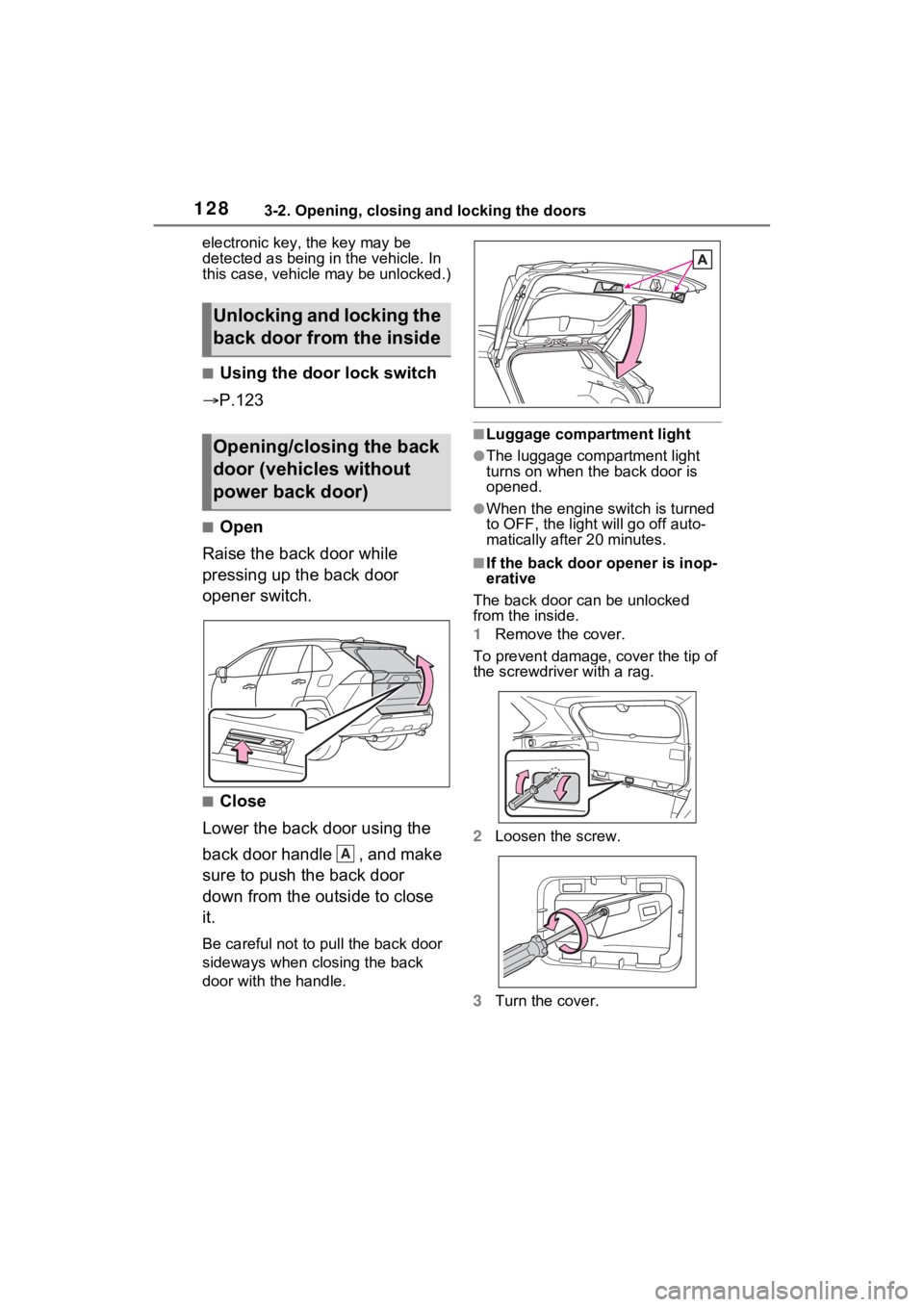
■Open
Raise the back door while
pressing up the back door
opener switch.
■Close
Lower the back door using the
back door handle , and make
sure to push the back door
down from the outside to close
it.
Be careful not to pull the back door
sideways when closing the back
door with the handle.
■Luggage compartment light
●The luggage compartment light
turns on when the back door is
opened.
●When the engine switch is turned
to OFF, the light will go off auto-
matically after 20 minutes.
■If the back door opener is inop-
erative
The back door can be unlocked
from the inside.
1 Remove the cover.
To prevent damage, cover the tip of
the screwdriver with a rag.
2 Loosen the screw.
3 Turn the cover.
Unlocking and locking the
back door from the inside
Opening/closing the back
door (vehicles without
power back door)
A
Page 131 of 574
1313-2. Opening, closing and locking the doors
3
Before driving
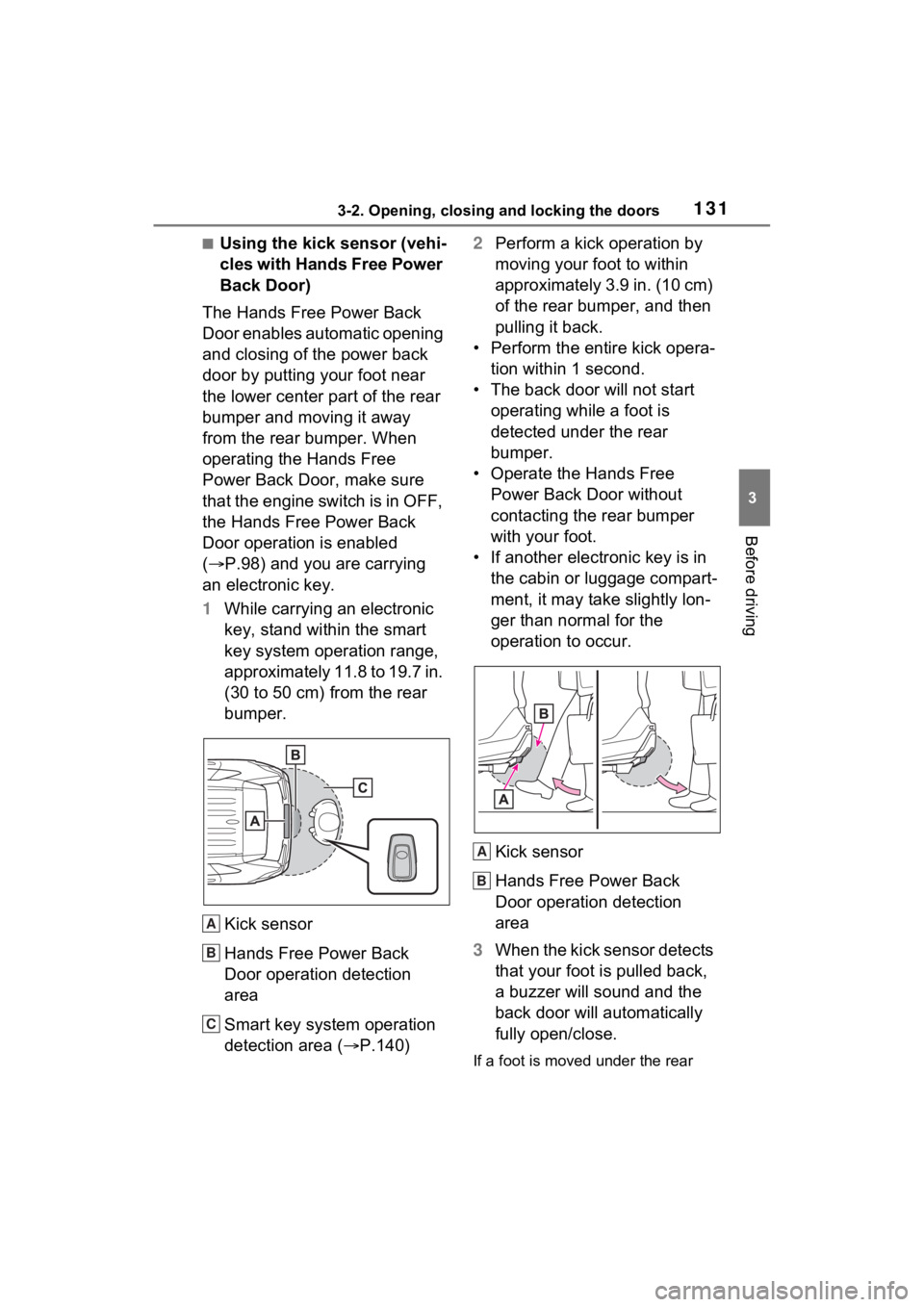
■Using the kick sensor (vehi-
cles with Hands Free Power
Back Door)
The Hands Free Power Back
Door enables automatic opening
and closing of the power back
door by putting your foot near
the lower center part of the rear
bumper and moving it away
from the rear bumper. When
operating the Hands Free
Power Back Door, make sure
that the engine switch is in OFF,
the Hands Free Power Back
Door operation is enabled
( P.98) and you are carrying
an electronic key.
1 While carrying an electronic
key, stand within the smart
key system operation range,
approximately 11.8 to 19.7 in.
(30 to 50 cm) from the rear
bumper.
Kick sensor
Hands Free Power Back
Door operation detection
area
Smart key system operation
detection area ( P.140) 2
Perform a kick operation by
moving your foot to within
approximately 3.9 in. (10 cm)
of the rear bumper, and then
pulling it back.
• Perform the entire kick opera- tion within 1 second.
• The back door will not start operating while a foot is
detected under the rear
bumper.
• Operate the Hands Free Power Back Door without
contacting the rear bumper
with your foot.
• If another electronic key is in the cabin or luggage compart-
ment, it may take slightly lon-
ger than normal for the
operation to occur.
Kick sensor
Hands Free Power Back
Door operation detection
area
3 When the kick sensor detects
that your foot is pulled back,
a buzzer will sound and the
back door will automatically
fully open/close.
If a foot is moved under the rear
A
B
C
A
B