fuel type TOYOTA RAV4 2023 Owners Manual
[x] Cancel search | Manufacturer: TOYOTA, Model Year: 2023, Model line: RAV4, Model: TOYOTA RAV4 2023Pages: 574, PDF Size: 17.31 MB
Page 15 of 574
15Pictorial index
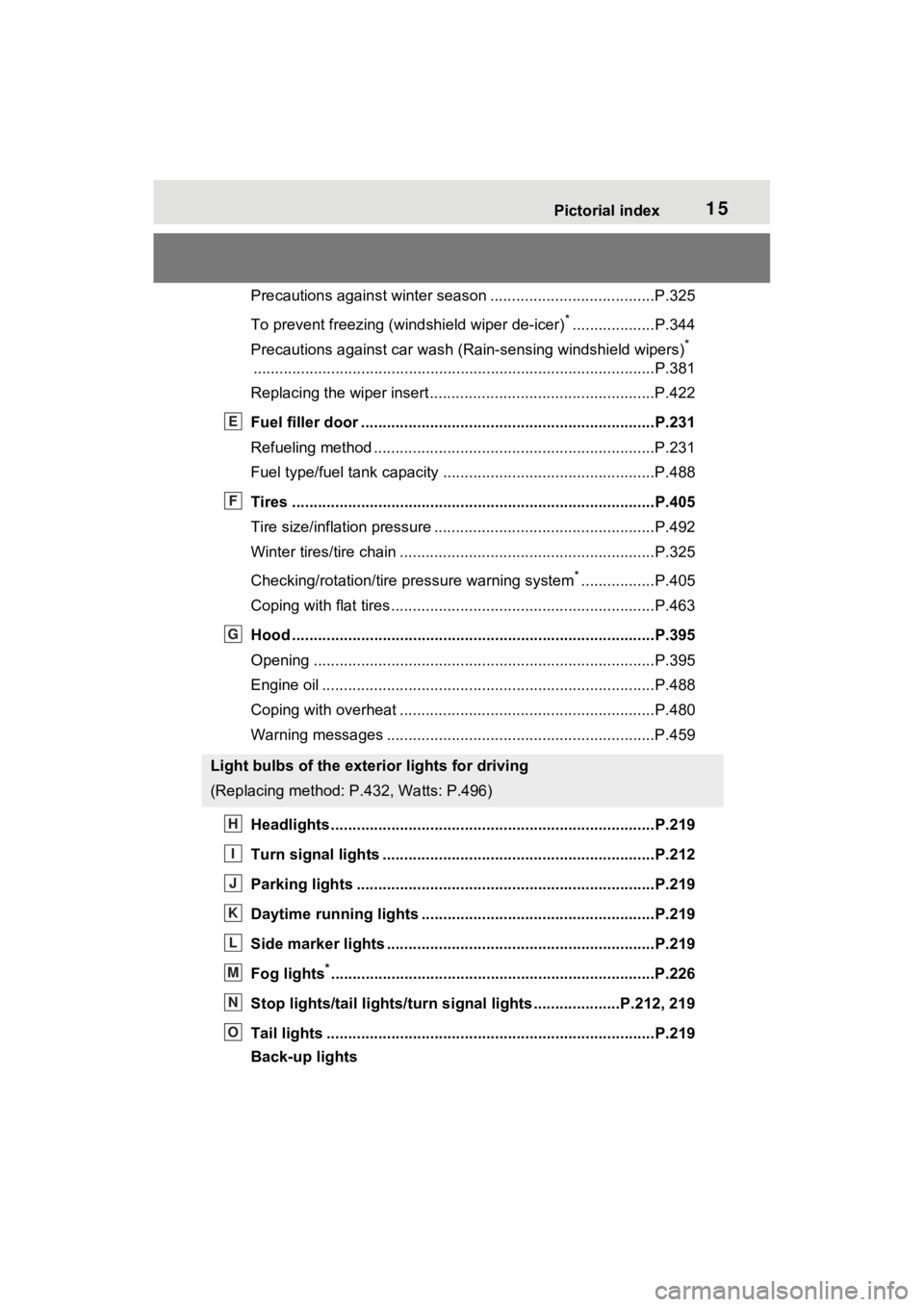
Precautions against winter season ......................................P.325
To prevent freezing (windshield wiper de-icer)
*...................P.344
Precautions against car wash (R ain-sensing windshield wipers)
*
............................................................... ..............................P.381
Replacing the wiper insert ..................................... ...............P.422
Fuel filler door ............................................... .....................P.231
Refueling method ............................................... ..................P.231
Fuel type/fuel tan k capacity .................................................P.488
Tires ....................................................................................P.405
Tire size/inflation pressure ................................... ................P.492
Winter tires/tire chain ........................................ ...................P.325
Checking/rotation/tire pressure warning system
*.................P.405
Coping with flat tires......................................... ....................P.463
Hood ....................................................................................P.395
Opening ........................................................ .......................P.395
Engine oil ..................................................... ........................P.488
Coping with overheat ........................................... ................P.480
Warning messages ..............................................................P.459
Headlights..................................................... ......................P.219
Turn signal lights ...............................................................P.212
Parking lights .....................................................................P.219
Daytime running lights .. ....................................................P.219
Side marker lights ............................................. .................P.219
Fog lights
*............................................................... ............P.226
Stop lights/tail lights/turn s ignal lights ....................P.212, 219
Tail lights .................................................... ........................P.219
Back-up lights
Light bulbs of the exterior lights for driving
(Replacing method: P .432, Watts: P.496)
E
F
G
H
I
J
K
L
M
N
O
Page 83 of 574
832-1. Instrument cluster
2
Vehicle status information and indicators
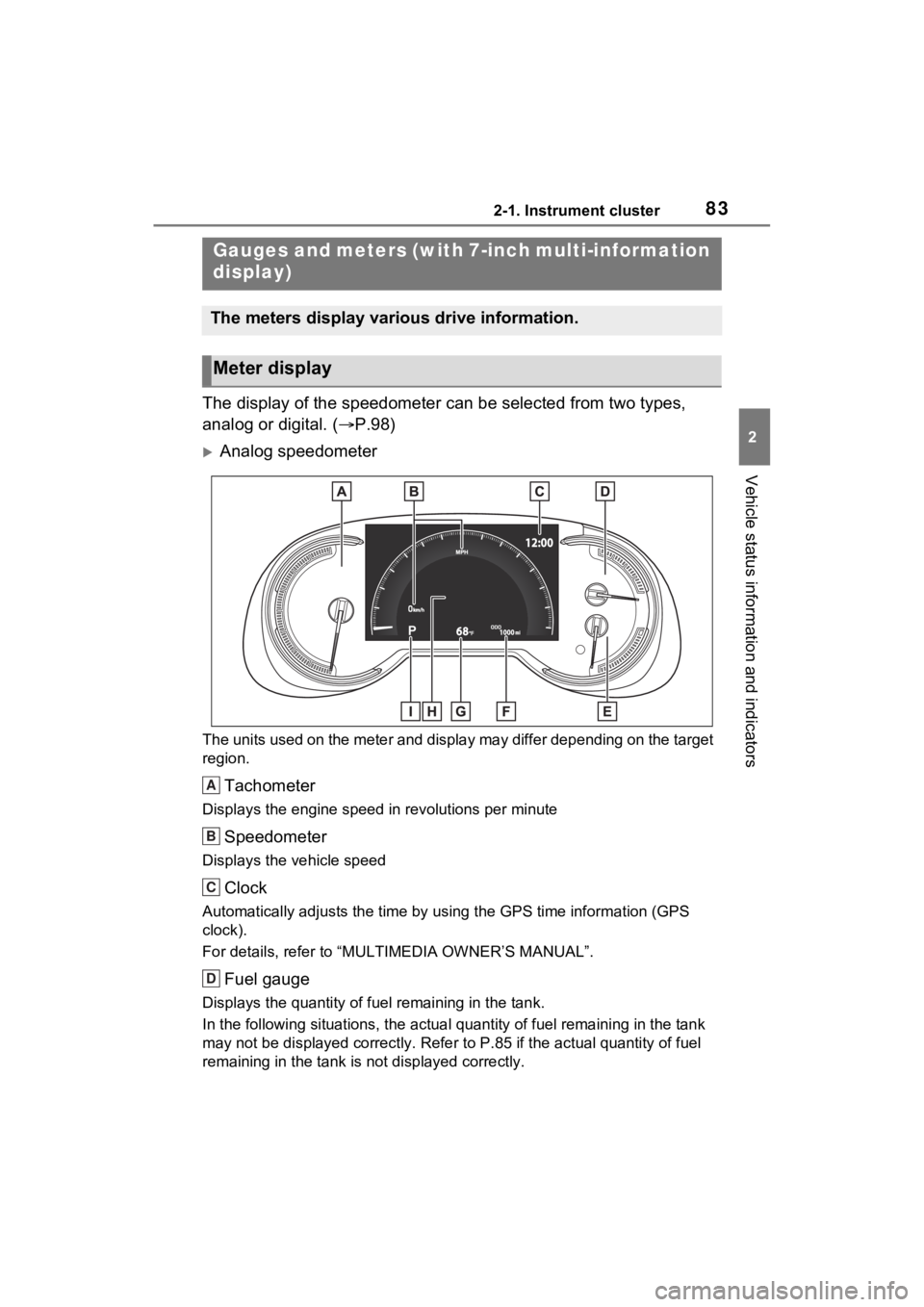
The display of the speedometer can be selected from two types,
analog or digital. (P.98)
Analog speedometer
The units used on the meter and display may differ depending on the target
region.
Tachometer
Displays the engine speed in revolutions per minute
Speedometer
Displays the vehicle speed
Clock
Automatically adjusts the time by using the GPS time informatio n (GPS
clock).
For details, refer to “MULTIMEDIA OWNER’S MANUAL”.
Fuel gauge
Displays the quantity of fu el remaining in the tank.
In the following sit uations, the actual quantity of fuel remain ing in the tank
may not be displayed correctly. Refer to P.85 if the actual quantity of fuel
remaining in the tank is not displayed correctly.
Gauges and meters (with 7-inch multi-information
display)
The meters display various drive information.
Meter display
A
B
C
D
Page 90 of 574
902-1. Instrument cluster
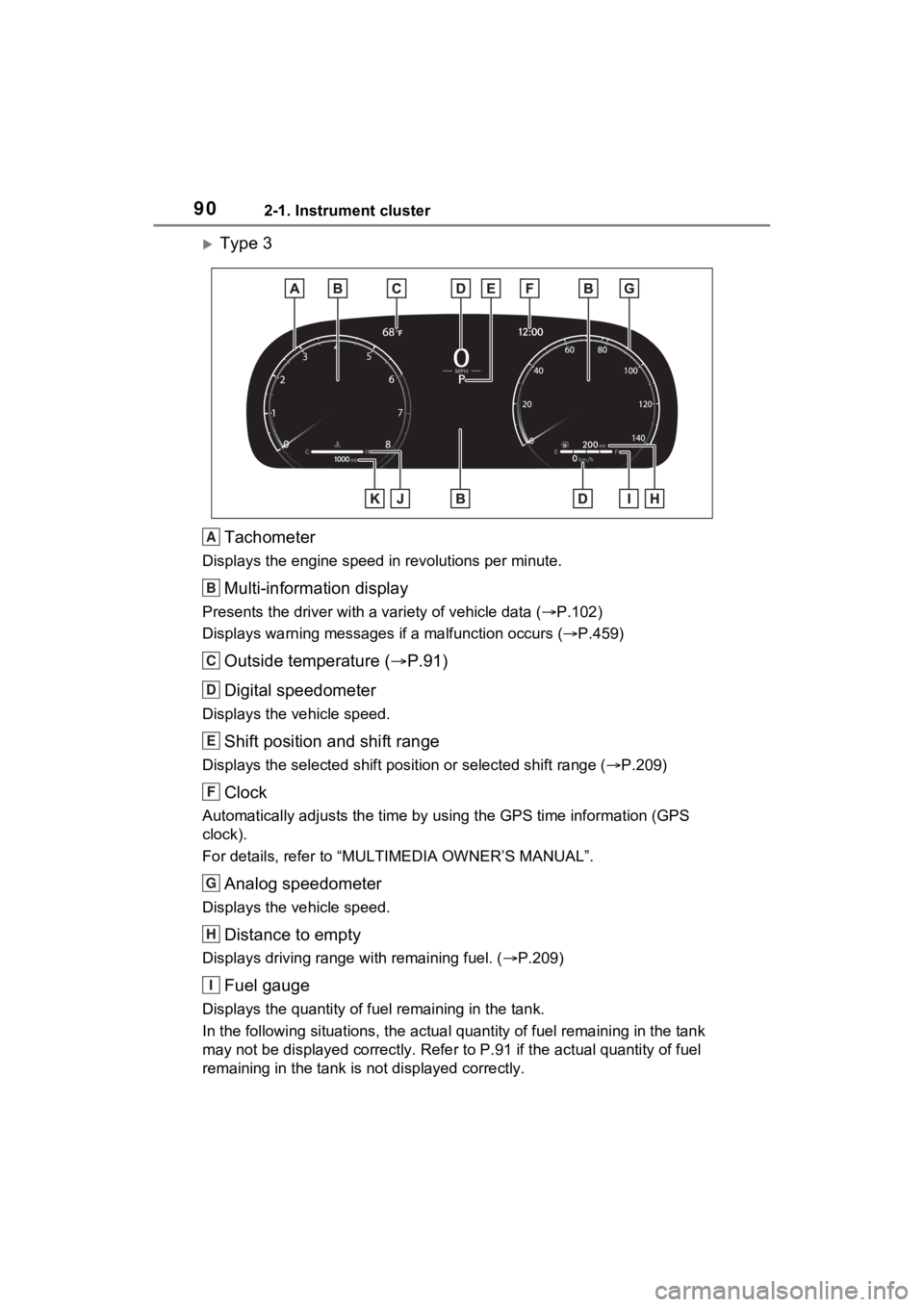
Type 3Tachometer
Displays the engine speed in revolutions per minute.
Multi-information display
Presents the driver with a variety of vehicle data (P.102)
Displays warning messages if a malfunction occurs (P.459)
Outside temperature ( P.91)
Digital speedometer
Displays the vehicle speed.
Shift position and shift range
Displays the selected shift posit ion or selected shift range (P.209)
Clock
Automatically adjusts the time by using the GPS time informatio n (GPS
clock).
For details, refer to “MULTIMEDIA OWNER’S MANUAL”.
Analog speedometer
Displays the vehicle speed.
Distance to empty
Displays driving range with remaining fuel. ( P.209)
Fuel gauge
Displays the quantity of fu el remaining in the tank.
In the following sit uations, the actual quantity of fuel remain ing in the tank
may not be displayed correctly. Refer to P.91 if the actual quantity of fuel
remaining in the tank is not displayed correctly.
A
B
C
D
E
F
G
H
I
Page 93 of 574
932-1. Instrument cluster
2
Vehicle status information and indicators
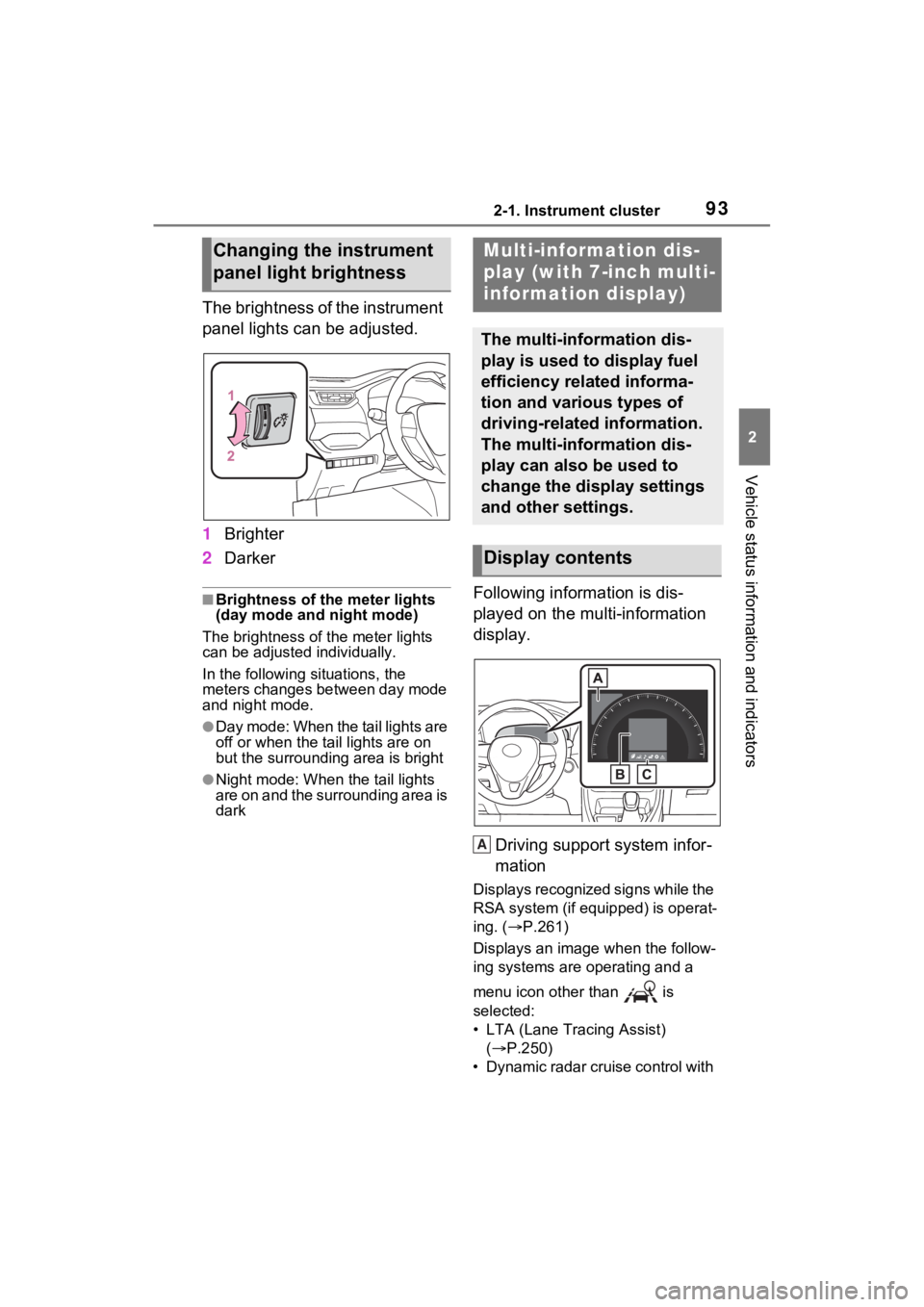
The brightness of the instrument
panel lights can be adjusted.
1Brighter
2 Darker
■Brightness of the meter lights
(day mode and night mode)
The brightness of the meter lights
can be adjusted individually.
In the following situations, the
meters changes between day mode
and night mode.
●Day mode: When the tail lights are
off or when the tail lights are on
but the surrounding area is bright
●Night mode: When the tail lights
are on and the surrounding area is
dark
Following information is dis-
played on the multi-information
display.
Driving support system infor-
mation
Displays recognized signs while the
RSA system (if equipped) is operat-
ing. ( P.261)
Displays an image when the follow-
ing systems are operating and a
menu icon other than is
selected:
• LTA (Lane Tracing Assist) ( P.250)
• Dynamic radar cruise control with
Changing the instrument
panel light brightnessMulti-information dis-
play (with 7-inch multi-
information display)
The multi-information dis-
play is used to display fuel
efficiency related informa-
tion and various types of
driving-related information.
The multi-information dis-
play can also be used to
change the display settings
and other settings.
Display contents
A
Page 101 of 574
1012-1. Instrument cluster
2
Vehicle status information and indicators
play settings)
Select to change the display on
Fuel Economy (P.95).
(Audio settings) (if
equipped)
Select to enable/disable
screen.
(Vehicle information dis-
play settings)
• “Display Contents”
Select to enable/disable the AWD
system display ( P.98). (AWD
models)
• “Drive Info Type”
Select to change the drive informa-
tion type display between trip and
total. ( P.97).
• “Drive Info Items”
Select to set the items on the upper
and lower side of the drive informa-
tion screen from three items, aver-
age speed, distance and total time.
“Pop-Up Display”
Select to enable/d isable the follow-
ing pop-up displays, which may
appear in some situations.
• Intersection guidance display of the navigation system-linked sys-
tem (if equipped)
• Incoming call display of the hands-free phone system (if
equipped)
• Audio operation (if equipped)
• Volume operation (if equipped)
• Voice control (if equipped)
• Stop & Start system duration (if equipped) • Stop & Start system status (if
equipped)
“MID OFF”
A blank screen is displayed
“Default Settings”
Select to reset the meter display
settings.
■Suspension of the settings dis-
play
●In the following situations, opera-
tion of the settings display will be
temporarily suspended.
• When a warning message appears on the multi-information
display
• When the vehicle begins to move
●Settings for functions not
equipped to the vehicle are not
displayed.
●When a function is turned off, the
related settings for that function
are not selectable.
WARNING
■Cautions during setting up
the display
As the engine needs to be run-
ning during setting up the display,
ensure that the vehicle is parked
in a place with adequate ventila-
tion. In a closed area such as a
garage, exhaust gases including
harmful carbon monoxide (CO)
may collect and enter the vehicle.
This may lead to death or a seri-
ous health hazard.
NOTICE
■During setting up the display
To prevent battery discharge,
ensure that the engine is running
while setting up the display fea-
tures.
Page 102 of 574
1022-1. Instrument cluster
Select to display warning mes-
sages and measures to be
taken if a malfunction is
detected. (P.459)
Displays suggestions to the
driver in the following situations.
To select a response to a dis-
played suggestion, use the
meter control switches.
■Suggestion to turn off the
headlights
If the headlights are left on for a
certain amount of time after the
engine switch has been turned
off, a suggestion message will
be displayed.
When the headlight switch is in
the AUTO position: The mes-
sage asking if you wish to turn
the headlights off is displayed.
To turn the headlights off, select
“Yes”.
If the driver’s door is opened after
the engine switch is turned off, this
suggestion message will not be dis-
played.
■Customization
Convenience Services (Suggestion
function) can be turned on/off. (Cus-
tomizable features: P.511)
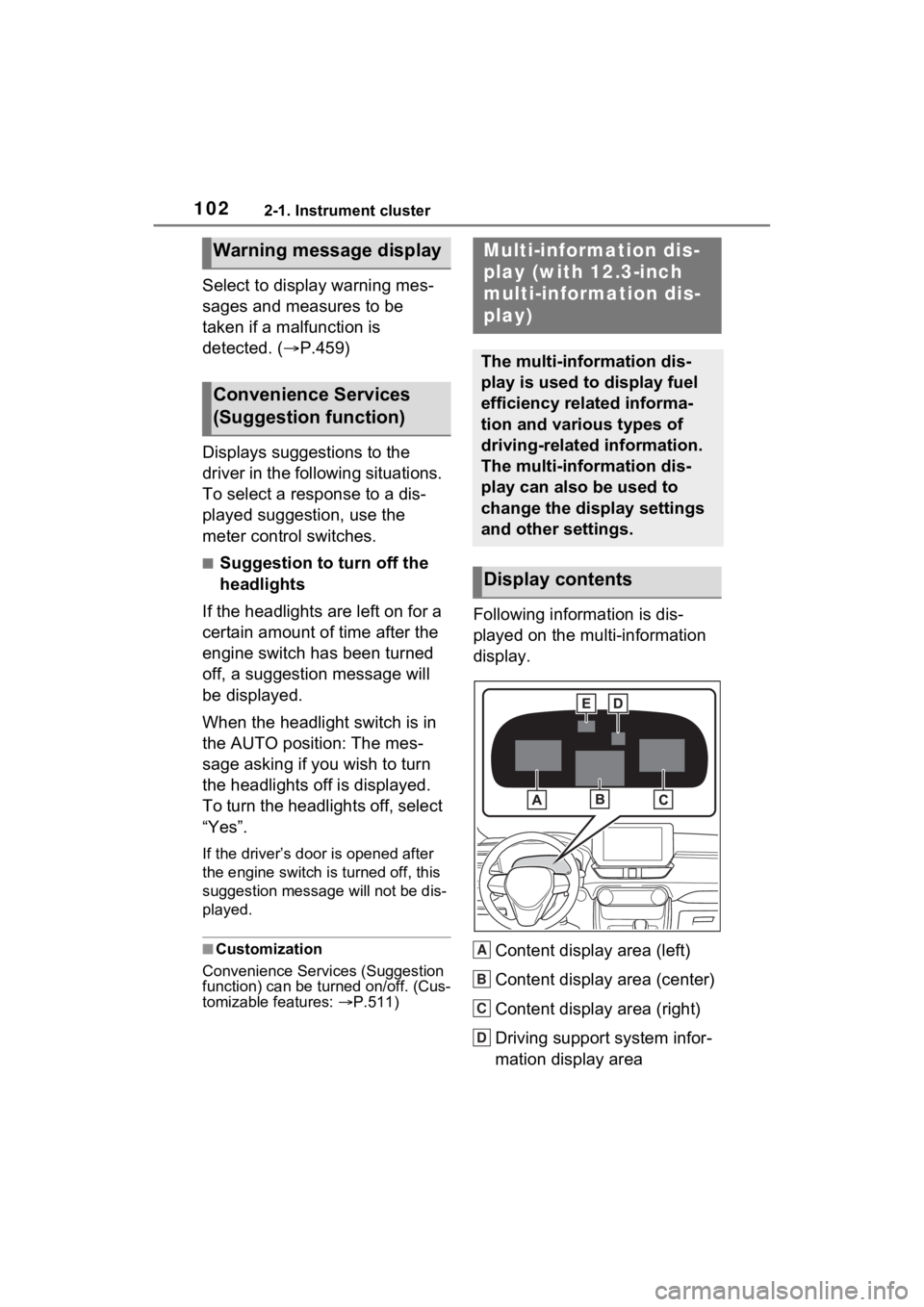
Following information is dis-
played on the multi-information
display.
Content display area (left)
Content display area (center)
Content display area (right)
Driving support system infor-
mation display area
Warning message display
Convenience Services
(Suggestion function)
Multi-information dis-
play (with 12.3-inch
multi-information dis-
play)
The multi-information dis-
play is used to display fuel
efficiency related informa-
tion and various types of
driving-related information.
The multi-information dis-
play can also be used to
change the display settings
and other settings.
Display contents
A
B
C
D
Page 110 of 574
1102-1. Instrument cluster
contact your Toyota dealer.
■ Settings
“Language”
Select to change the lan-
guage on the multi-informa-
tion display.
“Units”
Select to change the unit of
measure for fuel consump-
tion.
Meter Type
Select to change the meter
type setting.
Meter Style
Select to change the meter
style.
Dial Type
Select to change dial type.
( P.88)
(Eco Driving Indicator
Light) ( P.96)
Select to activate/deactivate the
Eco Driving Indicator Light.
Fuel Economy
Select to change the display
on Fuel Economy. ( P.105)
Drive Info
Select to change displayed
items on drive information dis-
play. ( P.106)
Pop-Up Display
Select to enable/disable the
pop-up displays, which may
appear in some situations.
Default Settings
Select to reset the meter dis- play settings.
■Suspension of the settings dis-
play
●In the following situations, opera-
tion of the settings display will be
temporarily suspended.
• When a warning message appears on the multi-information
display
• When the vehicle begins to move
●Settings for functions not
equipped to the vehicle are not
displayed.
●When a function is turned off, the
related settings for that function
are not selectable.
Select to display warning mes-
sages and measures to be
taken if a malfunction is
detected. ( P.459)
WARNING
■Cautions during setting up
the display
As the engine needs to be run-
ning during setting up the display,
ensure that the vehicle is parked
in a place with adequate ventila-
tion. In a closed area such as a
garage, exhaust gases including
harmful carbon monoxide (CO)
may collect and enter the vehicle.
This may lead to death or a seri-
ous health hazard.
NOTICE
■During setting up the display
To prevent battery discharge,
ensure that the engine is running
while setting up the display fea-
tures.
Warning message display
Page 111 of 574
1112-1. Instrument cluster
2
Vehicle status information and indicators
Displays suggestions to the
driver in the following situations.
To select a response to a dis-
played suggestion, use the
meter control switches.
■Suggestion to turn off the
headlights
If the headlights are left on for a
certain amount of time after the
engine switch has been turned
off, a suggestion message will
be displayed.
When the headlight switch is in
the AUTO position: The mes-
sage asking if you wish to turn
the headlights off is displayed.
To turn the headlights off, select
“Yes”.
If the driver’s door is opened after
the engine switch is turned off, this
suggestion message will not be dis-
played.
■Customization
Convenience Services (Suggestion
function) can be turned on/off. (Cus-
tomizable features: P.509)
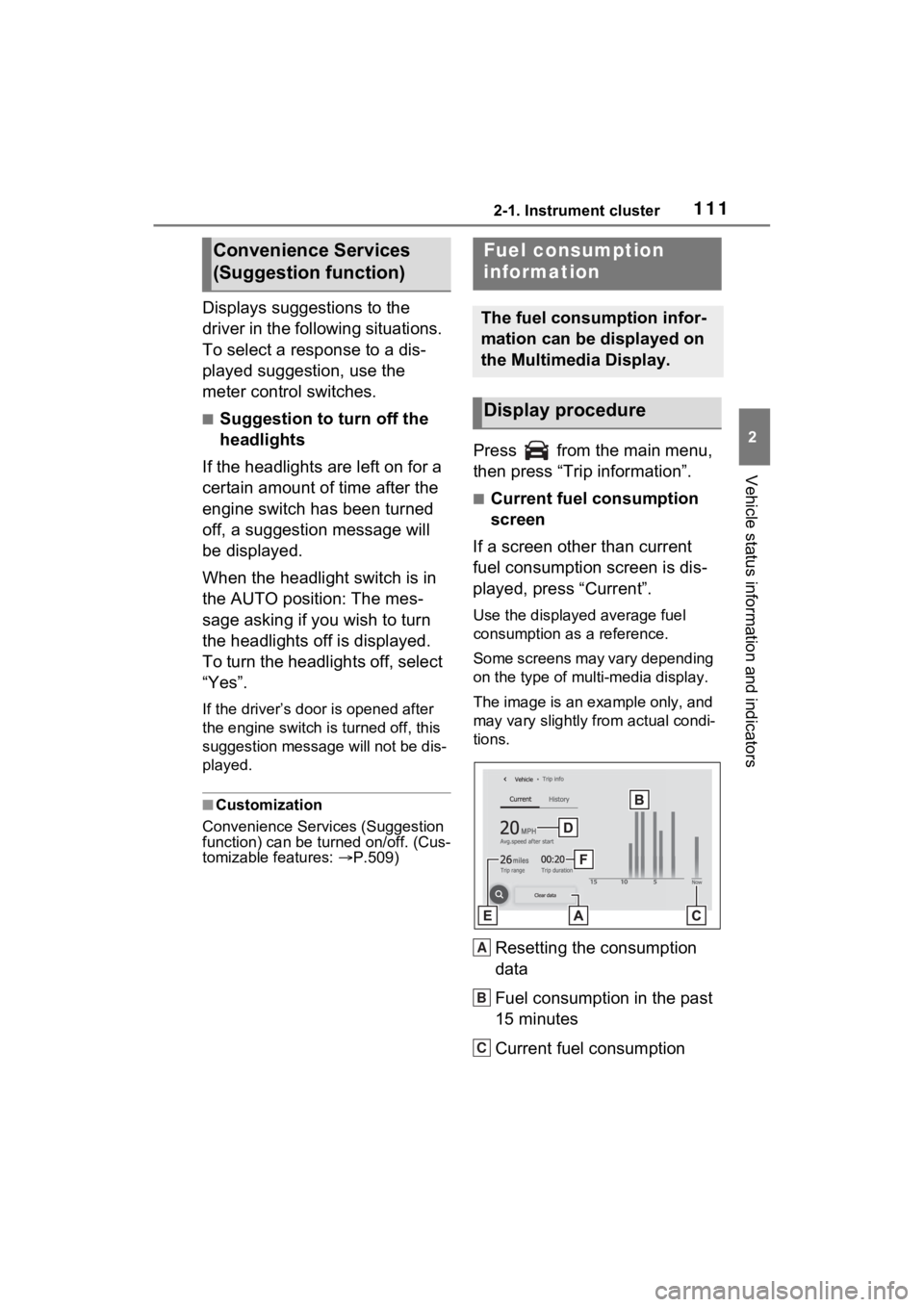
Press from the main menu,
then press “Trip information”.
■Current fuel consumption
screen
If a screen other than current
fuel consumption screen is dis-
played, press “Current”.
Use the displayed average fuel
consumption as a reference.
Some screens may vary depending
on the type of multi-media display.
The image is an example only, and
may vary slightly from actual condi-
tions.
Resetting the consumption
data
Fuel consumption in the past
15 minutes
Current fuel consumption
Convenience Services
(Suggestion function)Fuel consumption
information
The fuel consumption infor-
mation can be displayed on
the Multimedia Display.
Display procedure
A
B
C
Page 112 of 574
1122-1. Instrument cluster
Average vehicle speed since
the engine was started.
Trip range
Elapsed time since the
engine was started.
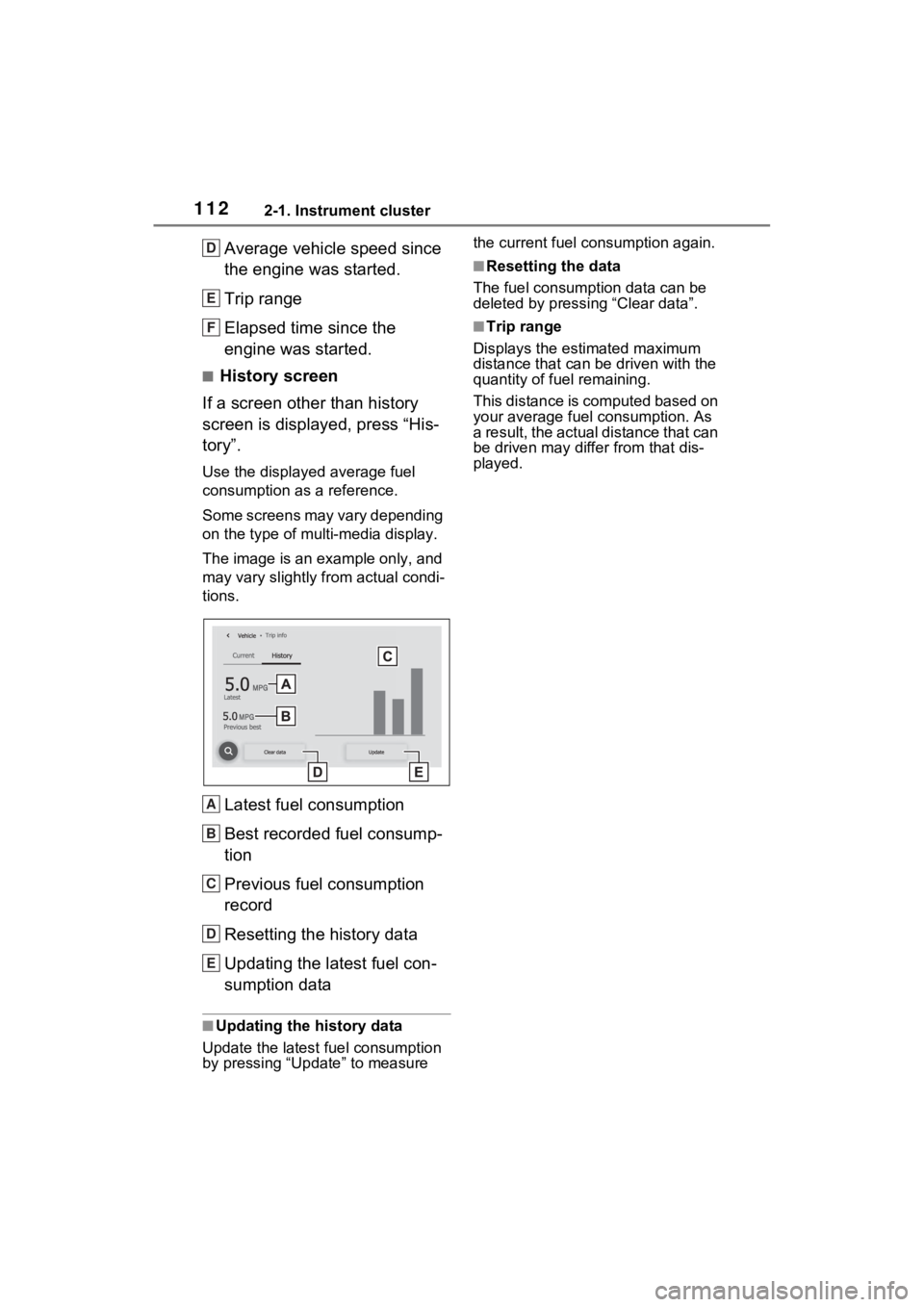
■History screen
If a screen other than history
screen is displayed, press “His-
tory”.
Use the displayed average fuel
consumption as a reference.
Some screens may vary depending
on the type of multi-media display.
The image is an example only, and
may vary slightly f rom actual condi-
tions.
Latest fuel consumption
Best recorded fuel consump-
tion
Previous fuel consumption
record
Resetting the history data
Updating the latest fuel con-
sumption data
■Updating the history data
Update the latest fuel consumption
by pressing “Update” to measure the current fuel consumption again.
■Resetting the data
The fuel consumption data can be
deleted by pressing “Clear data”.
■Trip range
Displays the estimated maximum
distance that can be driven with the
quantity of fuel remaining.
This distance is computed based on
your average fuel consumption. As
a result, the actual distance that can
be driven may differ from that dis-
played.
D
E
F
A
B
C
D
E
Page 220 of 574
2204-3. Operating the lights and wipers
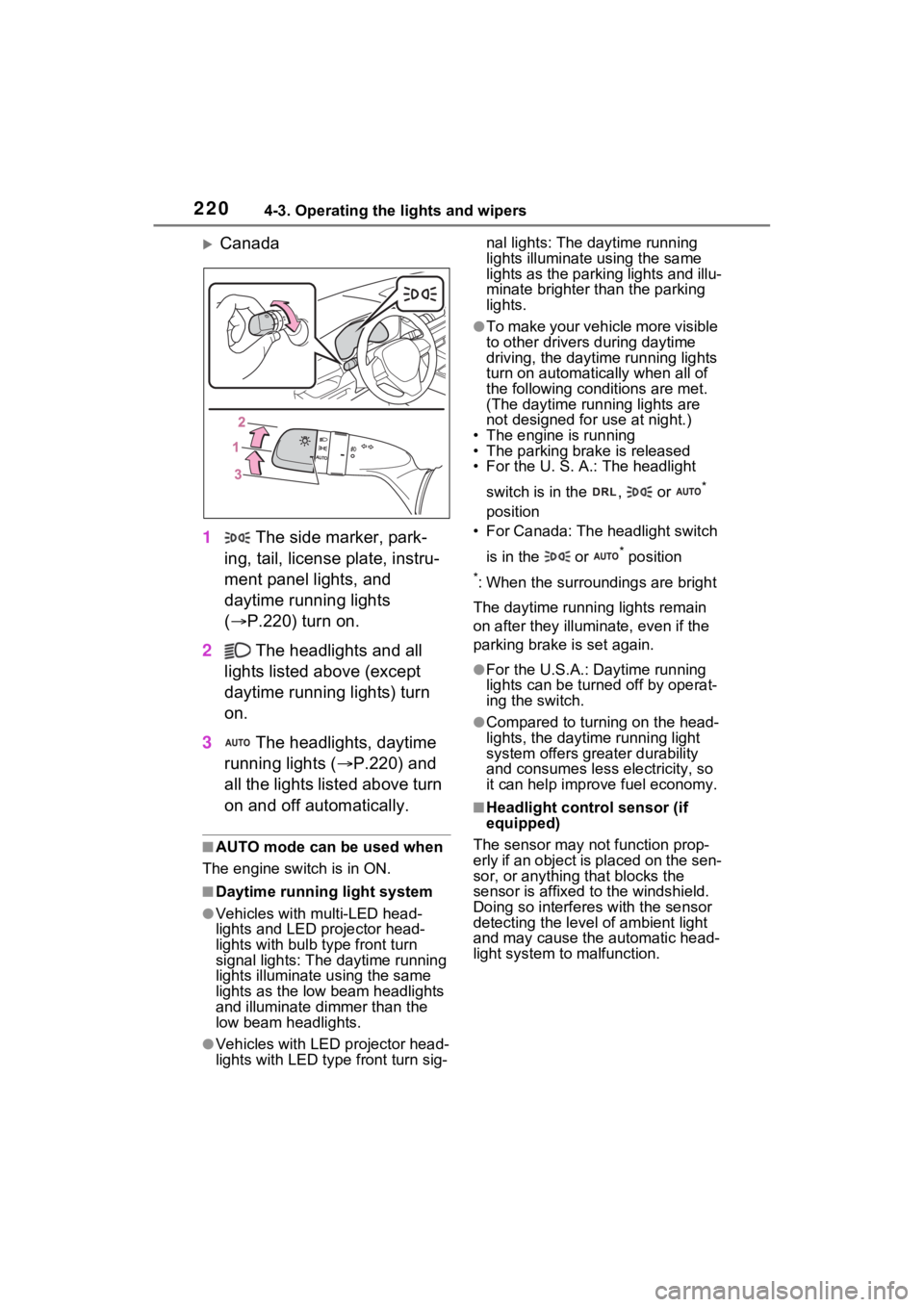
Canada
1 The side marker, park-
ing, tail, license plate, instru-
ment panel lights, and
daytime running lights
( P.220) turn on.
2 The headlights and all
lights listed above (except
daytime running lights) turn
on.
3 The headlights, daytime
running lights ( P.220) and
all the lights listed above turn
on and off automatically.
■AUTO mode can be used when
The engine switch is in ON.
■Daytime runni ng light system
●Vehicles with multi-LED head-
lights and LED projector head-
lights with bulb type front turn
signal lights: The daytime running
lights illuminate u sing the same
lights as the low beam headlights
and illuminate d immer than the
low beam headlights.
●Vehicles with LED projector head-
lights with LED type front turn sig-nal lights: The daytime running
lights illuminate using the same
lights as the parking lights and illu-
minate brighter than the parking
lights.
●To make your vehicle more visible
to other drivers
during daytime
driving, the daytime running lights
turn on automatically when all of
the following conditions are met.
(The daytime running lights are
not designed for use at night.)
• The engine is running
• The parking brake is released
• For the U. S. A.: The headlight
switch is in the , or
*
position
• For Canada: The headlight switch
is in the or
* position
*: When the surroundings are bright
The daytime running lights remain
on after they illumi nate, even if the
parking brake is set again.
●For the U.S.A.: Daytime running
lights can be turned off by operat-
ing the switch.
●Compared to turning on the head-
lights, the daytime running light
system offers greater durability
and consumes less electricity, so
it can help improve fuel economy.
■Headlight control sensor (if
equipped)
The sensor may not function prop-
erly if an object is placed on the sen-
sor, or anything that blocks the
sensor is affixed to the windshield.
Doing so interferes with the sensor
detecting the level of ambient light
and may cause t he automatic head-
light system to malfunction.