air condition TOYOTA RAV4 EV 2012 1.G Navigation Manual
[x] Cancel search | Manufacturer: TOYOTA, Model Year: 2012, Model line: RAV4 EV, Model: TOYOTA RAV4 EV 2012 1.GPages: 296, PDF Size: 4.04 MB
Page 83 of 296
83
2. ROUTE GUIDANCE
3
NAVIGATION SYSTEM
5. SETTING ROUTE
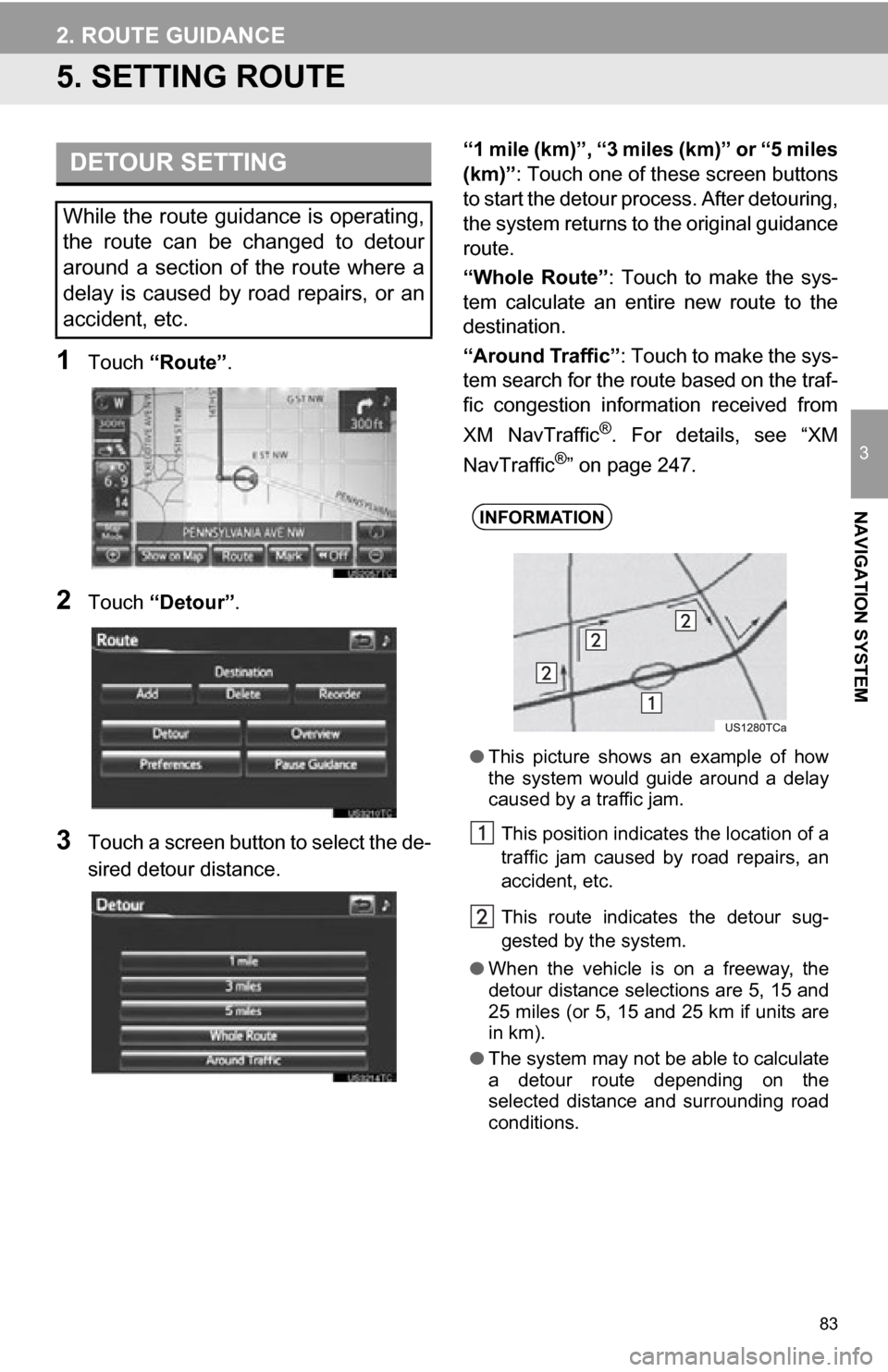
1Touch “Route” .
2Touch “Detour” .
3Touch a screen button to select the de-
sired detour distance. “1 mile (km)”, “3 miles (km)” or “5 miles
(km)”
: Touch one of these screen buttons
to start the detour pr ocess. After detouring,
the system returns to the original guidance
route.
“Whole Route” : Touch to make the sys-
tem calculate an entire new route to the
destination.
“Around Traffic” : Touch to make the sys-
tem search for the route based on the traf-
fic congestion information received from
XM NavTraffic
®. For details, see “XM
NavTraffic®” on page 247.
DETOUR SETTING
While the route guidance is operating,
the route can be changed to detour
around a section of the route where a
delay is caused by road repairs, or an
accident, etc.
INFORMATION
● This picture shows an example of how
the system would guide around a delay
caused by a traffic jam.
This position indicates the location of a
traffic jam caused by road repairs, an
accident, etc.
This route indicates the detour sug-
gested by the system.
● When the vehicle is on a freeway, the
detour distance selections are 5, 15 and
25 miles (or 5, 15 and 25 km if units are
in km).
● The system may not be able to calculate
a detour route depending on the
selected distance and surrounding road
conditions.
Page 115 of 296
115
4. SETUP
3
NAVIGATION SYSTEM
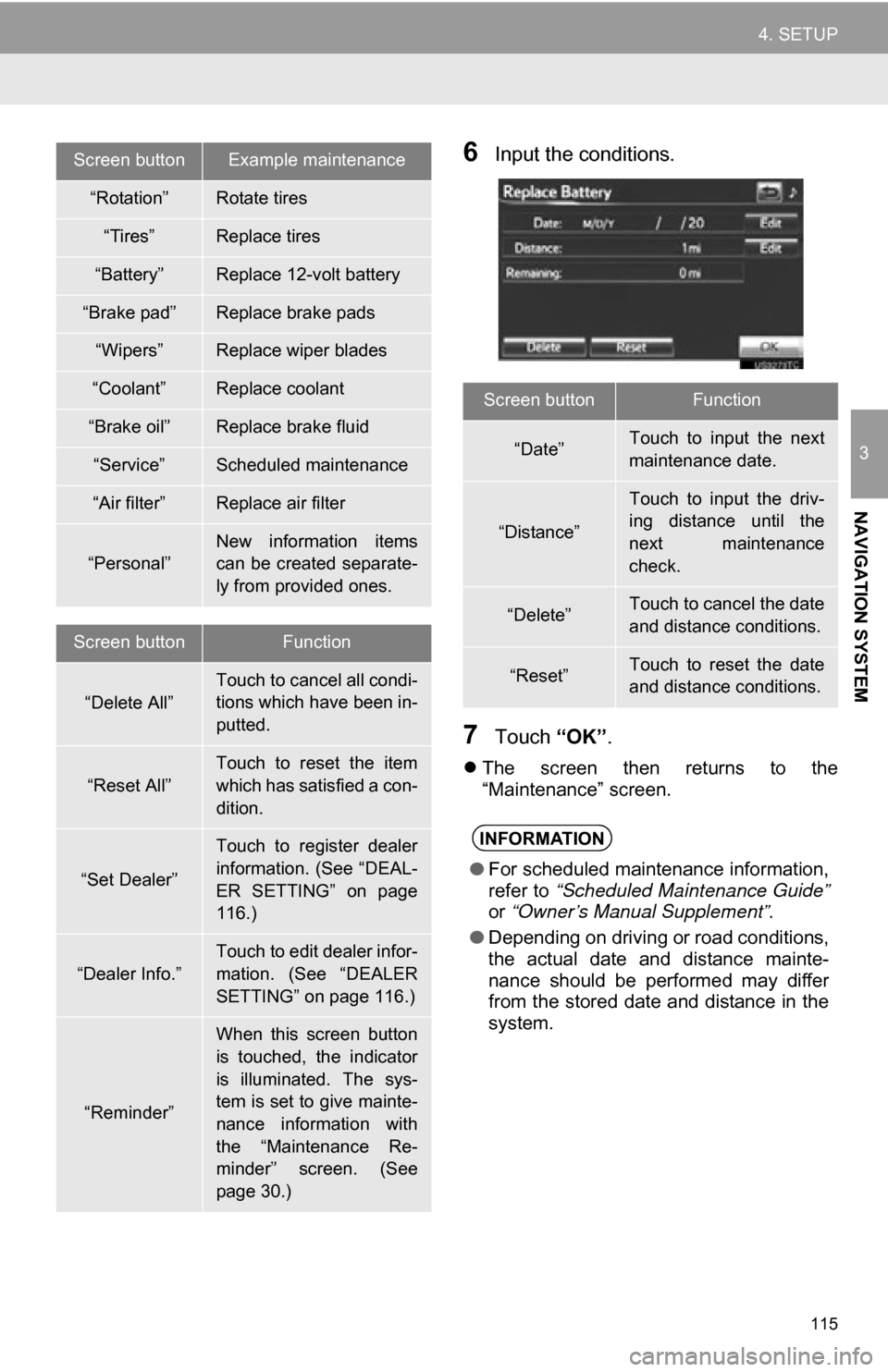
6Input the conditions.
7Touch “OK”.
The screen then returns to the
“Maintenance” screen.
Screen buttonExample maintenance
“Rotation”Rotate tires
“Tires”Replace tires
“Battery”Replace 12-volt battery
“Brake pad”Replace brake pads
“Wipers”Replace wiper blades
“Coolant”Replace coolant
“Brake oil”Replace brake fluid
“Service”Scheduled maintenance
“Air filter”Replace air filter
“Personal”
New information items
can be created separate-
ly from provided ones.
Screen buttonFunction
“Delete All”Touch to cancel all condi-
tions which have been in-
putted.
“Reset All”
Touch to reset the item
which has satisfied a con-
dition.
“Set Dealer”
Touch to register dealer
information. (See “DEAL-
ER SETTING” on page
116.)
“Dealer Info.”
Touch to edit dealer infor-
mation. (See “DEALER
SETTING” on page 116.)
“Reminder”
When this screen button
is touched, the indicator
is illuminated. The sys-
tem is set to give mainte-
nance information with
the “Maintenance Re-
minder” screen. (See
page 30.)
Screen buttonFunction
“Date”Touch to input the next
maintenance date.
“Distance”
Touch to input the driv-
ing distance until the
next maintenance
check.
“Delete”Touch to cancel the date
and distance conditions.
“Reset”Touch to reset the date
and distance conditions.
INFORMATION
● For scheduled maintenance information,
refer to “Scheduled Maintenance Guide”
or “Owner’s Manual Supplement” .
● Depending on driving or road conditions,
the actual date and distance mainte-
nance should be performed may differ
from the stored date and distance in the
system.
Page 125 of 296
125
1. PHONE OPERATION
4
PHONE
Bluetooth is a registered trademark of
Bluetooth SIG, Inc.
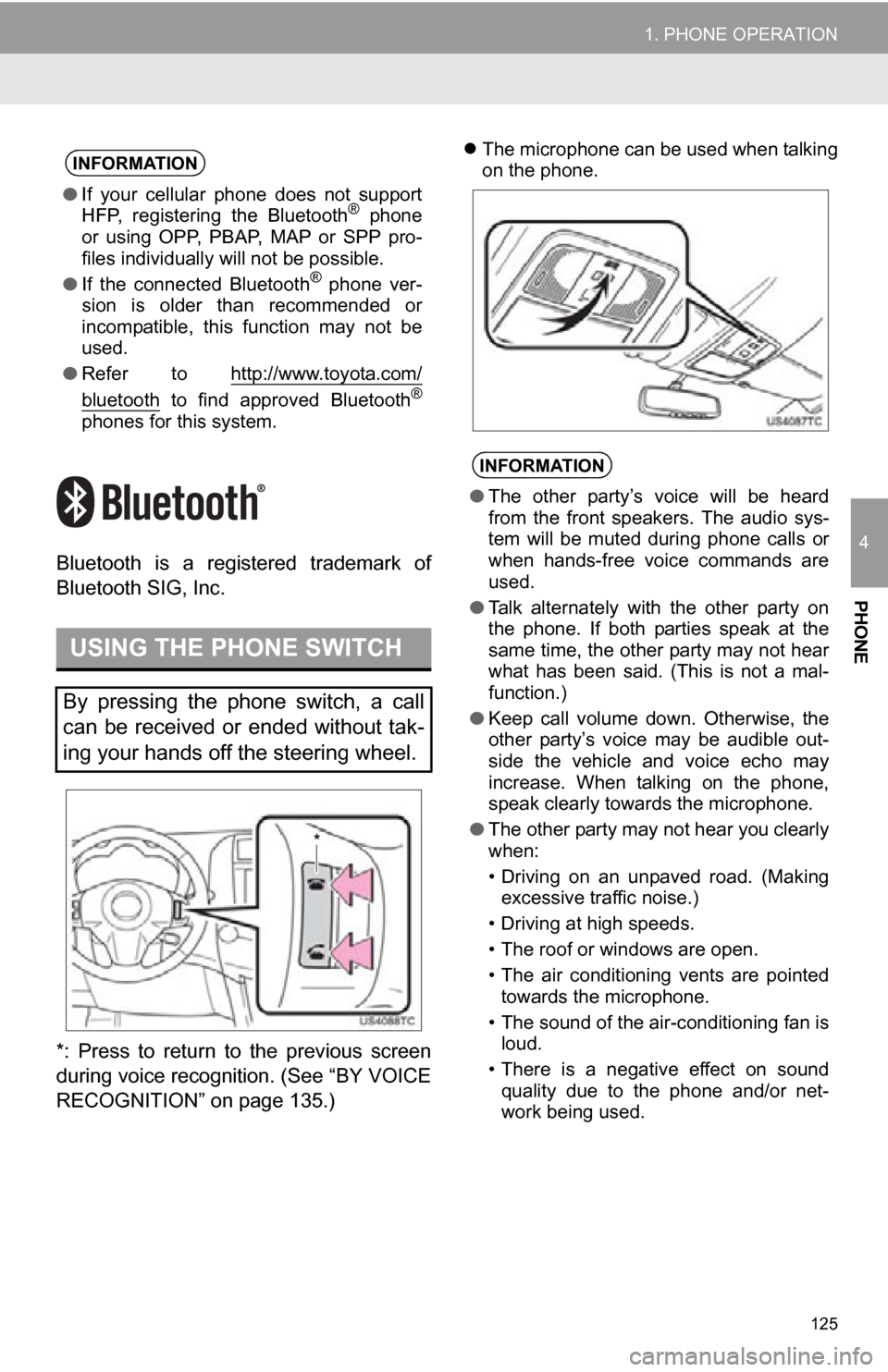
*: Press to return to the previous screen
during voice recognition. (See “BY VOICE
RECOGNITION” on page 135.)
The microphone can be used when talking
on the phone.INFORMATION
● If your cellular phone does not support
HFP, registering the Bluetooth® phone
or using OPP, PBAP , MAP or SPP pro-
files individually will not be possible.
● If the connected Bluetooth
® phone ver-
sion is older than recommended or
incompatible, this function may not be
used.
● Refer to http://www.toyota.com/
bluetooth to find approved Bluetooth®
phones for this system.
USING THE PHONE SWITCH
By pressing the phone switch, a call
can be received or ended without tak-
ing your hands off the steering wheel.
*
INFORMATION
●The other party’s voice will be heard
from the front speakers. The audio sys-
tem will be muted during phone calls or
when hands-free voice commands are
used.
● Talk alternately with the other party on
the phone. If both parties speak at the
same time, the other party may not hear
what has been said. (This is not a mal-
function.)
● Keep call volume down. Otherwise, the
other party’s voice may be audible out-
side the vehicle and voice echo may
increase. When talking on the phone,
speak clearly towards the microphone.
● The other party may not hear you clearly
when:
• Driving on an unpaved road. (Making
excessive traffic noise.)
• Driving at high speeds.
• The roof or windows are open.
• The air conditioning vents are pointed towards the microphone.
• The sound of the air-conditioning fan is loud.
• There is a negative effect on sound quality due to the phone and/or net-
work being used.
Page 226 of 296
226
1. VOICE COMMAND SYSTEM OPERATION
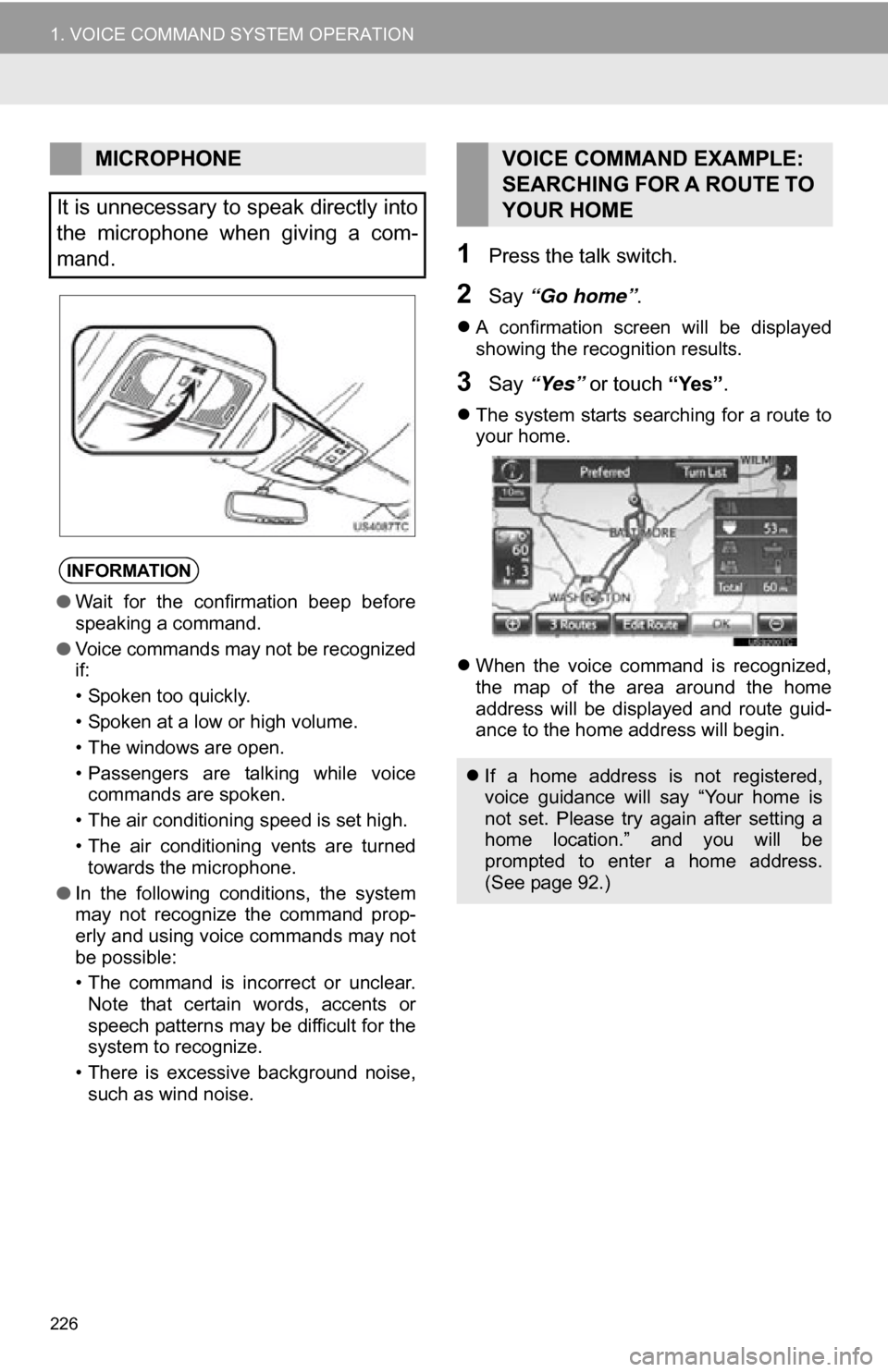
1Press the talk switch.
2Say “Go home” .
A confirmation screen will be displayed
showing the recognition results.
3Say “Yes” or touch “Yes”.
The system starts searching for a route to
your home.
When the voice command is recognized,
the map of the area around the home
address will be displayed and route guid-
ance to the home address will begin.
MICROPHONE
It is unnecessary to speak directly into
the microphone when giving a com-
mand.
INFORMATION
● Wait for the confirmation beep before
speaking a command.
● Voice commands may not be recognized
if:
• Spoken too quickly.
• Spoken at a low or high volume.
• The windows are open.
• Passengers are talking while voice
commands are spoken.
• The air conditioning speed is set high.
• The air conditioning vents are turned towards the microphone.
● In the following conditions, the system
may not recognize the command prop-
erly and using voice commands may not
be possible:
• The command is incorrect or unclear.
Note that certain words, accents or
speech patterns may be difficult for the
system to recognize.
• There is excessive background noise, such as wind noise.
VOICE COMMAND EXAMPLE:
SEARCHING FOR A ROUTE TO
YOUR HOME
If a home address is not registered,
voice guidance will say “Your home is
not set. Please try again after setting a
home location.” and you will be
prompted to enter a home address.
(See page 92.)