ECO mode TOYOTA RAV4 EV 2012 1.G User Guide
[x] Cancel search | Manufacturer: TOYOTA, Model Year: 2012, Model line: RAV4 EV, Model: TOYOTA RAV4 EV 2012 1.GPages: 520, PDF Size: 8.29 MB
Page 80 of 520

80 1-3. Charging
■Capacity reduction of the traction battery
The capacity of the traction battery will decline gradually with normal use
over the life of the vehicle. The rate at which it declines is dependant on a
number of factors, including environmental conditions and the way the vehi-
cle is used. By observing the following precautions, battery capacity decline
can be suppressed.
●Avoid parking the vehicle for prolonged periods in areas with a high tem-
perature under direct sunlight when the traction battery is fully charged.
When storing the vehicle for prolonged periods, it is recommended to
park the vehicle in a shaded area or a cool garage. This helps minimize
traction battery capacity decline.
● When not driving long distances, it is recommended to charge using nor-
mal charge mode to help minimize traction battery capacity decline.
( P. 58, 72)
● Regular use of the scheduled charging function helps mitigate battery
capacity decline by avoiding storage at high SOC.
Page 83 of 520

83
1-3. Charging
1
Before driving
■
If charging has not been car ried out in a long time
The charging port cap's lever may get stuck and not open automatically
even if the knob is moved. If this occurs, push aside the release button and
open the cap by hand.
■ When the outside temperature is low or high
The level shown on the SOC gauge ( P. 218) may drop slightly when the
“POWER” switch is turned to ON mode, even if charging has been com-
pleted and the traction battery is fully charged. However, this does not indi-
cate a malfunction.
■ Charging in extremely cold temperatures
If the vehicle is parked in ambient temperatures below freezing, 240 V
charging is recommended.
If only a 120 V outlet is available, the following will improve your charge pro-
cess:
●Charge at mid-day (when it is warmest)
● Protect the vehicle from wind during charging.
If the vehicle is still too cold to charge, please contact your Toyota dealership
or tow it to a warmer charging location.
■ Handling the traction battery
P. 2 2
Page 91 of 520
91
1-3. Charging
1
Before driving
If a warning message is displayed after charging
If a warning message is displayed when the “POWER” switch is
turned to ON mode after charging, comply with the contents of the
message and take any necessary actions. ( P. 443)
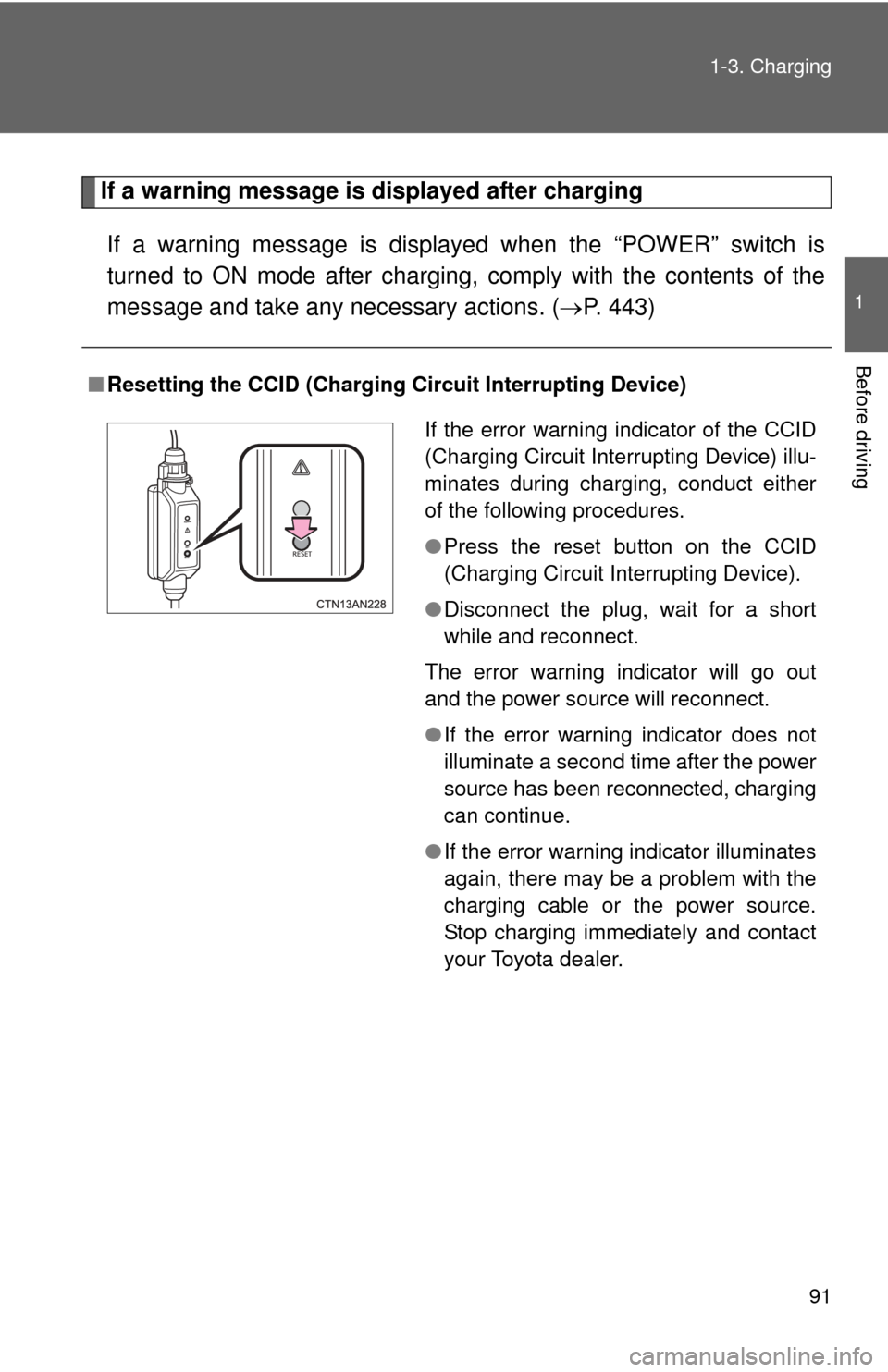
■Resetting the CCID (Charging Circuit Interrupting Device)
If the error warning indicator of the CCID
(Charging Circuit Interrupting Device) illu-
minates during charging, conduct either
of the following procedures.
●Press the reset button on the CCID
(Charging Circuit Interrupting Device).
● Disconnect the plug, wait for a short
while and reconnect.
The error warning indicator will go out
and the power source will reconnect.
● If the error warning indicator does not
illuminate a second time after the power
source has been reconnected, charging
can continue.
● If the error warning indicator illuminates
again, there may be a problem with the
charging cable or the power source.
Stop charging immediately and contact
your Toyota dealer.
Page 105 of 520

105
1-5. Opening, closing and locking the doors
1
Before driving
■
Note for the entry function
●Even when the electronic key is within the effective range (detection
areas), the system may not operate properly in the following cases.
• The electronic key is too close to the window or outside door handle,
near the ground, or in a high place when the doors are locked or
unlocked.
• The electronic key is on the instrument panel, in the auxiliary box, on the floor or in the glove box when the EV system is started or
“POWER” switch modes are changed.
● Do not leave the electronic key on top of the instrument panel or near the
door pockets when exiting the vehicle. Depending on the radio wave
reception conditions, it may be detected by the antenna outside the cabin
and the door will become lockable from the outside, possibly trapping the
electronic key inside the vehicle.
● As long as the electronic key is within the effective range, the doors may
be locked or unlocked by anyone.
● Even if the electronic key is not inside the vehicle, it may be possible to
start the EV system if the electronic key is near the window.
● The doors may unlock if a large amount of water splashes on the door
handle, such as in the rain or in a car wash. (The doors will automatically
be locked after approximately 60 seconds if the doors are not opened
and closed.)
● Gripping the door handle when wearing a glove may not unlock the door.
● If the wireless remote control is used to lock the doors when the elec-
tronic key is near the vehicle, there is a possibility that the door may not
be unlocked by the entry function. (Use the wireless remote control to
unlock the doors.)
■ When the vehicle is not dr iven for extended periods
To prevent theft of the vehicle, do not leave the electronic key within 6 ft. (2
m) of the vehicle.
Page 108 of 520
108
1-5. Opening, closing and locking the doors
Wireless remote control
■Operation signals
A buzzer sounds and the emergency flashers flash to indicate that the doors
have been locked/unlocked. (Locked: Once; Unlocked: Twice)
■ Panic mode
■ Door lock buzzer
If a door is not fully closed, a buzzer sounds continuously if an attempt to
lock the door is made. Fully close the door to stop the buzzer, and lock the
vehicle once more.
■ Key battery depletion
P. 383
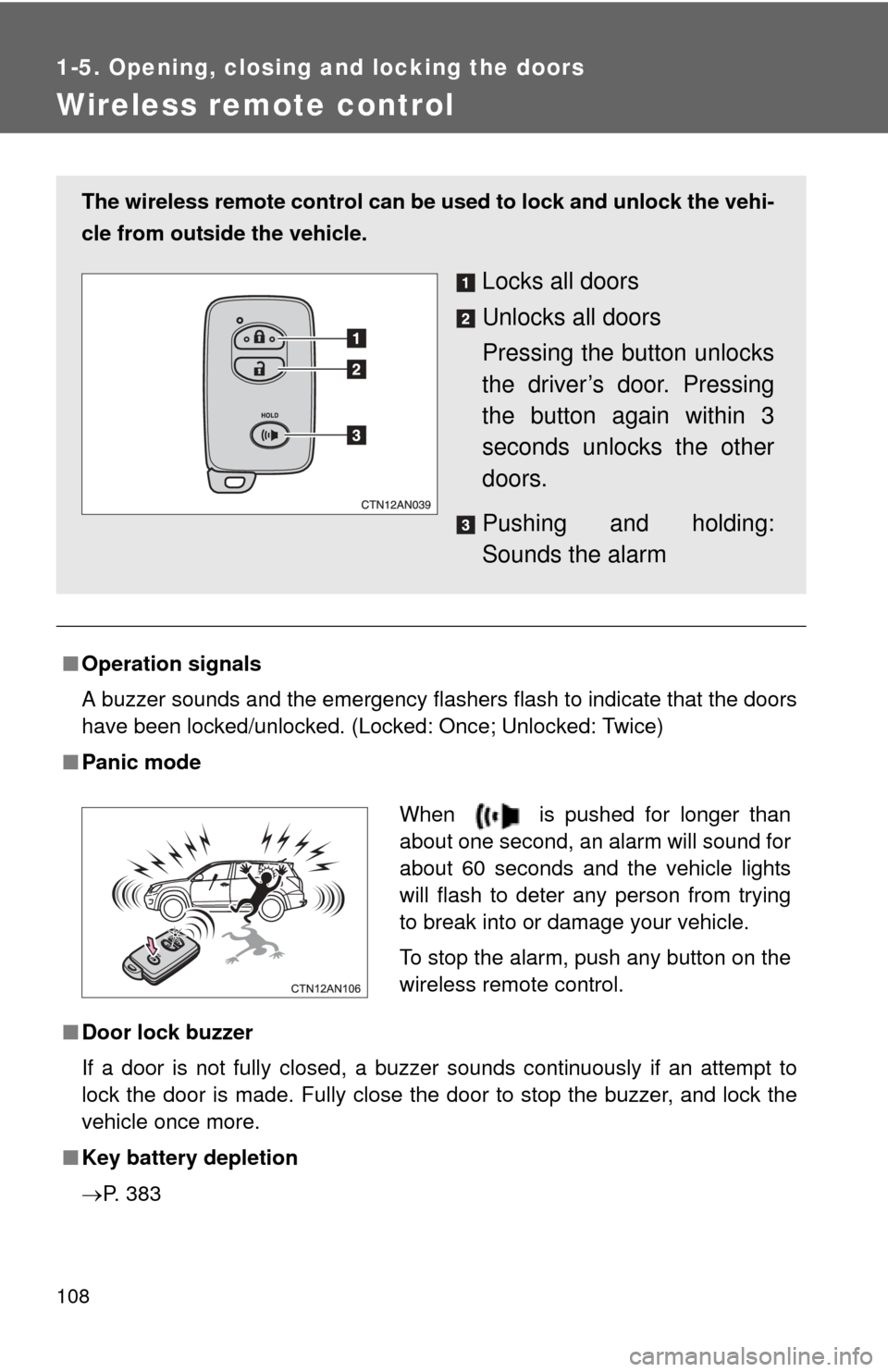
The wireless remote control can be used to lock and unlock the vehi-
cle from outside the vehicle.
Locks all doors
Unlocks all doors
Pressing the button unlocks
the driver’s door. Pressing
the button again within 3
seconds unlocks the other
doors.
Pushing and holding:
Sounds the alarm
When is pushed for longer than
about one second, an alarm will sound for
about 60 seconds and the vehicle lights
will flash to deter any person from trying
to break into or damage your vehicle.
To stop the alarm, push any button on the
wireless remote control.
Page 147 of 520

147
1-7. Opening and closing the windows
1
Before driving
■
The power windows can be operated when
The “POWER” switch is in ON mode.
■ Operating the power wi ndows after turning the “POWER” switch off
(front windows only)
The power windows can be operated for approximately 45 seconds after the
“POWER” switch is turned to ACCE SSORY mode or turned off. They can-
not, however, be operated once either front door is opened.
■ Jam protection function (driver’s window only)
If an object becomes caught between the window and the window frame,
window travel is stopped and the window is opened slightly.
■ When the power window does not cl ose normally (driver’s window only)
If the jam protection function is operating abnormally and a window cannot
be closed, perform the following operations using the power window switch
on the driver's door.
● After stopping the vehicle, the window can be closed by holding the
power window switch in the one-touch closing position while the
“POWER” switch is turned to ON mode.
● If the window still cannot be closed even by carrying out the operation
explained above, initialize the function by performing the following proce-
dure.
Hold the power window switch in the one-touch closing position.
Continue holding the switch for a further 6 seconds after the win-
dow has closed.
Hold the power window switch in the one-touch opening position.
Continue holding the switch for a further 2 seconds after the win-
dow has opened completely.
Hold the power window switch in the one-touch closing position
once again. Continue holding the switch for a further 2 seconds
after the window has closed.
If you release the switch while the window is moving, start again from the
beginning.
If the window continues to close but then re-open slightly even after perform-
ing the above procedure correctly, have the vehicle inspected by your Toyota
dealer.
STEP 1
STEP 2
STEP 3
Page 200 of 520
200
2-1. Driving procedures
Power switch
Performing the following operations when carrying the electronic
key on your person starts the EV system or changes “POWER”
switch modes.
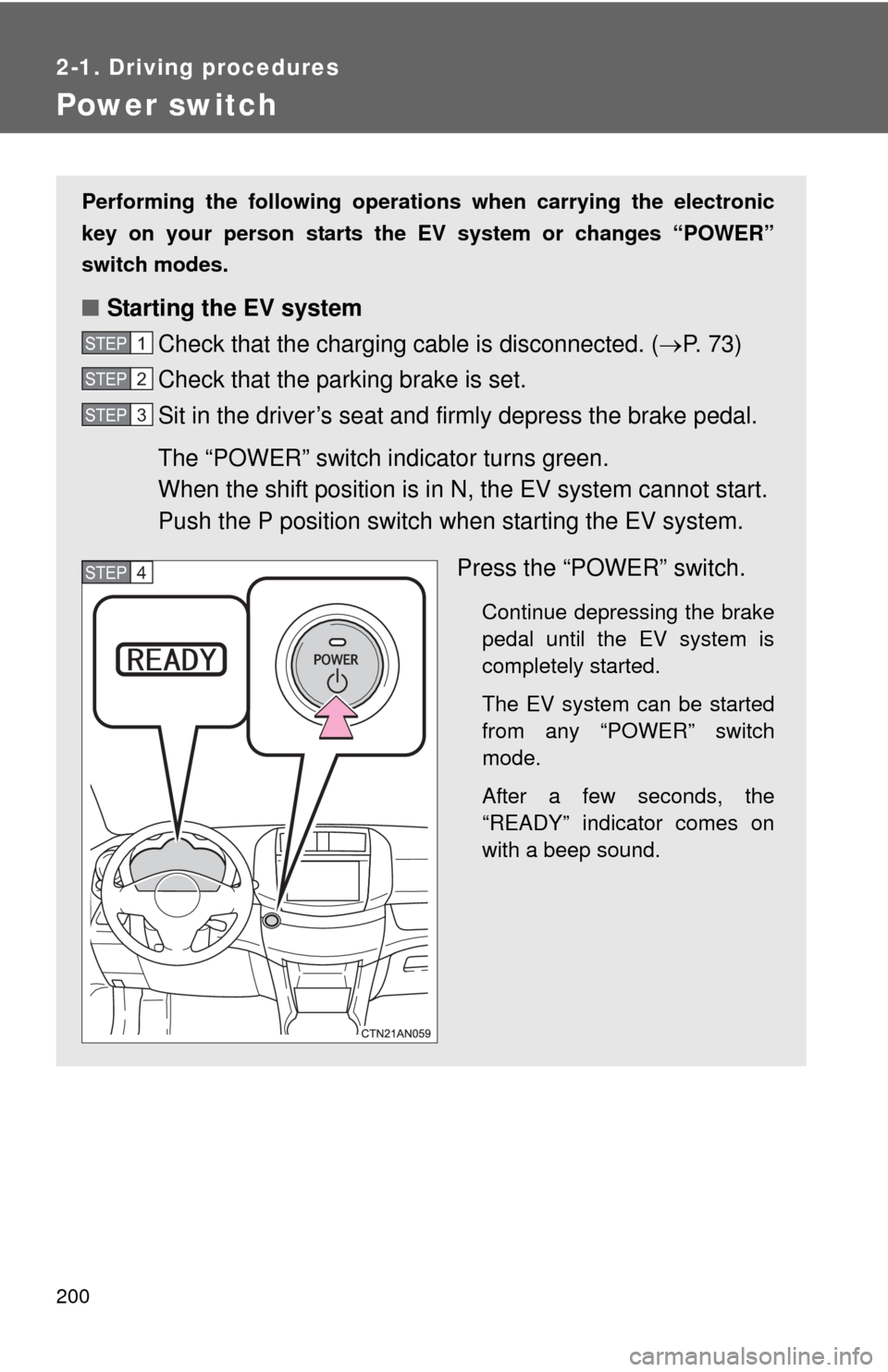
■ Starting the EV system
Check that the charging cable is disconnected. (P. 73)
Check that the parking brake is set.
Sit in the driver’s seat and firmly depress the brake pedal.
The “POWER” switch indicator turns green.
When the shift position is in N, the EV system cannot start.
Push the P position switch when starting the EV system.
Press the “POWER” switch.
Continue depressing the brake
pedal until the EV system is
completely started.
The EV system can be started
from any “POWER” switch
mode.
After a few seconds, the
“READY” indicator comes on
with a beep sound.
STEP 1
STEP 2
STEP 3
STEP 4
Page 205 of 520

205
2-1. Driving procedures
2
When driving
CAUTION
■
When starting the EV system
Always start the EV system while sitting in the driver’s seat. Do not depress
the accelerator pedal while starting the EV system under any circumstances.
Doing so may cause an accident resulting in death or serious injury.
■ Stopping the EV system in an emergency
If you want to stop the EV system in an emergency while driving the vehi\
cle,
press and hold the “POWER” switch for more than 2 seconds, or press it
briefly 3 times or more in succession. ( P. 479)
However, do not touch the “POWER” switch while driving except in an emer-
gency. Turning the EV system off while driving will not cause loss of steering
or braking control, but the power assist to these systems will be lost. This will
make it more difficult to steer and brake, so you should pull over and stop
the vehicle as soon as it is safe to do so.
NOTICE
■ To prevent 12-volt battery discharge
Do not leave the “POWER” switch in ACCESSORY or ON mode for long
periods of time without the EV system on.
■ When starting the EV system
●Do not depress the accelerator pedal unnecessarily.
● If the EV system becomes difficult to start, have your vehicle checked by
your Toyota dealer immediately.
Page 221 of 520
221
2-2. Instrument cluster
2
When driving
■
The meters and display illuminate when
The “POWER” switch is in ON mode.
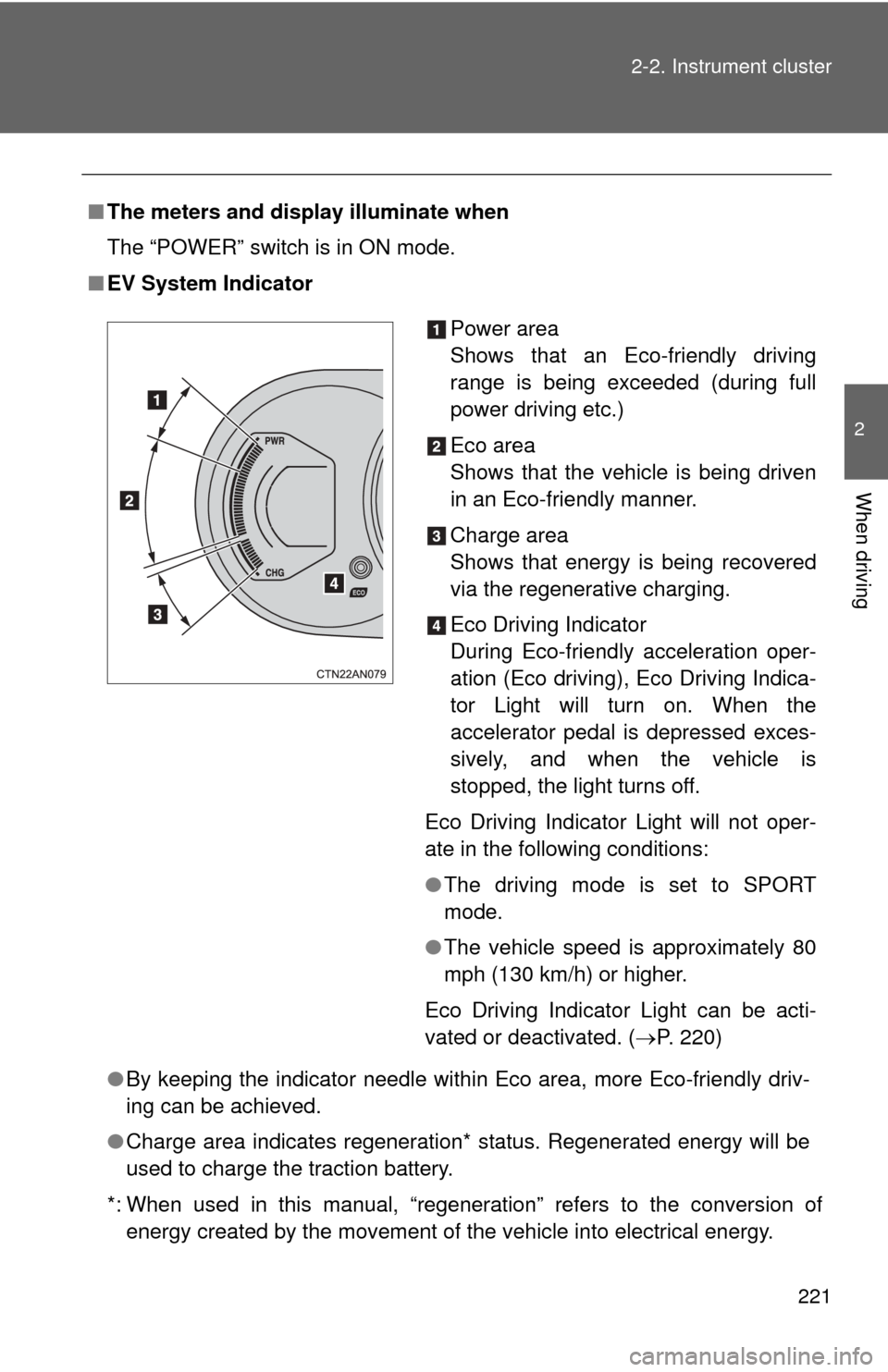
■ EV System Indicator
●By keeping the indicator needle within Eco area, more Eco-friendly driv-
ing can be achieved.
● Charge area indicates regeneration* status. Regenerated energy will be
used to charge the traction battery.
*: When used in this manual, “regeneration” refers to the conversion of energy created by the movement of the vehicle into electrical energy.
Power area
Shows that an Eco-friendly driving
range is being exceeded (during full
power driving etc.)
Eco area
Shows that the vehicle is being driven
in an Eco-friendly manner.
Charge area
Shows that energy is being recovered
via the regenerative charging.
Eco Driving Indicator
During Eco-friendly acceleration oper-
ation (Eco driving), Eco Driving Indica-
tor Light will turn on. When the
accelerator pedal is depressed exces-
sively, and when the vehicle is
stopped, the light turns off.
Eco Driving Indicator Light will not oper-
ate in the following conditions:
● The driving mode is set to SPORT
mode.
● The vehicle speed is approximately 80
mph (130 km/h) or higher.
Eco Driving Indicator Light can be acti-
vated or deactivated. ( P. 220)
Page 225 of 520
225
2-2. Instrument cluster
2
When driving
■
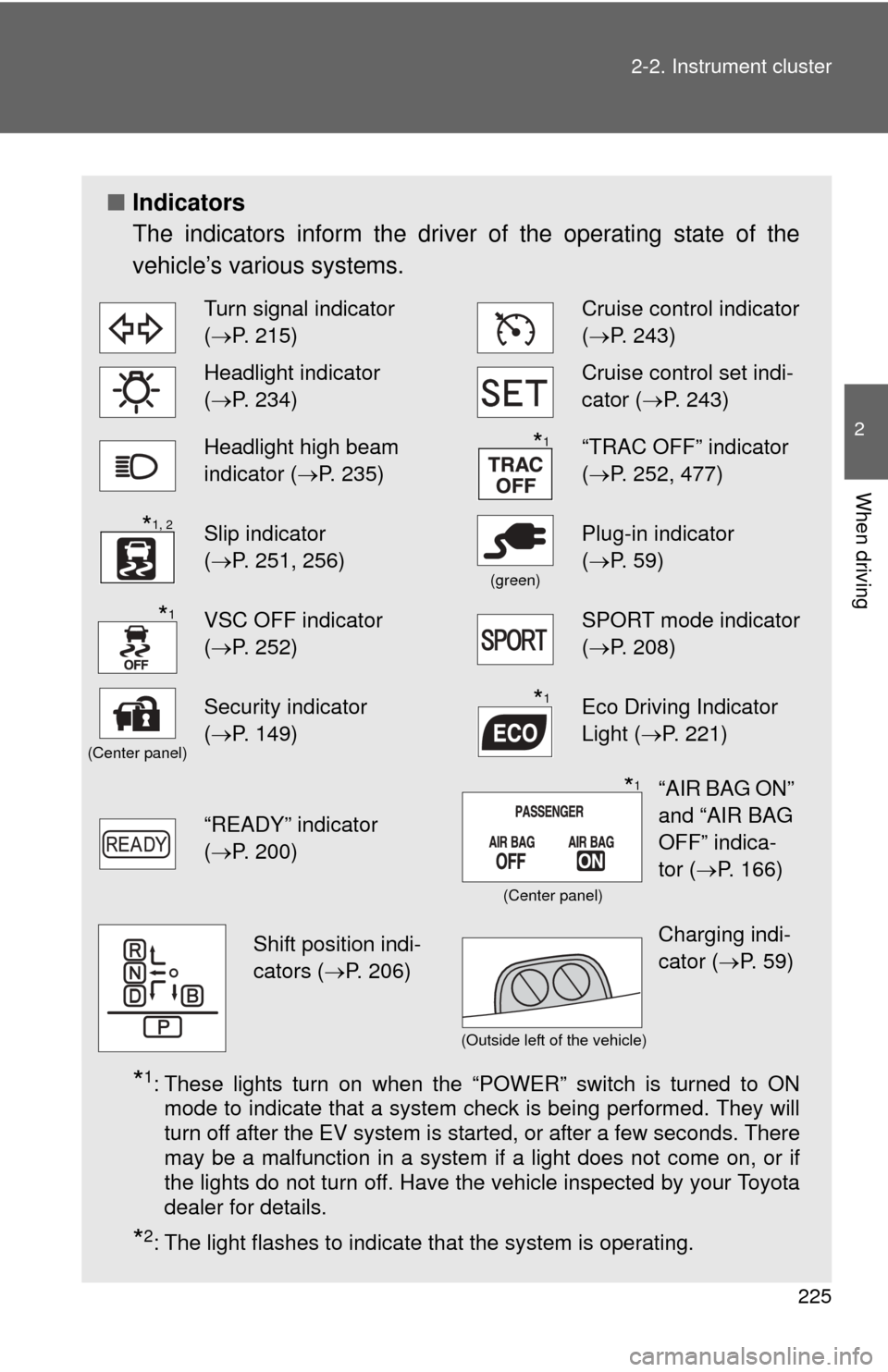
Indicators
The indicators inform the driver of the operating state of the
vehicle’s various systems.
*1: These lights turn on when the “POWER” switch is turned to ON
mode to indicate that a system check is being performed. They will
turn off after the EV system is started, or after a few seconds. There
may be a malfunction in a system if a light does not come on, or if
the lights do not turn off. Have the vehicle inspected by your Toyota
dealer for details.
*2: The light flashes to indicate that the system is operating.
Turn signal indicator
(P. 215)Cruise control indicator
( P. 243)
Headlight indicator
(P. 234)Cruise control set indi-
cator (P. 243)
Headlight high beam
indicator ( P. 235)“TRAC OFF” indicator
(P. 252, 477)
Slip indicator
(P. 251, 256)
(green)
Plug-in indicator
( P. 59)
VSC OFF indicator
(P. 252)SPORT mode indicator
( P. 208)
(Center panel)
Security indicator
(P. 149)Eco Driving Indicator
Light ( P. 221)
“READY” indicator
(P. 200)
*1
*1, 2
*1
*1
“AIR BAG ON”
and “AIR BAG
OFF” indica-
tor ( P. 166)*1
(Center panel)
Shift position indi-
cators ( P. 206)Charging indi-
cator (P. 59)
(Outside left of the vehicle)