air conditioning TOYOTA RAV4 EV 2012 1.G User Guide
[x] Cancel search | Manufacturer: TOYOTA, Model Year: 2012, Model line: RAV4 EV, Model: TOYOTA RAV4 EV 2012 1.GPages: 520, PDF Size: 8.29 MB
Page 58 of 520
58 1-3. Charging
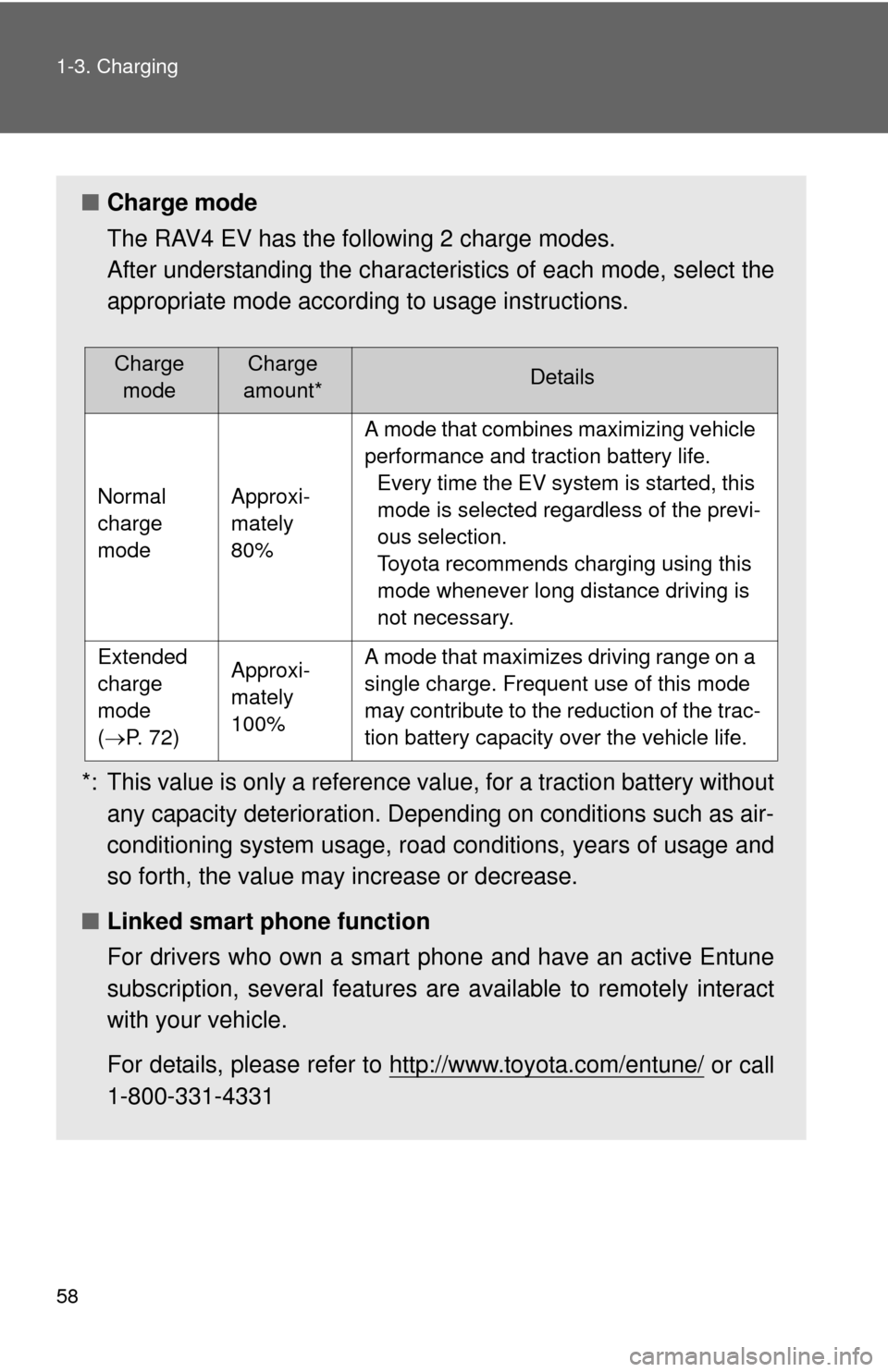
■Charge mode
The RAV4 EV has the following 2 charge modes.
After understanding the characterist ics of each mode, select the
appropriate mode according to usage instructions.
*: This value is only a reference value, for a traction battery without any capacity deterioration. Depending on conditions such as air-
conditioning system usage, road conditions, years of usage and
so forth, the value may increase or decrease.
■ Linked smart phone function
For drivers who own a smart phone and have an active Entune
subscription, several features are available to remotely interact
with your vehicle.
For details, please refer to http://www.toyota.com/entune/
or call
1-800-331-4331
Charge modeCharge
amount*Details
Normal
charge
modeApproxi-
mately
80%
A mode that combines maximizing vehicle
performance and traction battery life. Every time the EV system is started, this
mode is selected regardless of the previ-
ous selection.
Toyota recommends charging using this
mode whenever long distance driving is
not necessary.
Extended
charge
mode
(P. 72)Approxi-
mately
100%A mode that maximizes driving range on a
single charge. Frequent use of this mode
may contribute to the reduction of the trac-
tion battery capacity over the vehicle life.
Page 81 of 520

81
1-3. Charging
1
Before driving
■
When not using the vehicle for an extended period of time
In order to preserve the traction battery, Toyota recommends plugging in the
vehicle whenever it is not in use.
Pre-climate operations will occur while the amount of charge remaining in
the traction battery is more than 50% at the time pre-climate operations
begin. If the schedule is left set, pre-climate operations will continue to func-
tion up to the maximum of 15 minutes even if the vehicle is not used for
extended periods of time. Because this uses energy from the traction bat-
tery, temporarily suspend the pre-climate schedule (smart phone exclusive
setting P. 58) or delete the pre-climate schedule, if the vehicle is not being
regularly used.
When using navigation screen operations, only canceling the schedule is
available. Because the schedule will need to be set once again when it is
used next time, Toyota recommends using a smart phone and temporarily
suspending the schedule.
■ If the amount of charge remaining in the traction battery becomes low
while driving
The driving power restriction output control warning light illuminates and
driving range is extended by automatically restricting driving power and air
conditioning system operations. Using the navigation system, promptly
search for the closest charging station and charge the vehicle. If the traction
battery fully discharges, driving will not be possible.
For information on how to search for a charging station, refer to the “Naviga-
tion System Owner's Manual”.
■ Charging schedule confirmation disp lay after switching the EV system
off
The current charging schedule will be displayed for a while after the EV sys-
tem is turned off. To change the charging schedule, set the schedule using
the navigation system’s screen. ( P. 64, 70)
■ If the charging port door is frozen
P. 268
Page 82 of 520

82 1-3. Charging
■Pre-climate operations automatic shut-off
Pre-climate will automatically shut off under the following conditions:
●After about 15 minutes have passed since operations began
● If any one of the operating conditions are not met
● If there is only a slight difference between the air conditioning set temper-
ature and the inside temperature.
● When a door is opened.
■ While pre-climate is operating
●The effectiveness of the pre-climate operations may differ according to
outside temperature. Pre-climate operations may be unable to reach the
set temperature during very cold or very hot weather.
● Sometimes during normal operation of the pre-climate schedule, the
electric fan may spin and an operating noise may be heard. However,
this does not indicate a malfunction.
■ Safety functions
●For safety purposes, the EV system cannot be started while the charging
cable is connected to the vehicle, even if the “POWER” switch is oper-
ated. ( P. 443)
● If the charging cable is connected while the “READY” indicator light is\
illuminated, the EV system will stop automatically and driving will not be
possible. ( P. 443)
● When the charging cable is connected to the vehicle, the shift position
cannot be shifted out of P.
● For safety reasons, even if the charging cable is connected, charging will
not start while the latch release button is being pressed.
However, if the latch release button is pressed and held for a few seconds or
more while charging, charging will be canceled. To recommence charging,
reinsert the charging cable.
Page 229 of 520
229
2-2. Instrument cluster
2
When driving
Trip information
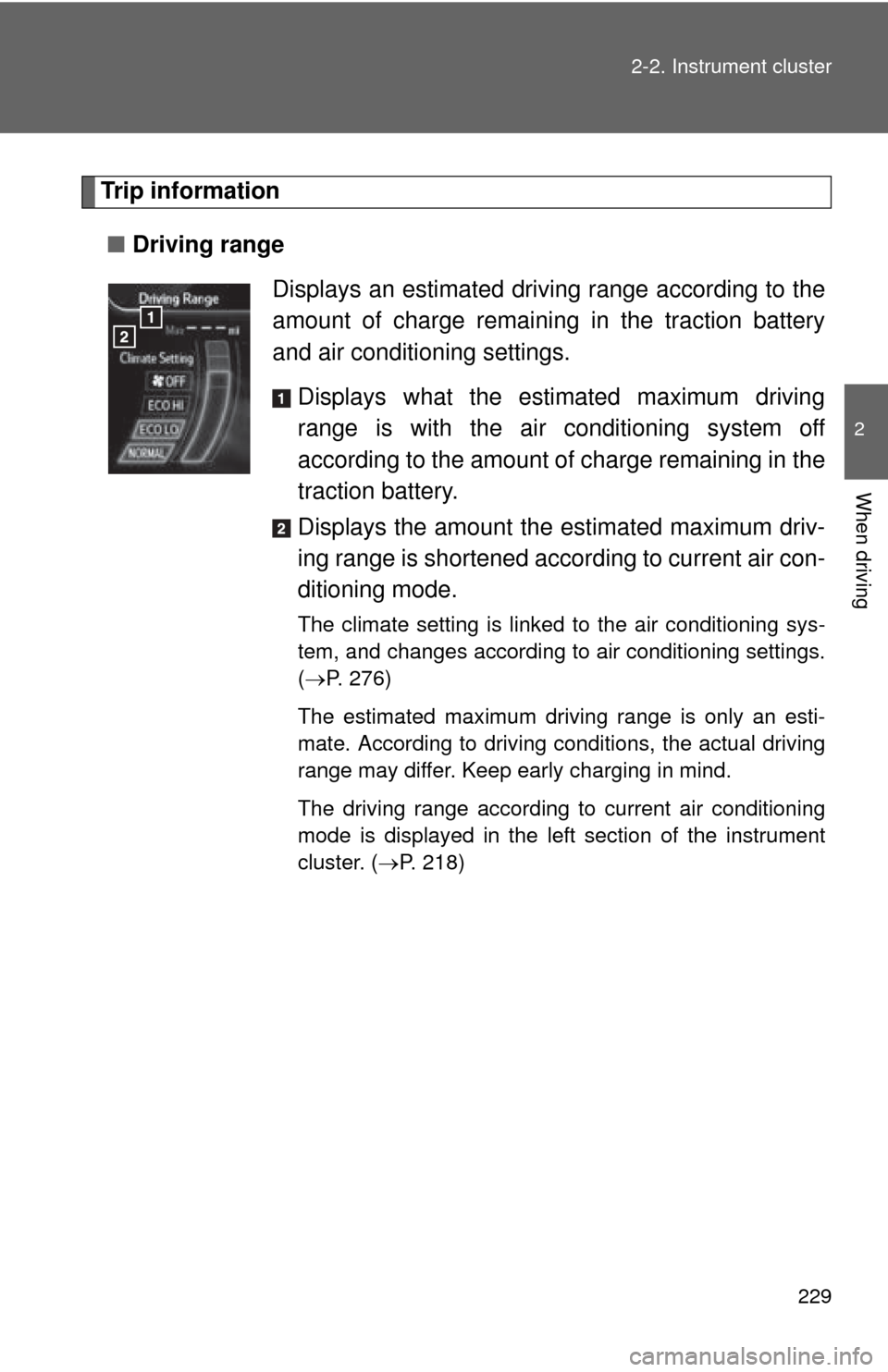
■ Driving range
Displays an estimated driving range according to the
amount of charge remaining in the traction battery
and air conditioning settings.Displays what the estimated maximum driving
range is with the air conditioning system off
according to the amount of charge remaining in the
traction battery.
Displays the amount the estimated maximum driv-
ing range is shortened acco rding to current air con-
ditioning mode.
The climate setting is linked to the air conditioning sys-
tem, and changes according to air conditioning settings.
( P. 276)
The estimated maximum driving range is only an esti-
mate. According to driving conditions, the actual driving
range may differ. Keep early charging in mind.
The driving range according to current air conditioning
mode is displayed in the left section of the instrument
cluster. ( P. 218)
Page 275 of 520
Interior features3
275
3-1. Using the air conditioning system and defogger
Automatic air conditioning system ....... 276
Rear window and outside rear view mirror
defoggers ....................... 292
3-2. Using the interior lights Interior lights list ............... 293
• Personal/interior light main switch .................... 294
• Personal/interior lights .............................. 294
• Interior light .................... 295
• Luggage compartment
light ................................ 295
3-3. Using the storage features List of storage features .... 296
• Glove box....................... 297
• Console box ................... 298
• Cup holders ................... 299
• Bottle holders ................. 300
• Auxiliary boxes............... 302 3-4. Other interior features
Sun visors ........................ 304
Vanity mirrors ................... 305
Power outlets ................... 306
Seat heaters..................... 310
Armrest ............................ 313
Coat hooks ....................... 314
Assist grips....................... 315
Floor mat .......................... 316
Luggage compartment features .......................... 317
Garage door opener......... 320
Safety Connect ................ 326
Page 276 of 520
276
3-1. Using the air conditioning system and defogger
Automatic air conditioning system
The driving distance of the RAV4 EV is affected by the method of air
conditioning use. In order to extend driving range, Toyota recom-
mends using AUTO ECO mode and setting temperatures conserva-
tively.
The effect on driving range can be confirmed on the meter. (P. 218)
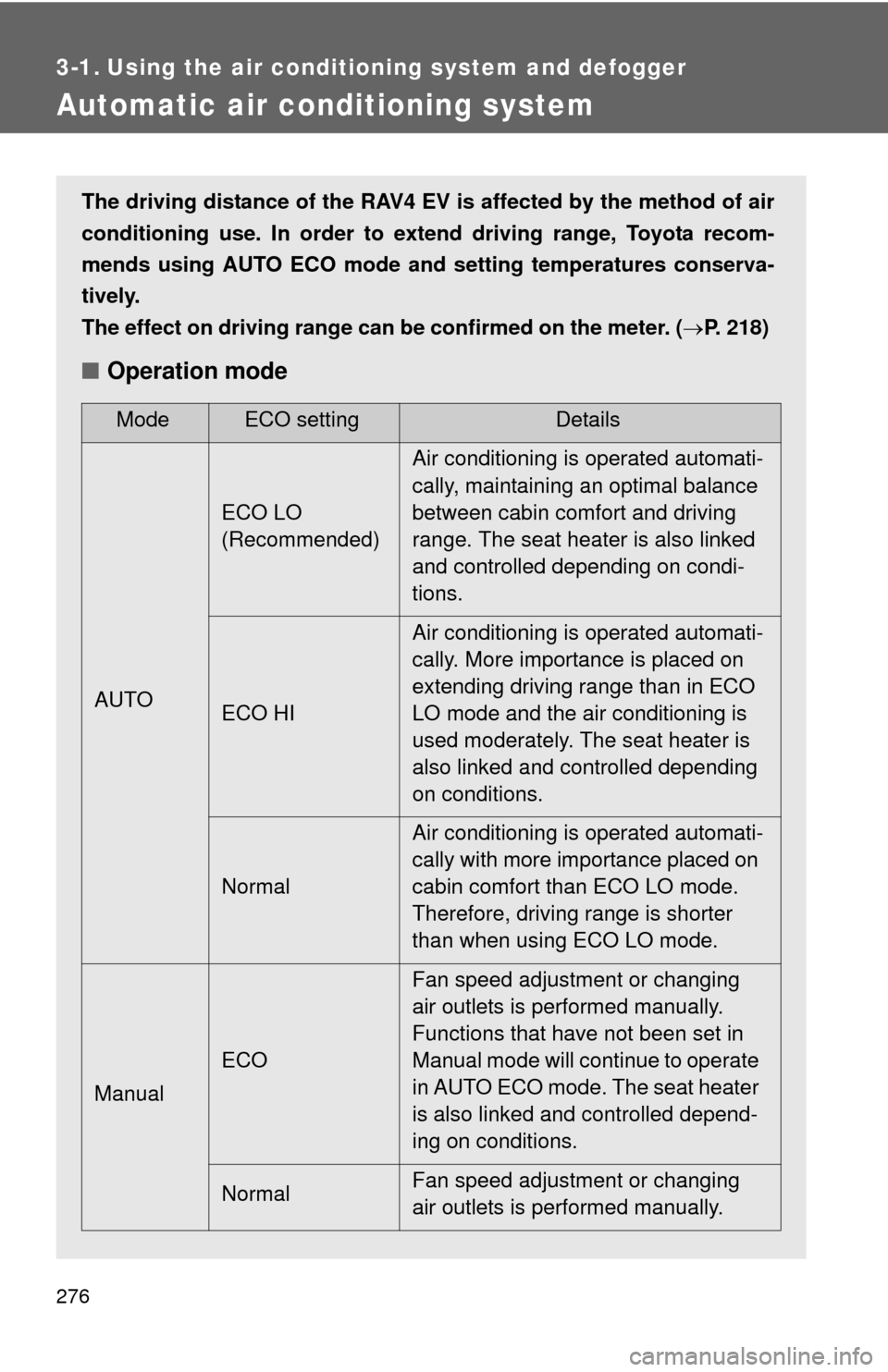
■Operation mode
ModeECO settingDetails
AUTO ECO LO
(Recommended)
Air conditioning is operated automati-
cally, maintaining an optimal balance
between cabin comfort and driving
range. The seat heater is also linked
and controlled depending on condi-
tions.
ECO HI Air conditioning is operated automati-
cally. More importance is placed on
extending driving range than in ECO
LO mode and the air conditioning is
used moderately. The seat heater is
also linked and controlled depending
on conditions.
Normal Air conditioning is operated automati-
cally with more importance placed on
cabin comfort than ECO LO mode.
Therefore, driving range is shorter
than when using ECO LO mode.
Manual ECO Fan speed adjustment or changing
air outlets is performed manually.
Functions that have not been set in
Manual mode will continue to operate
in AUTO ECO mode. The seat heater
is also linked and controlled depend-
ing on conditions.
Normal Fan speed adjustment or changing
air outlets is performed manually.
Page 277 of 520
277
3-1. Using the air conditioning system
and defogger
3
Interior features
■Pre-climate (Remote Climate Control)
By setting the sched ule, the air conditioning system can be
turned on before getting in the vehicle. ( P. 5 3 )
Even if the schedule has not been set, for users who own a
smart phone, the air conditioning system can be turned on and
off when away from the vehicle. ( P. 5 8 )
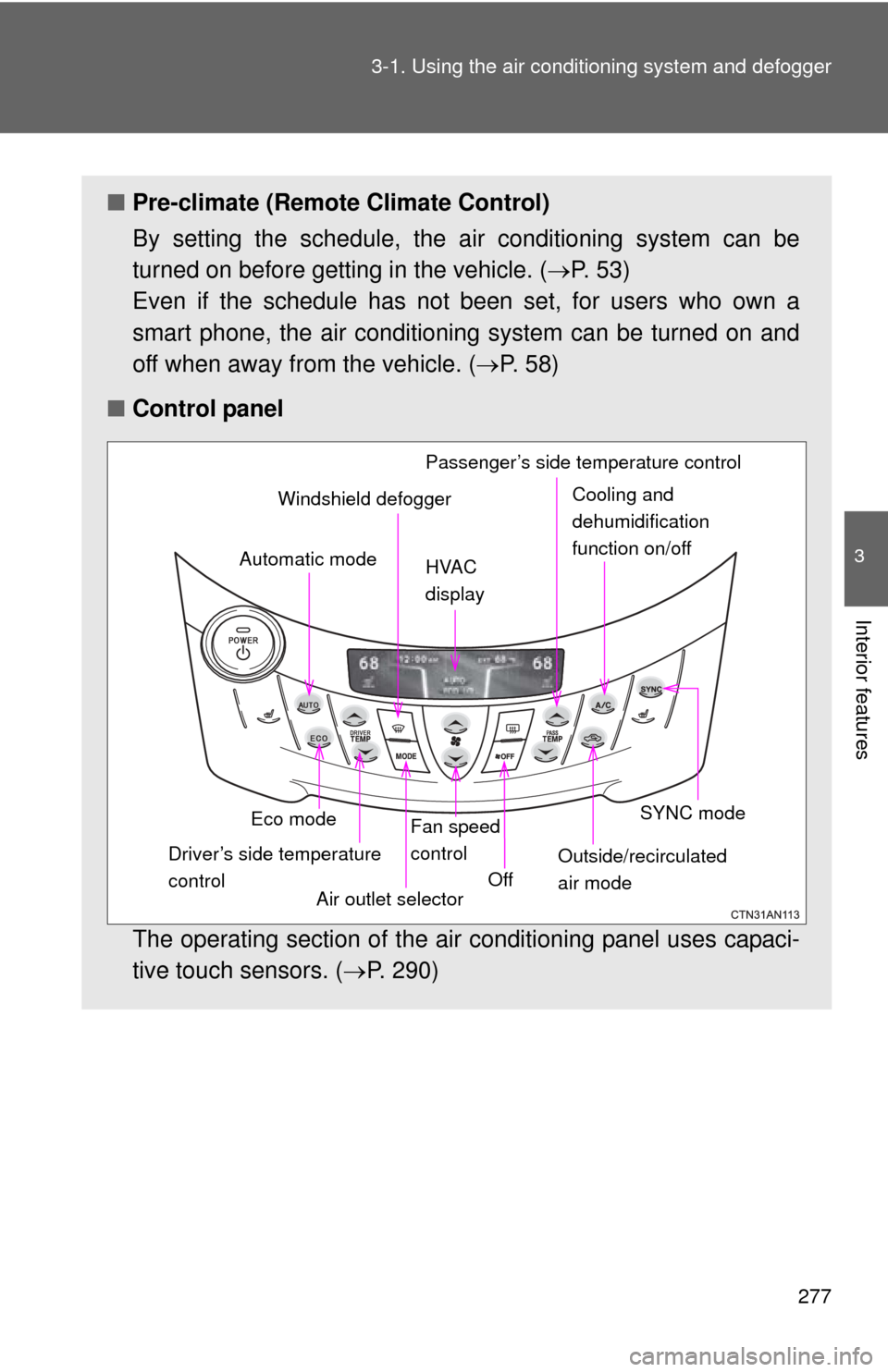
■ Control panel
The operating section of the air conditioning panel uses capaci-
tive touch sensors. ( P. 290)
Eco mode
Driver’s side temperature
control Air outlet selectorFan speed
control
Off SYNC mode
Outside/recirculated
air mode
Automatic mode
Windshield defogger
HVAC
display Passenger’s side temperature controlCooling and
dehumidification
function on/off
Page 278 of 520
278 3-1. Using the air conditioning system and defogger
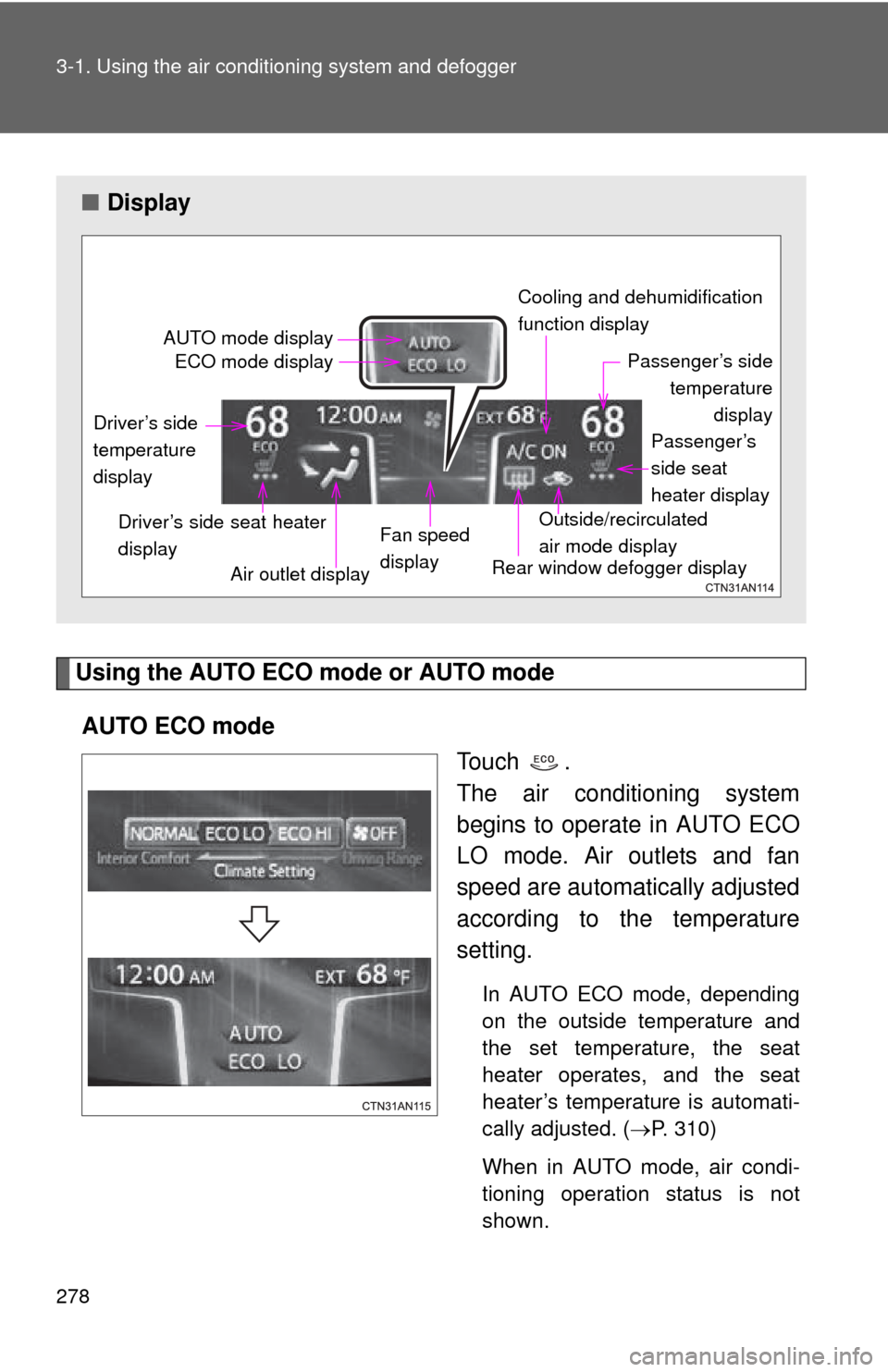
Using the AUTO ECO mode or AUTO mode
AUTO ECO mode To u c h .
The air conditioning system
begins to operate in AUTO ECO
LO mode. Air outlets and fan
speed are automatically adjusted
according to the temperature
setting.
In AUTO ECO mode, depending
on the outside temperature and
the set temperature, the seat
heater operates, and the seat
heater’s temperature is automati-
cally adjusted. (P. 310)
When in AUTO mode, air condi-
tioning operation status is not
shown.
■ Display
AUTO mode display
ECO mode display Cooling and dehumidification
function display
Passenger’s sidetemperature display
Passenger’s
side seat
heater display
Outside/recirculated
air mode display
Rear window defogger display
Fan speed
display
Air outlet display
Driver’s side seat heater
display
Driver’s side
temperature
display
Page 279 of 520
279
3-1. Using the air conditioning system
and defogger
3
Interior features
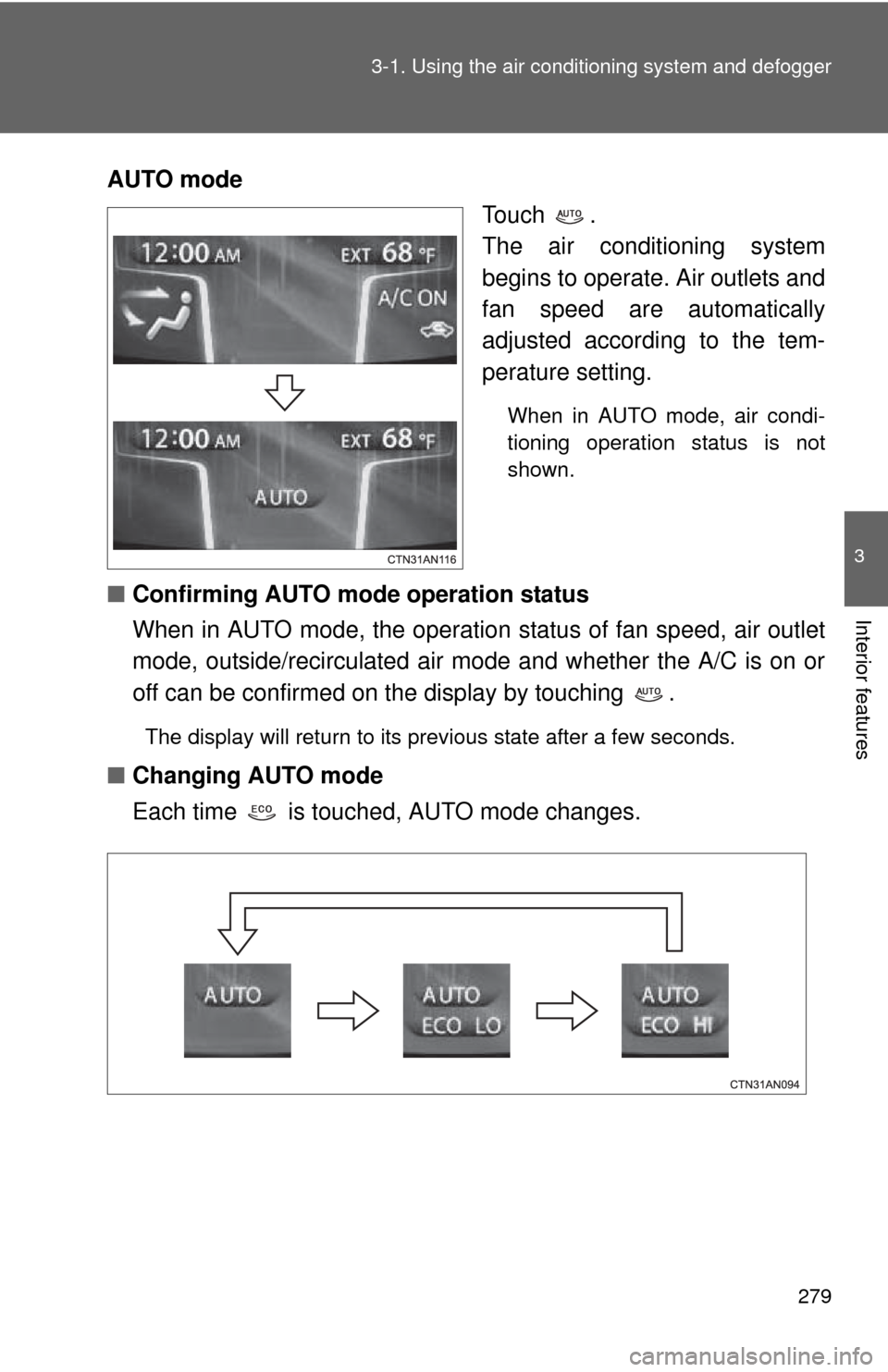
AUTO mode
Touch .
The air conditioning system
begins to operate. Air outlets and
fan speed are automatically
adjusted according to the tem-
perature setting.
When in AUTO mode, air condi-
tioning operation status is not
shown.
■Confirming AUTO mode operation status
When in AUTO mode, the operation status of fan speed, air outlet
mode, outside/recirculated air mode and whether the A/C is on or
off can be confirmed on the display by touching .
The display will return to its previous state after a few seconds.
■Changing AUTO mode
Each time is touched, AUTO mode changes.
Page 280 of 520
280 3-1. Using the air conditioning system and defogger
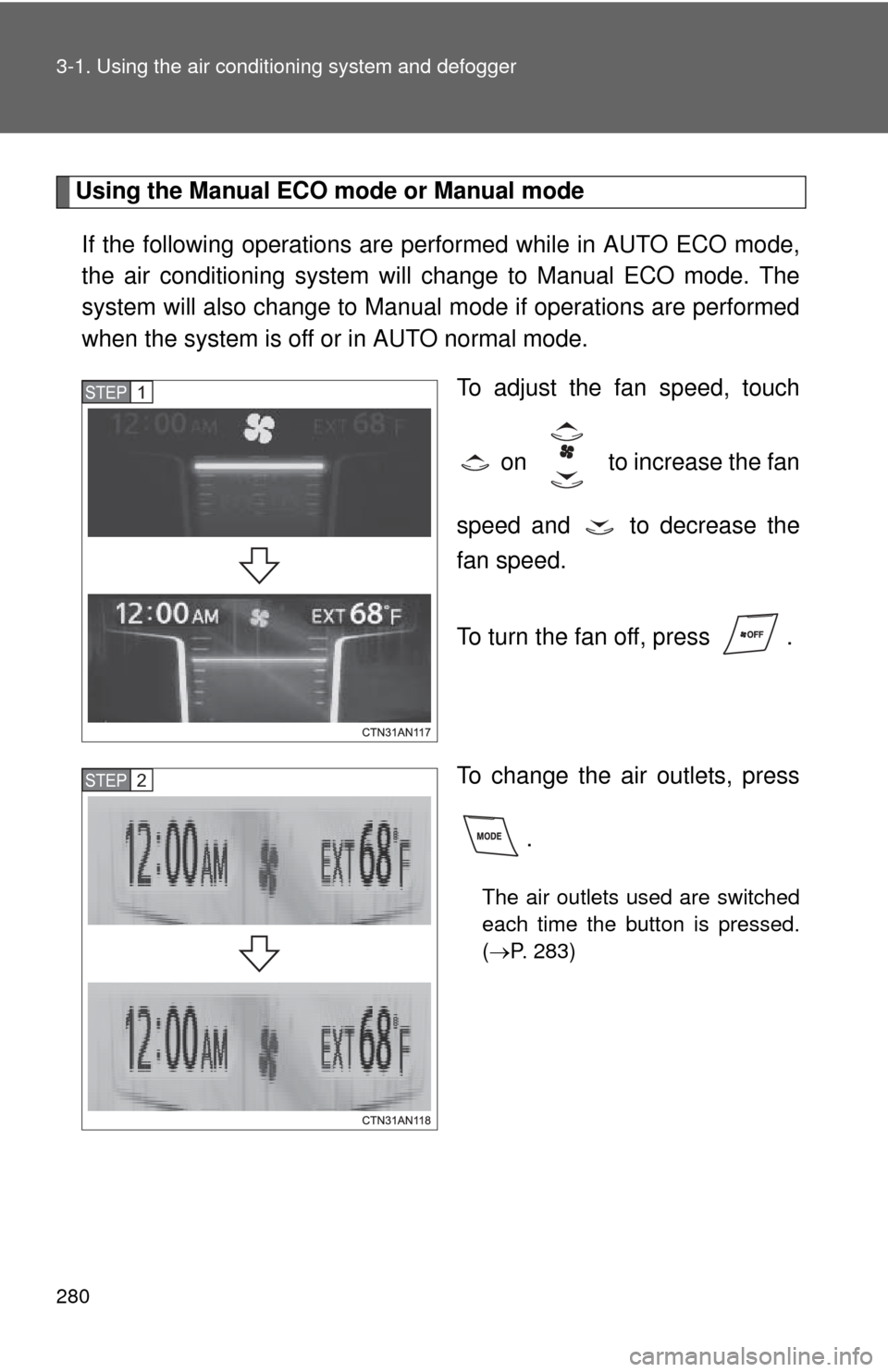
Using the Manual ECO mode or Manual mode
If the following operations are performed while in AUTO ECO mode,
the air conditioning system will change to Manual ECO mode. The
system will also change to Manual mode if operations are performed
when the system is off or in AUTO normal mode.
To adjust the fan speed, touch
on to increase the fan
speed and to decrease the
fan speed.
To turn the fan off, press .
To change the air outlets, press .
The air outlets used are switched
each time the button is pressed.
(P. 283)
STEP 1
STEP 2