lock TOYOTA RAV4 EV 2012 1.G User Guide
[x] Cancel search | Manufacturer: TOYOTA, Model Year: 2012, Model line: RAV4 EV, Model: TOYOTA RAV4 EV 2012 1.GPages: 520, PDF Size: 8.29 MB
Page 87 of 520

87
1-3. Charging
1
Before driving
NOTICE
■
After charging
●After disconnecting the charging connector from the charging port, always
make sure to firmly lock the charging port cap by closing it until a click is
heard, and close the charging port door.
If the charging port cap or door is left open, water or foreign objects may
enter the charging port, which could lead to vehicle damage.
● Promptly unplug the charging cable plug from the electrical receptacle and
store the charging cable in a dry, clean place. The charging cable may be
damaged if stepped on.
■ Using private power generators
Do not use private power generators as a power source for charging.
Doing so may make charging unsafe.
■ Usable temperature range
●Do not charge if the outside temperatur e is below -22 °F (-30 °C), as it is
likely that charging will take longer, and equipment related to charging may
be damaged.
● Do not leave the vehicle or the charging cable in areas where the outside
temperature is lower than -40 °F (-40 °C). The vehicle or charging cable
may be damaged.
Page 95 of 520

95
1-4. Key information
1
Before driving
■
When required to leave a key to th e vehicle with a parking attendant
Lock the glove box as circumstances demand. ( P. 297)
Remove the mechanical key for your own use and provide the attendant with
the electronic key only.
■ Key number plate
Keep the plate in a safe place such as your wallet, not in the vehicle. In the
event that a key is lost, a new key can be made by your Toyota dealer using
the key number plate. ( P. 467)
■ When riding in an aircraft
When bringing a key with wireless remote control function onto an aircra\
ft,
make sure you do not press any buttons on the key while inside the aircraft
cabin. If you are carrying the key in your bag etc, ensure that the buttons are
not likely to be pressed accidentally. Pressing a button may cause the key to
emit radio waves that could interfere with the operation of the aircraft.
NOTICE
■To prevent key damage
●Do not subject the keys to strong shocks, expose them to high tempera-
tures by placing them in direct sunlight, or get them wet.
● Do not expose the keys to electromagnetic materials or attach any mate-
rial that blocks electromagnetic waves to the key surface.
● Do not disassemble the key.
Page 96 of 520
96
1-5. Opening, closing and locking the doors
Smart key system
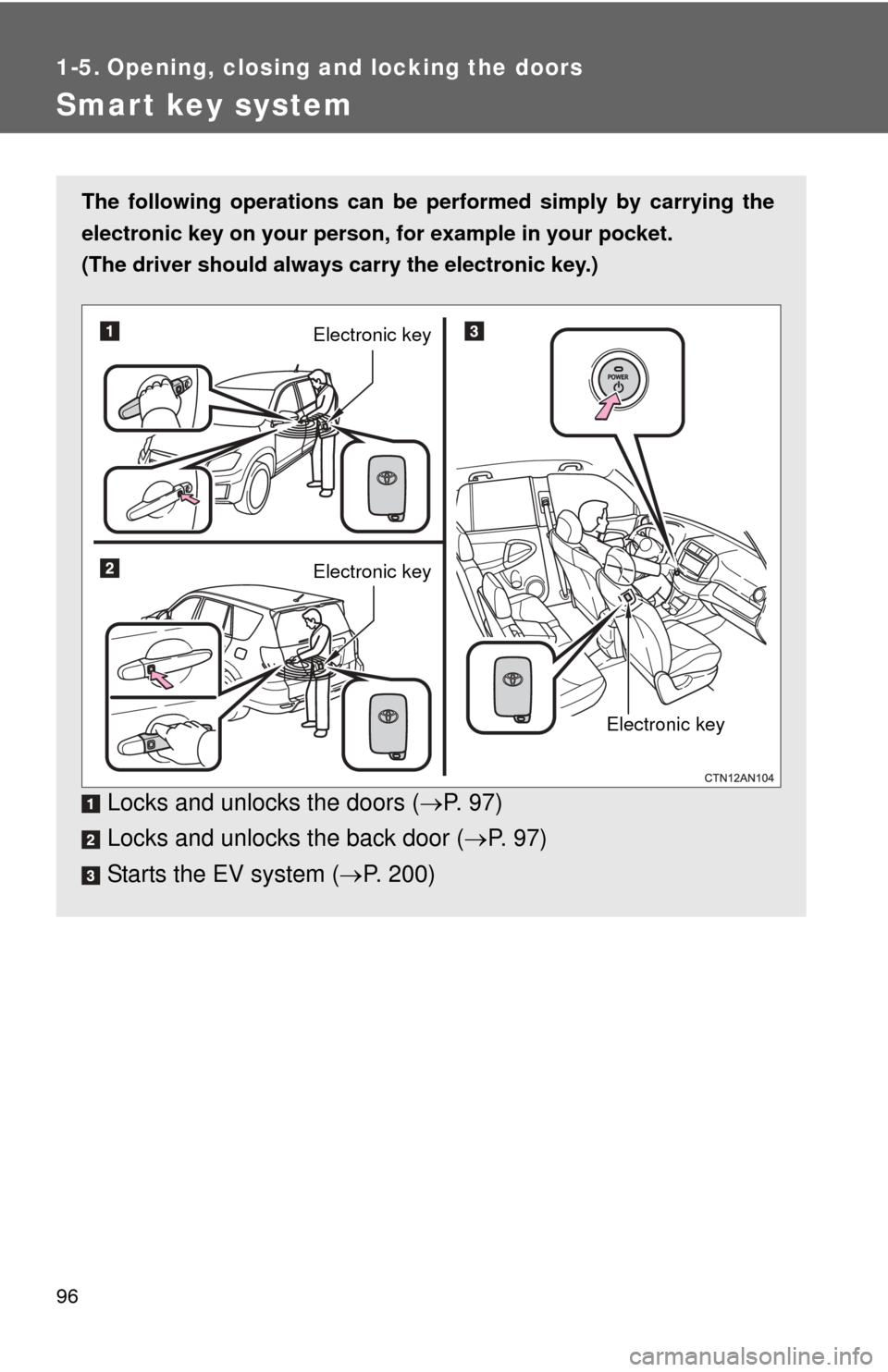
The following operations can be performed simply by carrying the
electronic key on your person, for example in your pocket.
(The driver should always carry the electronic key.)
Locks and unlocks the doors ( P. 9 7 )
Locks and unlocks the back door ( P. 97)
Starts the EV system ( P. 200)
Electronic key
Electronic key
Electronic key
Page 97 of 520
97
1-5. Opening, closing and locking the doors
1
Before driving
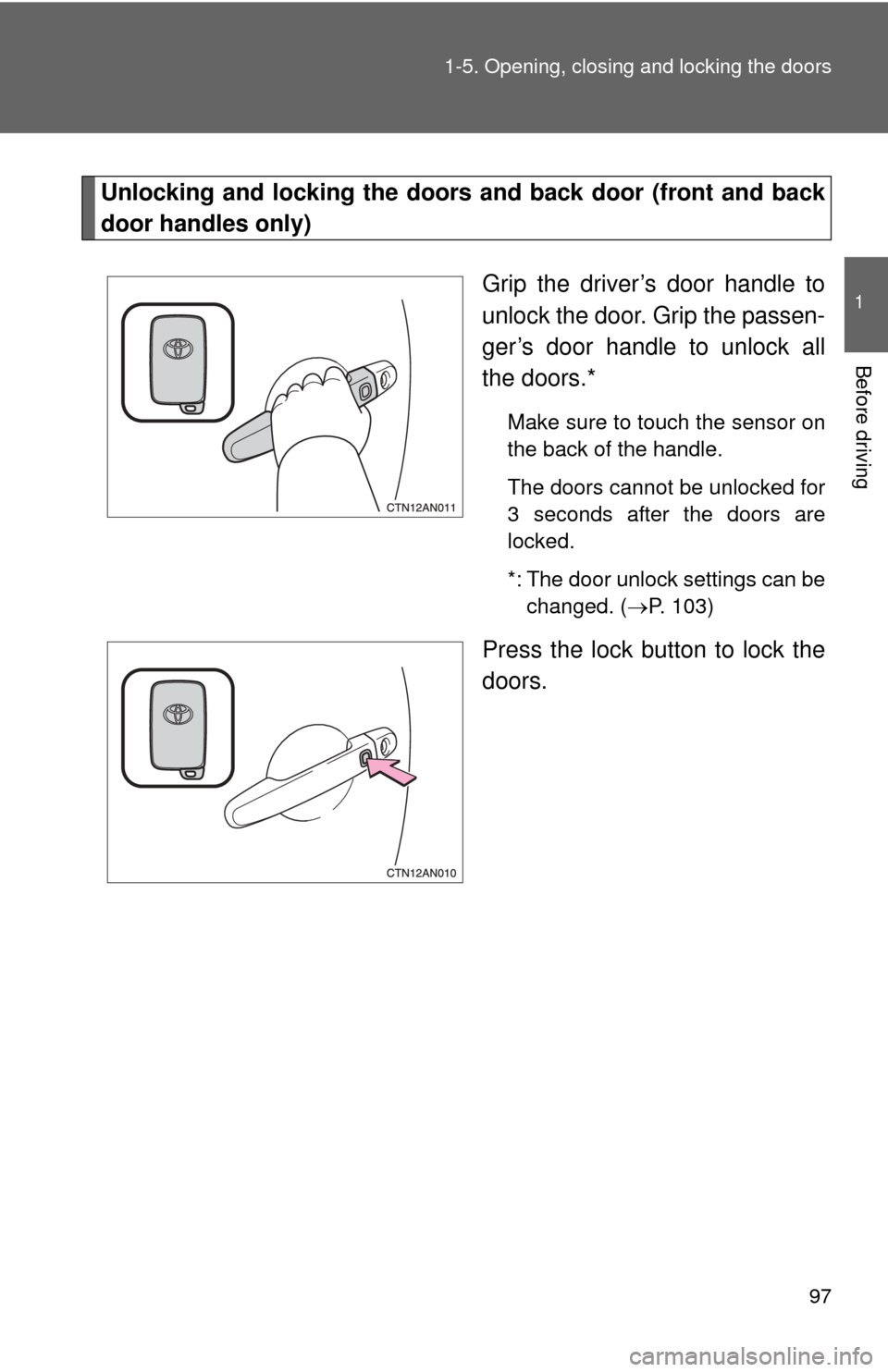
Unlocking and locking the doors and back door (front and back
door handles only)
Grip the driver’s door handle to
unlock the door. Grip the passen-
ger’s door handle to unlock all
the doors.*
Make sure to touch the sensor on
the back of the handle.
The doors cannot be unlocked for
3 seconds after the doors are
locked.
*: The door unlock settings can bechanged. ( P. 103)
Press the lock button to lock the
doors.
Page 98 of 520
98 1-5. Opening, closing and locking the doors
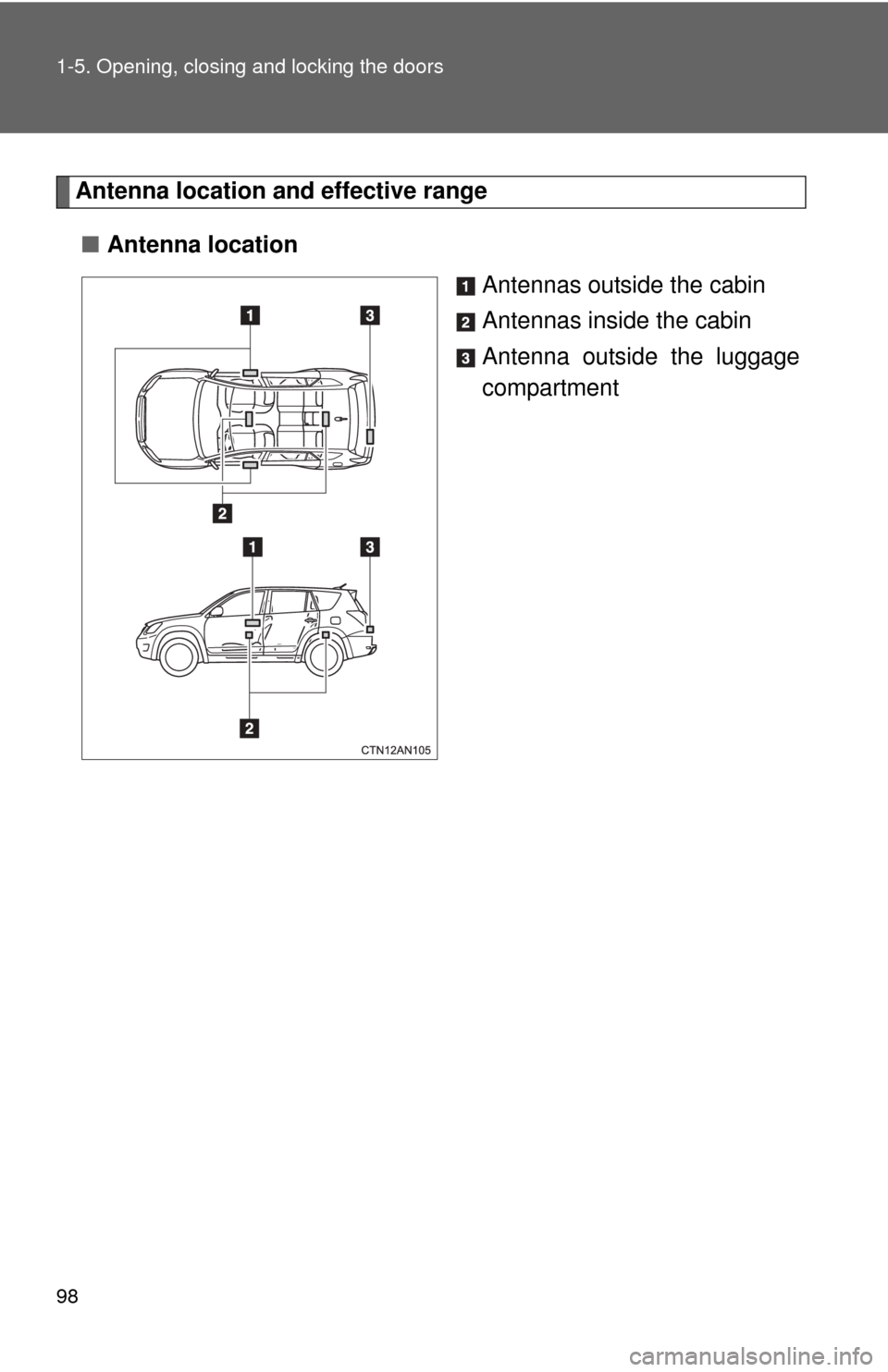
Antenna location and effective range
■ Antenna location
Antennas outside the cabin
Antennas inside the cabin
Antenna outside the luggage
compartment
Page 99 of 520
99
1-5. Opening, closing and locking the doors
1
Before driving
■
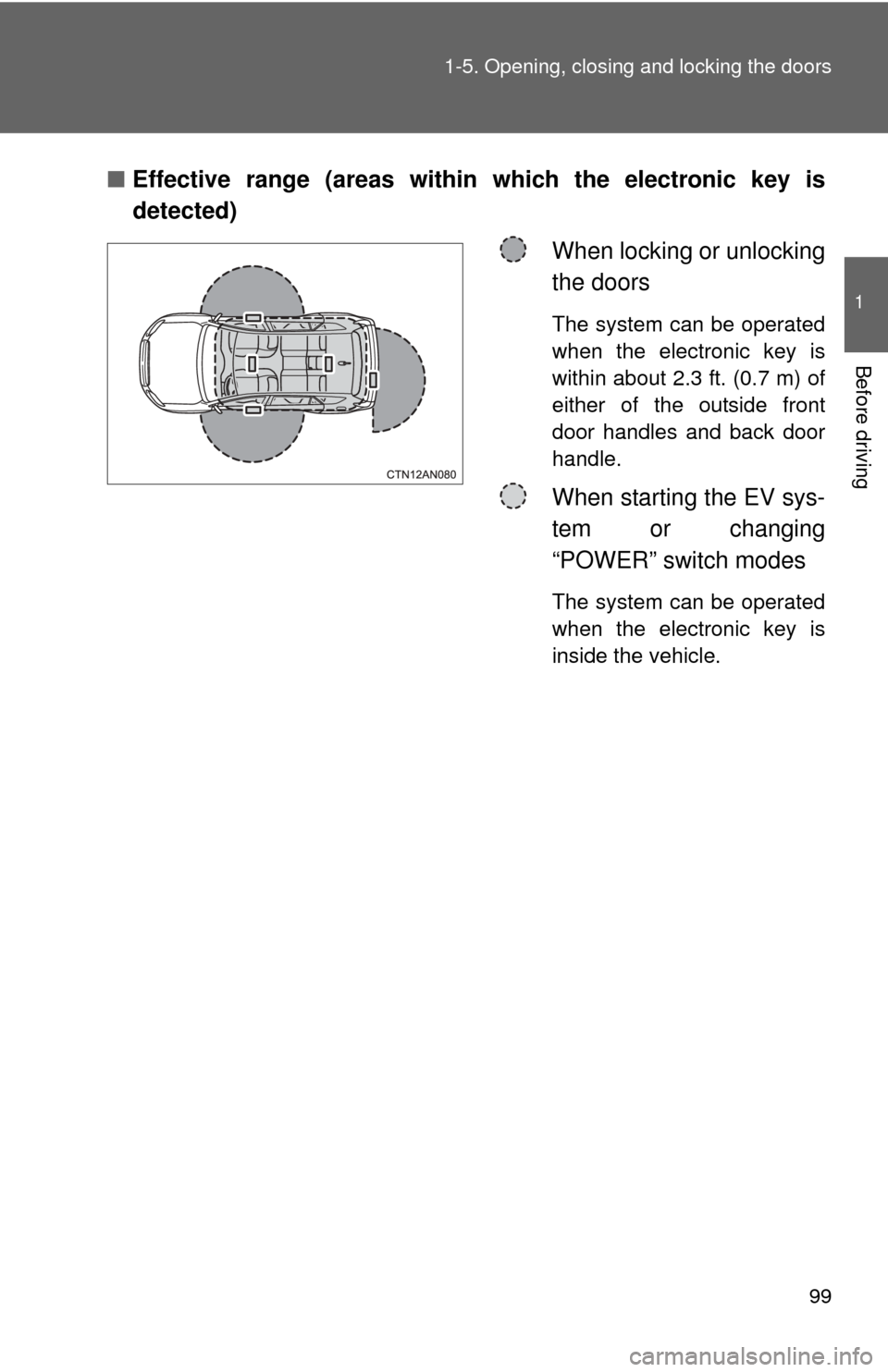
Effective range (areas within which the electronic key is
detected)
When locking or unlocking
the doors
The system can be operated
when the electronic key is
within about 2.3 ft. (0.7 m) of
either of the outside front
door handles and back door
handle.
When starting the EV sys-
tem or changing
“POWER” switch modes
The system can be operated
when the electronic key is
inside the vehicle.
Page 100 of 520

100 1-5. Opening, closing and locking the doors
■Operation signals
A buzzer sounds and the emergency flashers flash to indicate that the doors
have been locked/unlocked. (Locked: Once; Unlocked: Twice)
■ Alarms and warning indicators
A combination of exterior and interior alarms are used to prevent theft of the
vehicle and unforeseeable accidents resulting from erroneous operation.
Take appropriate measures according to the warning message shown on the
multi-information display. ( P. 427)
The following table describes circumstances and correction procedures
when only alarms are sounded.
AlarmSituationCorrection procedure
Interior alarm
pings once and
exterior alarm
sounds once for
10 seconds
*1
An attempt was made to
lock the doors using the
entry function while the
electronic key was still
inside the passenger com-
partment. Retrieve the elec-
tronic key from the
passenger compart-
ment and lock the
doors again.
An attempt was made to
exit the vehicle and lock
the doors without first turn-
ing the “POWER” switch
off. Turn the “POWER”
switch off and lock the
doors again.
Exterior alarm
sounds once for
10 seconds An attempt was made to
lock the vehicle while a
door is open. Close all of the doors
and lock the doors
again.
Page 101 of 520

101
1-5. Opening, closing and locking the doors
1
Before driving
AlarmSituationCorrection procedure
Interior alarm
pings continu-
ously
*1
The “POWER” switch was
turned to ACCESSORY
mode while the driver’s
door was open (or the
driver’s door was opened
while the “POWER” switch
was in ACCESSORY
mode). Turn the “POWER”
switch off and close
the driver’s door.
Interior alarm
sounds continu-
ously
*1
When the “POWER”
switch was in ON or
ACCESSORY mode, an
attempt was made to open
the door and exit the vehi-
cle when the shift position
was not in P. Push the P position
switch and turn the
“POWER” switch off.
Interior and exte-
rior alarms sound
continuously
*1
When the “POWER”
switch was in ON or
ACCESSORY mode, the
driver's door was closed
after the key was carried
outside the vehicle when
the shift position was not in
P. Push the P position
switch, turn the
“POWER” switch off
and close the driver’s
door again.
Page 102 of 520

102 1-5. Opening, closing and locking the doors
*1: A message will be shown on the multi-information display in the instru-ment cluster.
*2: If the EV system does not start when the electronic key is inside thevehicle, the electronic key battery may be depleted or there may be dif-
ficulties receiving the signal from the key. ( P. 468)
■ Security feature
If a door is not opened within approximately 60 seconds after the vehicle is
unlocked, the security feature automatically locks the vehicle again.
AlarmSituationCorrection procedure
Interior alarm
pings once
*1
The electronic key has a
low battery. Replace the electronic
key battery.
An attempt was made to
start the EV system with-
out the electronic key
being present, or the elec-
tronic key was not func-
tioning normally. Start the EV system
with the electronic key
present.
*2
Interior alarm
pings once and
exterior alarm
sounds 3 times
*1
The driver's door was
closed after the key was
carried outside the vehicle
when the “POWER” switch
was not turned off.
Turn the “POWER”
switch OFF and close
the driver’s door
again.
An occupant carried the
electronic key outside the
vehicle and closed the
door while the “POWER”
switch was not off. Bring the electronic
key back into the vehi-
cle.
Page 103 of 520
103
1-5. Opening, closing and locking the doors
1
Before driving
■
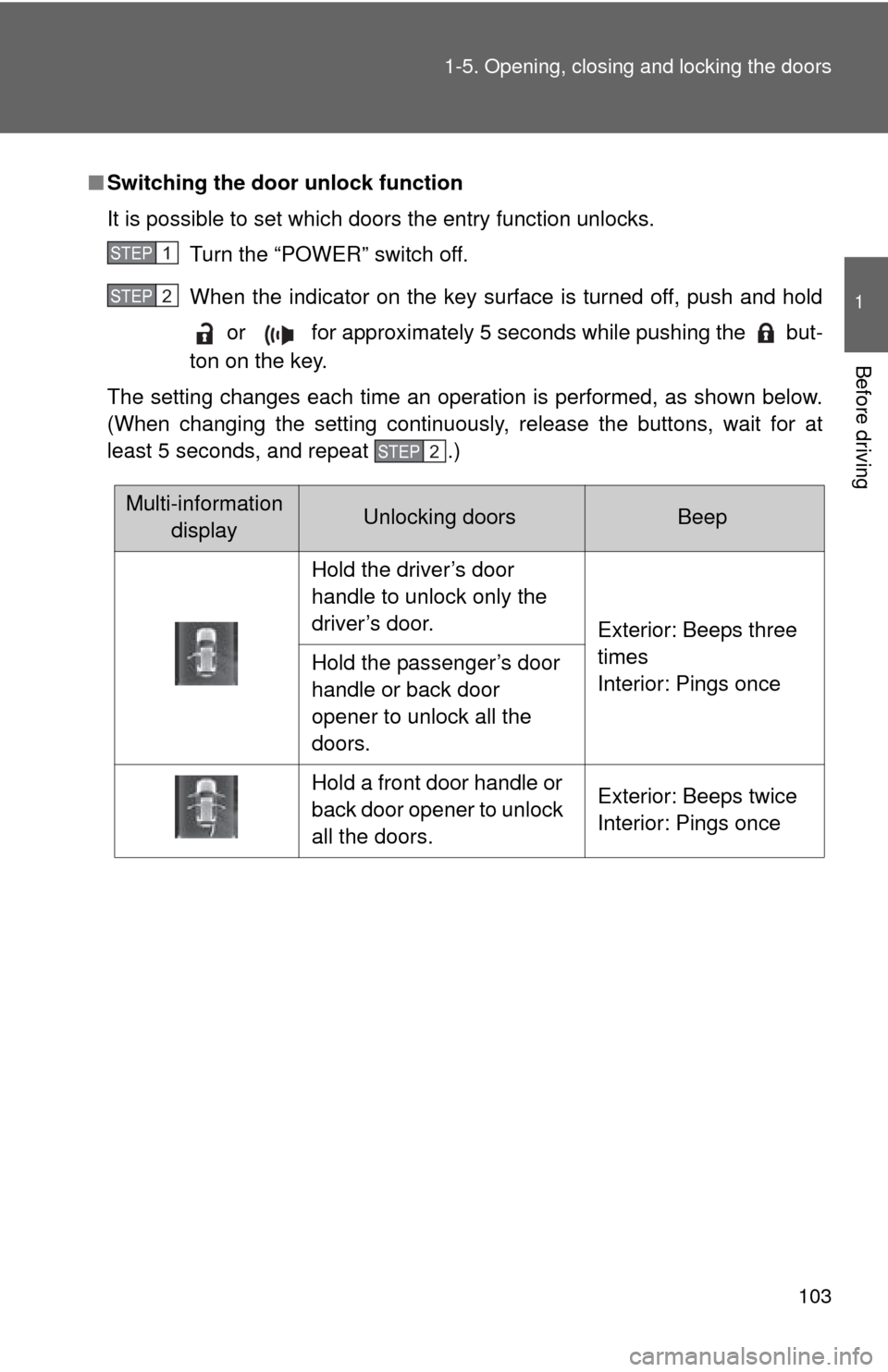
Switching the door unlock function
It is possible to set which doors the entry function unlocks.
Turn the “POWER” switch off.
When the indicator on the key surface is turned off, push and hold or for approximately 5 seconds while pushing the but-
ton on the key.
The setting changes each time an operation is performed, as shown below.
(When changing the setting continuously, release the buttons, wait for at
least 5 seconds, and repeat .)
STEP 1
STEP 2
STEP 2
Multi-information displayUnlocking doorsBeep
Hold the driver’s door
handle to unlock only the
driver’s door. Exterior: Beeps three
times
Interior: Pings once
Hold the passenger’s door
handle or back door
opener to unlock all the
doors.
Hold a front door handle or
back door opener to unlock
all the doors. Exterior: Beeps twice
Interior: Pings once