smart TOYOTA RAV4 EV 2012 1.G User Guide
[x] Cancel search | Manufacturer: TOYOTA, Model Year: 2012, Model line: RAV4 EV, Model: TOYOTA RAV4 EV 2012 1.GPages: 520, PDF Size: 8.29 MB
Page 107 of 520
107
1-5. Opening, closing and locking the doors
1
Before driving
■
Customization that can be co nfigured at Toyota dealer
Settings (e. g. smart key system) can be changed.
(Customizable features P. 500)
■ Certification for the smart key system
FCC ID: HYQ14AEM
FCC ID: NI4TMLF-2
FCC ID: HYQ14AAB
FCC ID: HYQ13BZS
FCC ID: HYQ14ABK
FCC ID: HYQ13CZA
NOTE:
This device complies with Part 15 of the FCC Rules. Operation is subject
to the following two conditions: (1) this device may not cause harmful
interference, and (2) this device must accept any interference received,
including interference that may cause undesired operation.
FCC WARNING:
Changes or modifications not expressly approved by the party responsible
for compliance could void the user's authority to operate the equipment.
CAUTION
■ Caution regarding interfer ence with electronic devices
● People with implanted pacemakers or cardiac defibrillators should keep
away from smart key system antennas. ( P. 98) The radio waves may
affect the operation of such devices. If necessary, the entry function can
be disabled. Ask your Toyota dealer for details, such as the frequency of
radio waves and timing of emitting the radio waves. Then, consult your
doctor to see if you should disable the entry function.
● Users of any electrical medical device other than implanted pacemakers
and implanted cardiac defibrillators should consult the manufacturer of the
device for information about its operation under the influence of radio
waves.
Radio waves could have unexpected effects on the operation of such
medical devices.
Ask your Toyota dealer for details for disabling the entry function.
Page 277 of 520
277
3-1. Using the air conditioning system
and defogger
3
Interior features
■Pre-climate (Remote Climate Control)
By setting the sched ule, the air conditioning system can be
turned on before getting in the vehicle. ( P. 5 3 )
Even if the schedule has not been set, for users who own a
smart phone, the air conditioning system can be turned on and
off when away from the vehicle. ( P. 5 8 )
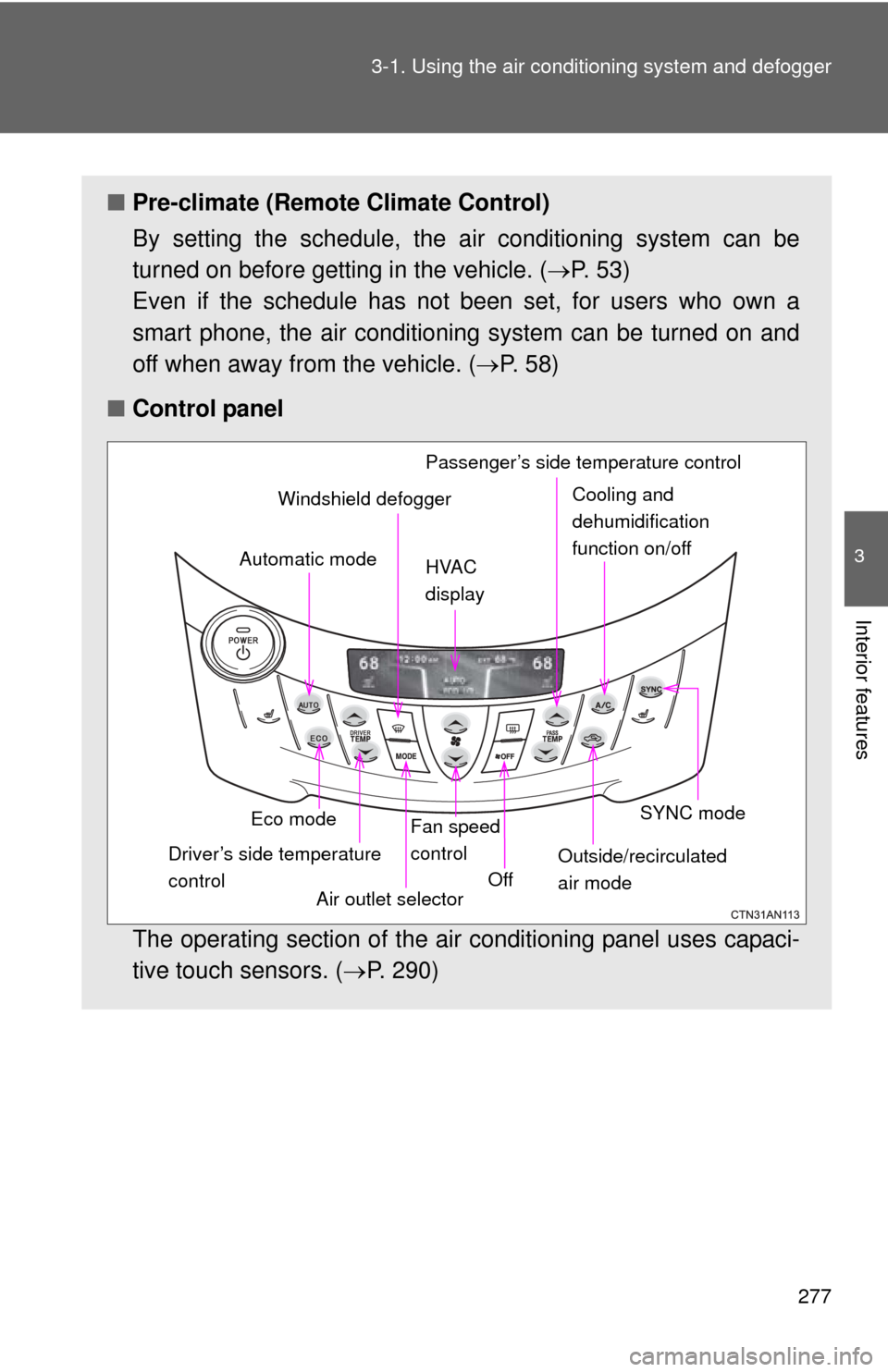
■ Control panel
The operating section of the air conditioning panel uses capaci-
tive touch sensors. ( P. 290)
Eco mode
Driver’s side temperature
control Air outlet selectorFan speed
control
Off SYNC mode
Outside/recirculated
air mode
Automatic mode
Windshield defogger
HVAC
display Passenger’s side temperature controlCooling and
dehumidification
function on/off
Page 363 of 520
363
4-3. Do-it-yourself maintenance
4
Maintenance and care
■
After recharging/reconnecting the 12-volt battery
●Unlocking the doors using the smart key system may not be possible
immediately after reconnecting the 12-volt battery. If this happens, use
the wireless remote control or the mechanical key to lock/unlock the
doors.
● Start the EV system with the “POWER” switch in ACCESSORY mode.
The EV system may not start with the “POWER” switch turned off. How-
ever, the EV system will operate normally from the second attempt.
● The “POWER” switch mode is recorded by the vehicle. If the 12-volt bat-
tery is reconnected, the vehicle will return the “POWER” switch mode to
the status it was in before the 12-volt battery was disconnected. Make
sure to turn the “POWER” switch off before disconnecting the 12-volt bat-
tery. Take extra care when connecting the 12-volt battery if the “POWER”
switch mode prior to discharge is unknown.
● When the 12-volt battery is reconnected, start the EV system, depress
the brake pedal, and confirm that it is possible to shift into each shift posi-
tion.
If the system will not start even after multiple attempts, contact your Toyota
dealer.
CAUTION
■ Chemicals in the 12-volt battery
The 12-volt battery contains poisonous and corrosive sulfuric acid and may
produce hydrogen gas which is flammable and explosive. To reduce the risk
of death or serious injury, take the following precautions while working on or
near the 12-volt battery:
●Do not cause sparks by touching the 12-volt battery terminals with tools.
● Do not smoke or light a match near the 12-volt battery.
● Avoid contact with eyes, skin and clothes.
● Never inhale or swallow electrolyte.
● Wear protective safety glasses when working near the 12-volt battery.
● Keep children away from the 12-volt battery.
Page 384 of 520
384 4-3. Do-it-yourself maintenance
■Use a CR1632 lithium battery
●Batteries can be purchased at your Toyota dealer, local electrical appli-
ance shops or camera stores.
● Replace only with the same or equivalent type recommended by the
manufacturer.
● Dispose of used batteries according to local laws.
■ If the electronic key battery is depleted
The following symptoms may occur.
●The smart key system and wireless remote control will not function prop-
erly.
● The operational range will be reduced.
CAUTION
■Removed electronic key battery and other parts
Keep away from children. These parts are small and if swallowed by a child,
they can cause choking. Failure to do so could result in death or serious
injury.
NOTICE
■For normal operation after re placing the electronic key battery
Observe the following precautions to prevent accidents.
● Always work with dry hands.
Moisture may cause the battery to rust.
● Do not touch or move any other component inside the remote control.
● Do not bend either of the battery terminals.
Page 390 of 520
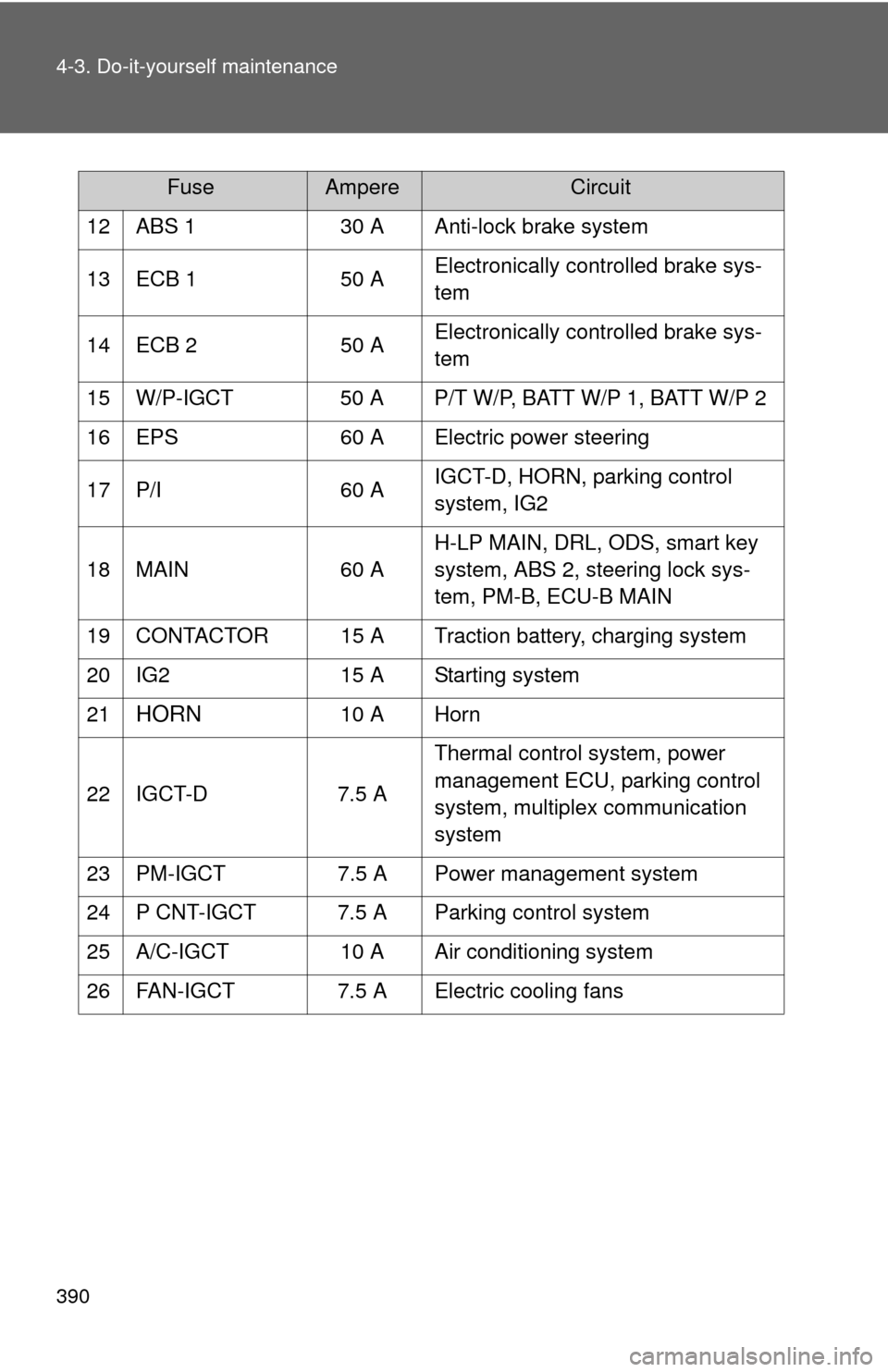
390 4-3. Do-it-yourself maintenance
12 ABS 130 A Anti-lock brake system
13 ECB 1 50 AElectronically controlled brake sys-
tem
14 ECB 2 50 AElectronically controlled brake sys-
tem
15 W/P-IGCT 50 A P/T W/P, BATT W/P 1, BATT W/P 2
16 EPS 60 A Electric power steering
17 P/I 60 AIGCT-D, HORN, parking control
system, IG2
18 MAIN 60 AH-LP MAIN, DRL, ODS, smart key
system, ABS 2, steering lock sys-
tem, PM-B, ECU-B MAIN
19 CONTACTOR 15 A Traction battery, charging system
20 IG2 15 A Starting system
21
HORN 10 A Horn
22 IGCT-D 7.5 A Thermal control system, power
management ECU, parking control
system, multiplex communication
system
23 PM-IGCT 7.5 A Power management system
24 P CNT-IGCT 7.5 A Parking control system
25 A/C-IGCT 10 A Air conditioning system
26 FAN-IGCT 7.5 A Electric cooling fans
FuseAmpereCircuit
Page 391 of 520
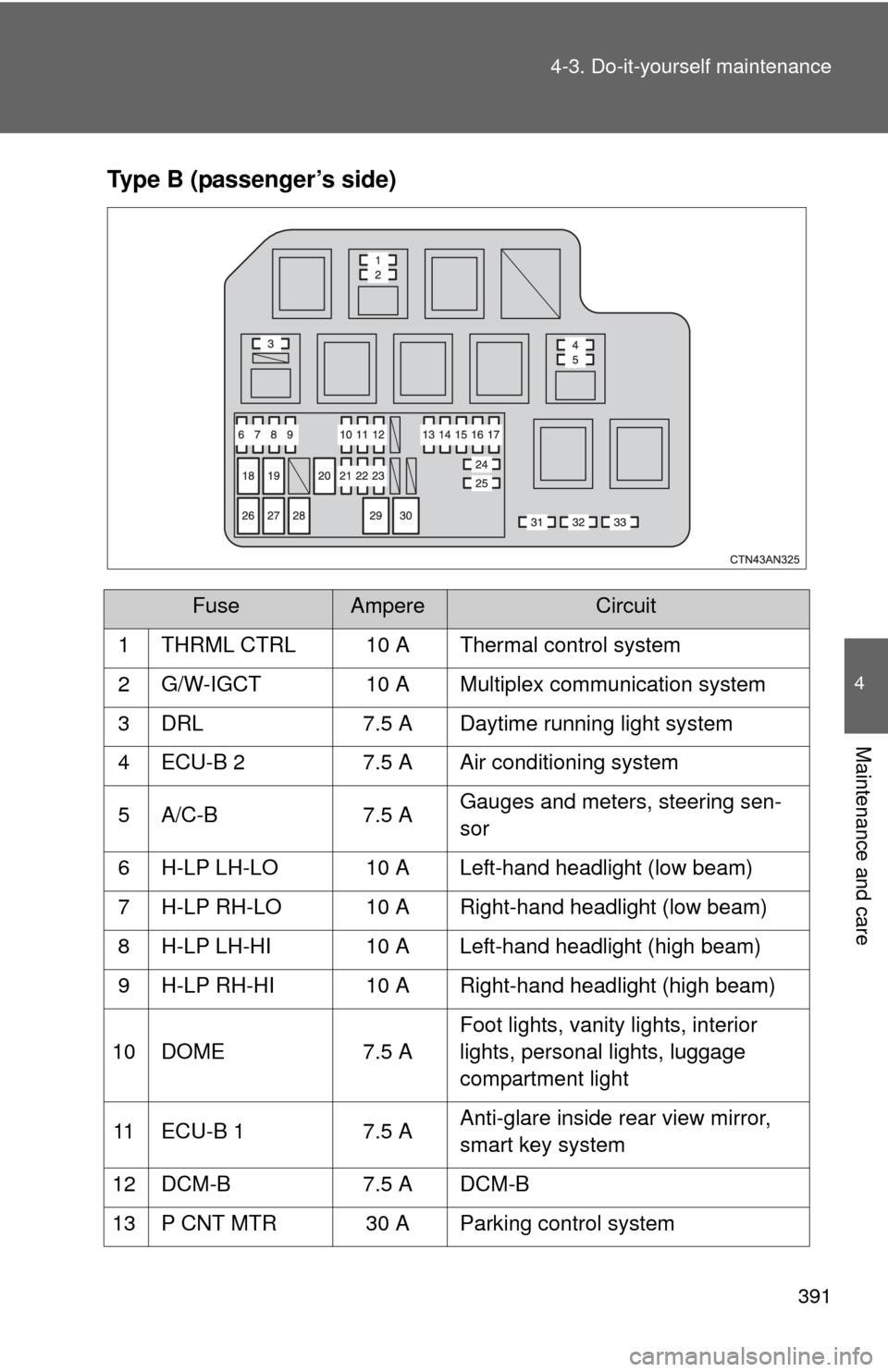
391
4-3. Do-it-yourself maintenance
4
Maintenance and care
Type B (passenger’s side)
FuseAmpereCircuit
1 THRML CTRL 10 A Thermal control system
2 G/W-IGCT 10 A Multiplex communication system
3 DRL 7.5 A Daytime running light system
4 ECU-B 2 7.5 A Air conditioning system
5 A/C-B 7.5 A Gauges and meters, steering sen-
sor
6 H-LP LH-LO 10 A Left-hand headlight (low beam)
7 H-LP RH-LO 10 A Right-hand headlight (low beam)
8 H-LP LH-HI 10 A Left-hand headlight (high beam)
9 H-LP RH-HI 10 A Right-hand headlight (high beam)
10 DOME 7.5 AFoot lights, vanity lights, interior
lights, personal lights, luggage
compartment light
11 ECU-B 1 7.5 AAnti-glare inside rear view mirror,
smart key system
12 DCM-B 7.5 A DCM-B
13 P CNT MTR 30 A Parking control system
Page 392 of 520
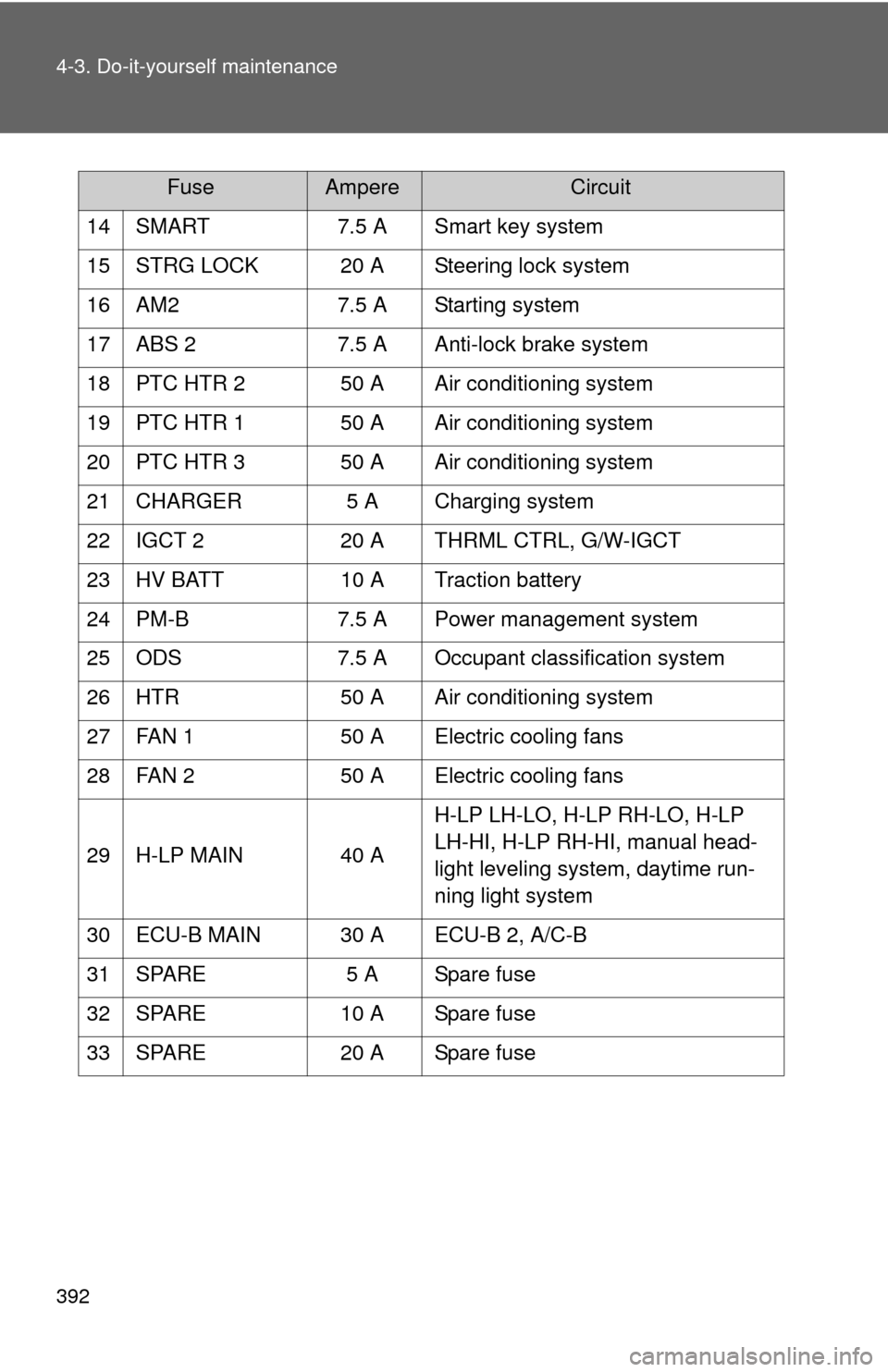
392 4-3. Do-it-yourself maintenance
14 SMART7.5 A Smart key system
15 STRG LOCK 20 A Steering lock system
16 AM2 7.5 A Starting system
17 ABS 2 7.5 A Anti-lock brake system
18 PTC HTR 2 50 A Air conditioning system
19 PTC HTR 1 50 A Air conditioning system
20 PTC HTR 3 50 A Air conditioning system
21 CHARGER 5 A Charging system
22 IGCT 2 20 A THRML CTRL, G/W-IGCT
23 HV BATT 10 A Traction battery
24 PM-B 7.5 A Power management system
25 ODS 7.5 A Occupant classification system
26 HTR 50 A Air conditioning system
27 FAN 1 50 A Electric cooling fans
28 FAN 2 50 A Electric cooling fans
29 H-LP MAIN 40 A H-LP LH-LO, H-LP RH-LO, H-LP
LH-HI, H-LP RH-HI, manual head-
light leveling system, daytime run-
ning light system
30 ECU-B MAIN 30 A ECU-B 2, A/C-B
31 SPARE 5 A Spare fuse
32 SPARE 10 A Spare fuse
33 SPARE 20 A Spare fuse
FuseAmpereCircuit
Page 394 of 520
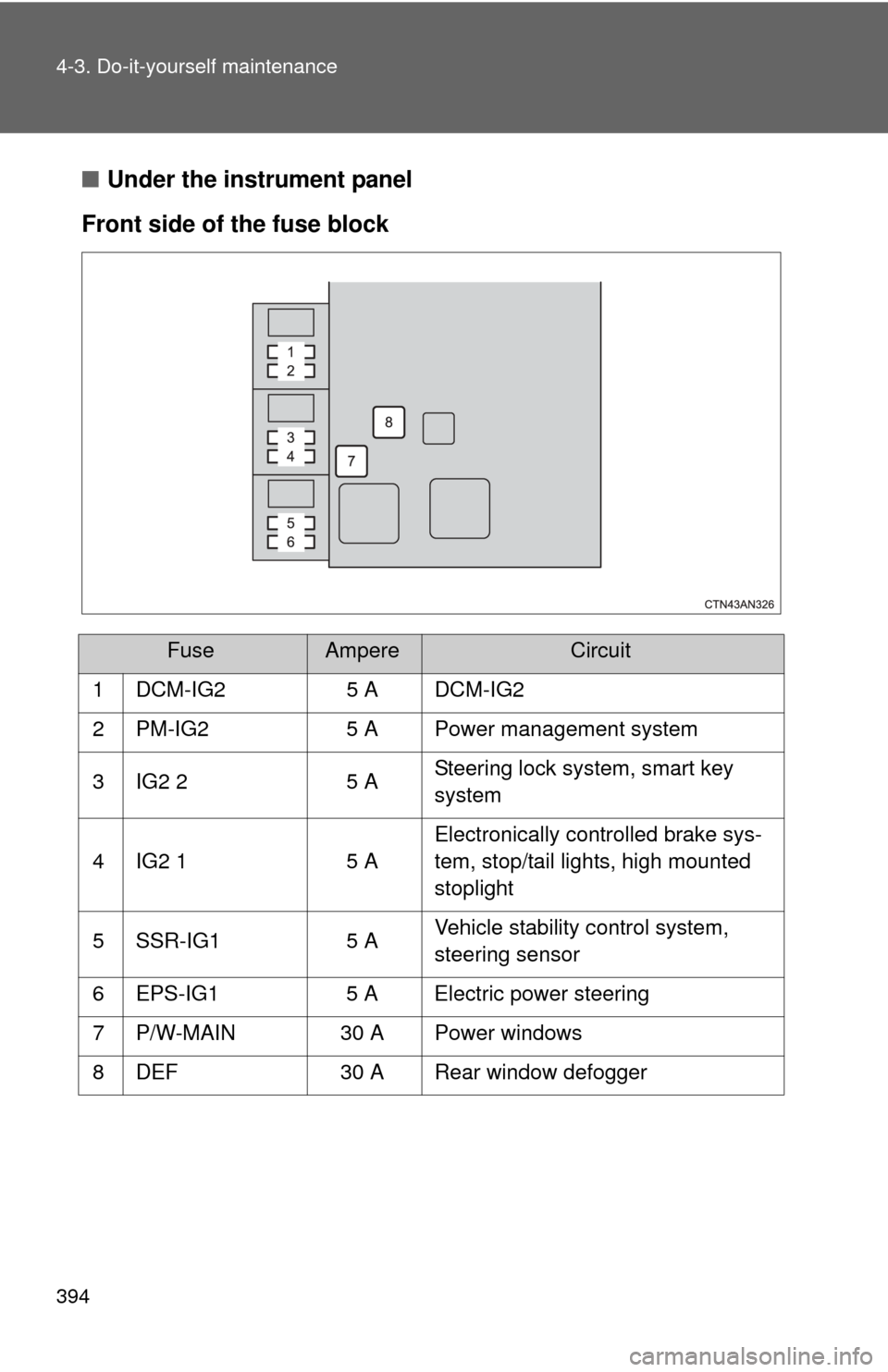
394 4-3. Do-it-yourself maintenance
■Under the instrument panel
Front side of the fuse block
FuseAmpereCircuit
1 DCM-IG2 5 A DCM-IG2
2 PM-IG2 5 A Power management system
3 IG2 2 5 ASteering lock system, smart key
system
4 IG2 1 5 AElectronically controlled brake sys-
tem, stop/tail lights, high mounted
stoplight
5 SSR-IG1 5 AVehicle stability control system,
steering sensor
6 EPS-IG1 5 A Electric power steering
7 P/W-MAIN 30 A Power windows
8 DEF 30 A Rear window defogger
Page 395 of 520
395
4-3. Do-it-yourself maintenance
4
Maintenance and care
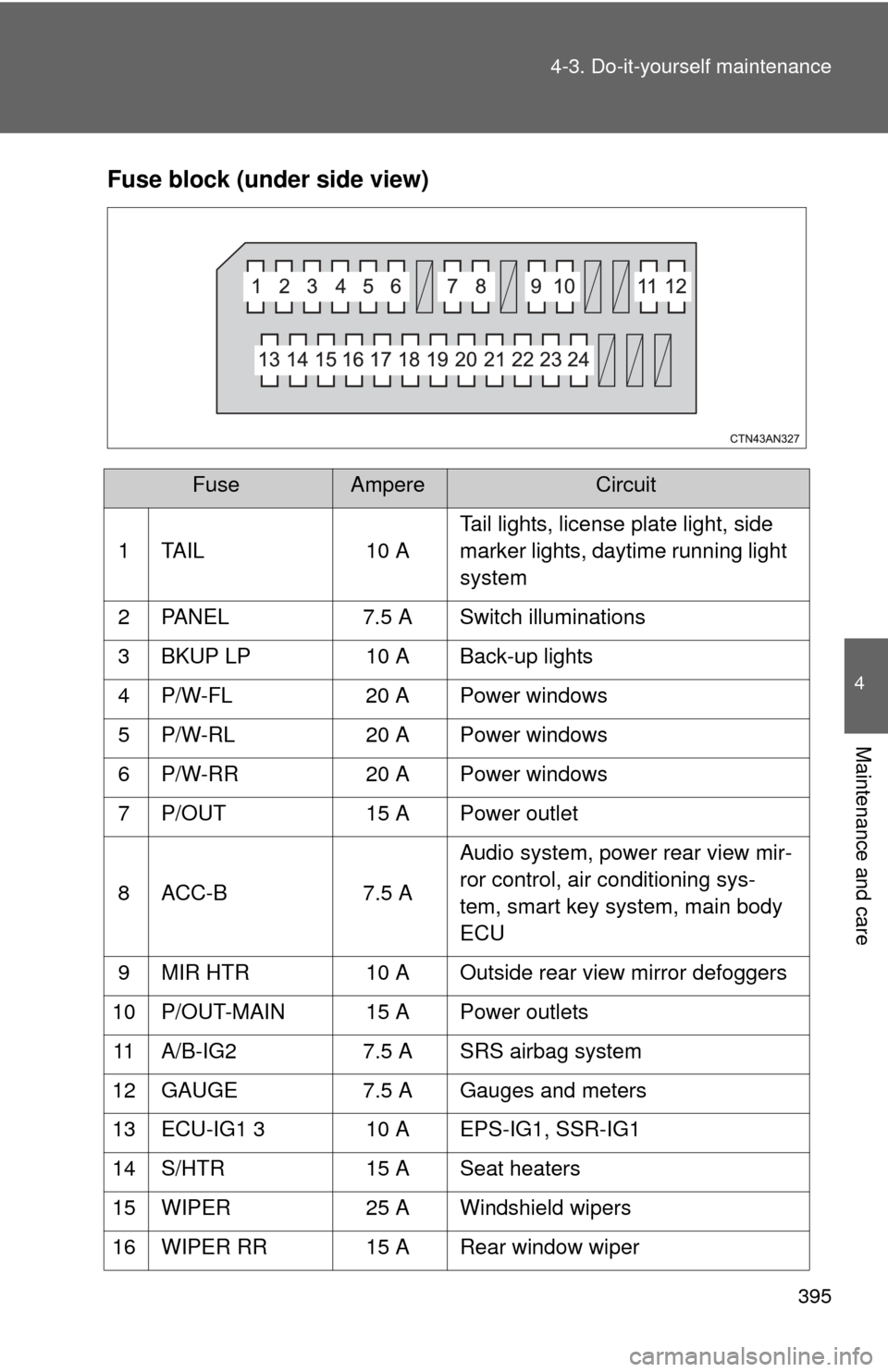
Fuse block (under side view)
FuseAmpereCircuit
1 TAIL 10 A Tail lights, license plate light, side
marker lights, daytime running light
system
2 PANEL 7.5 A Switch illuminations
3 BKUP LP 10 A Back-up lights
4 P/W-FL 20 A Power windows
5 P/W-RL 20 A Power windows
6 P/W-RR 20 A Power windows
7 P/OUT 15 A Power outlet
8 ACC-B 7.5 AAudio system, power rear view mir-
ror control, air conditioning sys-
tem, smart key system, main body
ECU
9 MIR HTR 10 A Outside rear view mirror defoggers
10 P/OUT-MAIN 15 A Power outlets 11 A/B-IG2 7.5 A SRS airbag system
12 GAUGE 7.5 A Gauges and meters
13 ECU-IG1 3 10 A EPS-IG1, SSR-IG1
14 S/HTR 15 A Seat heaters
15 WIPER 25 A Windshield wipers
16 WIPER RR 15 A Rear window wiper
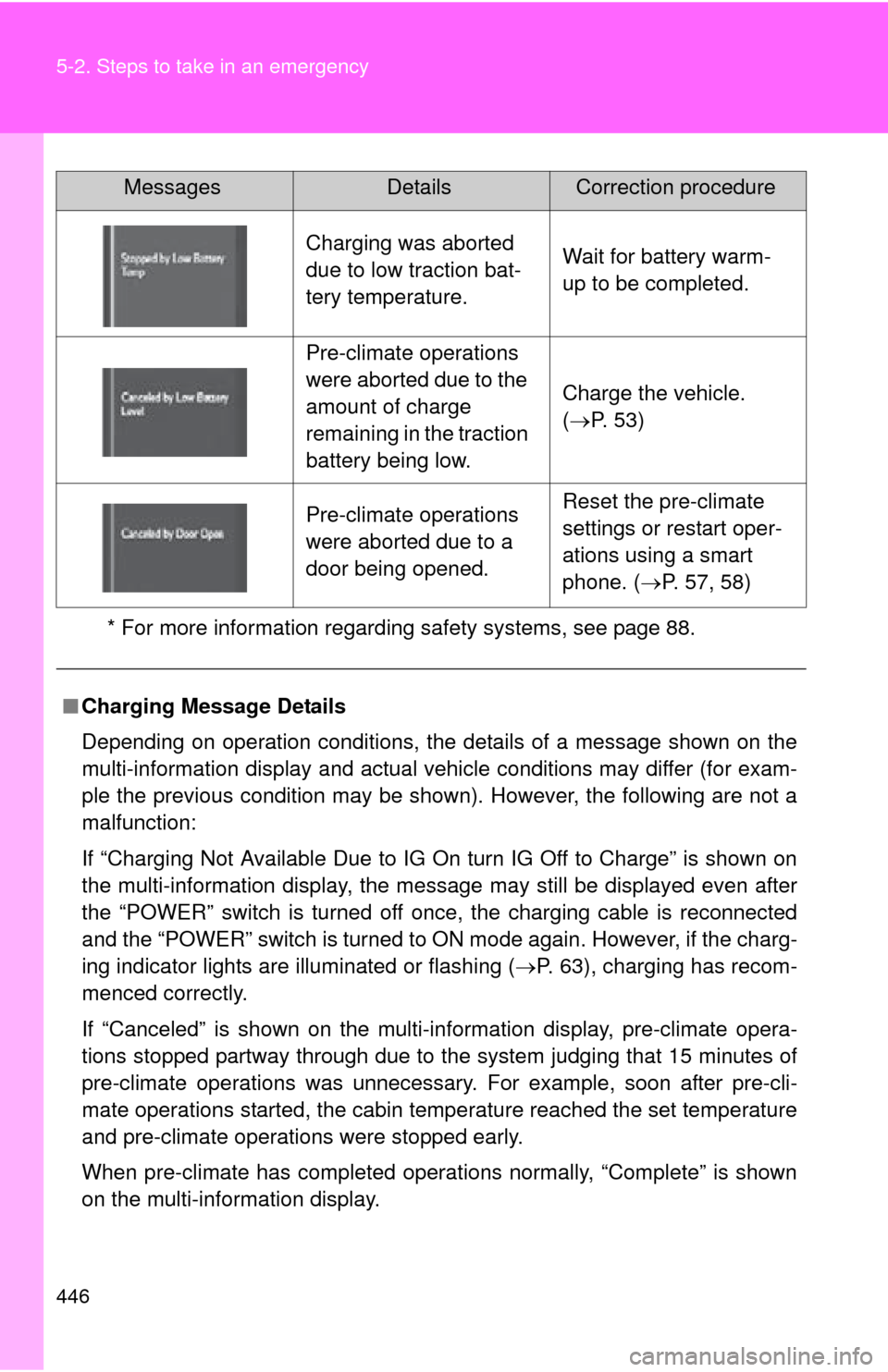
Page 446 of 520
446 5-2. Steps to take in an emergency
* For more information regarding safety systems, see page 88.
Charging was aborted
due to low traction bat-
tery temperature.Wait for battery warm-
up to be completed.
Pre-climate operations
were aborted due to the
amount of charge
remaining in the traction
battery being low.
Charge the vehicle.
(P. 53)
Pre-climate operations
were aborted due to a
door being opened.Reset the pre-climate
settings or restart oper-
ations using a smart
phone. ( P. 57, 58)
■ Charging Message Details
Depending on operation conditions, the details of a message shown on the
multi-information display and actual vehicle conditions may differ (for exam-
ple the previous condition may be shown). However, the following are not a
malfunction:
If “Charging Not Available Due to IG On turn IG Off to Charge” is shown on
the multi-information display, the message may still be displayed even after
the “POWER” switch is turned off once, the charging cable is reconnected
and the “POWER” switch is turned to ON mode again. However, if the charg-
ing indicator lights are illuminated or flashing ( P. 63), charging has recom-
menced correctly.
If “Canceled” is shown on the multi-in formation display, pre-climate opera-
tions stopped partway through due to the system judging that 15 minutes of
pre-climate operations was unnecessary . For example, soon after pre-cli-
mate operations started, the cabin temperature reached the set temperature
and pre-climate operations were stopped early.
When pre-climate has completed operations normally, “Complete” is shown
on the multi-information display.
MessagesDetailsCorrection procedure