warning TOYOTA RAV4 EV 2012 1.G User Guide
[x] Cancel search | Manufacturer: TOYOTA, Model Year: 2012, Model line: RAV4 EV, Model: TOYOTA RAV4 EV 2012 1.GPages: 520, PDF Size: 8.29 MB
Page 63 of 520
63
1-3. Charging
1
Before driving
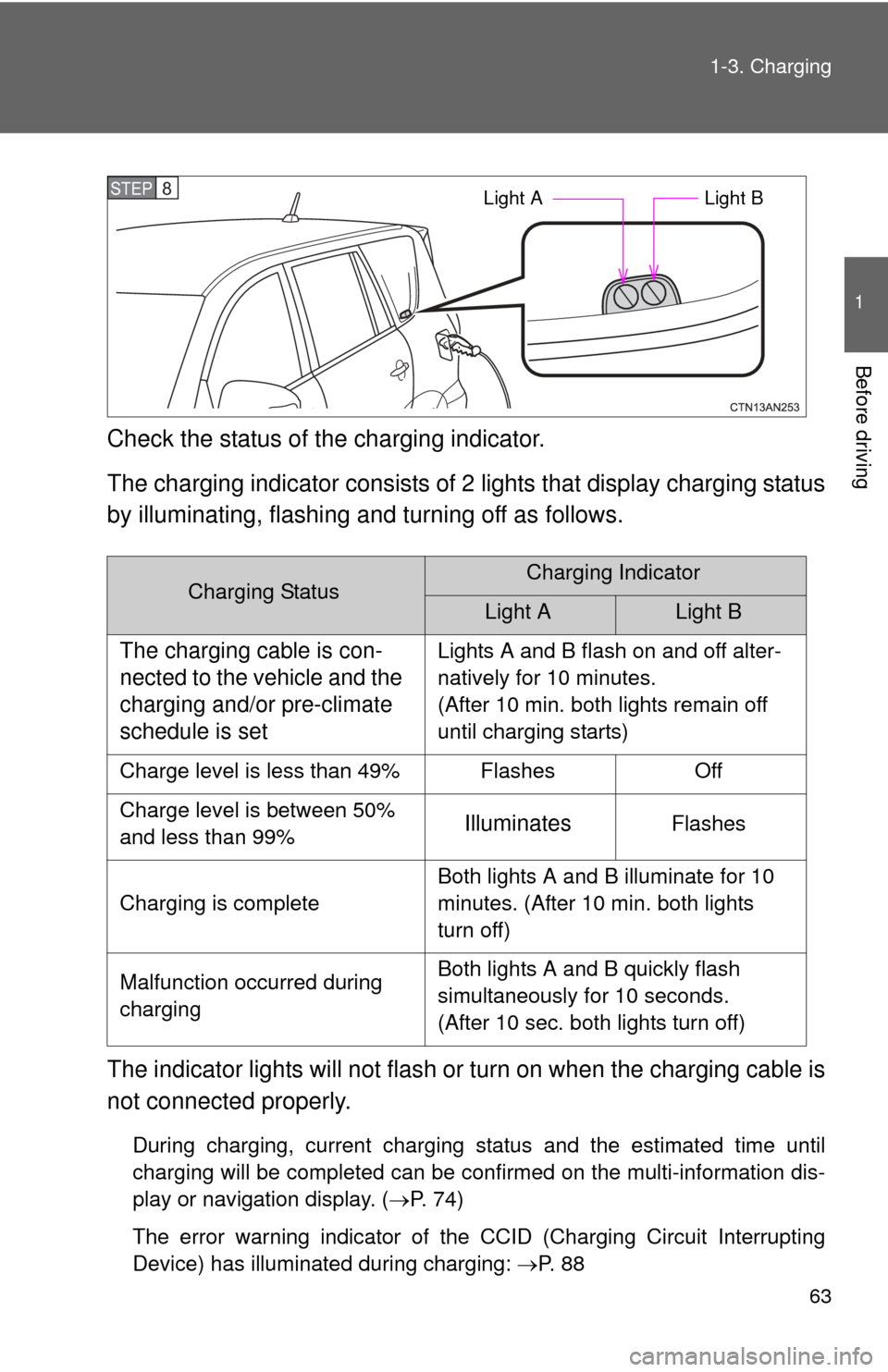
Check the status of the charging indicator.
The charging indicator consists of
2 lights that display charging status
by illuminating, flashing a nd turning off as follows.
The indicator lights will not flash or turn on when the charging cable is
not connected properly.
During charging, current charging status and the estimated time until
charging will be completed can be confirmed on the multi-information dis-
play or navigation display. ( P. 74)
The error warning indicator of the CCID (Charging Circuit Interrupting
Device) has illuminated during charging: P. 8 8
Charging StatusCharging Indicator
Light ALight B
The charging cable is con-
nected to the vehicle and the
charging and/or pre-climate
schedule is setLights A and B flash on and off alter-
natively for 10 minutes.
(After 10 min. both lights remain off
until charging starts)
Charge level is less than 49% Flashes Off
Charge level is between 50%
and less than 99%
IlluminatesFlashes
Charging is complete Both lights A and B illuminate for 10
minutes. (After 10 min. both lights
turn off)
Malfunction occurred during
charging Both lights A and B quickly flash
simultaneously for 10 seconds.
(After 10 sec. both lights turn off)
STEP 8 Light A
Light B
Page 76 of 520
76 1-3. Charging
■Charging information and warning messages
The first time the “POWER”
switch is turned to ON mode
after charging is completed, a
message detailing the results of
the charge is shown. Also, if an
operation that cannot be carried
out during charging was
attempted, a warning message
will be shown.
Comply with the instructions in
the message and perform any
necessary operations. (P. 443)
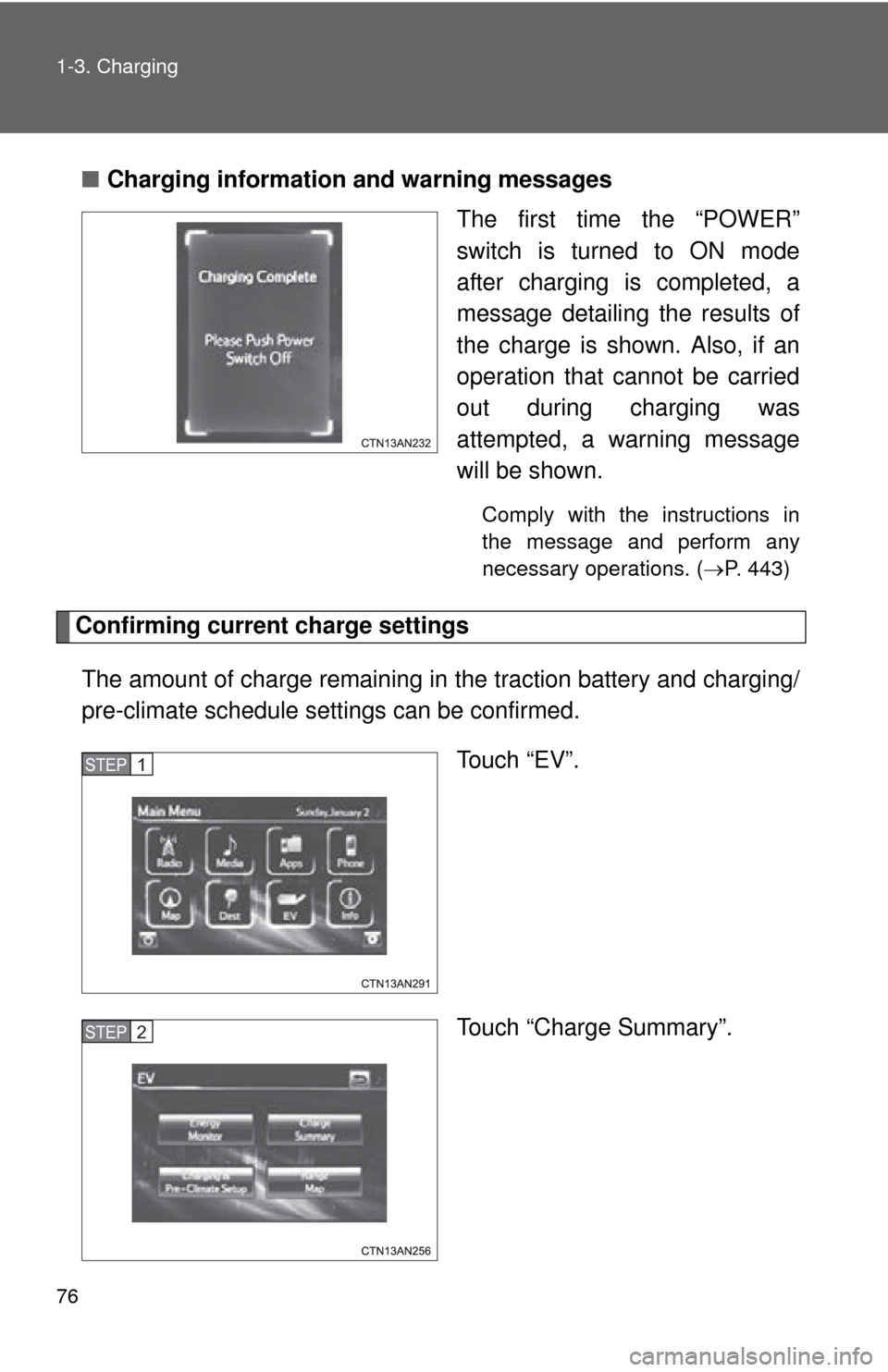
Confirming current charge settings
The amount of charge remaining in the traction battery and charging/
pre-climate schedule sett ings can be confirmed.
Touch “EV”.
Touch “Charge Summary”.
STEP 1
STEP 2
Page 81 of 520
81
1-3. Charging
1
Before driving
■
When not using the vehicle for an extended period of time
In order to preserve the traction battery, Toyota recommends plugging in the
vehicle whenever it is not in use.
Pre-climate operations will occur while the amount of charge remaining in
the traction battery is more than 50% at the time pre-climate operations
begin. If the schedule is left set, pre-climate operations will continue to func-
tion up to the maximum of 15 minutes even if the vehicle is not used for
extended periods of time. Because this uses energy from the traction bat-
tery, temporarily suspend the pre-climate schedule (smart phone exclusive
setting P. 58) or delete the pre-climate schedule, if the vehicle is not being
regularly used.
When using navigation screen operations, only canceling the schedule is
available. Because the schedule will need to be set once again when it is
used next time, Toyota recommends using a smart phone and temporarily
suspending the schedule.
■ If the amount of charge remaining in the traction battery becomes low
while driving
The driving power restriction output control warning light illuminates and
driving range is extended by automatically restricting driving power and air
conditioning system operations. Using the navigation system, promptly
search for the closest charging station and charge the vehicle. If the traction
battery fully discharges, driving will not be possible.
For information on how to search for a charging station, refer to the “Naviga-
tion System Owner's Manual”.
■ Charging schedule confirmation disp lay after switching the EV system
off
The current charging schedule will be displayed for a while after the EV sys-
tem is turned off. To change the charging schedule, set the schedule using
the navigation system’s screen. ( P. 64, 70)
■ If the charging port door is frozen
P. 268
Page 86 of 520
86 1-3. Charging
CAUTION
■Precautions for the pre-climate
Do not use pre-climate if people are in the vehicle.
Even when pre-climate is used, the temperature inside the vehicle may
become very high or very low due to features such as the automatic shut-off.
Do not leave children and/or pets inside the vehicle.
●When in the sun, the temperature inside a vehicle with all its windows
closed may rise rapidly, possibly causing heat stroke or dehydration.
● When in cold weather, the temperature inside the vehicle may drop rapidly,
possibly causing hypothermia.
Both of the above cases can lead to a serious health hazard or even deat\
h.
■ Handling the traction battery
No part of the traction battery can be repaired by you or a non-Toyota techni-
cian. Never open the traction battery or perform any modifications to it. If you
find a malfunction with the battery, always contact your Toyota dealer.
■ If the error warning indicator on the CCID (Charging Circuit Interrupt-
ing Device) stays on during charging
Press the reset button on the CCID (Charging Circuit Interrupting Device)
(P. 91). If the error warning indicator does not turn off even when the reset
button is pressed, an electrical leakage may be occurring in the path to the
power source, or there may be a problem with the charging cable or the
charging system. In this event, stop charging immediately, remove the
charging cable and contact your Toyota dealer. An accident may occur or
damage may be inflicted if charging continues.
■ When the charging cable is connected to the vehicle
Do not operate the shift lever.
In the unlikely event that the charging cable has been damaged, the shift
position may change from P to another position and the vehicle could move,
possibly leading to an accident.
Page 89 of 520
89
1-3. Charging
1
Before driving
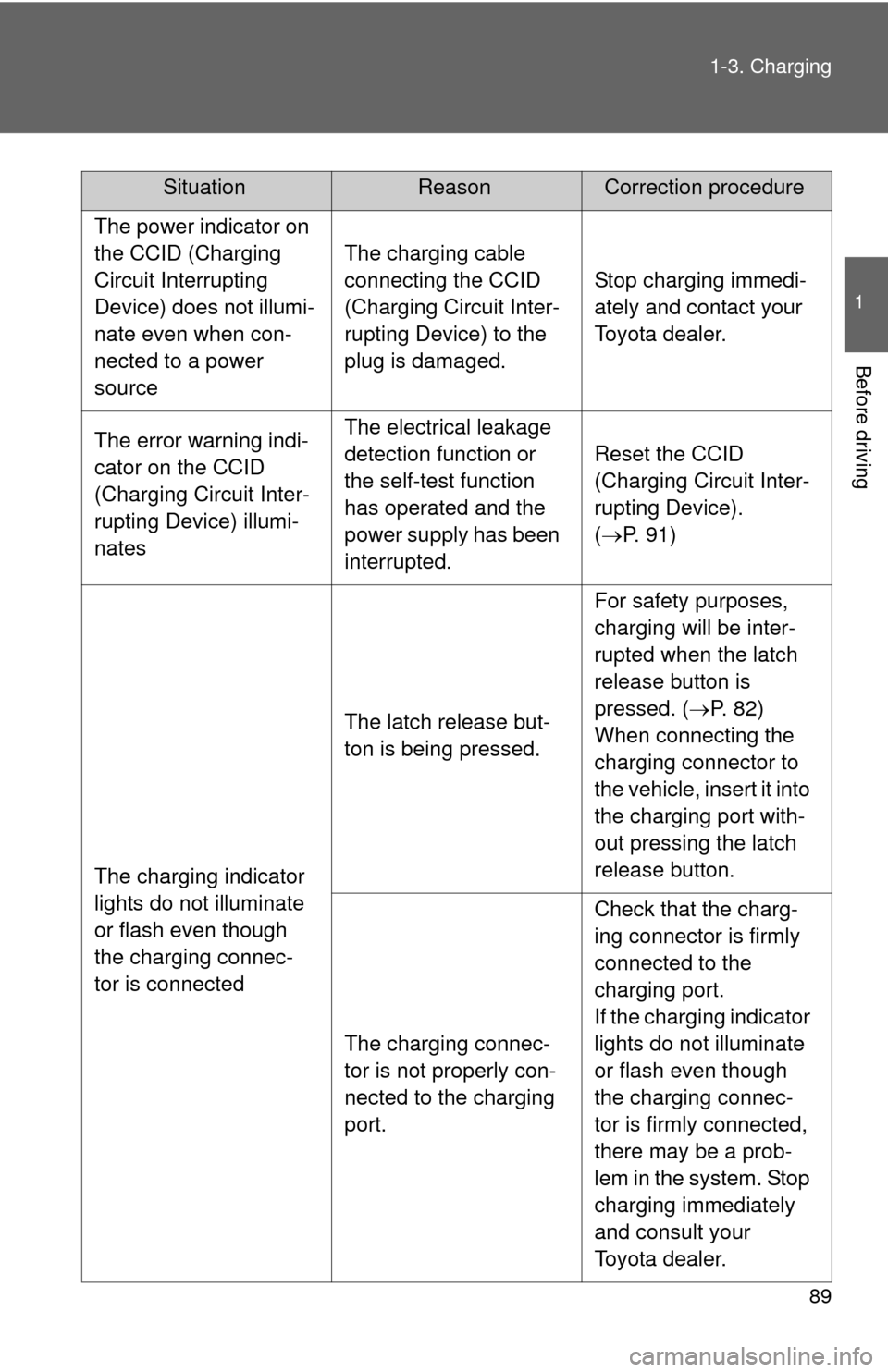
The power indicator on
the CCID (Charging
Circuit Interrupting
Device) does not illumi-
nate even when con-
nected to a power
source
The charging cable
connecting the CCID
(Charging Circuit Inter-
rupting Device) to the
plug is damaged.
Stop charging immedi-
ately and contact your
Toyota dealer.
The error warning indi-
cator on the CCID
(Charging Circuit Inter-
rupting Device) illumi-
natesThe electrical leakage
detection function or
the self-test function
has operated and the
power supply has been
interrupted.
Reset the CCID
(Charging Circuit Inter-
rupting Device).
(
P. 91)
The charging indicator
lights do not illuminate
or flash even though
the charging connec-
tor is connected
The latch release but-
ton is being pressed.
For safety purposes,
charging will be inter-
rupted when the latch
release button is
pressed. ( P. 82)
When connecting the
charging connector to
the vehicle, insert it into
the charging port with-
out pressing the latch
release button.
The charging connec-
tor is not properly con-
nected to the charging
port.
Check that the charg-
ing connector is firmly
connected to the
charging port.
If the charging indicator
lights do not illuminate
or flash even though
the charging connec-
tor is firmly connected,
there may be a prob-
lem in the system. Stop
charging immediately
and consult your
Toyota dealer.
SituationReasonCorrection procedure
Page 91 of 520
91
1-3. Charging
1
Before driving
If a warning message is displayed after charging
If a warning message is displayed when the “POWER” switch is
turned to ON mode after charging, comply with the contents of the
message and take any necessary actions. ( P. 443)
■Resetting the CCID (Charging Circuit Interrupting Device)
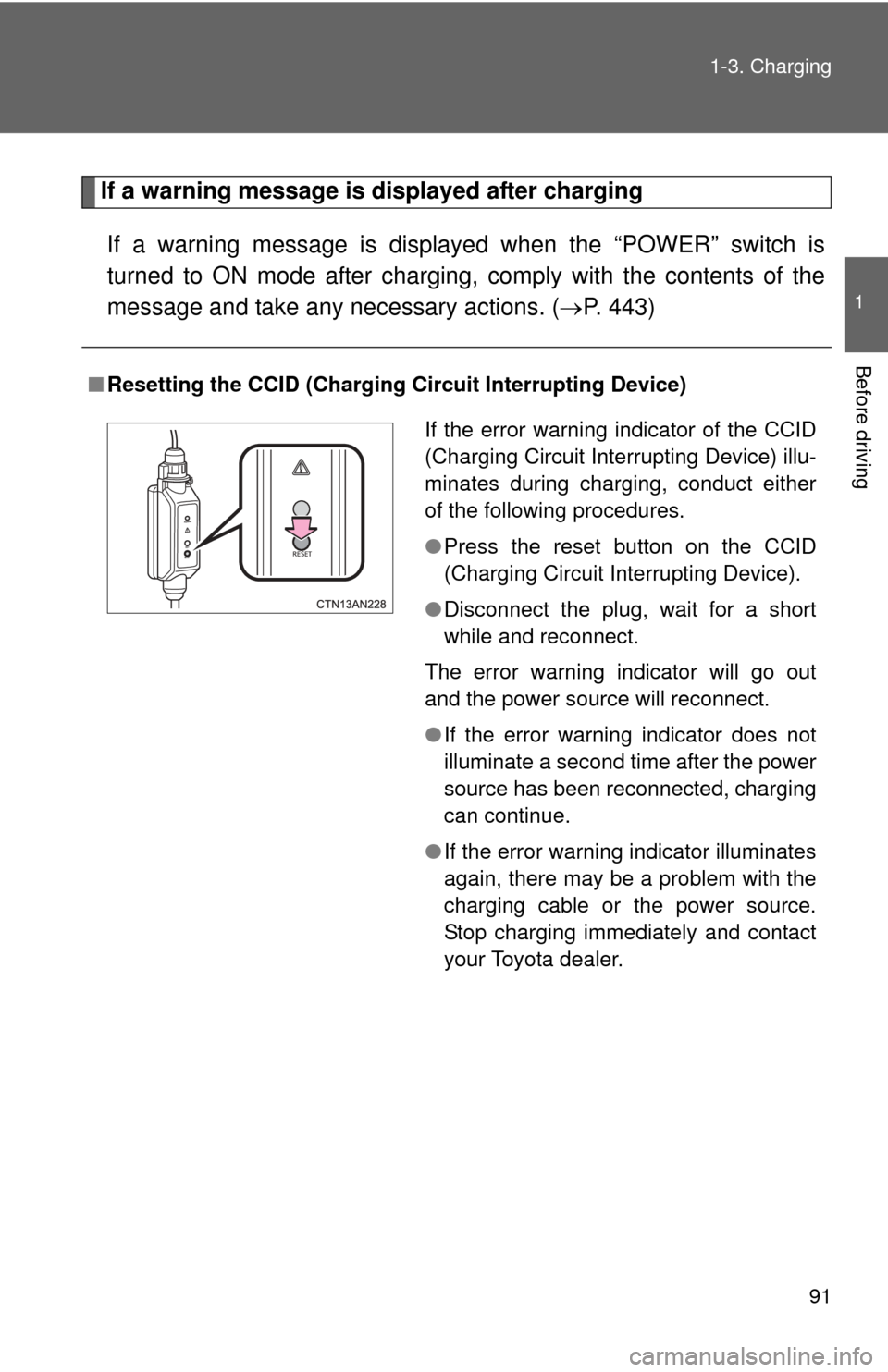
If the error warning indicator of the CCID
(Charging Circuit Interrupting Device) illu-
minates during charging, conduct either
of the following procedures.
●Press the reset button on the CCID
(Charging Circuit Interrupting Device).
● Disconnect the plug, wait for a short
while and reconnect.
The error warning indicator will go out
and the power source will reconnect.
● If the error warning indicator does not
illuminate a second time after the power
source has been reconnected, charging
can continue.
● If the error warning indicator illuminates
again, there may be a problem with the
charging cable or the power source.
Stop charging immediately and contact
your Toyota dealer.
Page 92 of 520
92
1-3. Charging
Inspecting the charging cable
Inspecting the electrical leakage detection function
Check that the electrical leakage detection function operates properly
by following the procedure below.
In the unlikely event that the elec trical leakage detection function
does not operate properly, contact your Toyota dealer as soon as
possible.
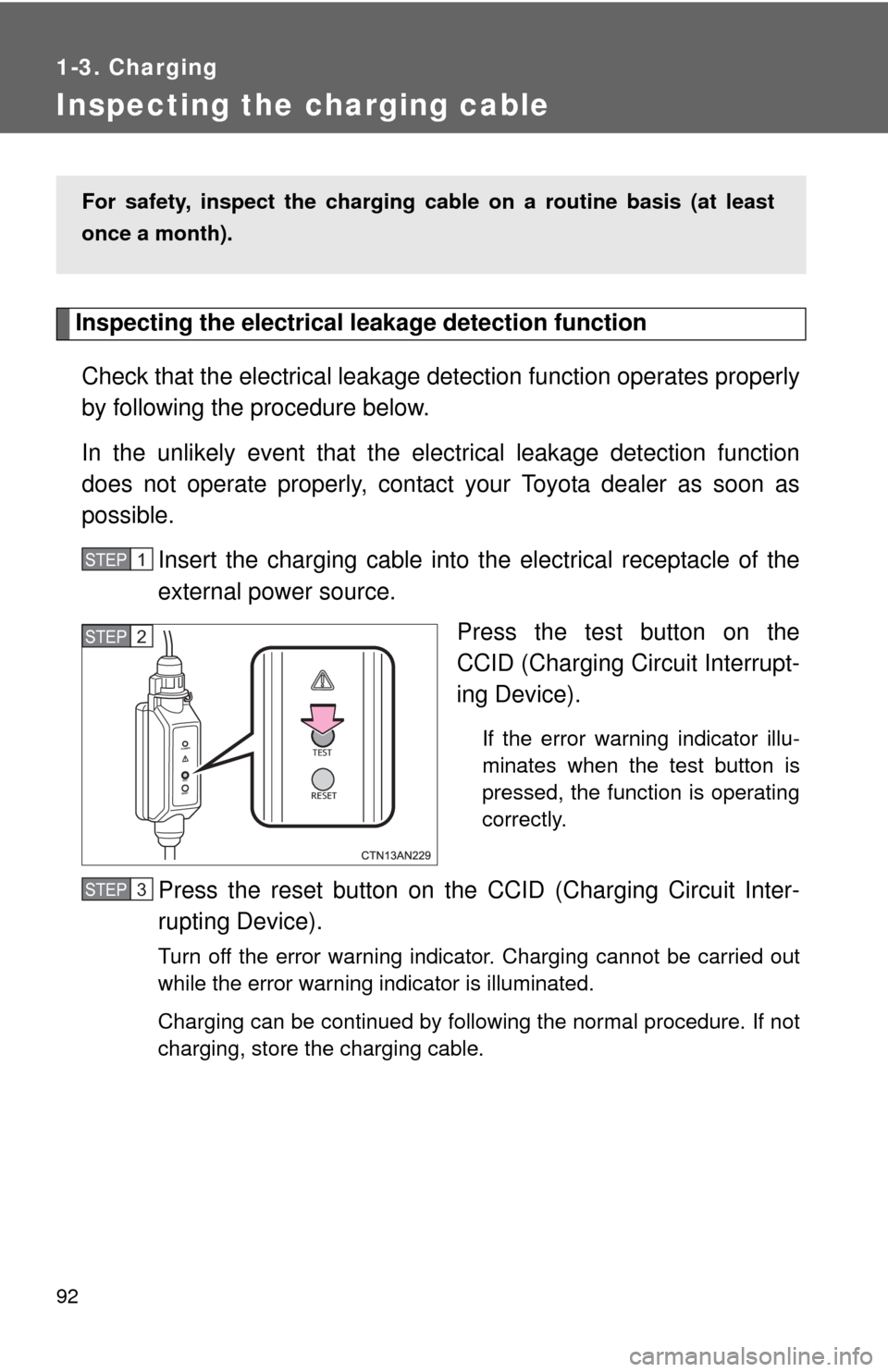
Insert the charging cable into t he electrical receptacle of the
external power source.
Press the test button on the
CCID (Charging Circuit Interrupt-
ing Device).
If the error warning indicator illu-
minates when the test button is
pressed, the function is operating
correctly.
Press the reset button on the CCID (Charging Circuit Inter-
rupting Device).
Turn off the error warning indicator. Charging cannot be carried out
while the error warning indicator is illuminated.
Charging can be continued by following the normal procedure. If not
charging, store the charging cable.
For safety, inspect the charging cable on a routine basis (at least
once a month).
STEP 1
STEP 2
STEP 3
Page 100 of 520
100 1-5. Opening, closing and locking the doors
■Operation signals
A buzzer sounds and the emergency flashers flash to indicate that the doors
have been locked/unlocked. (Locked: Once; Unlocked: Twice)
■ Alarms and warning indicators
A combination of exterior and interior alarms are used to prevent theft of the
vehicle and unforeseeable accidents resulting from erroneous operation.
Take appropriate measures according to the warning message shown on the
multi-information display. ( P. 427)
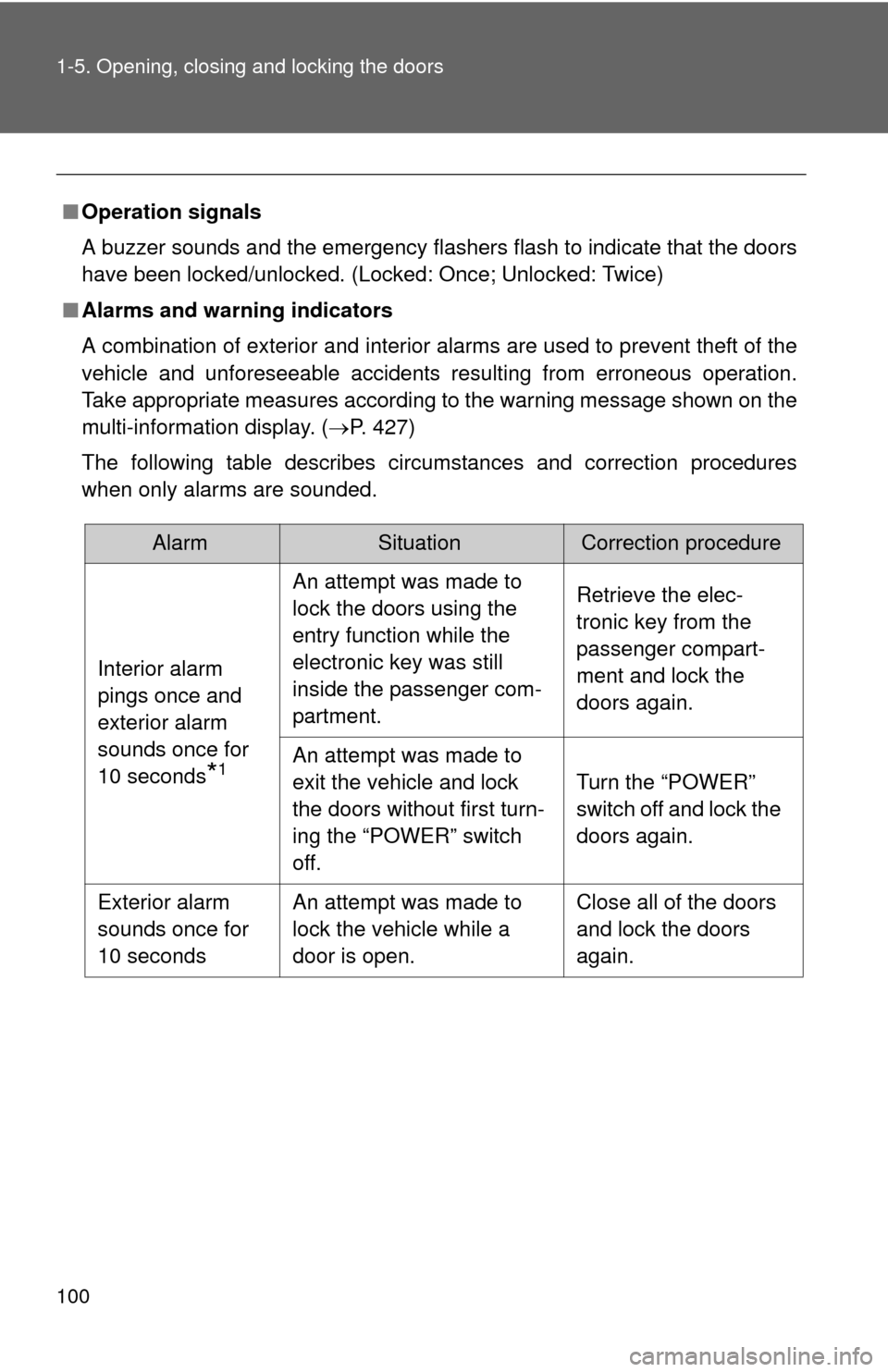
The following table describes circumstances and correction procedures
when only alarms are sounded.
AlarmSituationCorrection procedure
Interior alarm
pings once and
exterior alarm
sounds once for
10 seconds
*1
An attempt was made to
lock the doors using the
entry function while the
electronic key was still
inside the passenger com-
partment. Retrieve the elec-
tronic key from the
passenger compart-
ment and lock the
doors again.
An attempt was made to
exit the vehicle and lock
the doors without first turn-
ing the “POWER” switch
off. Turn the “POWER”
switch off and lock the
doors again.
Exterior alarm
sounds once for
10 seconds An attempt was made to
lock the vehicle while a
door is open. Close all of the doors
and lock the doors
again.
Page 107 of 520
107
1-5. Opening, closing and locking the doors
1
Before driving
■
Customization that can be co nfigured at Toyota dealer
Settings (e. g. smart key system) can be changed.
(Customizable features P. 500)
■ Certification for the smart key system
FCC ID: HYQ14AEM
FCC ID: NI4TMLF-2
FCC ID: HYQ14AAB
FCC ID: HYQ13BZS
FCC ID: HYQ14ABK
FCC ID: HYQ13CZA
NOTE:
This device complies with Part 15 of the FCC Rules. Operation is subject
to the following two conditions: (1) this device may not cause harmful
interference, and (2) this device must accept any interference received,
including interference that may cause undesired operation.
FCC WARNING:
Changes or modifications not expressly approved by the party responsible
for compliance could void the user's authority to operate the equipment.
CAUTION
■ Caution regarding interfer ence with electronic devices
● People with implanted pacemakers or cardiac defibrillators should keep
away from smart key system antennas. ( P. 98) The radio waves may
affect the operation of such devices. If necessary, the entry function can
be disabled. Ask your Toyota dealer for details, such as the frequency of
radio waves and timing of emitting the radio waves. Then, consult your
doctor to see if you should disable the entry function.
● Users of any electrical medical device other than implanted pacemakers
and implanted cardiac defibrillators should consult the manufacturer of the
device for information about its operation under the influence of radio
waves.
Radio waves could have unexpected effects on the operation of such
medical devices.
Ask your Toyota dealer for details for disabling the entry function.
Page 115 of 520
115
1-5. Opening, closing and locking the doors
1
Before driving
CAUTION
■
Caution while driving
●Keep the back door closed while driving.
If the back door is left open, it may hit near-by objects while driving or lug-
gage may be unexpectedly thrown out, causing an accident.
● Before driving the vehicle, make sure that the back door is fully closed. If
the back door is not fully closed, it may open unexpectedly while driving,
causing an accident.
● Never let anyone sit in the luggage compartment. In the event of sudden
braking or a collision, they are susceptible to death or serious injury.
● Do not get on the rear step bumper.
■ Caution while parking
If the open back door hides the stop, tail or rear turn signal lights, other road
users must be warned of the presence of your vehicle by a warning triangle
or other device.
■ When children are in the vehicle
Observe the following precautions.
Failure to do so may result in death or serious injury.
●Do not leave children alone in the luggage compartment.
If a child is accidentally locked in the luggage compartment, they could
have heat exhaustion.
● Do not allow a child to open or close the back door.
Doing so may cause the back door to move unexpectedly, or cause the
child’s hands, head, or neck to be caught by the closing back door.