window TOYOTA RAV4 EV 2012 1.G User Guide
[x] Cancel search | Manufacturer: TOYOTA, Model Year: 2012, Model line: RAV4 EV, Model: TOYOTA RAV4 EV 2012 1.GPages: 520, PDF Size: 8.29 MB
Page 78 of 520
78 1-3. Charging
■When leaving the vehicle
To prevent vehicle theft and to increase the efficiency of pre-climate opera-
tion, check that all windows are closed.
■ Amount of time required for charging
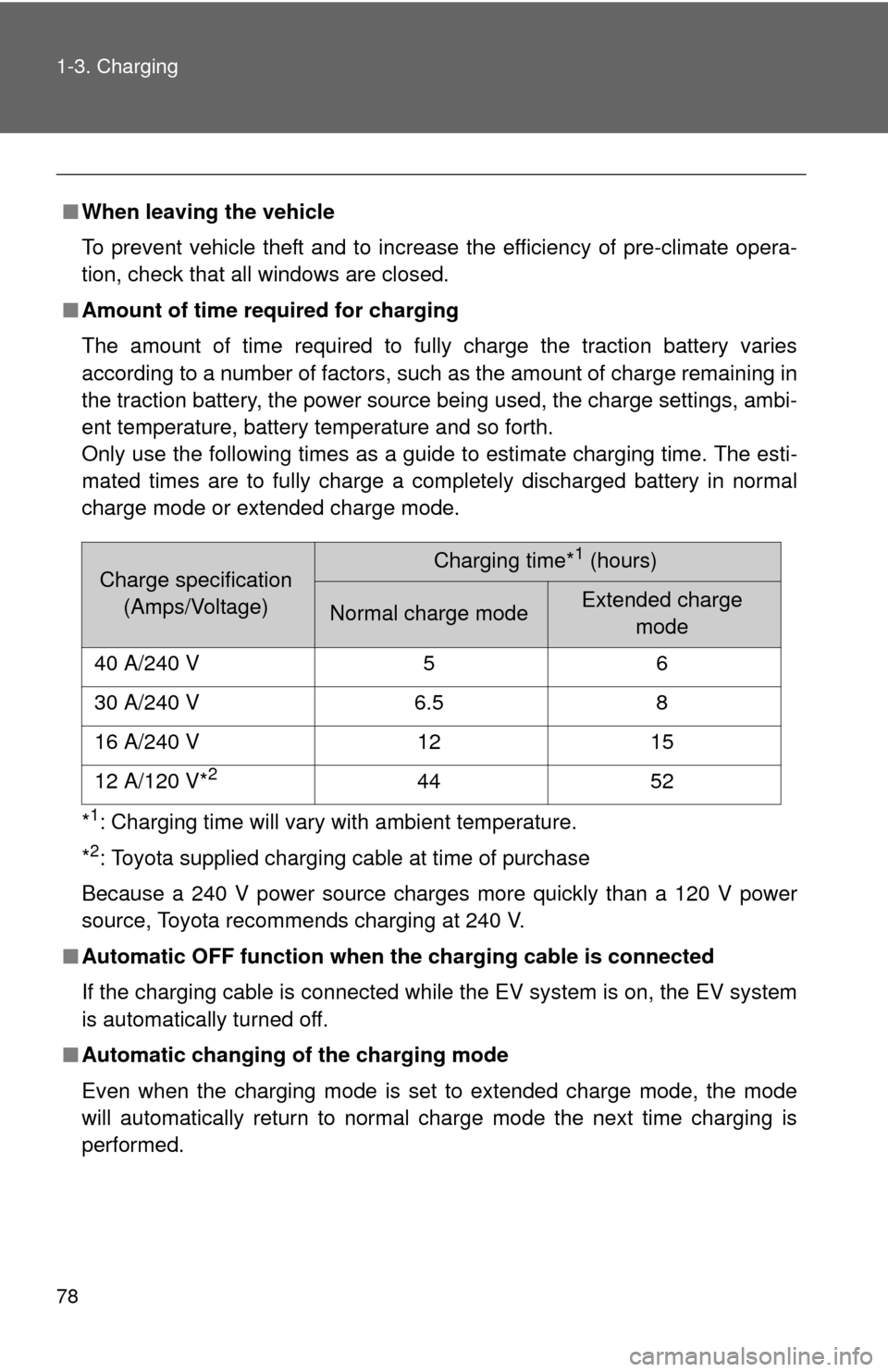
The amount of time required to fully charge the traction battery varies
according to a number of factors, such as the amount of charge remaining in
the traction battery, the power source being used, the charge settings, ambi-
ent temperature, battery temperature and so forth.
Only use the following times as a guide to estimate charging time. The esti-
mated times are to fully charge a completely discharged battery in normal
charge mode or extended charge mode.
*
1: Charging time will vary with ambient temperature.
*
2: Toyota supplied charging cable at time of purchase
Because a 240 V power source charges more quickly than a 120 V power
source, Toyota recommends charging at 240 V.
■ Automatic OFF function when th e charging cable is connected
If the charging cable is connected while the EV system is on, the EV system
is automatically turned off.
■ Automatic changing of the charging mode
Even when the charging mode is set to extended charge mode, the mode
will automatically return to normal charge mode the next time charging is
performed.
Charge specification
(Amps/Voltage)Charging time*1 (hours)
Normal charge mode Extended charge mode
40 A/240 V 5 6
30 A/240 V 6.5 8
16 A/240 V 12 15
12 A/120 V*
244 52
Page 86 of 520

86 1-3. Charging
CAUTION
■Precautions for the pre-climate
Do not use pre-climate if people are in the vehicle.
Even when pre-climate is used, the temperature inside the vehicle may
become very high or very low due to features such as the automatic shut-off.
Do not leave children and/or pets inside the vehicle.
●When in the sun, the temperature inside a vehicle with all its windows
closed may rise rapidly, possibly causing heat stroke or dehydration.
● When in cold weather, the temperature inside the vehicle may drop rapidly,
possibly causing hypothermia.
Both of the above cases can lead to a serious health hazard or even deat\
h.
■ Handling the traction battery
No part of the traction battery can be repaired by you or a non-Toyota techni-
cian. Never open the traction battery or perform any modifications to it. If you
find a malfunction with the battery, always contact your Toyota dealer.
■ If the error warning indicator on the CCID (Charging Circuit Interrupt-
ing Device) stays on during charging
Press the reset button on the CCID (Charging Circuit Interrupting Device)
(P. 91). If the error warning indicator does not turn off even when the reset
button is pressed, an electrical leakage may be occurring in the path to the
power source, or there may be a problem with the charging cable or the
charging system. In this event, stop charging immediately, remove the
charging cable and contact your Toyota dealer. An accident may occur or
damage may be inflicted if charging continues.
■ When the charging cable is connected to the vehicle
Do not operate the shift lever.
In the unlikely event that the charging cable has been damaged, the shift
position may change from P to another position and the vehicle could move,
possibly leading to an accident.
Page 104 of 520

104 1-5. Opening, closing and locking the doors
■Battery-saving function
In the following circumstances, the entry function is disabled in order to pre-
vent the 12-volt battery from discharging and the electronic key battery from
depleting.
●When the entry function has not been used for 2 weeks or more.
● When the electronic key has been left within approximately 3 ft. (1 m) of
the vehicle for 10 minutes or more.
The system will resume operation when
● The vehicle is locked using the door handle lock switch when carrying the
electronic key on your person.
● The vehicle is locked/unlocked using the wireless remote control.
( P. 108)
● The vehicle is locked/unlocked using the mechanical key. ( P. 468)
■ Conditions affecting operation
The smart key system uses weak radio waves. In the following situations,
the communication between the electronic key and the vehicle may be
affected, preventing the smart key system and wireless remote control from
operating properly. (Ways of coping: P. 468)
● When the electronic key battery is depleted
● Near a TV tower, electric power plant, gas station, radio station, large dis-
play, airport or other facility that generates strong radio waves or electri-
cal noise
● When carrying a portable radio, ce llular phone, cordless phone or other
wireless communication devices
● When the electronic key is in contact with, or is covered by a metallic
object
● When multiple electronic keys are in the vicinity
● When carrying or using the electronic key together with one or move of
the following devices that emit radio waves
• Another vehicle’s electronic key
• A wireless key that emits radio waves
• Personal computer
● If window tint with a metallic content or metallic objects is attached to the
rear window
Page 105 of 520

105
1-5. Opening, closing and locking the doors
1
Before driving
■
Note for the entry function
●Even when the electronic key is within the effective range (detection
areas), the system may not operate properly in the following cases.
• The electronic key is too close to the window or outside door handle,
near the ground, or in a high place when the doors are locked or
unlocked.
• The electronic key is on the instrument panel, in the auxiliary box, on the floor or in the glove box when the EV system is started or
“POWER” switch modes are changed.
● Do not leave the electronic key on top of the instrument panel or near the
door pockets when exiting the vehicle. Depending on the radio wave
reception conditions, it may be detected by the antenna outside the cabin
and the door will become lockable from the outside, possibly trapping the
electronic key inside the vehicle.
● As long as the electronic key is within the effective range, the doors may
be locked or unlocked by anyone.
● Even if the electronic key is not inside the vehicle, it may be possible to
start the EV system if the electronic key is near the window.
● The doors may unlock if a large amount of water splashes on the door
handle, such as in the rain or in a car wash. (The doors will automatically
be locked after approximately 60 seconds if the doors are not opened
and closed.)
● Gripping the door handle when wearing a glove may not unlock the door.
● If the wireless remote control is used to lock the doors when the elec-
tronic key is near the vehicle, there is a possibility that the door may not
be unlocked by the entry function. (Use the wireless remote control to
unlock the doors.)
■ When the vehicle is not dr iven for extended periods
To prevent theft of the vehicle, do not leave the electronic key within 6 ft. (2
m) of the vehicle.
Page 144 of 520
144 1-6. Adjustable components (seats, mirrors, steering wheel)
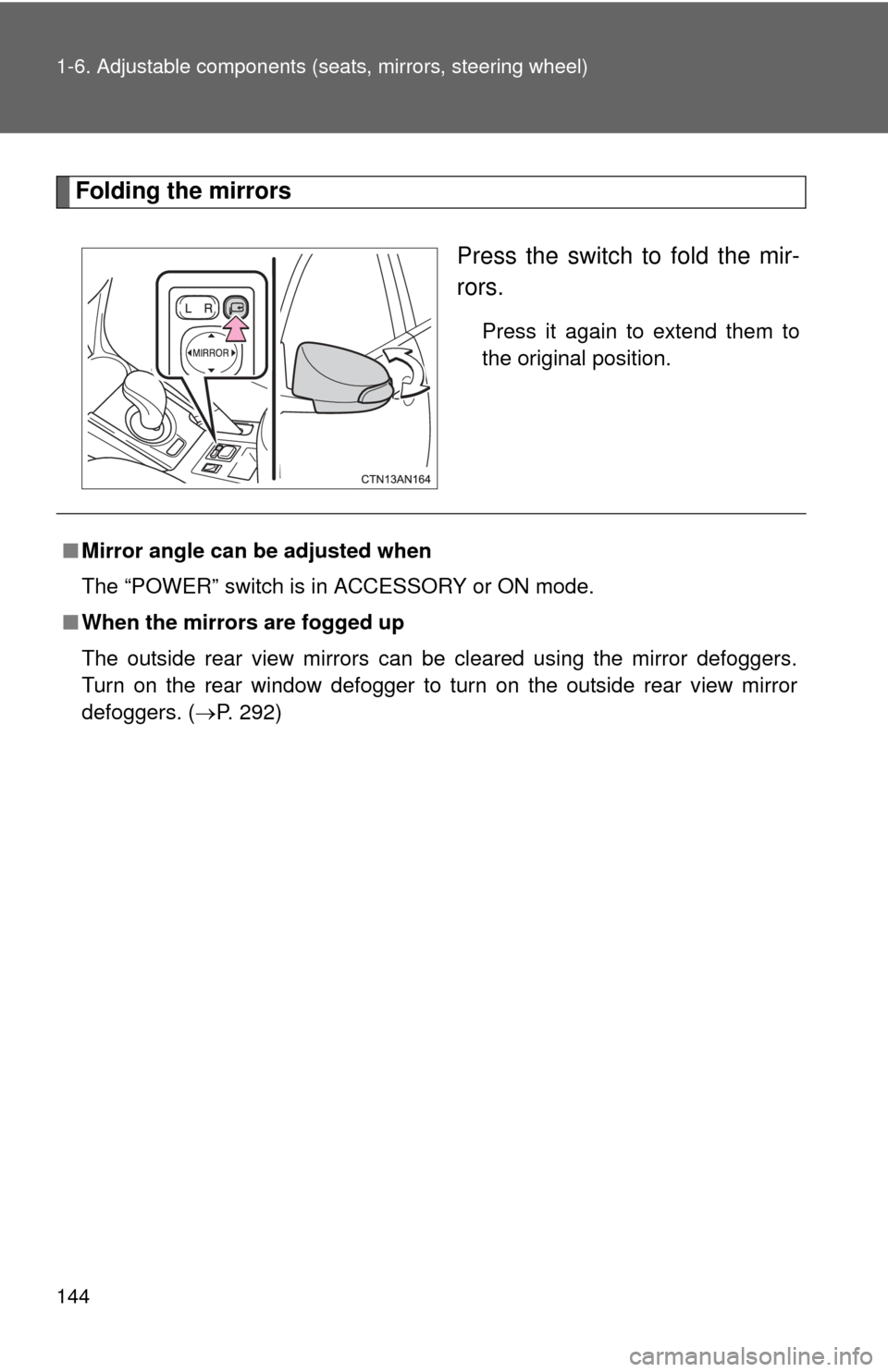
Folding the mirrors
Press the switch to fold the mir-
rors.
Press it again to extend them to
the original position.
■Mirror angle can be adjusted when
The “POWER” switch is in ACCESSORY or ON mode.
■ When the mirrors are fogged up
The outside rear view mirrors can be cleared using the mirror defoggers.
Turn on the rear window defogger to turn on the outside rear view mirror
defoggers. ( P. 292)
Page 146 of 520
146
1-7. Opening and closing the windows
Power windows
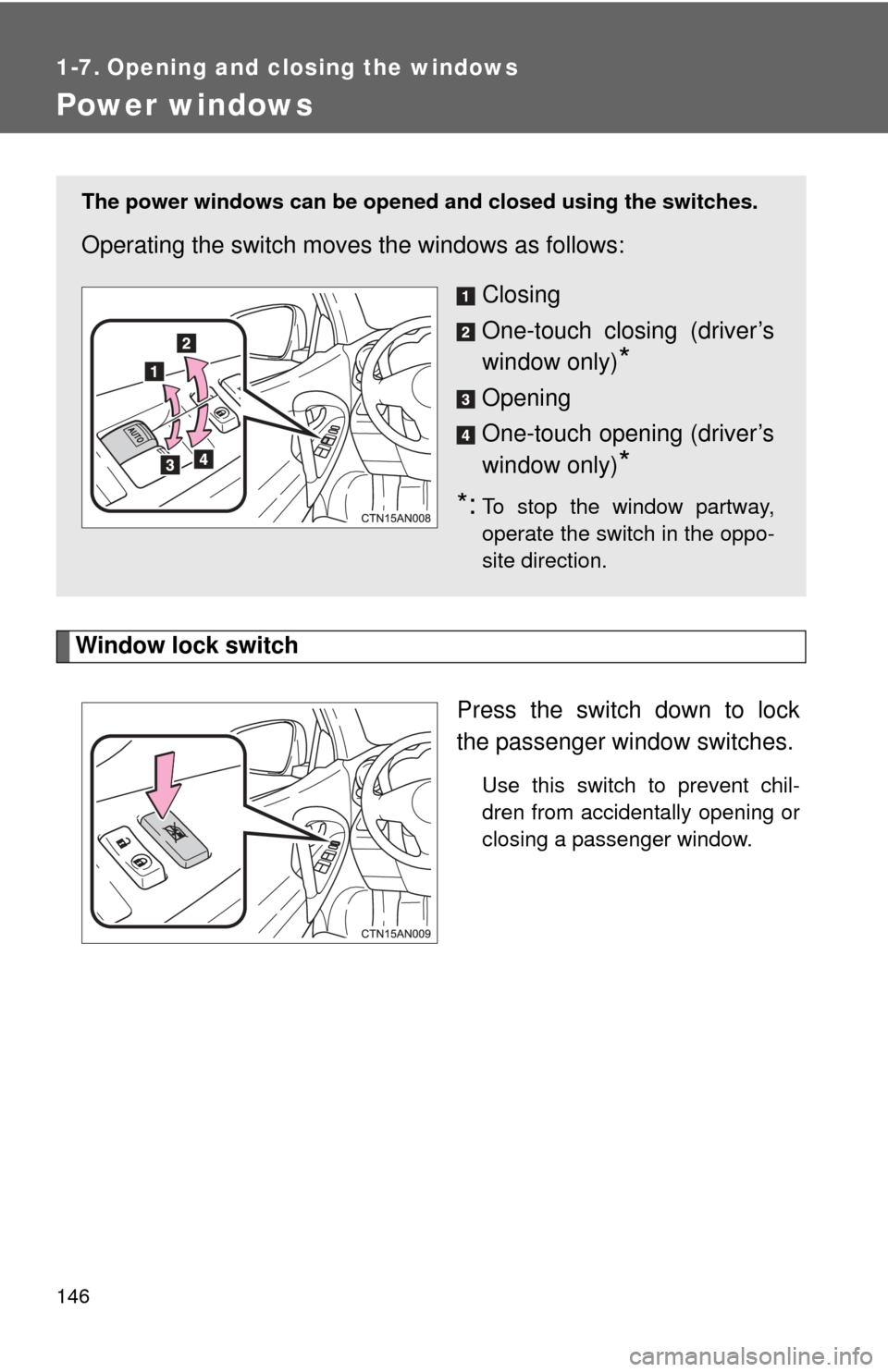
Window lock switchPress the switch down to lock
the passenger window switches.
Use this switch to prevent chil-
dren from accidentally opening or
closing a passenger window.
The power windows can be opened and closed using the switches.
Operating the switch moves the windows as follows:
Closing
One-touch closing (driver’s
window only)
*
Opening
One-touch opening (driver’s
window only)
*
*:To stop the window partway,
operate the switch in the oppo-
site direction.
Page 147 of 520

147
1-7. Opening and closing the windows
1
Before driving
■
The power windows can be operated when
The “POWER” switch is in ON mode.
■ Operating the power wi ndows after turning the “POWER” switch off
(front windows only)
The power windows can be operated for approximately 45 seconds after the
“POWER” switch is turned to ACCE SSORY mode or turned off. They can-
not, however, be operated once either front door is opened.
■ Jam protection function (driver’s window only)
If an object becomes caught between the window and the window frame,
window travel is stopped and the window is opened slightly.
■ When the power window does not cl ose normally (driver’s window only)
If the jam protection function is operating abnormally and a window cannot
be closed, perform the following operations using the power window switch
on the driver's door.
● After stopping the vehicle, the window can be closed by holding the
power window switch in the one-touch closing position while the
“POWER” switch is turned to ON mode.
● If the window still cannot be closed even by carrying out the operation
explained above, initialize the function by performing the following proce-
dure.
Hold the power window switch in the one-touch closing position.
Continue holding the switch for a further 6 seconds after the win-
dow has closed.
Hold the power window switch in the one-touch opening position.
Continue holding the switch for a further 2 seconds after the win-
dow has opened completely.
Hold the power window switch in the one-touch closing position
once again. Continue holding the switch for a further 2 seconds
after the window has closed.
If you release the switch while the window is moving, start again from the
beginning.
If the window continues to close but then re-open slightly even after perform-
ing the above procedure correctly, have the vehicle inspected by your Toyota
dealer.
STEP 1
STEP 2
STEP 3
Page 148 of 520

148 1-7. Opening and closing the windows
CAUTION
■Closing the windows
Observe the following precautions.
Failure to do so may result in death or serious injury.
●Check to make sure that all passengers do not have any part of their body
in a position where it could be caught when a window is being operated.
● Do not allow children to operate the power windows.
Closing a power window on someone can cause serious injury, and in
some instances, even death.
■ Jam protection function (driver’s window only)
●Never use any part of your body to intentionally activate the jam protection
function.
● The jam protection function may not work if something gets caught just
before the window fully closes.
Page 165 of 520

165
1-9. Safety information
1
Before driving
CAUTION
■
SRS airbag precautions
●Do not touch any of the component parts immediately after the SRS air-
bags have deployed (inflated) as they may be hot.
● If breathing becomes difficult after the SRS airbags has deployed, open a
door or window to allow fresh air in, or leave the vehicle if it is safe to do
so. Wash off any residue as soon as possible to prevent skin irritation.
● If the areas where the SRS airbags are stored, such as the steering wheel
pad and front and rear pillar garnishes, are damaged or cracked, have
them replaced by your Toyota dealer.
● Do not place anything, such as a cushion, on the front passenger's seat.
Doing so will disperse the passenger's weight, which prevents the sensor
from detecting the passenger's weight properly. As a result, the SRS front
passenger airbag may not deploy in the event of a collision.
■ Modification and disposal of SRS airbag system components
Do not dispose of your vehicle or per form any of the following modifications
without consulting your Toyota dealer.
The SRS airbags may malfunction or deploy (inflate) accidentally, causing
death or serious injury.
● Installation, removal, disassembly and repair of the SRS airbags
● Repairs, modifications, removal or replacement of the steering wheel,
instrument panel, dashboard, seats or seat upholstery, front, side and rear
pillars or roof side rails
● Repairs or modifications of the front fender, front bumper, or side of the
occupant compartment
● Installation of snow plows, winches, etc. to the front grille (bull bars or kan-
garoo bar etc.) or roof luggage carrier
● Modifications to the vehicle's suspension system
● Installation of electronic devices such as mobile two-way radios or CD
players
● Modifications to your vehicle for a person with a physical disability
Page 189 of 520
When driving2
189
2-1. Driving proceduresDriving the vehicle............ 190
Power switch .................... 200
Transmission.................... 206
Turn signal lever .............. 215
Parking brake ................... 216
Horn ................................. 217
2-2. Instrument cluster Gauges and meters ......... 218
Indicators and warning lights .............................. 223
Multi-information display............................ 227
2-3. Operating the lights and wipers
Headlight switch ............... 234
Windshield wipers and washer ........................... 238
Rear window wiper and washer ........................... 241
2-4. Using other driving systems
Cruise control ................... 243
Rear view monitor system ........................... 247
Driving assist systems ..... 251
Hill-start assist control ...... 256 2-5. Driving information
Utility vehicle precautions .................... 258
Cargo and luggage .......... 263
Vehicle load limits ............ 267
Winter driving tips ............ 268
Trailer towing ................... 273
Dinghy towing .................. 274