navigation TOYOTA RAV4 EV 2012 1.G Owners Manual
[x] Cancel search | Manufacturer: TOYOTA, Model Year: 2012, Model line: RAV4 EV, Model: TOYOTA RAV4 EV 2012 1.GPages: 520, PDF Size: 8.29 MB
Page 2 of 520

TABLE OF CONTENTSIndex
2
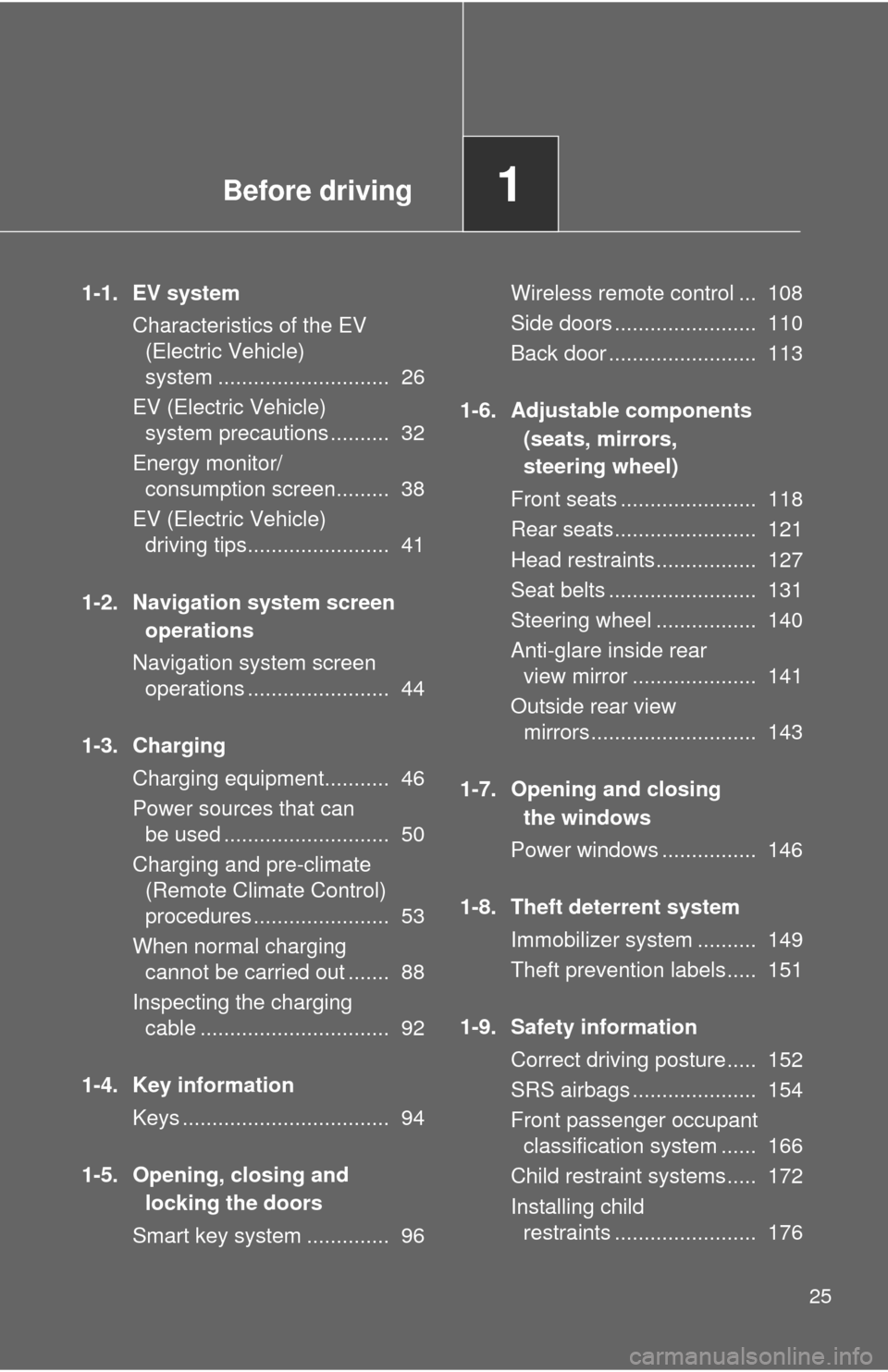
1-1. EV systemCharacteristics of the EV (Electric Vehicle) system .... 26
EV (Electric Vehicle) system precautions ............ 32
Energy monitor/ consumption screen ........... 38
EV (Electric Vehicle) driving tips .......................... 41
1-2. Navigation system screen operations
Navigation system screen operations .......................... 44
1-3. Charging Charging equipment ............. 46
Power sources that can be used .............................. 50
Charging and pre-climate (Remote Climate Control)
procedures ......................... 53
When normal charging cannot be carried out ......... 88
Inspecting the charging cable .................................. 92
1-4. Key information Keys ..................................... 94 1-5. Opening, closing and
locking the doors
Smart key system ................. 96
Wireless remote control ...... 108
Side doors .......................... 110
Back door ........................... 113
1-6. Adjustable components (seats, mirrors,
steering wheel)
Front seats.......................... 118
Rear seats .......................... 121
Head restraints ................... 127
Seat belts............................ 131
Steering wheel .................... 140
Anti-glare inside rear view mirror ........................ 141
Outside rear view mirrors ... 143
1-7. Opening and closing the windows
Power windows................... 146
1-8. Theft deterrent system Immobilizer system ............. 149
Theft prevention labels ....... 151
1-9. Safety information Correct driving posture ....... 152
SRS airbags ....................... 154
Front passenger occupant classification system ......... 166
Child restraint systems ....... 172
Installing child restraints ..... 176
1Before driving
Page 11 of 520
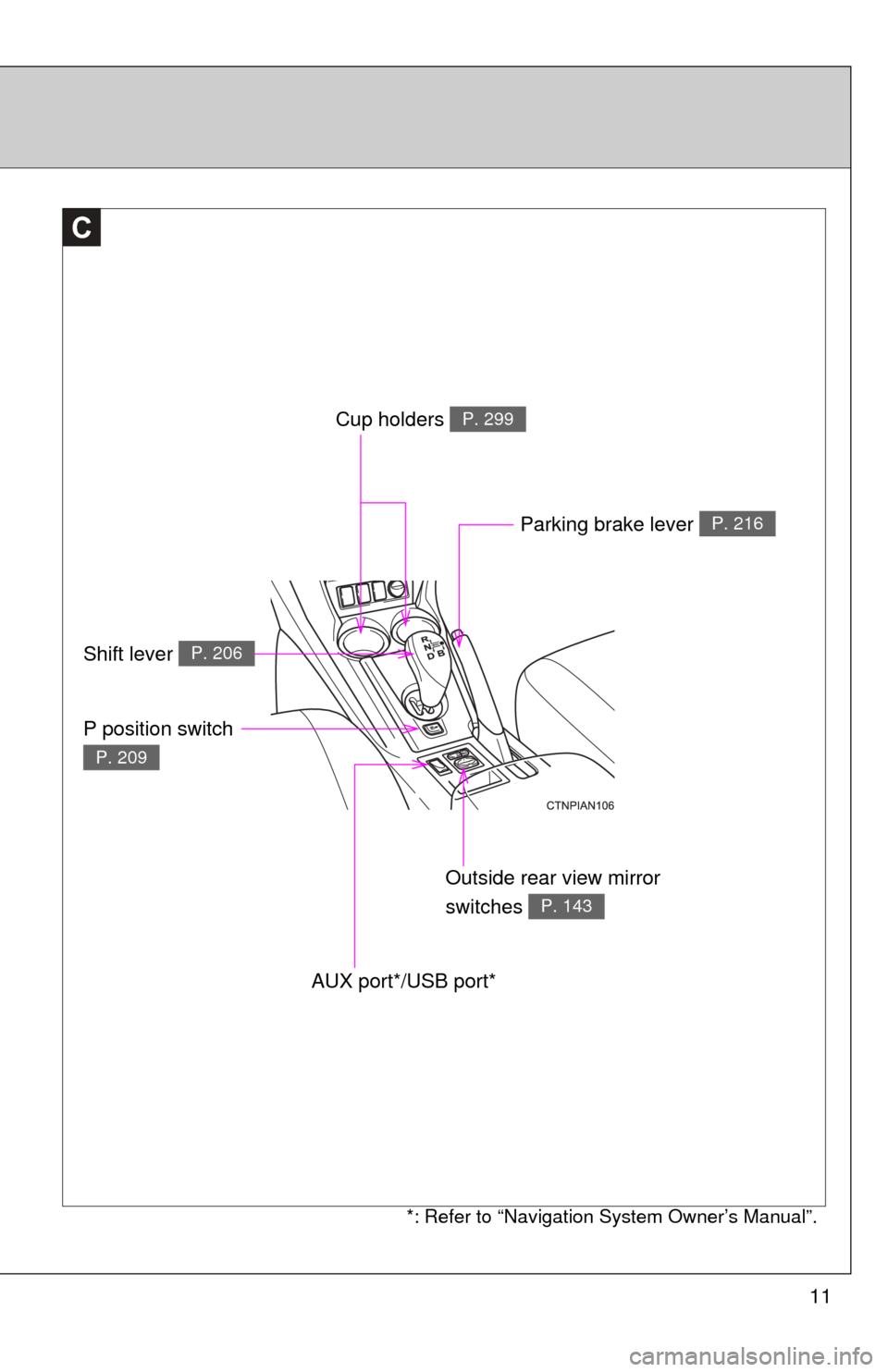
11
C
Outside rear view mirror
switches
P. 143
Parking brake lever P. 216
AUX port*/USB port*
Cup holders P. 299
Shift lever P. 206
P position switch
P. 209
*: Refer to “Navigation System Owner’s Manual”.
Page 12 of 520
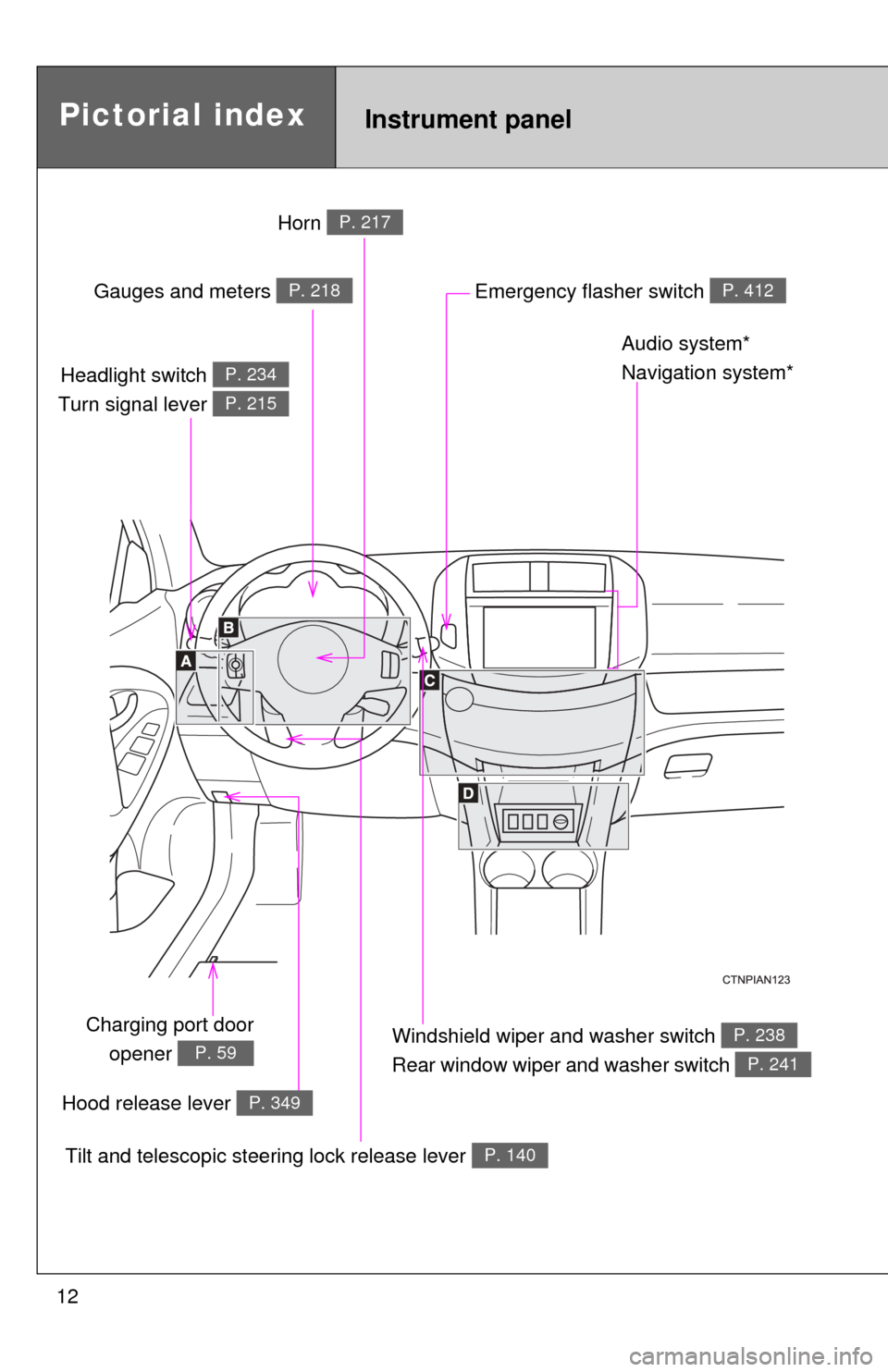
12
Tilt and telescopic steering lock release lever P. 140
Headlight switch
Turn signal lever P. 234
P. 215
Windshield wiper and washer switch
Rear window wiper and washer switch P. 238
P. 241
Charging port door
opener
P. 59
Emergency flasher switch P. 412
Pictorial indexInstrument panel
Gauges and meters P. 218
Audio system*
Navigation system*
Hood release lever
P. 349
Horn P. 217
Page 13 of 520
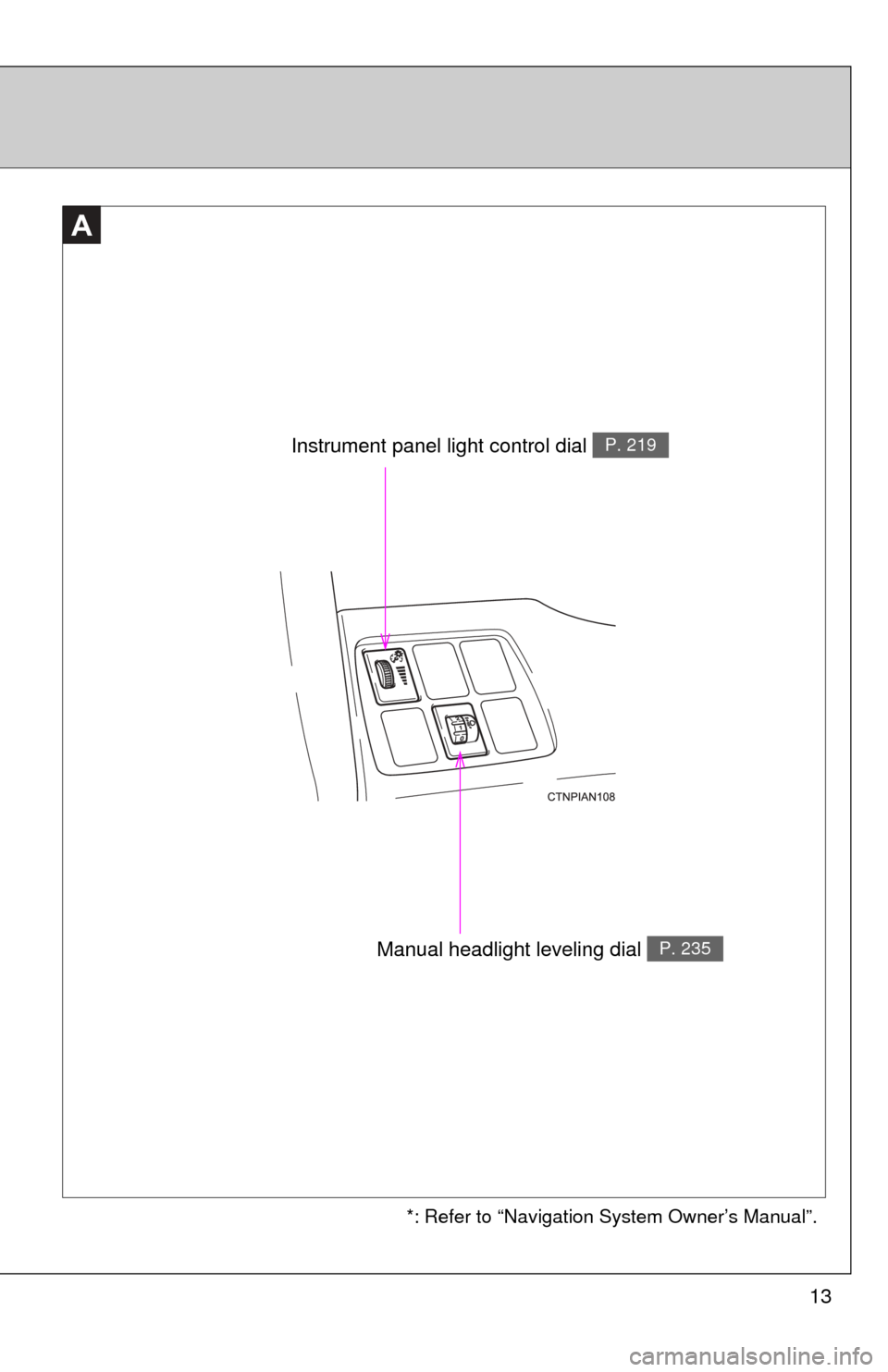
13
A
Instrument panel light control dial P. 219
*: Refer to “Navigation System Owner’s Manual”.
Manual headlight leveling dial P. 235
Page 15 of 520
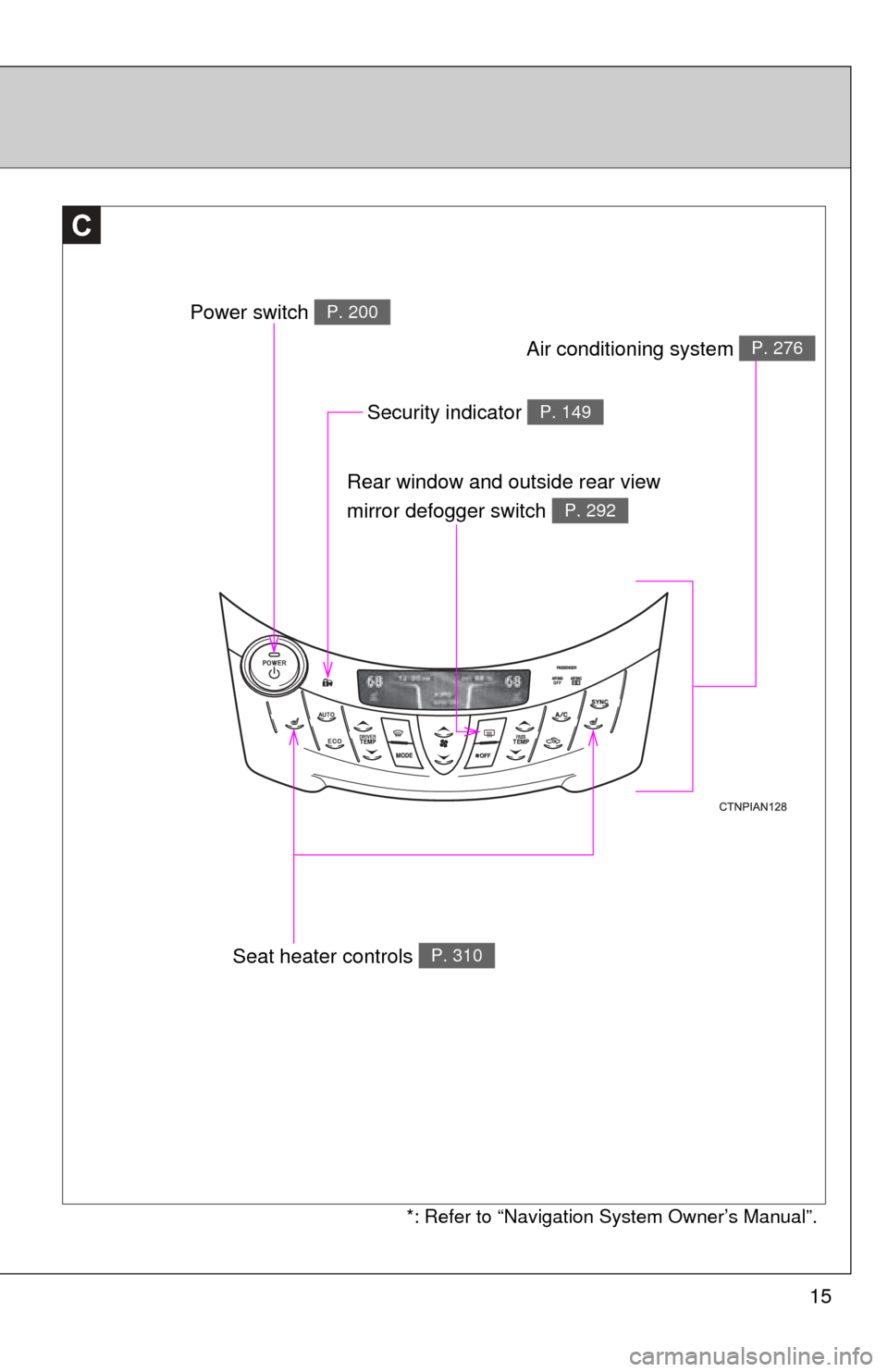
15
C
Power switch P. 200
Rear window and outside rear view
mirror defogger switch
P. 292
Security indicator P. 149
*: Refer to “Navigation System Owner’s Manual”.
Air conditioning system P. 276
Seat heater controls P. 310
Page 25 of 520
Before driving1
25
1-1. EV systemCharacteristics of the EV (Electric Vehicle)
system ............................. 26
EV (Electric Vehicle) system precautions .......... 32
Energy monitor/ consumption screen......... 38
EV (Electric Vehicle) driving tips........................ 41
1-2. Navigation system screen operations
Navigation system screen operations ........................ 44
1-3. Charging Charging equipment........... 46
Power sources that can be used ............................ 50
Charging and pre-climate (Remote Climate Control)
procedures ....................... 53
When normal charging cannot be carried out ....... 88
Inspecting the charging cable ................................ 92
1-4. Key information Keys ................................... 94
1-5. Opening, closing and locking the doors
Smart key system .............. 96 Wireless remote control ... 108
Side doors ........................ 110
Back door ......................... 113
1-6. Adjustable components (seats, mirrors,
steering wheel)
Front seats ....................... 118
Rear seats........................ 121
Head restraints................. 127
Seat belts ......................... 131
Steering wheel ................. 140
Anti-glare inside rear view mirror ..................... 141
Outside rear view mirrors............................ 143
1-7. Opening and closing the windows
Power windows ................ 146
1-8. Theft deterrent system Immobilizer system .......... 149
Theft prevention labels..... 151
1-9. Safety information Correct driving posture..... 152
SRS airbags ..................... 154
Front passenger occupant classification system ...... 166
Child restraint systems..... 172
Installing child restraints ........................ 176
Page 29 of 520
29
1-1. EV system
1
Before driving
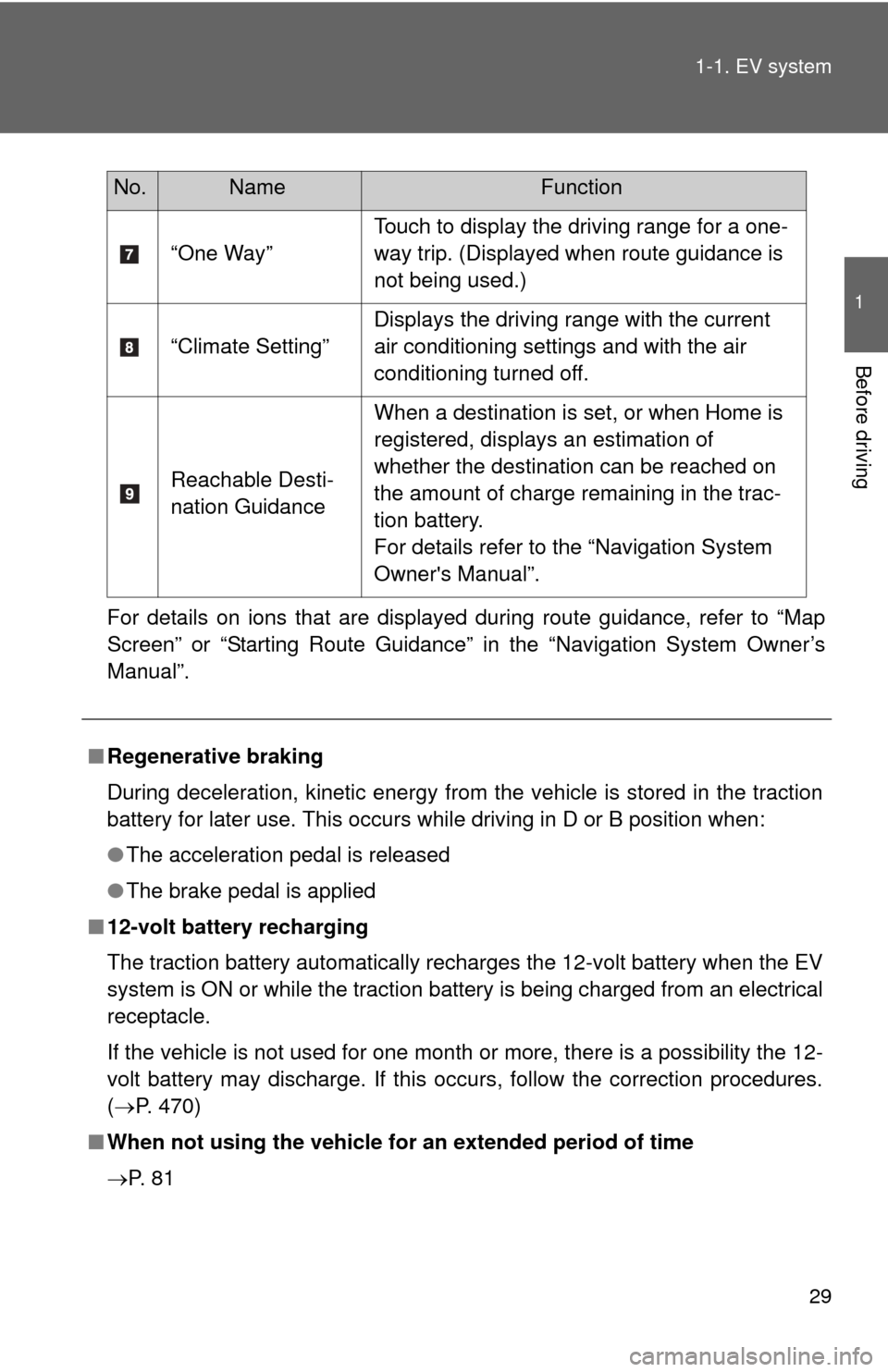
For details on ions that are displayed during route guidance, refer to “Map
Screen” or “Starting Route Guidance” in the “Navigation System Owner’s
Manual”.
“One Way”
Touch to display the driving range for a one-
way trip. (Displayed when route guidance is
not being used.)
“Climate Setting” Displays the driving range with the current
air conditioning settings and with the air
conditioning turned off.
Reachable Desti-
nation Guidance When a destination is set, or when Home is
registered, displays an estimation of
whether the destination can be reached on
the amount of charge remaining in the trac-
tion battery.
For details refer to the “Navigation System
Owner's Manual”.
No.NameFunction
■
Regenerative braking
During deceleration, kinetic energy from the vehicle is stored in the traction
battery for later use. This occurs while driving in D or B position when:
● The acceleration pedal is released
● The brake pedal is applied
■ 12-volt battery recharging
The traction battery automatically recharges the 12-volt battery when the EV
system is ON or while the traction battery is being charged from an electrical
receptacle.
If the vehicle is not used for one month or more, there is a possibility the 12-
volt battery may discharge. If this occurs, follow the correction procedures.
(P. 470)
■ When not using the vehicle for an extended period of time
P. 8 1
Page 30 of 520

30 1-1. EV system
■Charging
Be sure you maintain the traction battery charge level for your driving needs.
If the traction battery fully discharges, the vehicle cannot be driven a\
t all.
Even when driving, keep early charging in mind. ( P. 53) If the amount of
charge remaining in the traction battery becomes low, search for a charging
station using the navigation system*.
* For details, refer to the “Navigation System Owner's Manual”.
■ Driving Range
Based on the amount of charge remaining in the traction battery, the air-con-
ditioning system mode and so forth, the calculated driving range is displayed
on the meter.
Depending on driving speed, road surface conditions, method of air-condi-
tioning use, and so forth, the actual driving distance may increase or
decrease. Keep early charging in mind.
■ Noise and vibrations specific to an electric vehicle
Because an electric vehicle does not have the engine noise or vibrations
that a conventional vehicle has, the driver may not notice that the ready indi-
cator is illuminated and the vehicle is in a drivable condition. For safety rea-
sons, always shift the shift position to P and apply the parking brake when
parking the vehicle.
After starting the EV system, the following noises and vibrations may occur.
These noises and/or vibrations are not signs of a malfunction. For example:
● Motor sounds coming from the motor compartment.
● Electrical relay sounds may be heard from the traction battery when the
EV system starts or stops.
● Sounds may be heard from the transmission and its surrounding area
when the EV system starts or stops.
● Sounds may be heard due to regenerative braking when you depress the
brake pedal or release the accelerator pedal.
● Motor sounds may be heard when accelerating suddenly.
● Operational and motor sounds may be heard when the brake pedal is
depressed.
● The electric cooling fans in the front of the vehicle may be heard.
● Air conditioning operation sounds may be heard.
Page 38 of 520
38
1-1. EV system
Energy monitor/consumption screen
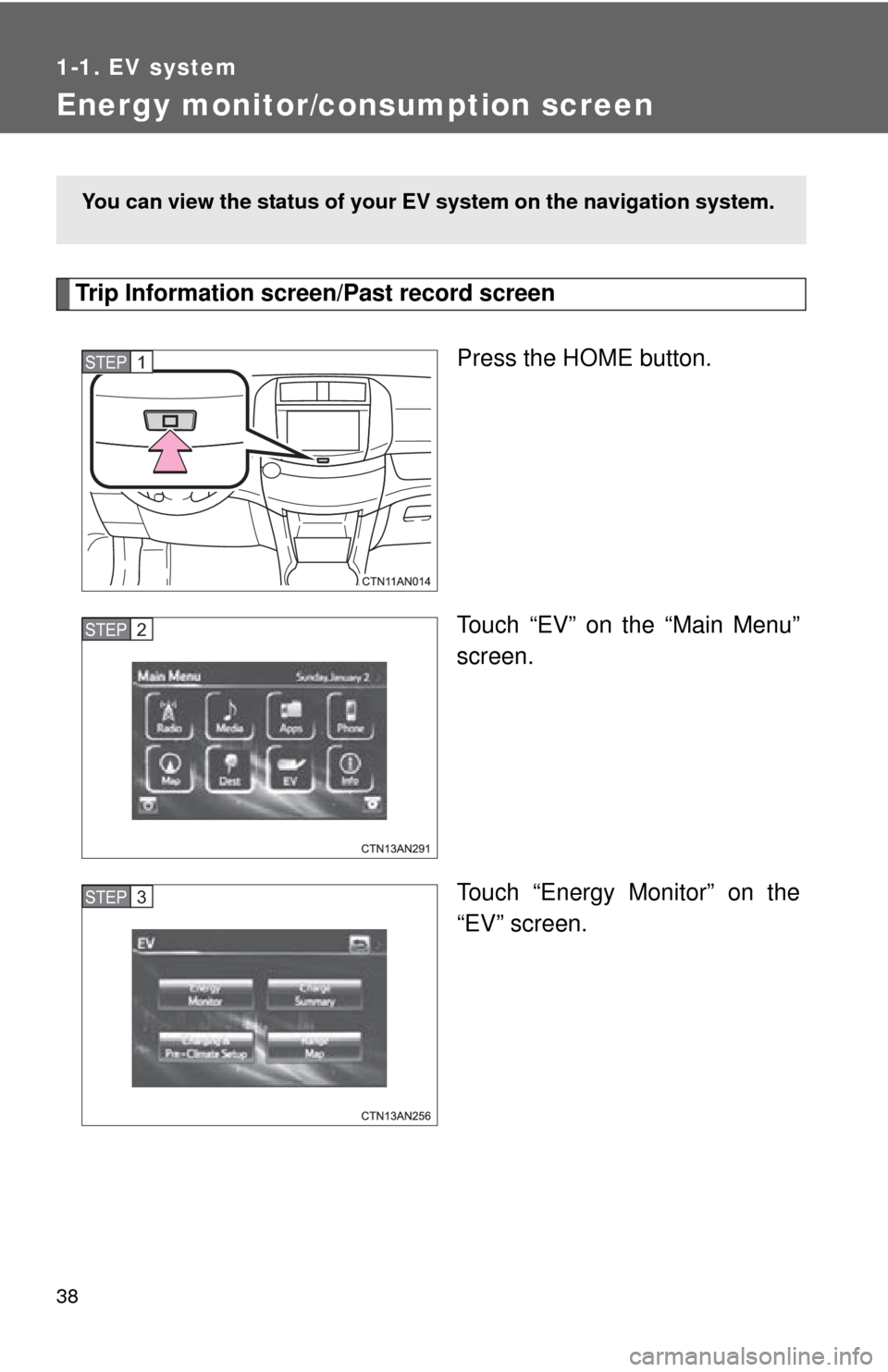
Trip Information screen/Past record screenPress the HOME button.
Touch “EV” on the “Main Menu”
screen.
Touch “Energy Monitor” on the
“EV” screen.
You can view the status of your EV system on the navigation system.
STEP 1
STEP 2
STEP 3
Page 44 of 520
44
1-2. Navigation system screen operations
Navigation system screen operations
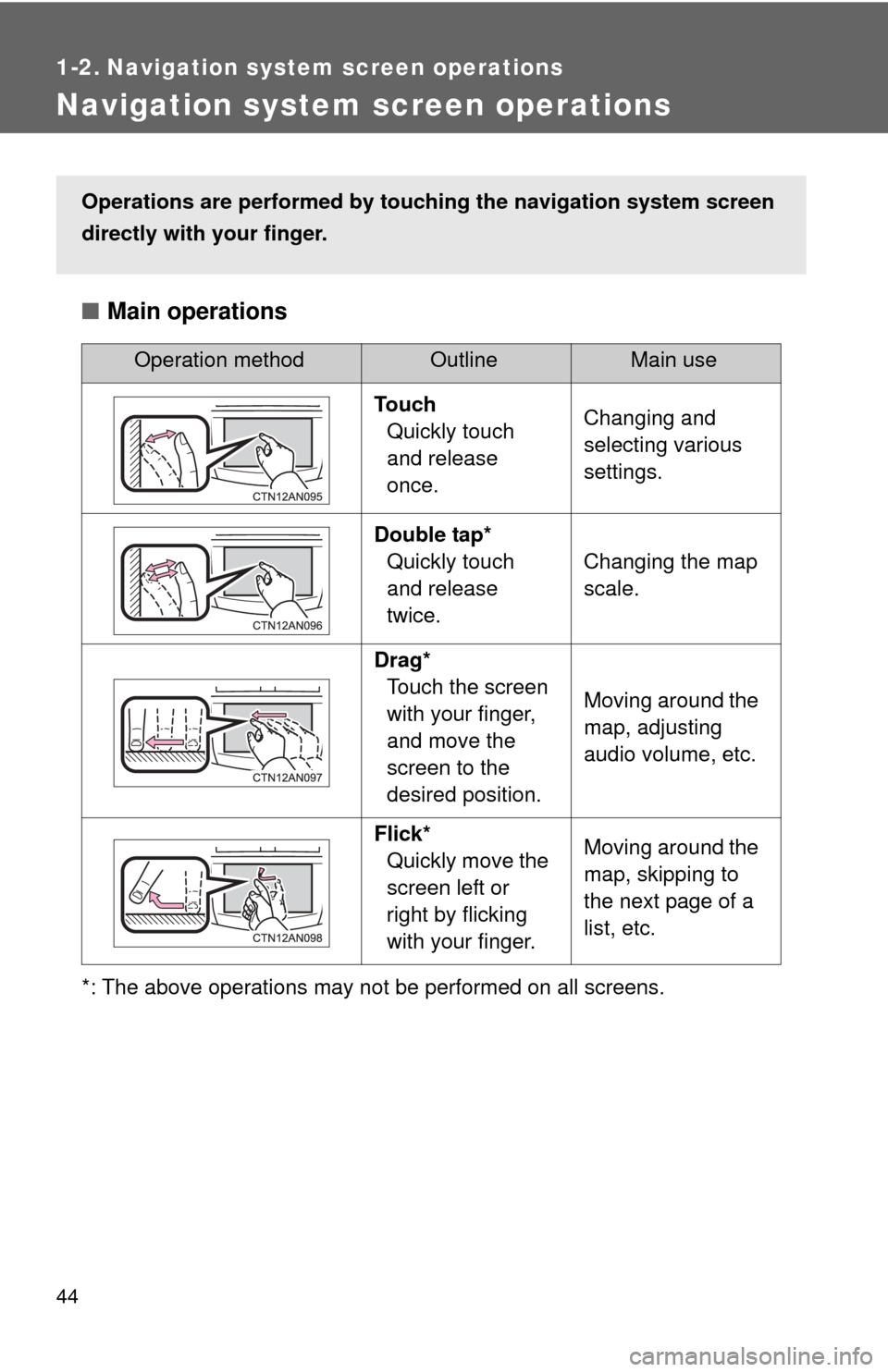
■Main operations
*: The above operations may not be performed on all screens.
Operation methodOutline Main use
Touch Quickly touch
and release
once. Changing and
selecting various
settings.
Double tap* Quickly touch
and release
twice. Changing the map
scale.
Drag* Touch the screen
with your finger,
and move the
screen to the
desired position. Moving around the
map, adjusting
audio volume, etc.
Flick* Quickly move the
screen left or
right by flicking
with your finger. Moving around the
map, skipping to
the next page of a
list, etc.
Operations are performed by touc
hing the navigation system screen
directly with your finger.