key battery TOYOTA RAV4 EV 2013 1.G User Guide
[x] Cancel search | Manufacturer: TOYOTA, Model Year: 2013, Model line: RAV4 EV, Model: TOYOTA RAV4 EV 2013 1.GPages: 520, PDF Size: 7.4 MB
Page 237 of 520
237
2-3. Operating the lights and wipers
2
When driving
■
Automatic light off system
The headlights and tail lights turn off 30 seconds after driver’s door is
opened and closed if the “POWER” switch has been turned to ACCESSORY
mode or turned off. (The lights turn off immediately if on the key is
pressed twice after all the doors are closed.)
To turn the lights on again, turn the “POWER” switch to ON mode, or turn the
headlight switch off and then back to or .
■ Customization that can be co nfigured at Toyota dealer
Settings (e.g. light sensor sensitivity) can be deactivated.
(Customizable features P. 500)
NOTICE
■To prevent 12-volt battery discharge
Do not leave the lights on longer than necessary when the EV system is off.
Page 295 of 520
295
3-2. Using the interior lights
3
Interior features
Interior light
Door position
Off
On
Luggage compartment lightOn
Off
■Illuminated entry system
The lights automatically turn on/off according to “POWER” switch mode, the
presence of the electronic key, whether the doors are locked/unlocked, and
whether the doors are open/closed.
■ To prevent 12-volt battery discharge (excluding luggage compartment
light)
If the lights remain on when a door is not fully closed and the personal/inte-
rior light main switch is in door position, the lights will go off automatically
after 20 minutes.
■ Customization that can be co nfigured at Toyota dealer
Settings (e.g. the time elapsed before lights turn off) can be changed.
(Customizable features P. 500)
Interior light and luggage compartment light
Page 333 of 520
Maintenance and care4
333
4-1. Maintenance and careCleaning and protecting the vehicle exterior ......... 334
Cleaning and protecting the vehicle interior .......... 337
4-2. Maintenance Maintenance requirements .................. 340
General maintenance....... 342
4-3. Do-it-yourself maintenance
Do-it-yourself service precautions .................... 346
Hood ................................ 349
Positioning a floor jack ..... 351
Motor compartment .......... 355
Tires ................................. 366
Tire inflation pressure ...... 374
Wheels ............................. 378
Air conditioning filter......... 381
Electronic key battery....... 383
Checking and replacing fuses .............................. 385
Headlight aim ................... 398
Light bulbs........................ 400
Page 363 of 520
363
4-3. Do-it-yourself maintenance
4
Maintenance and care
■
After recharging/reconnecting the 12-volt battery
●Unlocking the doors using the smart key system may not be possible
immediately after reconnecting the 12-volt battery. If this happens, use
the wireless remote control or the mechanical key to lock/unlock the
doors.
● Start the EV system with the “POWER” switch in ACCESSORY mode.
The EV system may not start with the “POWER” switch turned off. How-
ever, the EV system will operate normally from the second attempt.
● The “POWER” switch mode is recorded by the vehicle. If the 12-volt bat-
tery is reconnected, the vehicle will return the “POWER” switch mode to
the status it was in before the 12-volt battery was disconnected. Make
sure to turn the “POWER” switch off before disconnecting the 12-volt bat-
tery. Take extra care when connecting the 12-volt battery if the “POWER”
switch mode prior to discharge is unknown.
● When the 12-volt battery is reconnected, start the EV system, depress
the brake pedal, and confirm that it is possible to shift into each shift posi-
tion.
If the system will not start even after multiple attempts, contact your Toyota
dealer.
CAUTION
■ Chemicals in the 12-volt battery
The 12-volt battery contains poisonous and corrosive sulfuric acid and may
produce hydrogen gas which is flammable and explosive. To reduce the risk
of death or serious injury, take the following precautions while working on or
near the 12-volt battery:
●Do not cause sparks by touching the 12-volt battery terminals with tools.
● Do not smoke or light a match near the 12-volt battery.
● Avoid contact with eyes, skin and clothes.
● Never inhale or swallow electrolyte.
● Wear protective safety glasses when working near the 12-volt battery.
● Keep children away from the 12-volt battery.
Page 383 of 520
383
4-3. Do-it-yourself maintenance
4
Maintenance and care
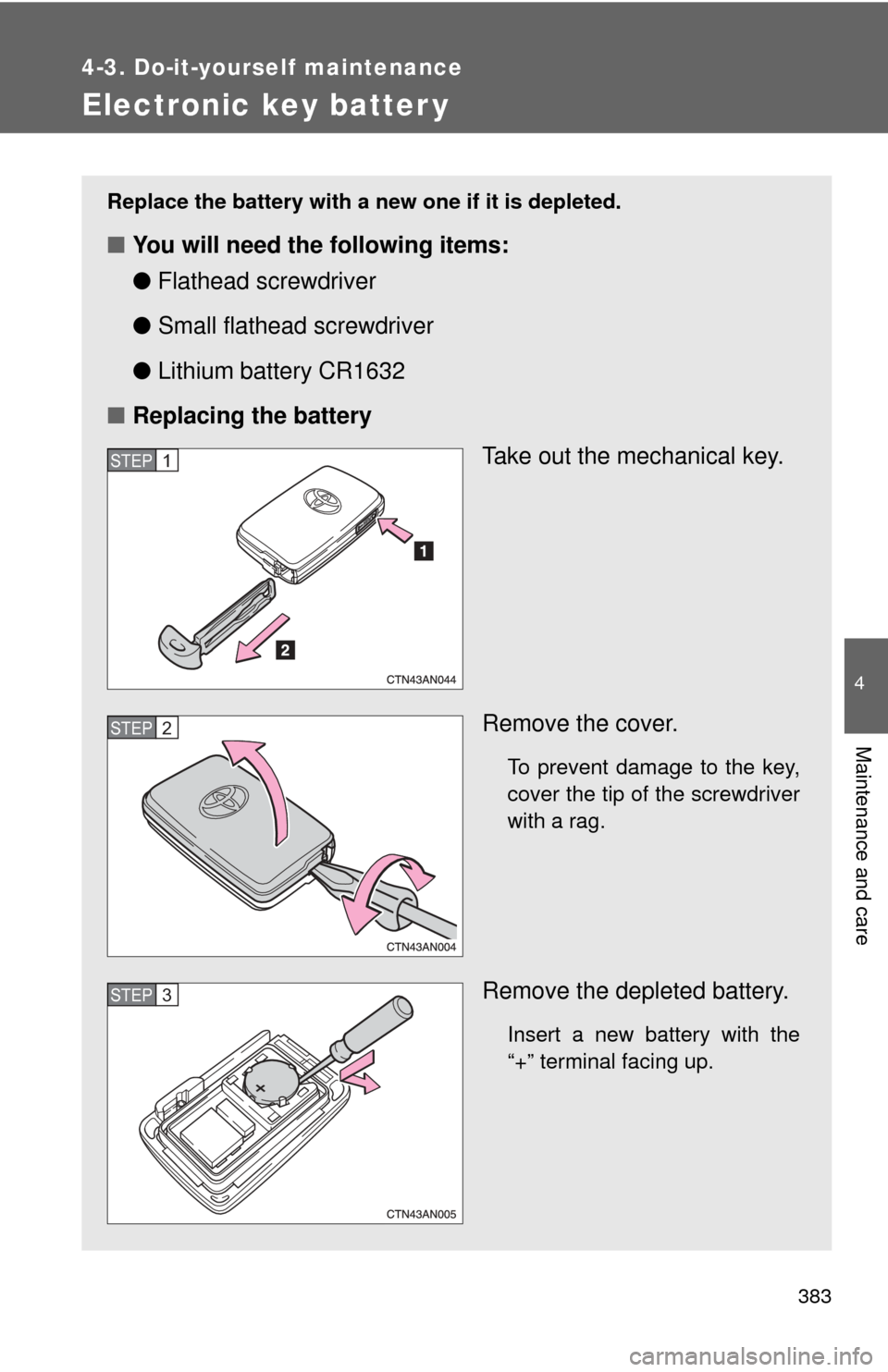
Electronic key batter y
Replace the battery with a new one if it is depleted.
■You will need the following items:
●Flathead screwdriver
● Small flathead screwdriver
● Lithium battery CR1632
■ Replacing the battery
Take out the mechanical key.
Remove the cover.
To prevent damage to the key,
cover the tip of the screwdriver
with a rag.
Remove the depleted battery.
Insert a new battery with the
“+” terminal facing up.
STEP 1
STEP 2
STEP 3
Page 384 of 520
384 4-3. Do-it-yourself maintenance
■Use a CR1632 lithium battery
●Batteries can be purchased at your Toyota dealer, local electrical appli-
ance shops or camera stores.
● Replace only with the same or equivalent type recommended by the
manufacturer.
● Dispose of used batteries according to local laws.
■ If the electronic key battery is depleted
The following symptoms may occur.
●The smart key system and wireless remote control will not function prop-
erly.
● The operational range will be reduced.
CAUTION
■Removed electronic key battery and other parts
These parts are small and if swallowed by a child, they can cause choking.
Keep away from children. Failure to do so could result in death or serious
injury.
NOTICE
■For normal operation after re placing the electronic key battery
Observe the following precautions to prevent accidents.
● Always work with dry hands.
Moisture may cause the battery to rust.
● Do not touch or move any other component inside the remote control.
● Do not bend either of the battery terminals.
Page 390 of 520

390 4-3. Do-it-yourself maintenance
12 ABS 130 A Anti-lock brake system
13 ECB 1 50 AElectronically controlled brake sys-
tem
14 ECB 2 50 AElectronically controlled brake sys-
tem
15 W/P-IGCT 50 A P/T W/P, BATT W/P 1, BATT W/P 2
16 EPS 60 A Electric power steering
17 P/I 60 AIGCT-D, HORN, parking control
system, IG2
18 MAIN 60 AH-LP MAIN, DRL, ODS, smart key
system, ABS 2, steering lock sys-
tem, PM-B, ECU-B MAIN
19 CONTACTOR 15 A Traction battery, charging system
20 IG2 15 A Starting system
21
HORN 10 A Horn
22 IGCT-D 7.5 A Thermal control system, power
management ECU, parking control
system, multiplex communication
system
23 PM-IGCT 7.5 A Power management system
24 P CNT-IGCT 7.5 A Parking control system
25 A/C-IGCT 10 A Air conditioning system
26 FAN-IGCT 7.5 A Electric cooling fans
FuseAmpereCircuit
Page 392 of 520

392 4-3. Do-it-yourself maintenance
14 SMART7.5 A Smart key system
15 STRG LOCK 20 A Steering lock system
16 AM2 7.5 A Starting system
17 ABS 2 7.5 A Anti-lock brake system
18 PTC HTR 2 50 A Air conditioning system
19 PTC HTR 1 50 A Air conditioning system
20 PTC HTR 3 50 A Air conditioning system
21 CHARGER 5 A Charging system
22 IGCT 2 20 A THRML CTRL, G/W-IGCT
23 HV BATT 10 A Traction battery
24 PM-B 7.5 A Power management system
25 ODS 7.5 A Occupant classification system
26 HTR 50 A Air conditioning system
27 FAN 1 50 A Electric cooling fans
28 FAN 2 50 A Electric cooling fans
29 H-LP MAIN 40 A H-LP LH-LO, H-LP RH-LO, H-LP
LH-HI, H-LP RH-HI, manual head-
light leveling system, daytime run-
ning light system
30 ECU-B MAIN 30 A ECU-B 2, A/C-B
31 SPARE 5 A Spare fuse
32 SPARE 10 A Spare fuse
33 SPARE 20 A Spare fuse
FuseAmpereCircuit
Page 411 of 520
When trouble arises5
411
5-1. Essential informationEmergency flashers ......... 412
If your vehicle needs to be towed ........................ 413
If you think something is wrong ......................... 416
5-2. Steps to take in an emergency
If a warning light turns on or a warning buzzer
sounds... ....................... 417
If a warning message is displayed........................ 427
If you have a flat tire......... 447
If the EV (Electric Vehicle) system will not start ....... 465
If you lose your keys ........ 467
If the electronic key does not operate
properly .......................... 468
If the vehicle 12-volt battery is discharged ...... 470
If your vehicle overheats ....................... 475
If the vehicle becomes stuck .............................. 477
If your vehicle has to be stopped in an
emergency ..................... 479
Page 441 of 520
5
When trouble arises
441
5-2. Steps to take in an emergency
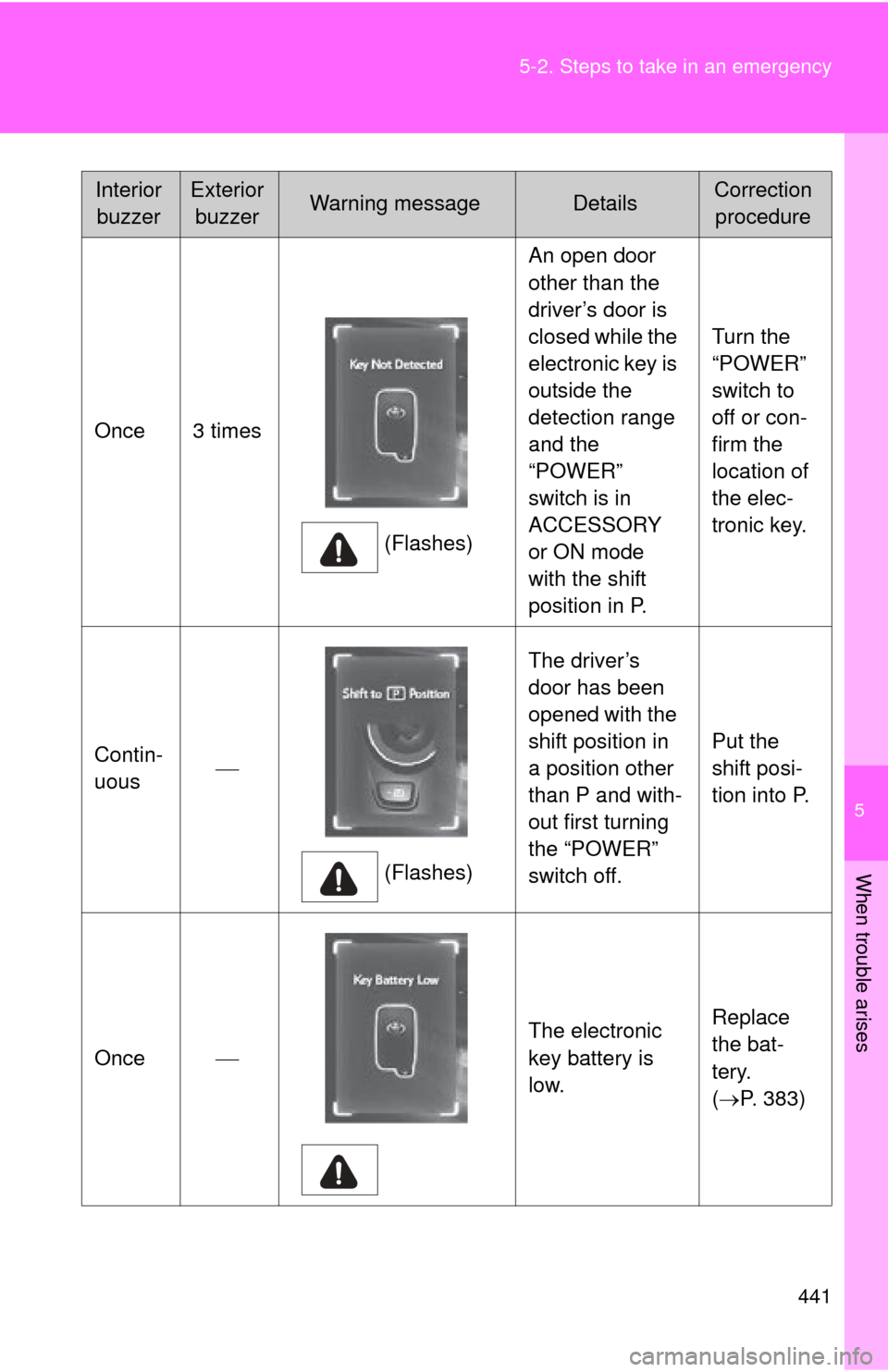
Once 3 times
(Flashes)An open door
other than the
driver’s door is
closed while the
electronic key is
outside the
detection range
and the
“POWER”
switch is in
ACCESSORY
or ON mode
with the shift
position in P.
Turn the
“POWER”
switch to
off or con-
firm the
location of
the elec-
tronic key.
Contin-
uous
(Flashes)The driver’s
door has been
opened with the
shift position in
a position other
than P and with-
out first turning
the “POWER”
switch off.
Put the
shift posi-
tion into P.
Once The electronic
key battery is
low.Replace
the bat-
tery.
(
P. 383)
Interior
buzzerExterior buzzerWarning messageDetailsCorrection procedure