remote control TOYOTA RAV4 EV 2013 1.G User Guide
[x] Cancel search | Manufacturer: TOYOTA, Model Year: 2013, Model line: RAV4 EV, Model: TOYOTA RAV4 EV 2013 1.GPages: 520, PDF Size: 7.4 MB
Page 106 of 520

106 1-5. Opening, closing and locking the doors
■To operate the system properly
Make sure to carry the electronic key when operating the system. Do not get
the electronic key too close to the vehicle when operating the system from
the outside of the vehicle.
Depending on the position and holding condition of the electronic key, the
key may not be detected correctly and the system may not operate properly.
(The alarm may go off accidentally, or the door lock prevention may not func-
tion.)
■ If the smart key system does not operate properly
● Locking and unlocking the doors: Use the mechanical key. ( P. 468)
● Starting the EV system. ( P. 468)
■ Electronic key battery depletion
●The standard battery life is 1 to 2 years. (The battery becomes depleted
even if the electronic key is not used.) If the smart key system or the
wireless remote control function does not operate, or the detection area
becomes smaller, the battery may be depleted. Replace the battery when
necessary. ( P. 383)
● If the battery becomes low, an alarm will sound in the cabin when the EV
system stops. (P. 100)
● To avoid serious deterioration, do not leave the electronic key within 3 ft.
(1 m) of the following electrical appliances that produce a magnetic field:
•TVs
• Personal computers
• Cellular phones, cordless phones and battery chargers
• Recharging cellular phones or cordless phones
• Induction cookers
• Table lamps
■ When the electronic key battery is fully depleted
P. 383
Page 108 of 520
108
1-5. Opening, closing and locking the doors
Wireless remote control
■Operation signals
A buzzer sounds and the emergency flashers flash to indicate that the doors
have been locked/unlocked. (Locked: Once; Unlocked: Twice)
■ Panic mode
■ Door lock buzzer
If a door is not fully closed, a buzzer sounds continuously if an attempt to
lock the door is made. Fully close the door to stop the buzzer, and lock the
vehicle once more.
■ Key battery depletion
P. 383
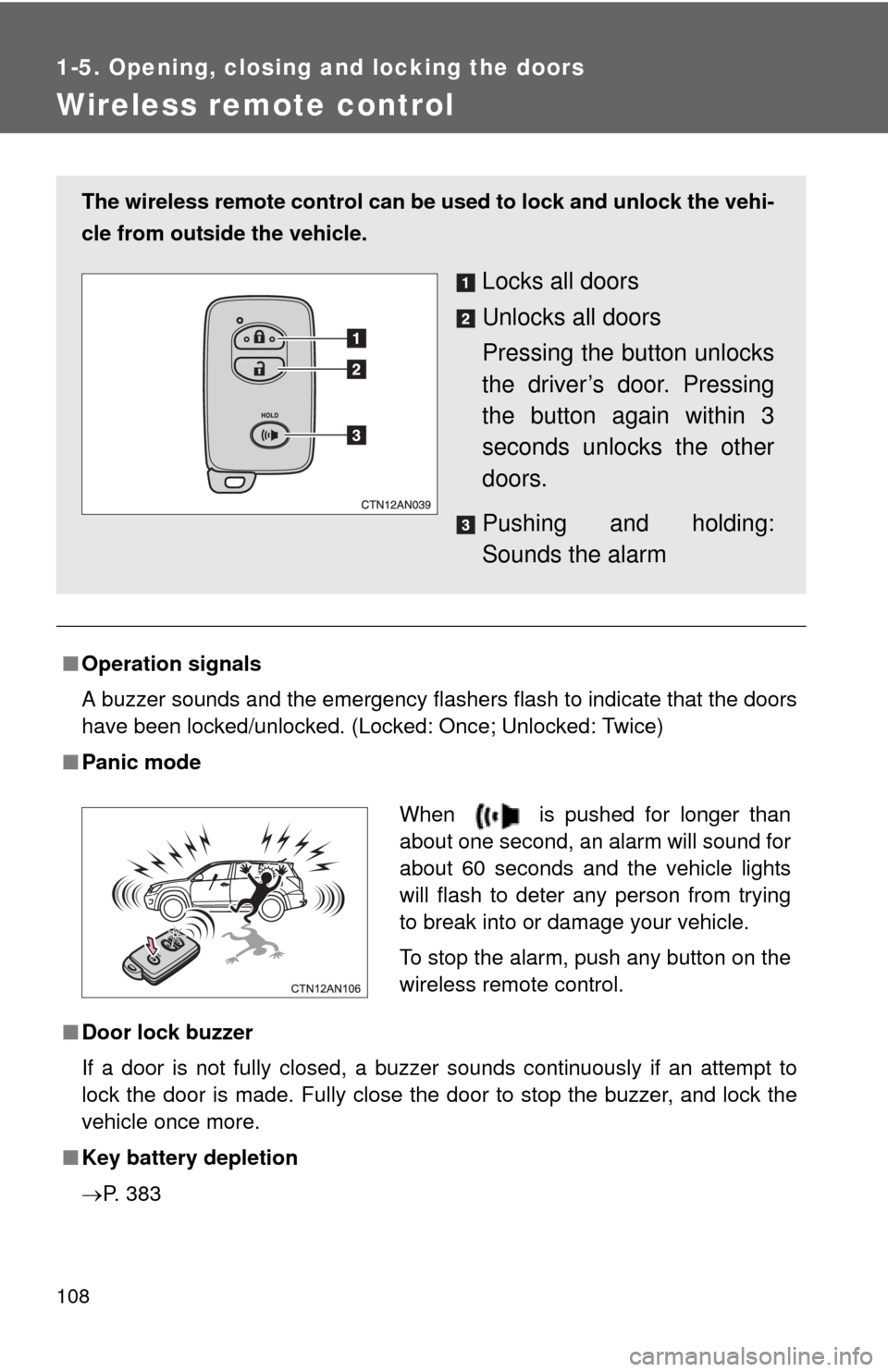
The wireless remote control can be used to lock and unlock the vehi-
cle from outside the vehicle.
Locks all doors
Unlocks all doors
Pressing the button unlocks
the driver’s door. Pressing
the button again within 3
seconds unlocks the other
doors.
Pushing and holding:
Sounds the alarm
When is pushed for longer than
about one second, an alarm will sound for
about 60 seconds and the vehicle lights
will flash to deter any person from trying
to break into or damage your vehicle.
To stop the alarm, push any button on the
wireless remote control.
Page 109 of 520

109
1-5. Opening, closing and locking the doors
1
Before driving
■
If the wireless remote control does not operate
Locking and unlocking the doors: Use the mechanical key. ( P. 468)
■ Security feature
If a door is not opened within approximately 60 seconds after the vehicle is
unlocked, the anti-theft system automatically locks the vehicle again.
■ Conditions affecting operation
P. 104
■ Customization that can be conf igured at your Toyota dealer
Settings (e.g. wireless remote control) can be changed.
(Customizable features P. 500)
■ Certification for wireless remote control
P. 107
Page 110 of 520
110
1-5. Opening, closing and locking the doors
Side doors
The vehicle can be locked and unlocked using the entry function,
wireless remote control or door lock switch.
■Entry function
P. 9 6
■ Wireless remote control
P. 108
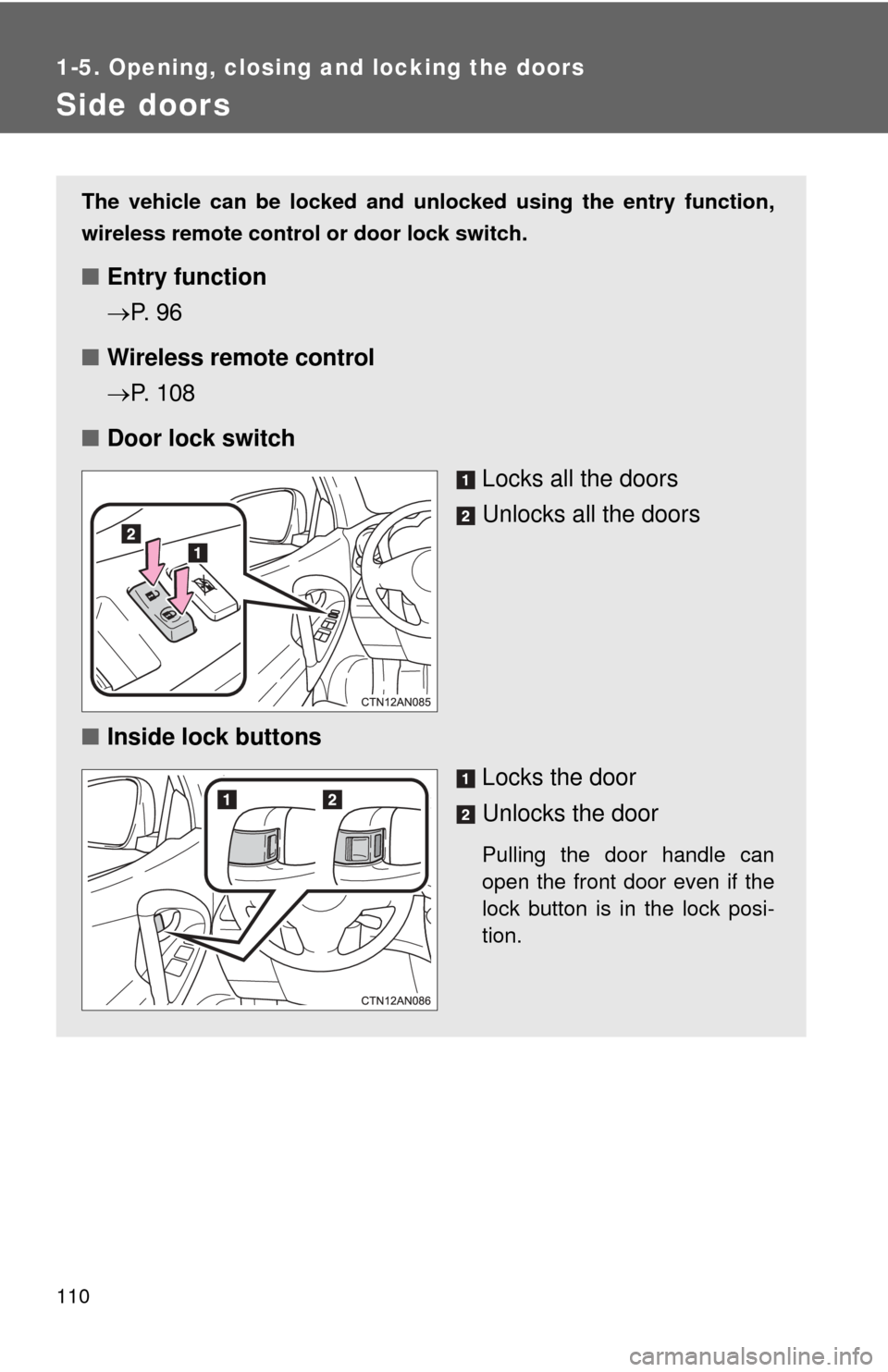
■ Door lock switch
Locks all the doors
Unlocks all the doors
■ Inside lock buttons
Locks the door
Unlocks the door
Pulling the door handle can
open the front door even if the
lock button is in the lock posi-
tion.
Page 111 of 520
111
1-5. Opening, closing and locking the doors
1
Before driving
Locking the front doors from the outside without the wireless
remote control or key
Move the inside lock button to the lock position.
Close the door.
The door cannot be locked if the “P OWER” switch is in ACCESSORY
or ON mode, or the electronic key is left inside the vehicle.
The key may not be detected correctly and the door may be locked.
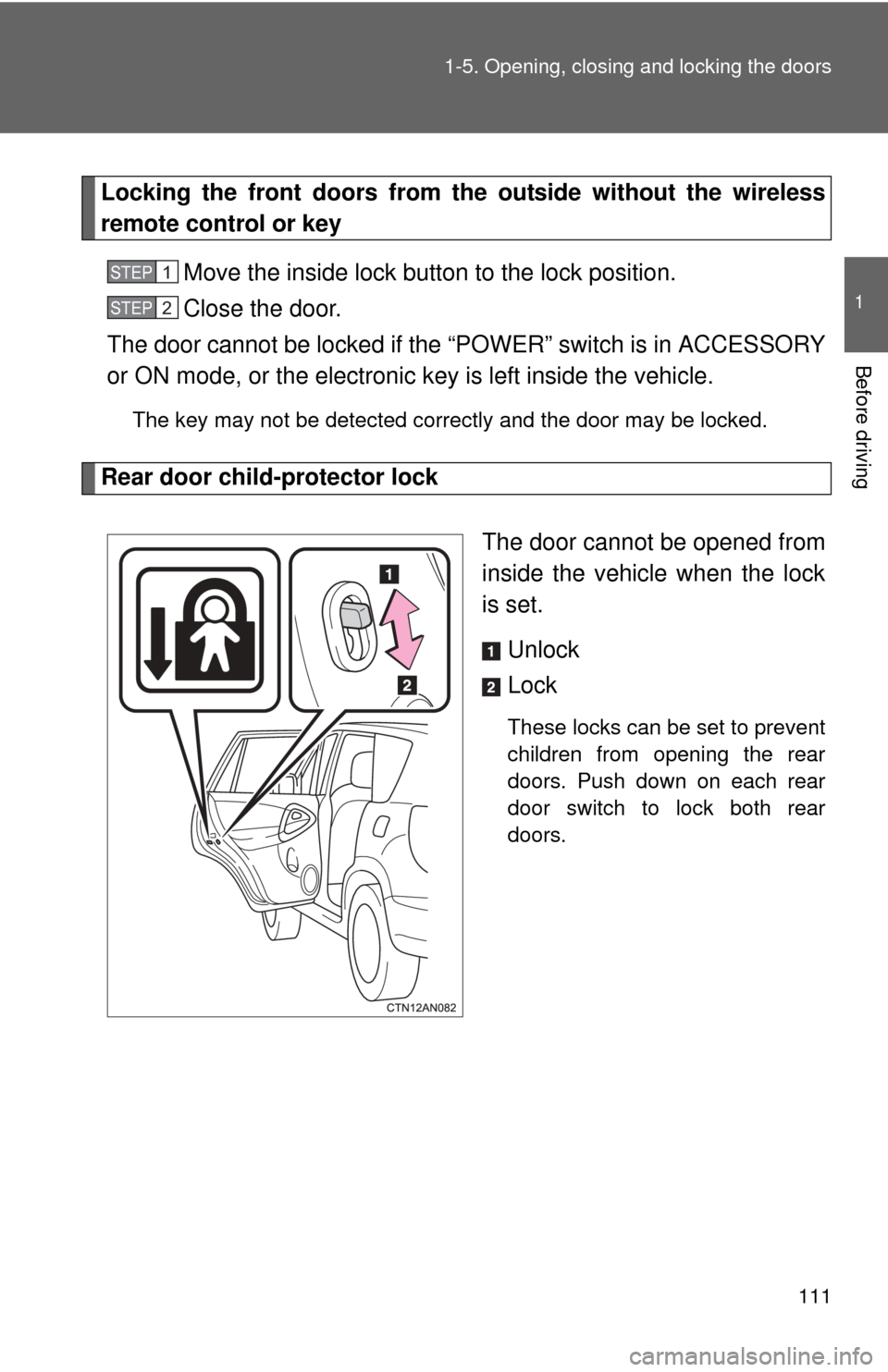
Rear door child-protector lock
The door cannot be opened from
inside the vehicle when the lock
is set. Unlock
Lock
These locks can be set to prevent
children from opening the rear
doors. Push down on each rear
door switch to lock both rear
doors.
STEP 1
STEP 2
Page 112 of 520
112 1-5. Opening, closing and locking the doors
■Using the mechanical key
The doors can also be locked and unlocked with the mechanical key.
(P. 468)
■ When all the doors are locked with the entry function, wireless remote
control or key
The doors cannot be unlocked with the door lock switch.
The door lock switch can be reset by unlocking all the doors with the entry
function, wireless remote control or key.
■ The doors cannot be locked when
The “POWER” switch is in ACCESSORY or ON mode, or the electronic key
is left inside the vehicle.
Depending on the position of the electronic key, the key may not be detected
correctly and the door may be locked.
■ Customization that can be co nfigured at Toyota dealer
Settings (e.g. door unlocking function) can be changed.
(Customizable features P. 500)
CAUTION
■To prevent an accident
Observe the following precautions while driving the vehicle.
Failure to do so may result in a door opening and an occupant falling out,
resulting in death or serious injury.
●Always use a seat belt.
● Always lock all the doors.
● Ensure that all doors are properly closed.
● Do not pull the inside handle of the doors while driving.
The doors may be opened and the passengers are thrown out of the vehi-
cle and it may result in serious injury or death.
Be especially careful for the front doors, as the doors may be opened even
if the inside lock buttons are in locked position.
● Set the rear door child-protector locks when children are seated in the rear
seats.
Page 113 of 520
113
1
1-5. Opening, closing and locking the doors
Before driving
Back door
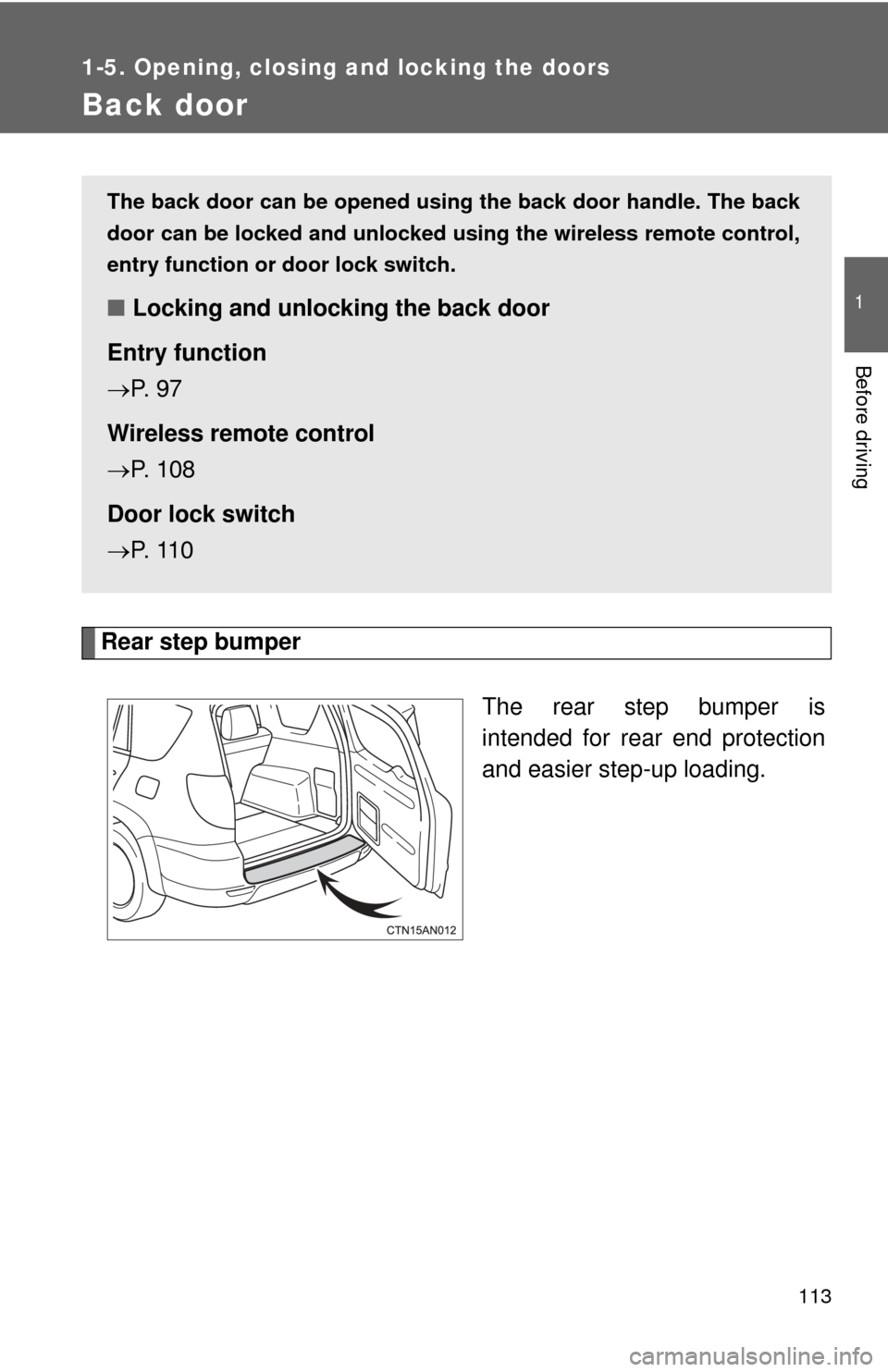
Rear step bumperThe rear step bumper is
intended for rear end protection
and easier step-up loading.
The back door can be opened using the back door handle. The back
door can be locked and unlocked us ing the wireless remote control,
entry function or door lock switch.
■ Locking and unlocking the back door
Entry function
P. 9 7
Wireless remote control
P. 108
Door lock switch
P. 11 0
Page 114 of 520
114 1-5. Opening, closing and locking the doors
■Luggage compartment light
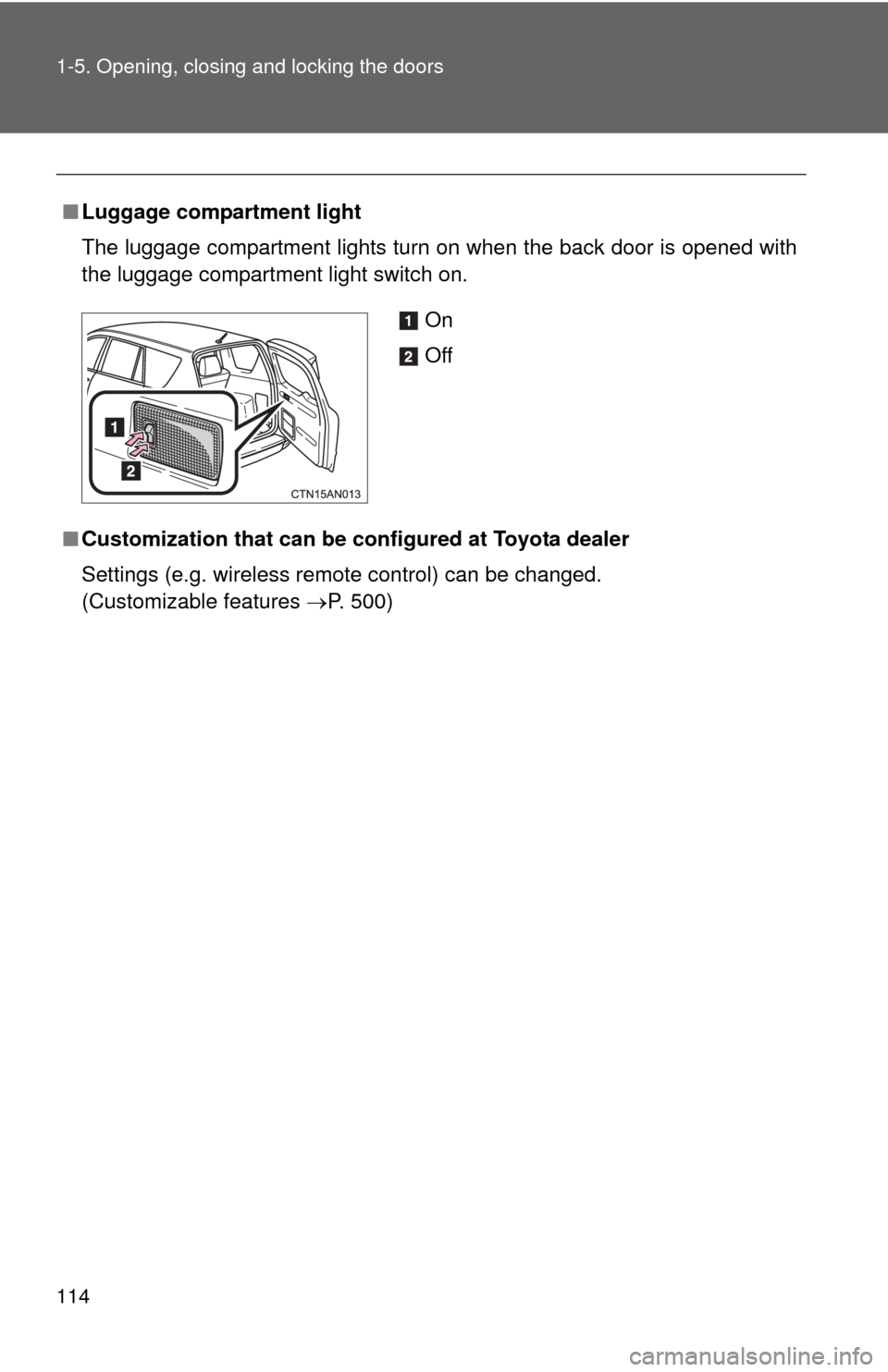
The luggage compartment lights turn on when the back door is opened with
the luggage compartment light switch on.
■ Customization that can be co nfigured at Toyota dealer
Settings (e.g. wireless remote control) can be changed.
(Customizable features P. 500)
On
Off
Page 277 of 520
277
3-1. Using the air conditioning system
and defogger
3
Interior features
■Pre-climate (Remote Climate Control)
By setting the sched ule, the air conditioning system can be
turned on before getting in the vehicle. ( P. 5 3 )
Even if the schedule has not been set, for users who own a
smart phone, the air conditioning system can be turned on and
off when away from the vehicle. ( P. 5 8 )
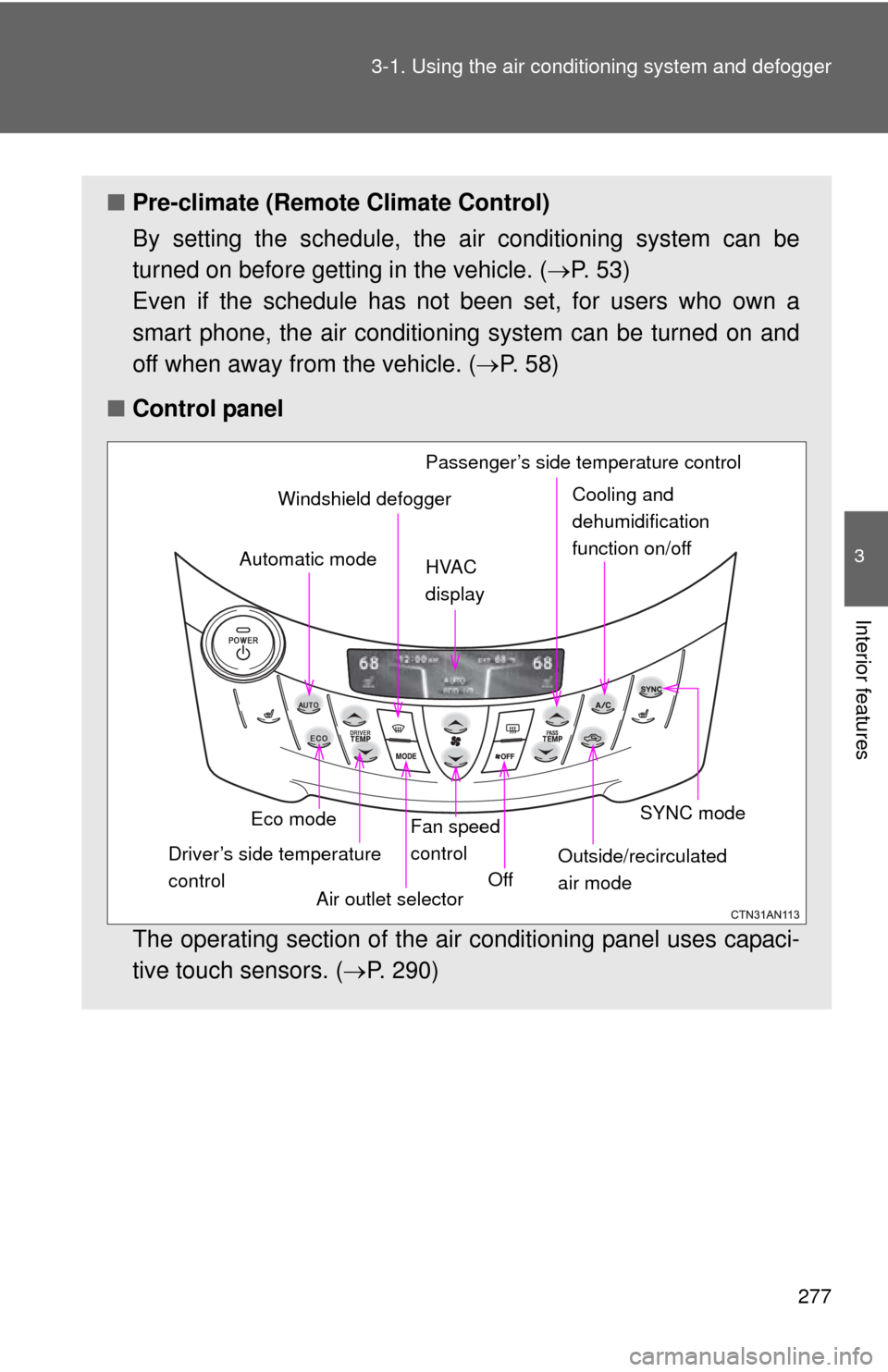
■ Control panel
The operating section of the air conditioning panel uses capaci-
tive touch sensors. ( P. 290)
Eco mode
Driver’s side temperature
control Air outlet selectorFan speed
control
Off SYNC mode
Outside/recirculated
air mode
Automatic mode
Windshield defogger
HVAC
display Passenger’s side temperature controlCooling and
dehumidification
function on/off
Page 321 of 520
321
3-4. Other interior features
3
Interior features
■
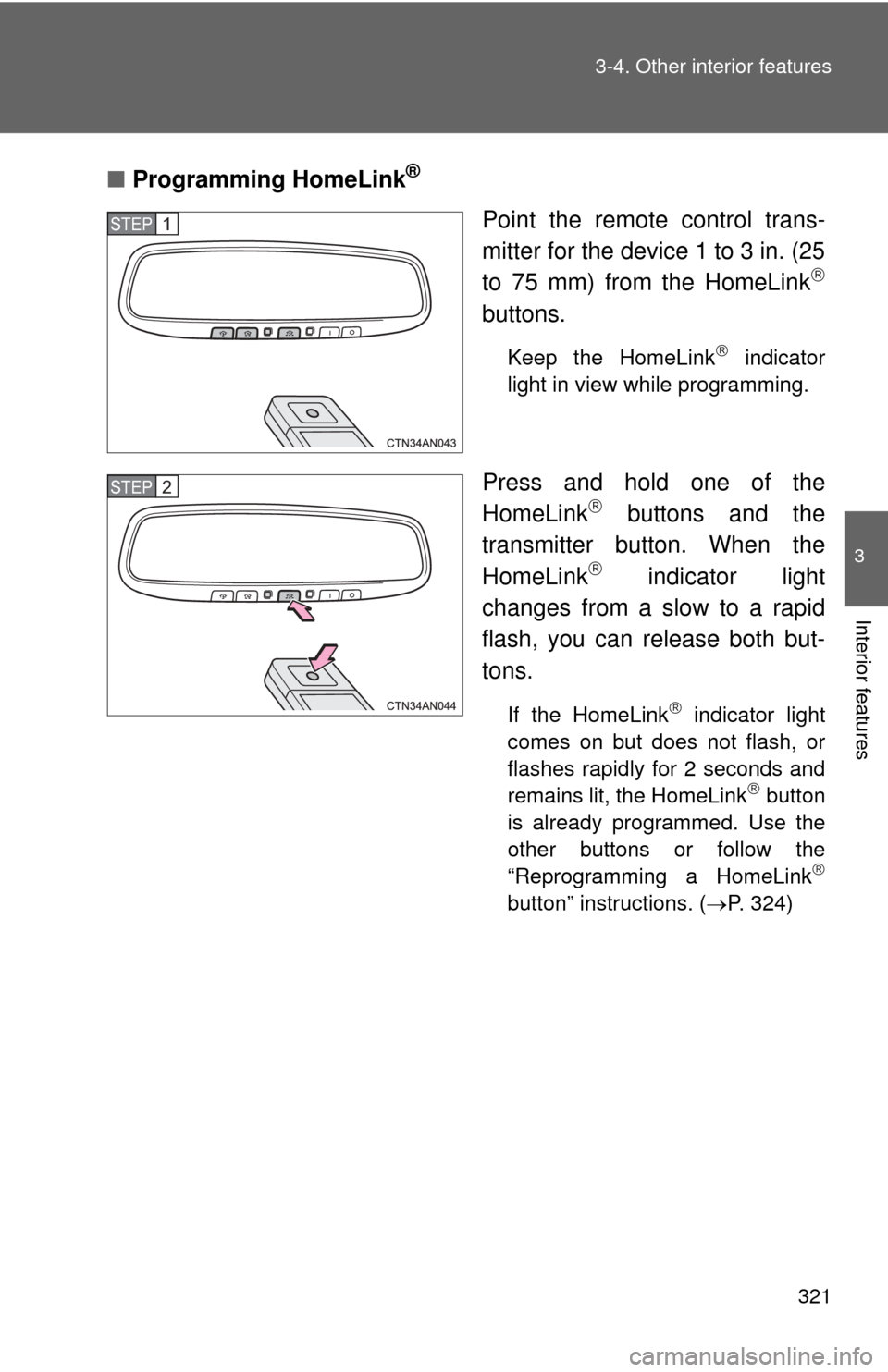
Programming HomeLink®
Point the remote control trans-
mitter for the device 1 to 3 in. (25
to 75 mm) from the HomeLink
buttons.
Keep the HomeLink indicator
light in view while programming.
Press and hold one of the
HomeLink buttons and the
transmitter button. When the
HomeLink
indicator light
changes from a slow to a rapid
flash, you can release both but-
tons.
If the HomeLink indicator light
comes on but does not flash, or
flashes rapidly for 2 seconds and
remains lit, the HomeLink
button
is already programmed. Use the
other buttons or follow the
“Reprogramming a HomeLink
button” instructions. ( P. 324)
STEP 1
STEP 2