brake TOYOTA RAV4 EV 2013 1.G Owners Manual
[x] Cancel search | Manufacturer: TOYOTA, Model Year: 2013, Model line: RAV4 EV, Model: TOYOTA RAV4 EV 2013 1.GPages: 520, PDF Size: 7.4 MB
Page 3 of 520

1
2
3
4
5
6
7
3
2-1. Driving proceduresDriving the vehicle............... 190
Power switch ....................... 200
Transmission....................... 206
Turn signal lever ................. 215
Parking brake ...................... 216
Horn .................................... 217
2-2. Instrument cluster Gauges and meters ............ 218
Indicators and warning lights ................................. 223
Multi-information display ..... 227
2-3. Operating the lights and wipers
Headlight switch .................. 234
Windshield wipers and washer .............................. 238
Rear window wiper and washer .............................. 241
2-4. Using other driving systems
Cruise control ...................... 243
Rear view monitor system .............................. 247
Driving assist systems ........ 251
Hill-start assist control ......... 256 2-5. Driving information
Utility vehicle precautions....................... 258
Cargo and luggage ............. 263
Vehicle load limits............... 267
Winter driving tips ............... 268
Trailer towing ...................... 273
Dinghy towing ..................... 274
3-1. Using the air conditioning system and defogger
Automatic air conditioning system.......... 276
Rear window and outside rear view mirror
defoggers ......................... 292
3-2. Using the interior lights Interior lights list ................. 293
• Personal/interior light main switch ...................... 294
• Personal/interior lights...... 294
• Interior light ...................... 295
• Luggage compartment light................................... 295
3-3. Using the storage features List of storage features ....... 296
• Glove box ......................... 297
• Console box ..................... 298
• Cup holders ...................... 299
• Bottle holders ................... 300
• Auxiliary boxes ................. 302
2When driving
3Interior features
Page 11 of 520
11
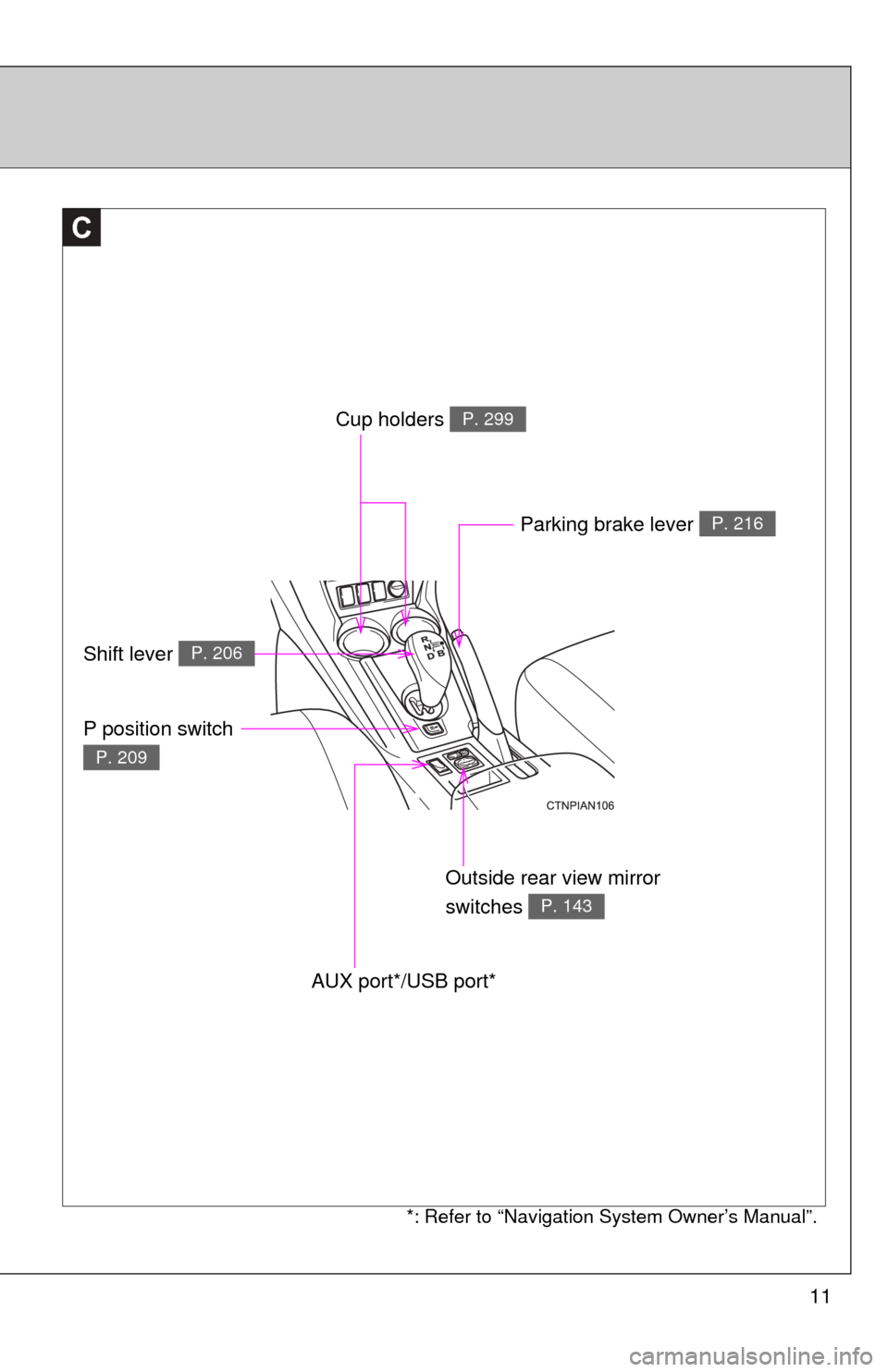
C
Outside rear view mirror
switches
P. 143
Parking brake lever P. 216
AUX port*/USB port*
Cup holders P. 299
Shift lever P. 206
P position switch
P. 209
*: Refer to “Navigation System Owner’s Manual”.
Page 18 of 520

18
For your information
Main Owner’s Manual
Please note that this manual covers all models and all equipment, including
options. Therefore, you may find some explanations for equipment not
installed on your vehicle.
All specifications provided in this manual are current at the time of printing.
However, because of the Toyota policy of continual product improvement, we
reserve the right to make changes at any time without notice.
Depending on specifications, the vehicle shown in the illustrations may differ
from your vehicle in terms of equipment.
Accessories, spare parts and modification of your Toyota
A wide variety of non-genuine spare parts and accessories for Toyota
vehicles are currently available on the market. You should know that these
parts are not covered by Toyota warranty and that Toyota is not responsible
for their performance, repair, or replacement, or for any damage they may
cause to, or adverse effect they may have on, your Toyota vehicle.
This vehicle should not be modified with non-genuine Toyota products.
Modification with non-genuine Toyota products may affect performance,
safety or durability, and may even violate governmental regulations. In
addition, damage or performance problems resulting from the modification
may not be covered under warranty.
Installation of a mobile two-way radio system
The installation of a mobile two-way radio system in your vehicle could affect
electronic systems such as:
●Cruise control system
● Anti-lock brake system
● SRS airbag system
● Seat belt pretensioner system
Be sure to check with your Toyota dealer for precautionary measures or spe-
cial instructions regarding installation of a mobile two-way radio system.
Page 19 of 520

19
Vehicle data recordings
Your Toyota is equipped with several sophisticated computers that will record
certain data, such as:
• Electric motor speed (traction motor speed)
• Accelerator status
• Brake status
• Vehicle speed
• Shift position
• Traction battery status
The recorded data varies according to the vehicle grade level and options
with which it is equipped. Furthermore, these computers do not record con-
versations, sounds or pictures.
●Data usage
Toyota may use the data recorded in these computers to diagnose malfunc-
tions, conduct research and development, and improve quality.
Toyota will not disclose the recorded data to a third party except:
• With the consent of the vehicle owner or with the consent of the lessee if the vehicle is leased
• In response to an official request by the police, a court of law or a govern- ment agency
• For use by Toyota in a law suit
• For research purposes where the data is not tied to a specific vehicle or vehicle owner
● Usage of data collected through Safety Connect
If your Toyota has Safety Connect and if you have subscribed to those ser-
vices, please refer to the Safety Connect Telematics Subscription Service
Agreement for information on data collected and its usage.
Page 20 of 520

20
Event data recorder
This vehicle is equipped with an event data recorder (EDR). The main pur-
pose of an EDR is to record, in certain crash or near crash-like situations,
such as an air bag deployment or hitting a road obstacle, data that will assist
in understanding how a vehicle’s systems performed. The EDR is designed
to record data related to vehicle dynamics and safety systems for a short
period of time, typically 30 seconds or less.
The EDR in this vehicle is designed to record such data as:
• How various systems in your vehicle were operating;
• Whether or not the driver and passenger safety belts were buckled/fas-tened;
• How far (if at all) the driver was depressing the accelerator and/or brake pedal; and,
• How fast the vehicle was traveling.
These data can help provide a better understanding of the circumstances in
which crashes and injuries occur.
NOTE: EDR data are recorded by your vehicle only if a non-trivial crash situ-
ation occurs; no data are recorded by the EDR under normal driving condi-
tions and no personal data (e.g., name, gender, age, and crash location) are
recorded. However, other parties, such as law enforcement, could combine
the EDR data with the type of personally identifying data routinely acquired
during a crash investigation.
To read data recorded by an EDR, special equipment is required, and access
to the vehicle or the EDR is needed. In addition to the vehicle manufacturer,
other parties, such as law enforcement, that have the special equipment, can
read the information if they have access to the vehicle or the EDR.
Page 29 of 520

29
1-1. EV system
1
Before driving
For details on ions that are displayed during route guidance, refer to “Map
Screen” or “Starting Route Guidance” in the “Navigation System Owner’s
Manual”.
“One Way”
Touch to display the driving range for a one-
way trip. (Displayed when route guidance is
not being used.)
“Climate Setting” Displays the driving range with the current
air conditioning settings and with the air
conditioning turned off.
Reachable Desti-
nation Guidance When a destination is set, or when Home is
registered, displays an estimation of
whether the destination can be reached on
the amount of charge remaining in the trac-
tion battery.
For details refer to the “Navigation System
Owner's Manual”.
No.NameFunction
■
Regenerative braking
During deceleration, kinetic energy from the vehicle is stored in the traction
battery for later use. This occurs while driving in D or B position when:
● The acceleration pedal is released
● The brake pedal is applied
■ 12-volt battery recharging
The traction battery automatically recharges the 12-volt battery when the EV
system is ON or while the traction battery is being charged from an electrical
receptacle.
If the vehicle is not used for one month or more, there is a possibility the 12-
volt battery may discharge. If this occurs, follow the correction procedures.
(P. 470)
■ When not using the vehicle for an extended period of time
P. 8 1
Page 30 of 520

30 1-1. EV system
■Charging
Be sure you maintain the traction battery charge level for your driving needs.
If the traction battery fully discharges, the vehicle cannot be driven a\
t all.
Even when driving, keep early charging in mind. ( P. 53) If the amount of
charge remaining in the traction battery becomes low, search for a charging
station using the navigation system*.
* For details, refer to the “Navigation System Owner's Manual”.
■ Driving Range
Based on the amount of charge remaining in the traction battery, the air-con-
ditioning system mode and so forth, the calculated driving range is displayed
on the meter.
Depending on driving speed, road surface conditions, method of air-condi-
tioning use, and so forth, the actual driving distance may increase or
decrease. Keep early charging in mind.
■ Noise and vibrations specific to an electric vehicle
Because an electric vehicle does not have the engine noise or vibrations
that a conventional vehicle has, the driver may not notice that the ready indi-
cator is illuminated and the vehicle is in a drivable condition. For safety rea-
sons, always shift the shift position to P and apply the parking brake when
parking the vehicle.
After starting the EV system, the following noises and vibrations may occur.
These noises and/or vibrations are not signs of a malfunction. For example:
● Motor sounds coming from the motor compartment.
● Electrical relay sounds may be heard from the traction battery when the
EV system starts or stops.
● Sounds may be heard from the transmission and its surrounding area
when the EV system starts or stops.
● Sounds may be heard due to regenerative braking when you depress the
brake pedal or release the accelerator pedal.
● Motor sounds may be heard when accelerating suddenly.
● Operational and motor sounds may be heard when the brake pedal is
depressed.
● The electric cooling fans in the front of the vehicle may be heard.
● Air conditioning operation sounds may be heard.
Page 36 of 520

36 1-1. EV system
CAUTION
■Road accident cautions
Observe the following precautions to reduce the risk of death or serious
injury:
●Stop the vehicle in a safe place, apply the parking brake while depressing
the brake pedal, shift the shift position to P and turn the EV system off.
Then gradually release the brake pedal.
● Do not touch the high voltage parts, cables or connectors.
● If electric wires are exposed inside or outside your vehicle, an electric
shock may occur. Never touch exposed electric wires.
● Do not touch the traction battery if liquid is leaking from or adhering to it.
If electrolyte (Organic Carbonate-based electrolyte) from the traction bat-
tery comes into contact with the eyes or skin, it could cause blindness or
skin wounds. In the unlikely event that it comes into contact with the eyes
or skin, wash it off immediately with a large amount of water, and seek
immediate medical attention.
● If electrolyte is leaking from the traction battery, do not approach the vehi-
cle.
Even in the unlikely event that the traction battery is damaged, the internal
construction of the battery will prevent a large amount of electrolyte from
leaking out. However, any electrolyte that does leak out will give off acidic
fumes. These fumes are an irritant to skin and eyes and could cause acute
poisoning if inhaled.
● Do not bring burning or high-temperat ure items close to the electrolyte.
The electrolyte may ignite and cause a fire.
● If a fire occurs in the electric vehicle, leave the vehicle as soon as possi-
ble. Never use a fire extinguisher that is not meant for electrical fires.
Using even a small amount of water may be dangerous.
● If your vehicle needs to be towed, do so with the front wheels raised. If the
wheels connected to the electric motor (traction motor) are on the ground
when towing, the motor may continue to generate electricity. This may
cause an electricity leakage leading to a fire. ( P. 413)
Page 41 of 520
41
1
1-1. EV system
Before driving
EV (Electric Vehicle) driving tips
Observe the following to reduce traction battery consumption and
increase driving range.
■ Driving in normal mode:
Normal mode (when compared with sport mode) allows the most effi-
cient driving. ( P. 208)
■Route selection
In addition to a driving style of repeated acceleration and deceleration,
driving on routes that have steep inclines and long waits at traffic lights
will lead to poor power consumption. Check traffic reports before leav-
ing, avoid delays and drive on flat roads as much as possible. When
encountering a delay, gently release the brake pedal to allow the vehi-
cle to move forward slightly while avoiding overuse of the accelerator
pedal. Doing so can help control excessive energy consumption.
■Use of EV System Indicator
Keeping the EV System Indicator needle within ECO area can help
improve Eco-friendly driving. ( P. 221)
■When braking the vehicle
Make sure to operate the brakes gently and in good time. A greater
amount of electrical energy can be retained when slowing down.
■Highway driving
Control your speed, keep at a constant speed and obey speed limits.
Also, before stopping at a toll booth or similar, allow plenty of time to
release the accelerator and slowly stop the vehicle using regenerative
braking and the brake pedal. A greater amount of electrical energy can
be retained while slowing down.
Page 54 of 520
54 1-3. Charging
*: By using a smart phone, pre-climate operations and so forth can
be performed from a distant location. ( P. 58)
■ Important things to check be fore charging and pre-climate
operations (Remote Climate Control)
Before charging and pre-climate operations, always check that:
● The parking brake is securely set ( P. 216)
● The shift position is in P ( P. 206)
● All windows and doors are closed
● The motor compartment hood is securely closed
If the hood is open the electric cooling fans will not operate, raising
the temperature of the charger and traction battery. This may
increase charging time or cause charging to be aborted.
●All lights are turned off (For example, the headlights, emer-
gency flashers, interior lights, etc.)
If any lights are turned on, then these features will consume electric-
ity, and charging time will increase.
SystemDetails
Pre-climate
(Remote Climate
Control)*
The time when pre-climate operations are to be
completed by can be set for each day of the
week. Cabin temperature is adjusted before depar-
ture by performing climate control operations,
thereby reducing traction battery consumption
after departure. If these operations are per-
formed while the vehicle is plugged in, the
traction battery's power consumption is
reduced, increasing driving range. ( P. 66)
If the amount of charge remaining in the trac-
tion battery is 50% or less at the time pre-cli-
mate operations begin, pre-climate operations
will not be performed in order to preserve driv-
ing range.