battery TOYOTA RAV4 HYBRID 2017 XA40 / 4.G Owner's Guide
[x] Cancel search | Manufacturer: TOYOTA, Model Year: 2017, Model line: RAV4 HYBRID, Model: TOYOTA RAV4 HYBRID 2017 XA40 / 4.GPages: 676, PDF Size: 18.91 MB
Page 226 of 676

226
RAV4-HV_OM_OM42B03U_(U)
4-3. Operating the lights and wipers
WARNING
■Caution regarding the use of windshie ld wipers in “AUTO” mode (vehi-
cles with rain-sensing windshield wipers)
The windshield wipers may operate unexpectedly if the sensor is touched or
the windshield is subject to vibration in “AUTO” mode. Take care that your
fingers or anything else do not become caught in the windshield wipers.
■ Caution regarding the use of washer fluid
When it is cold, do not use the washer fluid until the windshield becomes
warm. The fluid may freeze on the windshield and cause low visibility. This
may lead to an accident, resulting in death or serious injury.
NOTICE
■When the windshield is dry
Do not use the wipers, as they may damage the windshield.
■ When the washer fluid tank is empty
Do not operate the switch continually as the washer fluid pump may over-
heat.
■ When a nozzle becomes blocked
In this case, contact your Toyota dealer.
Do not try to clear it with a pin or other object. The nozzle will be damaged.
■ To prevent 12-volt battery discharge
Do not leave the wipers on longer than necessary when the hybrid system
is off.
Page 247 of 676

RAV4-HV_OM_OM42B03U_(U)
2474-5. Using the driving support systems
4
Driving
■Operational conditions
Availability of the pedestrian detection function and pre-collision braking func-
tion depend on the region in which the vehicle was sold. (For specific coun-
tries/areas: →P. 240)
Read the following for details:
Region A
(The pedestrian detection function is available)
The pre-collision system is enabled and the system determines that the pos-
sibility of a frontal collision wi th a vehicle or pedestrian is high.
Each function is operational at the following speeds:
● Pre-collision warning:
• Vehicle speed is between approximately 7 and 110 mph (10 and 180 km/h).
(For detecting a pedestrian, vehicle speed is between approximately 7 and
50 mph [10 and 80 km/h].)
• The relative speed between your vehicle and the vehicle or pedestrian ahead is approximately 7 mph (10 km/h) or more.
● Pre-collision brake assist:
• Vehicle speed is between approximately 19 and 110 mph (30 and
180 km/h). (For detecting a pedestrian, vehicle speed is between approx-
imately 19 and 50 mph [30 and 80 km/h].)
• The relative speed between your vehicle and the vehicle or pedestrian ahead is approximately 19 mph (30 km/h) or more.
● Pre-collision braking:
• Vehicle speed is between approximately 7 and 110 mph (10 and 180 km/h).
(For detecting a pedestrian, vehicle speed is between approximately 7 and
50 mph [10 and 80 km/h].)
• The relative speed between your vehicle and the vehicle or pedestrian
ahead is approximately 7 mph (10 km/h) or more.
The system may not operate in the following situations:
● If a 12-volt battery terminal has been disconnected and reconnected and
then the vehicle has not been driven for a certain amount of time
● If the shift lever is in R
● If VSC is disabled (only the pre-collision warning function will be opera-
tional)
● If the PCS warning light is flashing or illuminated
Page 248 of 676
248
RAV4-HV_OM_OM42B03U_(U)
4-5. Using the driving support systems
Region B
(The pedestrian detection function is not available)
The pre-collision system is enabled and the system determines that the pos-
sibility of a frontal collision with a vehicle is high.
Each function is operational at the following speeds:
● Pre-collision warning:
• Vehicle speed is between approximately 10 and 110 mph (15 and
180 km/h).
• The relative speed between your vehicle and the vehicle ahead is approximately 7 mph (10 km/h) or more.
● Pre-collision brake assist:
• Vehicle speed is between approximately 19 and 110 mph (30 and
180 km/h).
• The relative speed between your vehicle and the vehicle ahead is
approximately 19 mph (30 km/h) or more.
● Pre-collision braking:
• Vehicle speed is between approximately 10 and 110 mph (15 and
180 km/h).
• The relative speed between your vehicle and the vehicle ahead is approximately 7 mph (10 km/h) or more.
The system may not operate in the following situations:
● If a 12-volt battery terminal has been disconnected and reconnected and
then the vehicle has not been driven for a certain amount of time
● If the shift lever is in R
● If VSC is disabled (only the pre-collision warning function will be opera-
tional)
● If the PCS warning light is flashing or illuminated
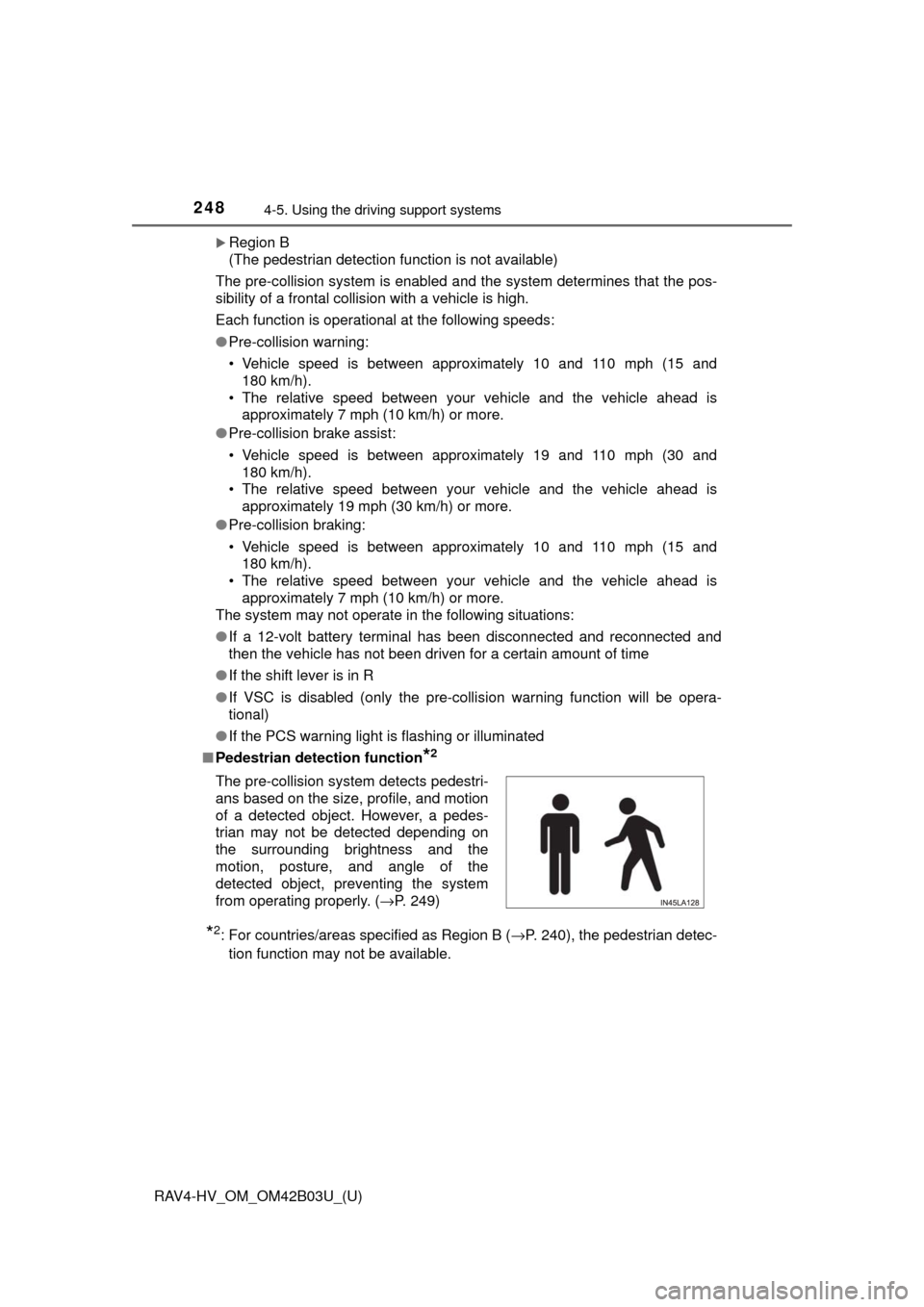
■ Pedestrian detection function
*2
*2: For countries/areas specified as Region B ( →P. 240), the pedestrian detec-
tion function may not be available.
The pre-collision system detects pedestri-
ans based on the size, profile, and motion
of a detected object. However, a pedes-
trian may not be detected depending on
the surrounding brightness and the
motion, posture, and angle of the
detected object, preventing the system
from operating properly. (
→P. 249)
Page 314 of 676
314
RAV4-HV_OM_OM42B03U_(U)
4-6. Driving tips
Hybrid vehicle driving tips
◆Using Eco drive mode
When using Eco drive mode, the torque corresponding to the accel-
erator pedal depression amount can be generated more smoothly
than it is in normal conditions. In addition, the operation of the air
conditioning system (h eating/cooling) will be minimized, improving
the fuel economy. ( →P. 206)
◆Use of Hybrid System Indicator
The Eco-friendly driving is possible by keeping the Hybrid System
Indicator within Eco area. ( →P. 95)
◆Shift lever operation
Shift the shift lever to D when stopped at a traffic light, or driving in
heavy traffic etc. Shift the shift le ver to P when parking. When using
the N, there is no positive effect on fuel consumption. In the N, the
gasoline engine operates but elec tricity cannot be generated. Also,
when using the air conditioning s ystem, etc., the hybrid battery
(traction battery) power is consumed.
◆Accelerator pedal/brake pedal operation
● Drive your vehicle smoothly. Avoid abrupt acceleration and
deceleration. Gradual accelerati on and deceleration will make
more effective use of the electric motor (traction motor) without
having to use gasoline engine power.
● Avoid repeated acceleration. Repeated acceleration consumes
hybrid battery (traction battery) power, resulting in poor fuel con-
sumption. Battery power can be restored by driving with the
accelerator pedal slightly released.
For economical and ecological driv ing, pay attention to the fol-
lowing points:
Page 324 of 676

324
RAV4-HV_OM_OM42B03U_(U)
4-6. Driving tips
NOTICE
■To prevent the water damage
Take all necessary safety measures to ensure that water damage to the
hybrid battery (traction battery), hybrid system or other components does
not occur.
● Water entering the engine compartment may cause severe damage to the
hybrid system. Water entering the interior may cause the hybrid battery
(traction battery) stowed under the rear seats to short circuit.
● Water entering the hybrid transmission will cause deterioration in transmis-
sion quality. The malfunction indicator may come on, and the vehicle may
not be drivable.
● Water can wash the grease from wheel bearings, causing rusting and pre-
mature failure, and may also enter the hybrid transaxle case, reducing the
gear oil’s lubricating qualities.
■ When you drive through water
If driving through water, such as when crossing shallow streams, first check
the depth of the water and the bottom of the riverbed for firmness. Drive
slowly and avoid deep water.
■ Inspection after off-road driving
● Sand and mud that has accumulated around brake drums and around
brake discs may affect braking efficiency and may damage brake system
components.
● Always perform a maintenance inspection after each day of off-road driv-
ing that has taken you through rough terrain, sand, mud, or water. For
scheduled maintenance information, refer to the “Scheduled Maintenance
Guide” or “Owner’s Manual Supplement”.
Page 328 of 676
328
RAV4-HV_OM_OM42B03U_(U)
5-1. Basic Operations
Audio system types
Entune Audio
→ P. 3 2 9
Entune Audio Plus/Entune Premium Audio with Navigation
Owners of models equipped with a navigation system should refer to
the “NAVIGATION AND MULTIMEDIA SYSTEM OWNER’S
MANUAL”.
WARNING
■ Certification for the disc player
● Part 15 of the FCC Rules
FCC Warning:
Changes or modifications not expressly approved by the party responsi-
ble for compliance could void the user’s authority to operate the equip-
ment.
● Laser products
• Do not take this unit apart or attempt to make any changes yourself.
This is an intricate unit that uses a laser pickup to retrieve information
from the surface of compact discs. The laser is carefully shielded so
that its rays remain inside the cabinet. Therefore, never try to disassem-
ble the player or alter any of its parts since you may be exposed to laser
rays and dangerous voltages.
• This product utilizes a laser.
Use of controls or adjustments or performance of procedures other than
those specified herein may result in hazardous radiation exposure.
THE USE OF OPTICAL INSTRUMENTS WITH THIS PRODUCT WILL
INCREASE EYE HAZARD.
NOTICE
■ To prevent 12-volt battery discharge
Do not leave the audio system on longer than necessary when the hybrid
system is off.
■ To avoid damaging the audio system
Take care not to spill drinks or other fluids on the audio system.
Page 336 of 676
336
RAV4-HV_OM_OM42B03U_(U)
5-1. Basic Operations
Select to change on/off.
Select to change on/off.
■Using cellular phones
Interference may be heard through the audio system’s speakers if a cellular
phone is being used inside or close to the vehicle while the audio system is
operating.
Random playback
Repeat play
WARNING
■ Laser product
This product is a class 1 laser product.
Do not open the cover of the player or attempt to repair the unit yourself.
Refer servicing to qualified personnel.
● Laser products
• Do not take this unit apart or attempt to make any changes yourself.
This is an intricate unit that uses a laser pickup to retrieve information
from the surface of compact discs. The laser is carefully shielded so
that its rays remain inside the cabinet. Therefore, never try to disassem-
ble the player or alter any of its parts since you may be exposed to laser
rays and dangerous voltages.
• This product utilizes a laser. Use of controls or adjustments or performance of procedures other than
those specified herein may result in hazardous radiation exposure.
THE USE OF OPTICAL INSTRUMENTS WITH THIS PRODUCT WILL
INCREASE EYE HAZARD.
NOTICE
■To prevent battery discharge
Do not leave the audio system on longer than necessary when the hybrid
system is off.
■ To avoid damaging the audio system
Take care not to spill drinks or other fluids on the audio system.
Page 339 of 676
RAV4-HV_OM_OM42B03U_(U)
3395-2. Setup
5
Audio system
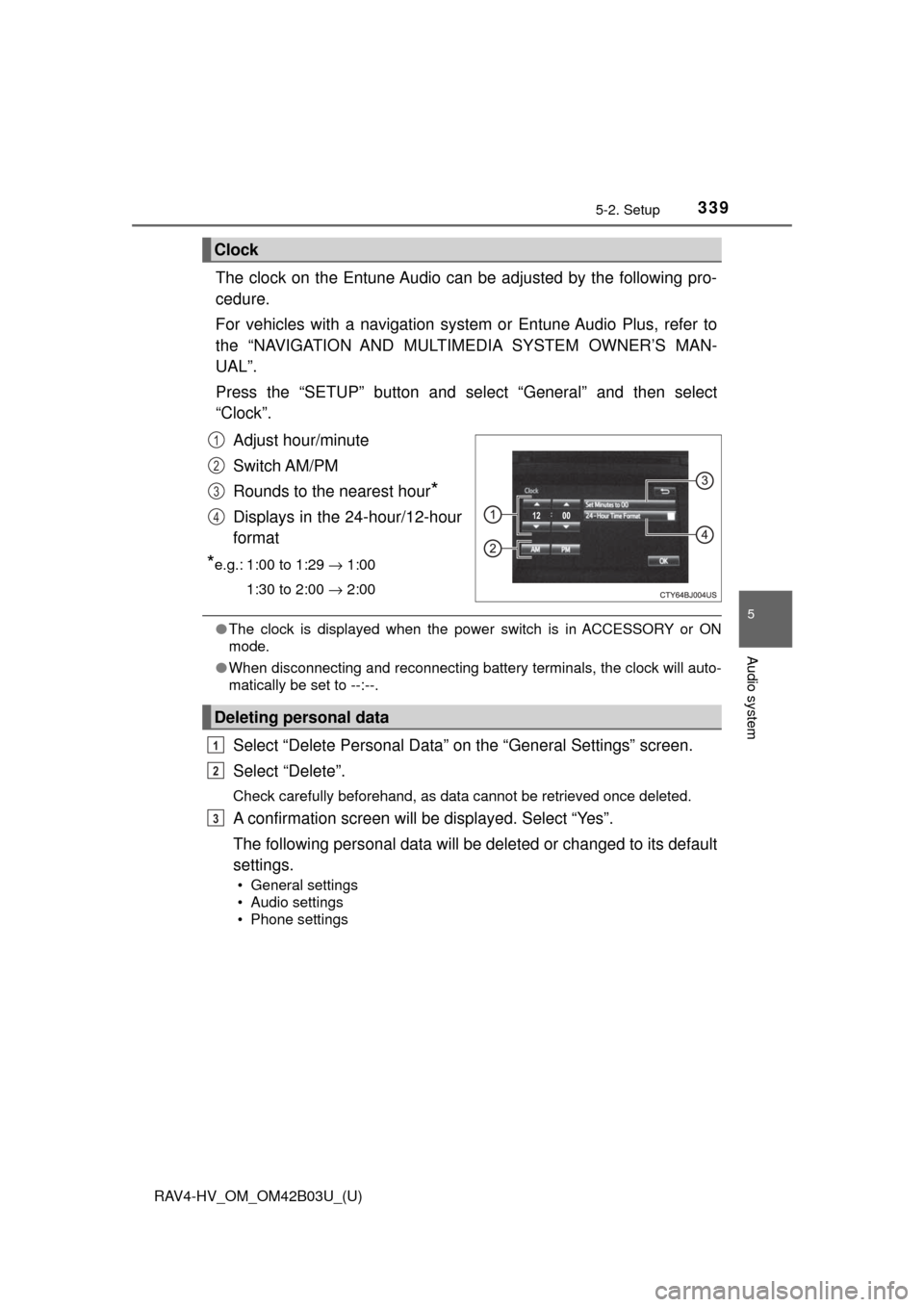
The clock on the Entune Audio can be adjusted by the following pro-
cedure.
For vehicles with a navigation system or Entune Audio Plus, refer to
the “NAVIGATION AND MULTIMEDIA SYSTEM OWNER’S MAN-
UAL”.
Press the “SETUP” button and select “General” and then select
“Clock”.
Adjust hour/minute
Switch AM/PM
Rounds to the nearest hour
*
Displays in the 24-hour/12-hour
format
*e.g.: 1:00 to 1:29 → 1:00
1:30 to 2:00 → 2:00
●The clock is displayed when the power switch is in ACCESSORY or ON
mode.
● When disconnecting and reconnecting battery terminals, the clock will auto-
matically be set to --:--.
Select “Delete Personal Data” on the “General Settings” screen.
Select “Delete”.
Check carefully beforehand, as data cannot be retrieved once deleted.
A confirmation screen will be displayed. Select “Yes”.
The following personal data will be deleted or changed to its default
settings.
• General settings
• Audio settings
• Phone settings
Clock
1
2
3
4
Deleting personal data
1
2
3
Page 360 of 676

360
RAV4-HV_OM_OM42B03U_(U)
5-6. Using an external device
■About iPod
●“Made for iPod” and “Made for iPhone” mean that an electronic accessory
has been designed to connect specifically to iPod or iPhone, respectively,
and has been certified by the developer to meet Apple performance stan-
dards.
● Apple is not responsible for the operation of this device or its compliance
with safety and regulatory standards. Please note that the use of this acces-
sory with iPod or iPhone may affect wireless performance.
● iPhone, iPod, iPod classic, iPod nano, and iPod touch are trademarks of
Apple Inc., registered in the U.S. and other countries. Lightning is a trade-
mark of Apple Inc.
■ iPod cover art
●Depending on the iPod and songs in the iPod, iPod cover art may be dis-
played.
● This function can be changed to on/off. ( →P. 341)
● It may take time to display iPod cover art, and the iPod may not be operated
while the cover art display is in process.
● Only iPod cover art that is saved in JPEG format can be displayed.
■ iPod functions
●When an iPod is connected and the audio source is changed to iPod mode,
the iPod will resume play from the same point in which it was last used.
● Depending on the iPod that is connected to the system, certain functions
may not be available. If a function is unavailable due to a malfunction (as
opposed to a system specification), disconnecting the device and recon-
necting it may resolve the problem.
● While connected to the system, the iPod cannot be operated with its own
controls. It is necessary to use the controls of the vehicle’s audio system
instead.
● When the battery level of an iPod is very low, the iPod may not operate. If
so, charge the iPod before use.
● Compatible models ( →P. 362)
Page 381 of 676
381
RAV4-HV_OM_OM42B03U_(U)
5-8. Bluetooth® Audio
5
Audio system
Listening to Bluetooth® Audio
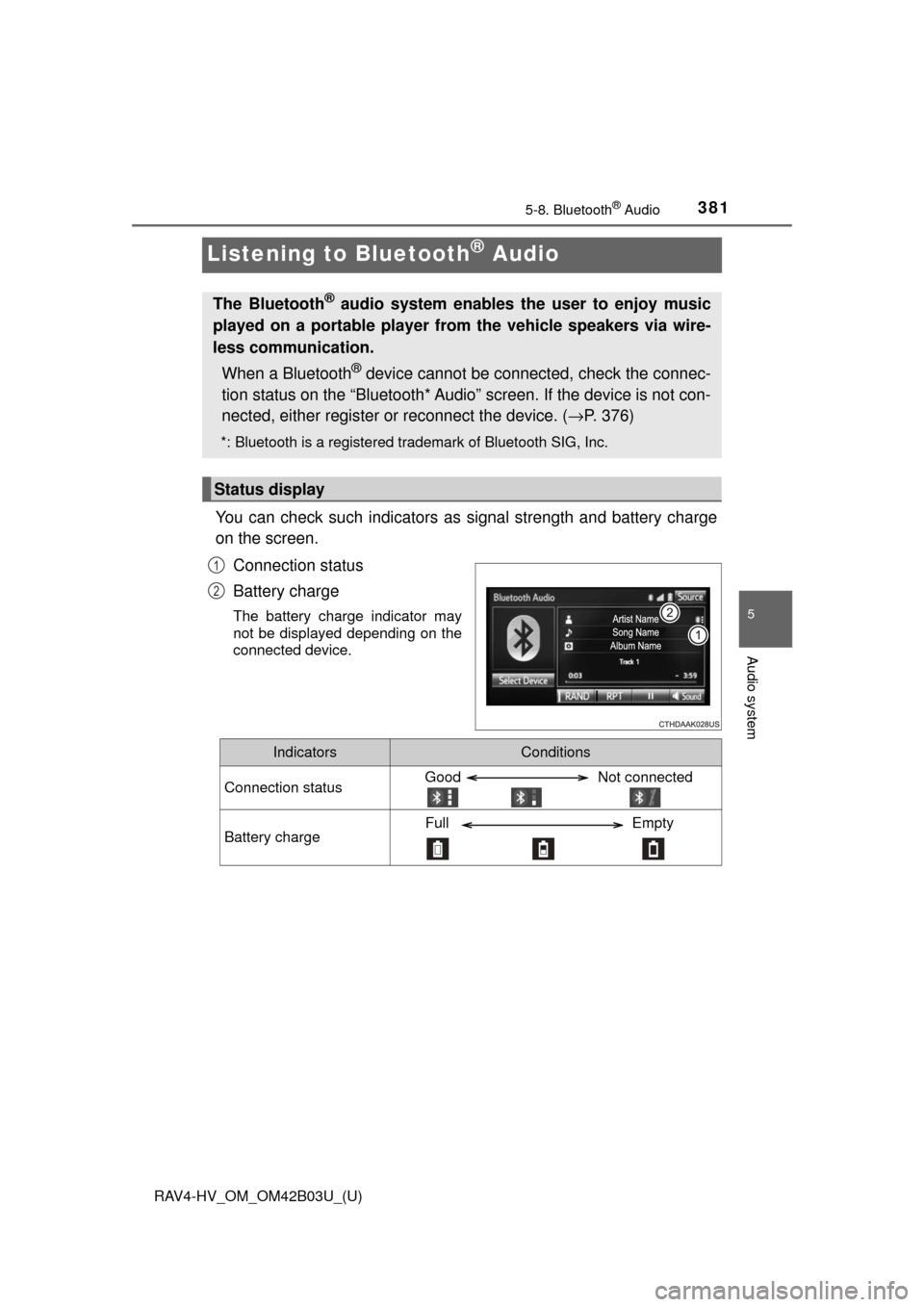
You can check such indicators as signal strength and battery charge
on the screen.
Connection status
Battery charge
The battery charge indicator may
not be displayed depending on the
connected device.
The Bluetooth® audio system enables the user to enjoy music
played on a portable player from the vehicle speakers via wire-
less communication.
When a Bluetooth
® device cannot be connected, check the connec-
tion status on the “Bl uetooth* Audio” screen. If the device is not con-
nected, either register or reconnect the device. (→ P. 376)
*: Bluetooth is a registered trademark of Bluetooth SIG, Inc.
Status display
1
2
IndicatorsConditions
Connection statusGood Not connected
Battery chargeFull Empty