alarm TOYOTA RAV4 HYBRID 2021 (in English) User Guide
[x] Cancel search | Manufacturer: TOYOTA, Model Year: 2021, Model line: RAV4 HYBRID, Model: TOYOTA RAV4 HYBRID 2021Pages: 752, PDF Size: 31.15 MB
Page 148 of 752
1483-2. Opening, closing and locking the doors
●When an exterior alarm sounds
once for 5 seconds
●When an interior alarm pings con-
tinuously
■Battery-saving function
The battery-saving function will be
activated in order to prevent the
electronic key battery and the 12-
volt battery from being discharged
while the vehicle is not in operation
for a long time.
●In the following situations, the
smart key system may take some
time to unlock the doors.
• The electronic key has been left in an area of approximately 6 ft. (2
m) of the outside of the vehicle for
10 minutes or longer.
• The smart key system has not been used for 5 days or longer.
●If the smart key system has not
been used for 14 days or longer,
the doors canno t be unlocked at
any doors except the driver’s
door. In this case, take hold of the
driver’s door handle, or use the
wireless remote control or the mechanical key, to unlock the
doors.
■Turning an electronic key to
battery-saving mode
●When battery-saving mode is set,
battery depletion is minimized by
stopping the electronic key from
receiving radio waves.
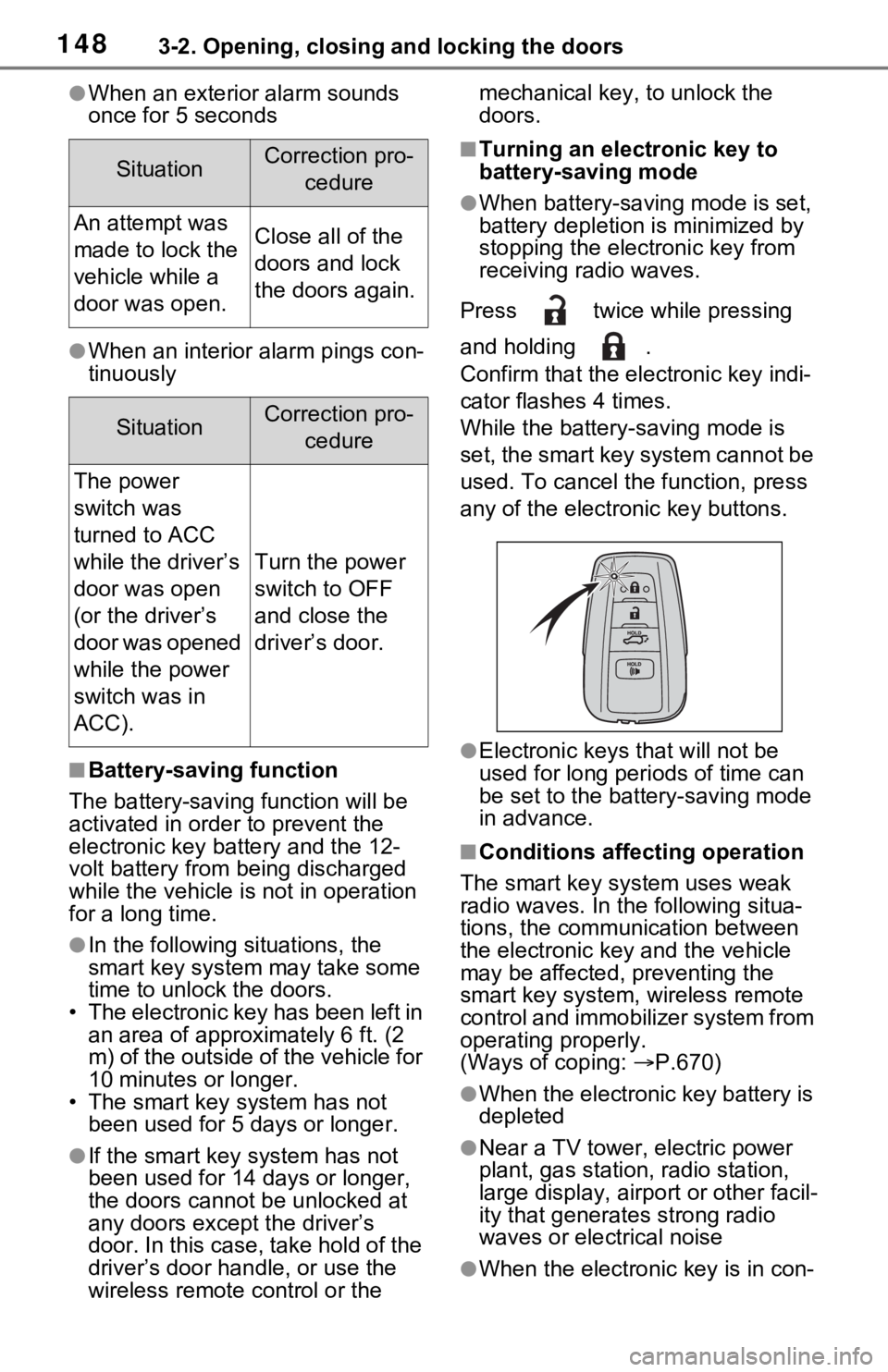
Press twice while pressing
and holding .
Confirm that the ele ctronic key indi-
cator flashes 4 times.
While the battery-saving mode is
set, the smart key system cannot be
used. To cancel the function, press
any of the electronic key buttons.
●Electronic keys that will not be
used for long periods of time can
be set to the battery-saving mode
in advance.
■Conditions affecting operation
The smart key system uses weak
radio waves. In the following situa-
tions, the communication between
the electronic key and the vehicle
may be affected, preventing the
smart key system, wireless remote
control and immobilizer system from
operating properly.
(Ways of coping: P.670)
●When the electronic key battery is
depleted
●Near a TV tower, electric power
plant, gas station, radio station,
large display, airpo rt or other facil-
ity that generates strong radio
waves or electrical noise
●When the electronic key is in con-
SituationCorrection pro-
cedure
An attempt was
made to lock the
vehicle while a
door was open.Close all of the
doors and lock
the doors again.
SituationCorrection pro-cedure
The power
switch was
turned to ACC
while the driver’s
door was open
(or the driver’s
door was opened
while the power
switch was in
ACC).
Turn the power
switch to OFF
and close the
driver’s door.
Page 150 of 752

1503-2. Opening, closing and locking the doors
the effective range, the door may
lock and unlock repeatedly. In that
case, follow the fo llowing correc-
tion procedures to wash the vehi-
cle:
• Place the electronic key in a loca- tion 6 ft. (2 m) or more away from
the vehicle. (Take care to ensure
that the key is not stolen.)
• Set the electronic key to battery-
saving mode to disable the smart
key system. ( P.148)
●If the electronic key is inside the
vehicle and a door handle
becomes wet during a car wash, a
message may be shown on the
multi-informatio n display and a
buzzer will sound outside the vehi-
cle. To turn off the alarm, lock all
the doors.
●The lock sensor may not work
properly if it com es into contact
with ice, snow, mud, etc. Clean
the lock sensor and attempt to
operate it again, or use the lock
sensor on the lower part of the
door handle.
●A sudden approac h to the effec-
tive range or door handle may pre-
vent the doors from being
unlocked. In this case, return the
door handle to the original position
and check that the doors unlock
before pulling the door handle
again.
●If there is another electronic key in
the detection area, it may take
slightly longer to unlock the doors
after the door handle is gripped.
■When the vehicle is not driven
for extended periods
●To prevent theft of the vehicle, do
not leave the electronic key within
6 ft. (2 m) of the vehicle.
●The smart key system can be
deactivated in advance. ( P.710)
●Battery-saving mode can reduce
the power consumption of elec-
tronic keys. ( P.148)
■To operate the system properly
Make sure to carry the electronic
key when operating the system. Do
not get the electronic key too close
to the vehicle when operating the
system from the out side of the vehi-
cle.
Depending on the position and hold-
ing condition of the electronic key,
the key may not be detected cor-
rectly and the system may not oper-
ate properly. (The alarm may go off
accidentally, or the door lock pre-
vention may not operate.)
■If the smart key system does
not operate properly
●Locking and unlocking the doors:
Use the mechanical key.
( P.670)
●Starting the hybrid system:
P.671
■Customization
Settings (e.g. smart key system)
can be changed.
(Customizable features: P.709)
If the smart key system has been
deactivated in a customized setting,
refer to the explanations for the fol-
lowing operations.
●Locking and unlocking the doors:
Use the wireless remote control or
mechanical key. ( P.127, 670)
●Starting the hybr id system and
changing power switch modes:
P.671
●Stopping the hybrid system:
P.214
Page 177 of 752
1773-5. Opening, closing the windows and moon roof
3
Before driving
5Release the power window
switch for a m oment, resume
pushing the switch in the one-
touch opening direction, and
hold it there for a pproximately 4
seconds or more.
6 Pull and hold the power window
switch in the one-touch closing
direction again. After the side
window is completely closed,
continue holding the switch for a
further 1 second or more.
If you release the switch while the
side window is moving, start again
from the beginning.
If the side window reverses and
cannot be fully closed or opened,
have the vehicle inspected by your
Toyota dealer.
■Door lock linked power window
operation
●The power windows can be
opened and closed using the key
(vehicles without smart key sys-
tem) or mechanical key (vehicles
with smart key system).
* ( P.128,
670)
●The power windows can be
opened using the wireless remote
control.
* ( P.127)
●Vehicles with alarm: The alarm
may be triggered if the alarm is set
and the power wi ndow is closed
using the door lock linked power
window operation function.
( P.84)
*: These settings must be custom-
ized at your To yota dealer.
■Power window open reminder
function
Vehicles without smart key system
The buzzer sounds and a message
is shown on the multi-information
display when the key has been
removed from the power switch and
the driver’s door is opened with the
power windows open.
Vehicles with smart key system
The buzzer sounds and a message
is shown on the mu lti-information
display when the power switch is
turned to OFF and the driver’s door
is opened with the power windows
open.
■Customization
Settings (e.g. linked door lock oper-
ation) can be changed. (Customiz-
able features: P.712)
WARNING
Observe the following precau-
tions.
Failing to do so may result in
death or serious injury.
■Closing the power windows
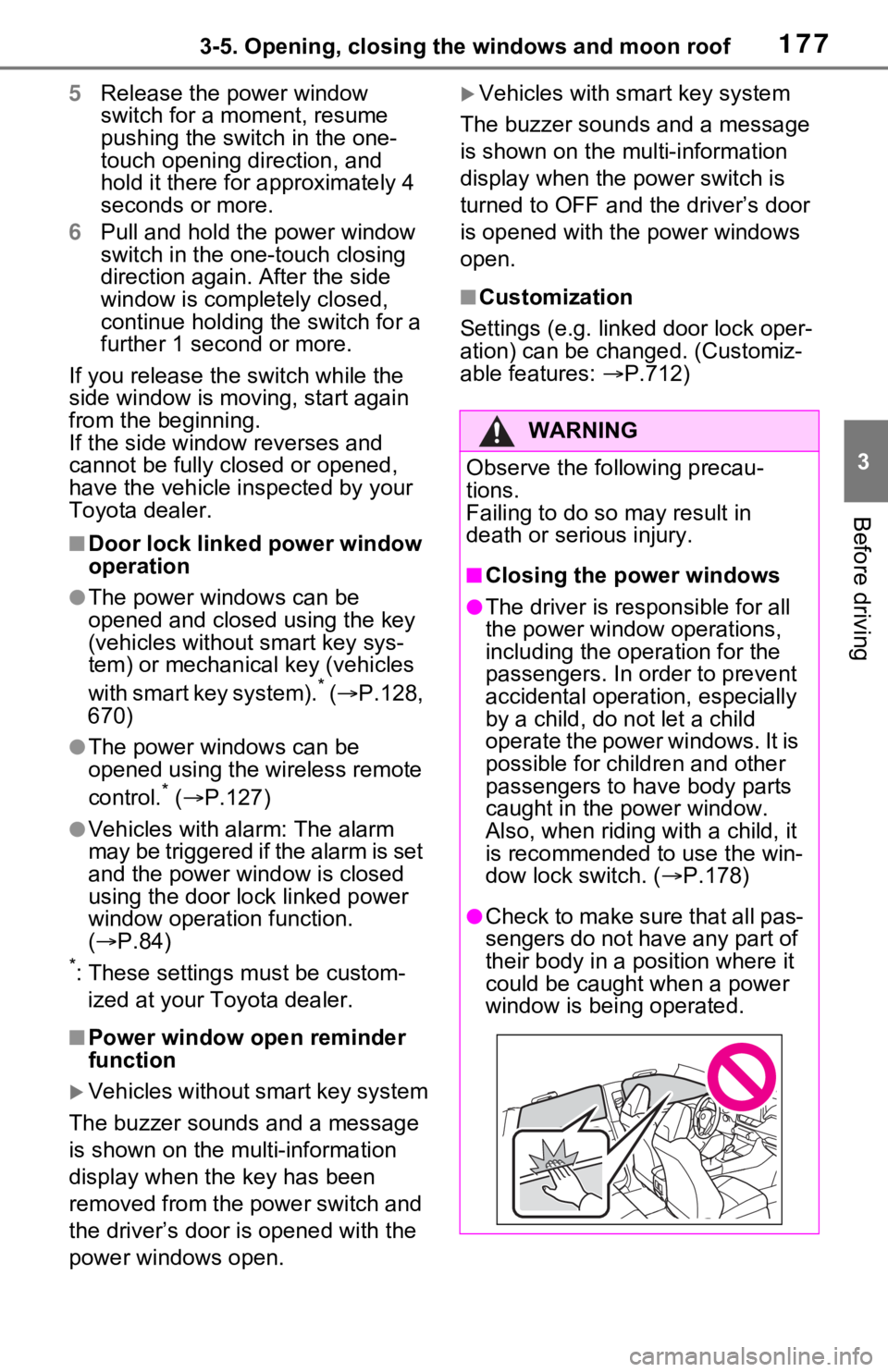
●The driver is responsible for all
the power window operations,
including the operation for the
passengers. In order to prevent
accidental operation, especially
by a child, do not let a child
operate the power windows. It is
possible for children and other
passengers to have body parts
caught in the power window.
Also, when ridin g with a child, it
is recommended to use the win-
dow lock switch. ( P.178)
●Check to make sure that all pas-
sengers do not have any part of
their body in a position where it
could be caught when a power
window is being operated.
Page 179 of 752
1793-5. Opening, closing the windows and moon roof
3
Before driving
*: If equipped
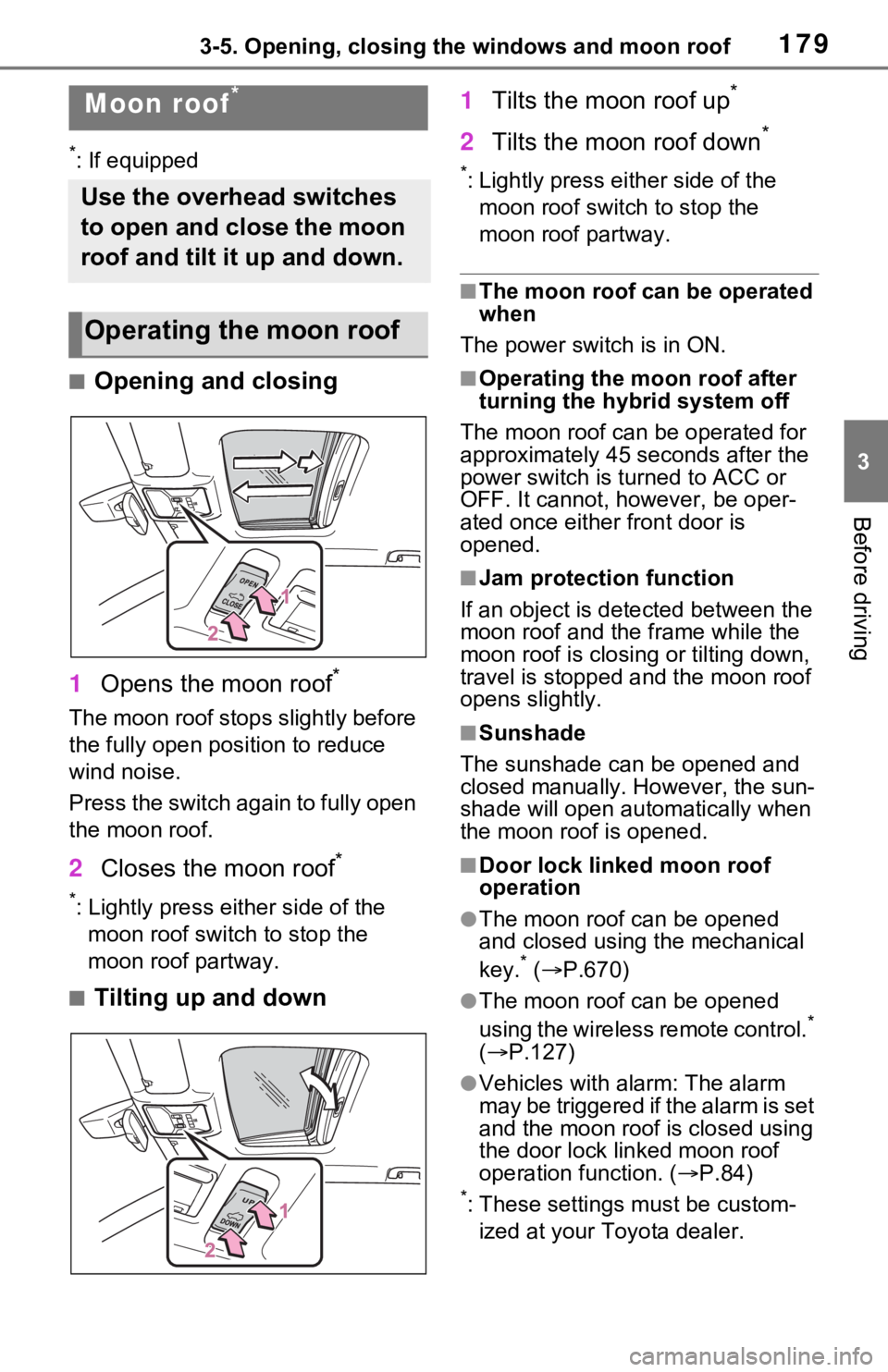
■Opening and closing
1 Opens the moon roof
*
The moon roof stops slightly before
the fully open position to reduce
wind noise.
Press the switch again to fully open
the moon roof.
2Closes the moon roof*
*: Lightly press either side of the
moon roof switch to stop the
moon roof partway.
■Tilting up and down 1
Tilts the moon roof up
*
2Tilts the moon roof down*
*: Lightly press e ither side of the
moon roof switch to stop the
moon roof partway.
■The moon roof can be operated
when
The power switch is in ON.
■Operating the moon roof after
turning the hybrid system off
The moon roof can be operated for
approximately 45 s econds after the
power switch is turned to ACC or
OFF. It cannot, however, be oper-
ated once either front door is
opened.
■Jam protection function
If an object is dete cted between the
moon roof and the frame while the
moon roof is closing or tilting down,
travel is stopped and the moon roof
opens slightly.
■Sunshade
The sunshade can be opened and
closed manually. However, the sun-
shade will open aut omatically when
the moon roof is opened.
■Door lock linked moon roof
operation
●The moon roof can be opened
and closed using the mechanical
key.
* ( P.670)
●The moon roof can be opened
using the wireless remote control.*
( P.127)
●Vehicles with alarm: The alarm
may be triggered if the alarm is set
and the moon roof is closed using
the door lock linked moon roof
operation function. ( P.84)
*: These settings must be custom-
ized at your Toyota dealer.
Moon roof*
Use the overhead switches
to open and close the moon
roof and tilt it up and down.
Operating the moon roof
Page 183 of 752
1833-5. Opening, closing the windows and moon roof
3
Before driving
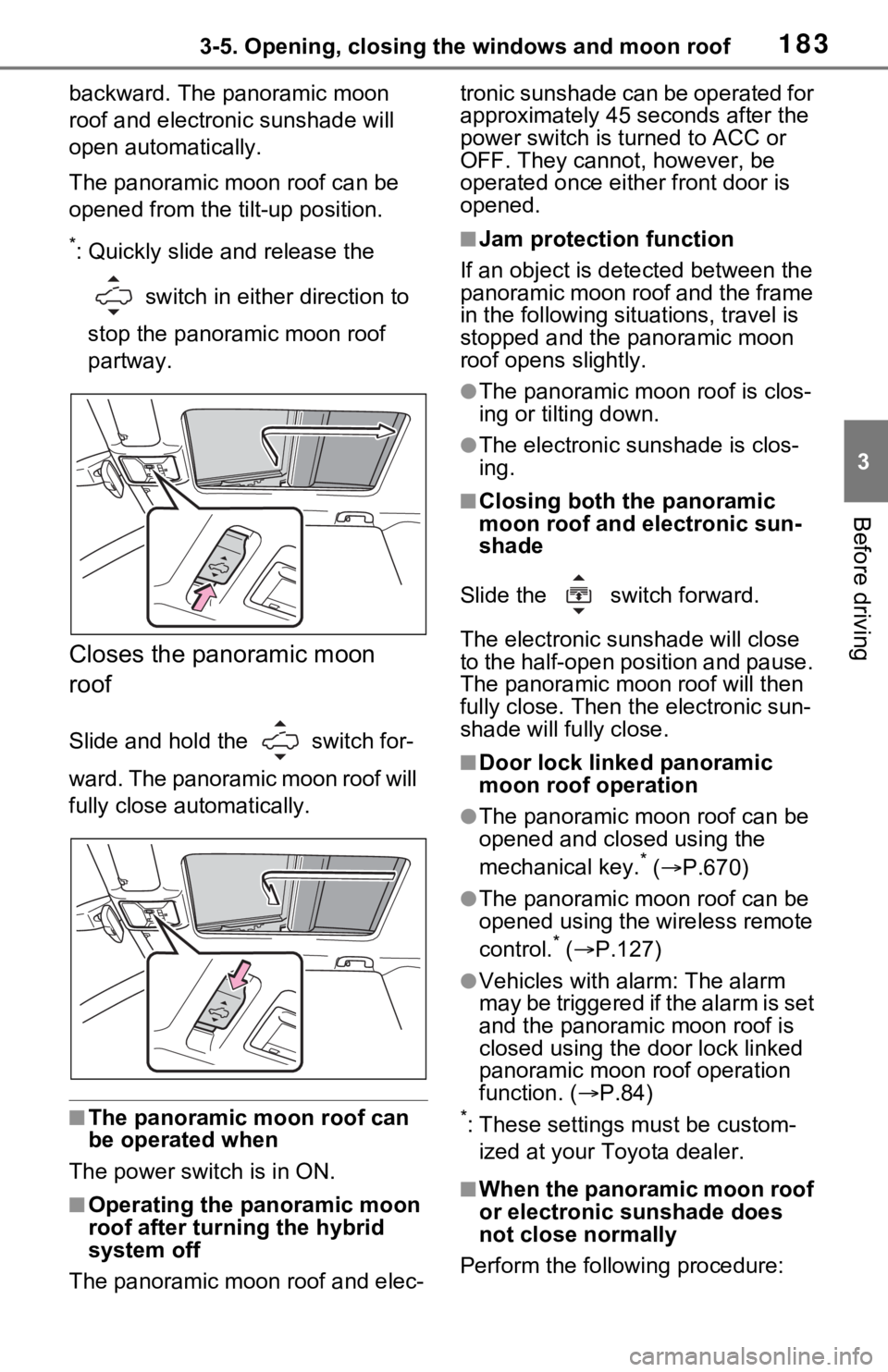
backward. The panoramic moon
roof and electronic sunshade will
open automatically.
The panoramic moon roof can be
opened from the tilt-up position.
*: Quickly slide and release the
switch in either direction to
stop the panoramic moon roof
partway.
Closes the panoramic moon
roof
Slide and hold the switch for-
ward. The panoramic moon roof will
fully close automatically.
■The panoramic moon roof can
be operated when
The power swit ch is in ON.
■Operating the panoramic moon
roof after turning the hybrid
system off
The panoramic moon roof and elec- tronic sunshade can be operated for
approximately 45 s
econds after the
power switch is turned to ACC or
OFF. They cannot, however, be
operated once eithe r front door is
opened.
■Jam protection function
If an object is dete cted between the
panoramic moon roof and the frame
in the following situations, travel is
stopped and the panoramic moon
roof opens slightly.
●The panoramic moon roof is clos-
ing or tilting down.
●The electronic sunshade is clos-
ing.
■Closing both the panoramic
moon roof and electronic sun-
shade
Slide the switch forward.
The electronic sunshade will close
to the half-open position and pause.
The panoramic moo n roof will then
fully close. Then the electronic sun-
shade will fully close.
■Door lock linked panoramic
moon roof operation
●The panoramic moon roof can be
opened and closed using the
mechanical key.
* ( P.670)
●The panoramic moon roof can be
opened using the wireless remote
control.
* ( P.127)
●Vehicles with alarm: The alarm
may be triggered if the alarm is set
and the panoramic moon roof is
closed using the door lock linked
panoramic moon roof operation
function. ( P.84)
*: These settings must be custom-
ized at your Toyota dealer.
■When the panoramic moon roof
or electronic sunshade does
not close normally
Perform the following procedure:
Page 670 of 752
6708-2. Steps to take in an emergency
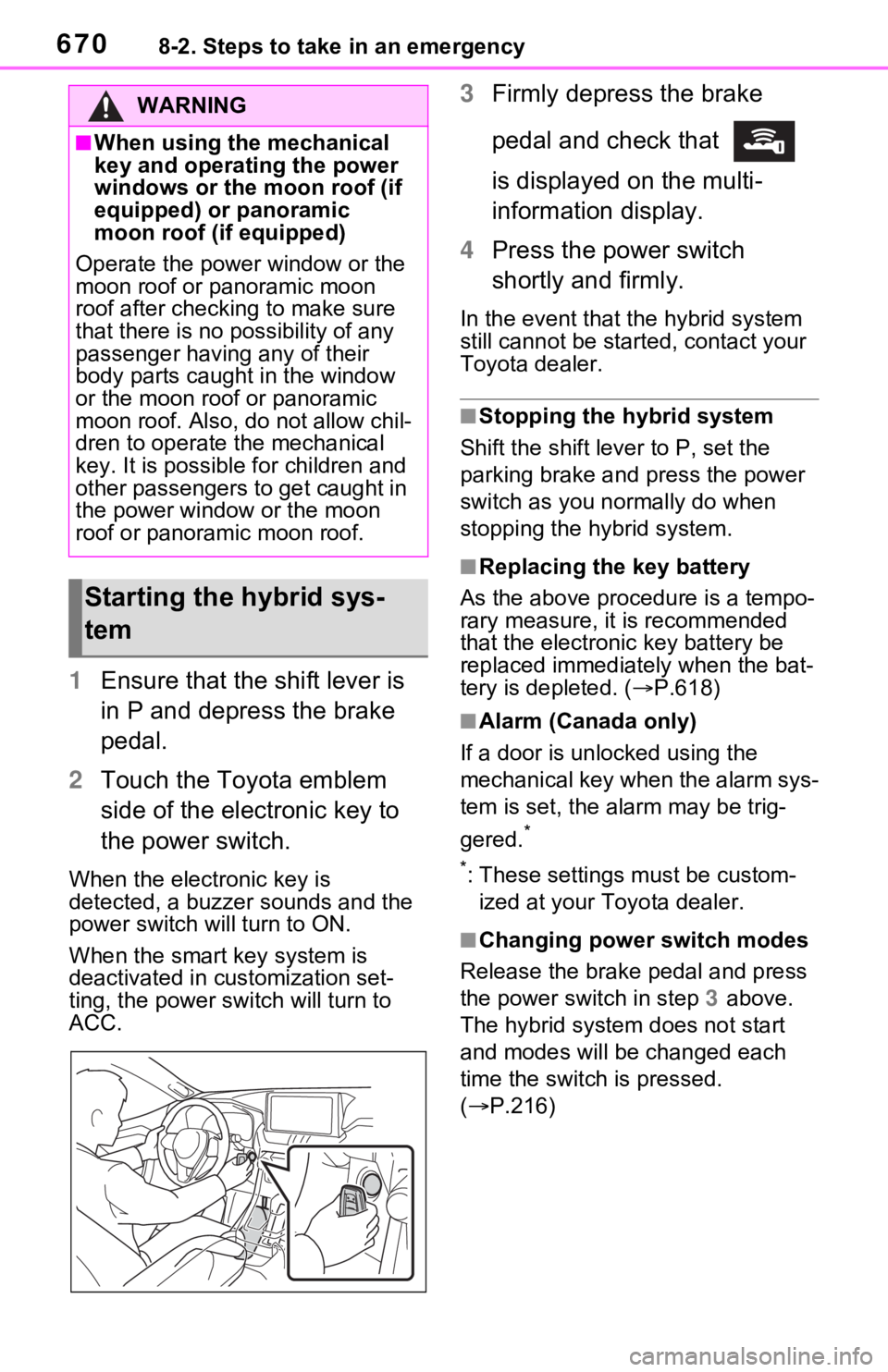
1Ensure that the shift lever is
in P and depress the brake
pedal.
2 Touch the Toyota emblem
side of the electronic key to
the power switch.
When the electronic key is
detected, a buzzer sounds and the
power switch will turn to ON.
When the smart key system is
deactivated in customization set-
ting, the power switch will turn to
ACC.
3Firmly depress the brake
pedal and check that
is displayed on the multi-
information display.
4 Press the power switch
shortly and firmly.
In the event that t he hybrid system
still cannot be star ted, contact your
Toyota dealer.
■Stopping the hybrid system
Shift the shift lever to P, set the
parking brake and press the power
switch as you normally do when
stopping the hybrid system.
■Replacing the key battery
As the above proce dure is a tempo-
rary measure, it is recommended
that the electronic key battery be
replaced immediatel y when the bat-
tery is depleted. ( P.618)
■Alarm (Canada only)
If a door is unl ocked using the
mechanical key when the alarm sys-
tem is set, the alarm may be trig-
gered.
*
*
: These settings must be custom- ized at your Toyota dealer.
■Changing power switch modes
Release the brake pedal and press
the power switch in step 3 above.
The hybrid system does not start
and modes will be changed each
time the switch is pressed.
( P.216)
WARNING
■When using the mechanical
key and operating the power
windows or the moon roof (if
equipped) or panoramic
moon roof (if equipped)
Operate the power window or the
moon roof or panoramic moon
roof after checking to make sure
that there is no possibility of any
passenger having any of their
body parts caught in the window
or the moon roof or panoramic
moon roof. Also, do not allow chil-
dren to operate the mechanical
key. It is possible for children and
other passengers to get caught in
the power window or the moon
roof or panoramic moon roof.
Starting the hybrid sys-
tem
Page 671 of 752
6718-2. Steps to take in an emergency
8
When trouble arises
If you have a set of jumper (or
booster) cables and a second
vehicle with a 12-volt battery,
you can jump start your vehicle
by following the steps below.
1Vehicles with alarm: Confirm
that the electronic key is
being carried.
When connecting the jumper (or
booster) cables, depending on the
situation, the ala rm may activate and the doors locked. (
P.85)
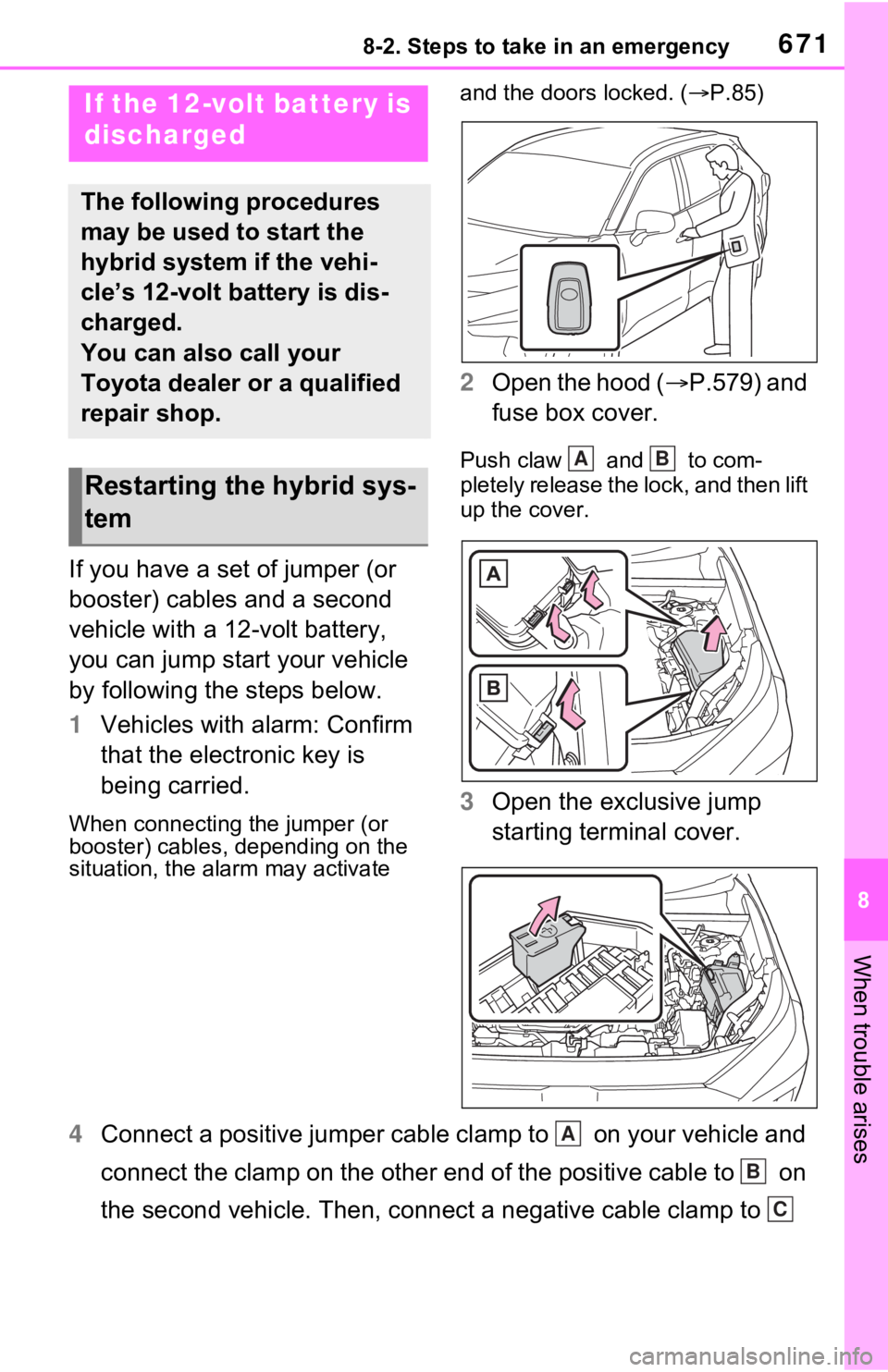
2 Open the hood ( P.579) and
fuse box cover.
Push claw and to com-
pletely release the lock, and then lift
up the cover.
3 Open the exclusive jump
starting terminal cover.
4 Connect a positive jumper cable clamp to on your vehicle and
connect the clamp on the other end of the positive cable to on
the second vehicle. Then, connect a negative cable clamp to
If the 12-volt battery is
discharged
The following procedures
may be used to start the
hybrid system if the vehi-
cle’s 12-volt battery is dis-
charged.
You can also call your
Toyota dealer or a qualified
repair shop.
Restarting the hybrid sys-
tem
AB
A
B
C
Page 707 of 752
7079-2. Customization
9
Vehicle specifications
Some function settings are changed simultaneously with other func-
tions being customized. Contact your Toyota dealer for further
details.Vehicles with navigation system or multimedia system: Settings
that can be changed using the navigation system or multimedia s ys-
tem
Settings that can be changed using the multi-information displa y
Settings that can be changed by your Toyota dealer
Definition of symbols: O = Available, – =Not available
■Predictive efficient drive*1 ( P.75)
*1: Vehicles with navigation system*2
*2
: This function can on ly be used in the mainland U.S.A. It canno t be used
in other states and territorie s, including Alaska and Hawaii.
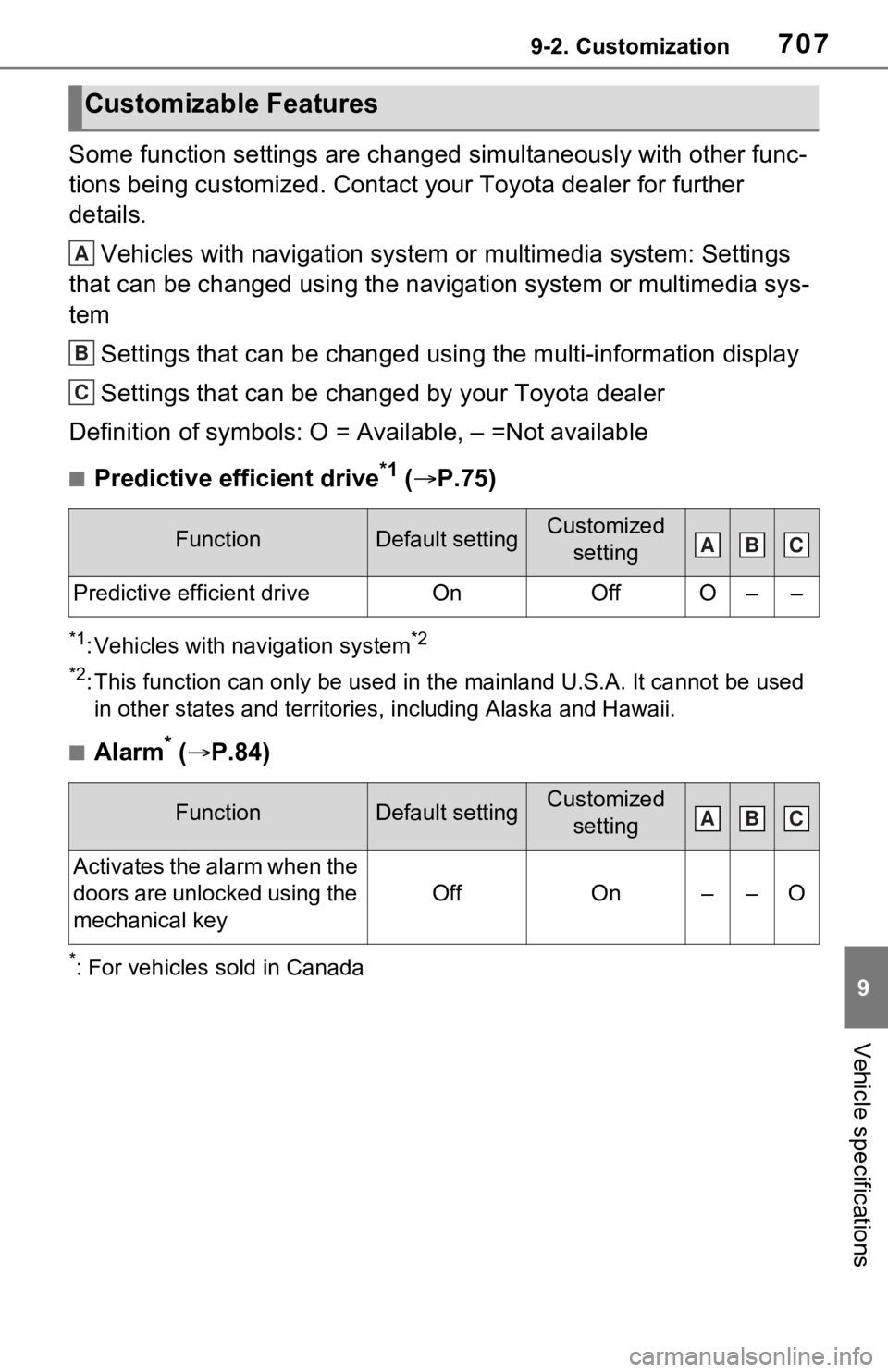
■Alarm* ( P.84)
*: For vehicles sold in Canada
Customizable Features
FunctionDefault settingCustomized
setting
Predictive efficient driveOnOffO––
FunctionDefault settingCustomized setting
Activates the alarm when the
doors are unlocked using the
mechanical key
OffOn––O
A
B
C
ABC
ABC
Page 734 of 752
734What to do if... (Troubleshooting)
Depending on the situation,
other types of warning buzzer
may also sound. (P.642, 654)
Did anyone inside the vehicle
open a door during setting the
alarm?
The sensor detects it and the
alarm sounds. ( P.84)
To stop the alarm, turn the power
switch to ON or start the hybrid sys-
tem.
Is the message displayed on
the multi-information display?
Check the message on the
multi-information display.
( P.654)
When a warning light turns on
or a warning message is dis-
played, refer to P.642, 654.
Stop the vehicle in a safe place and replace the flat tire
with the spare tire. (
P.658)
Try the procedure for when
the vehicle becomes stuck in
mud, dirt, or snow. ( P.680)
An alarm is activated and
the horn sounds (if
equipped)
A warning buzzer sounds
when leaving the vehicle
A warning light turns on
or a warning message is
displayed
When a problem has
occurred
If you have a flat tire
The vehicle becomes
stuck
Page 735 of 752

735Alphabetical Index
Alphabetical Index
A
A/C ........................................... 524Air conditioning filter ............. 609
Automatic air conditioning sys-tem ..................................... 524
Eco air conditioning mode .... 525
Front seat concentrated airflow mode (S-FLOW) ................. 528
ABS (Anti-lock Brake System) ............................................... 369Function ............................... 369
Warning light ........................ 644
ACA (Active Cornering Assist) ............................................... 369
Active Cornering Assist (ACA) ............................................... 369
Adaptive Front-lighting System (AFS)...................................... 232
AFS (Adaptive Front-lighting System) ................................. 232
Airbags ...................................... 35 Airbag operating conditions.... 37
Airbag precautions for your child............................................. 40
Airbag warning light.............. 644
Correct driving posture ........... 29
Curtain shield airbag operating conditions ............................. 38
Curtain shield airbag precautions ............................................. 40
Front passenger occupant clas- sification system ................... 45
General airbag precautions .... 40
Locations of airbags ............... 35
Modification and disposal of air- bags ..................................... 44
Seat cushion airbag ............... 35
Side airbag operating conditions ............................................. 38
Side airbag precautions ......... 40
Side and curtain shield airbags operating conditions .............38
Side and curtain shield airbags precautions ...........................40
SRS airbags ...........................35
SRS warning light .................644
Air conditioning filter .............609
Air conditioning system.........524 Air conditioning filter .............609
Automatic air conditioning sys-tem .....................................524
Eco air conditioning mode ....525
Front seat concent rated airflow
mode (S-FLOW) .................528
Alarm .........................................84 Alarm ......................................84
Warning buzzer .. ..................642
AM/FM/SiriusXM (SXM) radio Refer to the tabl e below to iden-
tify the problem and take the
suggested corrective action 442
AM ............................................437
Anchor brackets ... ..............54, 63
Android Auto...........419, 422, 449
Android Auto button (Menu screen) ...................................389
Antenna (Smart key system) .147
Anti-lock brake system (ABS)369 Function................................369
Warning light ........................644
Apple CarPlay .........................446
Apple CarPlay
®/Android Auto
.......................................419, 422
Apple CarPlay button (Menu screen) ...................................389
Approach warning ..................278
Apps button (Menu screen) ...389
Armrest ......... ......................... ..556
Assist grips .............................556
Audio .......................................432 Operating information ...........458
Some basics .........................433
Turning the system on and off