ESP TOYOTA RAV4 HYBRID 2021 (in English) Service Manual
[x] Cancel search | Manufacturer: TOYOTA, Model Year: 2021, Model line: RAV4 HYBRID, Model: TOYOTA RAV4 HYBRID 2021Pages: 752, PDF Size: 31.15 MB
Page 299 of 752
2994-5. Using the driving support systems
4
Driving
The Parking Support Brake can
be enabled/disabled on the
screen of the multi-information
display. All of the Parking Sup-
port Brake functions (static
objects and rear-crossing vehi-
cles) are enabled/disabled
simultaneously. (P.109)
When the Parking Support Brake is
disabled, the PKSB OFF indicator
( P.91) illuminates on the multi-
information display.
To re-enable the system, select
on the multi-information display,
select and turn it on.
If the system is disabled, it will
remain off even if the power switch
is turned to ON after the power
switch has bee n turned off.
WARNING
■Limitations of the Parking
Support Brake system
Do not overly rely on the system,
as doing so may lead to an acci-
dent.
Always drive while checking the
safety of the su rroundings of the
vehicle.
Depending on the vehicle and
road conditions, weather, etc., the
system may not operate.
The detection capa bilities of sen-
sors and radars are limited.
Always drive while checking the
safety of the su rroundings of the
vehicle.
●The driver is solely responsible
for safe driving. Always drive
carefully, taking care to observe
your surroundings. The Parking
Support Brake system is
designed to provide support to
lessen the severity of collisions.
However, it may not operate in
some situations.
●The Parking Support Brake sys-
tem is not designed to stop the
vehicle completely. Addition-
ally, even if the system has
stopped the vehicle, it is neces-
sary to depress the brake pedal
immediately as brake control
will be canceled after approxi-
mately 2 seconds.
NOTICE
■If “Parking Support Brake
Unavailable” is displayed on
the multi-information display
and the PKSB OFF indicator
is flashing
If this message is displayed
immediately after the power
switch is changed to ON, operate
the vehicle carefully, paying atten-
tion to your surroundings. It may
be necessary to drive the vehicle
for a certain amount of time
before the system returns to nor-
m a l . ( I f t h e s y s t e m d o e s n o t r e t u r n
to normal after dr iving for a while,
clean the sensors and their sur-
rounding area on the bumpers.)
Enabling/Disabling the
Parking Support Brake
Page 308 of 752
3084-5. Using the driving support systems
other devices which produce ultra-
sonic waves are near the vehicle
• If a sticker or an electronic compo- nent, such as a backlit license
plate (especially fluorescent type),
fog lights, fender pole or wireless
antenna is insta lled near a sensor
●Changes in the vehicle posture
• If the vehicle is significantly tilted
• If the front of the vehicle is raised
or lowered due to the carried load
• If the orientation of a sensor has
been changed due t o a collision or
other impact
■Situations in which the Parking
Support Brake function (static
objects) may not operate prop-
erly
In some situations, such as the fol-
lowing, this function may not oper-
ate properly.
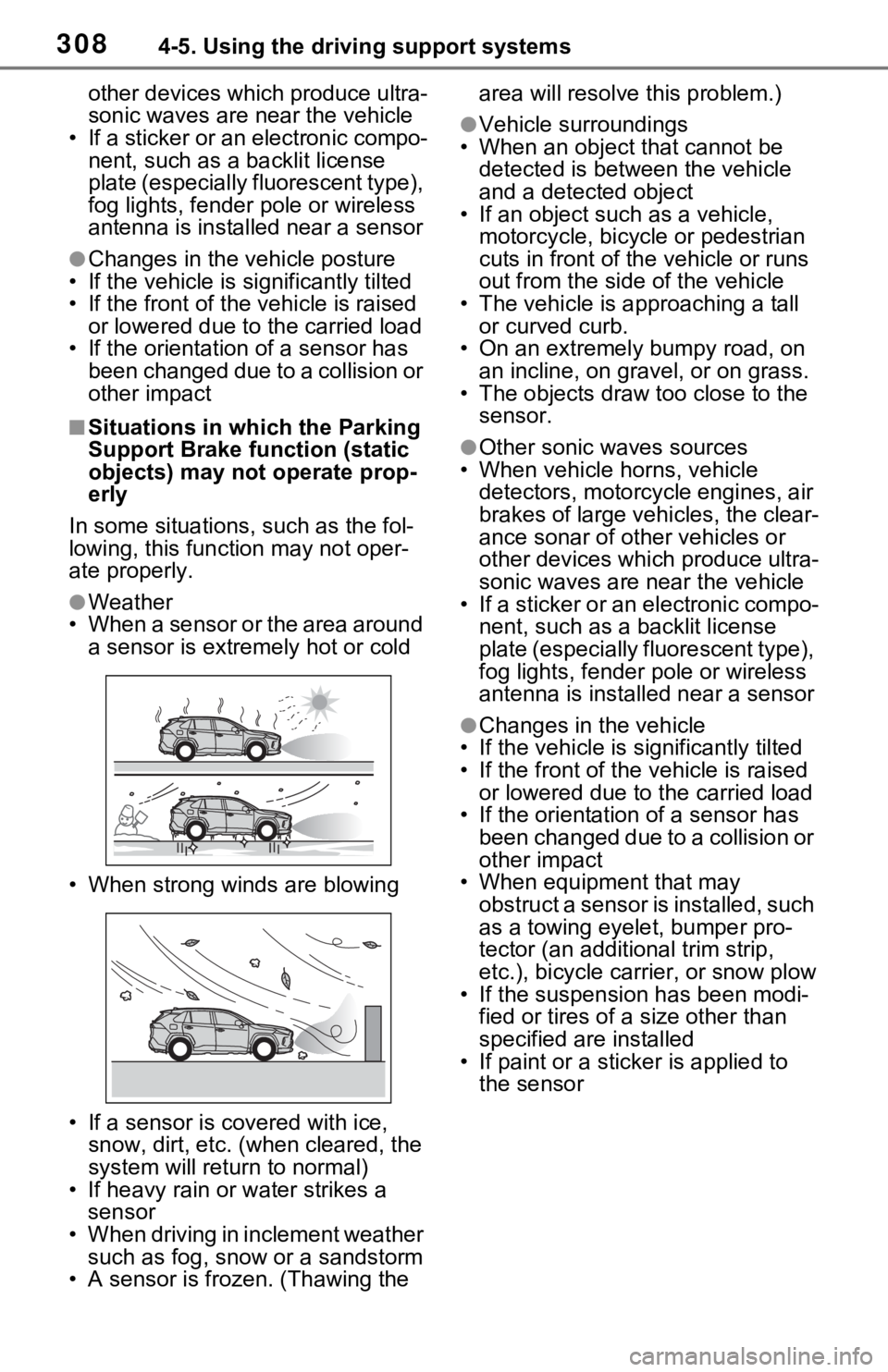
●Weather
• When a sensor or the area around a sensor is extremely hot or cold
• When strong winds are blowing
• If a sensor is covered with ice, snow, dirt, etc. (when cleared, the
system will return to normal)
• If heavy rain or water strikes a sensor
• When driving in inclement weather
such as fog, snow or a sandstorm
• A sensor is frozen. (Thawing the area will resolve this problem.)
●Vehicle surroundings
• When an object that cannot be
detected is between the vehicle
and a detected object
• If an object such as a vehicle,
motorcycle, bicycle or pedestrian
cuts in front of the vehicle or runs
out from the side of the vehicle
• The vehicle is approaching a tall or curved curb.
• On an extremely bumpy road, on
an incline, on gravel, or on grass.
• The objects draw too close to the sensor.
●Other sonic waves sources
• When vehicle horns, vehicle
detectors, motorcycle engines, air
brakes of large vehicles, the clear-
ance sonar of ot her vehicles or
other devices which produce ultra-
sonic waves are near the vehicle
• If a sticker or an electronic compo- nent, such as a backlit license
plate (especially fluorescent type),
fog lights, fender pole or wireless
antenna is installed near a sensor
●Changes in the vehicle
• If the vehicle is significantly tilted
• If the front of the v ehicle is raised
or lowered due to the carried load
• If the orientation of a sensor has
been changed due to a collision or
other impact
• When equipment that may
obstruct a sensor is installed, such
as a towing eyelet, bumper pro-
tector (an additional trim strip,
etc.), bicycle car rier, or snow plow
• If the suspension has been modi- fied or tires of a size other than
specified are installed
• If paint or a stic ker is applied to
the sensor
Page 312 of 752
3124-5. Using the driving support systems
vehicle, is short
●When there are spinning objects
near your vehicle such as the fan
of an air conditioning unit
●When water is splashed or
sprayed toward the rear bumper,
such as from a sprinkler
■Situations in which the Parking
Support Brake function (rear-
crossing vehicles) may not
operate properly
In some situations, such as the fol-
lowing, the radar sensors may not
detect an object and this function
may not operate properly
●Stationary objects
●When a sensor or the area around
a sensor is extremely hot or cold
●If the rear bumper is covered with
ice, snow, dirt, etc.
●When it is raining heavily or water
strikes the vehicle
●When the detecti on area of a
radar sensor is obstructed by an
adjacent vehicle
●If the vehicle is s ignificantly tilted
●When equipment that may
obstruct a sensor is installed, such
as a towing eyelet, bumper pro-
tector (an additional trim strip,
etc.), bicycle carrier, or snow plow
●If the suspension has been modi-
fied or tires of a size other than
specified are installed
●If the front of the vehicle is raised
or lowered due to the carried load
●If a sticker or an electronic compo-
nent, such as a backlit license
plate (especially fluorescent type), fog lights, fender pole or wireless
antenna is installed near a radar
sensor
●If the orientation of a radar sensor
has been changed
●When multiple vehicles are
approaching with only a small gap
between each vehicle
●If a vehicle is approaching the rear
of your vehicle rapidly
●Situations in which the radar sen-
sor may not detect a vehicle
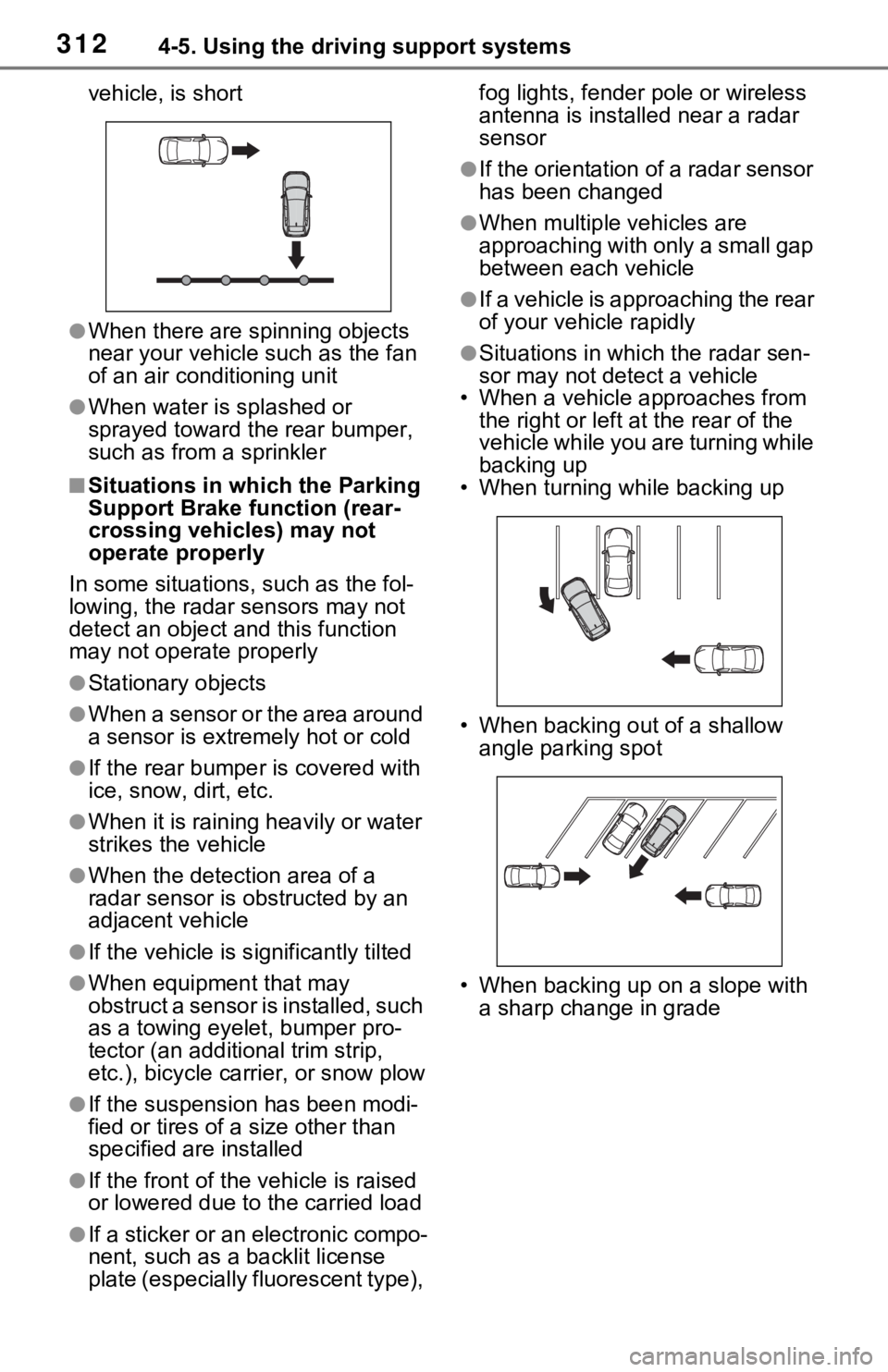
• When a vehicle approaches from
the right or left at the rear of the
vehicle while you are turning while
backing up
• When turning while backing up
• When backing out of a shallow angle parking spot
• When backing up on a slope with a sharp change in grade
Page 342 of 752
3424-5. Using the driving support systems
*: If equipped
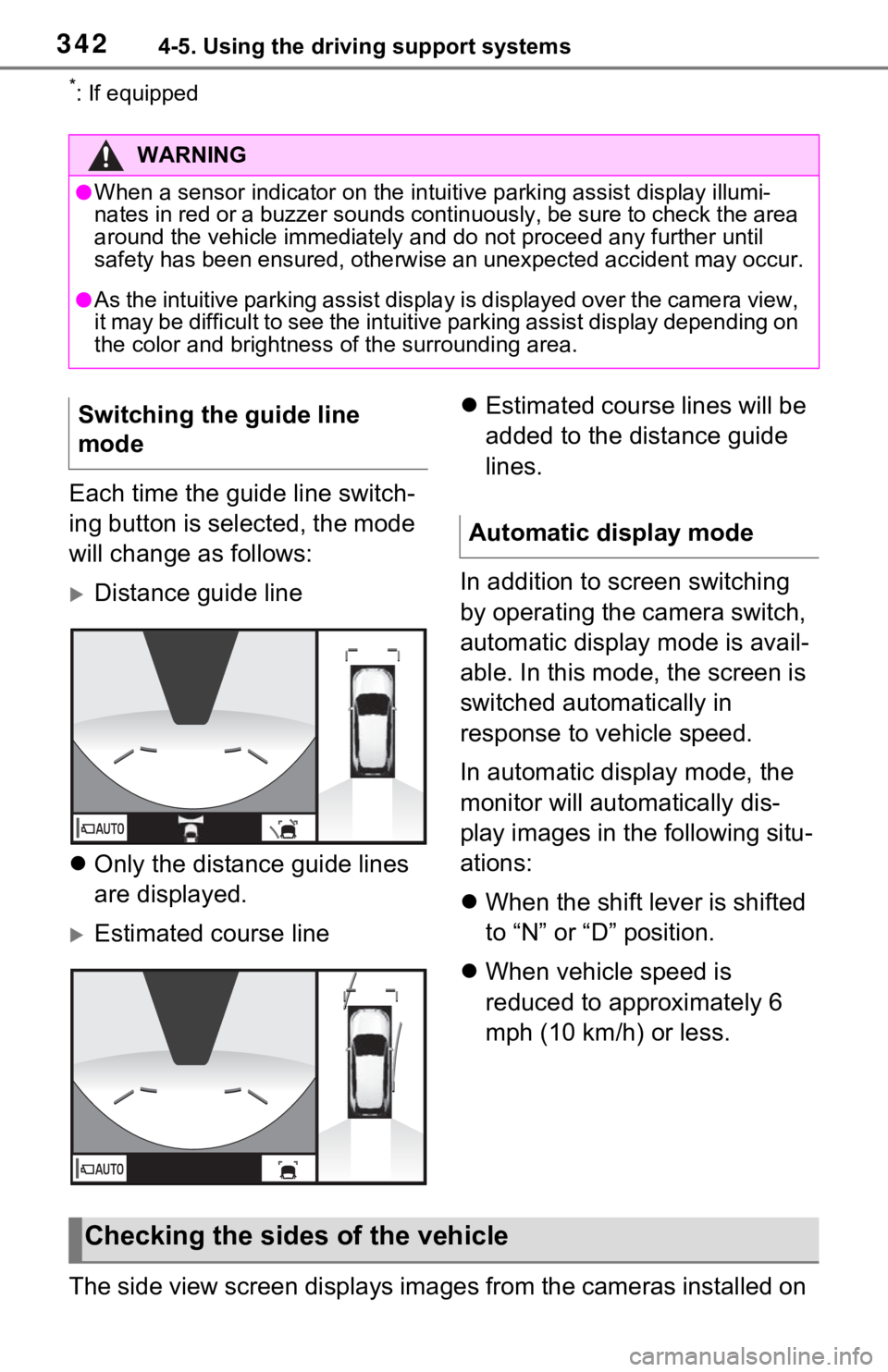
Each time the guide line switch-
ing button is selected, the mode
will change as follows:
Distance guide line
Only the distance guide lines
are displayed.
Estimated course line
Estimated course lines will be
added to the distance guide
lines.
In addition to screen switching
by operating the camera switch,
automatic display mode is avail-
able. In this mode, the screen is
switched automatically in
response to vehicle speed.
In automatic display mode, the
monitor will automatically dis-
play images in the following situ-
ations:
When the shift lever is shifted
to “N” or “D” position.
When vehicle speed is
reduced to approximately 6
mph (10 km/h) or less.
The side view screen displays images from the cameras installed on
WARNING
●When a sensor indicator on the intuitive parking assist display illumi-
nates in red or a buzzer sounds continuously, be sure to check the area
around the vehicle immediately a nd do not proceed any further until
safety has been ensured, otherwise an unexpected accident may o ccur.
●As the intuitive parking assist display is displayed over the camera view,
it may be difficult to see the intuitive parking assist display depending on
the color and brightness of the surrounding area.
Switching the guide line
mode
Automatic display mode
Checking the sides of the vehicle
Page 344 of 752
3444-5. Using the driving support systems
●The side views can be displayed even when the outside rear view mirrors
are retracted.
In addition to screen switching
by operating the camera switch,
automatic display mode is avail-
able. In this mode, the screen is
switched automatically in
response to vehicle speed.
In automatic display mode, the
monitor will automatically dis-
play images in the following situ-
ations:
When the shift lever is shifted
to “N” or “D” position.
When vehicle speed is
reduced to approximately 6
mph (12 km/h) or less.
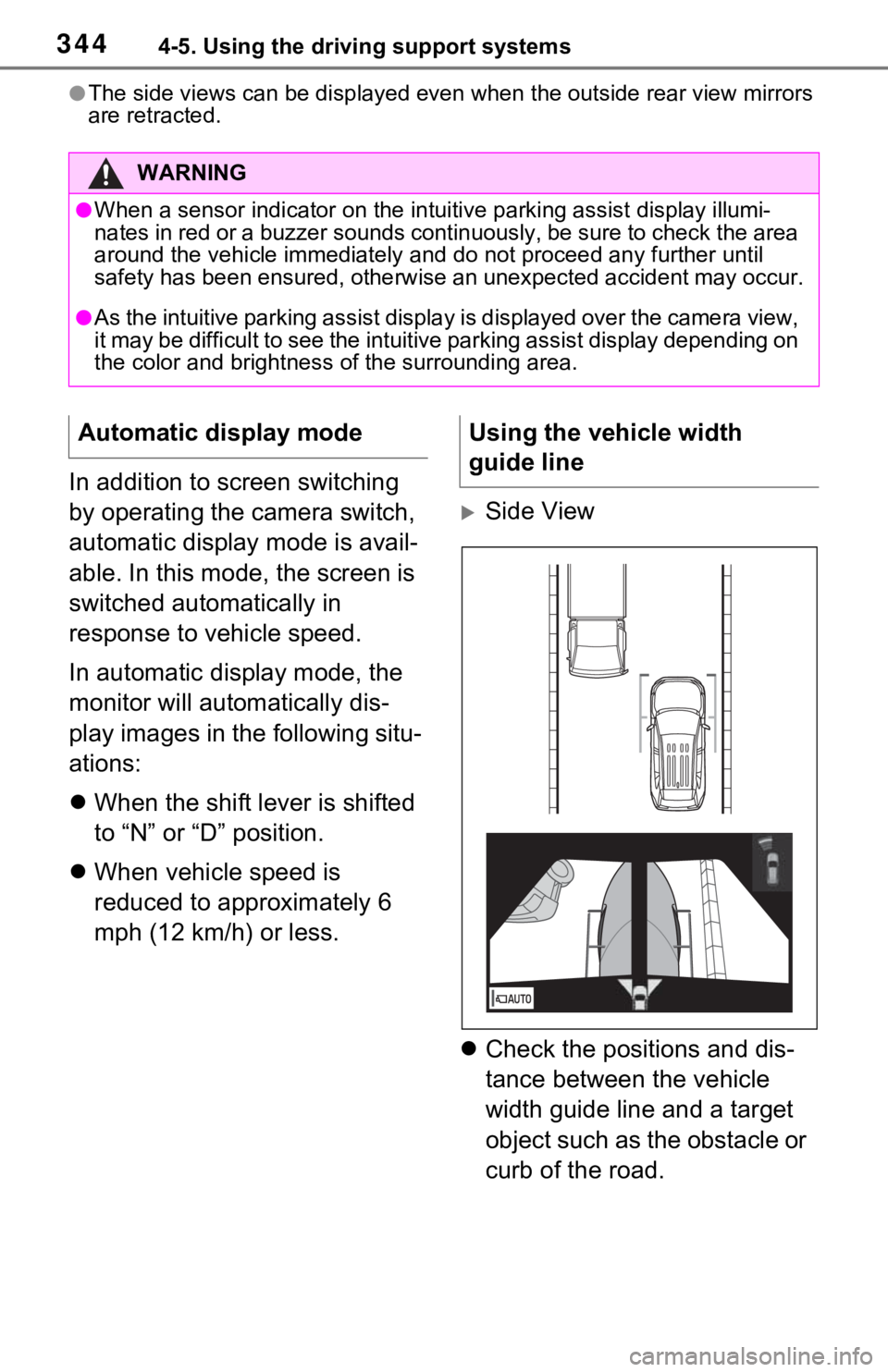
Side View
Check the positions and dis-
tance between the vehicle
width guide line and a target
object such as the obstacle or
curb of the road.
WARNING
●When a sensor indicator on the intuitive parking assist display illumi-
nates in red or a buzzer sounds continuously, be sure to check the area
around the vehicle immediately a nd do not proceed any further until
safety has been ensured, otherwise an unexpected accident may o ccur.
●As the intuitive parking assist display is displayed over the camera view,
it may be difficult to see the intuitive parking assist display depending on
the color and brightness of the surrounding area.
Automatic display modeUsing the vehicle width
guide line
Page 366 of 752
3664-5. Using the driving support systems
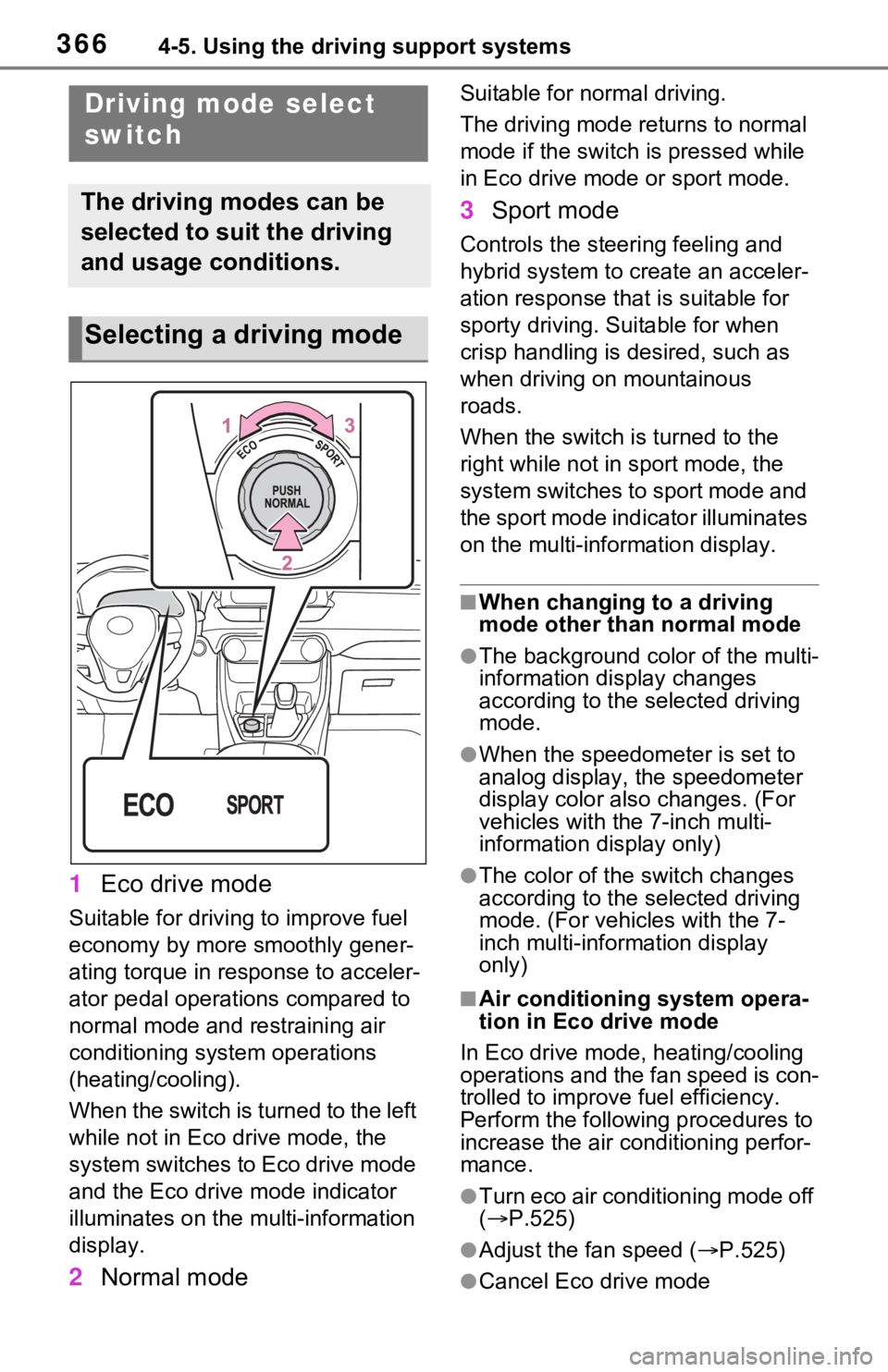
1Eco drive mode
Suitable for driving to improve fuel
economy by more smoothly gener-
ating torque in response to acceler-
ator pedal operations compared to
normal mode and restraining air
conditioning system operations
(heating/cooling).
When the switch is turned to the left
while not in Eco drive mode, the
system switches to Eco drive mode
and the Eco drive mode indicator
illuminates on the mu lti-information
display.
2 Normal mode
Suitable for n ormal driving.
The driving mode returns to normal
mode if the switch i s pressed while
in Eco drive mode or sport mode.
3 Sport mode
Controls the steering feeling and
hybrid system to create an acceler-
ation response tha t is suitable for
sporty driving. Suitable for when
crisp handling is desired, such as
when driving on mountainous
roads.
When the switch is turned to the
right while not in sport mode, the
system switches to sport mode and
the sport mode indicator illuminates
on the multi-information display.
■When changing to a driving
mode other than normal mode
●The background color of the multi-
information display changes
according to the selected driving
mode.
●When the speedometer is set to
analog display, the speedometer
display color also changes. (For
vehicles with the 7-inch multi-
information di splay only)
●The color of the switch changes
according to the selected driving
mode. (For vehicles with the 7-
inch multi-information display
only)
■Air conditioning system opera-
tion in Eco drive mode
In Eco drive mode, heating/cooling
operations and the fan speed is con-
trolled to improve fuel efficiency.
Perform the following procedures to
increase the air conditioning perfor-
mance.
●Turn eco air conditioning mode off
( P.525)
●Adjust the fan speed ( P.525)
●Cancel Eco drive mode
Driving mode select
switch
The driving modes can be
selected to suit the driving
and usage conditions.
Selecting a driving mode
Page 369 of 752
3694-5. Using the driving support systems
4
Driving■ECB (Electronically Con-
trolled Brake System)
The electronically controlled
system generates braking force
corresponding to the brake
operation
■ABS (Anti-lock Brake Sys-
tem)
Helps to prevent wheel lock
when the brakes are applied
suddenly, or if the brakes are
applied while driving on a slip-
pery road surface
■Brake assist
Generates an increased level of
braking force after the brake
pedal is depressed when the
system detects a panic stop sit-
uation
■VSC (Vehicle Stability Con-
trol)
Helps the driver to control skid-
ding when swerving suddenly or
turning on slippery road sur-
faces.
■Enhanced VSC (Enhanced
Vehicle Stability Control)
Provides cooperative control of
the ABS, TRAC, VSC and EPS.
Helps to maintain directional
stability when swerving on slip-
pery road surfaces by con-
trolling steering performance.
■Trailer Sway Control
Helps the driver to control trailer
sway by selectively applying
brake pressure for individual
wheels and reducing driving
torque when trailer sway is
detected.
■TRAC (Traction Control)
Helps to maintain drive power
and prevent the drive wheels
from spinning when starting the
vehicle or accelerating on slip-
pery roads
■Active Cornering Assist
(ACA)
Helps to prevent the vehicle
from drifting to the outer side by
performing inner wheel brake
control when attempting to
accelerate while turning
■Hill-start assist control
Helps to reduce the backward
Driving assist systems
To keep driving safety and
performance, the following
systems operate automati-
cally in response to various
driving situations. Be
aware, however, that these
systems are supplementary
and should not be relied
upon too heavily when oper-
ating the vehicle.
Summary of the driving
assist systems
Page 373 of 752
3734-5. Using the driving support systems
4
Driving
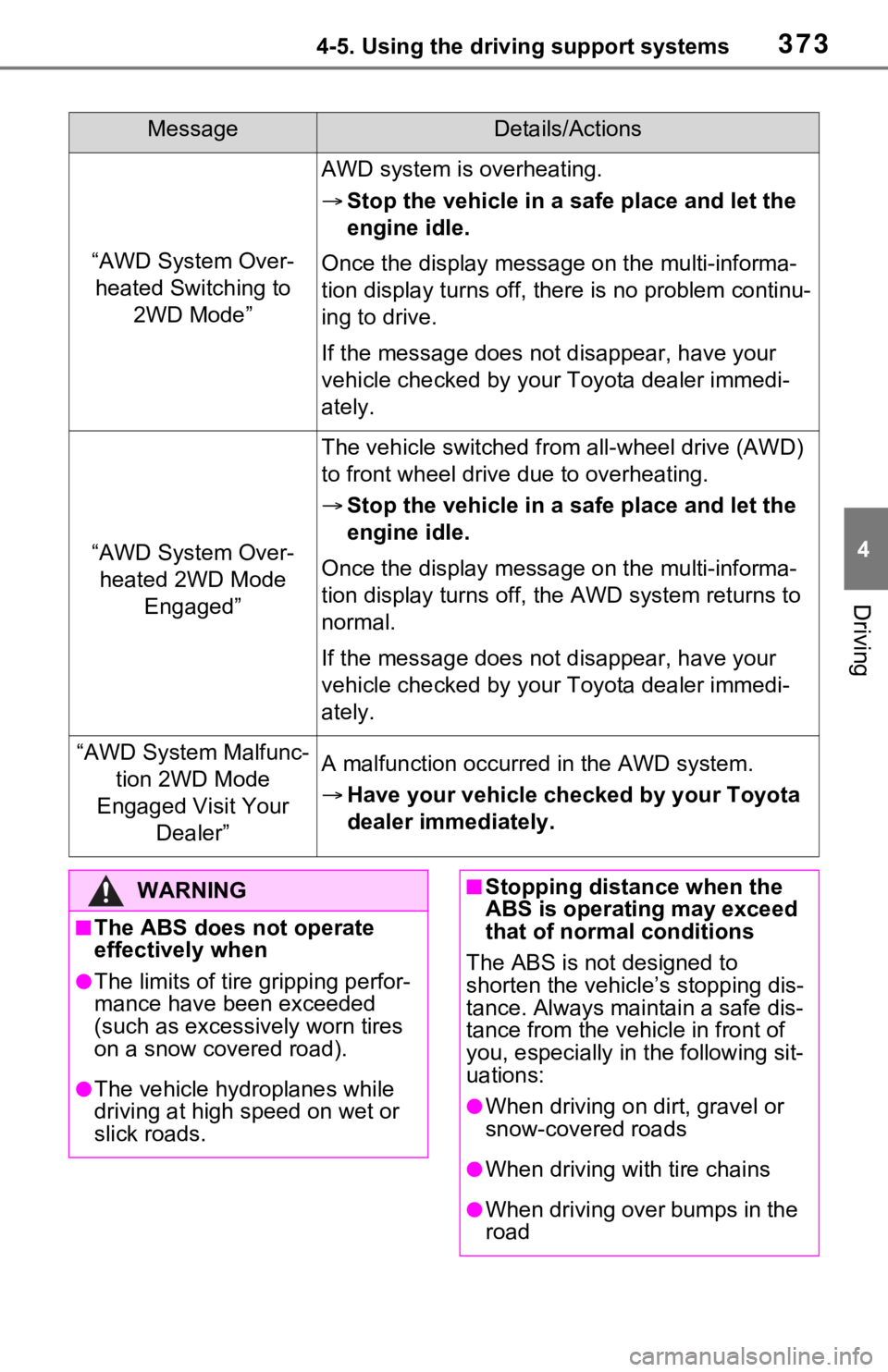
MessageDetails/Actions
“AWD System Over-heated Switching to 2WD Mode”
AWD system is overheating.
Stop the vehicle in a sa fe place and let the
engine idle.
Once the display message on the multi-informa-
tion display turns off, there is no problem continu-
ing to drive.
If the message does not disappear, have your
vehicle checked by your Toyota dealer immedi-
ately.
“AWD System Over- heated 2WD Mode Engaged”
The vehicle switched from all-wheel drive (AWD)
to front wheel drive due to overheating.
Stop the vehicle in a sa fe place and let the
engine idle.
Once the display message on the multi-informa-
tion display turns off, the AWD system returns to
normal.
If the message does not disappear, have your
vehicle checked by your Toyota dealer immedi-
ately.
“AWD System Malfunc- tion 2WD Mode
Engaged Visit Your Dealer”A malfunction occurred in the AWD system.
Have your vehicle checked by your Toyota
dealer immediately.
WARNING
■The ABS does not operate
effectively when
●The limits of tire gripping perfor-
mance have been exceeded
(such as excessively worn tires
on a snow covered road).
●The vehicle hydroplanes while
driving at high speed on wet or
slick roads.
■Stopping distance when the
ABS is operating may exceed
that of normal conditions
The ABS is not designed to
shorten the vehicle’s stopping dis-
tance. Always maintain a safe dis-
tance from the veh icle in front of
you, especially in the following sit-
uations:
●When driving on dirt, gravel or
snow-covered roads
●When driving with tire chains
●When driving over bumps in the
road
Page 374 of 752

3744-5. Using the driving support systems
WARNING
●When driving over roads with
potholes or uneven surfaces
■TRAC/VSC may not operate
effectively when
Directional control and power may
not be achievable while driving on
slippery road surfaces, even if the
TRAC/VSC system is operating.
Drive the vehicle carefully in con-
ditions where st ability and power
may be lost.
■Active Cornering Assist does
not operate effectively when
●Do not overly rely on Active
Cornering Assist. Active Corner-
ing Assist may not operate
effectively when accelerating
down slopes or driving on slip-
pery road surfaces.
●When Active Cornering Assist
frequently operates, Active Cor-
nering Assist may temporarily
stop operating to ensure proper
operation of the brakes, TRAC
and VSC.
■Hill-start assist control does
not operate effectively when
●Do not overly rely on hill-start
assist control. Hill-start assist
control may not operate effec-
tively on steep inclines and
roads covered with ice.
●Unlike the parking brake, hill-
start assist control is not
intended to hold the vehicle sta-
tionary for an extended period
of time. Do not attempt to use
hill-start assist control to hold
the vehicle on an incline, as
doing so may lead to an acci-
dent.
■When the
TRAC/ABS/VSC/Trailer Sway
Control is activated
The slip indicator light flashes.
Always drive carefully. Reckless
driving may cause an accident.
Exercise particula r care when the
indicator light flashes.
■When the TRAC/VSC/Trailer
Sway Control systems are
turned off
Be especially careful and drive at
a speed appropriate to the road
conditions. As these are the sys-
tems to help ensure vehicle stabil-
ity and driving force, do not turn
the TRAC/VSC/Tra iler Sway Con-
trol systems off unless necessary.
Trailer Sway Control is part of the
VSC system and will not operate
if VSC is turned off or experiences
a malfunction.
■Replacing tires
Make sure that all tires are of the
specified size, brand, tread pat-
tern and total load capacity. In
addition, make sure that the tires
are inflated to the recommended
tire inflation p ressure level.
The ABS, TRAC and VSC/Trailer
Sway Control systems will not
function correctly if different tires
are installed on the vehicle.
Contact your Toyota dealer for
further information when replacing
tires or wheels.
■Handling of tires and the sus-
pension
Using tires with any kind of prob-
lem or modifying the suspension
will affect the driving assist sys-
tems, and may cause a system to
malfunction.
Page 376 of 752
3764-6. Driving tips
4-6.Driving tips
When using Eco drive mode, the
torque corresponding to the
accelerator pedal depression
amount can be generated more
smoothly than it is in normal
conditions. In addition, the oper-
ation of the air conditioning sys-
tem (heating/cooling) will be
minimized, improving the fuel
economy. (P.366)
The Eco-friendly driving is pos-
sible by keeping the indicator of
Hybrid System Indicator within
Eco area. ( P.95, 100)
Shift the shift lever to D when
stopped at a traffic light, or driv-
ing in heavy traffic etc. Shift the
shift lever to P when parking.
When using the N position,
there is no positive effect on fuel
consumption. In the N position,
the gasoline engine operates
but electricity cannot be gener-
ated. Also, when using the air conditioning system, etc., the
hybrid battery (traction battery)
power is consumed.
Drive your vehicle smoothly.
Avoid abrupt acceleration and
deceleration. Gradual accel-
eration and deceleration will
make more effective use of
the electric motor (traction
motor) without having to use
gasoline engine power.
Avoid repeated acceleration.
Repeated acceleration con-
sumes hybrid battery (trac-
tion battery) power, resulting
in poor fuel consumption. Bat-
tery power can be restored by
driving with the accelerator
pedal slightly released.
Make sure to operate the brakes
gently and in a timely manner. A
greater amount of electrical
energy can be regenerated
when slowing down.
Repeated acceleration and
deceleration, as well as long
waits at traffic lights, will lead to
bad fuel economy. Check traffic
reports before leaving and avoid
delays as much as possible.
Hybrid vehicle driving
tips
For economical and ecolog-
ical driving, pay attention to
the following points:
Using Eco drive mode
Use of Hybrid System
Indicator
Shift lever operation
Accelerator pedal/brake
pedal operation
When braking
Delays