headlights TOYOTA RAV4 HYBRID 2021 Owners Manual
[x] Cancel search | Manufacturer: TOYOTA, Model Year: 2021, Model line: RAV4 HYBRID, Model: TOYOTA RAV4 HYBRID 2021Pages: 752, PDF Size: 31.25 MB
Page 16 of 752
16Pictorial index
Pictorial index
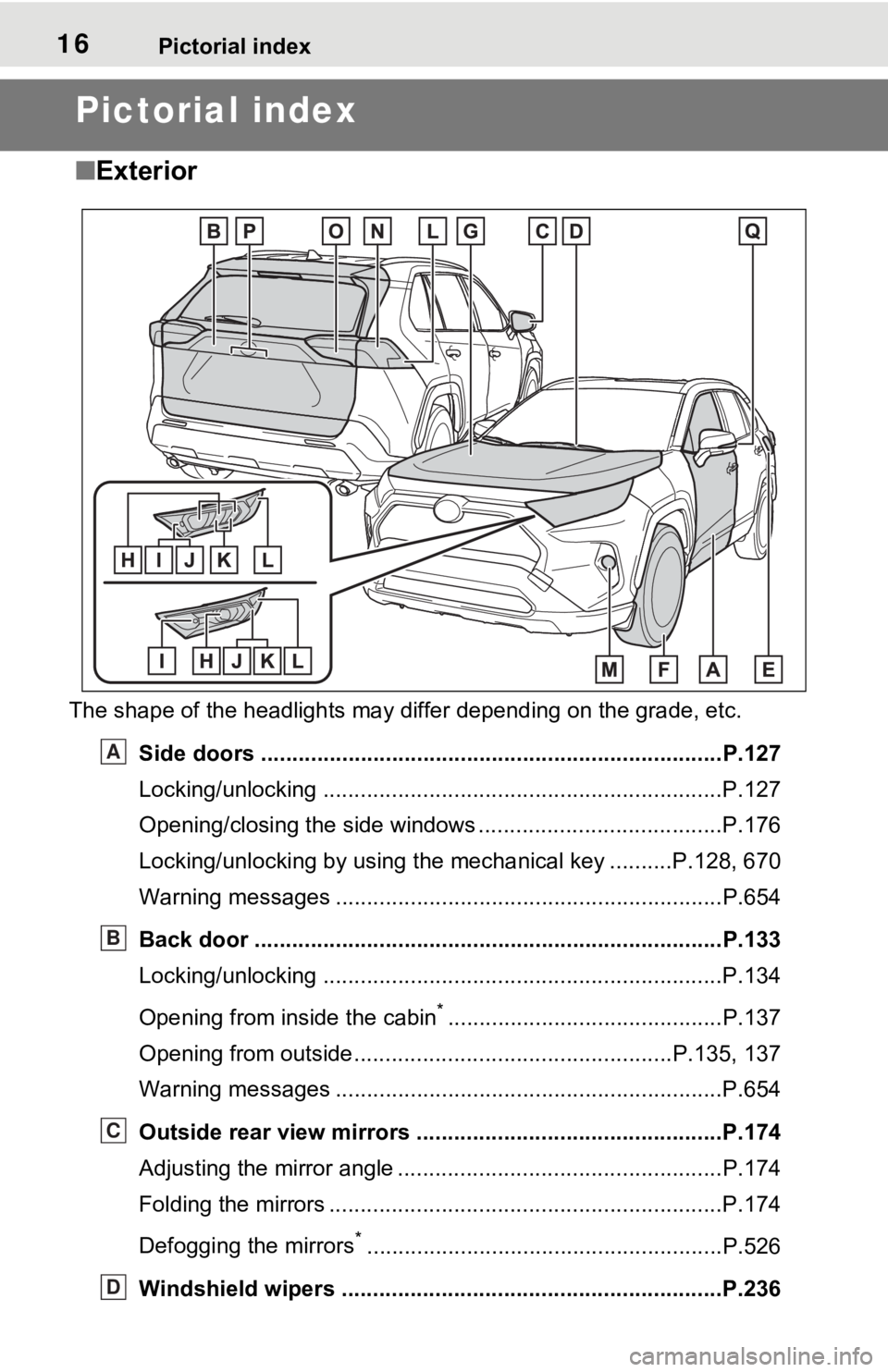
■Exterior
The shape of the headlights may differ depending on the grade, etc.
Side doors ......... ................................. ................................P.127
Locking/unlocking ................................................................P.127
Opening/closing the side windows ............................... ........P.176
Locking/unlocking by using the mechanical key ..........P.128, 670
Warning messages ..............................................................P.654
Back door ...................................................... .....................P.133
Locking/unlocking ................................................................P.134
Opening from inside the cabin
*............................................P.137
Opening from outside........................................... ........P.135, 137
Warning messages ..............................................................P.654
Outside rear view mirrors .................................................P.174
Adjusting the mirror angle ..................................... ...............P.174
Folding the mirrors ...............................................................P.174
Defogging the mirrors
*.........................................................P.526
Windshield wipers .............................................. ...............P.236
A
B
C
D
Page 17 of 752
17Pictorial index
Precautions against winter season ......................................P.378
To prevent freezing (windshield wiper de-icer)
*...................P.529
Precautions against car wash
(Rain-sensing windshield wipers)
*.......................................P.567
Replacing the wiper insert .................................... ...............P.615
Fuel filler door ............................................... .....................P.241
Refueling method ............................................... ..................P.241
Fuel type/fuel tan k capacity .................................................P.685
Tires ....................................................................................P.590
Tire size/inflation pressure ................................... ................P.690
Winter tires/tire chain ........................................ ...................P.378
Checking/rotation/tire pressure warning system
*.................P.590
Coping with flat tires......................................... ....................P.658
Hood ....................................................................................P.579
Opening ........................................................ .......................P.579
Engine oil ..................................................... ........................P.686
Coping with overheat ........................................... ................P.677
Warning messages ..............................................................P.654
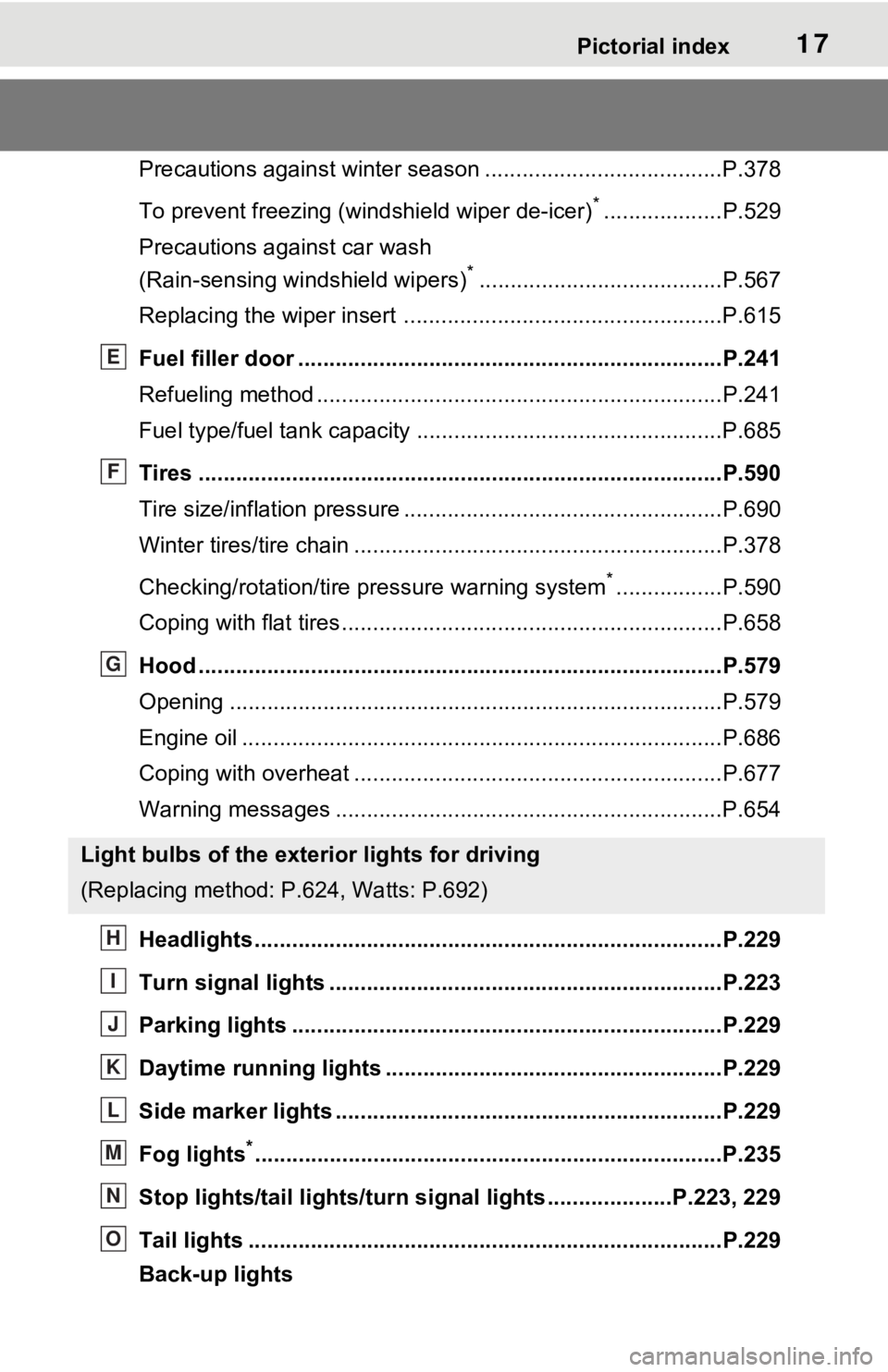
Headlights..................................................... ......................P.229
Turn signal lights ...............................................................P.223
Parking lights .....................................................................P.229
Daytime running lights .. ....................................................P.229
Side marker lights ............................................. .................P.229
Fog lights
*............................................................... ............P.235
Stop lights/tail lights/turn s ignal lights ....................P.223, 229
Tail lights .................................................... ........................P.229
Back-up lights
Light bulbs of the exterior lights for driving
(Replacing method: P .624, Watts: P.692)
E
F
G
H
I
J
K
L
M
N
O
Page 20 of 752
20Pictorial index
Energy monitor.....................................................................P.113
When the warning messages are displayed ........................ P.654
Turn signal lever ................................................................P.223
Headlight switch ................................................................P.229
Headlights/parking lights/tail lights/
license plate lights/daytime running lights .................... ........P.229
Fog lights
*1............................................................... ............P.235
Windshield wiper and washer switch ..............................P.236
Rear window wiper and washer switch ...........................P.239
Usage.......................................................... .................P.236, 239
Adding washer fluid ..............................................................P.587
Warning messages ..............................................................P.654
Emergency flasher switch ....................................... ..........P.634
Hood lock release lever ........................................ .............P.579
Tilt and telescopic steering lock release lever ................P.162
Adjustment ..................................................... ......................P.162
Air conditioning system ............................. .......................P.524
Usage.......................................................... .........................P.524
Rear window defogger ........................................... ..............P.526
Audio
*1............................................................... .................P.387
Audio Plus
*1, 2
Premium Audio*1, 2
Fuel filler door opener swi tch ...........................................P.242
*1: If equipped
*2: Refer to “NAVIGATION AND MULTIMEDIA SYSTEM OWNER’S MAN-
UAL”.
E
F
G
H
I
J
K
L
Page 112 of 752
1122-1. Instrument cluster
and lower side of the drive informa-
tion screen from three items, aver-
age speed, distance and total time.
“Trip Summary”
Select to set the i tems displayed
when the power switch is turned off.
“Pop-Up Display”
Select to enable/d isable the follow-
ing pop-up displays, which may
appear in some situations.
• Intersection guidance display of the navigation system-linked sys-
tem (if equipped)
• Incoming call di splay of the
hands-free phone system (if
equipped)
• Audio operation (if equipped)
• Volume operation (if equipped)
• Voice control (if equipped)
“MID OFF”
A blank screen is displayed.
“Default Settings”
Select to reset the meter display
settings.
■Suspension of the settings dis-
play
●In the following si tuations, opera-
tion of the setting s display will be
temporarily suspended.
• When a warning message
appears on the multi-information
display
• When the vehicle begins to move
●Settings for functions not
equipped to the vehicle are not
displayed.
●When a function is turned off, the
related settings for that function
are not selectable.
Select to display warning mes-
sages and measures to be
taken if a malfunction is
detected. ( P.654)
Displays suggestions to the
driver in the following situations.
To select a response to a dis-
played suggestion, use the
meter control switches.
■Suggestion to turn on the
headlights
If the headlight switch is in other
than or , and the vehicle
speed is 3 mph (5 km/h) or
higher for a certain amount of
time when the surroundings are
WARNING
■Cautions during setting up
the display
As the hybrid system needs to be
operating during setting up the
display, ensure that the vehicle is
parked in a place with adequate
ventilation. In a closed area such
as a garage, exhaust gases
including harmful carbon monox-
ide (CO) may collect and enter
the vehicle. This may lead to
death or a serious health hazard.
NOTICE
■During setting up the display
To prevent 12-vo lt battery dis-
charge, ensure that the hybrid
system is operating while setting
up the display features.
Warning message display
Suggestion function
Page 113 of 752
1132-1. Instrument cluster
2
Vehicle status information and indicators
dark, a suggestion message will
be displayed.
■Suggestion to turn off the
headlights
If the headlights are left on for a
certain amount of time after the
power switch has been turned
off, a suggestion message will
be displayed.
When the headlight switch is in
the AUTO position: The mes-
sage asking if you wish to turn
the headlights off is displayed.
To turn the headlights off, select
“Yes”.
If the driver’s door is opened after
the power switch is turned off, this
suggestion message will not be dis-
played.
■Customization
The suggestion function can be
turned on/off. (Customizable fea-
tures: P.708)
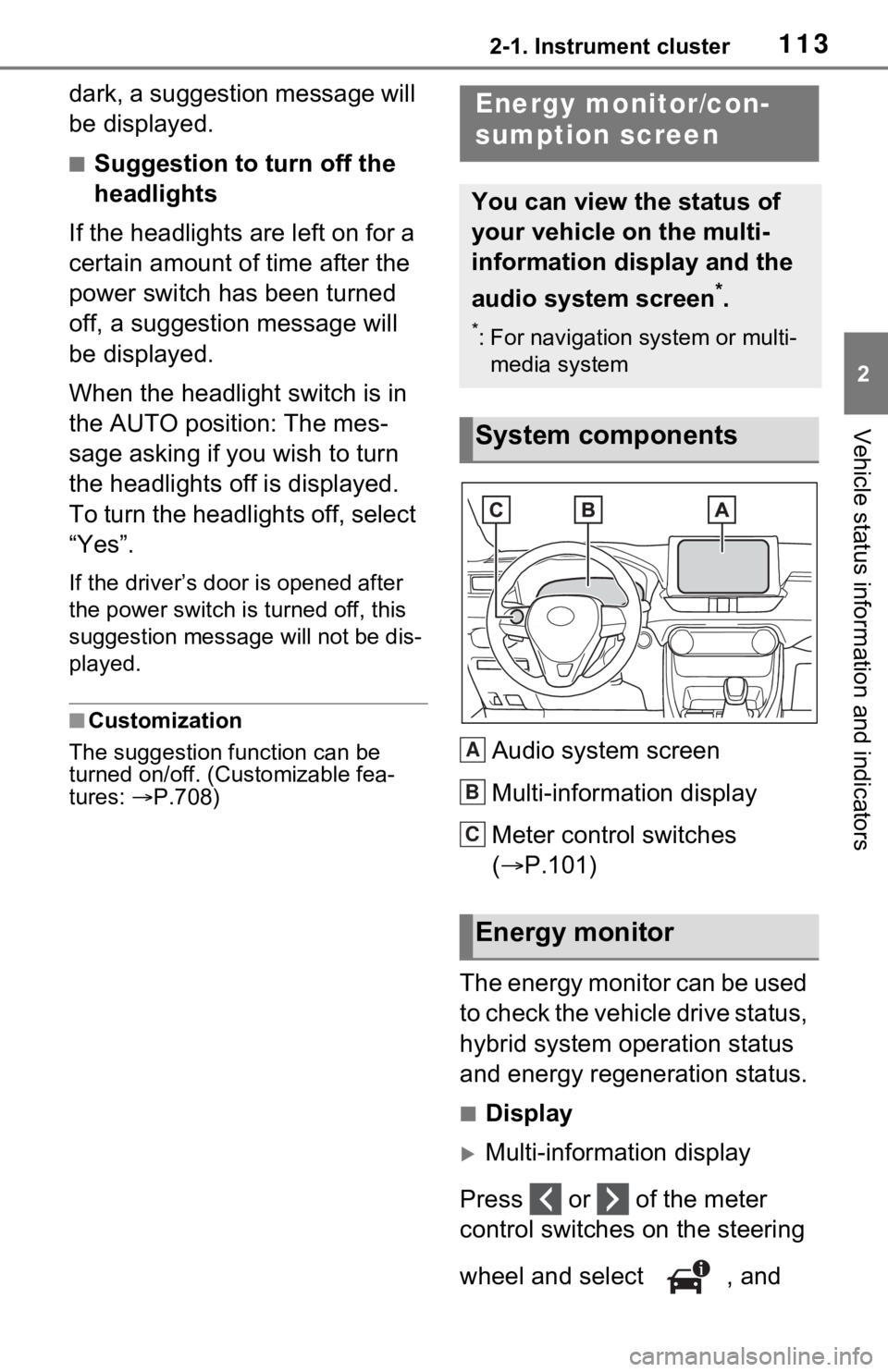
Audio system screen
Multi-information display
Meter control switches
( P.101)
The energy monitor can be used
to check the vehicle drive status,
hybrid system operation status
and energy regeneration status.
■Display
Multi-information display
Press or of the meter
control switches on the steering
wheel and select , and
Energy monitor/con-
sumption screen
You can view the status of
your vehicle on the multi-
information display and the
audio system screen
*.
*: For navigation system or multi- media system
System components
Energy monitor
A
B
C
Page 163 of 752
1633-4. Adjusting the steering wheel and mirrors
3
Before driving
*: If equipped
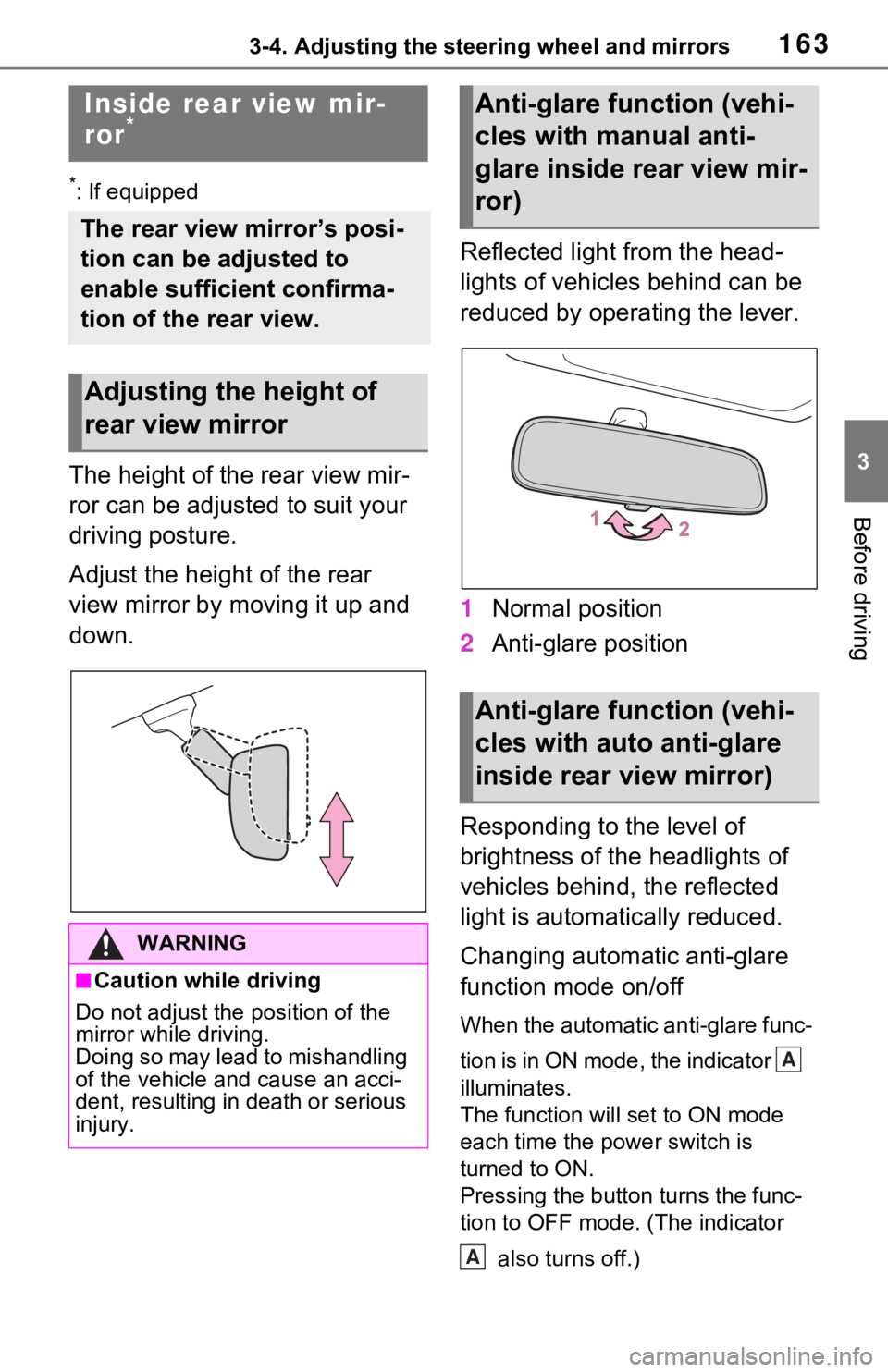
The height of the rear view mir-
ror can be adjusted to suit your
driving posture.
Adjust the height of the rear
view mirror by moving it up and
down.Reflected light from the head-
lights of vehicles behind can be
reduced by operating the lever.
1
Normal position
2 Anti-glare position
Responding to the level of
brightness of the headlights of
vehicles behind, the reflected
light is automatically reduced.
Changing automatic anti-glare
function mode on/off
When the automatic anti-glare func-
tion is in ON mode, the indicator
illuminates.
The function will set to ON mode
each time the power switch is
turned to ON.
Pressing the button turns the func-
tion to OFF mode. (The indicator also turns off.)
Inside rear view mir-
ror*
The rear view mirror’s posi-
tion can be adjusted to
enable sufficient confirma-
tion of the rear view.
Adjusting the height of
rear view mirror
WARNING
■Caution while driving
Do not adjust the position of the
mirror while driving.
Doing so may lead to mishandling
of the vehicle and cause an acci-
dent, resulting in death or serious
injury.
Anti-glare function (vehi-
cles with manual anti-
glare inside rear view mir-
ror)
Anti-glare function (vehi-
cles with auto anti-glare
inside rear view mirror)
A
A
Page 168 of 752
1683-4. Adjusting the steering wheel and mirrors
*: This is a function for the optical
mirror mode, however, the setting
can also be changed while using
the digital mirror mode.
■Enabling/disabling the
automatic anti-glare func-
tion (optical mirror mode)
The automatic anti-glare func-
tion in the optical mirror mode
can be enabled/disabled. The
setting can be changed in both
the digital mirror mode and the
optical mirror mode.
When using the digital mirror
mode
P.167
When using the optical mirror
mode
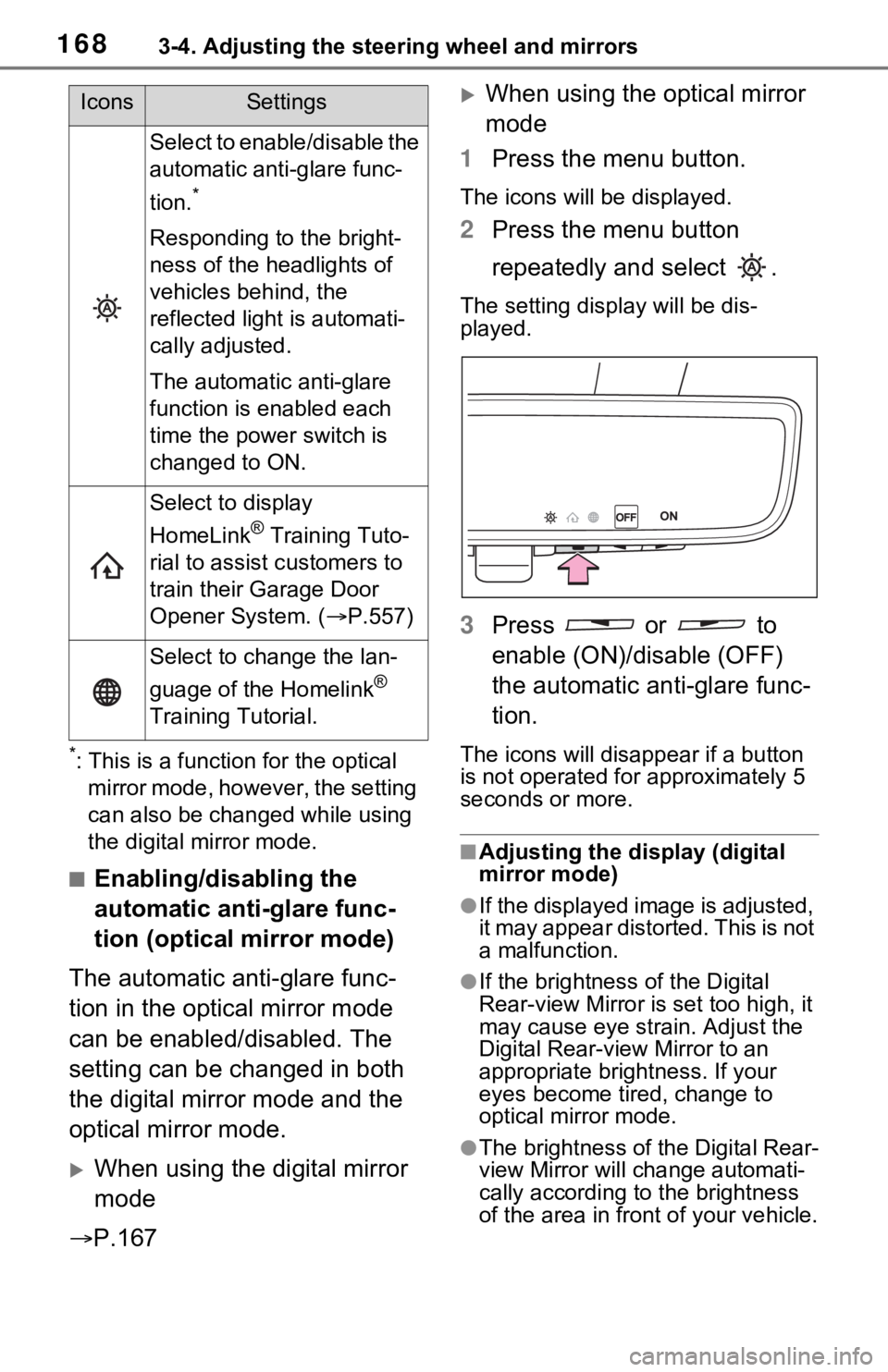
1 Press the menu button.
The icons will be displayed.
2Press the menu button
repeatedly and select .
The setting display will be dis-
played.
3Press or to
enable (ON)/disable (OFF)
the automatic anti-glare func-
tion.
The icons will disappear if a button
is not operated fo r approximately 5
seconds or more.
■Adjusting the display (digital
mirror mode)
●If the displayed image is adjusted,
it may appear distorted. This is not
a malfunction.
●If the brightness of the Digital
Rear-view Mirror is set too high, it
may cause eye strain. Adjust the
Digital Rear-view Mirror to an
appropriate brightness. If your
eyes become tired, change to
optical mirror mode.
●The brightness of the Digital Rear-
view Mirror will change automati-
cally according to the brightness
of the area in front of your vehicle.
Select to enable/disable the
automatic anti-glare func-
tion.
*
Responding to the bright-
ness of the headlights of
vehicles behind, the
reflected light is automati-
cally adjusted.
The automatic anti-glare
function is enabled each
time the power switch is
changed to ON.
Select to display
HomeLink
® Training Tuto-
rial to assist c ustomers to
train their Garage Door
Opener System. ( P.557)
Select to change the lan-
guage of the Homelink
®
Training Tutorial.
IconsSettings
Page 171 of 752
1713-4. Adjusting the steering wheel and mirrors
3
Before driving
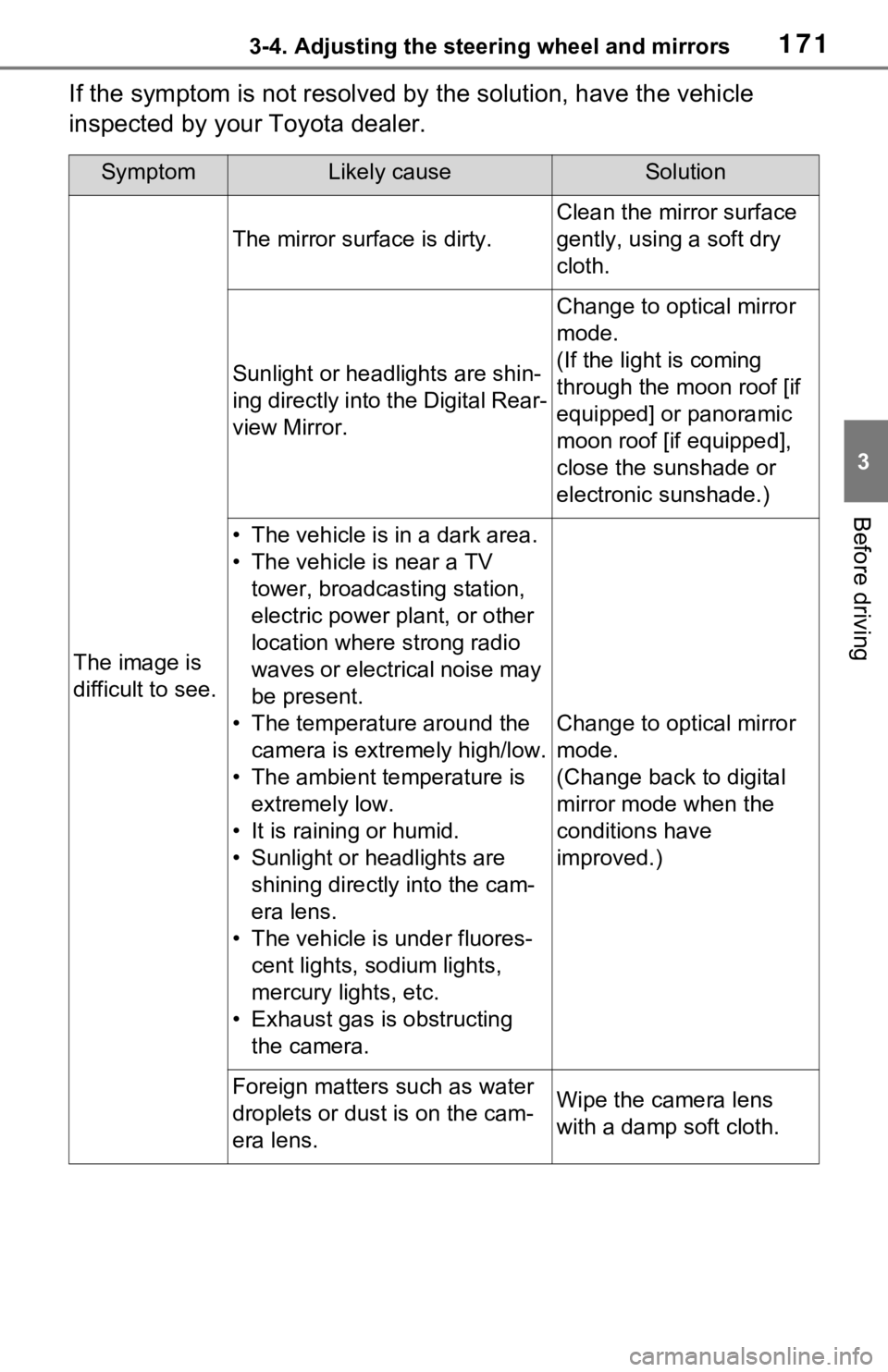
If the symptom is not resolved by the solution, have the vehicle
inspected by your Toyota dealer.
SymptomLikely causeSolution
The image is
difficult to see.
The mirror surface is dirty.
Clean the mirror surface
gently, using a soft dry
cloth.
Sunlight or headlights are shin-
ing directly into the Digital Rear-
view Mirror.
Change to optical mirror
mode.
(If the light is coming
through the moon roof [if
equipped] or panoramic
moon roof [if equipped],
close the sunshade or
electronic sunshade.)
• The vehicle is in a dark area.
• The vehicle is near a TV tower, broadcasting station,
electric power plant, or other
location where strong radio
waves or electrical noise may
be present.
• The temperature around the camera is extremely high/low.
• The ambient te mperature is
extremely low.
• It is raining or humid.
• Sunlight or headlights are shining directly into the cam-
era lens.
• The vehicle is under fluores- cent lights, sodium lights,
mercury lights, etc.
• Exhaust gas is obstructing the camera.
Change to optical mirror
mode.
(Change back to digital
mirror mode when the
conditions have
improved.)
Foreign matters such as water
droplets or dust is on the cam-
era lens.Wipe the camera lens
with a damp soft cloth.
Page 229 of 752
2294-3. Operating the lights and wipers
4
Driving
4-3.Operating the lights and wipers
Operating the switch
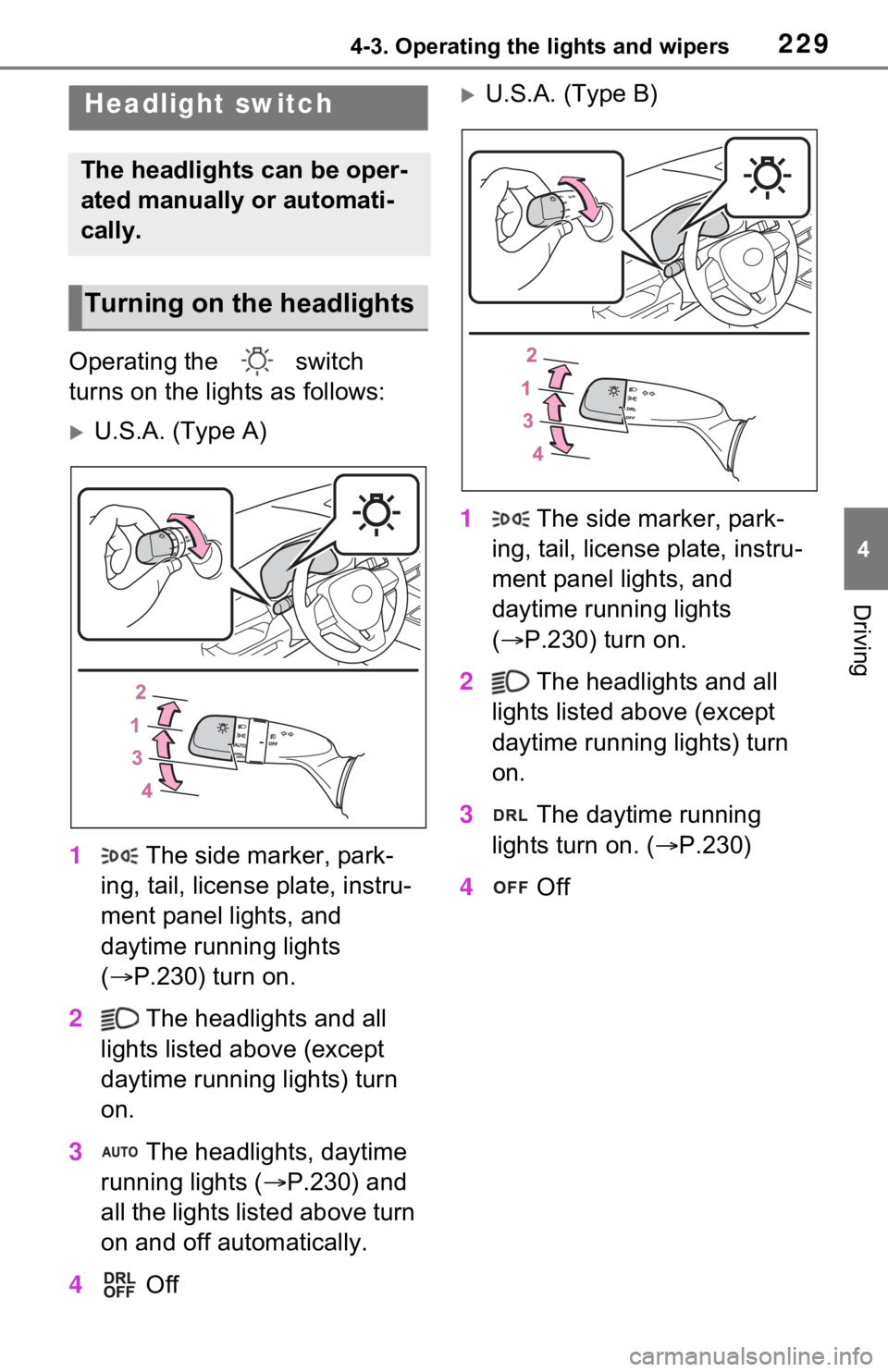
turns on the lights as follows:
U.S.A. (Type A)
1 The side marker, park-
ing, tail, license plate, instru-
ment panel lights, and
daytime running lights
( P.230) turn on.
2 The headlights and all
lights listed above (except
daytime running lights) turn
on.
3 The headlights, daytime
running lights ( P.230) and
all the lights listed above turn
on and off automatically.
4 Off
U.S.A. (Type B)
1 The side marker, park-
ing, tail, license plate, instru-
ment panel lights, and
daytime running lights
( P.230) turn on.
2 The headlights and all
lights listed above (except
daytime running lights) turn
on.
3 The daytime running
lights turn on. ( P.230)
4 OffHeadlight switch
The headlights can be oper-
ated manually or automati-
cally.
Turning on the headlights
Page 230 of 752
2304-3. Operating the lights and wipers
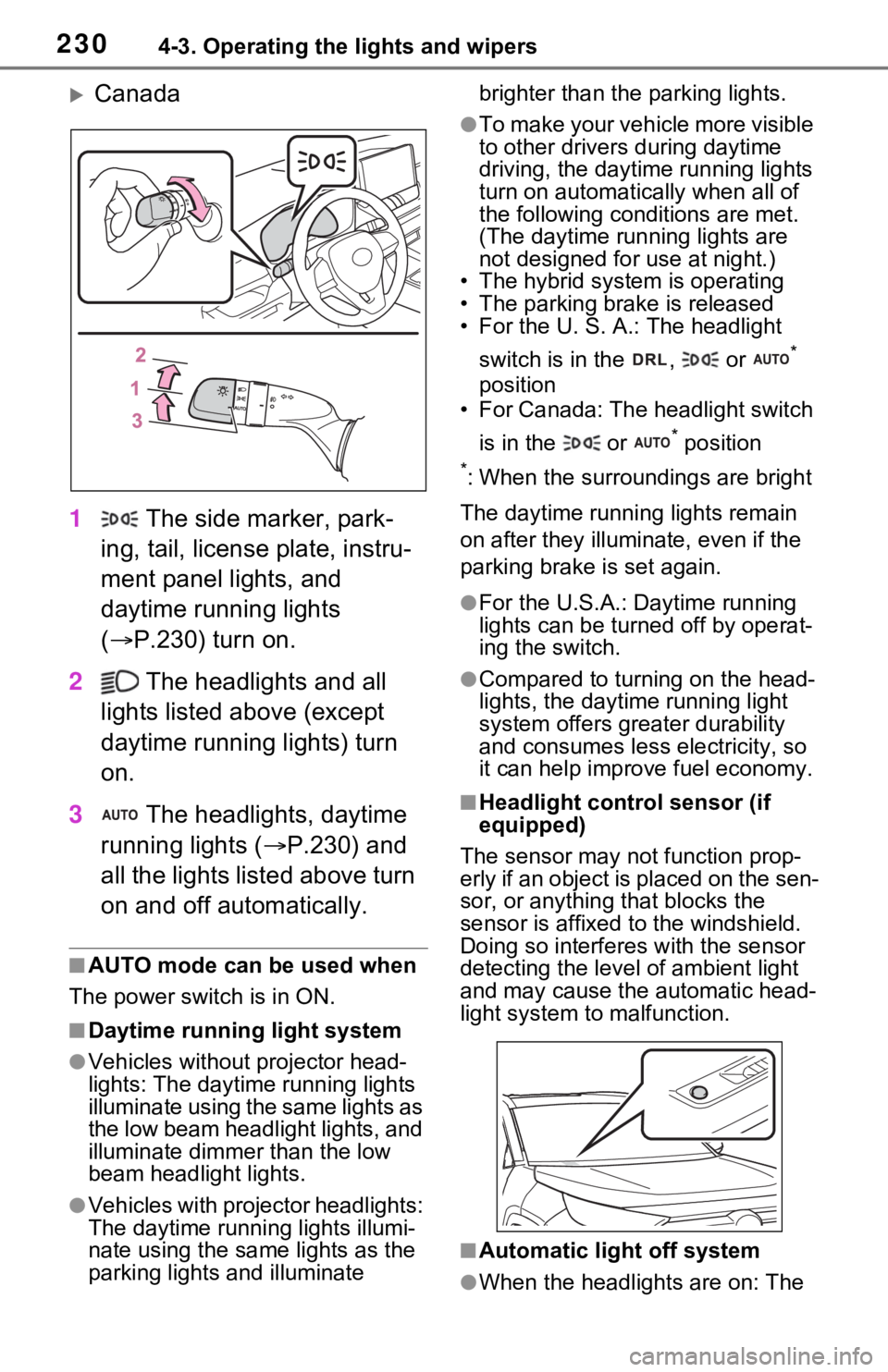
Canada
1 The side marker, park-
ing, tail, license plate, instru-
ment panel lights, and
daytime running lights
( P.230) turn on.
2 The headlights and all
lights listed above (except
daytime running lights) turn
on.
3 The headlights, daytime
running lights ( P.230) and
all the lights listed above turn
on and off automatically.
■AUTO mode can be used when
The power swit ch is in ON.
■Daytime running light system
●Vehicles without projector head-
lights: The daytime running lights
illuminate using the same lights as
the low beam headlight lights, and
illuminate dimme r than the low
beam headlight lights.
●Vehicles with projector headlights:
The daytime running lights illumi-
nate using the same lights as the
parking lights and illuminate brighter than the parking lights.
●To make your vehicle more visible
to other drivers
during daytime
driving, the daytime running lights
turn on automatically when all of
the following conditions are met.
(The daytime running lights are
not designed for use at night.)
• The hybrid system is operating
• The parking brake is released
• For the U. S. A.: The headlight
switch is in the , or
*
position
• For Canada: The headlight switch
is in the or
* position
*: When the surroundings are bright
The daytime running lights remain
on after they illumi nate, even if the
parking brake is set again.
●For the U.S.A.: Daytime running
lights can be turned off by operat-
ing the switch.
●Compared to turning on the head-
lights, the daytime running light
system offers greater durability
and consumes less electricity, so
it can help improve fuel economy.
■Headlight control sensor (if
equipped)
The sensor may not function prop-
erly if an object is placed on the sen-
sor, or anything that blocks the
sensor is affixed to the windshield.
Doing so interferes with the sensor
detecting the level of ambient light
and may cause t he automatic head-
light system to malfunction.
■Automatic light off system
●When the headlights are on: The