tire pressure reset TOYOTA RAV4 HYBRID 2021 Owners Manual
[x] Cancel search | Manufacturer: TOYOTA, Model Year: 2021, Model line: RAV4 HYBRID, Model: TOYOTA RAV4 HYBRID 2021Pages: 752, PDF Size: 31.25 MB
Page 111 of 752
1112-1. Instrument cluster
2
Vehicle status information and indicators
Select to initialize the tire pressure
warning system.
• “Change Wheel” (except for mod-
els made in Japan
* without tire
inflation pressure display func-
tion)
Select to register the ID codes of
the tire pressure s ensors to the tire
pressure warning system.
• “Change Wheel” (for models
made in Japan
* without tire infla-
tion pressure display function)
Select to change the tire pressure
warning system sensor ID code set.
To enable this function, a second
set of tire pressure warning system
sensor ID codes must be registered
by a Toyota dealer. For information
regarding changing the registered
ID code set, contact your Toyota
dealer.
*: The country of production is writ- ten on the Certification Regula-
tion Label. ( P.684)
“Scheduled Maintenance”
( P.573)
Select to reset the scheduled main-
tenance information (message indi-
cating maintenance is required and
distance until the next mainte-
nance) after all maintenance is per-
formed.
■ Settings
“Language”
Select to change the language on
the multi-inform ation display.
“Units”
Select to change t he units of mea-
sure displayed.
“Meter Type” (7-inch display)
Select to change the speedometer
display.
(EV indicator) ( P.73)
Select to enable/disable the EV
indicator.
(Driving information dis-
play settings)
Select to set up t he following items.
• “Hybrid System”
Select to enable/disable the ECO
Accelerator Guidance (P.105).
• “Fuel Economy”
Select to change the display on
Fuel Economy ( P.105).
(Audio settings) (if
equipped)
Select to enable/disable
screen.
(Vehicle information dis-
play settings)
• “Display Contents”
Select to set up t he following items.
“Energy monitor”:
Select to enable/disable the Energy
monitor ( P.113)
“AWD”:
Select to enable /disable the AWD
system display ( P.108).
• “Drive Info Type”
Select to change the drive informa-
tion type display between trip and
total. ( P.108).
• “Drive Info Items”
Select to set the items on the upper
Page 602 of 752
6027-3. Do-it-yourself maintenance
few minutes. However, in the follow-
ing cases, the set tings have not
been recorded an d the system will
not operate prope rly. If repeated
attempts to record tire inflation pres-
sure settings are unsuccessful,
have the vehicle inspected by your
Toyota dealer.
●When operating the tire pressure
warning reset swit ch, the tire pres-
sure warning light does not blink 3
times.
●After driving for a certain period of
time since the initialization has
been completed, the warning light
comes on after blin king for 1 min-
ute.
■If the tire pressure warning sys-
tem is not initialized properly
(vehicles with tire inflation pres-
sure display function)
●In the following si tuations, initial-
ization may take longer than usual
to be completed or may not be
possible. Normally, initialization
completes within approximately
30 minutes.
• Vehicle is not driven at approxi- mately 25 mph ( 40 km/h) or more
• Vehicle is driven on unpaved
roads
• Vehicle is driven near other vehi- cles and system cannot recog-
nize tire pressure warning valve
and transmitters of your vehicle
over those of other vehicles.
• If the vehicle is driven in heavy traffic or another situation where
other vehicles are driven close by,
it may take time for the system to
recognize the tire pressure warn-
ing valve and tran smitters of your
vehicle over those of other vehi-
cles.
If initialization does not complete
after driving for 1 hour or more, park
the vehicle in a safe place for
approximately 20 minutes and then
drive the vehicle again.
●If the vehicle is reversed during initialization, the data up to that
point is reset, so p
erform the ini-
tialization procedure again from
the beginning.
●In the following situations, initial-
ization will not be started or was
not completed properly and the
system will not oper ate properly.
Perform the initialization proce-
dure again.
• If, when attempting to start initial- ization, the tire pressure warning
light does not blink 3 times.
• If, when the veh icle has been
driven for about 20 minutes after
performing initialization, the tire
pressure warning light blinks for
approximately 1 minute and then
illuminates.
If the inflation pressure of each tire
is still not display ed, have the vehi-
cle inspected by your Toyota dealer.
For models made in Japan*1
without tire inflation pressure
display function
Every tire pressure warning
valve and transmitter has a
unique ID code. In addition to
WARNING
■When initializing the tire pres-
sure warning system
Do not initialize tire inflation pres-
sure without first adjusting the tire
inflation pressure to the specified
level. Otherwise, the tire pressure
warning light may not come on
even if the tire inflation pressure is
low, or it may c ome on when the
tire inflation pre ssure is actually
normal.
Registering ID codes
(vehicles with tire pres-
sure warning system)
Page 605 of 752
6057-3. Do-it-yourself maintenance
7
Maintenance and care
point is reset, so perform the reg-
istration procedure again from the
beginning.
●In the following situations, ID code
registration will not be started or
was not completed properly and
the system will not operate prop-
erly. Perform the ID code registra-
tion procedure again.
• If, when attempting to start ID code registration, the tire pressure
warning light does not blink slowly
3 times.
• If, when the vehicle has been driven for about 20 minutes after
performing ID co de registration,
the tire pressur e warning light
blinks for approxi mately 1 minute
and then illu minates.
If the ID codes cannot be registered
even when performing the above
procedure, contact your Toyota
dealer.
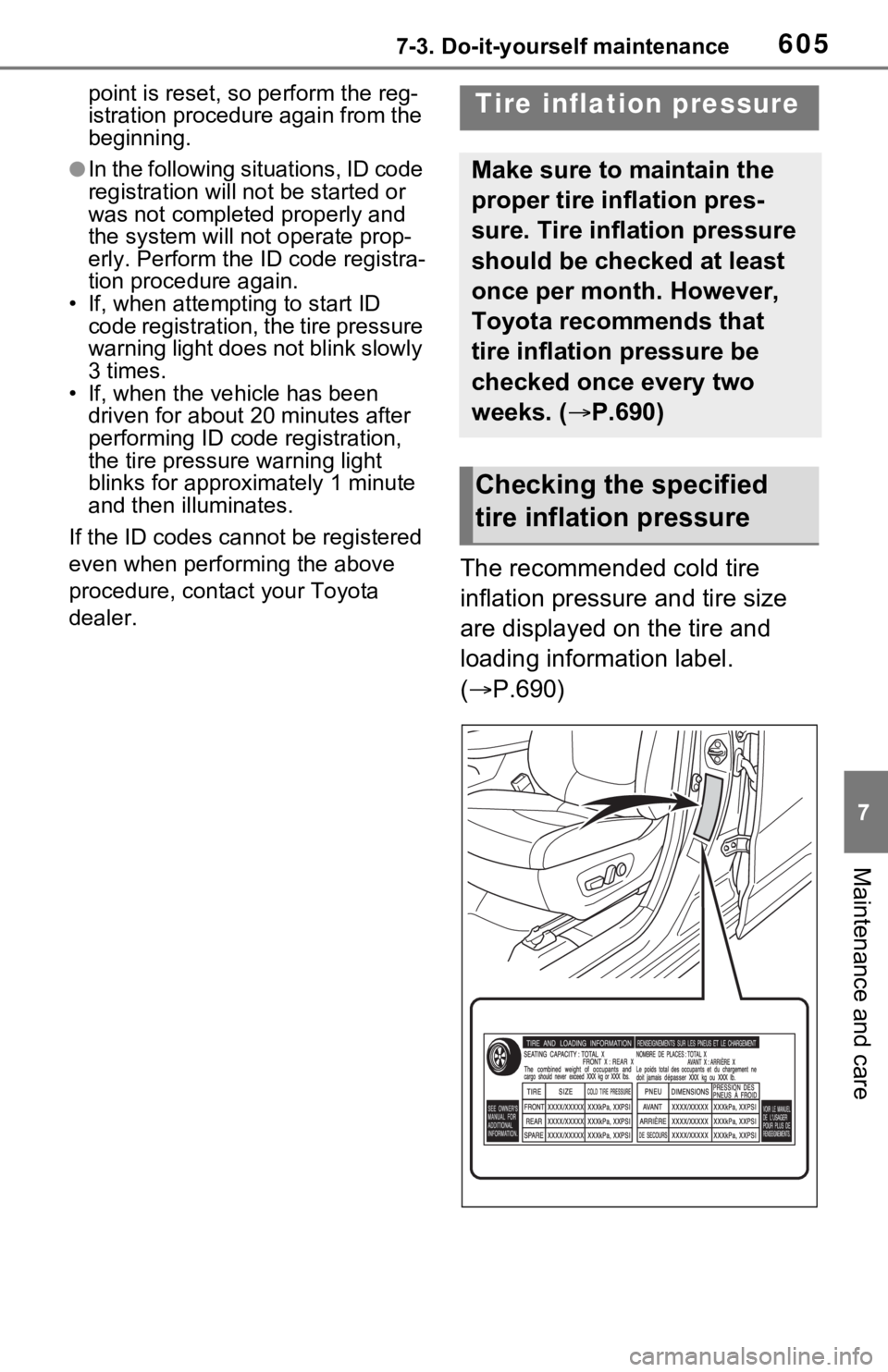
The recommended cold tire
inflation pressure and tire size
are displayed on the tire and
loading information label.
( P.690)
Tire inflation pressure
Make sure to maintain the
proper tire inflation pres-
sure. Tire inflation pressure
should be checked at least
once per month. However,
Toyota recommends that
tire inflation pressure be
checked once every two
weeks. ( P.690)
Checking the specified
tire inflation pressure
Page 748 of 752

748Alphabetical Index
PCS (Pre-Collision System) . 252
PKSB (Parking Support Brake)........................................... 299
Power back door switch137, 138
Power door lock switch ........ 131
Power switch ................ 210, 212
Power window switch ........... 176
RCTA ................................... 284
Rear window and outside rear view mirror defoggers switch........................................... 526
Rear window wipe r and washer
switch ................................. 239
Seat heater switches .... 531, 532
Seat ventilator switches ....... 532
Tire pressure warning reset switch ................................. 600
Vehicle-to-vehicle distance switch ................................. 271
VSC OFF switch................... 370
Window lock switch .............. 178
Windshield defogger switch . 526
Windshield wiper de-icer switch
........................................... 528
Windshield wipers and washer switch ................................. 236
T
Tail lights Light switch .......................... 229
Replacing light bulbs ............ 624
Talking on the Bluetooth
®
hands-free system ............... 488 Call screen operation ........... 488
Incoming call waiting ............ 490
Sending tones ...................... 489
Transmit volume setting ....... 489
Theft deterrent system Alarm ...................................... 84
Immobilizer system ................ 81
Tire inflati on pressure Maintenance data .................690
Tire inflation pressure display
function ...............................593
Warning light ........................649
Tire information ......................696 Glossary ...............................700
Size ......................................698
Tire identification number .....697
Tire section names ...............698
Tire pressure warning system Function................................593
Initializing..............................599
Installing tire p ressure warning
valves and transmitters ......598
Registering ID codes ............602
Warning light ........................649
Tires .........................................590 Chains ..................................380
Checking ..............................590
Glossary ...............................700
If you have a flat tire .............658
Inflation pressure ..................605
Information ......... ..................696
Replacing .............................658
Rotating tires ........................592
Size ......................................690
Snow tires.............................378
Spare tire ..............................658
Tire identification number .....697
Tire inflation pressure display function ...............................593
Tire pressure warning system ...........................................593
Uniform Tire Qua lity Grading 699
Warning light ........................649
Tools ........................................659
Top tether strap ........................63
Total load capacity .........196, 199
Touch screen ..........................394 Touch screen gestures .........394
Touch screen operation........395
Towing