brake sensor TOYOTA RAV4 HYBRID 2022 User Guide
[x] Cancel search | Manufacturer: TOYOTA, Model Year: 2022, Model line: RAV4 HYBRID, Model: TOYOTA RAV4 HYBRID 2022Pages: 752, PDF Size: 23.11 MB
Page 299 of 752

2994-5. Using the driving support systems
4
Driving
depressing the brake pedal or wait-
ing for approximately 2 seconds for
it to automatically be canceled.
Then, the vehicle can be operated
by depressing the accelerator pedal.
■Re-enabling the Parking Sup-
port Brake
To re-enable the Parking Support
Brake when it is disabled due to
operation of the Parking Support
Brake, either enable the system
again ( P.296), or turn the power
switch to OFF and then back to ON.
Additionally, if the object becomes
no longer in the traveling direction of
the vehicle or if the traveling direc-
tion of the vehicle changes (such as
changing from moving forward to
backing up, or from backing up to
moving forward) , the system will be
re-enabled automatically.
■If “PKSB Unavailable” is dis-
played on the multi-information
display and the PKSB OFF indi-
cator is flashing
If this message is displayed, a sen-
sor on the front or rear bumper may
be dirty. Clean the sensors and their
surrounding area on the bumpers.
■If “PKSB Unavailable” and
“Parking Assist Unavailable
Clean Parking Assist Sensor”
are displayed on the multi-infor-
mation display and the PKSB
OFF indicator is flashing
●A sensor may be covered with ice,
snow, dirt, etc. In this case,
remove the ice, s now, dirt, etc.,
from the sensor to return the sys-
tem to normal. If this message is
shown even after removing dirt
from the sensor, or shown when
the sensor was not dirty to begin
with, have the vehicle inspected at
your Toyota dealer.
●A sensor may be frozen. Once the
ice melts, the sys tem will return to
normal.
●Water may be continuously flow-
ing over the sensor surface, such as in a heavy rain. When the sys-
tem determines that it is normal,
the system will retu
rn to normal.
■If a 12-volt battery terminal has
been disconnected and recon-
nected
The system needs to be initialized.
To initialize the system, drive the
vehicle straight ahead for 5 seconds
or more at a speed of approximately
22 mph (35 km/h) or more.
Page 300 of 752
3004-5. Using the driving support systems
*: If equipped
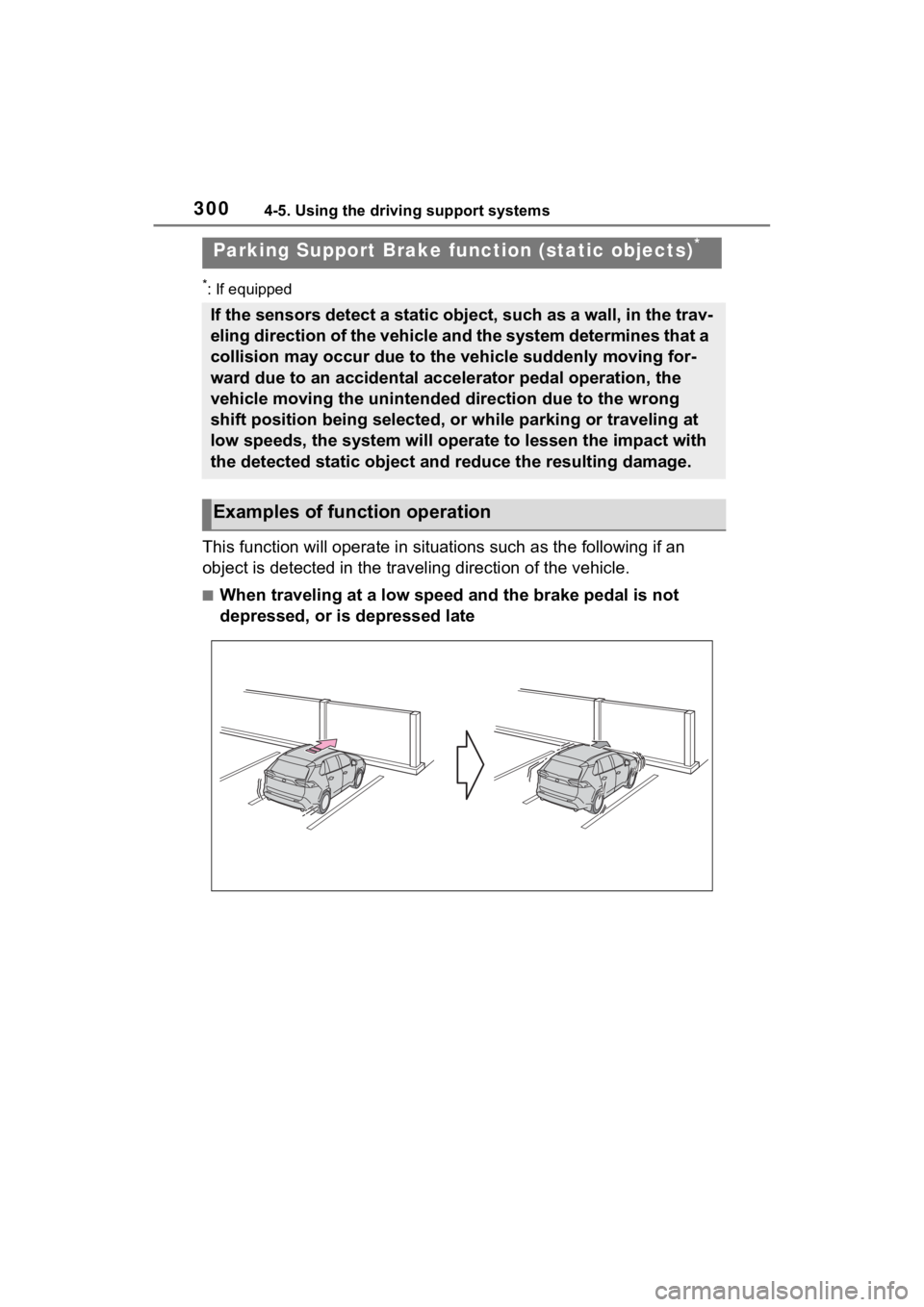
This function will operate in situations such as the following if an
object is detected in the traveling direction of the vehicle.
■When traveling at a low speed and the brake pedal is not
depressed, or is depressed late
Parking Support Brake fu nction (static objects)*
If the sensors detect a static object, such as a wall, in the t rav-
eling direction of the vehicle and the system determines that a
collision may occur due to the vehicle suddenly moving for-
ward due to an accidental accelerator pedal operation, the
vehicle moving the unintended direction due to the wrong
shift position being selected, or while parking or traveling at
low speeds, the system will operate to lessen the impact with
the detected static object and reduce the resulting damage.
Examples of function operation
Page 301 of 752
3014-5. Using the driving support systems
4
Driving
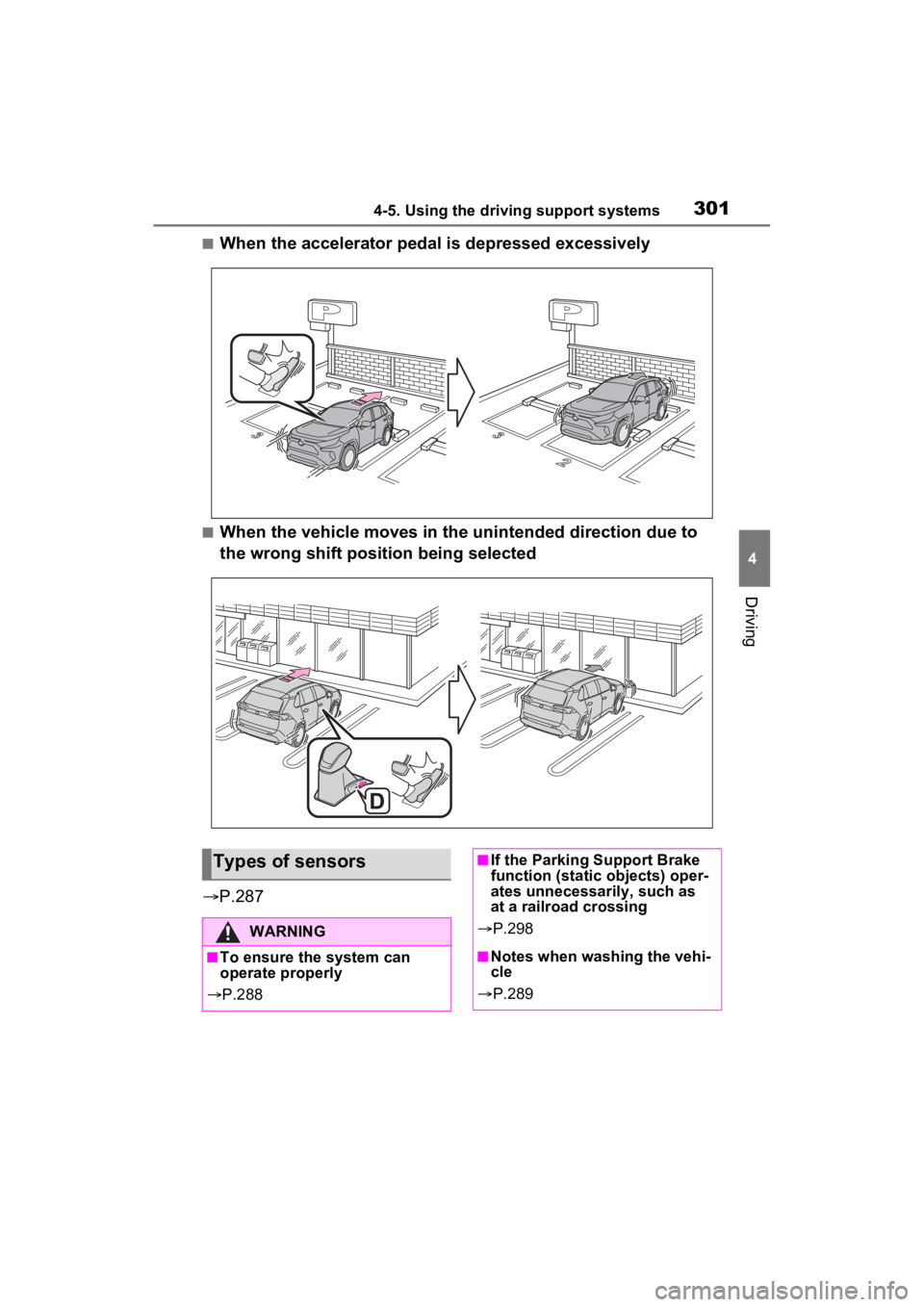
■When the accelerator pedal is depressed excessively
■When the vehicle moves in the unintended direction due to
the wrong shift position being selected
P.287
Types of sensors
WARNING
■To ensure the system can
operate properly
P.288
■If the Parking Support Brake
function (static objects) oper-
ates unnecessarily, such as
at a railroad crossing
P.298
■Notes when washing the vehi-
cle
P.289
Page 303 of 752
3034-5. Using the driving support systems
4
Driving
*: If equipped
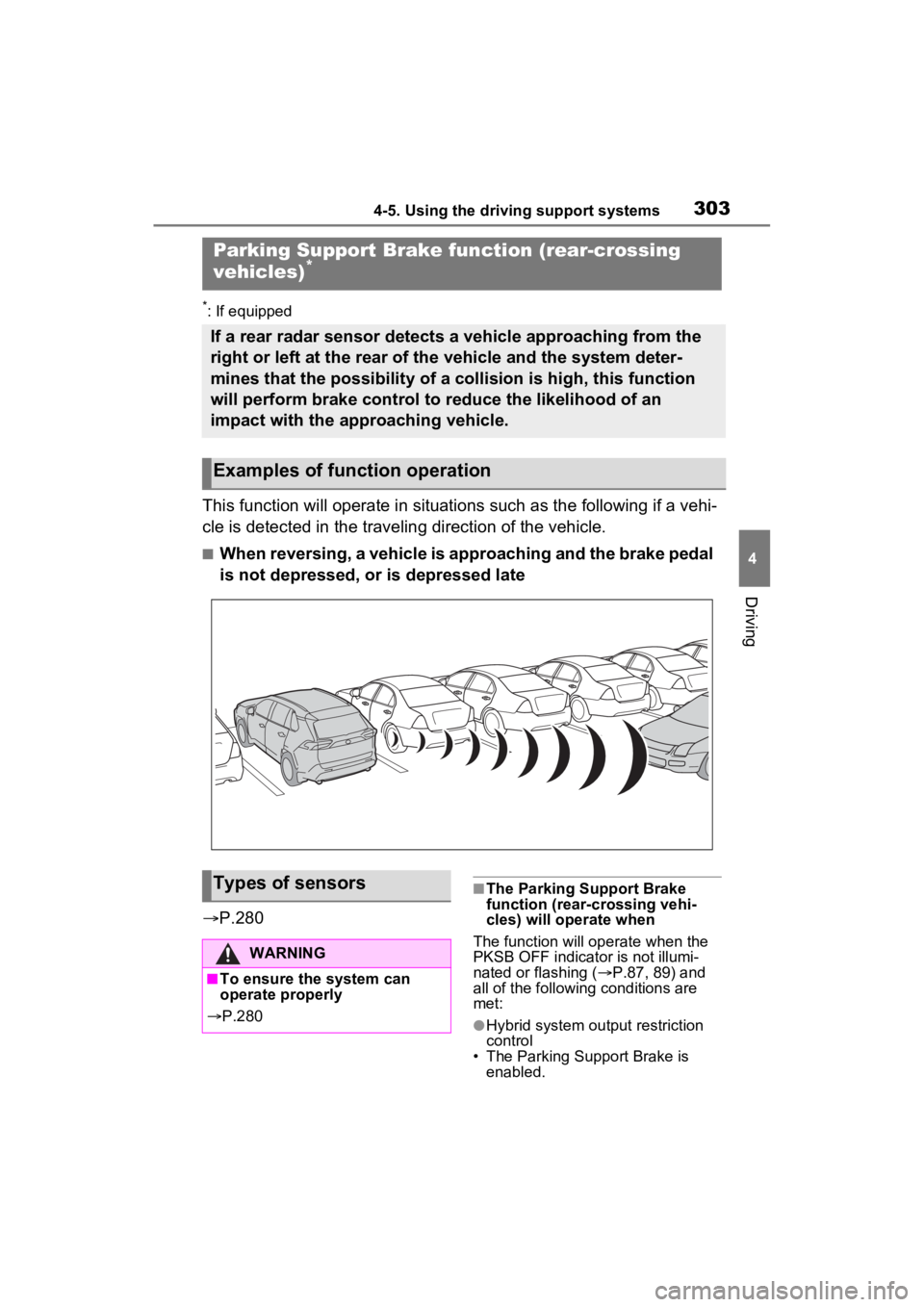
This function will operate in situations such as the following if a vehi-
cle is detected in the traveling direction of the vehicle.
■When reversing, a vehicle is approaching and the brake pedal
is not depressed, or is depressed late
P.280
■The Parking Support Brake
function (rear-crossing vehi-
cles) will operate when
The function will op erate when the
PKSB OFF indicator is not illumi-
nated or flashing ( P.87, 89) and
all of the followin g conditions are
met:
●Hybrid system output restriction
control
• The Parking Support Brake is enabled.
Parking Support Brake function (rear-crossing
vehicles)*
If a rear radar sensor detects a vehicle approaching from the
right or left at the rear of the vehicle and the system deter-
mines that the possibility of a collision is high, this function
will perform brake control to reduce the likelihood of an
impact with the approaching vehicle.
Examples of function operation
Types of sensors
WARNING
■To ensure the system can
operate properly
P.280
Page 333 of 752
3334-5. Using the driving support systems
4
Driving
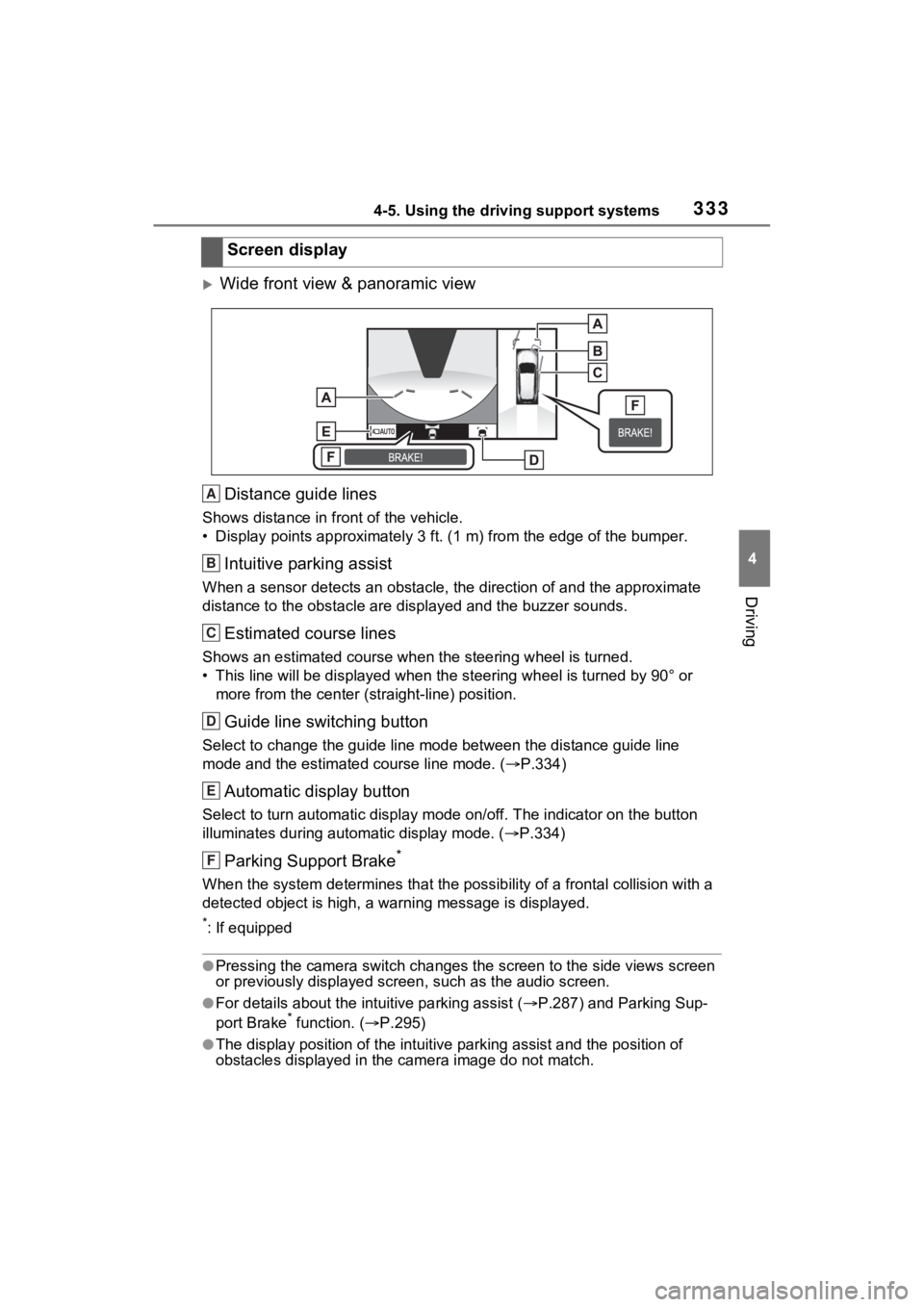
Wide front view & panoramic viewDistance guide lines
Shows distance in front of the vehicle.
• Display points approximately 3 ft. (1 m) from the edge of the bumper.
Intuitive parking assist
When a sensor detects an obstacle, the direction of and the app roximate
distance to the obsta cle are displayed and the buzzer sounds.
Estimated course lines
Shows an estimated course when the steering wheel is turned.
• This line will be displayed when the steering wh eel is turned by 90° or
more from the cen ter (straight-line) position.
Guide line switching button
Select to change the guide line mode between the distance guide line
mode and the estimated course line mode. ( P.334)
Automatic display button
Select to turn automatic display mode on/off. The indicator on the button
illuminates during autom atic display mode. (P.334)
Parking Support Brake*
When the system determines that the possib ility of a frontal collision with a
detected object is high, a warning message is displayed.
*: If equipped
●Pressing the camera switch chan ges the screen to the side views screen
or previously displayed scre en, such as the audio screen.
●For details about the intuitive parking assist (P.287) and Parking Sup-
port Brake* function. ( P.295)
●The display position of the intuitive parking assist and the po sition of
obstacles displayed in the camera image do not match.
Screen display
A
B
C
D
E
F
Page 338 of 752
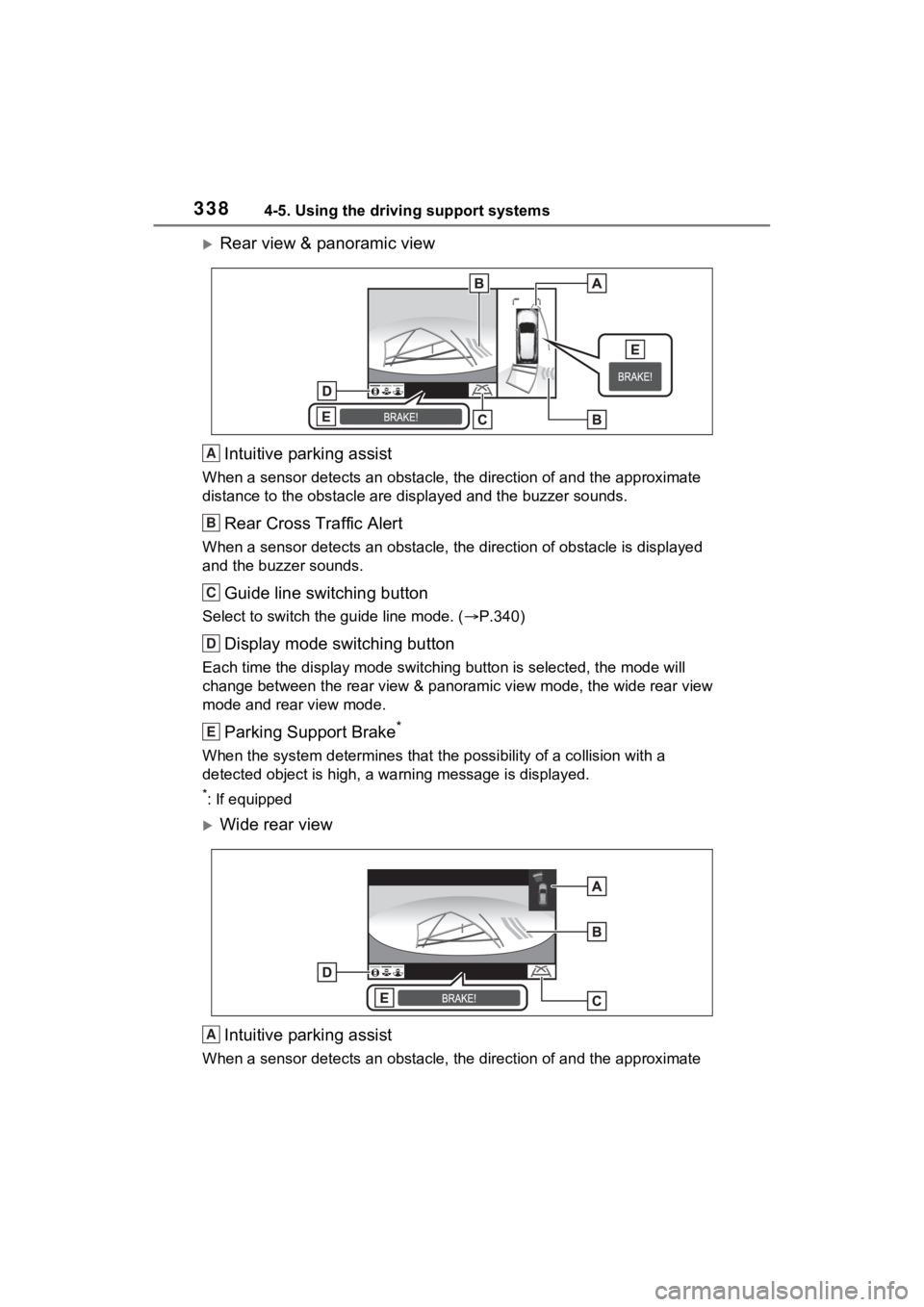
3384-5. Using the driving support systems
Rear view & panoramic viewIntuitive parking assist
When a sensor detects an obstacle, the direction of and the app roximate
distance to the obsta cle are displayed and the buzzer sounds.
Rear Cross Traffic Alert
When a sensor detects an obstacle, the direction of obstacle is displayed
and the buzzer sounds.
Guide line switching button
Select to switch the guide line mode. ( P.340)
Display mode switching button
Each time the display mode swit ching button is selected, the mode will
change between the rear view & panoramic view mode, the wide rear view
mode and rear view mode.
Parking Support Brake*
When the system determines that the possibility of a collision with a
detected object is high, a warning message is displayed.
*: If equipped
Wide rear view
Intuitive parking assist
When a sensor detects an obstacle, the direction of and the app roximate
A
B
C
D
E
A
Page 339 of 752
3394-5. Using the driving support systems
4
Driving
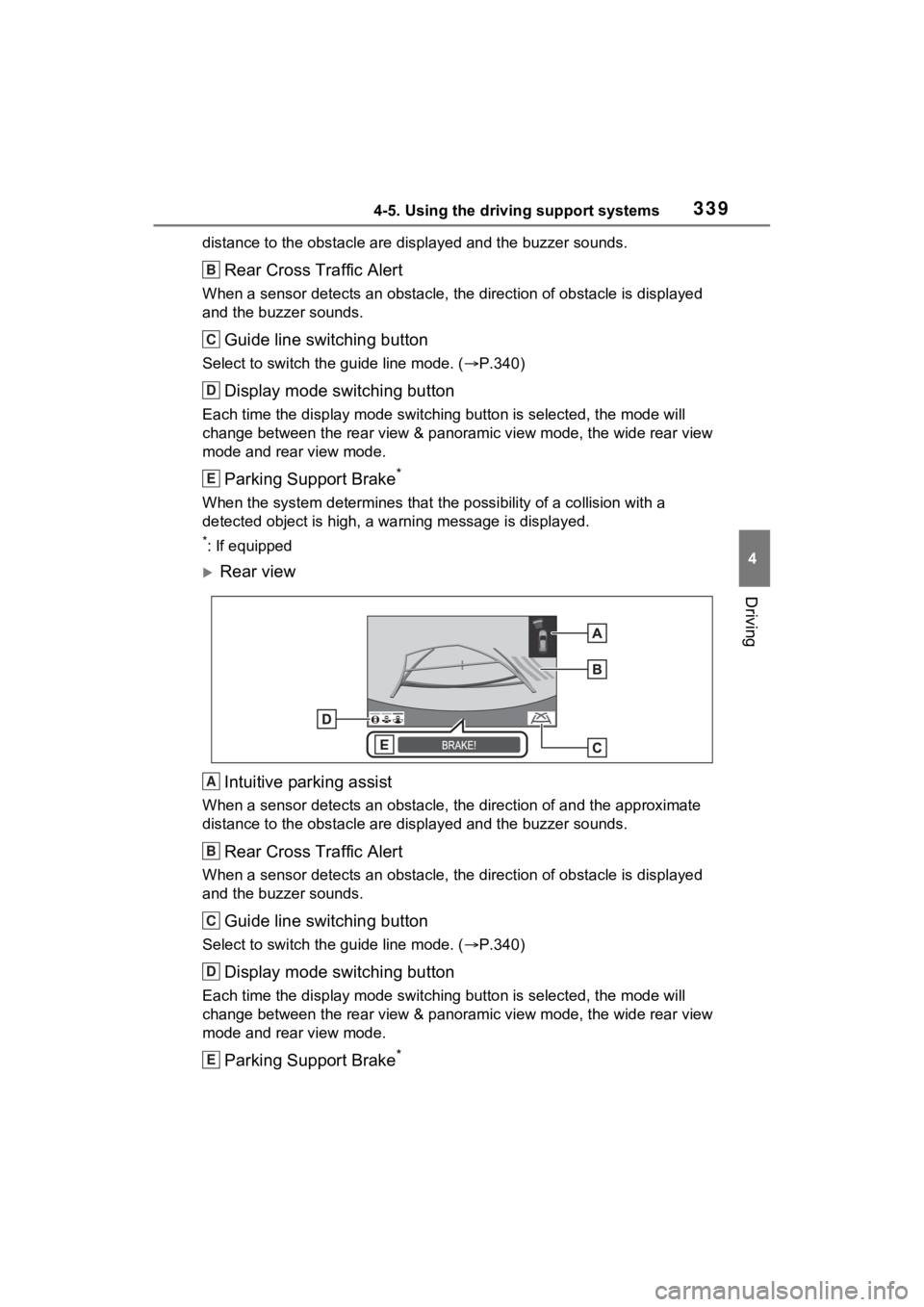
distance to the obstacle are displayed and the buzzer sounds.
Rear Cross Traffic Alert
When a sensor detects an obstacle, the direction of obstacle is displayed
and the buzzer sounds.
Guide line switching button
Select to switch the guide line mode. ( P.340)
Display mode switching button
Each time the display mode swit ching button is selected, the mode will
change between the rear view & panoramic view mode, the wide rear view
mode and rear view mode.
Parking Support Brake*
When the system determines that the possibility of a collision with a
detected object is high, a warning message is displayed.
*: If equipped
Rear view
Intuitive parking assist
When a sensor detects an obstacle, the direction of and the app roximate
distance to the obsta cle are displayed and the buzzer sounds.
Rear Cross Traffic Alert
When a sensor detects an obstacle, the direction of obstacle is displayed
and the buzzer sounds.
Guide line switching button
Select to switch the guide line mode. ( P.340)
Display mode switching button
Each time the display mode swit ching button is selected, the mode will
change between the rear view & panoramic view mode, the wide rear view
mode and rear view mode.
Parking Support Brake*
B
C
D
E
A
B
C
D
E
Page 340 of 752
3404-5. Using the driving support systems
When the system determines that the possibility of a collision with a
detected object is high, a warning message is displayed.
*: If equipped
●The monitor is canceled when the shift lever is shifted into any position
other than the “R” position.
●For details about the intuitive parking assist ( P.287), Rear Cross Traffic
Alert function ( P.283) and Parking Support Brake* function. ( P.295)
●The display position of the intuitive parking assist and the po sition of
obstacles displayed in the camera image do not match.
*: If equipped
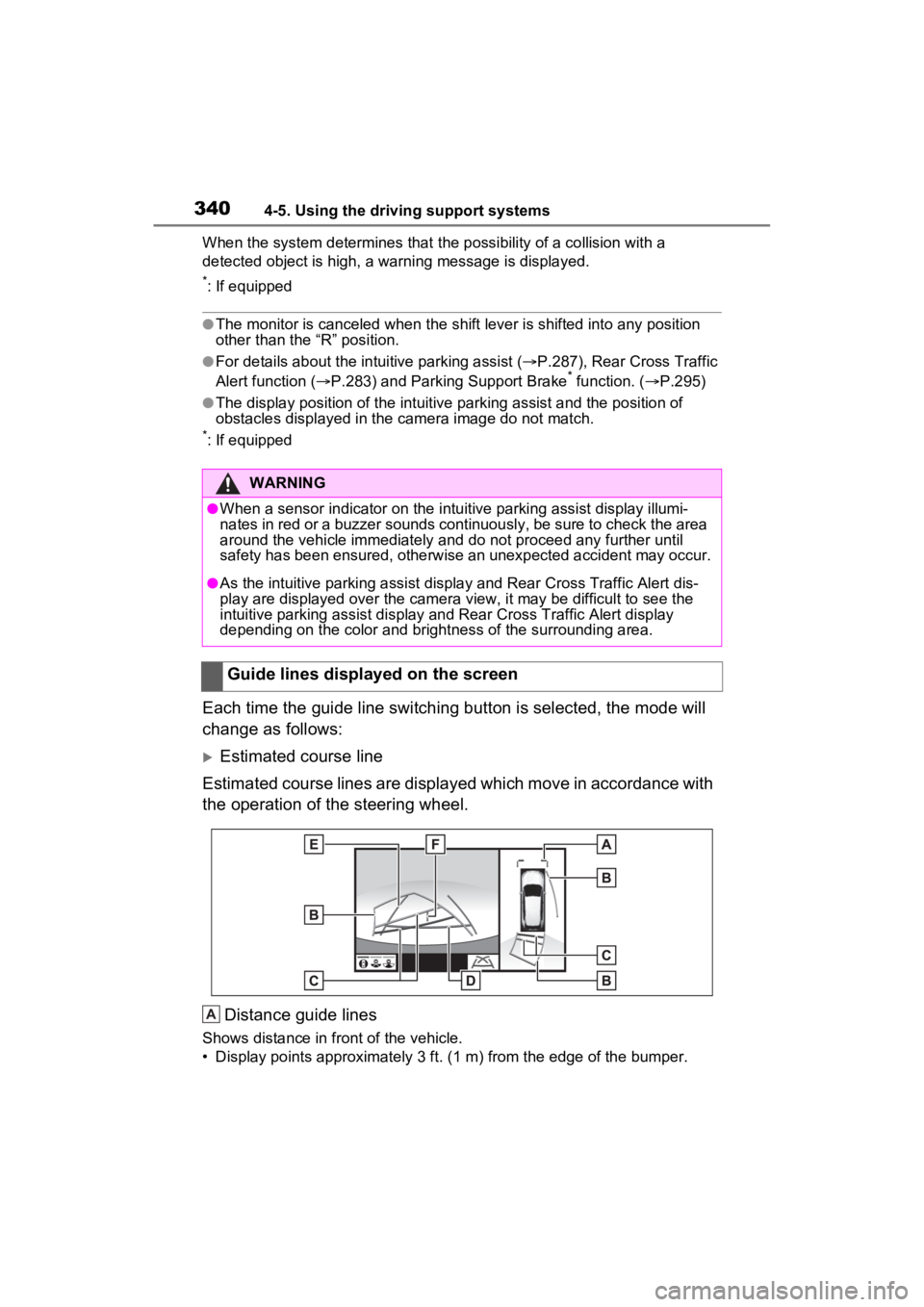
Each time the guide line switching button is selected, the mode will
change as follows:
Estimated course line
Estimated course lines are displ ayed which move in accordance w ith
the operation of the steering wheel.
Distance guide lines
Shows distance in fr ont of the vehicle.
• Display points approximately 3 ft. (1 m) from the edge of the bumper.
WARNING
●When a sensor indicator on the intuitive parking assist display illumi-
nates in red or a buzzer sounds continuously, be sure to check the area
around the vehicle immediately a nd do not proceed any further until
safety has been ensured, otherwise an unexpected accident may o ccur.
●As the intuitive parking assist display and Rear Cross Traffic Alert dis-
play are displayed over the camera view, it may be difficult to see the
intuitive parking assist display and Rear Cross Traffic Alert d isplay
depending on the color and brigh tness of the surrounding area.
Guide lines displayed on the screen
A
Page 362 of 752
3624-5. Using the driving support systems
movement of the vehicle when
starting on an uphill
■EPS (Electric Power Steer-
ing)
Employs an electric motor to
reduce the amount of effort
needed to turn the steering
wheel.
■E-Four (Electronic On-
Demand AWD system)
(AWD models)
Automatically controls the drive
system such as to front-wheel
drive or AWD (all wheel drive)
according to various running
conditions including normal driv-
ing, during cornering, on a
uphill, when starting off, during
acceleration, on a slippery roads
due to snow or rain, thus con-
tributing to stable operability and
driving stability.
■The Secondary Collision
Brake
When the SRS airbag sensor
detects a collision and the sys-
tem operates, the brakes and
brake lights are automatically
controlled to reduce the vehicle
speed and help reduce the pos-
sibility of further damage due to
a secondary collision.
■When the TRAC/VSC/ABS/Trail
Mode/Trailer Sway Control sys-
tems are operating
The slip indicator light will flash
while the TRAC/VSC/ABS/Trail
Mode/Trailer Sway Control systems
are operating.
■Disabling the TRAC system
If the vehicle gets stuck in mud, dirt
or snow, the TRAC system may
reduce power from the hybrid sys-
tem to the wheels.
Pressing to turn the system off
may make it easier for you to rock
the vehicle in order to free it.
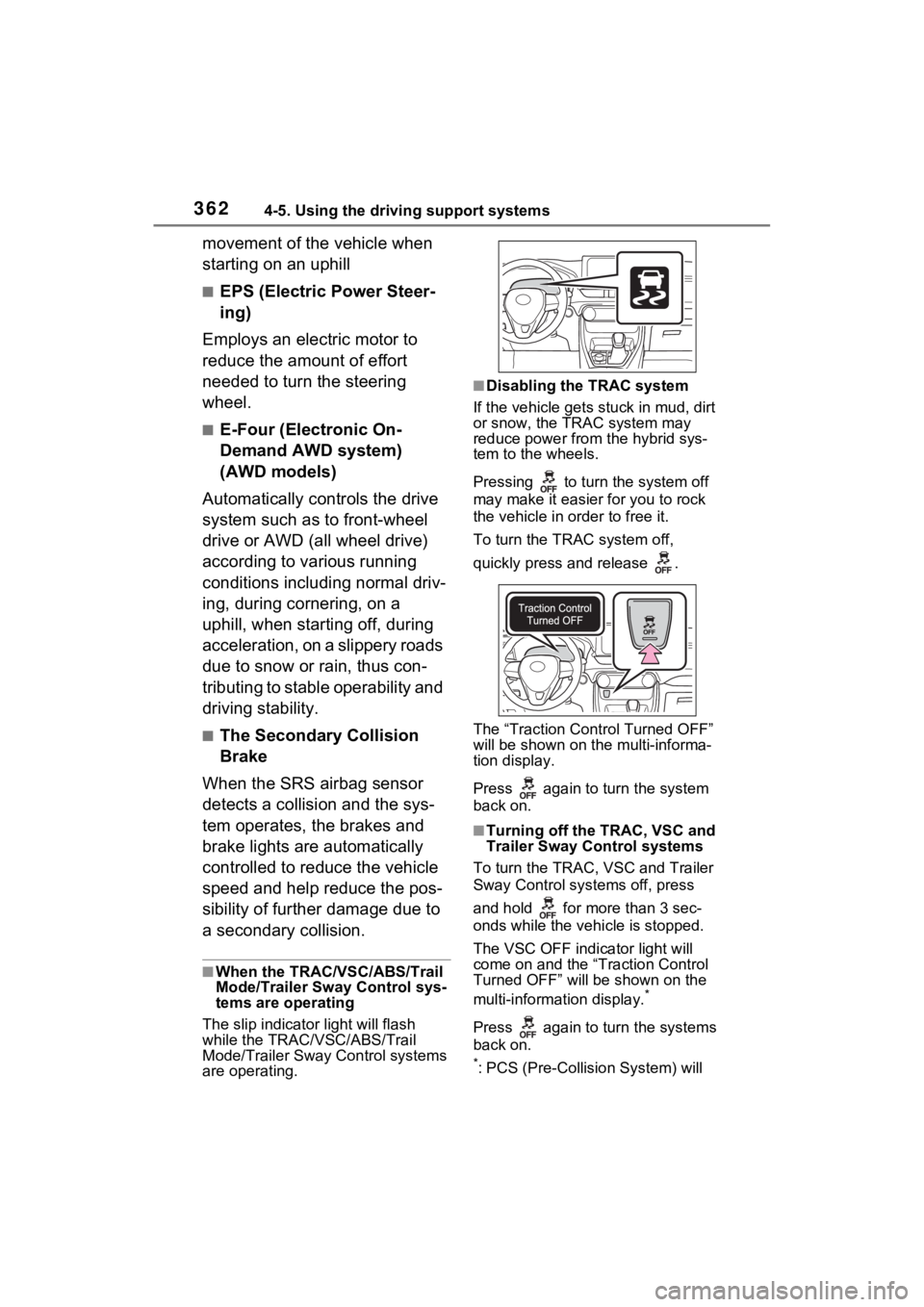
To turn the TRAC system off,
quickly press and release .
The “Traction Control Turned OFF”
will be shown on the multi-informa-
tion display.
Press again to turn the system
back on.
■Turning off the TRAC, VSC and
Trailer Sway Control systems
To turn the TRAC, VSC and Trailer
Sway Control systems off, press
and hold for more than 3 sec-
onds while the vehicle is stopped.
The VSC OFF indicator light will
come on and the “Traction Control
Turned OFF” will be shown on the
multi-informat ion display.
*
Press again to turn the systems
back on.
*: PCS (Pre-Collision System) will
Page 364 of 752

3644-5. Using the driving support systems
■Automatic reactivation of
TRAC, Trailer Sway Control and
VSC systems
After turning the TRAC, Trailer
Sway Control and VSC systems off,
the systems will be automatically re-
enabled in the following situations:
●When the power switch is turned
off
●If only the TRAC system is turned
off, the TRAC will turn on when
vehicle speed increases
If both the TRAC and VSC sys-
tems are turned off, automatic re-
enabling will not oc cur when vehi-
cle speed increases.
■Operating conditions of Active
Cornering Assist
The system operates when the fol-
lowing occurs.
●TRAC/VSC can operate
●The driver is at tempting to accel-
erate while turning
●The system detects that the vehi-
cle is drifting to the outer side
●The brake pedal is released
■Reduced effectiveness of the
EPS system
The effectiveness of the EPS sys-
tem is reduced to prevent the sys-
tem from overheating when there is
frequent steering input over an
extended period of time. The steer-
ing wheel may feel heavy as a
result. Should this occur, refrain
from excessive steering input or
stop the vehicle and turn the hybrid
system off. The EPS system should
return to normal within 10 minutes.
■Secondary Collision Brake
operating conditions
The system operates when the SRS
airbag sensor de tects a collision
while the vehicle is in motion. How-
ever, the system does not operate
when the components are dam-
aged.
■Secondary Collision Brake
automatic cancellation
The system is automatically can-
celed in any of th e following situa-
tions.
●The vehicle speed is below 6 mph
(10 km/h)
●A certain amount of time elapses
during operation
●The accelerator pedal is
depressed a large amount
■If a message about AWD is
shown on the multi-information
display (AWD models)
Perform the following actions.
●“AWD System Overheated
Switching to 2WD Mode”
AWD system is overheated. Stop
the vehicle in a safe place with the
hybrid system operating.
*
If the message disappears after a
while, there is no problem. If the
message remains, have the vehicle
inspected by your Toyota dealer
immediately.
●“AWD System Overheated 2WD
Mode Engaged”
AWD system has been temporarily
released and swit ched to front-
wheel drive due to overheating.
Stop the vehicle in a safe place with
the hybrid system operating.
*
If the message disappears after a
while, AWD syste m will automati-
cally recover. If the message
remains, have the vehicle inspected
by your Toyota dea ler immediately.
●“AWD System Malfunction 2WD
Mode Engaged Visit Your Dealer”
A malfunction oc curs in the AWD
system. Have the vehicle inspected
by your Toyota dea ler immediately.
*: When stopping the vehicle, do not