instrument panel TOYOTA RAV4 HYBRID 2022 User Guide
[x] Cancel search | Manufacturer: TOYOTA, Model Year: 2022, Model line: RAV4 HYBRID, Model: TOYOTA RAV4 HYBRID 2022Pages: 752, PDF Size: 23.11 MB
Page 145 of 752

1453-2. Opening, closing and locking the doors
3
Before driving
control and immobilizer system from
operating properly.
(Ways of coping: P.652)
●When the electronic key battery is
depleted
●Near a TV tower, electric power
plant, gas station , radio station,
large display, airpo rt or other facil-
ity that generates strong radio
waves or electrical noise
●When the electronic key is in con-
tact with, or is covered by the fol-
lowing metallic objects
• Cards to which al uminum foil is
attached
• Cigarette boxes that have alumi- num foil inside
• Metallic wallets or bags
• Coins
• Hand warmers made of metal
• Media such as CDs and DVDs
●When other wireless key (that
emits radio waves) is being used
nearby
●When carrying the electronic key
together with the following devices
that emit radio waves
• Portable radio, cellular phone,
cordless phone or other wireless
communication devices
• Another vehicle’s electronic key or
a wireless key that emits radio
waves
• Personal computers or personal
digital assistants (PDAs)
• Digital audio players
• Portable game systems
●If window tint with a metallic con-
tent or metallic objects are
attached to the rear window
●When the electronic key is placed
near a battery charger or elec-
tronic devices
●When parking in a coin-operated
parking lot (Radio waves used to
detect vehicles may affect the
smart key system.)
■Note for the entry function
●Even when the electronic key is
within the effective range (detec- tion areas), the system may not
operate properly in the following
cases:
• The electronic key is too close to the window or outside door han-
dle, near the ground, or in a high
place when the doors are locked
or unlocked.
• The electronic key is on the instru-
ment panel, luggage cover or
floor, or in the door pockets or
glove box when the hybrid system
is started or power switch modes
are changed.
●Do not leave the electronic key on
top of the instrument panel or near
the door pockets when exiting the
vehicle. Depending on the radio
wave reception conditions, it may
be detected by the antenna out-
side the cabin and the door will
become lockable from the outside,
possibly trapping the electronic
key inside the vehicle.
●As long as the electronic key is
within the effective range, the
doors may be locked or unlocked
by anyone. However, only the
doors detecting the electronic key
can be used to unlock the vehicle.
●Even if the electro nic key is not
inside the vehicle, it may be possi-
ble to start the hybrid system if the
electronic key is near the window.
●The doors may unlock if a large
amount of water splashes on the
door handle, such as in the rain or
in a car wash when the electronic
key is within the effective range.
(The doors will au tomatically be
locked after approximately 60 sec-
onds if the doors are not opened
and closed.)
●If the wireless remote control is
used to lock the doors when the
electronic key is near the vehicle,
there is a possib ility that the door
may not be unlocked by the entry
function. (Use the wireless remote
control to unlock the doors.)
●Touching the door lock sensor
while wearing gloves may delay or
Page 187 of 752
1874-1. Before driving
4
Driving
WARNING
●If the vehicle is stopped on an
incline, in order to prevent acci-
dents caused by the vehicle roll-
ing forward or backward, always
depress the brake pedal and
securely apply the parking
brake as needed.
●Avoid revving or racing the
engine.
Running the engine at high
speed while the vehicle is
stopped may cause the exhaust
system to overheat, which could
result in a fire if combustible
material is nearby.
■When the vehicle is parked
●Do not leave glasses, cigarette
lighters, spray cans, or soft
drink cans in the vehicle when it
is in the sun.
Doing so may result in the fol-
lowing:
• Gas may leak from a cigarette lighter or spray can, and may
lead to a fire.
• The temperature inside the vehicle may cause the plastic
lenses and plastic material of
glasses to deform or crack.
• Soft drink cans may fracture, causing the contents to spray
over the interior of the vehicle,
and may also caus e a short cir-
cuit in the vehicle’s electrical
components.
●Do not leave cigarette lighters in
the vehicle. If a cigarette lighter
is in a place such as the glove
box or on the floor, it may be lit
accidentally when luggage is
loaded or the seat is adjusted,
causing a fire.
●Do not attach adhesive discs to
the windshield or windows. Do
not place containers such as air
fresheners on the instrument
panel or dashboard. Adhesive
discs or containers may act as
lenses, causing a fire in the
vehicle.
●Do not leave a door or window
open if the curved glass is
coated with a metallized film
such as a silver-colored one.
Reflected sunlight may cause
the glass to act a s a lens, caus-
ing a fire.
●Always apply the parking brake,
shift the shift lever to P, stop the
hybrid system and lock the vehi-
cle.
Do not leave the vehicle unat-
tended while the “READY” indi-
cator is illu minated.
If the vehicle is parked with the
shift lever in P but the parking
brake is not set, the vehicle may
start to move, possibly leading
to an accident.
●Do not touch the exhaust pipes
while the “READY” indicator is
illuminated or immediately after
turning the hybrid system off.
Doing so may cause burns.
■When taking a nap in the
vehicle
Always turn the hybrid system off.
Otherwise, if you accidentally
move the shift lever or depress
the accelerator pedal, this could
cause an accident or fire due to
hybrid system overheating. Addi-
tionally, if the vehicle is parked in
a poorly ventilated area, exhaust
gases may collect and enter the
vehicle, leading to death or a seri-
ous health hazard.
Page 190 of 752
1904-1. Before driving
Cargo capacity depends on the
total weight of the occupants.
(Cargo capacity) = (Total load
capacity) - (Total weight of occu-
pants)
Steps for Determining Correct
Load Limit
(1) Locate the statement “The
combined weight of occupants
and cargo should never exceed
XXX kg or XXX lbs.” on your
vehicle’s placard.
(2) Determine the combined
weight of the driver and passen-
gers that will be riding in your
vehicle.
(3) Subtract the combined
weight of the driver and passen-
gers from XXX kg or XXX lbs.
(4) The resulting figure equals
the available amount of cargo
and luggage load capacity.
Cargo and luggage
Take notice of the following
information about storage
precautions, cargo capacity
and load.
WARNING
■Things that must not be car-
ried in the luggage compart-
ment
The following things may cause a
fire if loaded in the luggage com-
partment:
●Receptacles co ntaining gaso-
line
●Aerosol cans
■Storage precautions
Observe the following precau-
tions.
Failure to do so m ay prevent the
pedals from being depressed
properly, may bloc k the driver’s
vision, or may result in items hit-
ting the driver or passengers, pos-
sibly causing an accident.
●Stow cargo and luggage in the
luggage compartment when-
ever possible.
●Do not stack anything in the lug-
gage compartment higher than
the seatbacks.
●Do not place cargo or luggage
in or on the following locations.
• At the feet of the driver
• On the front passenger or rear seats (when stacking items)
• On the luggage cover (if equipped)
• On the instrument panel
• On the dashboard
●Secure all items in the occupant
compartment.
●When you fold down the rear
seats, long items should not be
placed directly behind the front
seats.
●Never allow anyon e to ride in
the luggage compartment. It is
not designed for passengers.
They should ride in their seats
with their seat belts properly
fastened. Otherw ise, they are
much more likely to suffer death
or serious bodily injury, in the
event of sudden braking, sud-
den swerving or an accident.
Capacity and distribution
Page 381 of 752
3815-1. Basic function
5
Audio
While using Data Communi-
cation Module (DCM)
While using Wi-Fi®Hotspot
●When Wi-Fi® Hotspot is off, no
item is displayed.
The amount displayed does not
always correspond with the
amount displayed on the
Bluetooth
® device.
The amount of battery charge
left may not be displayed
depending on the type of the
Bluetooth
® device connected.
This system does not have a
charging function. An antenna for the Bluetooth
®
connection is built into the
instrument panel.
The condition of the Bluetooth
®
connection may deteriorate and
the system may not function
when a Bluetooth
® phone is
used in the following conditions
and/or places:
The cellular phone is obstructed
by certain objects (such as
when it is behind the seat or in
the glove box or console box).
The cellular phone is touching or
is covered with metal materials.
Leave the Bluetooth
® phone in a
place where the condition of the
Bluetooth
® connection is good.
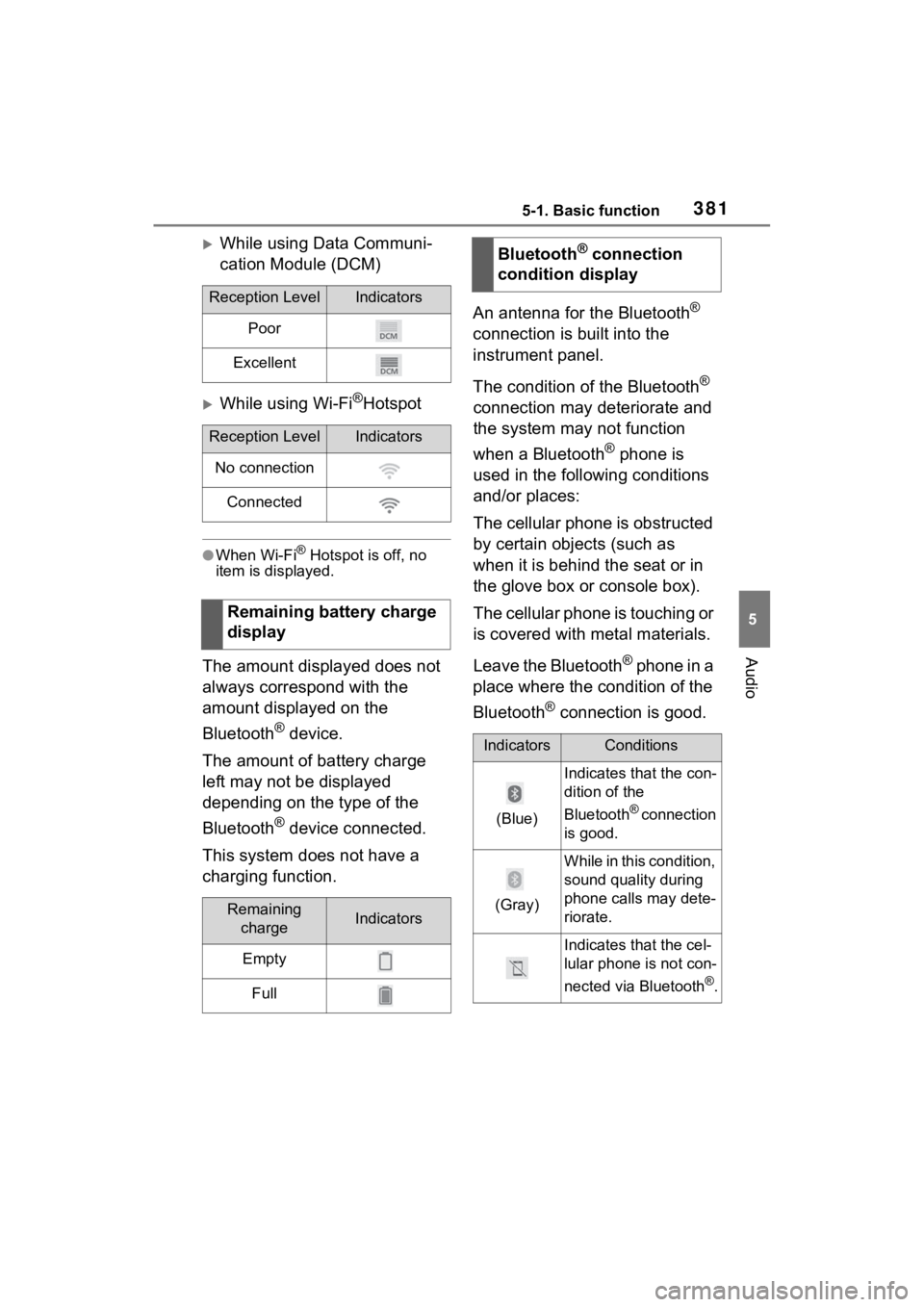
Reception LevelIndicators
Poor
Excellent
Reception LevelIndicators
No connection
Connected
Remaining battery charge
display
Remaining chargeIndicators
Empty
Full
Bluetooth® connection
condition display
IndicatorsConditions
(Blue)
Indicates that the con-
dition of the
Bluetooth
® connection
is good.
(Gray)
While in this condition,
sound quality during
phone calls may dete-
riorate.
Indicates that the cel-
lular phone is not con-
nected via Bluetooth
®.
Page 392 of 752
3925-3. Connectivity settings
5-3.Connectivity settings
■Registering from the sys-
tem
1 Turn the Bluetooth
® connec-
tion setting of your cellular
phone on.
This function is not available
when Bluetooth
® connection
setting of your cellular phone
is set to off.
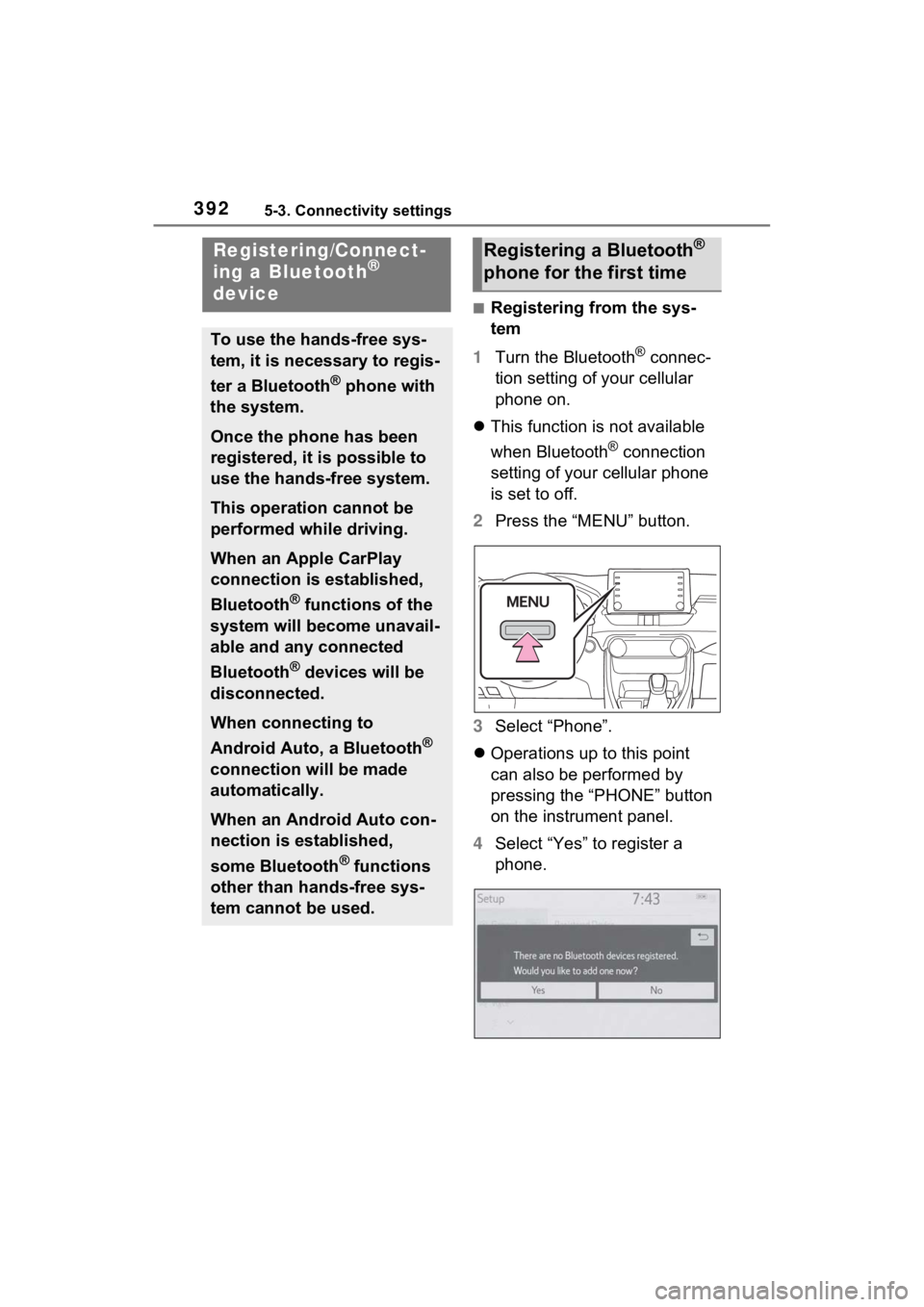
2 Press the “MENU” button.
3 Select “Phone”.
Operations up to this point
can also be performed by
pressing the “PHONE” button
on the instrument panel.
4 Select “Yes” to register a
phone.
Registering/Connect-
ing a Bluetooth®
device
To use the hands-free sys-
tem, it is necessary to regis-
ter a Bluetooth
® phone with
the system.
Once the phone has been
registered, it is possible to
use the hands-free system.
This operation cannot be
performed while driving.
When an Apple CarPlay
connection is established,
Bluetooth
® functions of the
system will become unavail-
able and any connected
Bluetooth
® devices will be
disconnected.
When connecting to
Android Auto, a Bluetooth
®
connection will be made
automatically.
When an Android Auto con-
nection is established,
some Bluetooth
® functions
other than hands-free sys-
tem cannot be used.
Registering a Bluetooth®
phone for the first time
Page 520 of 752
5206-1. Using the air conditioning system and defogger
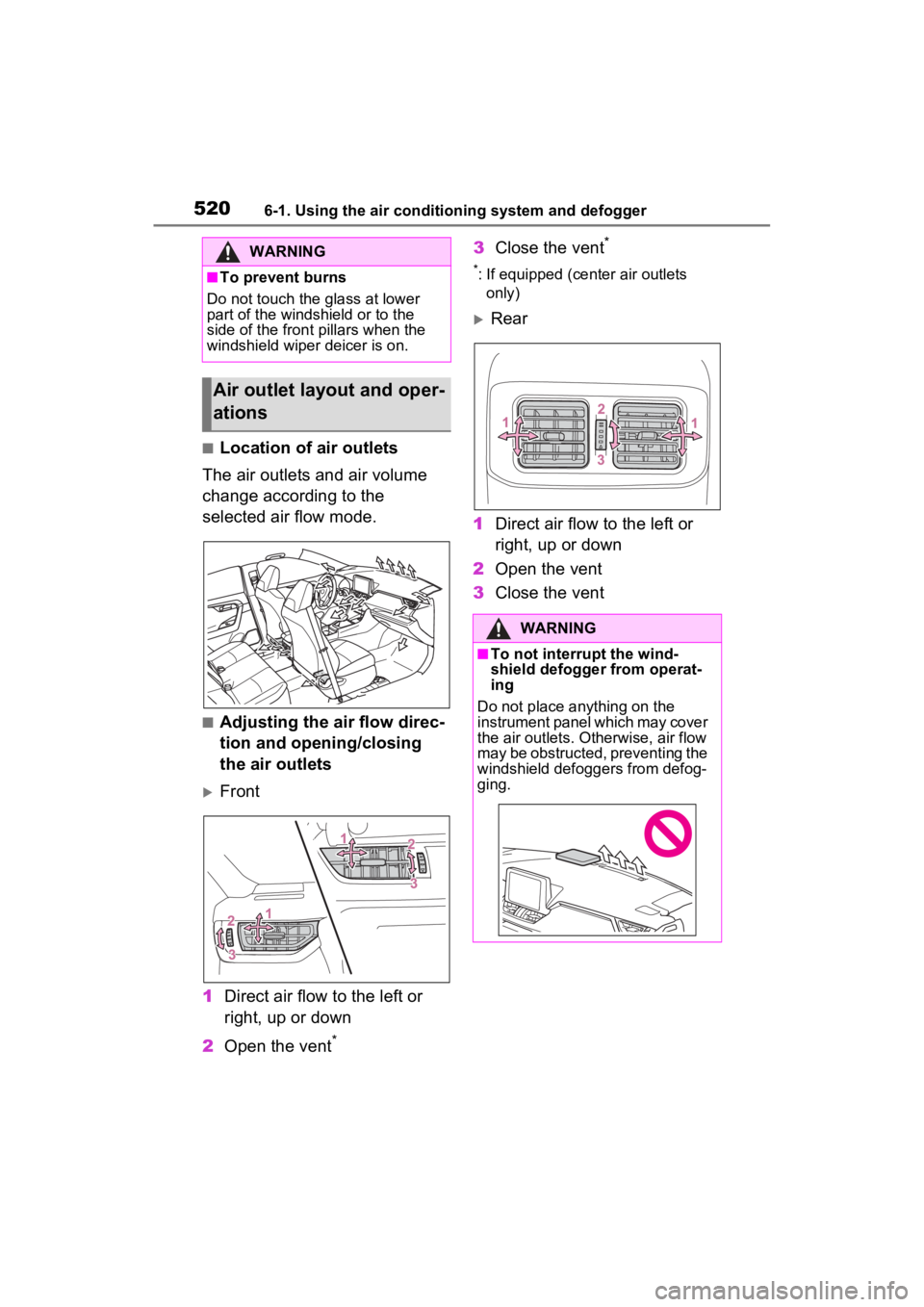
■Location of air outlets
The air outlets and air volume
change according to the
selected air flow mode.
■Adjusting the air flow direc-
tion and opening/closing
the air outlets
Front
1 Direct air flow to the left or
right, up or down
2 Open the vent
*
3Close the vent*
*: If equipped (cent er air outlets
only)
Rear
1 Direct air flow to the left or
right, up or down
2 Open the vent
3 Close the vent
WARNING
■To prevent burns
Do not touch the glass at lower
part of the windshield or to the
side of the fron t pillars when the
windshield wiper deicer is on.
Air outlet layout and oper-
ations
WARNING
■To not interrupt the wind-
shield defogger from operat-
ing
Do not place anything on the
instrument panel which may cover
the air outlets. Otherwise, air flow
may be obstructed, preventing the
windshield defoggers from defog-
ging.
Page 558 of 752
5587-1. Maintenance and care
WARNING
■Water in the vehicle
●Do not splash or spill liquid in
the vehicle, such as on the floor,
on the rear seats, in the hybrid
battery (traction battery) air
intake vent or in the luggage
compartment. (P.79)
Doing so may cause the hybrid
battery, electrical components,
etc. to malfunction or catch fire.
●Do not get any of the SRS com-
ponents or wiring in the vehicle
interior wet.
( P.36)
An electrical malfunction may
cause the airbags to deploy or
not function properly, resulting
in death or serious injury.
●Vehicles with wireless charger:
Do not let the wireless charger
( P.538) get wet. Failure to do
so may cause the charger to
become hot and cause burns or
could cause electric shock
resulting in death or serious
injury.
■Cleaning the interior (espe-
cially instrument panel)
Do not use a polis h wax or polish
cleaner. The instrument panel
may reflect off the windshield,
obstructing the dr iver’s view and
leading to an accident, resulting in
death or serious injury.
NOTICE
■Cleaning detergents
●Do not use the following types
of detergent, as they may dis-
color the vehicle interior or
cause streaks or damage to
painted surfaces:
• Non-seat portions: Organic sub- stances such as benzene or
gasoline, alkaline or acidic solu-
tions, dye, and bleach
• Seats: Alkaline or acidic solu- tions, such as thinner, benzene,
and alcohol
●Do not use a polish wax or pol-
ish cleaner. The instrument
panel’s or other interior part’s
painted surface may be dam-
aged.
■Preventing damage to leather
surfaces
Observe the following precautions
to avoid damage to and deteriora-
tion of leather surfaces:
●Remove any dust or dirt from
leather surfaces immediately.
●Do not expose the vehicle to
direct sunlight for extended peri-
ods of time. Park the vehicle in
the shade, especially during
summer.
●Do not place items made of
vinyl, plastic, or containing wax
on the upholstery, as they may
stick to the leather surface if the
vehicle interior heats up signifi-
cantly.
Page 604 of 752
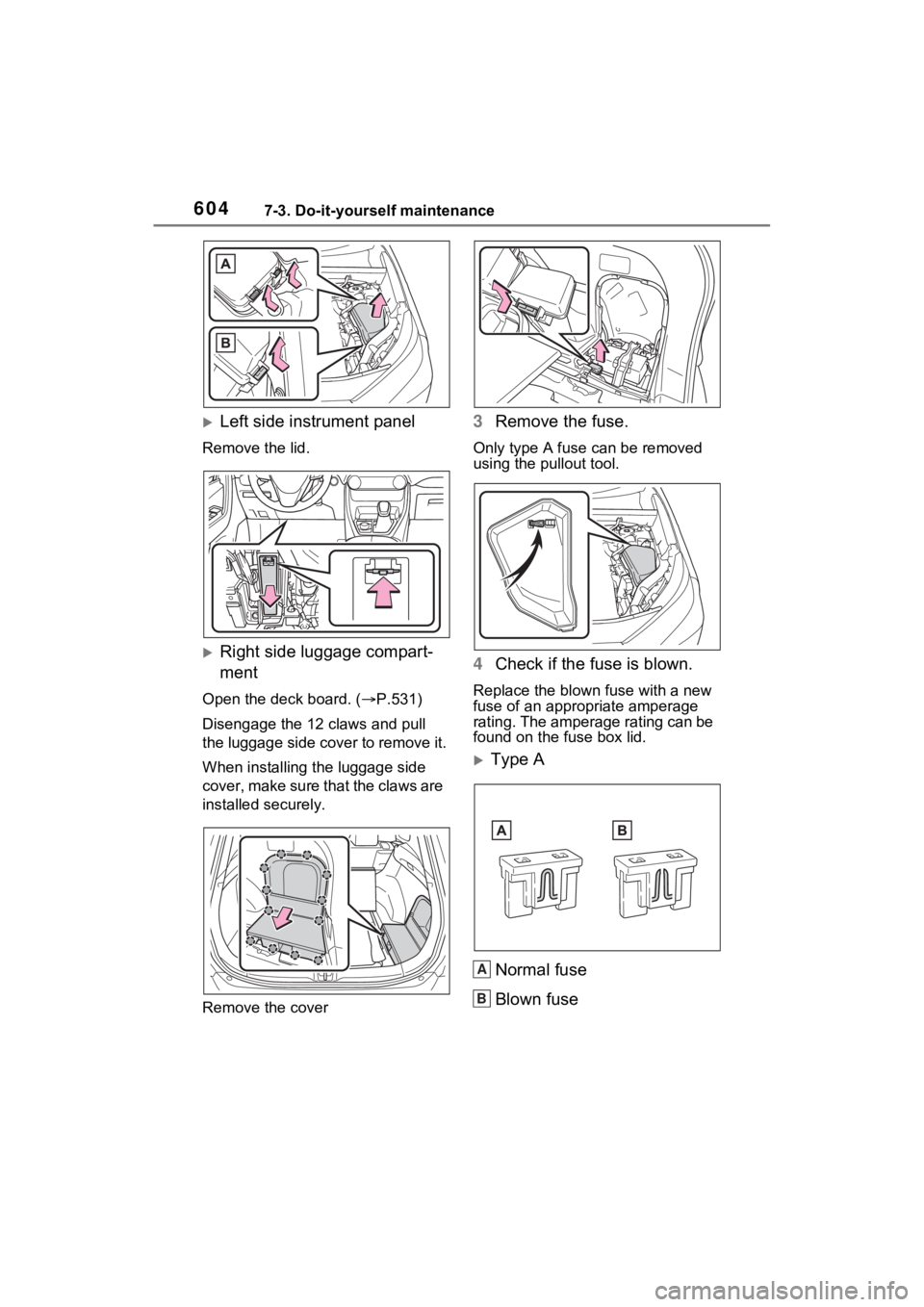
6047-3. Do-it-yourself maintenance
Left side instrument panel
Remove the lid.
Right side luggage compart-
ment
Open the deck board. ( P.531)
Disengage the 12 claws and pull
the luggage side cover to remove it.
When installing th e luggage side
cover, make sure that the claws are
installed securely.
Remove the cover
3 Remove the fuse.
Only type A fuse c an be removed
using the pullout tool.
4 Check if the fuse is blown.
Replace the blown fuse with a new
fuse of an appropriate amperage
rating. The amperage rating can be
found on the fuse box lid.
Type A
Normal fuse
Blown fuse
A
B
Page 666 of 752
6669-1. Specifications
9-1.Specifications
*: Unladen vehicle
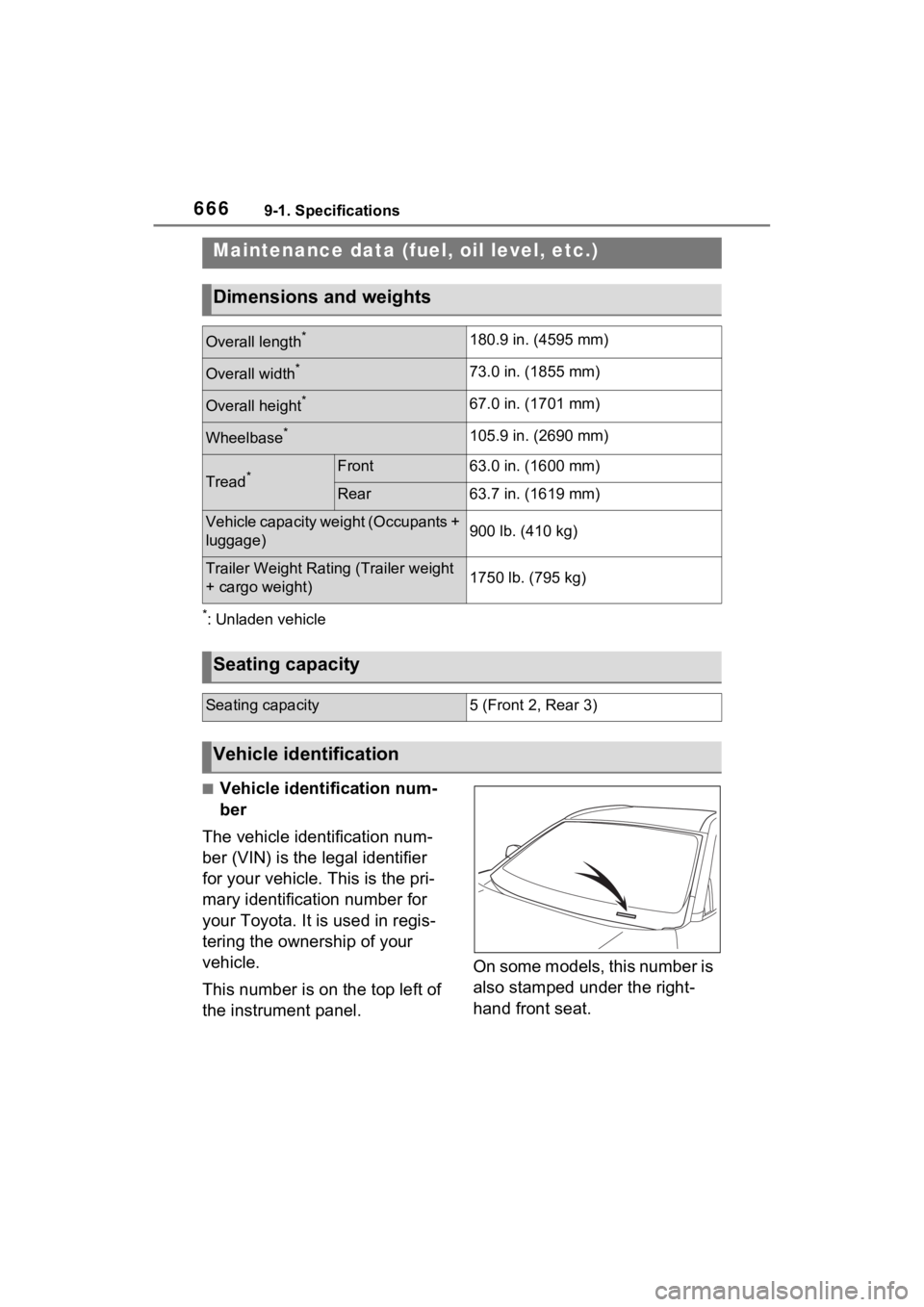
■Vehicle identification num-
ber
The vehicle identification num-
ber (VIN) is the legal identifier
for your vehicle. This is the pri-
mary identification number for
your Toyota. It is used in regis-
tering the ownership of your
vehicle.
This number is on the top left of
the instrument panel. On some models, this number is
also stamped under the right-
hand front seat.
Maintenance data (fuel, oil level, etc.)
Dimensions and weights
Overall length*180.9 in. (4595 mm)
Overall width*73.0 in. (1855 mm)
Overall height*67.0 in. (1701 mm)
Wheelbase*105.9 in. (2690 mm)
Tread*Front63.0 in. (1600 mm)
Rear63.7 in. (1619 mm)
Vehicle capacity weight (Occupants +
luggage)900 lb. (410 kg)
Trailer Weight Rating (Trailer weight
+ cargo weight)1750 lb. (795 kg)
Seating capacity
Seating capacity5 (Front 2, Rear 3)
Vehicle identification
Page 692 of 752
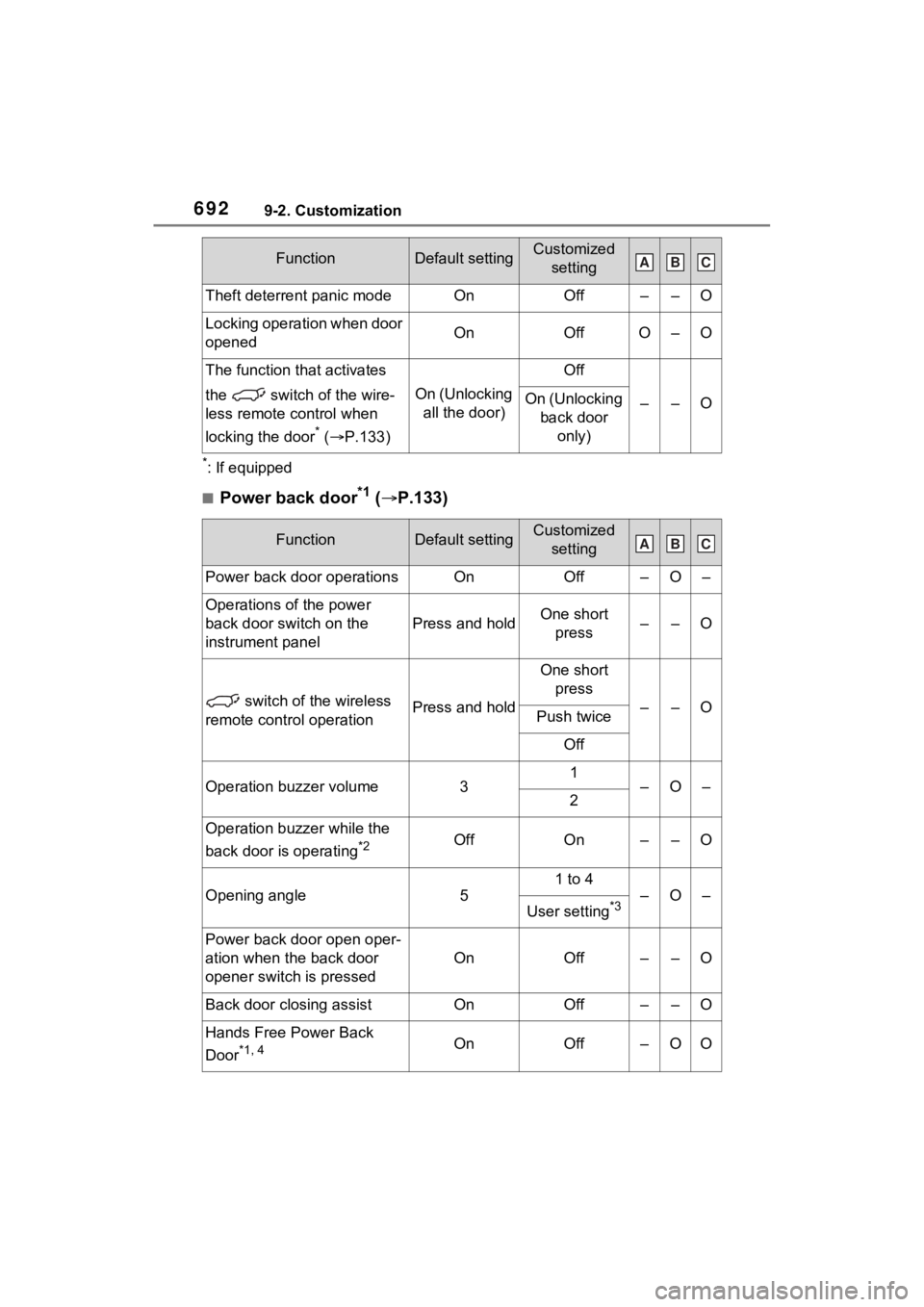
6929-2. Customization
*: If equipped
■Power back door*1 ( P.133)
Theft deterrent panic modeOnOff––O
Locking operation when door
openedOnOffO–O
The function that activates
the switch of the wire-
less remote control when
locking the door
* ( P.133)
On (Unlocking
all the door)
Off
––OOn (Unlocking back door only)
FunctionDefault settingCustomized setting
Power back door operationsOnOff–O–
Operations of the power
back door switch on the
instrument panel
Press and holdOne short press––O
switch of the wireless
remote control operationPress and hold
One short press
––OPush twice
Off
Operation buzzer volume31–O–2
Operation buzzer while the
back door is operating
*2OffOn––O
Opening angle5
1 to 4
–O–
User setting*3
Power back door open oper-
ation when the back door
opener switch is pressed
OnOff––O
Back door closing assistOnOff––O
Hands Free Power Back
Door
*1, 4OnOff–OO
FunctionDefault settingCustomized settingABC
ABC