ABS TOYOTA RAV4 HYBRID 2022 Owners Manual
[x] Cancel search | Manufacturer: TOYOTA, Model Year: 2022, Model line: RAV4 HYBRID, Model: TOYOTA RAV4 HYBRID 2022Pages: 752, PDF Size: 23.11 MB
Page 81 of 752
811-5. Theft deterrent system
1
For safety and security
1-5.Theft deterrent system
Vehicles without smart key
system
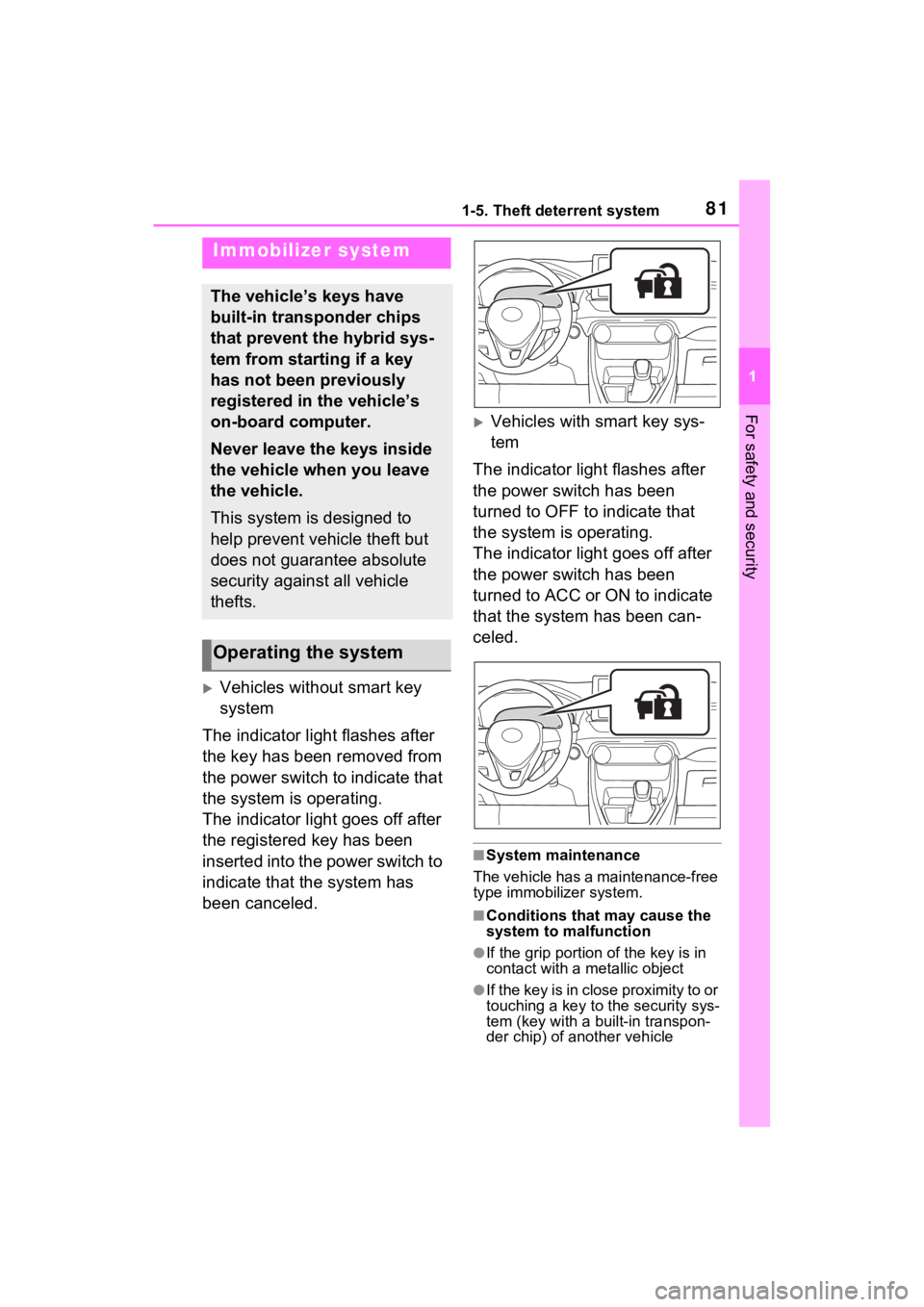
The indicator light flashes after
the key has been removed from
the power switch to indicate that
the system is operating.
The indicator light goes off after
the registered key has been
inserted into the power switch to
indicate that the system has
been canceled.
Vehicles with smart key sys-
tem
The indicator light flashes after
the power switch has been
turned to OFF to indicate that
the system is operating.
The indicator light goes off after
the power switch has been
turned to ACC or ON to indicate
that the system has been can-
celed.
■System maintenance
The vehicle has a maintenance-free
type immobilizer system.
■Conditions that may cause the
system to malfunction
●If the grip portion of the key is in
contact with a metallic object
●If the key is in close proximity to or
touching a key to the security sys-
tem (key with a built-in transpon-
der chip) of another vehicle
Immobilizer system
The vehicle’s keys have
built-in transponder chips
that prevent the hybrid sys-
tem from starting if a key
has not been previously
registered in the vehicle’s
on-board computer.
Never leave the keys inside
the vehicle when you leave
the vehicle.
This system is designed to
help prevent vehicle theft but
does not guarantee absolute
security against all vehicle
thefts.
Operating the system
Page 88 of 752
882-1. Instrument cluster
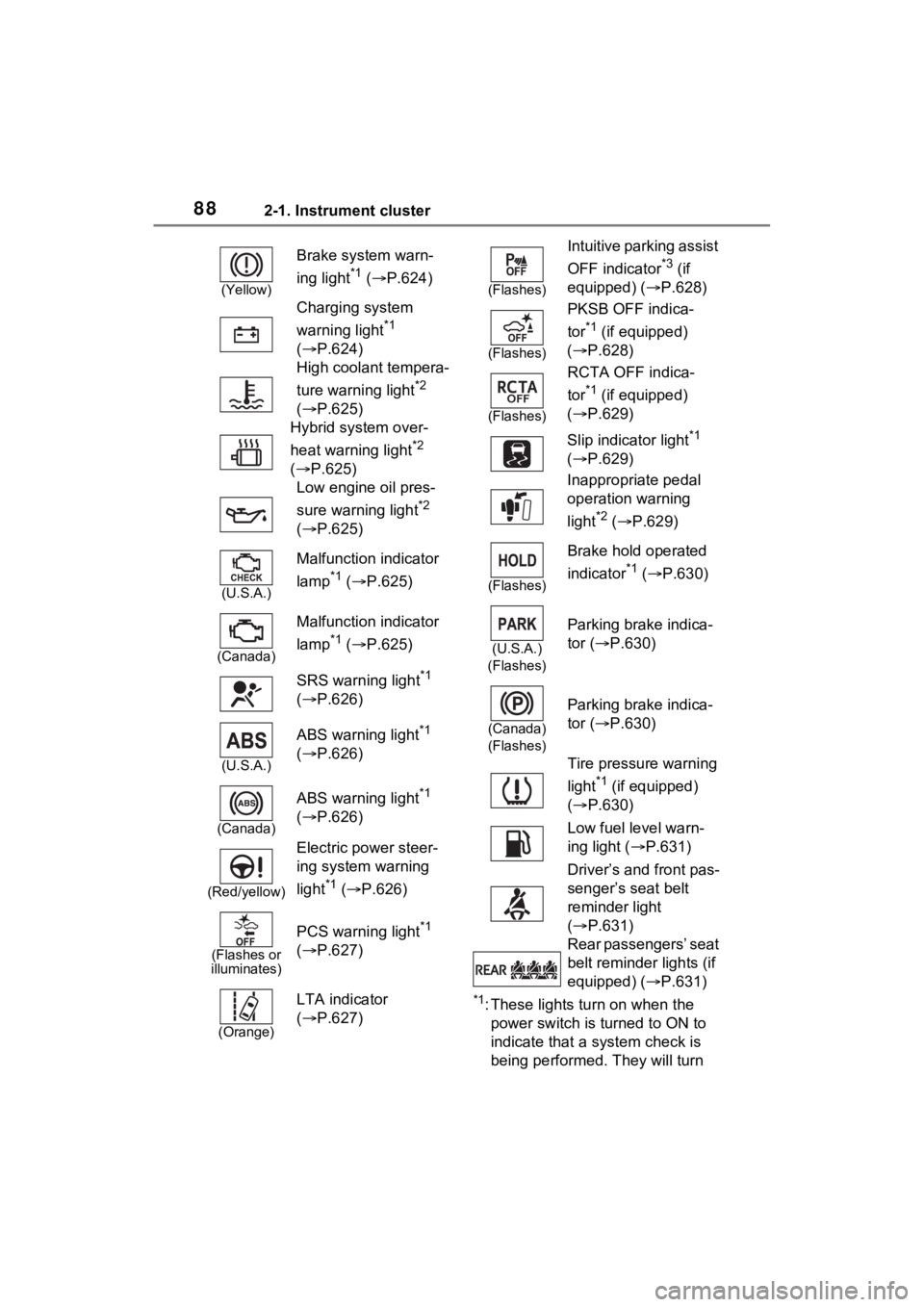
*1: These lights turn on when the
power switch is turned to ON to
indicate that a system check is
being performed. They will turn
(Yellow)
Brake system warn-
ing light
*1 ( P.624)
Charging system
warning light
*1
( P.624)
High coolant tempera-
ture warning light
*2
( P.625)
Hybrid system over-
heat warning light
*2
( P.625)
Low engine oil pres-
sure warning light
*2
( P.625)
(U.S.A.)
Malfunction indicator
lamp
*1 ( P.625)
(Canada)
Malfunction indicator
lamp
*1 ( P.625)
SRS warning light
*1
( P.626)
(U.S.A.)
ABS warning light*1
( P.626)
(Canada)
ABS warning light*1
( P.626)
(Red/yellow)
Electric power steer-
ing system warning
light
*1 ( P.626)
(Flashes or
illuminates)
PCS warning light*1
( P.627)
(Orange)
LTA indicator
( P.627)
(Flashes)
Intuitive parking assist
OFF indicator
*3 (if
equipped) ( P.628)
(Flashes)
PKSB OFF indica-
tor
*1 (if equipped)
( P.628)
(Flashes)
RCTA OFF indica-
tor
*1 (if equipped)
( P.629)
Slip indicator light
*1
( P.629)
Inappropriate pedal
operation warning
light
*2 ( P.629)
(Flashes)
Brake hold operated
indicator
*1 ( P.630)
(U.S.A.)
(Flashes)
Parking brake indica-
tor ( P.630)
(Canada)
(Flashes)
Parking brake indica-
tor ( P.630)
Tire pressure warning
light
*1 (if equipped)
( P.630)
Low fuel level warn-
ing light ( P.631)
Driver’s and front pas-
senger’s seat belt
reminder light
( P.631)
Rear passengers’ seat
belt reminder lights (if
equipped) ( P.631)
Page 89 of 752
892-1. Instrument cluster
2
Vehicle status information and indicators
off after the hybrid system is on,
or after a few seconds. There
may be a malfunction in a sys-
tem if the light does not come on,
or turn off. Have the vehicle
inspected by your Toyota dealer.
*2: This light illuminates on the multi-informatio n display with a
message.
*3: Intuitive parking assist OFF indi- cator turns on when the power
switch is turned to ON while the
Intuitive parking assist function is
on. It will turn off after a few sec-
onds.
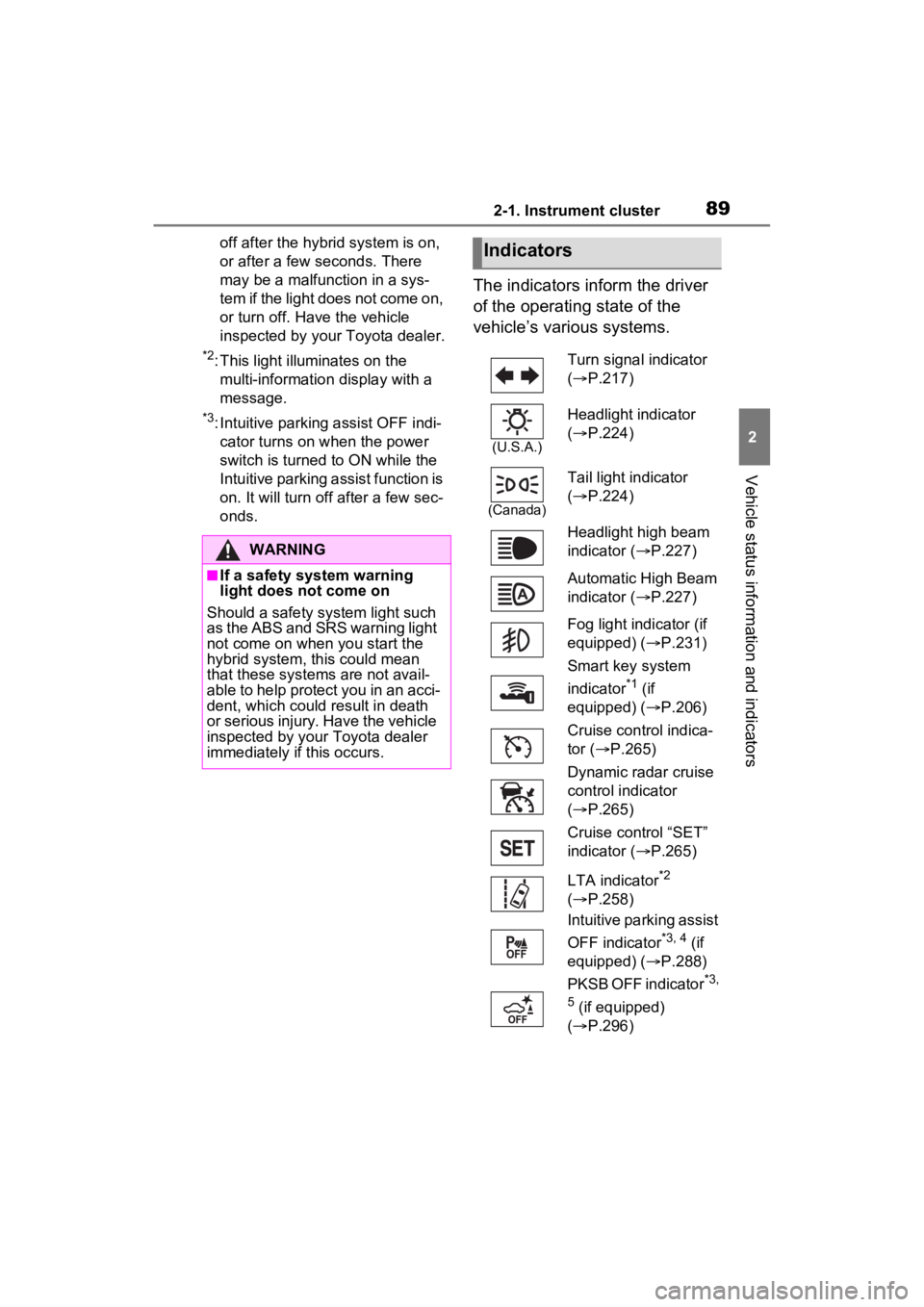
The indicators inform the driver
of the operating state of the
vehicle’s various systems.
WARNING
■If a safety system warning
light does not come on
Should a safety system light such
as the ABS and SR S warning light
not come on when you start the
hybrid system, this could mean
that these systems are not avail-
able to help protect you in an acci-
dent, which could result in death
or serious injury. Have the vehicle
inspected by your Toyota dealer
immediately if this occurs.
Indicators
Turn signal indicator
( P.217)
(U.S.A.)
Headlight indicator
( P.224)
(Canada)
Tail light indicator
( P.224)
Headlight high beam
indicator ( P.227)
Automatic High Beam
indicator ( P.227)
Fog light indicator (if
equipped) ( P.231)
Smart key system
indicator
*1 (if
equipped) ( P.206)
Cruise control indica-
tor ( P.265)
Dynamic radar cruise
control indicator
( P.265)
Cruise control “SET”
indicator ( P.265)
LTA indicator
*2
( P.258)
Intuitive parking assist
OFF indicator
*3, 4 (if
equipped) ( P.288)
PKSB OFF indicator
*3,
5
(if equipped)
( P.296)
Page 201 of 752

2014-1. Before driving
4
Driving
vehicle control. This is espe-
cially true on wet or slippery
surfaces.
Avoid jerky starts or sudden
acceleration.
Avoid jerky steering and
sharp turns, and slow down
before making turn.
Note that when making a turn,
the trailer wheels will be
closer than the vehicle wheels
to the inside of the turn. Com-
pensate by making a wider
than normal turning radius.
Slow down before making a
turn, in cross winds, on wet or
slippery surfaces, etc.
Increasing vehicle speed can
destabilize the trailer.
Take care when passing other
vehicles. Passing requires
considerable distance. After
passing a vehicle, do not for-
get the length of your trailer,
and be sure you have plenty
of room before changing
lanes.
To maintain engine braking
efficiency, when using engine
braking, do not use the trans-
mission in D.
Instability happens more fre-
quently when descending
steep or long downhill grades.
Before descending, slow
down and downshift. Do not
make sudden downshifts
while descending steep or long downhill grades.
Avoid holding the brake pedal
down too long or applying the
brakes too frequently. This
could cause the brakes to
overheat and result in
reduced braking efficiency.
Due to the added load of the
trailer, your vehicle’s hybrid
system may overheat on hot
days (at temperatures over
85°F [30°C]) when driving up
a long or steep grade. If the
engine coolant temperature
gauge indicates overheating,
immediately turn off the air
conditioning (if in use), pull
your vehicle off the road and
stop in a safe spot. ( P.659)
Always place wheel blocks
under both the vehicle’s and
the trailer’s wheels when
parking. Apply the parking
brake firmly, and put the
transmission in P. Avoid park-
ing on a slope, but if unavoid-
able, do so only after
performing the following:
1 Apply the brakes and keep
them applied.
2 Have someone place wheel
blocks under both the vehi-
cle’s and trailer’s wheels.
3 When the wheel blocks are in
place, release the brakes
slowly until the blocks absorb
the load.
Page 259 of 752
2594-5. Using the driving support systems
4
Driving
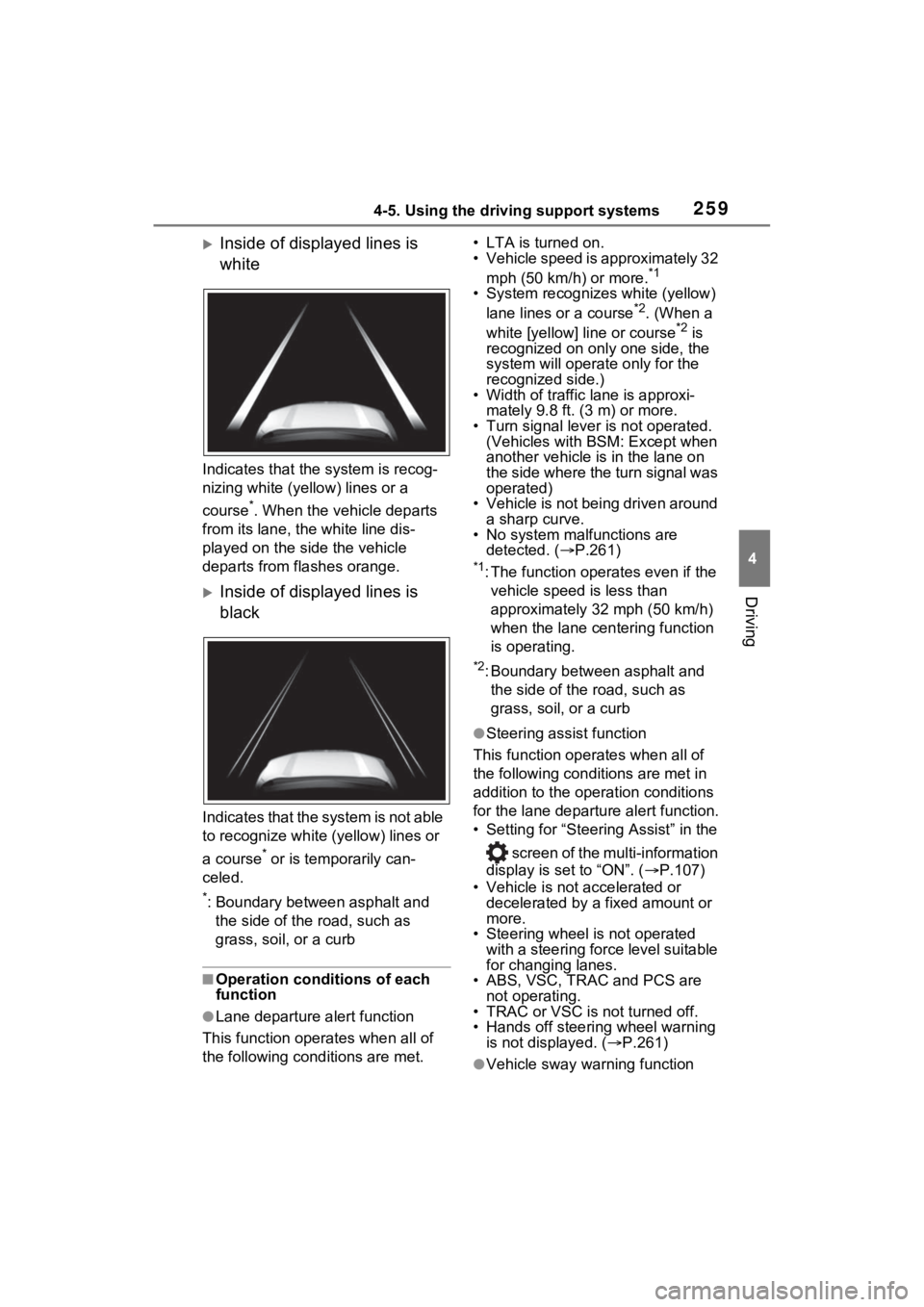
Inside of displayed lines is
white
Indicates that the system is recog-
nizing white (yellow) lines or a
course
*. When the vehicle departs
from its lane, the white line dis-
played on the si de the vehicle
departs from flashes orange.
Inside of displayed lines is
black
Indicates that the system is not able
to recognize white (yellow) lines or
a course
* or is temporarily can-
celed.
*: Boundary between asphalt and the side of the road, such as
grass, soil, or a curb
■Operation conditions of each
function
●Lane departure alert function
This function oper ates when all of
the following cond itions are met. • LTA is turned on.
• Vehicle speed is approximately 32
mph (50 km/h) or more.
*1
• System recognizes white (yellow) lane lines or a course*2. (When a
white [yellow] line or course*2 is
recognized on only one side, the
system will operate only for the
recognized side.)
• Width of traffic lane is approxi-
mately 9.8 ft. (3 m) or more.
• Turn signal lever is not operated. (Vehicles with BSM: Except when
another vehicle is in the lane on
the side where the turn signal was
operated)
• Vehicle is not being driven around a sharp curve.
• No system malfunctions are
detected. ( P.261)
*1: The function oper ates even if the
vehicle speed is less than
approximately 32 mph (50 km/h)
when the lane centering function
is operating.
*2: Boundary between asphalt and the side of the road, such as
grass, soil, or a curb
●Steering assist function
This function operates when all of
the following conditions are met in
addition to the operation conditions
for the lane departure alert function.
• Setting for “Steering Assist” in the
screen of the multi-information
display is set to “ON”. ( P.107)
• Vehicle is not accelerated or decelerated by a fixed amount or
more.
• Steering wheel is not operated with a steering force level suitable
for changing lanes.
• ABS, VSC, TRAC and PCS are
not operating.
• TRAC or VSC is not turned off.
• Hands off steering wheel warning is not displayed. ( P.261)
●Vehicle sway warning function
Page 260 of 752
2604-5. Using the driving support systems
This function operates when all of
the following cond itions are met.
• Setting for “Sway Warning” in the
screen of the mu lti-information
display is set to “ON”. ( P.101)
• Vehicle speed is approximately 32 mph (50 km/h) or more.
• Width of traffic lane is approxi- mately 9.8 ft. ( 3 m) or more.
• No system malfunctions are detected. ( P.261)
●Lane centering function
This function oper ates when all of
the following cond itions are met.
• LTA is turned on.
• Setting for “Steering Assist” and
“Lane Center” in the screen of
the multi-informati on display is set
to “ON”. ( P.101)
• This function recognizes white (yellow) lane lines or the position
of a preceding vehicle (except
when the preceding vehicle is
small, such as a motorcycle).
• The dynamic radar cruise control
with full-speed range is operating
in vehicle-to-vehic le distance con-
trol mode.
• Width of traffic lane is approxi-
mately 10 to 13 ft. (3 to 4 m).
• Turn signal lever is not operated.
• Vehicle is not being driven around a sharp curve.
• No system malfunctions are detected. ( P.261)
• Vehicle does not accelerate or decelerate by a fixed amount or
more.
• Steering wheel is not operated with a steering force level suitable
for changing lanes.
• ABS, VSC, TRAC and PCS are not operating.
• TRAC or VSC is not turned off.
• Hands off steering wheel warning
is not displayed. ( P.261)
• The vehicle is being driven in the
center of a lane.
• Steering assist function is not operating.
■Temporary cancelation of func-
tions
●When operation conditions are no
longer met, a function may be
temporarily canceled. However,
when the operation conditions are
met again, operation of the func-
tion is automatically restored.
( P.259)
●If the operation conditions
( P.259) are no longer met while
the lane centering function is
operating, the buzzer may sound
to indicate that the function has
been temporarily canceled.
■Steering assist function/lane
centering function
●Depending on the vehicle speed,
lane departure situation, road con-
ditions, etc., the driver may not
feel the function is operating or
the function may not operate at
all.
●The steering control of the func-
tion is overridden by the driver’s
steering wheel operation.
●Do not attempt to test the opera-
tion of the steering assist function.
■Lane departure alert function
●The warning buzzer may be diffi-
cult to hear due to external noise,
audio playback, etc.
●If the edge of the course* is not
clear or straight, the lane depar-
ture alert function may not oper-
ate.
●Vehicles with BSM: It may not be
possible for the system to deter-
mine if there is a danger of a colli-
sion with a vehicl e in an adjacent
lane.
●Do not attempt to test the opera-
tion of the lane departure alert
function.
*: Boundary between asphalt and
the side of the road, such as
grass, soil, or a curb
Page 267 of 752
2674-5. Using the driving support systems
4
Driving
WARNING
■Cautions regarding the driv-
ing assist systems
Observe the following precau-
tions, as there are limitations to
the assistance provided by the
system. Failure to do so may
cause an accident resulting in
death or serious injury.
●Assisting the driver to measure
following distance
The dynamic radar cruise control
with full-speed range is only
intended to help the driver in
determining the following distance
between the driver’s own vehicle
and a designated vehicle traveling
ahead. It is not a mechanism that
allows careless or inattentive driv-
ing, and it is not a system that can
assist the driver in low-visibility
conditions.
It is still necessary for driver to
pay close attention to the vehi-
cle’s surroundings.
●Assisting the driver to judge
proper following distance
The dynamic radar cruise control
with full-speed range determines
whether the follo wing distance
between the driver’s own vehicle
and a designated vehicle traveling
ahead is within a set range. It is
not capable of making any other
type of judgement. Therefore, it is
absolutely necessary for the
driver to remain vigilant and to
determine whether or not there is
a possibility of danger in any
given situation.
●Assisting the driver to operate
the vehicle
The dynamic radar cruise control
with full-speed range does not
include functions which will pre-
vent or avoid collisions with vehi-
cles ahead of your vehicle.
Therefore, if there is ever any
possibility of dang er, the driver
must take immediate and direct
control of the vehicle and act
appropriately in order to ensure
the safety of all involved.
■Situations unsuitable for
dynamic radar cruise control
with full-speed range
Do not use dynamic radar cruise
control with full-speed range in
any of the following situations.
Doing so may result in inappropri-
ate speed control and could
cause an accident resulting in
death or serious injury.
●Roads where there are pedes-
trians, cyclists, etc.
●In heavy traffic
●On roads with sharp bends
●On winding roads
●On slippery roads, such as
those covered with rain, ice or
snow
●On steep downhills, or where
there are sudden changes
between sharp up and down
gradients
Vehicle speed may exceed the
set speed when driving down a
steep hill.
●At entrances to freeways and
highways
Page 290 of 752
2904-5. Using the driving support systems
●Initialization may not have been
performed after a 12-volt battery
terminal was dis connected and
reconnected. Initialize the sys-
tem. ( P.290) If this message
continues to be displayed even
after initialization, have the vehicle
inspected by your Toyota dealer.
■If a 12-volt batte ry terminal has
been disconnected and recon-
nected
The system needs to be initialized.
To initialize the system, drive the
vehicle straight ahead for 5 seconds
or more at a speed of approximately
22 mph (35 km/h) or more.
■Sensor detection information
●The sensor’s detection areas are
limited to the areas around the
vehicle’s front and rear bumpers.
●The following situations may occur
during use.
• Depending on the shape of the
object and other factors, the
detection distance may shorten,
or detection may be impossible.
• Detection may be impossible if static objects draw too close to the
sensor.
• There will be a short delay
between static object detection
and display (warning buzzer
sounds). Even at low speeds,
there is a possibilit y that the object
will come within 11. 9 in. (30 cm)
before the display is shown and
the warning buzzer sounds.
• It might be difficult to hear the
buzzer due to the volume of the
audio system or air flow noise of
the air conditioning system.
• It may be difficult to hear the sound of this system due to the
buzzers of other systems.
■Objects which the system may
not properly detect
The shape of the object may pre-
vent the sensor from detecting it.
Pay particular attention to the fol-
lowing objects:
●Wires, fences, ropes, etc.
●Cotton, snow and other materials
that absorb sound waves
●Sharply-angled objects
●Low objects
●Tall objects with upper sections
projecting outwards in the direc-
tion of your vehicle
People may not be detected if they
are wearing certain types of cloth-
ing.
■Situations in which the system
may not operate properly
Certain vehicle conditions and the
surrounding environment may affect
the ability of a sensor to correctly
detect objects. Part icular instances
where this may occur are listed
below.
●There is dirt, snow or ice on a sen-
sor. (Cleaning th e sensors will
resolve this problem.)
●A sensor is froz en. (Thawing the
area will resolve this problem.)
In especially cold weather, if a
sensor is frozen the sensor dis-
play may be displayed abnor-
mally, or objects, such as a wall,
may not be detected.
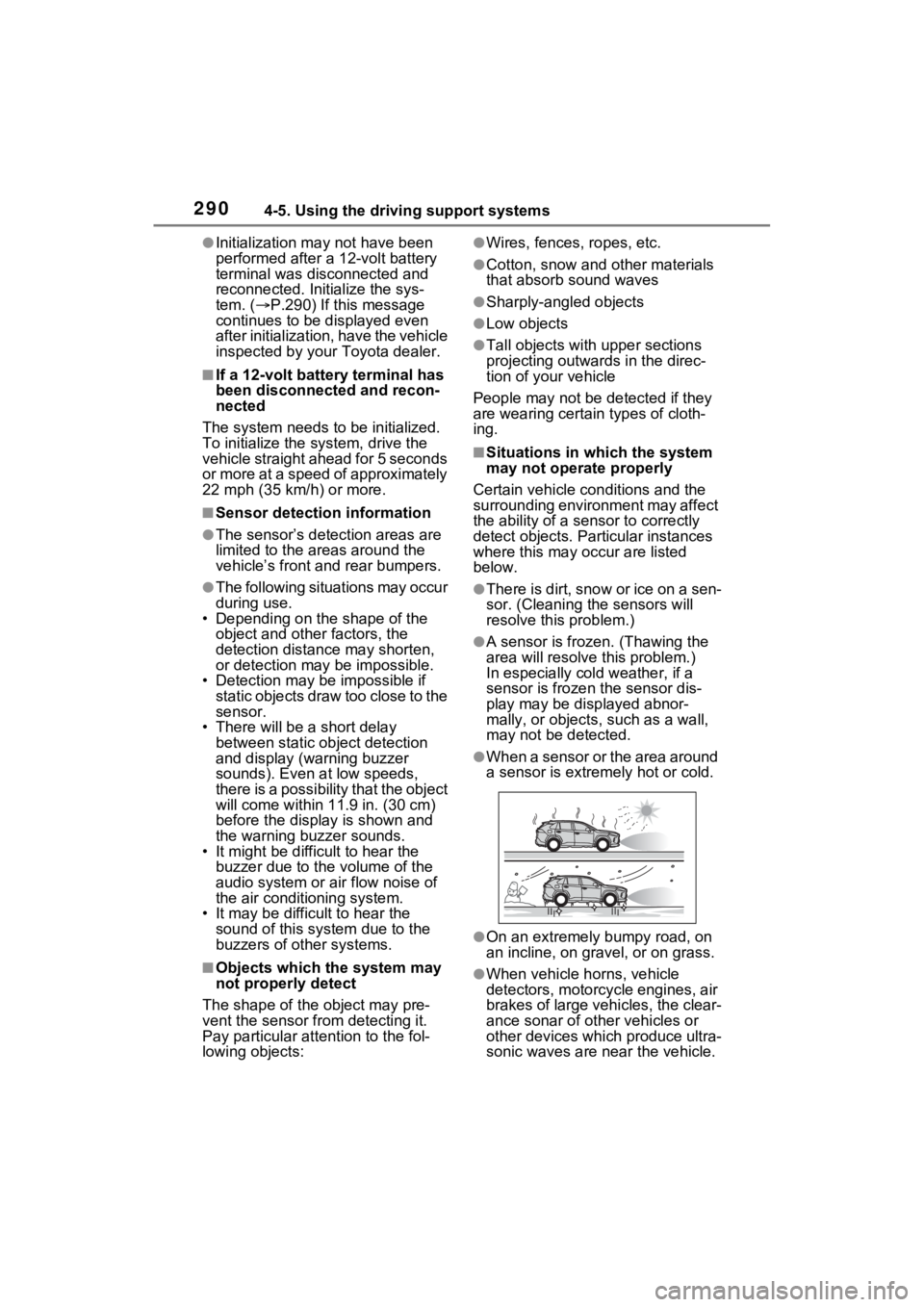
●When a sensor or the area around
a sensor is extremely hot or cold.
●On an extremely bumpy road, on
an incline, on gravel, or on grass.
●When vehicle horns, vehicle
detectors, motorcycle engines, air
brakes of large vehicles, the clear-
ance sonar of ot her vehicles or
other devices which produce ultra-
sonic waves are near the vehicle.
Page 361 of 752
3614-5. Using the driving support systems
4
Driving■ECB (Electronically Con-
trolled Brake System)
The electronically controlled
system generates braking force
corresponding to the brake
operation
■ABS (Anti-lock Brake Sys-
tem)
Helps to prevent wheel lock
when the brakes are applied
suddenly, or if the brakes are
applied while driving on a slip-
pery road surface
■Brake assist
Generates an increased level of
braking force after the brake
pedal is depressed when the
system detects a panic stop sit-
uation
■VSC (Vehicle Stability Con-
trol)
Helps the driver to control skid-
ding when swerving suddenly or
turning on slippery road sur-
faces.
■Enhanced VSC (Enhanced
Vehicle Stability Control)
Provides cooperative control of
the ABS, TRAC, VSC and EPS.
Helps to maintain directional
stability when swerving on slip-
pery road surfaces by con-
trolling steering performance.
■Trailer Sway Control
Helps the driver to control trailer
sway by selectively applying
brake pressure for individual
wheels and reducing driving
torque when trailer sway is
detected.
■TRAC (Traction Control)
Helps to maintain drive power
and prevent the drive wheels
from spinning when starting the
vehicle or accelerating on slip-
pery roads
■Active Cornering Assist
(ACA)
Helps to prevent the vehicle
from drifting to the outer side by
performing inner wheel brake
control when attempting to
accelerate while turning
■Hill-start assist control
Helps to reduce the backward
Driving assist systems
To keep driving safety and
performance, the following
systems operate automati-
cally in response to various
driving situations. Be
aware, however, that these
systems are supplementary
and should not be relied
upon too heavily when oper-
ating the vehicle.
Summary of the driving
assist systems
Page 362 of 752
3624-5. Using the driving support systems
movement of the vehicle when
starting on an uphill
■EPS (Electric Power Steer-
ing)
Employs an electric motor to
reduce the amount of effort
needed to turn the steering
wheel.
■E-Four (Electronic On-
Demand AWD system)
(AWD models)
Automatically controls the drive
system such as to front-wheel
drive or AWD (all wheel drive)
according to various running
conditions including normal driv-
ing, during cornering, on a
uphill, when starting off, during
acceleration, on a slippery roads
due to snow or rain, thus con-
tributing to stable operability and
driving stability.
■The Secondary Collision
Brake
When the SRS airbag sensor
detects a collision and the sys-
tem operates, the brakes and
brake lights are automatically
controlled to reduce the vehicle
speed and help reduce the pos-
sibility of further damage due to
a secondary collision.
■When the TRAC/VSC/ABS/Trail
Mode/Trailer Sway Control sys-
tems are operating
The slip indicator light will flash
while the TRAC/VSC/ABS/Trail
Mode/Trailer Sway Control systems
are operating.
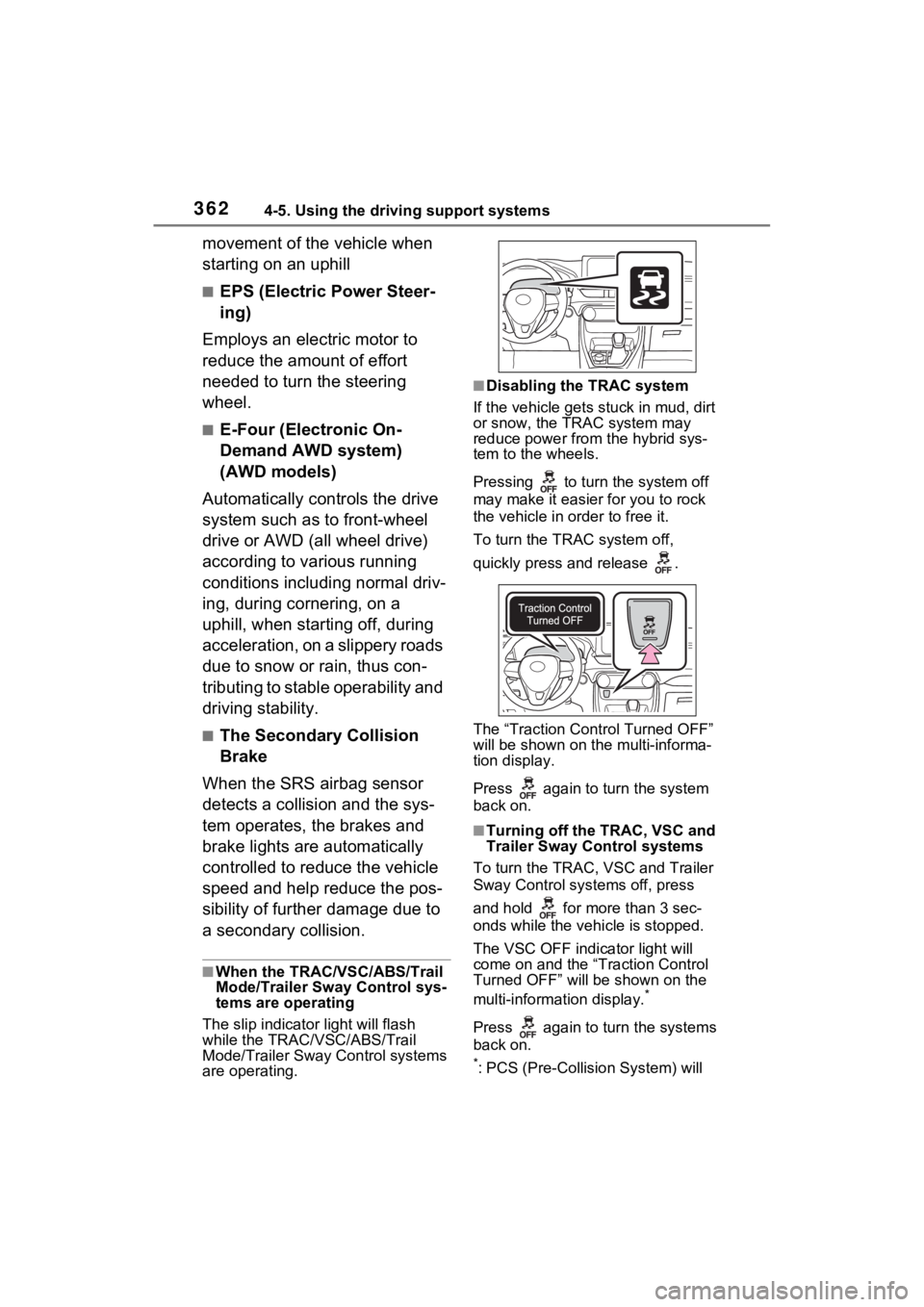
■Disabling the TRAC system
If the vehicle gets stuck in mud, dirt
or snow, the TRAC system may
reduce power from the hybrid sys-
tem to the wheels.
Pressing to turn the system off
may make it easier for you to rock
the vehicle in order to free it.
To turn the TRAC system off,
quickly press and release .
The “Traction Control Turned OFF”
will be shown on the multi-informa-
tion display.
Press again to turn the system
back on.
■Turning off the TRAC, VSC and
Trailer Sway Control systems
To turn the TRAC, VSC and Trailer
Sway Control systems off, press
and hold for more than 3 sec-
onds while the vehicle is stopped.
The VSC OFF indicator light will
come on and the “Traction Control
Turned OFF” will be shown on the
multi-informat ion display.
*
Press again to turn the systems
back on.
*: PCS (Pre-Collision System) will