cruise control TOYOTA RAV4 HYBRID 2022 Owners Manual
[x] Cancel search | Manufacturer: TOYOTA, Model Year: 2022, Model line: RAV4 HYBRID, Model: TOYOTA RAV4 HYBRID 2022Pages: 752, PDF Size: 23.11 MB
Page 3 of 752
3TABLE OF CONTENTS
1
2
3
4
5
6
7
8
9
10
4-1. Before drivingDriving the vehicle......... 183
Cargo and luggage ....... 190
Vehicle load limits ......... 193
Trailer towing ................ 194
Dinghy towing ............... 203
4-2. Driving procedures Power (ignition) switch (vehi-cles without smart key sys-
tem) ............................. 204
Power (ignition) switch (vehi- cles with smart key system).................................... 206
EV drive mode .............. 211
Hybrid transmission ...... 213
Turn signal lever ........... 217
Parking brake ................ 218
Brake Hold .................... 221
4-3. Operating the lights and wipers
Headlight switch ............ 224
AHB (Automatic High Beam) .................................... 227
Fog light switch ............. 231
Windshield wipers and washer......................... 231
Rear window wiper and washer......................... 234
4-4. Refueling Opening the fuel tank cap.................................... 236
4-5. Using the driving support
systems
Toyota Safety Sense 2.0 239PCS (Pre-Collision System)
.................................... 244
LTA (Lane Tracing Assist) .................................... 252
RSA (Road Sign Assist) 262
Dynamic radar cruise control with full-speed range ... 265
BSM (Blind Spot Monitor) .................................... 276
Intuitive parking assist ... 287
PKSB (Parking Support Brake) .......................... 295
Parking Support Brake func- tion (static objects) ...... 300
Parking Support Brake func- tion (rear-crossing vehicles).................................... 303
Rear view monitor system .................................... 305
Toyota parking assist monitor .................................... 313
Panoramic view monitor 326
Driving mode s elect switch
.................................... 358
Trail Mode (AWD vehicles) .................................... 359
Driving assist systems ... 361
4-6. Driving tips Hybrid Electric Vehicle driv-ing tips ......................... 367
Winter d
riving tips .......... 369
Utility vehicle precautions .................................... 372
5-1. Basic function Buttons overview ........... 377
4Driving
5Audio
Page 22 of 752
22Pictorial index
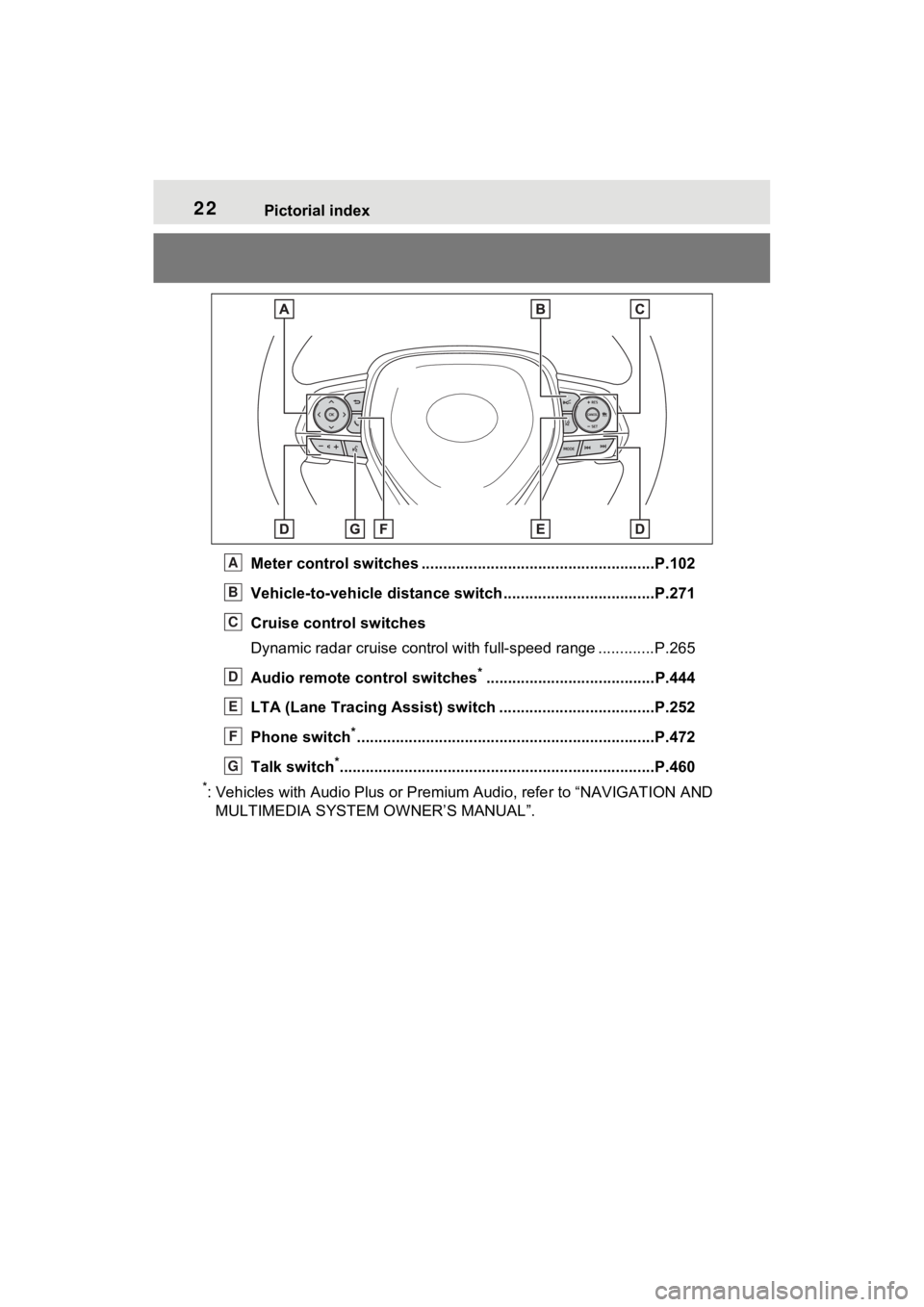
Meter control switches ......................................................P.102
Vehicle-to-vehicle distance switch ...................................P.271
Cruise control switches
Dynamic radar cruise control with full-speed range ............. P.265
Audio remote control switches
*.......................................P.444
LTA (Lane Tracing Assist) sw itch ....................................P.252
Phone switch
*............................................................... ......P.472
Talk switch
*............................................................... ..........P.460
*: Vehicles with Audio Plus or Premium Audio, refer to “NAVIGATION AND
MULTIMEDIA SYSTEM O WNER’S MANUAL”.
A
B
C
D
E
F
G
Page 89 of 752
892-1. Instrument cluster
2
Vehicle status information and indicators
off after the hybrid system is on,
or after a few seconds. There
may be a malfunction in a sys-
tem if the light does not come on,
or turn off. Have the vehicle
inspected by your Toyota dealer.
*2: This light illuminates on the multi-informatio n display with a
message.
*3: Intuitive parking assist OFF indi- cator turns on when the power
switch is turned to ON while the
Intuitive parking assist function is
on. It will turn off after a few sec-
onds.
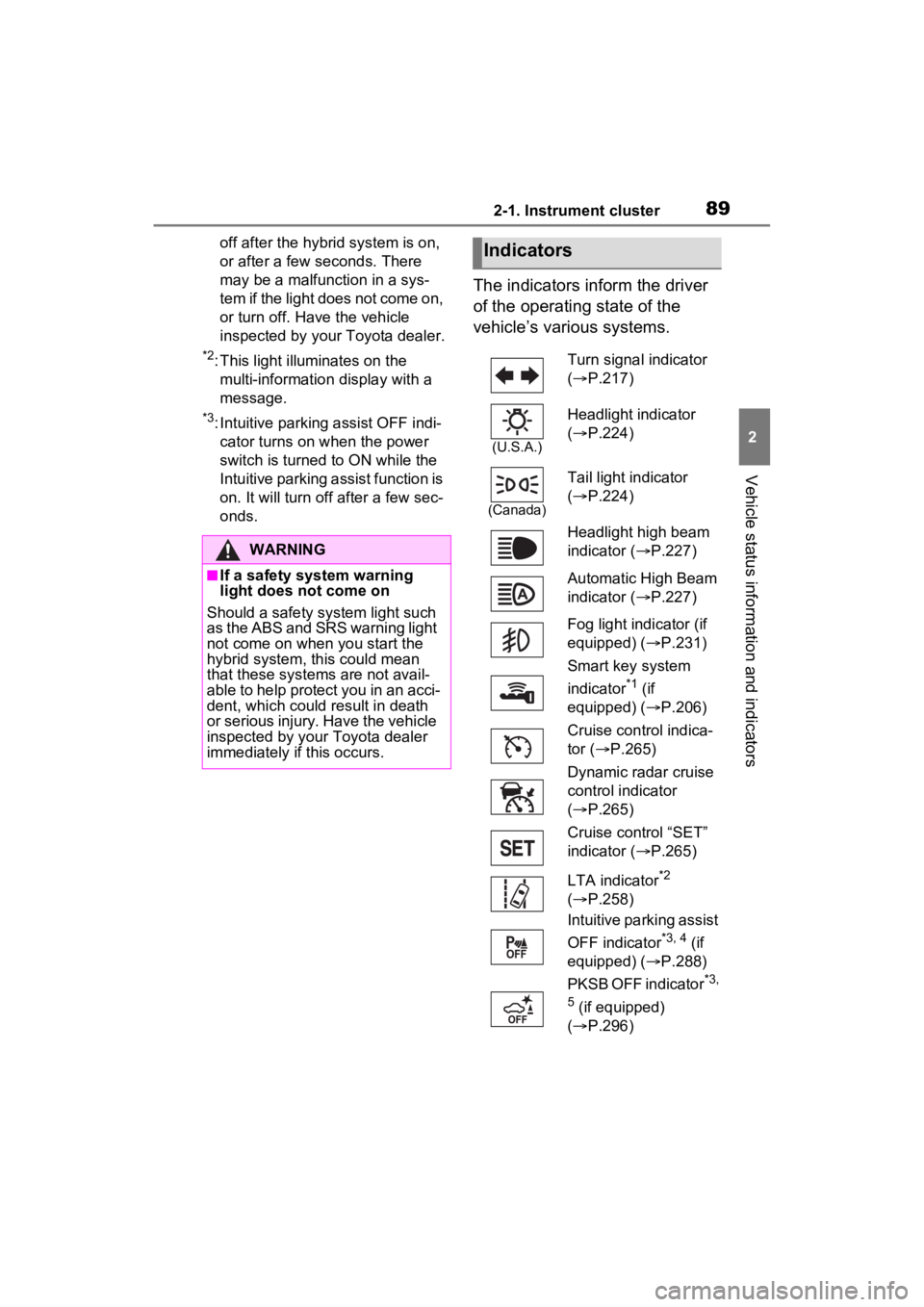
The indicators inform the driver
of the operating state of the
vehicle’s various systems.
WARNING
■If a safety system warning
light does not come on
Should a safety system light such
as the ABS and SR S warning light
not come on when you start the
hybrid system, this could mean
that these systems are not avail-
able to help protect you in an acci-
dent, which could result in death
or serious injury. Have the vehicle
inspected by your Toyota dealer
immediately if this occurs.
Indicators
Turn signal indicator
( P.217)
(U.S.A.)
Headlight indicator
( P.224)
(Canada)
Tail light indicator
( P.224)
Headlight high beam
indicator ( P.227)
Automatic High Beam
indicator ( P.227)
Fog light indicator (if
equipped) ( P.231)
Smart key system
indicator
*1 (if
equipped) ( P.206)
Cruise control indica-
tor ( P.265)
Dynamic radar cruise
control indicator
( P.265)
Cruise control “SET”
indicator ( P.265)
LTA indicator
*2
( P.258)
Intuitive parking assist
OFF indicator
*3, 4 (if
equipped) ( P.288)
PKSB OFF indicator
*3,
5
(if equipped)
( P.296)
Page 101 of 752
1012-1. Instrument cluster
2
Vehicle status information and indicators
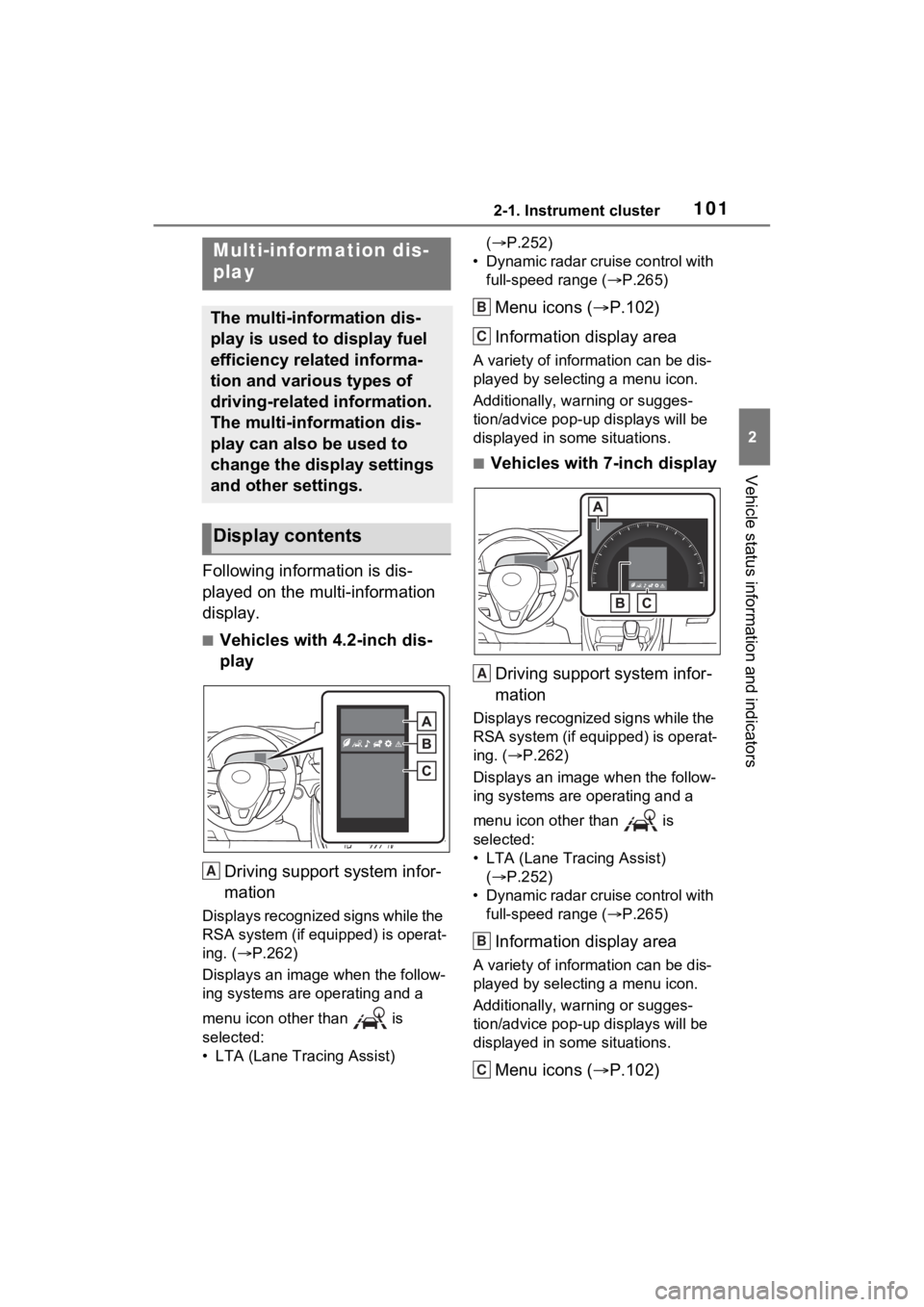
Following information is dis-
played on the multi-information
display.
■Vehicles with 4.2-inch dis-
playDriving support system infor-
mation
Displays recognized signs while the
RSA system (if equipped) is operat-
ing. ( P.262)
Displays an image when the follow-
ing systems are operating and a
menu icon other than is
selected:
• LTA (Lane Tracing Assist) (
P.252)
• Dynamic radar cruise control with full-speed range ( P.265)
Menu icons ( P.102)
Information display area
A variety of information can be dis-
played by selecting a menu icon.
Additionally, warning or sugges-
tion/advice pop-up displays will be
displayed in some situations.
■Vehicles with 7-inch display
Driving support system infor-
mation
Displays recognized signs while the
RSA system (if equipped) is operat-
ing. ( P.262)
Displays an image when the follow-
ing systems are operating and a
menu icon other than is
selected:
• LTA (Lane Tracing Assist) ( P.252)
• Dynamic radar cruise control with full-speed range ( P.265)
Information display area
A variety of information can be dis-
played by selecting a menu icon.
Additionally, warning or sugges-
tion/advice pop-up displays will be
displayed in some situations.
Menu icons ( P.102)
Multi-information dis-
play
The multi-information dis-
play is used to display fuel
efficiency related informa-
tion and various types of
driving-related information.
The multi-information dis-
play can also be used to
change the display settings
and other settings.
Display contents
A
B
C
A
B
C
Page 105 of 752
1052-1. Instrument cluster
2
Vehicle status information and indicators
After starting off, “Eco Score” dis-
play does not start until the vehicle
speed exceeds approximately 12
mph (20 km/h).
The “Eco Score” is reset each time
the vehicle starts off to start a new
evaluation.
When the hybrid system stops, the
current total score result is dis-
played.
*
*
: The score result is displayed only when “Eco Score” is selected for
“Trip Summary”. ( P.107)
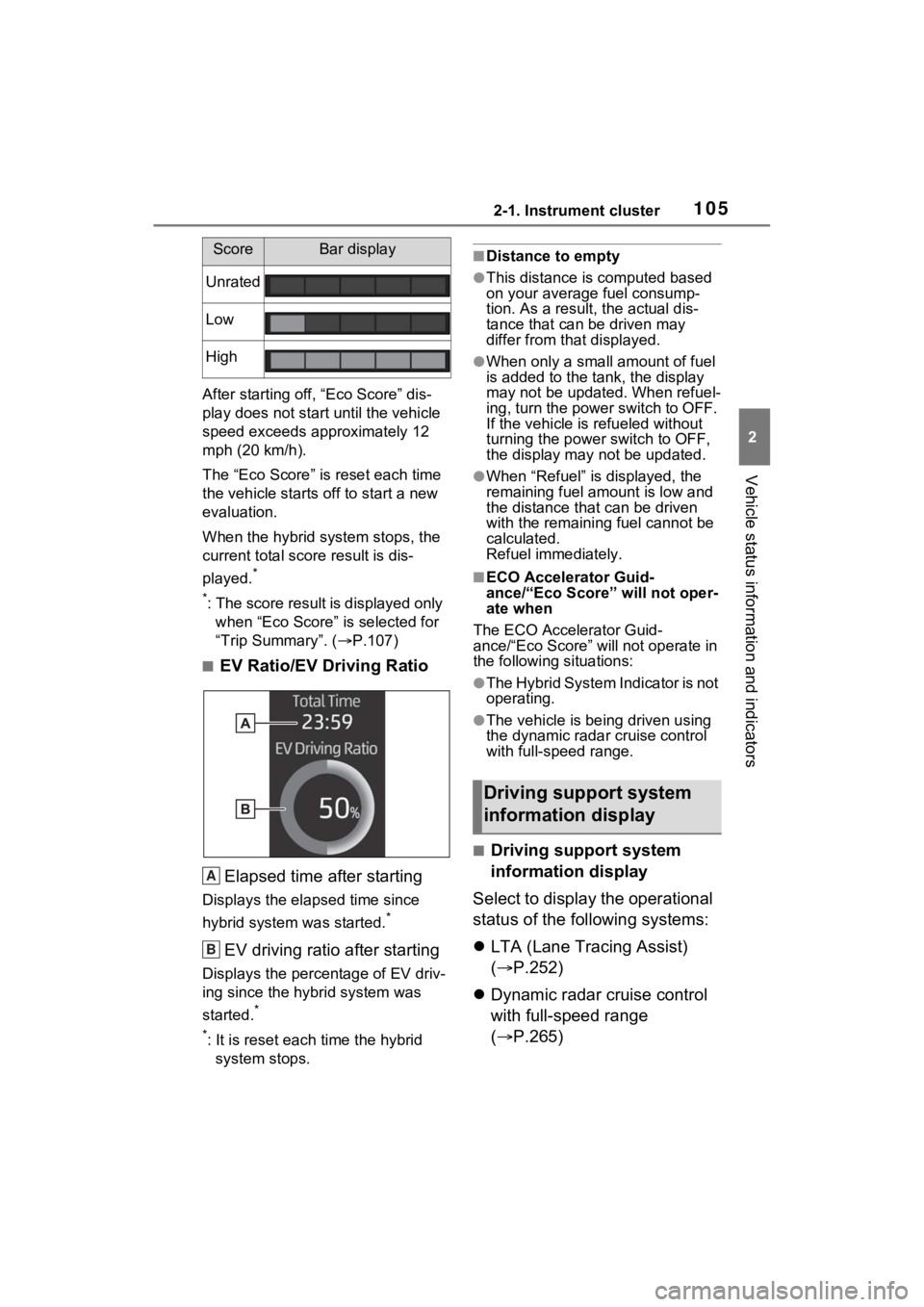
■EV Ratio/EV Driving Ratio
Elapsed time after starting
Displays the elapsed time since
hybrid system was started.
*
EV driving ratio after starting
Displays the percen tage of EV driv-
ing since the hybrid system was
started.
*
*
: It is reset each time the hybrid system stops.
■Distance to empty
●This distance is computed based
on your average fuel consump-
tion. As a result, the actual dis-
tance that can be driven may
differ from that displayed.
●When only a small amount of fuel
is added to the tank, the display
may not be updated. When refuel-
ing, turn the power switch to OFF.
If the vehicle is refueled without
turning the power switch to OFF,
the display may not be updated.
●When “Refuel” is displayed, the
remaining fuel amount is low and
the distance that can be driven
with the remaining fuel cannot be
calculated.
Refuel immediately.
■ECO Accelerator Guid-
ance/“Eco Score” will not oper-
ate when
The ECO Accelerator Guid-
ance/“Eco Score” will not operate in
the following situations:
●The Hybrid System Indicator is not
operating.
●The vehicle is bei ng driven using
the dynamic radar cruise control
with full-speed range.
■Driving support system
information display
Select to display the operational
status of the following systems:
LTA (Lane Tracing Assist)
( P.252)
Dynamic radar cruise control
with full-speed range
( P.265)
ScoreBar display
Unrated
Low
High
A
B
Driving support system
information display
Page 195 of 752
1954-1. Before driving
4
Driving
WARNING
■Trailer towing precautions
To tow a traile r safely, use
extreme care and drive the vehi-
cle in accordance with the trailer’s
characteristics and operating con-
ditions. Failure to do so could
cause an accident resulting in
death or serious injury. Vehicle
stability and braking performance
are affected by trailer stability,
brake setting and performance,
and the hitch. Your vehicle will
handle differently when towing a
trailer.
■To avoid accident or injury
●Do not exceed the TWR,
unbraked TWR, GCWR, GVWR
or GAWR.
●Adjust the tongue weight within
the appropriate range. Place
heavier loads as close to the
trailer axle as possible.
●Do not exceed 65 mph (104
km/h), the posted towing speed
limit or the speed limit for your
trailer as set fort h in your trailer
owner’s manual, whichever is
lowest. Slow down sufficiently
before making a turn, in cross
winds, on wet or slippery sur-
face, etc. to help avoid an acci-
dent. If you experience a
vehicle-trailer instability from
reducing a certain speed, slow
down and make sure you keep
your vehicle speed under the
speed of which you experience
the instability.
●Do not make jerky, abrupt or
sharp turns.
●Do not apply the brakes sud-
denly as you may skid, resulting
in jackknifing and loss of vehicle
control. This is especially true
on wet or slippery surfaces.
●Do not exceed the trailer hitch
assembly weight, gross vehicle
weight, gross axle weight and
trailer tongue w eight capacities.
●Do not use dynamic radar
cruise control with full-speed
range when towing.
●Slow down and downshift
before descending steep or long
downhill grades. Do not make
sudden downshifts while
descending steep or long down-
hill grades.
●Vehicle-trailer in stability is more
likely on steep long downhills.
Before descending steep or
long downhill grades, slow
down and downshift. Do not
make sudden downshifts when
descending steep or long down-
hill grades. Avoid holding the
brake pedal down too long or
applying the brakes too fre-
quently. This could cause the
brakes to overheat and result in
reduced braking efficiency.
●Do not tow a trailer when the
compact spare tire is installed
on your vehicle.
■When towing a trailer
Toyota recommends trailers with
brakes that conform to any appli-
cable federal and s tate/provincial
regulations.
●If the gross tr ailer weight
exceeds unbraked TWR, trailer
brakes are required. Toyota rec-
ommends trailers with brakes
that conform to all applicable
federal and state/provincial reg-
ulations.
●Never tap into your vehicle’s
hydraulic system, as this will
lower the vehicle’s braking
effectiveness.
Page 213 of 752
2134-2. Driving procedures
4
Driving
*1: To improve fuel efficiency and reduce noise, shift the shift lever
to D for normal driving.
*2: By selecting shift ranges using S mode, you can control accelerat-
ing force and engine braking
force.
■When driving with dynamic
radar cruise control with full-
speed range activated
Even when perform ing the following
actions with the intent of enabling
engine braking, engine braking will
not activate because dynamic radar
cruise control with full-speed range
will not be canceled.
●While driving in S mode, down-
shifting to 5 or 4. ( P.215)
●When switching th e driving mode
to sport mode while driving in D
position. ( P.358)
WARNING
■Caution while driving
When driving in EV drive mode,
pay special attention to the area
around the vehicle. Because
there is no engine noise, pedestri-
ans, people riding bicycles or
other people and vehicles in the
area may not be aware of the
vehicle starting off or approaching
them, so take extra care while
driving.
Hybrid transmission
Select the shift position
depending on your purpose
and situation.
Shift position purpose
and functions
Shift
positionObjective or function
P
Parking the vehi-
cle/starting the hybrid system
RReversing
NNeutral
DNormal driving*1
SS mode driving*2
Page 239 of 752
2394-5. Using the driving support systems
4
Driving
4-5.Using the driving support systems
■PCS (Pre-Collision System)
P.244
■LTA (Lane Tracing Assist)
P.252
■AHB (Automatic High
Beam)
P.227
■RSA (Road Sign Assist) (if
equipped)
P.262
■Dynamic radar cruise con-
trol with full-speed range
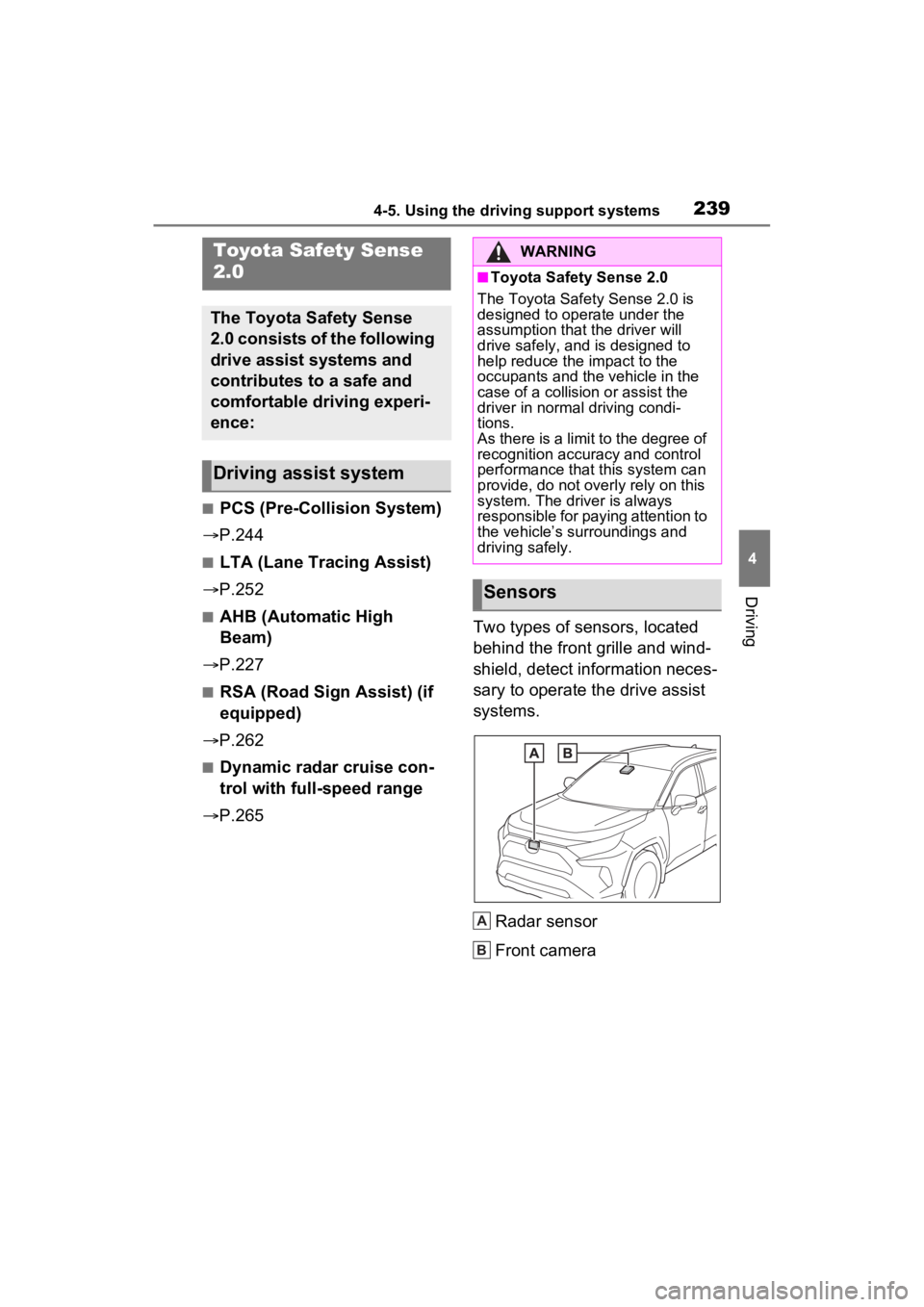
P.265 Two types of sensors, located
behind the front grille and wind-
shield, detect information neces-
sary to operate the drive assist
systems.
Radar sensor
Front camera
Toyota Safety Sense
2.0
The Toyota Safety Sense
2.0 consists of the following
drive assist systems and
contributes to a safe and
comfortable driving experi-
ence:
Driving assist system
WARNING
■Toyota Safety Sense 2.0
The Toyota Safety Sense 2.0 is
designed to operate under the
assumption that the driver will
drive safely, and is designed to
help reduce the impact to the
occupants and the vehicle in the
case of a collision or assist the
driver in normal driving condi-
tions.
As there is a limit to the degree of
recognition accuracy and control
performance that this system can
provide, do not overly rely on this
system. The driver is always
responsible for paying attention to
the vehicle’s su rroundings and
driving safely.
Sensors
A
B
Page 257 of 752
2574-5. Using the driving support systems
4
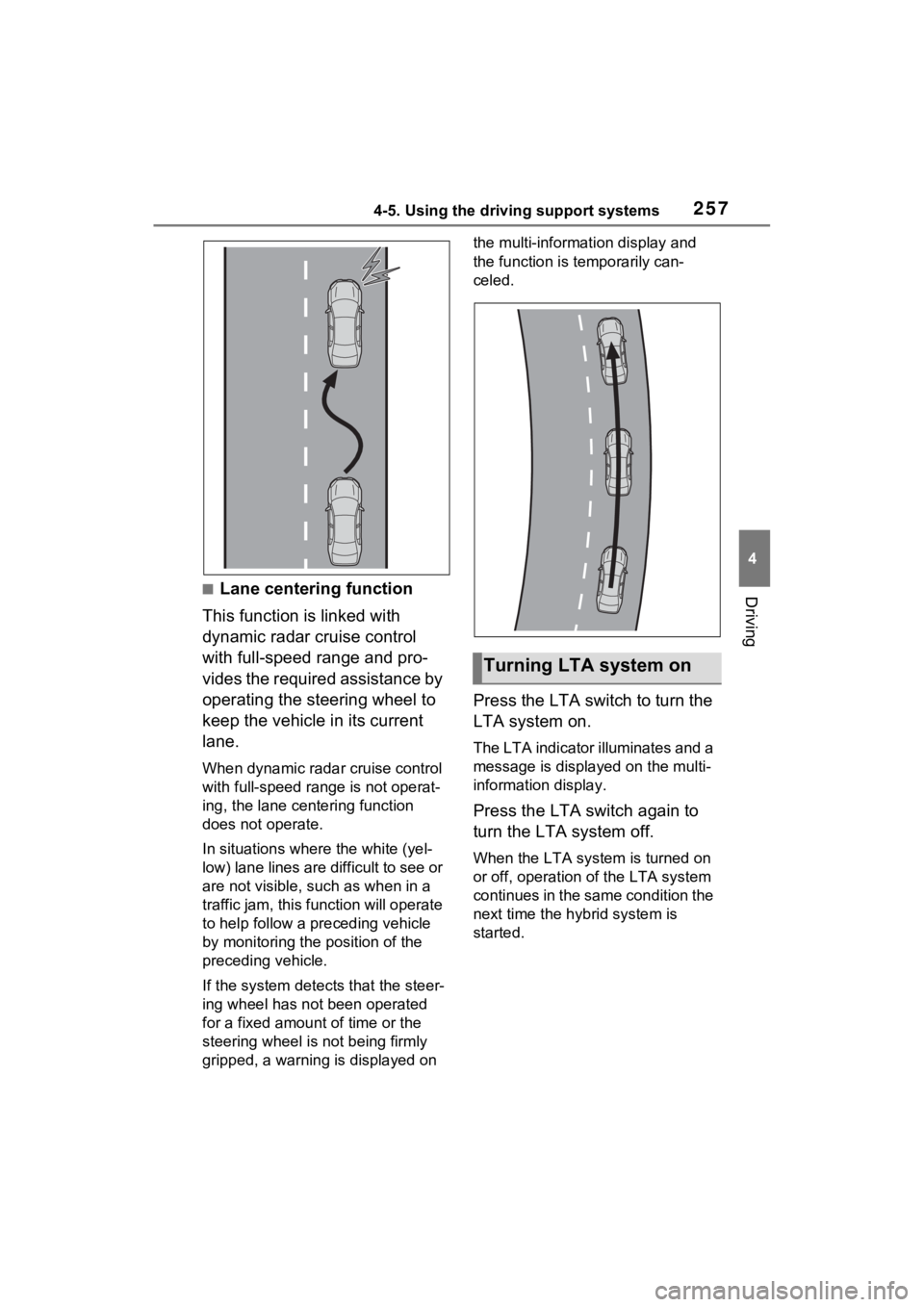
Driving■Lane centering function
This function is linked with
dynamic radar cruise control
with full-speed range and pro-
vides the required assistance by
operating the steering wheel to
keep the vehicle in its current
lane.
When dynamic radar cruise control
with full-speed range is not operat-
ing, the lane centering function
does not operate.
In situations where the white (yel-
low) lane lines are difficult to see or
are not visible, such as when in a
traffic jam, this fu nction will operate
to help follow a preceding vehicle
by monitoring the position of the
preceding vehicle.
If the system detects that the steer-
ing wheel has not been operated
for a fixed amount of time or the
steering wheel is not being firmly
gripped, a warning is displayed on the multi-information display and
the function is temporarily can-
celed.
Press the LTA switch to turn the
LTA system on.
The LTA indicator illuminates and a
message is display
ed on the multi-
information display.
Press the LTA switch again to
turn the LTA system off.
When the LTA syste m is turned on
or off, operation of the LTA system
continues in the same condition the
next time the hybrid system is
started.
Turning LTA system on
Page 260 of 752
2604-5. Using the driving support systems
This function operates when all of
the following cond itions are met.
• Setting for “Sway Warning” in the
screen of the mu lti-information
display is set to “ON”. ( P.101)
• Vehicle speed is approximately 32 mph (50 km/h) or more.
• Width of traffic lane is approxi- mately 9.8 ft. ( 3 m) or more.
• No system malfunctions are detected. ( P.261)
●Lane centering function
This function oper ates when all of
the following cond itions are met.
• LTA is turned on.
• Setting for “Steering Assist” and
“Lane Center” in the screen of
the multi-informati on display is set
to “ON”. ( P.101)
• This function recognizes white (yellow) lane lines or the position
of a preceding vehicle (except
when the preceding vehicle is
small, such as a motorcycle).
• The dynamic radar cruise control
with full-speed range is operating
in vehicle-to-vehic le distance con-
trol mode.
• Width of traffic lane is approxi-
mately 10 to 13 ft. (3 to 4 m).
• Turn signal lever is not operated.
• Vehicle is not being driven around a sharp curve.
• No system malfunctions are detected. ( P.261)
• Vehicle does not accelerate or decelerate by a fixed amount or
more.
• Steering wheel is not operated with a steering force level suitable
for changing lanes.
• ABS, VSC, TRAC and PCS are not operating.
• TRAC or VSC is not turned off.
• Hands off steering wheel warning
is not displayed. ( P.261)
• The vehicle is being driven in the
center of a lane.
• Steering assist function is not operating.
■Temporary cancelation of func-
tions
●When operation conditions are no
longer met, a function may be
temporarily canceled. However,
when the operation conditions are
met again, operation of the func-
tion is automatically restored.
( P.259)
●If the operation conditions
( P.259) are no longer met while
the lane centering function is
operating, the buzzer may sound
to indicate that the function has
been temporarily canceled.
■Steering assist function/lane
centering function
●Depending on the vehicle speed,
lane departure situation, road con-
ditions, etc., the driver may not
feel the function is operating or
the function may not operate at
all.
●The steering control of the func-
tion is overridden by the driver’s
steering wheel operation.
●Do not attempt to test the opera-
tion of the steering assist function.
■Lane departure alert function
●The warning buzzer may be diffi-
cult to hear due to external noise,
audio playback, etc.
●If the edge of the course* is not
clear or straight, the lane depar-
ture alert function may not oper-
ate.
●Vehicles with BSM: It may not be
possible for the system to deter-
mine if there is a danger of a colli-
sion with a vehicl e in an adjacent
lane.
●Do not attempt to test the opera-
tion of the lane departure alert
function.
*: Boundary between asphalt and
the side of the road, such as
grass, soil, or a curb