fuel consumption TOYOTA RAV4 HYBRID 2022 Owners Manual
[x] Cancel search | Manufacturer: TOYOTA, Model Year: 2022, Model line: RAV4 HYBRID, Model: TOYOTA RAV4 HYBRID 2022Pages: 752, PDF Size: 23.11 MB
Page 114 of 752
1142-1. Instrument cluster
4Select “Trip information” or
“History”.
■Trip information
If a screen other than “Trip infor-
mation” is displayed, select “Trip
information”.
The image is an example only, and
may vary slightly f rom actual condi-
tions.
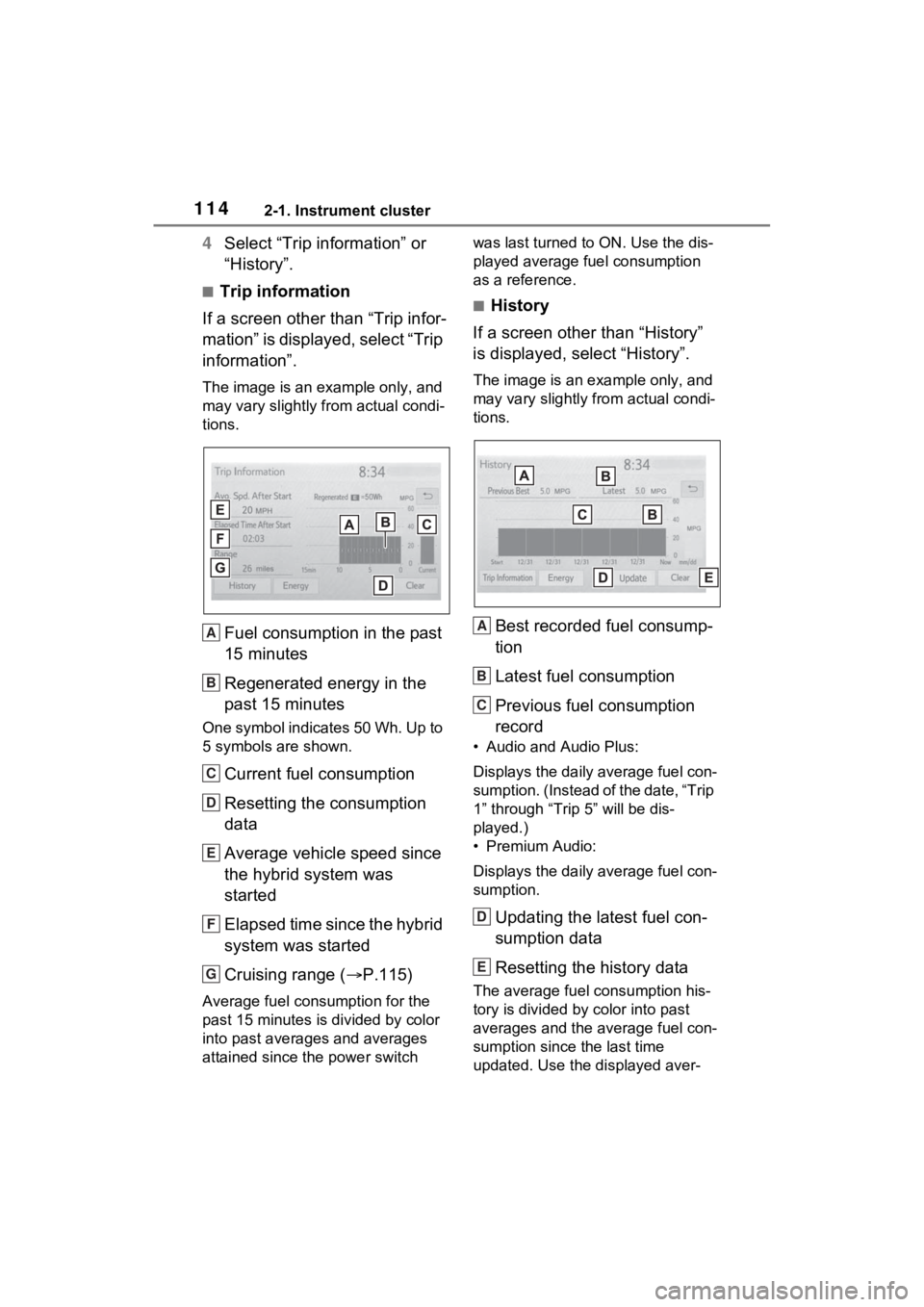
Fuel consumption in the past
15 minutes
Regenerated energy in the
past 15 minutes
One symbol indicates 50 Wh. Up to
5 symbols are shown.
Current fuel consumption
Resetting the consumption
data
Average vehicle speed since
the hybrid system was
started
Elapsed time since the hybrid
system was started
Cruising range ( P.115)
Average fuel consumption for the
past 15 minutes is divided by color
into past averages and averages
attained since the power switch was last turned to ON. Use the dis-
played average fuel consumption
as a reference.
■History
If a screen other than “History”
is displayed, select “History”.
The image is an example only, and
may vary slightly from actual condi-
tions.
Best recorded fuel consump-
tion
Latest fuel consumption
Previous fuel consumption
record
• Audio and Audio Plus:
Displays the daily average fuel con-
sumption. (Instead of the date, “Trip
1” through “Trip 5” will be dis-
played.)
• Premium Audio:
Displays the daily average fuel con-
sumption.
Updating the latest fuel con-
sumption data
Resetting the history data
The average fuel consumption his-
tory is divided by color into past
averages and the average fuel con-
sumption since the last time
updated. Use the displayed aver-
A
B
C
D
E
F
G
A
B
C
D
E
Page 115 of 752

1152-1. Instrument cluster
2
Vehicle status information and indicators
age fuel consumption as a refer-
ence.
■Updating the history data
Update the latest fuel consumption
by selecting “Upda te” to measure
the current fuel consumption again.
■Resetting the data
The fuel consumption data can be
deleted by selecting “Clear”.
■Cruising range
Displays the estimated maximum
distance that can be driven with the
quantity of fuel remaining.
This distance is computed based on
your average fuel consumption. As
a result, the actual distance that can
be driven may differ from that dis-
played.
Page 367 of 752
3674-6. Driving tips
4
Driving
4-6.Driving tips
When using Eco drive mode, the
torque corresponding to the
accelerator pedal depression
amount can be generated more
smoothly than it is in normal
conditions. In addition, the oper-
ation of the air conditioning sys-
tem (heating/cooling) will be
minimized, improving the fuel
economy. (P.358)
The Eco-friendly driving is pos-
sible by keeping the indicator of
Hybrid System Indicator within
Eco area. ( P.93, 98)
Shift the shift lever to D when
stopped at a traffic light, or driv-
ing in heavy traffic etc. Shift the
shift lever to P when parking.
When using the N position,
there is no positive effect on fuel
consumption. In the N position,
the gasoline engine operates
but electricity cannot be gener-
ated. Also, when using the air conditioning system, etc., the
hybrid battery (traction battery)
power is consumed.
Drive your vehicle smoothly.
Avoid abrupt acceleration and
deceleration. Gradual accel-
eration and deceleration will
make more effective use of
the electric motor (traction
motor) without having to use
gasoline engine power.
Avoid repeated acceleration.
Repeated acceleration con-
sumes hybrid battery (trac-
tion battery) power, resulting
in poor fuel consumption. Bat-
tery power can be restored by
driving with the accelerator
pedal slightly released.
Make sure to operate the brakes
gently and in a timely manner. A
greater amount of electrical
energy can be regenerated
when slowing down.
Repeated acceleration and
deceleration, as well as long
waits at traffic lights, will lead to
bad fuel economy. Check traffic
reports before leaving and avoid
delays as much as possible.
Hybrid Electric Vehi-
cle driving tips
For economical and ecolog-
ical driving, pay attention to
the following points:
Using Eco drive mode
Use of Hybrid System
Indicator
Shift lever operation
Accelerator pedal/brake
pedal operation
When braking
Delays
Page 368 of 752
3684-6. Driving tips
When driving in a traffic jam,
gently release the brake pedal
to allow the vehicle to move for-
ward slightly while avoiding
overuse of the accelerator
pedal. Doing so can help control
excessive gasoline consump-
tion.
Control and maintain the vehicle
at a constant speed. Before
stopping at a toll booth or simi-
lar, allow plenty of time to
release the accelerator and gen-
tly apply the brakes. A greater
amount of electrical energy can
be regenerated when slowing
down.
Use the air conditioning only
when necessary. Doing so can
help reduce excessive gasoline
consumption.
In summer: When the ambient
temperature is high, use the
recirculated air mode. Doing so
will help to reduce the burden on
the air conditioning system and
reduce fuel consumption as
well.
In winter: Because the gasoline
engine will not automatically cut
out until it and the interior of the
vehicle are warm, it will con-
sume fuel. Also, fuel consump-
tion can be improved by avoiding overuse of the heater.
Make sure to check the tire infla-
tion pressure frequently.
Improper tire inflation pressure
can cause poor fuel economy.
Also, as snow tires can cause
large amounts of friction, their
use on dry roads can lead to
poor fuel economy. Use tires
that are appropriate for the sea-
son.
Carrying heavy luggage will lead
to poor fuel economy. Avoid car-
rying unnecessary luggage.
Installing a large roof rack will
also cause poor fuel economy.
Since the gasoline engine starts
up and cuts out automatically
when cold, warming up the
engine is unnecessary. More-
over, frequently driving short
distances will cause the engine
to repeatedly warm up, which
can lead to excess fuel con-
sumption.
Highway driving
Air conditioning
Checking tire inflation
pressure
Luggage
Warming up before driv-
ing
Page 416 of 752
4165-5. Other settings
5-5.Other settings
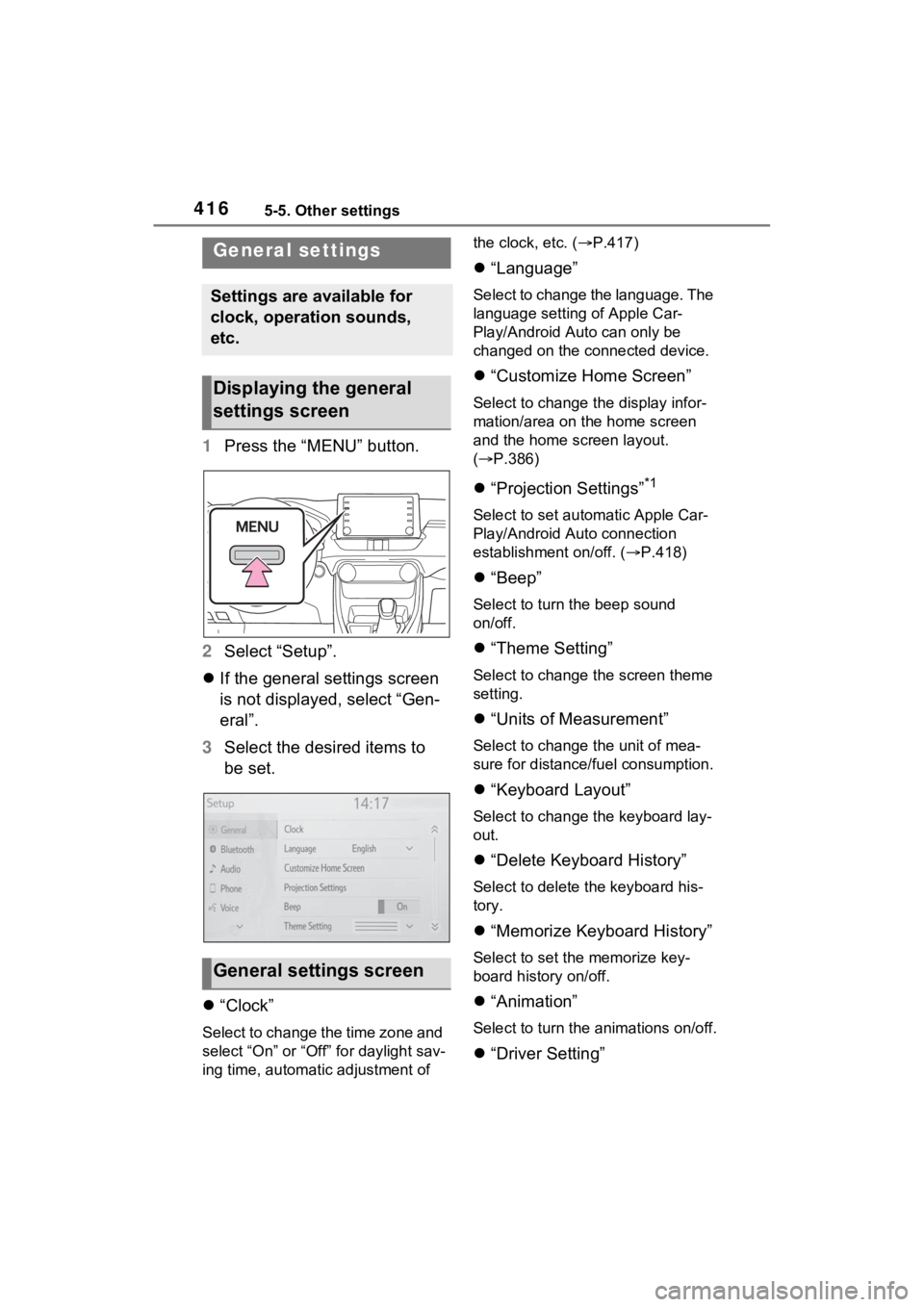
1Press the “MENU” button.
2 Select “Setup”.
If the general settings screen
is not displayed, select “Gen-
eral”.
3 Select the desired items to
be set.
“Clock”
Select to change the time zone and
select “On” or “Off” for daylight sav-
ing time, automatic adjustment of the clock, etc. (
P.417)
“Language”
Select to change the language. The
language setting of Apple Car-
Play/Android Auto can only be
changed on the connected device.
“Customize Home Screen”
Select to change the display infor-
mation/area on the home screen
and the home screen layout.
( P.386)
“Projection Settings”*1
Select to set automatic Apple Car-
Play/Android Auto connection
establishment on/off. ( P.418)
“Beep”
Select to turn the beep sound
on/off.
“Theme Setting”
Select to change the screen theme
setting.
“Units of Measurement”
Select to change the unit of mea-
sure for distance/fuel consumption.
“Keyboard Layout”
Select to change the keyboard lay-
out.
“Delete Keyboard History”
Select to delete the keyboard his-
tory.
“Memorize Keyboard History”
Select to set the memorize key-
board history on/off.
“Animation”
Select to turn the animations on/off.
“Driver Setting”
General settings
Settings are available for
clock, operation sounds,
etc.
Displaying the general
settings screen
General settings screen
Page 515 of 752
5156-1. Using the air conditioning system and defogger
6
Interior features
decreases the temperature.
The air conditioning system
switches between individual and
simultaneous modes each time the
“SYNC” switch is pressed.
Simultaneous mode (the indicator
on the “SYNC” switch is on):
The driver’s side temperature con-
trol dial can be used to adjust the
temperature for the driver’s and
passenger’s side. At this time,
operate the passenger’s side tem-
perature control dial to enter indi-
vidual mode.
Individual mode (t he indicator on
the “SYNC” switch is off):
The temperature for the driver’s
and passenger’s side can be
adjusted separately.
■Setting the fan speed
Press the fan speed increase
switch to increase the fan speed
and the fan speed decrease
switch to decrease the fan
speed.
Pressing the “OFF” switch turns off
the fan.
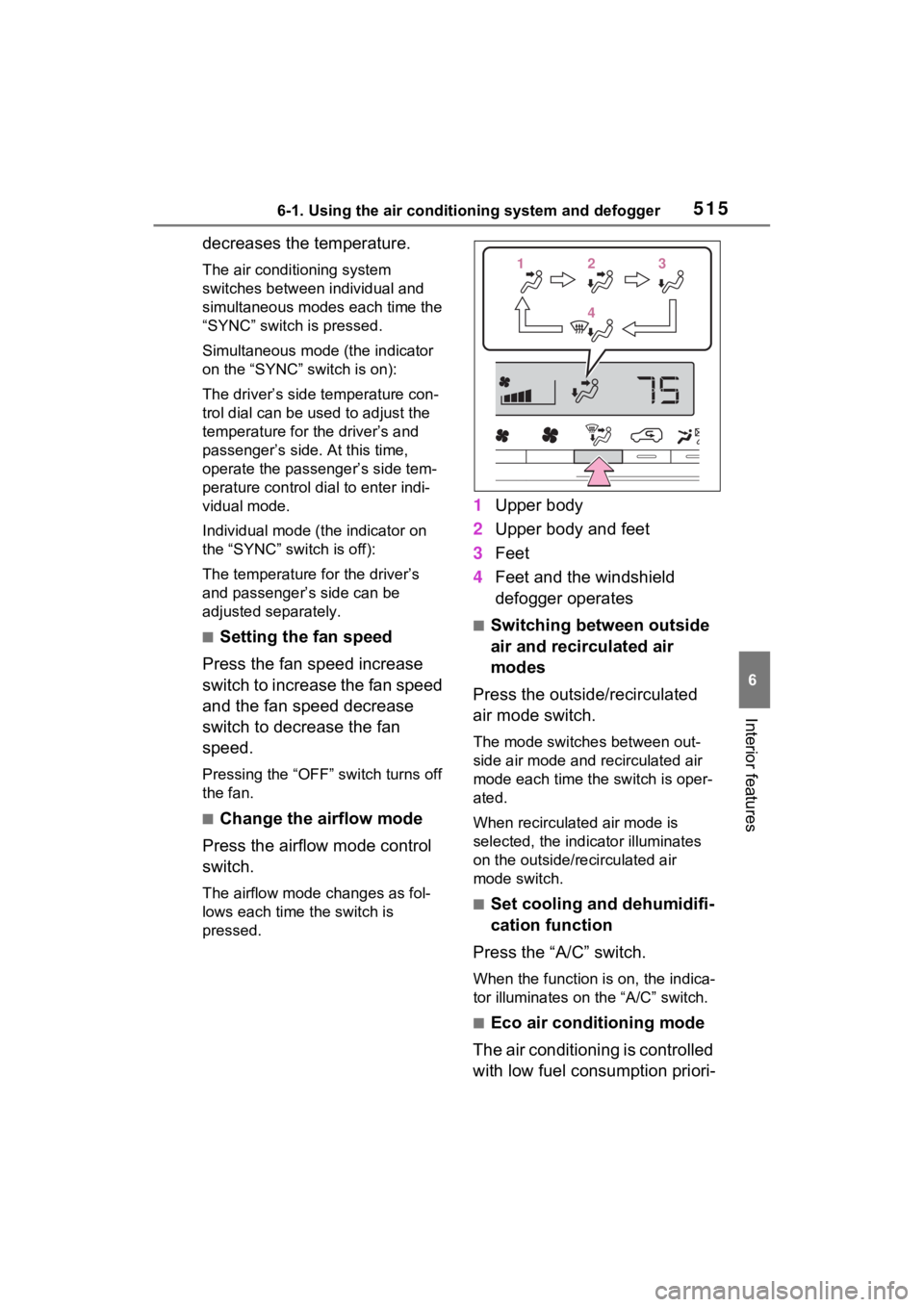
■Change the airflow mode
Press the airflow mode control
switch.
The airflow mode changes as fol-
lows each time the switch is
pressed.
1 Upper body
2 Upper body and feet
3 Feet
4 Feet and the windshield
defogger operates
■Switching between outside
air and recirculated air
modes
Press the outside/recirculated
air mode switch.
The mode switches between out-
side air mode and recirculated air
mode each time the switch is oper-
ated.
When recirculated air mode is
selected, the indicator illuminates
on the outside/recirculated air
mode switch.
■Set cooling and dehumidifi-
cation function
Press the “A/C” switch.
When the function is on, the indica-
tor illuminates on the “A/C” switch.
■Eco air conditioning mode
The air conditioning is controlled
with low fuel consumption priori-
112233
44
Page 517 of 752
5176-1. Using the air conditioning system and defogger
6
Interior features
recirculated air mode automati-
cally. This may also reduce fuel
consumption.
●Recirculated air mode is selected
as a default mode when the power
switch is turned to ON.
●It is possible to switch to outside
air mode at any time by pressing
the outside/recirculated air mode
switch.
■Operation of the air condition-
ing system in Eco drive mode
●In Eco drive mode, the air condi-
tioning system is controlled as fol-
lows to prioritize fuel efficiency:
• Engine speed and compressor
operation controlled to restrict
heating/cooling capacity
• Fan speed restr icted when auto-
matic mode is selected
●To improve air conditioning perfor-
mance, perform the following
operations:
• Adjust the fan speed
• Turn off Eco drive mode ( P.358)
• Turn off Eco air conditioning mode
●When the driving mode is set to
Eco driving mode, the Eco air con-
ditioning mode will be turned on
automatically. Even in this case,
the Eco air conditioning mode can
be turned off by pressing the Eco
air conditioning mode switch.
■When the outside temperature
falls to nearly 32°F (0°C)
The dehumidification function may
not operate even when “A/C” switch
is pressed.
■Ventilation and air conditioning
odors
●To let fresh air in, set the air condi-
tioning system to the outside air
mode.
●During use, various odors from
inside and outside the vehicle may
enter into and a ccumulate in the
air conditioning system. This may
then cause odor to be emitted
from the vents.
●To reduce potential odors from
occurring:
• It is recommended that the air
conditioning system be set to out-
side air mode prior to turning the
vehicle off.
• The start timing of the blower may be delayed for a short period of
time immediately after the air con-
ditioning system is started in auto-
matic mode.
●When parking, the system auto-
matically switches to outside air
mode to encourage better air cir-
culation throughout the vehicle,
helping to reduce odors that occur
when starting the vehicle.
■Air conditioning filter
P.591
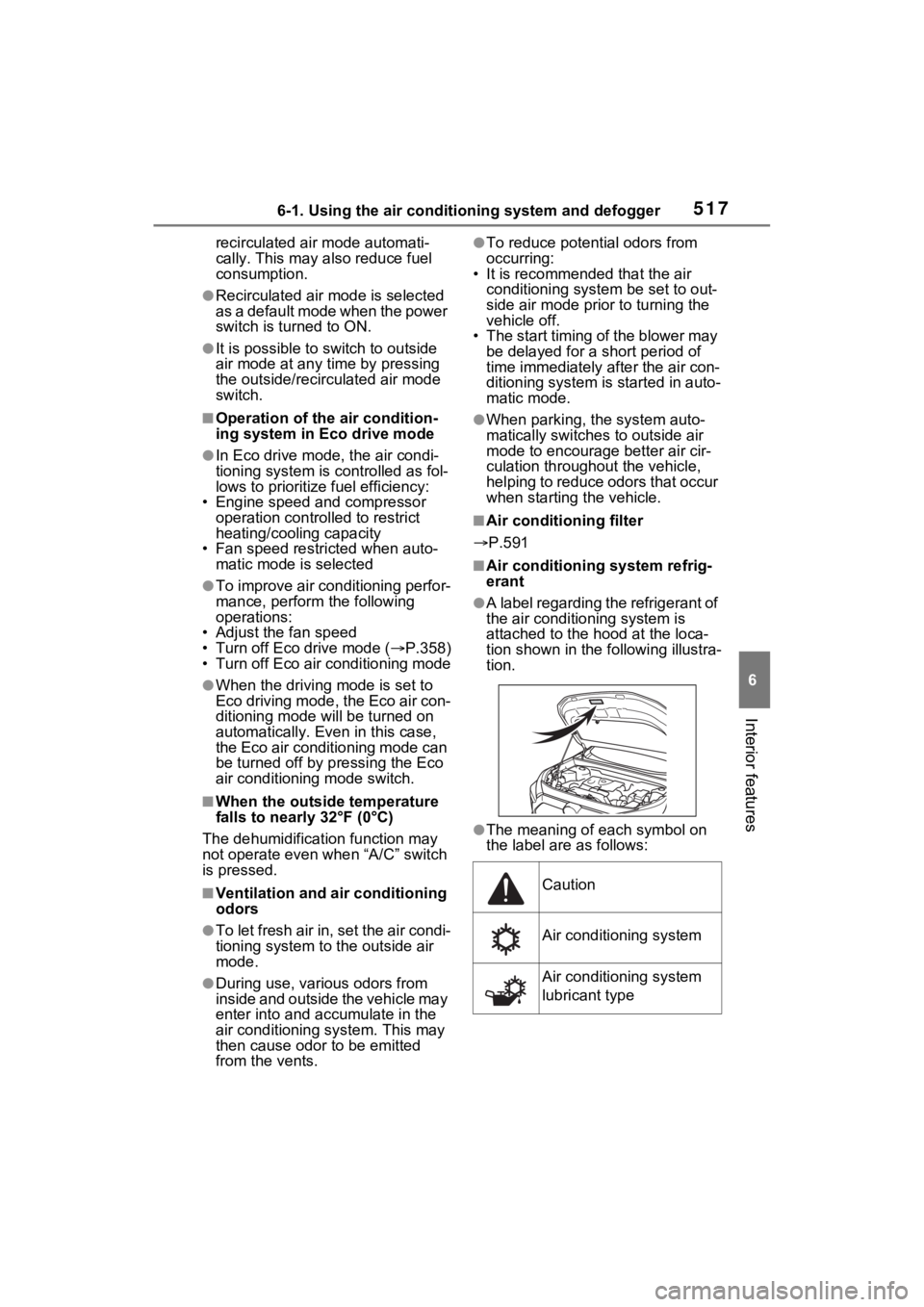
■Air conditioning system refrig-
erant
●A label regarding the refrigerant of
the air conditioning system is
attached to the h ood at the loca-
tion shown in the following illustra-
tion.
●The meaning of each symbol on
the label are as follows:
Caution
Air conditioning system
Air conditioning system
lubricant type
Page 720 of 752
720Alphabetical Index
........................................... 423
Audio button (Menu screen).. 379
Audio button (Setup screen)382, 446
AUDIO button.......................... 377
Audio buttons overview......... 377
Audio settings ........................ 446
Automatic air conditioning sys- tem ......................................... 514Air conditioning filter ............. 591
Eco air conditioning mode .... 515
Automatic High Beam ............ 227
Automatic light control system ............................................... 225
Auxiliary boxes ....................... 529
Average fuel consumption .... 113
Average fuel economy ........... 103
Average vehicle speed .. 106, 113
B
Back door ................................ 129 Hands Free Power Back Door........................................... 134
Power back door .................. 133
Wireless remote control ....... 133
Back-up lights Replacing light bulbs ............ 607
Wattage ................................ 674
Battery (12-volt battery) ......... 576 If the 12-volt battery is dis-charged .............................. 654
Preparing and c hecking before
winter.................................. 369
Replacing ............................. 656
Warning light ........................ 624
Battery (traction battery) ......... 76
Blind Spot Monitor (BSM) ...... 276 Blind Spot Monitor function .. 280
Rear Cross Traffic Alert function........................................... 283
Bluetooth
® button (Setup screen) ...................................382
Bluetooth
® details settings ...396
Bluetooth
® setup screen.......397
Connecting a Bluetooth
® device
...........................................397
Deleting a Bluetooth
® device399
Detailed settings screen .......401
Displaying the Bluetooth
® setup
screen.................................396
Editing the Bluetooth
® device
information..........................400
Registering a Bluetooth
® device
...........................................399
Bluetooth
® device information
...............................................400
Bluetooth
® hands-free system
...............................................469
Bluetooth
® phone message func-
tion .........................................480 Calling the message sender .483
Checking received messages ...........................................481
Displaying the message screen ...........................................480
Receiving a mess age ...........481
Replying to a message (dictation reply) ..................................482
Replying to a message (quick reply) ..................................483
Bottle holders .........................529
Brake Brake Hold ............................221
Fluid......................................574
Parking brake .......................218
Regenerative braking .............73
Warning light ........................624
Brake assist ............................361
Brake Hold...............................221
Break-in tips ............................184
Brightness control
Page 721 of 752

Alphabetical Index721
Instrument panel light control94, 100
BSM (Blind Spot Monitor) ...... 276 Blind Spot Monitor function .. 280
Rear Cross Traffic Alert function........................................... 283
C
Care Aluminum wheels ................. 554
Exterior ................................. 554
Interior .................................. 557
Seat belts ............................. 557
Cargo capacity ............... 190, 193
Cargo hooks ........................... 531
Chains ..................................... 371
Child-protectors ..................... 128
Child restraint s ystem ............. 52
Fixed with a LATCH system ... 61
Fixed with a seat belt ............. 56
Front passenger occupant clas- sification system ................... 45
Points to remember ................ 52
Riding with children ................ 51
Types of child restraint system installation met hod ............... 54
Using an anchor bracket ........ 63
Child safety ............................... 51 12-volt battery precautions . 576, 658
Airbag precautions ................. 40
Back door precautions ......... 129
Child restraint system............. 54
Heated steering wheel and seat
heater precautions ............. 521
How your child should wear the seat belt................................ 32
Moon roof precau tions ......... 175
Panoramic moon roof precau- tions.................................... 179
Power window lock switch.... 173
Power window precautions .. 172 Rear door child-protectors ....128
Removed key battery precau-
tions ....................................602
Seat belt extender precautions .............................................32
Seat belt precautions..............31
Seat heater precautions .......521
Cleaning ..........................554, 557 Aluminum wheels .................554
Exterior .................................554
Interior ..................................557
Radar sensor ........................240
Seat belts .............................557
Clock ..................................95, 100
Coat hooks ..............................545
Command list ..........................463
Condenser ............. ..................573
Connected Service s ...............499
Console box ............................528
Consumption screen ..............111
Convenience Services (Sugges- tion function).........................110
Coolant Checking ..............................572
Preparing and checking before winter ..................................369
Warning light ........................625
Cooling system .......................572 Hybrid system overheating ...659
Cruise control Dynamic radar cruise control with full-speed range ..........265
Cup holders.............................528
Current fuel consumption......113
Current fuel economy ............103
Curtain shield airbags ..............35
Customizable featu res ...........687
D
Daytime running light system225
Replacing light bulbs ............607
DCM .................500, 502, 503, 506
Page 724 of 752
724Alphabetical Index
Fog lightsReplacing light bulbs ............ 607
Switch................................... 231
Footwell lights ..... ................... 524
Front passenger’s seat belt reminder light ....................... 631
Front passenger occupant clas- sification system .................... 45
Front position lights Light switch .......................... 224
Front seat heaters .................. 521
Front seats .............................. 148 Adjustment ........................... 148
Cleaning ............................... 557
Correct driving posture ........... 29
Driving position memory....... 151
Head restraints ..................... 154
Memory recall function ......... 153
Seat heaters ......................... 521
Seat position memory .......... 151
Seat ventilators .................... 521
Front side marker lights ........ 224 Light switch .......................... 224
Replacing light bulbs ............ 607
Wattage ................................ 674
Front turn signal lights Replacing light bulbs ............ 607
Turn signal lever................... 217
Wattage ................................ 674
Fuel Capacity ............................... 667
Fuel gauge ....................... 92, 96
Gas station information ........ 750
Information ........................... 675
Refueling .............................. 236
Type ............................. 667, 675
Warning light ........................ 631
Fuel consumption information Average fuel consumption.... 113
Current fuel consumption ..... 113
Fuel filler door ..... ................... 237
If the fuel filler door cannot be opened ...............................651
Refueling ..............................236
Fuel gauge...........................92, 96
Fuses .......................................603
G
Garage door opene r ...............546
Gas station information .........750
Gauges ................................92, 96
General button (Setup screen) .......................................382, 416
General settings .....................416 Displaying the general settings screen.................................416
General settings screen .......416
Glove box ................................528
H
Hands-free system .................469
Headlight aim ..........................606
Headlight aim instructions for Canadian owners ..................712
Headlights ...............................224 Automatic High Beam system...........................................227
Light switch...........................224
Replacing light bulbs ............607
Head restraints .......................154
Heated steering wheel............521
Heaters Automatic air conditioning sys-tem .....................................514
Heated steering wheel..........521
Outside rear view mirrors .....516
Seat heaters ....... ..................521
High mounted stoplight Replacing light bulbs ............607
Hill-start assist control...........361
HOME button...........................386
Home screen ...........................386
Hood ........................................567