tow TOYOTA RAV4 HYBRID 2022 Owners Manual
[x] Cancel search | Manufacturer: TOYOTA, Model Year: 2022, Model line: RAV4 HYBRID, Model: TOYOTA RAV4 HYBRID 2022Pages: 752, PDF Size: 23.11 MB
Page 3 of 752
3TABLE OF CONTENTS
1
2
3
4
5
6
7
8
9
10
4-1. Before drivingDriving the vehicle......... 183
Cargo and luggage ....... 190
Vehicle load limits ......... 193
Trailer towing ................ 194
Dinghy towing ............... 203
4-2. Driving procedures Power (ignition) switch (vehi-cles without smart key sys-
tem) ............................. 204
Power (ignition) switch (vehi- cles with smart key system).................................... 206
EV drive mode .............. 211
Hybrid transmission ...... 213
Turn signal lever ........... 217
Parking brake ................ 218
Brake Hold .................... 221
4-3. Operating the lights and wipers
Headlight switch ............ 224
AHB (Automatic High Beam) .................................... 227
Fog light switch ............. 231
Windshield wipers and washer......................... 231
Rear window wiper and washer......................... 234
4-4. Refueling Opening the fuel tank cap.................................... 236
4-5. Using the driving support
systems
Toyota Safety Sense 2.0 239PCS (Pre-Collision System)
.................................... 244
LTA (Lane Tracing Assist) .................................... 252
RSA (Road Sign Assist) 262
Dynamic radar cruise control with full-speed range ... 265
BSM (Blind Spot Monitor) .................................... 276
Intuitive parking assist ... 287
PKSB (Parking Support Brake) .......................... 295
Parking Support Brake func- tion (static objects) ...... 300
Parking Support Brake func- tion (rear-crossing vehicles).................................... 303
Rear view monitor system .................................... 305
Toyota parking assist monitor .................................... 313
Panoramic view monitor 326
Driving mode s elect switch
.................................... 358
Trail Mode (AWD vehicles) .................................... 359
Driving assist systems ... 361
4-6. Driving tips Hybrid Electric Vehicle driv-ing tips ......................... 367
Winter d
riving tips .......... 369
Utility vehicle precautions .................................... 372
5-1. Basic function Buttons overview ........... 377
4Driving
5Audio
Page 6 of 752
6TABLE OF CONTENTS
Wireless remote control/elec-tronic key battery ......... 600
Checking and replacing fuses .................................... 603
Headlight aim ................ 606
Light bulbs..................... 607
8-1. Essential information Emergency flashers ...... 616
If your vehicle has to be stopped in an emergency
.................................... 617
If the vehicle is submerged or water on the road is rising
.................................... 618
8-2. Steps to take in an emer- gency
If your vehicle needs to be
towed........................... 619
If you think something is wrong .......................... 623
If a warning light turns on or a warning buzzer sounds 624
If a warning message is dis- played.......................... 635
If you have a flat tire...... 640
If the hybrid system will not start ............................. 649
If you lose your keys ..... 650
If the fuel filler door cannot be opened ........................ 651
If the electronic key does not operate properly (vehicles
with smart key system) 652
If the 12-volt battery is dis- charged ....................... 654If your vehicle overheats
659
If the vehicle becomes stuck .................................... 662
9-1. Specifications Maintenance data (fuel, oil level, etc.) .................... 666
Fuel information............. 675
Tire information ............. 677
9-2. Customization Customizable features... 687
9-3. Initialization Items to initialize ............ 699
10-1.For owners Reporting safet y defects for
U.S. owners ................. 702
Reporting safet y defects for
Canadian owners ........ 703
Seat belt instructions for Canadian owners (in
French) ........................ 703
SRS airbag instructions for Canadian owners (in
French) ........................ 705
Headlight aim instructions for Canadian owners (in
French) ........................ 712
What to do if... (Trouble- shooting) ..................... 716
Alphabetical Index ........ 719
8When trouble arises
9Vehicle specifications
10For owners
Index
Page 19 of 752
19Pictorial index
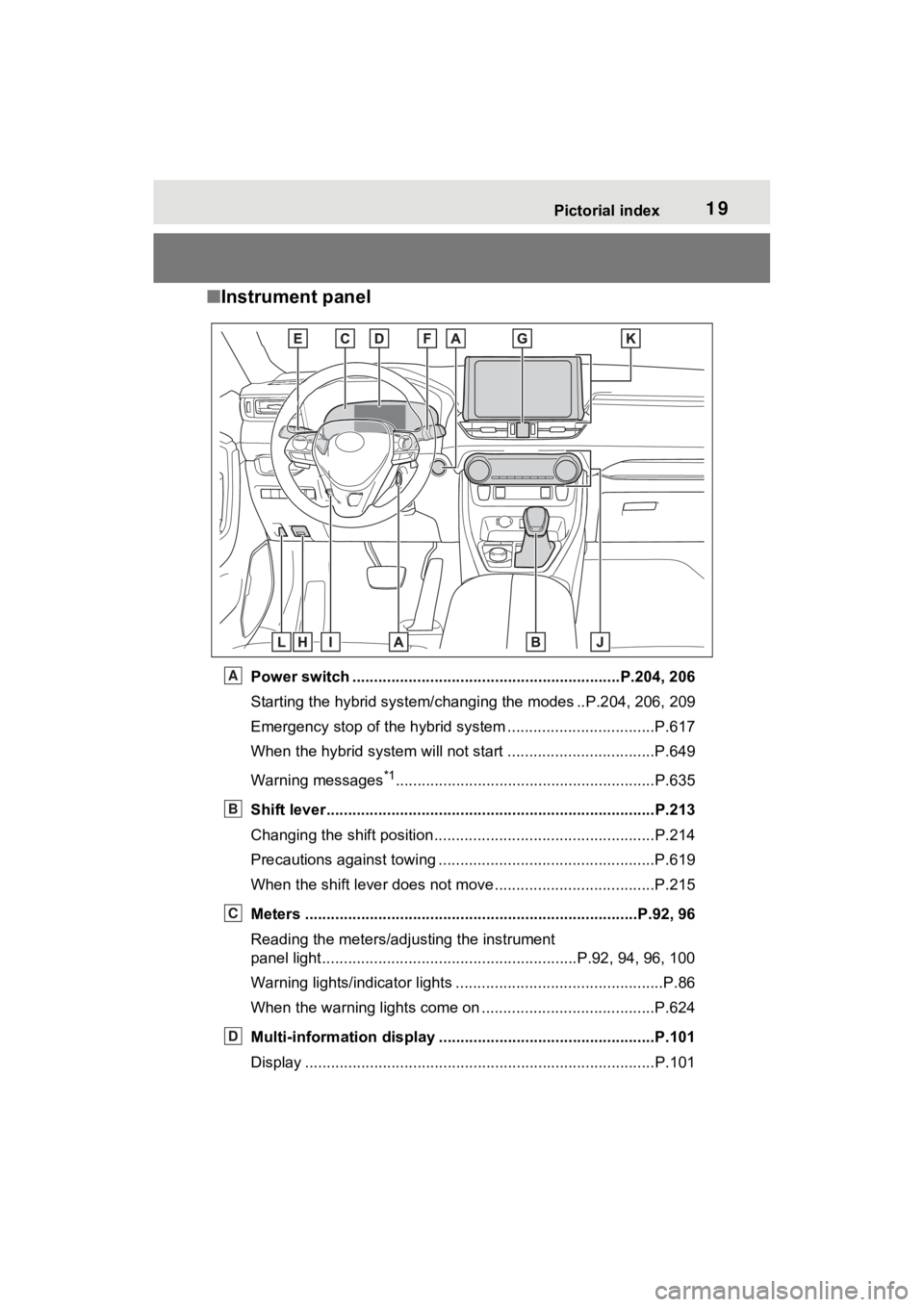
■Instrument panel
Power switch ................................................... ...........P.204, 206
Starting the hybrid system/chan ging the modes ..P.204, 206, 209
Emergency stop of the hybrid system ............................ ......P.617
When the hybrid system will not start .......................... ........P.649
Warning messages
*1............................................................P.6 35
Shift lever.................................................... ........................P.213
Changing the shift position.................................... ...............P.214
Precautions against towing ..................................................P.619
When the shift lever does not move............................. ........P.215
Meters ......................................................... ....................P.92, 96
Reading the meters/adjusting the instrument
panel light.................................................... .......P.92, 94, 96, 100
Warning lights/indicator lights ................................ ................P.86
When the warning lights come on ................................ ........P.624
Multi-information display . .................................................P.101
Display .................................................................................P.101
A
B
C
D
Page 42 of 752
421-1. For safe use
WARNING
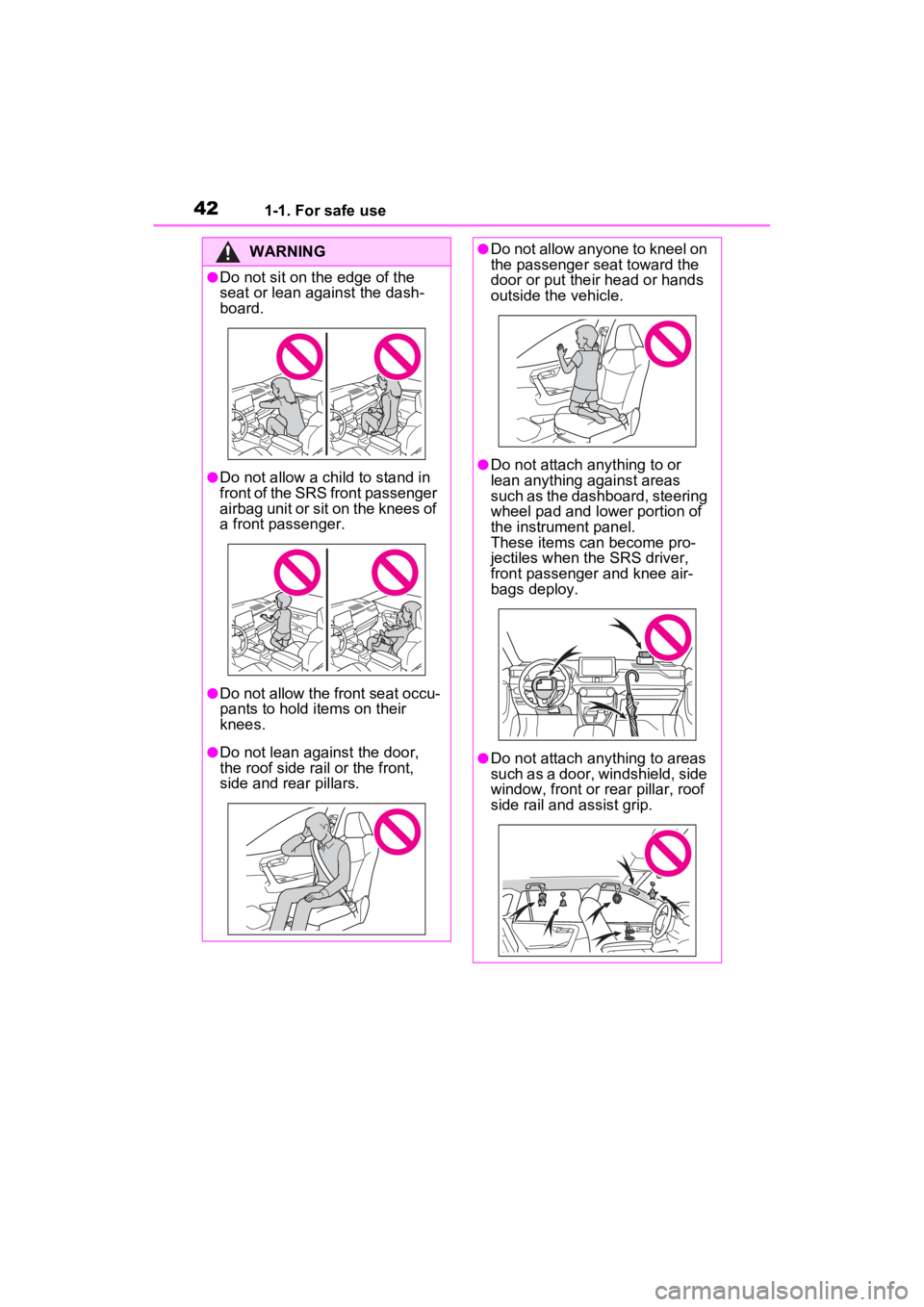
●Do not sit on the edge of the
seat or lean against the dash-
board.
●Do not allow a child to stand in
front of the SRS front passenger
airbag unit or sit on the knees of
a front passenger.
●Do not allow the front seat occu-
pants to hold items on their
knees.
●Do not lean against the door,
the roof side rail or the front,
side and rear pillars.
●Do not allow anyone to kneel on
the passenger seat toward the
door or put their head or hands
outside the vehicle.
●Do not attach anything to or
lean anything against areas
such as the dashboard, steering
wheel pad and lower portion of
the instrument panel.
These items can become pro-
jectiles when the SRS driver,
front passenger and knee air-
bags deploy.
●Do not attach anything to areas
such as a door, windshield, side
window, front or rear pillar, roof
side rail and assist grip.
Page 60 of 752
601-2. Child safety
buckle. Make sure that the
belt is not twisted.
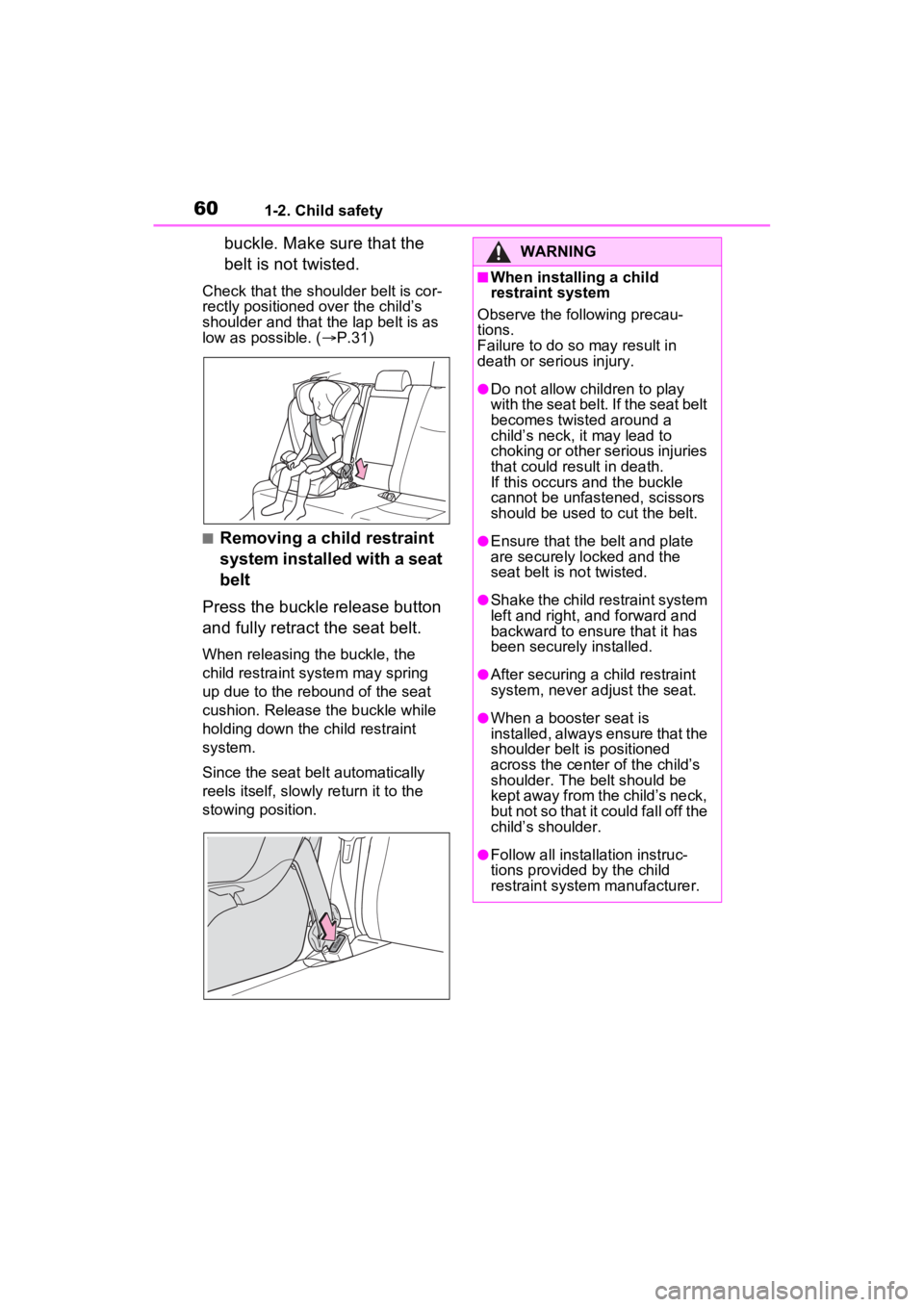
Check that the shoulder belt is cor-
rectly positioned over the child’s
shoulder and that the lap belt is as
low as possible. (P.31)
■Removing a child restraint
system installed with a seat
belt
Press the buckle release button
and fully retract the seat belt.
When releasing the buckle, the
child restraint system may spring
up due to the rebound of the seat
cushion. Release the buckle while
holding down the child restraint
system.
Since the seat belt automatically
reels itself, slowly return it to the
stowing position.
WARNING
■When installing a child
restraint system
Observe the following precau-
tions.
Failure to do so may result in
death or serious injury.
●Do not allow children to play
with the seat belt. If the seat belt
becomes twisted around a
child’s neck, it may lead to
choking or other serious injuries
that could result in death.
If this occurs and the buckle
cannot be unfastened, scissors
should be used to cut the belt.
●Ensure that the belt and plate
are securely locked and the
seat belt is not twisted.
●Shake the child restraint system
left and right, and forward and
backward to ensure that it has
been securely installed.
●After securing a child restraint
system, never adjust the seat.
●When a booster seat is
installed, always ensure that the
shoulder belt is positioned
across the center of the child’s
shoulder. The belt should be
kept away from the child’s neck,
but not so that it could fall off the
child’s shoulder.
●Follow all installation instruc-
tions provided by the child
restraint system manufacturer.
Page 71 of 752
711-3. Emergency assistance
1
For safety and security
cle’s location, assess the emer-
gency, and dispatch the
necessary assistance required.
If you accidentally press the “SOS”
button, tell the response-center
agent that you are not experiencing
an emergency.
■Enhanced Roadside Assis-
tance
Enhanced Roadside Assistance
adds GPS data to the already
included warranty-based Toyota
roadside service.
Subscribers can press the
“SOS” button to reach a Safety
Connect response-center agent,
who can help with a wide range
of needs, such as: towing, flat
tire, fuel delivery, etc. For a
description of the Enhanced
Roadside Assistance services
and their limitations, please see
the Safety Connect Terms and
Conditions, which are available
at Toyota.com in the United
States, Toyotapr.com in Puerto
Rico and Toyota.ca in Canada.
Important! Read this informa-
tion before using Safety Con-
nect.
■Exposure to radio fre-
quency signals
The Safety Connect system
installed in your vehicle is a low-
power radio transmitter and receiver. It receives and also
sends out radio frequency (RF)
signals.
In August 1996, the Federal
Communications Commission
(FCC) adopted RF exposure
guidelines with safety levels for
mobile wireless phones. Those
guidelines are consistent with
the safety standards previously
set by the following U.S. and
international standards bodies.
ANSI (American National
Standards Institute) C95.1
[1992]
NCRP (National Council on
Radiation Protection and
Measurement) Report 86
[1986]
ICNIRP (International Com-
mission on Non-Ionizing Radi-
ation Protection) [1996]
Those standards were based on
comprehensive and periodic
evaluations of the relevant sci-
entific literature. Over 120 scien-
tists, engineers, and physicians
from universities, and govern-
ment health agencies and
industries reviewed the avail-
able body of research to
develop the ANSI Standard
(C95.1).
The design of Safety Connect
complies with the FCC guide-
lines in addition to those stan-
dards.
Safety information for
Safety Connect
Page 78 of 752
781-4. Hybrid system
WARNING
●If electric wires are exposed
inside or outside your vehicle,
an electric shock may occur.
Never touch exposed electric
wires.
●If a fire occurs in the Hybrid
Electric Vehicle, leave the vehi-
cle as soon as possible. Never
use a fire extinguisher that is
not meant for electric fires.
Using even a small amount of
water may be dangerous.
●If your vehicle needs to be
towed, do so with four wheels
raised. If the wheels connected
to the electric motor (traction
motor) are on the ground when
towing, the motor may continue
to generate electricity. This may
cause a fire. (P.619)
●Carefully inspect the ground
under the vehicle. If you find
that liquid has leaked onto the
ground, the fuel system may
have been damaged. Leave the
vehicle as soon as possible.
AXAH54L models*
●If a fluid leak occurs, do not
touch the fluid as it may be
strong alkaline electrolyte from
the hybrid battery (traction bat-
tery). If it comes into contact
with your skin or eyes, wash it
off immediately with a large
amount of water or, if possible,
boric acid solution. Seek imme-
diate medical attention.
*: The model code is indicated on
the Certification Regulation
Label. ( P.666)
AXAL54L models*
●Do not touch the battery if liquid
is leaking from or adhering to it.
If electrolyte (carbonic-based
organic electrolyte) from the
hybrid battery (traction battery)
comes into contact with the
eyes or skin, it could cause
blindness or skin wounds. In the
unlikely event that it comes into
contact with the eyes or skin,
wash it off immediately with a
large amount of water, and seek
immediate medical attention.
●If electrolyte is leaking from the
hybrid battery (traction battery),
do not approac h the vehicle.
Even in the unlikely event that
the hybrid battery (traction bat-
tery) is damaged, the internal
construction of the battery will
prevent a large amount of elec-
trolyte from leaking out. How-
ever, any electrolyte that does
leak out will give off a vapor.
This vapor is an irritant to skin
and eyes and could cause acute
poisoning if inhaled.
●Do not bring burning or high-
temperature items close to the
electrolyte.
The electrolyte may ignite and
cause a fire.
*: The model code is indicated on
the Certificatio n Regulation
Label. ( P.666)
■Hybrid battery (traction bat-
tery)
●AXAL54L models*: Your vehi-
cle contains a sealed lithium-ion
battery.
*: The model code is indicated on
the Certificatio n Regulation
Label. ( P.666)
Page 121 of 752
1213-1. Key information
3
Before driving
Opens and closes the power
back door
*2 ( P.133)
Sounds the alarm ( P.121)
*1: These settings must be custom-
ized at your Toyota dealer.
*2: If equipped
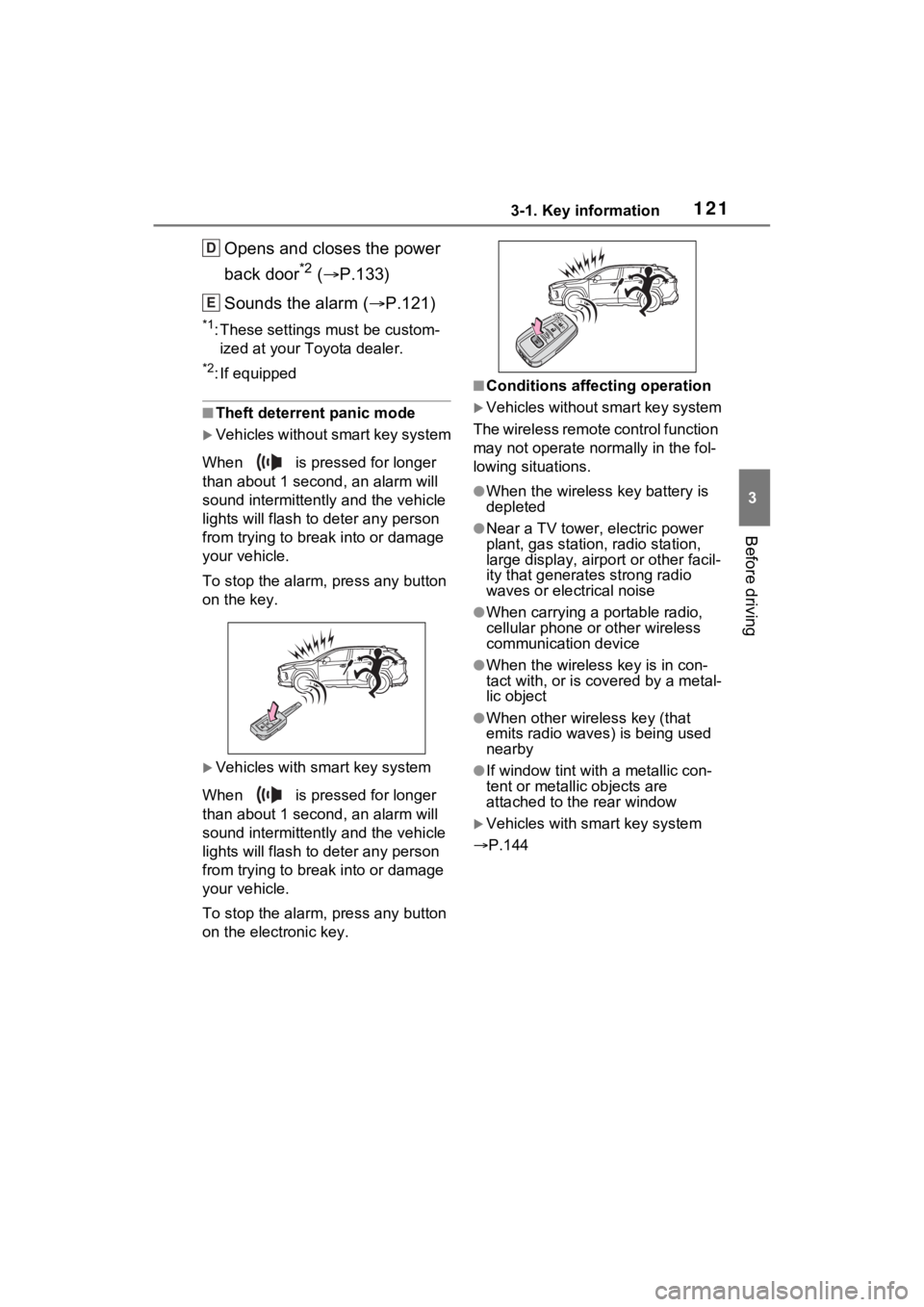
■Theft deterrent panic mode
Vehicles without smart key system
When is pressed for longer
than about 1 seco nd, an alarm will
sound intermittentl y and the vehicle
lights will flash to deter any person
from trying to break into or damage
your vehicle.
To stop the alarm, press any button
on the key.
Vehicles with smart key system
When is pressed for longer
than about 1 seco nd, an alarm will
sound intermittentl y and the vehicle
lights will flash to deter any person
from trying to break into or damage
your vehicle.
To stop the alarm, press any button
on the electronic key.
■Conditions affecting operation
Vehicles without smart key system
The wireless remote control function
may not operate normally in the fol-
lowing situations.
●When the wireles s key battery is
depleted
●Near a TV tower, electric power
plant, gas station, radio station,
large display, airpo rt or other facil-
ity that generates strong radio
waves or electrical noise
●When carrying a portable radio,
cellular phone or other wireless
communication device
●When the wireless key is in con-
tact with, or is c overed by a metal-
lic object
●When other wireless key (that
emits radio waves) is being used
nearby
●If window tint wit h a metallic con-
tent or metallic objects are
attached to the rear window
Vehicles with smart key system
P.144
D
E
Page 122 of 752

1223-1. Key information
1Releasing
To release the key, press the but-
ton.
2Folding
To stow the key back in its case,
push the key back to the stowed
position while pre ssing the button.
To take out the mechanical key,
slide the release lever and
take the key out.
The mechanical key can only be
inserted in one direction, as the key
only has grooves on one side. If the
key cannot be inserted in a lock cyl-
inder, turn it over and re-attempt to
insert it.
After using the mechanical key,
store it in the electronic key. Carry
the mechanical key together with
the electronic key. If the electronic
key battery is dep leted or the entry
function does not operate properly,
you will need the m echanical key. (
P.652)
■When required to leave the
vehicle’s key wi th a parking
attendant (vehicles with smart
key system)
Lock the glove box as circum-
stances demand.( P.528)
Remove the mechanical key for
your own use and p rovide the atten-
dant with the elec tronic key only.
■If you lose your keys
P.650
■If a wrong key is used
The key cylinder rotates freely to
isolate inside mechanism.
Using the master key
(vehicles without smart
key system)
Using the mechanical key
(vehicles with smart key
system)
A
Page 137 of 752

1373-2. Opening, closing and locking the doors
3
Before driving
■Hands Free Power Back Door
operating conditions (vehicles
with Hands Free Power Back
Door)
The Hands Free Power Back Door
will open/close automatically when
the following cond itions are met:
●The Hands Free Power Back Door
operation is enabled ( P.107)
●The power switch is in OFF.
●The electronic key is within the
operational range. ( P.143)
●A foot is put near the lower center
part of the rear bumper and
moved away from the rear
bumper.
The power back door may also be
operated by putting a hand, an
elbow, a knee, etc. near the lower
center part of the rear bumper and
moving it away from the rear
bumper. Make sure to put it close
enough to the center part of the
rear bumper.
■Situations in which the Hands
Free Power Back Door may not
operate properly (vehicles with
Hands Free Powe r Back Door)
In the following situations, the
Hands Free Power Back Door may
not operate properly:
●When a foot remains under the
rear bumper
●If the rear bumper is strongly hit
with a foot or is touched for a while
If the rear bumper has been touched
for a while, wait for a short time
before attempting to operate the
Hands Free Power Back Door
again.
●When operated while a person is
too close to the rear bumper
●When an external radio wave
source interferes with the commu-
nication between the electronic
key and the vehicle ( P.144)
●When the vehicle is parked near
an electrical noise source which affects the sensitivity of the Hands
Free Power Back Door, such as a
pay parking spot, gas station,
electrically heated road, or fluo-
rescent light
●When the vehicle is near a TV
tower, electric po
wer plant, radio
station, large display, airport or
other facility that generates strong
radio waves or electrical noise
●When a large amount of water is
applied to the rea r bumper, such
as when the vehicle is being
washed or in heavy rain
●When mud, snow, ice, etc. is
attached to the rear bumper
●When the vehicle has been
parked for a while near objects
that may move and contact the
rear bumper, such as plants
●When an accessory i s installed to
the rear bumper
If an accessory has been installed,
turn the Hands F ree Power Back
Door operation setting off.
■Preventing unintentional opera-
tion of the Hands Free Power
Back Door (vehicles with Hands
Free Power Back Door)
When an electronic key is in the
operation range, the Hands Free
Power Back Door may operate unin-
tentionally, so be careful in the fol-
lowing situations.
●When a large amount of water is
applied to the rea r bumper, such
as when the vehicle is being
washed or in heavy rain
●When dirt is wip ed off the rear
bumper
●When a small animal or small
object, such as a ball, moves
under the rear bumper
●When an object is moved from
under the rear bumper
●If someone is swinging their legs
while sitting on the rear bumper
●If the legs or another part of some-