windshield wipers TOYOTA RAV4 PRIME 2022 User Guide
[x] Cancel search | Manufacturer: TOYOTA, Model Year: 2022, Model line: RAV4 PRIME, Model: TOYOTA RAV4 PRIME 2022Pages: 624, PDF Size: 24.01 MB
Page 308 of 624
3085-5. Using the driving support systems
WARNING
■To avoid malfunction of the
radar sensor
Observe the following precau-
tions.
Otherwise, the radar sensor may
not operate properly, possibly
leading to an accident resulting in
death or serious injury.
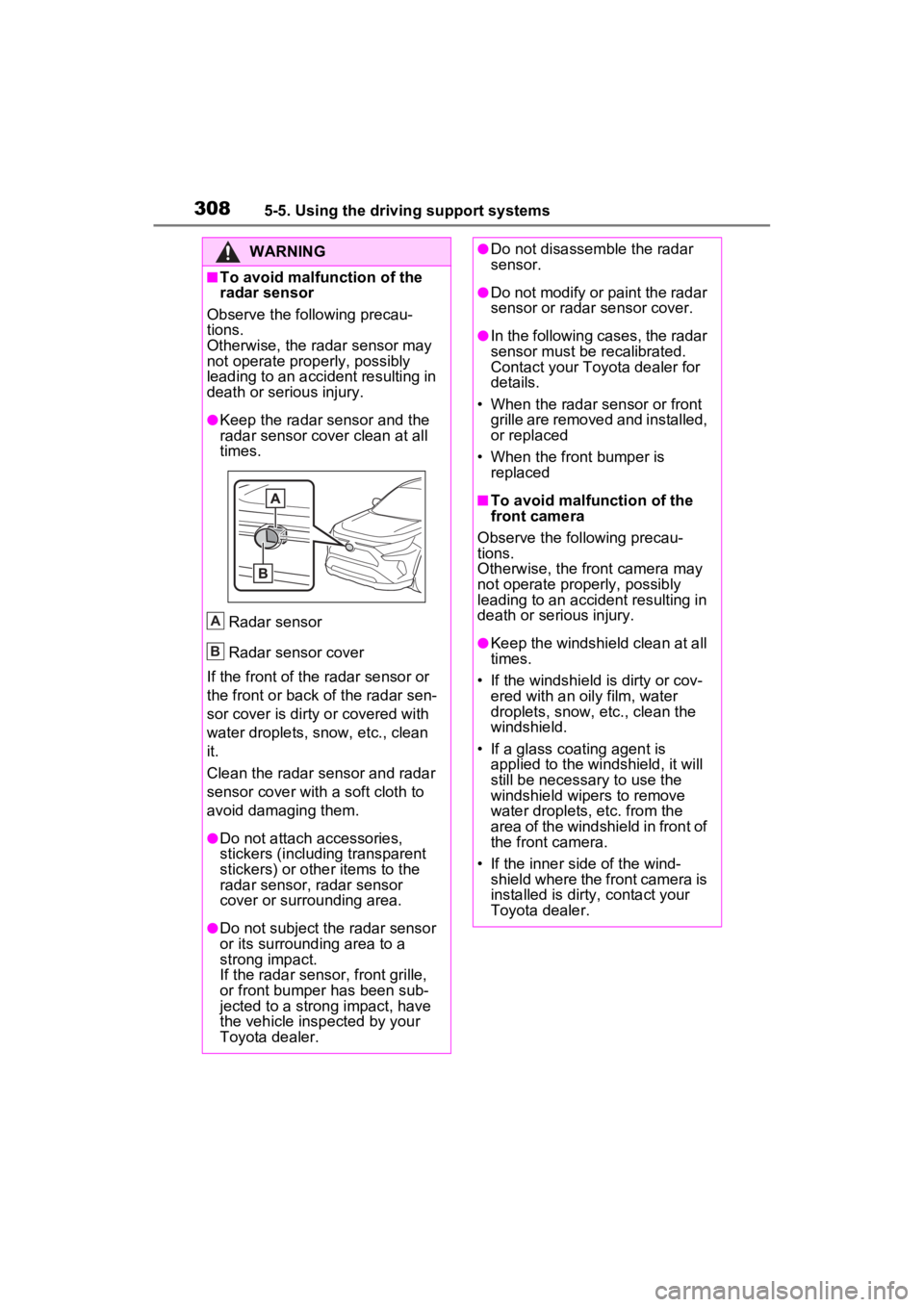
●Keep the radar sensor and the
radar sensor cover clean at all
times.
Radar sensor
Radar sensor cover
If the front of the r adar sensor or
the front or back of the radar sen-
sor cover is dirty or covered with
water droplets, snow, etc., clean
it.
Clean the radar sensor and radar
sensor cover with a soft cloth to
avoid damaging them.
●Do not attach accessories,
stickers (including transparent
stickers) or other items to the
radar sensor, radar sensor
cover or surrounding area.
●Do not subject the radar sensor
or its surrounding area to a
strong impact.
If the radar sensor, fron t grille,
or front bumper has been sub-
jected to a strong impact, have
the vehicle insp ected by your
Toyota dealer.
A
B
●Do not disassemble the radar
sensor.
●Do not modify or paint the radar
sensor or radar sensor cover.
●In the following cases, the radar
sensor must be recalibrated.
Contact your Toyota dealer for
details.
• When the radar s ensor or front
grille are removed and installed,
or replaced
• When the front bumper is replaced
■To avoid malfunction of the
front camera
Observe the following precau-
tions.
Otherwise, the f ront camera may
not operate properly, possibly
leading to an accident resulting in
death or serious injury.
●Keep the windshield clean at all
times.
• If the windshield is dirty or cov-
ered with an o ily film, water
droplets, snow, etc., clean the
windshield.
• If a glass coating agent is applied to the windshield, it will
still be necessary to use the
windshield wipers to remove
water droplets, etc. from the
area of the windshield in front of
the front camera.
• If the inner side of the wind- shield where the front camera is
installed is dirty, contact your
Toyota dealer.
Page 309 of 624
3095-5. Using the driving support systems
5
Driving
WARNING
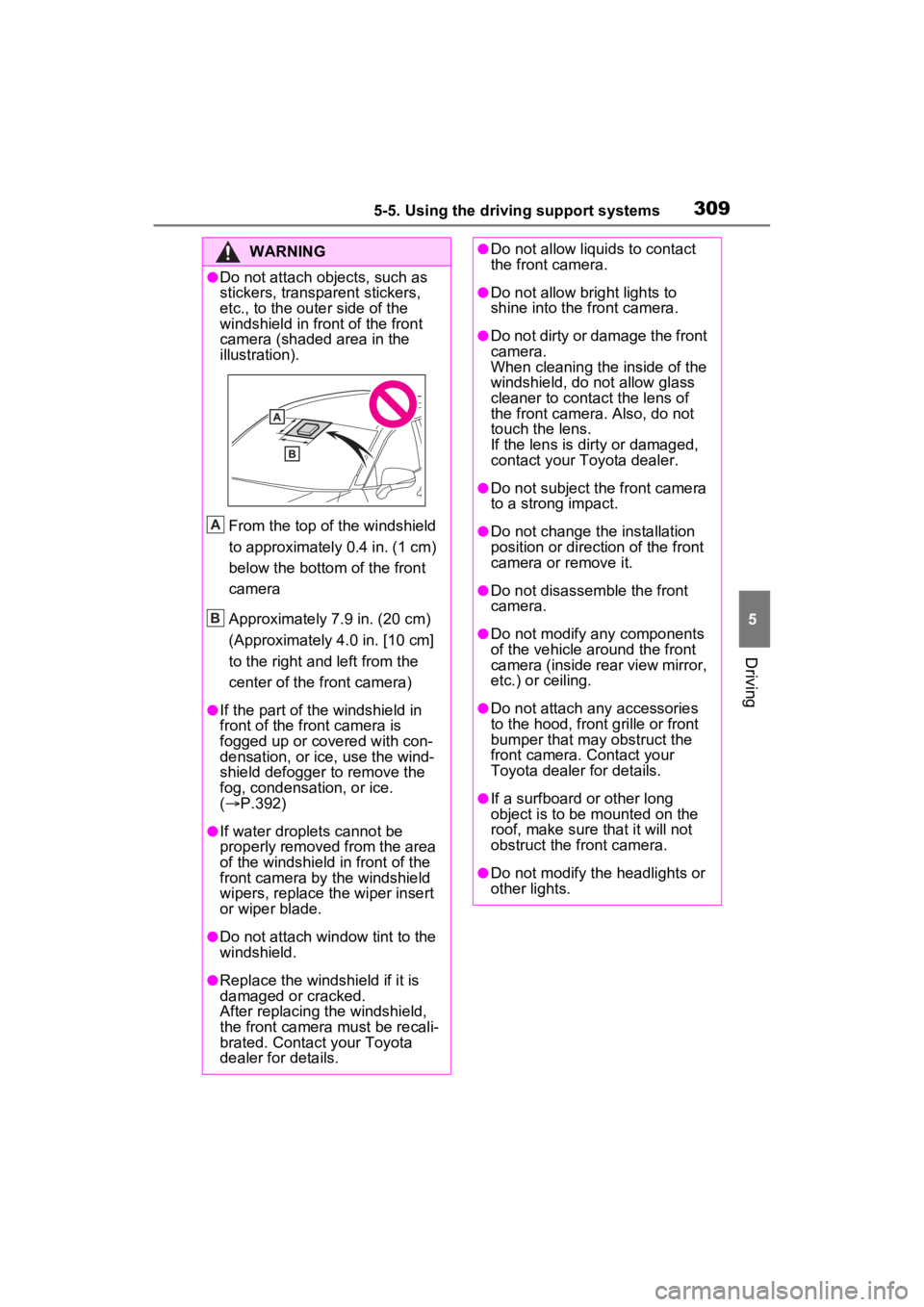
●Do not attach objects, such as
stickers, transparent stickers,
etc., to the outer side of the
windshield in fr ont of the front
camera (shaded area in the
illustration).
From the top of the windshield
to approximately 0.4 in. (1 cm)
below the bottom of the front
camera
Approximately 7.9 in. (20 cm)
(Approximately 4.0 in. [10 cm]
to the right and left from the
center of the front camera)
●If the part of the windshield in
front of the front camera is
fogged up or covered with con-
densation, or ice, use the wind-
shield defogger to remove the
fog, condensation, or ice.
( P.392)
●If water droplets cannot be
properly removed from the area
of the windshield in front of the
front camera by the windshield
wipers, replace the wiper insert
or wiper blade.
●Do not attach win dow tint to the
windshield.
●Replace the windshield if it is
damaged or cracked.
After replacing the windshield,
the front camera must be recali-
brated. Contact your Toyota
dealer for details.
A
B
●Do not allow liquids to contact
the front camera.
●Do not allow bright lights to
shine into the front camera.
●Do not dirty or damage the front
camera.
When cleaning the inside of the
windshield, do not allow glass
cleaner to contact the lens of
the front camera . Also, do not
touch the lens.
If the lens is dirty or damaged,
contact your Toyota dealer.
●Do not subject the front camera
to a strong impact.
●Do not change the installation
position or direction of the front
camera or remove it.
●Do not disassemble the front
camera.
●Do not modify any components
of the vehicle around the front
camera (inside rear view mirror,
etc.) or ceiling.
●Do not attach any accessories
to the hood, front grille or front
bumper that may obstruct the
front camera. Contact your
Toyota dealer for details.
●If a surfboard or other long
object is to be mounted on the
roof, make sure that it will not
obstruct the front camera.
●Do not modify the headlights or
other lights.
Page 441 of 624
4417-1. Maintenance and care
7
Maintenance and care
■Front side windows water-
repellent coating (except quar-
ter window)
●The following precautions can
extend the effectiveness of the
water-repellent coating.
• Remove any dirt, etc., from the front side windows regularly.
• Do not allow dirt and dust to accu- mulate on the windows for a long
period. Clean the windows with a
soft, damp cloth as soon as possi-
ble.
• Do not use wax or glass cleaners
that contain abrasives when
cleaning the windows.
• Do not use any metallic objects to
remove condensation build up.
■Brake pads and calipers
Rust may form if the vehicle is
parked with wet brake pads or disc
rotors, causing them to stick. Before
parking the vehicle after it is
washed, drive slow ly and apply the
brakes several times to dry the
parts.
■Bumpers
Do not scrub with abrasive cleaners.
■Plated portions
If dirt cannot be removed, clean the
parts as follows:
●Use a soft cloth dampened with
an approximately 5% solution of
neutral detergent and water to
clean the dirt off.
●Wipe the surface with a dry, soft
cloth to remove any remaining
moisture.
●To remove oily deposits, use alco-
hol wet wipes or a similar product.
WARNING
■When washing the vehicle
Do not apply water to the inside of
the engine compartment. Doing
so may cause the electrical com-
ponents, etc. to catch fire.
■When cleaning the windshield
(vehicles with rain-sensing
windshield wipers)
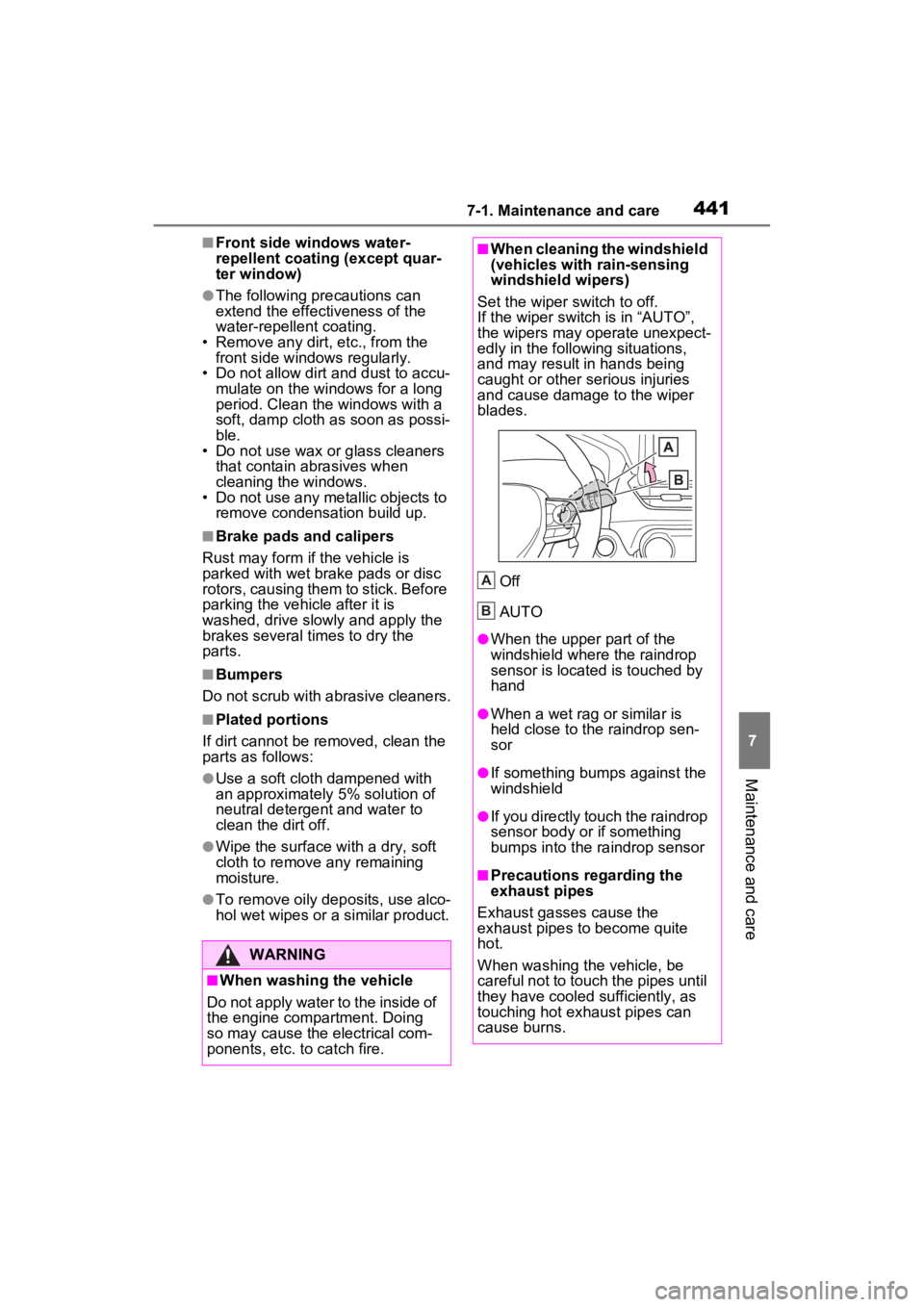
Set the wiper switch to off.
If the wiper switch is in “AUTO”,
the wipers may operate unexpect-
edly in the following situations,
and may result in hands being
caught or other serious injuries
and cause damage to the wiper
blades.
Off
AUTO
●When the upper part of the
windshield where the raindrop
sensor is located is touched by
hand
●When a wet rag or similar is
held close to the raindrop sen-
sor
●If something bumps against the
windshield
●If you directly touch the raindrop
sensor body or if something
bumps into the ra indrop sensor
■Precautions regarding the
exhaust pipes
Exhaust gasses cause the
exhaust pipes to become quite
hot.
When washing the vehicle, be
careful not to touch the pipes until
they have cooled sufficiently, as
touching hot exhaust pipes can
cause burns.
A
B
Page 442 of 624
4427-1. Maintenance and care
WARNING
■Precaution regarding the rear
bumper with Blind Spot Moni-
tor
If the paint of the rear bumper is
chipped or scratched, the system
may malfunction. If this occurs,
consult your Toyota dealer.
NOTICE
■To prevent paint deterioration
and corrosion on the body
and components (aluminum
wheels, etc.)
●Wash the vehicle immediately in
the following cases:
• After driving near the sea coast
• After driving on salted roads
• If coal tar or tre e sap is present
on the paint surface
• If dead insects, insect droppings or bird droppings are present on
the paint surface
• After driving in an area contami- nated with soot, oily smoke,
mine dust, iron powder or chem-
ical substances
• If the vehicle becomes heavily soiled with dust or mud
• If liquids such as benzene and gasoline are spilled on the paint
surface
●If the paint is chipped or
scratched, have it repaired
immediately.
●To prevent the wheels from cor-
roding, remove any dirt and
store in a place with low humid-
ity when storing the wheels.
■Cleaning the exterior lights
●Wash carefully. Do not use
organic substances or scrub
with a hard brush.
This may damage the surfaces
of the lights.
●Do not apply wax to the sur-
faces of the lights.
Wax may cause damage to the
lenses.
■When using an automatic car
wash (vehicles with rain-
sensing windshield wipers)
Set the wiper switch to off posi-
tion.
If the wiper switch is in “AUTO”,
the wipers may operate and the
wiper blades may be damaged.
■When using a high pressure
car wash
●When washing the vehicle, do
not let water from the high-pres-
sure washer directly hit the
camera or the area around the
camera. Due to the shock from
the high pressure water, it is
possible that the device may not
operate normally.
●Do not bring the nozzle tip close
to boots (rubber or resin manu-
factured cover), or connectors
or the following parts.
The parts may be damaged if
they come into contact with
high-pressure water.
• Traction re lated parts
• Steering parts
• Suspension parts
• Brake parts
Page 449 of 624
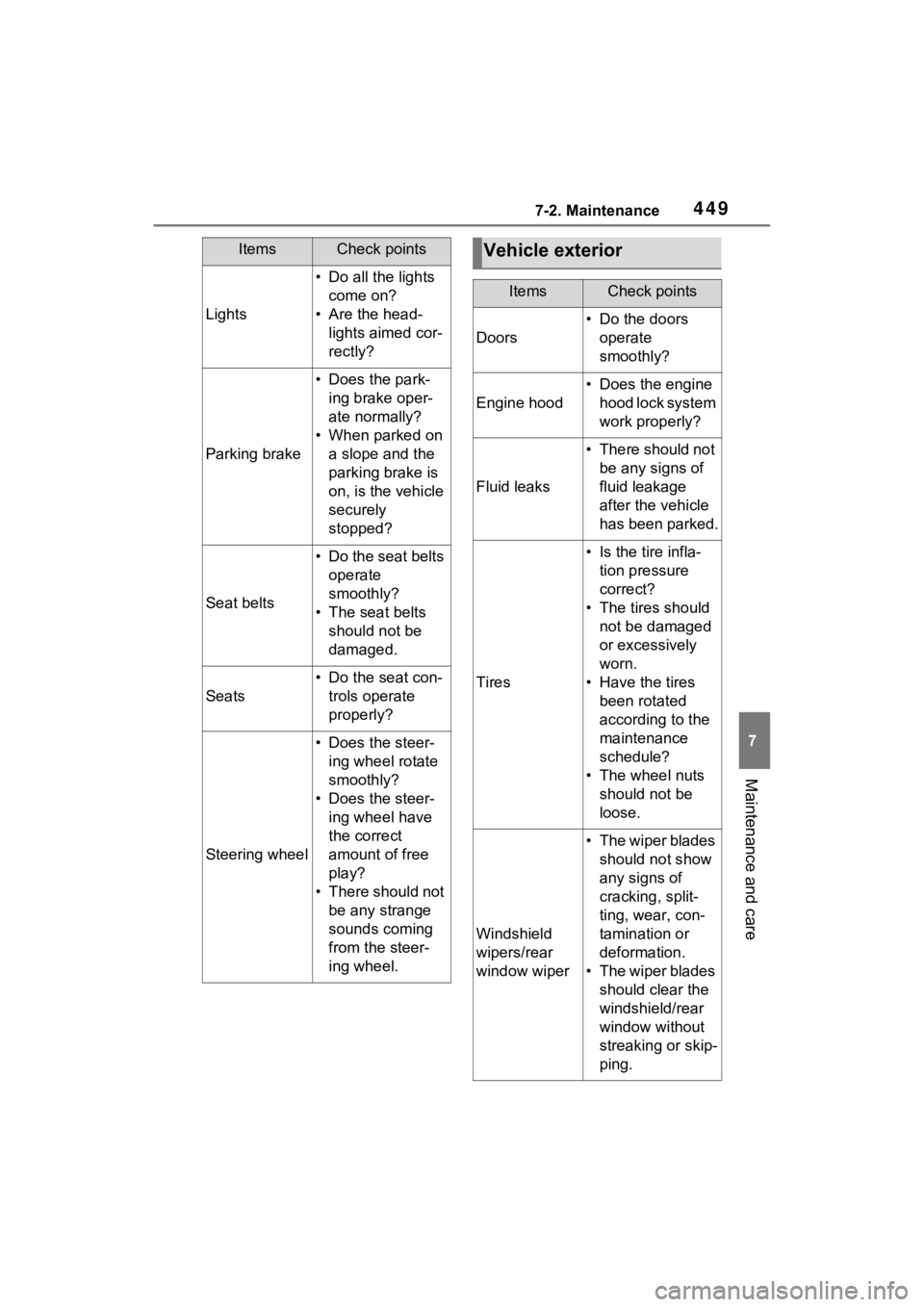
4497-2. Maintenance
7
Maintenance and care
Lights
• Do all the lights come on?
• Are the head- lights aimed cor-
rectly?
Parking brake
• Does the park-ing brake oper-
ate normally?
• When parked on a slope and the
parking brake is
on, is the vehicle
securely
stopped?
Seat belts
• Do the seat belts operate
smoothly?
• The seat belts should not be
damaged.
Seats
• Do the seat con-trols operate
properly?
Steering wheel
• Does the steer-ing wheel rotate
smoothly?
• Does the steer- ing wheel have
the correct
amount of free
play?
• There should not be any strange
sounds coming
from the steer-
ing wheel.
ItemsCheck pointsVehicle exterior
ItemsCheck points
Doors
• Do the doors operate
smoothly?
Engine hood
• Does the engine hood lock system
work properly?
Fluid leaks
• There should not be any signs of
fluid leakage
after the vehicle
has been parked.
Tires
• Is the tire infla-tion pressure
correct?
• The tires should not be damaged
or excessively
worn.
• Have the tires been rotated
according to the
maintenance
schedule?
• The wheel nuts should not be
loose.
Windshield
wipers/rear
window wiper
• The wiper blades should not show
any signs of
cracking, split-
ting, wear, con-
tamination or
deformation.
• The wiper blades should clear the
windshield/rear
window without
streaking or skip-
ping.
Page 483 of 624
4837-3. Do-it-yourself maintenance
7
Maintenance and care
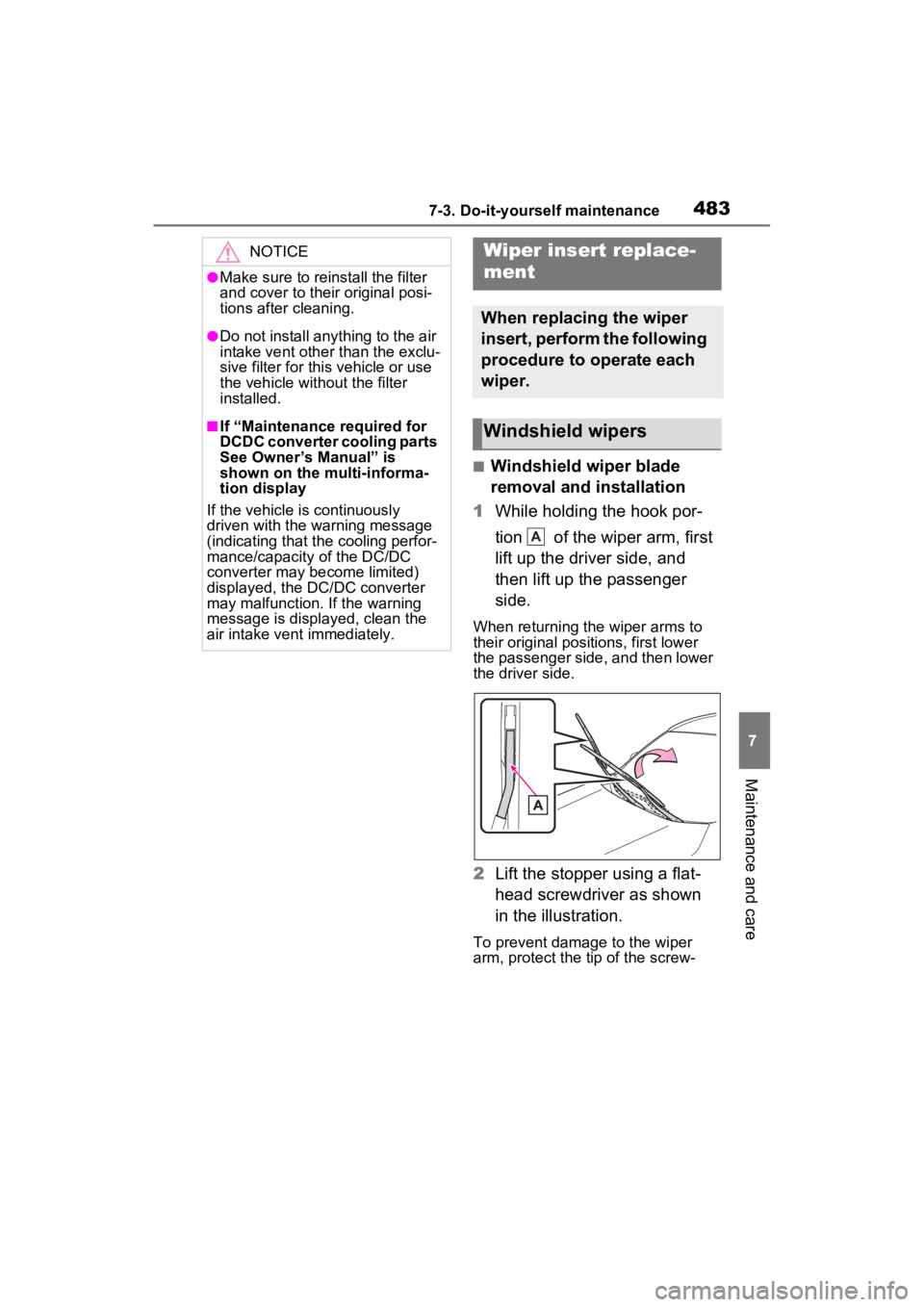
■Windshield wiper blade
removal and installation
1 While holding the hook por-
tion of the wiper arm, first
lift up the driver side, and
then lift up the passenger
side.
When returning the wiper arms to
their original positions, first lower
the passenger side, and then lower
the driver side.
2Lift the stopper using a flat-
head screwdriver as shown
in the illustration.
To prevent damage to the wiper
arm, protect the tip of the screw-
NOTICE
●Make sure to reinstall the filter
and cover to their original posi-
tions after cleaning.
●Do not install anything to the air
intake vent other than the exclu-
sive filter for this vehicle or use
the vehicle without the filter
installed.
■If “Maintenance required for
DCDC converter cooling parts
See Owner’s Manual” is
shown on the multi-informa-
tion display
If the vehicle is continuously
driven with the warning message
(indicating that the cooling perfor-
mance/capacity of the DC/DC
converter may become limited)
displayed, the DC/DC converter
may malfunction. If the warning
message is displayed, clean the
air intake vent immediately.
Wiper insert replace-
ment
When replacing the wiper
insert, perform the following
procedure to operate each
wiper.
Windshield wipers
A
Page 486 of 624
4867-3. Do-it-yourself maintenance
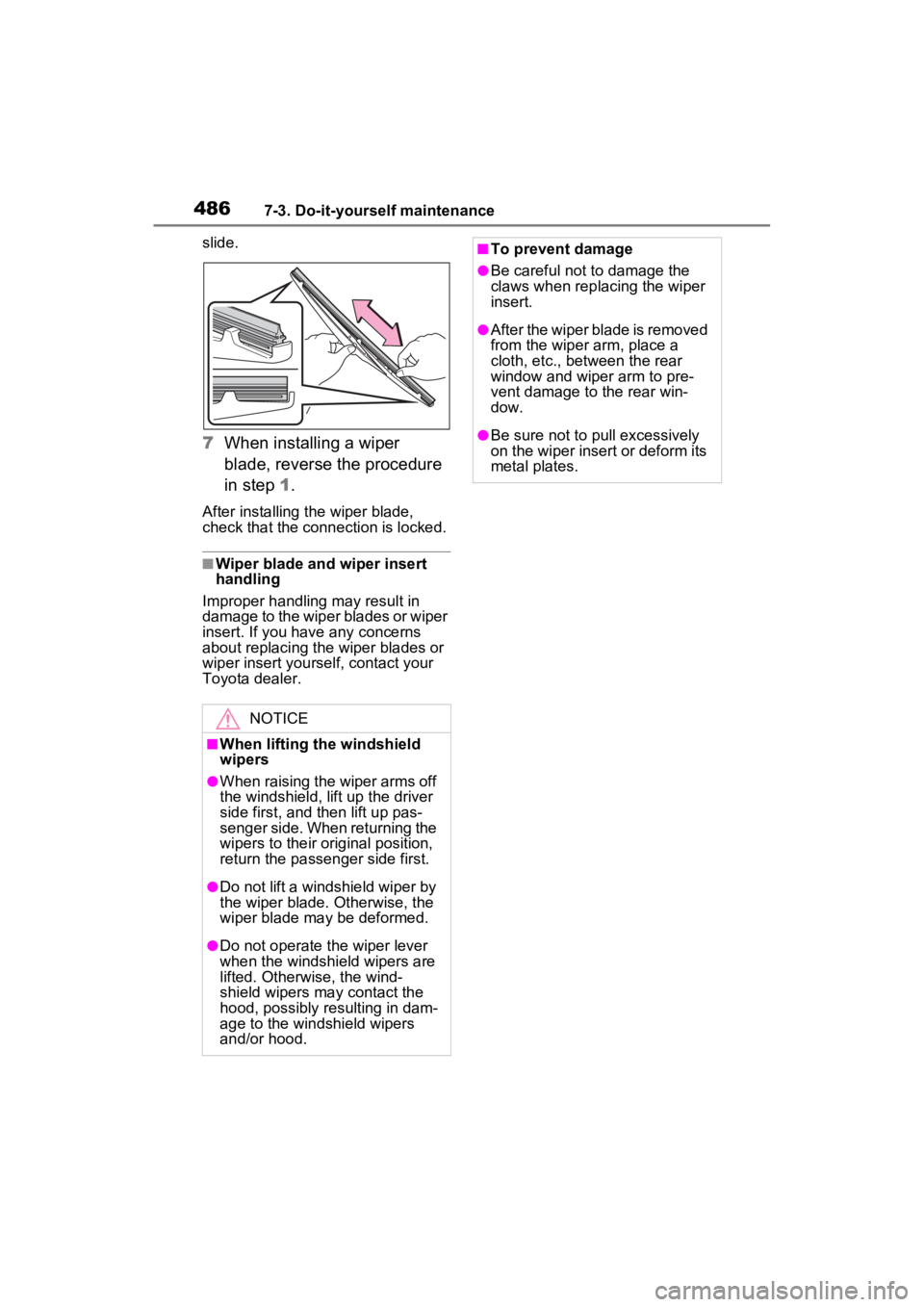
slide.
7When installing a wiper
blade, reverse the procedure
in step 1.
After installing the wiper blade,
check that the connection is locked.
■Wiper blade and wiper insert
handling
Improper handling may result in
damage to the wiper blades or wiper
insert. If you have any concerns
about replacing the wiper blades or
wiper insert yourself, contact your
Toyota dealer.
NOTICE
■When lifting th e windshield
wipers
●When raising the wiper arms off
the windshield, lift up the driver
side first, and then lift up pas-
senger side. When returning the
wipers to their original position,
return the passenger side first.
●Do not lift a win dshield wiper by
the wiper blade. Otherwise, the
wiper blade may be deformed.
●Do not operate the wiper lever
when the windshield wipers are
lifted. Otherwise, the wind-
shield wipers may contact the
hood, possibly resulting in dam-
age to the windshield wipers
and/or hood.
■To prevent damage
●Be careful not to damage the
claws when replacing the wiper
insert.
●After the wiper blade is removed
from the wiper arm, place a
cloth, etc., between the rear
window and wiper arm to pre-
vent damage to the rear win-
dow.
●Be sure not to pull excessively
on the wiper insert or deform its
metal plates.
Page 608 of 624

608Alphabetical Index
seat belt................................ 30
Pregnant women, proper seat belt use................................. 29
Reminder light and buzzer . 513, 514
Seat belt extender .................. 30
Seat belt instructions for Cana- dian owners ........................ 581
Seat belt pretensioners .......... 32
SRS warning light................. 508
Seat heaters ............................ 401
Seating capacity ............. 266, 546
Seat position memory ............ 225
Seats Adjustment precautions 222, 223
Adjustment ................... 222, 223
Armrest................................. 422
Child seats/child restraint system installation ............................ 51
Cleaning ............................... 443
Driving position memory....... 225
Folding down the rear seatbacks ........................................... 224
Head restraint....................... 228
Properly sitting in the seat ...... 27
Seat heaters ......................... 401
Seat position memory .......... 225
Seat ventilators .................... 401
Seat ventilators ...................... 401
Secondary Collision Brake .... 376
Sensor Automatic headlight system . 294
Automatic High Beam (AHB) 296
BSM (Blind Spot Monitor)..... 348
Digital Rear-view Mirror........ 236
Front camera ........................ 307
Inside rear view mirror.......... 232
Intuitive parking assist .......... 355
LTA (Lane Tracing Assist).... 321
Parking Support Brake function (rear-crossing vehicles) ...... 348
Parking Support Brake function (static objects) ....................355
Radar sensor ........................307
Rain-sensing windshield wipers ...........................................301
RCTA ....................................348
Toyota Safety Sense 2.0 ......307
Service plug ..............................87
Service reminder message ....447
Shift lever ................................282 If th e s hif t le ver ca n no t b e s hif te d from P .................................284
Shift lock system ....................284
Side airbags ..............................34
Side doors ............. ..................198
Side marker lights Light switch...........................293
Replacing light bulbs ............492
Side mirrors ............................242 Adjustment ...........................242
BSM (Blind Spot M onitor) .....346
Folding..................................242
Heaters .................................392
Outside rear view mirror defog- gers ....................................392
Side turn signal lights Replacing light bulbs ............492
Turn signal lever . ..................286
Side windows ..........................244
Smart key system ...................217 Antenna location...................217
Entry functions..............198, 204
Starting the hybrid system ....277
Warning message . ...............518
Snow tires ...............................382
“SOS” button ............................65
Spare tire Storage location ...................523
Spark plug ...............................550
Specifications .........................546
Speedometer ...........................165
Sport mode..............................372
SRS airbags ..............................34
Page 609 of 624

Alphabetical Index609
Steering wheelAdjustment ........................... 230
Heated steering wheel ......... 401
Meter control switches ......... 171
Stop lights Replacing light bulbs ............ 492
Storage feature ....................... 407
Storage precautions .............. 407
Stuck If the vehicle becomes stuck 543
Sunshade ........................ 247, 250
Sun visors ............................... 414
Switches “ODO TRIP” switch .............. 169
“SOS” button .......................... 65
AUTO EV/HV mode switch .... 78
Automatic High Beam switch 296
Brake hold switch ................. 291
Digital Rear-view Mirror control switches ............................. 232
Door lock switch ................... 201
Driving mode select switch... 372
Driving position memory switches ............................. 225
Dynamic radar cruise control with full-speed range .......... 335
Electronic sunshade switch .. 250
Emergency flashers switch .. 498
EV/HV mode selection switch 78
Fuel filler door op ener switch305
Garage door opener switches ........................................... 432
Heated steering wheel ......... 401
Ignition switch (power switch) ........................................... 277
Intuitive parking assist .......... 357
Light switch .......................... 293
LTA switch............................ 326
Meter control switches ......... 171
Moon roof switches .............. 247
Outside rear view mirror switches ............................. 242 Paddle shift switches ............284
Panoramic moon roof switches
...........................................250
Parking brake switch ............287
Power back door s witch .......207
Power switch ........................277
Power window switch ...........244
Rear window and outside rear view mirror defoggers switch...........................................392
Rear window wiper and washer switch .................................302
Seat heater switches ............402
Seat ventilator switches........402
Vehicle-to-vehicle distance switch .................................335
VSC OFF switch ...................377
Window lock switch ..............246
Windshield defogger switch..392
Windshield wiper de-icer switch ...........................................397
Windshield wipers and washer switch .................................299
Wireless charger switch .......417
T
Tail lights Light switch...........................293
Replacing light bulbs ............492
Theft deterrent system Alarm ......................................72
Immobilizer system .................71
Tire inflation pressure Maintenance data .................551
Tire inflation pressure display function ...............................467
Warning light ........................513
Tire information ......................555 Glossary ...............................559
Size ......................................557
Tire identification number .....556
Tire section names ...............557
Page 612 of 624

612Alphabetical Index
Windshield defogger .............. 392
Windshield wiper de-icer ....... 397
Windshield wipersIntermittent windshield wipers........................................... 299
Position ........................ 299, 302
Rain-sensing windshield wipers ........................................... 299
Replacing the wiper insert .... 483
Winter driving tips .................. 382
Wiper insert ............................ 483
Wireless charger .................... 416
Wireless remote c ontrol ........ 196
Battery-saving function......... 218
Locking/Unlocking ................ 196
Panic mode .......................... 196
Remote Air Conditioning System ........................................... 399
Replacing the battery ........... 487
For vehicles with Premium Audio with Navigation or
Audio Plus, refer to “NAVI-
GATION AND MULTIME-
DIA SYSTEM OWNER’S
MANUAL” for information
regarding the equipment
listed below.
· Navigation system
· Audio system
· Rear view monitor system
· Toyota parking assist monitor
· Panoramic view monitor