navigation TOYOTA RAV4 PRIME 2022 Owner's Manual
[x] Cancel search | Manufacturer: TOYOTA, Model Year: 2022, Model line: RAV4 PRIME, Model: TOYOTA RAV4 PRIME 2022Pages: 624, PDF Size: 24.01 MB
Page 366 of 624
3665-5. Using the driving support systems
The system has determined that
stronger-than-normal brake opera-
tion is necessary.
Multi-information display and head-
up display: “BRAKE!”
Navigation system or multimedia
system screen: “BRAKE!”
PKSB OFF indicator: Not illumi-
nated
Buzzer: Short beep
Brake control is operating
The system determ ined that emer-
gency braking is necessary.
Multi-information display and head-
up display: “BRAKE!”
Navigation system or multimedia
system screen: “BRAKE!”
PKSB OFF indicator: Illuminated
Buzzer: Short beep
Vehicle stopped by system
operation
The vehicle has been stopped by
brake control operation.
Multi-information display and head-
up display: “Switch to Brake” (If the
accelerator pedal is not depressed,
“Press Brake Pedal” will be dis-
played.)
Navigation system or multimedia
system screen: “Press Brake
Pedal”
PKSB OFF indicator: Illuminated (If
the accelerator pedal is not
depressed, the indi cator is not illu-
minated.)
Buzzer: Short beep
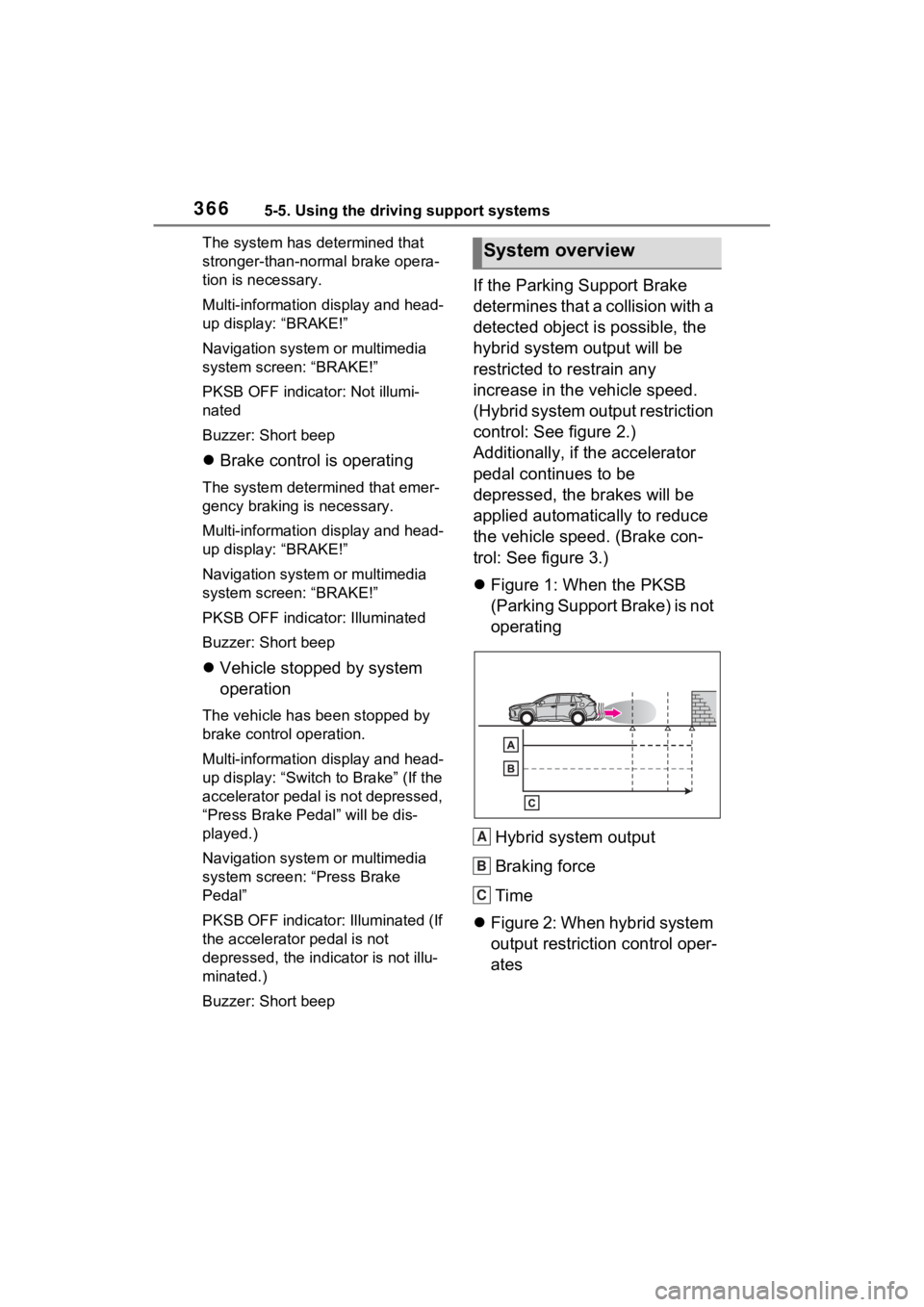
If the Parking Support Brake
determines that a collision with a
detected object is possible, the
hybrid system output will be
restricted to restrain any
increase in the vehicle speed.
(Hybrid system output restriction
control: See figure 2.)
Additionally, if the accelerator
pedal continues to be
depressed, the brakes will be
applied automatically to reduce
the vehicle speed. (Brake con-
trol: See figure 3.)
Figure 1: When the PKSB
(Parking Support Brake) is not
operating
Hybrid system output
Braking force
Time
Figure 2: When hybrid system
output restriction control oper-
ates
System overview
A
B
C
Page 528 of 624
5288-2. Steps to take in an emergency
Perform the following steps and fit
tire chains to the front tires:
1Replace a rear tire with the com-
pact spare tire.
2 Replace the flat front tire with the
tire removed from the rear of the
vehicle.
3 Fit tire chains to the front tires.
WARNING
■When using the compact
spare tire
●Remember that the compact
spare tire provided is specifi-
cally designed for use with your
vehicle. Do not use your com-
pact spare tire on another vehi-
cle.
●Do not use more than one com-
pact spare tire simultaneously.
●Replace the compact spare tire
with a standard tire as soon as
possible.
●Avoid sudden acceleration,
abrupt steering, sudden brak-
ing and shifting operations that
cause sudden engine braking.
■When the compact spare tire
is attached
The vehicle speed may not be
correctly detecte d, and the follow-
ing systems may not operate cor-
rectly:
• ABS & Brake assist
• VSC/Trailer Sway Control
• TRAC
• Dynamic radar cruise control
with full-speed range
• PCS (Pre-Collision System)
• EPS
• LTA (Lane Tracing Assist)
• Tire pressure warning system (if equipped)
• AHB (Automatic High Beam)
• BSM (Blind Spot Monitor)
• Rear view monitor system (if equipped)
• Panoramic view monitor (if equipped)
• Toyota parking assist monitor (if equipped)
• Intuitive parking assist (if equipped)
• PKSB (Parking Support Brake) (if equipped)
• Navigation system (if equipped)
Also, not only c an the following
system not be utilized fully, but it
may actually negatively affect the
drive-train components:
• E-Four (Electronic On-Demand
AWD system)
■Speed limit when using the
compact spare tire
Do not drive at speeds in excess
of 50 mph (80 km /h) when a com-
pact spare tire is installed on the
vehicle.
The compact spare tire is not
designed for driving at high
speeds. Failure to observe this
precaution may lead to an acci-
dent causing death or serious
injury.
■After using the tools and jack
Before driving, ma ke sure all the
tools and jack are securely in
place in their storage location to
reduce the possibility of personal
injury during a collision or sudden
braking.
Page 565 of 624
5659-2. Customization
9
Vehicle specifications
9-2.Customization
■Changing using the naviga-
tion/multimedia system
1 Press the “MENU” button.
2 Select “Setup” on the menu
screen and select “Vehicle”.
3 Select “Vehicle Customiza-
tion”.
Various setting can be changed.
Refer to the list o f settings that can
be changed for details.
■Changing using the multi-
information display
1 Press or of the meter
control switches and select
.
2 Press or of the meter
control switches, select the
item.
3 To switch the function on and
off, press to switch to the
desired setting. 4
To perform detailed setting of
functions that support
detailed settings, press and
hold and display the set-
ting screen.
The method of pe rforming detailed
setting differs for each screen.
Please refer to the advice sentence
displayed on the screen.
To go back to the p revious screen
or exit the customize mode, press
.
■When customizing using the
navigation/multimedia system
or multi-information display
Stop the vehicle in a safe place,
apply the parking brake, and shift
the shift lever to P. Also, to prevent
12-volt battery discharge, leave the
hybrid system operating while cus-
tomizing the features.
Customizable features
Your vehicle includes a vari-
ety of electronic features
that can be personalized to
suit your preferences. The
settings of these features
can be changed using the
multi-information display,
navigation/multimedia sys-
tem, or at your Toyota
dealer.
Customizing vehicle fea-
tures
WARNING
■During customization
As the hybrid system needs to be
operating during customization,
ensure that the vehicle is parked
in a place with adequate ventila-
tion. In a closed area such as a
garage, exhaust gases including
harmful carbon monoxide (CO)
may collect and enter the vehicle.
This may lead to death or a seri-
ous health hazard.
NOTICE
■During customization
To prevent 12-vo lt battery dis-
charge, ensure that the hybrid
system is operating while custom-
izing features.
Page 566 of 624
5669-2. Customization
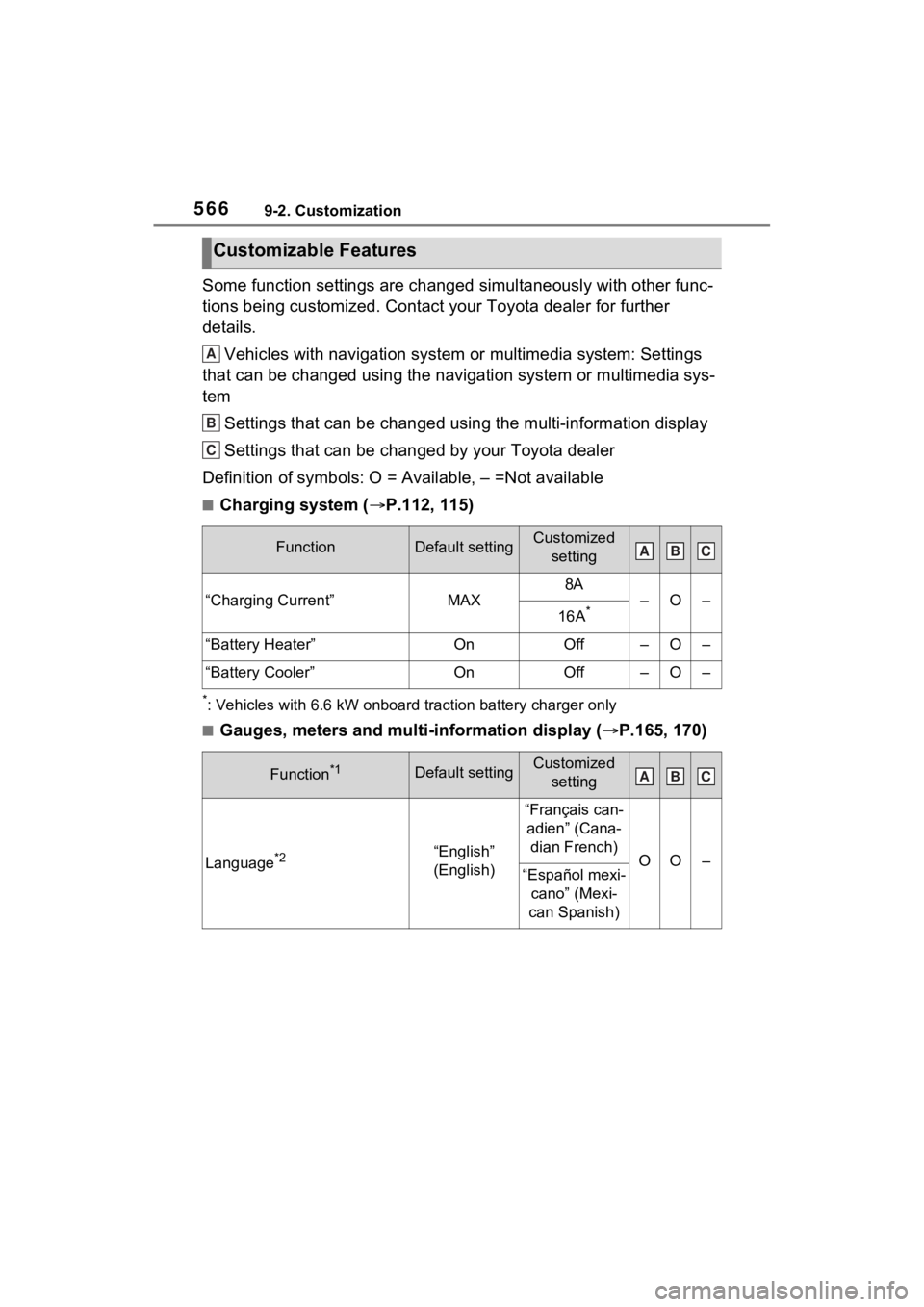
Some function settings are changed simultaneously with other func-
tions being customized. Contact your Toyota dealer for further
details.Vehicles with navigation system or multimedia system: Settings
that can be changed using the navigation system or multimedia s ys-
tem
Settings that can be changed using the multi-information displa y
Settings that can be changed by your Toyota dealer
Definition of symbols: O = Available, – =Not available
■Charging system ( P.112, 115)
*: Vehicles with 6.6 kW onboard t raction battery charger only
■Gauges, meters and multi-information display ( P.165, 170)
Customizable Features
FunctionDefault settingCustomized
setting
“Charging Current”MAX
8A
–O–
16A*
“Battery Heater”OnOff–O–
“Battery Cooler”OnOff–O–
Function*1Default settingCustomized setting
Language*2“English”
(English)
“Français can-adien” (Cana- dian French)
OO–“Español mexi- cano” (Mexi-
can Spanish)
A
B
C
ABC
ABC
Page 605 of 624

Alphabetical Index605
Head-up display ................... 182
Indicators.............................. 163
Instrument panel light control169
Meter control switches ......... 171
Multi-information display ...... 170
Settings ........................ 177, 566
Units ............................. 179, 566
Warning lights .............. 161, 506
Warning messages ...... 181, 518
Meter control switches .......... 171
Mirrors Digital Rear-view Mirror........ 232
Inside rear view mirror.......... 231
Outside rear view mirror defog-gers .................................... 392
Outside rear view mirrors ..... 242
Vanity mirrors ....................... 414
Moon roof Door lock linked moon roof oper-ation ................................... 247
Jam protection function ........ 247
Operation ............................. 247
Warning message ................ 248
Multi-information display Audio system-linked display . 175
BSM (Blind Spot Monitor)..... 346
Changing the display............ 171
Convenience Services (Sugges-tion function)............... 181, 566
Display contents ................... 170
Driving information display ... 172
Driving support system informa- tion display ......................... 175
Dynamic radar cruise control with full-speed range .......... 334
Energy monitor/consumption screen ................................ 187
Hybrid System Indicator ....... 167
Intuitive parking assist-sensor ........................................... 355
Language ..................... 179, 566
LTA (Lane Tracing Assist).... 327 Menu icons ...........................171
Meter control switches..........171
Navigation system-linked display
...........................................175
Parking Support Brake function ...........................................365
PCS (Pre-Collisio n System) .313
Pop-up display......................179
RSA (Road Sign Assist) .......332
Settings ........................177, 566
Tire pressure ...... ..................467
Units .............................179, 566
Vehicle information display...176
Warning message display ....181
Warning messages ...............518
“My Room Mode” ...................144
N
Navigation system-linked display ...............................................175
Noise from under ve hicle...........6
Normal mode...........................372
O
Odometer.................................165 “ODO TRIP” switch ...............169
“ODO TRIP” switch ................169
Oil Engine oil..............................548
Opener Back door .....................205, 207
Fuel filler door.......................305
Garage door .........................432
Hood .....................................453
Outer foot lights Replacing light bulbs ............492
Wattage ................................552
Outside rear view mirrors ......242 Adjusting and folding ............242
BSM (Blind Spot M onitor) .....346
Outside rear view mirror defog-
Page 612 of 624

612Alphabetical Index
Windshield defogger .............. 392
Windshield wiper de-icer ....... 397
Windshield wipersIntermittent windshield wipers........................................... 299
Position ........................ 299, 302
Rain-sensing windshield wipers ........................................... 299
Replacing the wiper insert .... 483
Winter driving tips .................. 382
Wiper insert ............................ 483
Wireless charger .................... 416
Wireless remote c ontrol ........ 196
Battery-saving function......... 218
Locking/Unlocking ................ 196
Panic mode .......................... 196
Remote Air Conditioning System ........................................... 399
Replacing the battery ........... 487
For vehicles with Premium Audio with Navigation or
Audio Plus, refer to “NAVI-
GATION AND MULTIME-
DIA SYSTEM OWNER’S
MANUAL” for information
regarding the equipment
listed below.
· Navigation system
· Audio system
· Rear view monitor system
· Toyota parking assist monitor
· Panoramic view monitor