ECO mode TOYOTA RAV4 PRIME 2022 Workshop Manual
[x] Cancel search | Manufacturer: TOYOTA, Model Year: 2022, Model line: RAV4 PRIME, Model: TOYOTA RAV4 PRIME 2022Pages: 624, PDF Size: 24.01 MB
Page 373 of 624

3735-5. Using the driving support systems
5
Driving
Suitable for normal driving.
The driving mode returns to normal
mode if the switch is pressed while
in Eco drive mode or sport mode.
3Sport mode
Controls the steering feeling and
hybrid system to create an acceler-
ation response tha t is suitable for
sporty driving. Suitable for when
crisp handling is desired, such as
when driving on mountainous
roads.
When the switch is turned to the
right while not in sport mode, the
system switches to sport mode and
the sport mode indicator illuminates
on the multi-info rmation display.
■When changing to a driving
mode other than normal mode
●The background color of the multi-
information display changes
according to the selected driving
mode.
●When the speedometer is set to
analog display, the speedometer
display color also changes.
●The color of the switch changes
according to the selected driving
mode. (On some models)
■Air conditioning system opera-
tion in Eco drive mode
In Eco drive mode, heating/cooling
operations and the fan speed is con-
trolled to improve fuel efficiency.
Perform the following procedures to
increase the air conditioning perfor-
mance.
●Turn eco air conditioning mode off
( P.391)
●Adjust the fan speed ( P.391)
●Cancel Eco drive mode
■Canceling a driving mode
●Sport mode is automatically can-
celed and the driving mode returns to normal mode when the
power switch is turned off.
●Normal mode and Eco drive mode
are not canceled until another
driving mode is selected. (Even if
the power switch is turned off, nor-
mal mode and Eco
drive mode will
not be automatically canceled).
Page 376 of 624

3765-5. Using the driving support systems
■VSC (Vehicle Stability Con-
trol)
Helps the driver to control skid-
ding when swerving suddenly or
turning on slippery road sur-
faces.
■Enhanced VSC (Enhanced
Vehicle Stability Control)
Provides cooperative control of
the ABS, TRAC, VSC and EPS.
Helps to maintai n directional
stability when swerving on slip-
pery road surfaces by con-
trolling steering performance.
■Trailer Sway Control
Helps the driver to control trailer
sway by selectively applying
brake pressure for individual
wheels and reducing driving
torque when trailer sway is
detected.
■TRAC (Traction Control)
Helps to maintain drive power
and prevent the drive wheels
from spinning when starting the
vehicle or accelerating on slip-
pery roads
■Active Cornering Assist
(ACA)
Helps to prevent the vehicle
from drifting to the outer side by
performing inner wheel brake
control when attempting to
accelerate while turning
■Hill-start assist control
Helps to reduce the backward movement of the vehicle when
starting on an uphill
■EPS (Electric Power Steer-
ing)
Employs an electric motor to
reduce the amount of effort
needed to turn the steering
wheel.
■E-Four (Electronic On-
Demand AWD system)
Automatically controls the drive
system such as to front-wheel
drive or AWD (all wheel drive)
according to various running
conditions including normal driv-
ing, during cornering, on a
uphill, when starting off, during
acceleration, on a slippery roads
due to snow or rain, thus con-
tributing to stable operability and
driving stability.
■The Secondary Collision
Brake
When the SRS airbag sensor
detects a collision and the sys-
tem operates, the brakes and
brake lights are automatically
controlled to reduce the vehicle
speed and help reduce the pos-
sibility of further damage due to
a secondary collision.
■When the TRAC/VSC/ABS/Trail
Mode/Trailer Sway Control sys-
tems are operating
The slip indicator light will flash
while the TRAC/VSC/ABS/Trail
Mode/Trailer Sway Control systems
are operating.
Page 379 of 624

3795-5. Using the driving support systems
5
Driving
■Secondary Collision Brake
automatic cancellation
The system is automatically can-
celed in any of th e following situa-
tions.
●The vehicle speed drops to
approximately 6 mph (10 km/h)
●A certain amount of time elapses
during operation
●The accelerator pedal is
depressed a large amount
■If a message about AWD is
shown on the multi-information
display (AWD models)
Perform the following actions.
●“AWD System Overheated
Switching to 2WD Mode”
AWD system is overheated. Stop
the vehicle in a safe place with the
hybrid system operating.
*
If the message disappears after a
while, there is n o problem. If the
message remains, have the vehicle
inspected by your Toyota dealer
immediately.
●“AWD System Overheated 2WD
Mode Engaged”
AWD system has been temporarily
released and switched to front-
wheel drive due to overheating.
Stop the vehicle in a safe place with
the hybrid system operating.
*
If the message disappears after a
while, AWD system will automati-
cally recover. If the message
remains, have the vehicle inspected
by your Toyota dealer immediately.
●“AWD System Malfunction 2WD
Mode Engaged Visit Your Dealer”
A malfunction occurs in the AWD
system. Have the vehicle inspected
by your Toyota dealer immediately.
*: When stopping the vehicle, do not stop the hybrid system until the
display message has turned off.
WARNING
■The ABS does not operate
effectively when
●The limits of tire gripping perfor-
mance have been exceeded
(such as excessively worn tires
on a snow covered road).
●The vehicle hydroplanes while
driving at high speed on wet or
slick roads.
■Stopping distance when the
ABS is operating may exceed
that of normal conditions
The ABS is not designed to
shorten the vehicle’s stopping dis-
tance. Always maintain a safe dis-
tance from the veh icle in front of
you, especially in the following sit-
uations:
●When driving on dirt, gravel or
snow-covered roads
●When driving with tire chains
●When driving over bumps in the
road
●When driving over roads with
potholes or uneven surfaces
■TRAC/VSC may not operate
effectively when
Directional control and power may
not be achievable while driving on
slippery road surfaces, even if the
TRAC/VSC system is operating.
Drive the vehicle carefully in con-
ditions where stability and power
may be lost.
Page 390 of 624
3906-1. Using the air conditioning system and defogger
6-1.Using the air conditioning system and defogger
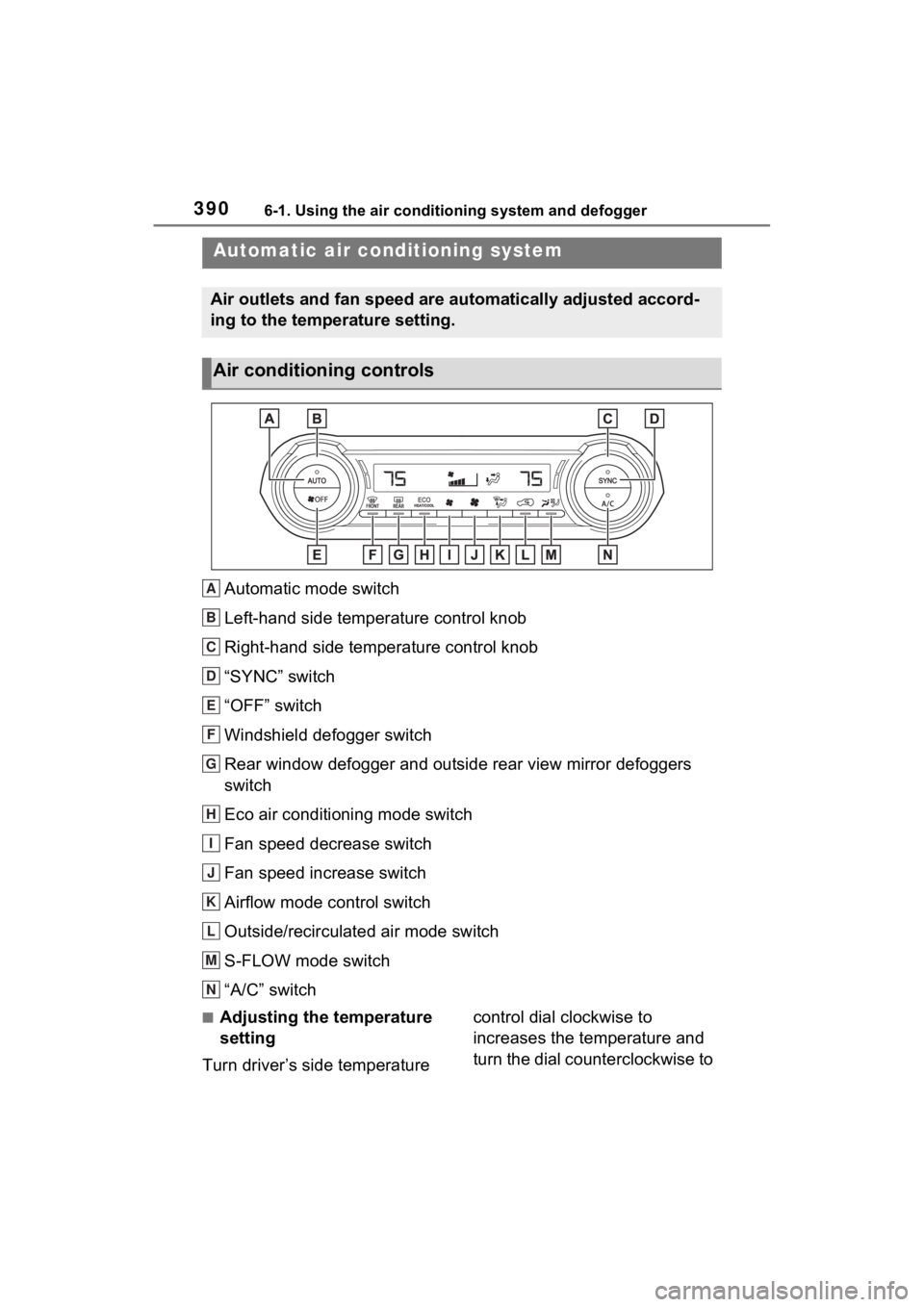
Automatic mode switch
Left-hand side temperature control knob
Right-hand side temperature control knob
“SYNC” switch
“OFF” switch
Windshield defogger switch
Rear window defogger and outside rear view mirror defoggers
switch
Eco air conditioning mode switch
Fan speed decrease switch
Fan speed increase switch
Airflow mode control switch
Outside/recirculated air mode switch
S-FLOW mode switch
“A/C” switch
■Adjusting the temperature
setting
Turn driver’s side temperature control dial clockwise to
increases the temperature and
turn the dial counterclockwise to
Automatic air co
nditioning system
Air outlets and fan speed are automatically adjusted accord-
ing to the temperature setting.
Air conditioning controls
A
B
C
D
E
F
G
H
I
J
K
L
M
N
Page 391 of 624
3916-1. Using the air conditioning system and defogger
6
Interior features
decreases the temperature.
The air conditioning system
switches between individual and
simultaneous modes each time the
“SYNC” switch is pressed.
Simultaneous mode (the indicator
on the “SYNC” switch is on):
The driver’s side temperature con-
trol dial can be used to adjust the
temperature for the driver’s and
passenger’s side. At this time,
operate the passenger’s side tem-
perature control dial to enter indi-
vidual mode.
Individual mode (t he indicator on
the “SYNC” switch is off):
The temperature for the driver’s
and passenger’s side can be
adjusted separately.
■Setting the fan speed
Press the fan speed increase
switch to increase the fan speed
and the fan speed decrease
switch to decrease the fan
speed.
Pressing the “OFF” switch turns off
the fan.
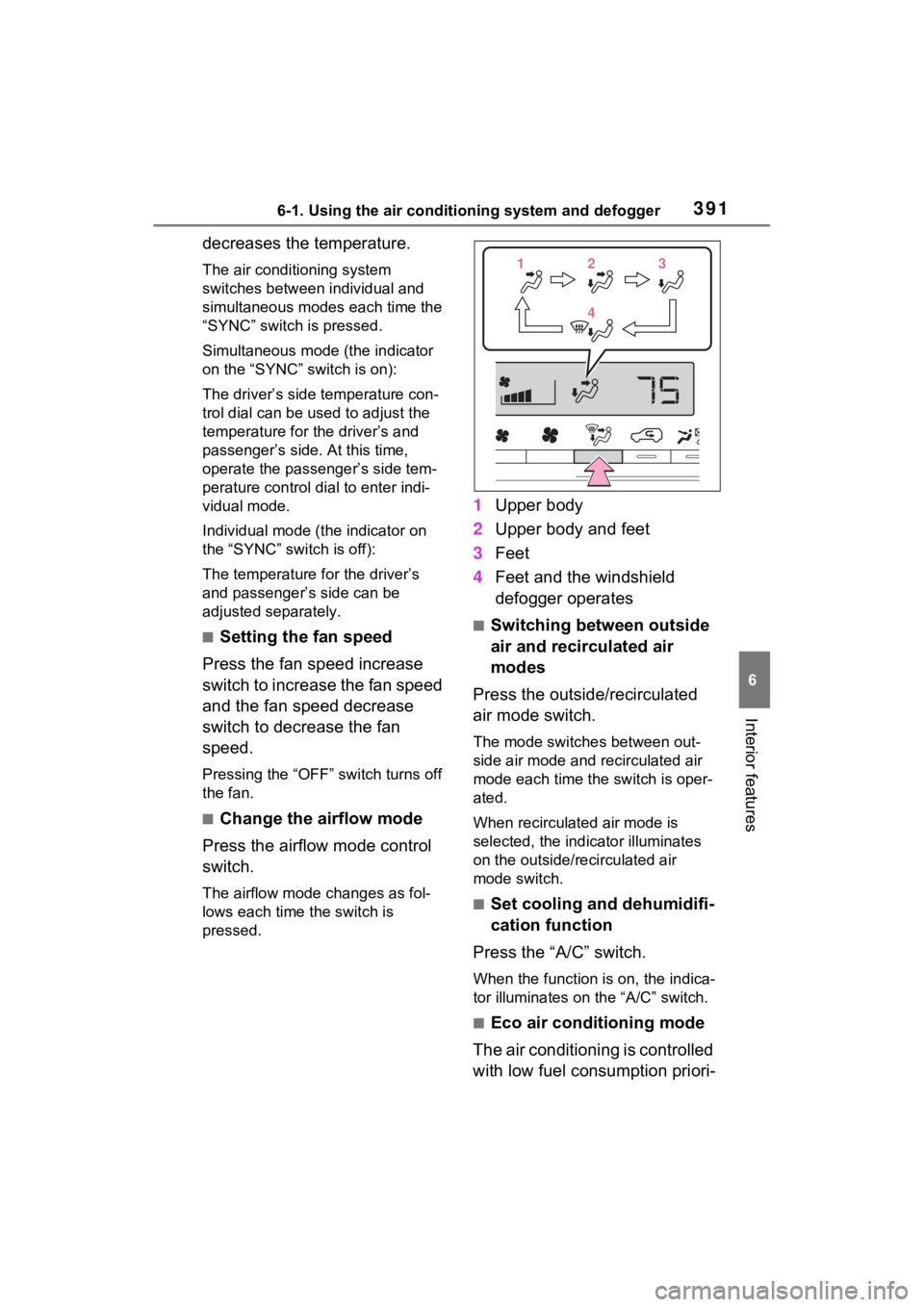
■Change the airflow mode
Press the airflow mode control
switch.
The airflow mode changes as fol-
lows each time the switch is
pressed.
1 Upper body
2 Upper body and feet
3 Feet
4 Feet and the windshield
defogger operates
■Switching between outside
air and recirculated air
modes
Press the outside/recirculated
air mode switch.
The mode switches between out-
side air mode and recirculated air
mode each time the switch is oper-
ated.
When recirculated air mode is
selected, the indicator illuminates
on the outside/recirculated air
mode switch.
■Set cooling and dehumidifi-
cation function
Press the “A/C” switch.
When the function is on, the indica-
tor illuminates on the “A/C” switch.
■Eco air conditioning mode
The air conditioning is controlled
with low fuel consumption priori-
112233
44
Page 392 of 624

3926-1. Using the air conditioning system and defogger
tized such as reducing fan
speed, etc.
Press the eco air conditioning
mode switch.
When the eco air conditioning
mode is on, the indicator illumi-
nates on the eco air conditioning
mode switch.
■Defogging the windshield
Defoggers are used to defog the
windshield and front side win-
dows.
Press the windshield defogger
switch.
Set the outside/recirculated air
mode switch to outside air mode if
t h e r e c i r c u l a t e d a i r m o d e i s u s e d . ( I t
may switch automatically.)
To defog the windshield and the
side windows quickly, turn the air
flow and temperature up.
To return to the previous mode,
press the windshield defogger
switch again when the windshield is
defogged.
When the windshield defogger
switch is on, the indicator illumi-
nates on the windshield defogger
switch.
■Defogging the rear window
and outside rear view mir-
rors
Defoggers are used to defog the
rear window and to remove rain-
drops, dew and frost from the
outside rear view mirrors.
Press the rear window defogger
and outside rear view mirror
defoggers switch.
The defoggers will automatically
turn off after 15 minutes.
When the rear window defogger
and outside rear view mirror defog-
gers switch is on, the indicator illu-
minates on the rear window
defogger and outside rear view mir-
ror defoggers switch.
■Heating
●In HV mode, the gasoline engine
may operate in order to extract
heat from the engine coolant via
the heater.
●In EV mode, heating is done by a
heat pump system.
• When the outside temperature is low or it is snowing, compared to
conventional vehicles, heating
may be less effective and warm
air may not come out.
• When the outside heat exchanger is frosted over, fan speed declines
and it may become harder to heat
the interior.
However, it is not a malfunction. In
this situation, the air temperature
from the outlets may not change
even though the set temperature is
raised.
• If frost has formed of the outside heat exchanger, the heating per-
formance will decline. The frost
can be removed from the outside
heat exchanger by operating the
Remote Air Conditioning System
before driving ( P.399). When
frosted over, the heating operation
of the Remote Air Conditioning
System starts after defrosting.
• When “AUTO” switch is turned on,
the heating is controlled opti-
mally. Therefore, the set heating
performance may not be achieved
even if the fan speed setting is
increased.
Page 393 of 624
3936-1. Using the air conditioning system and defogger
6
Interior features
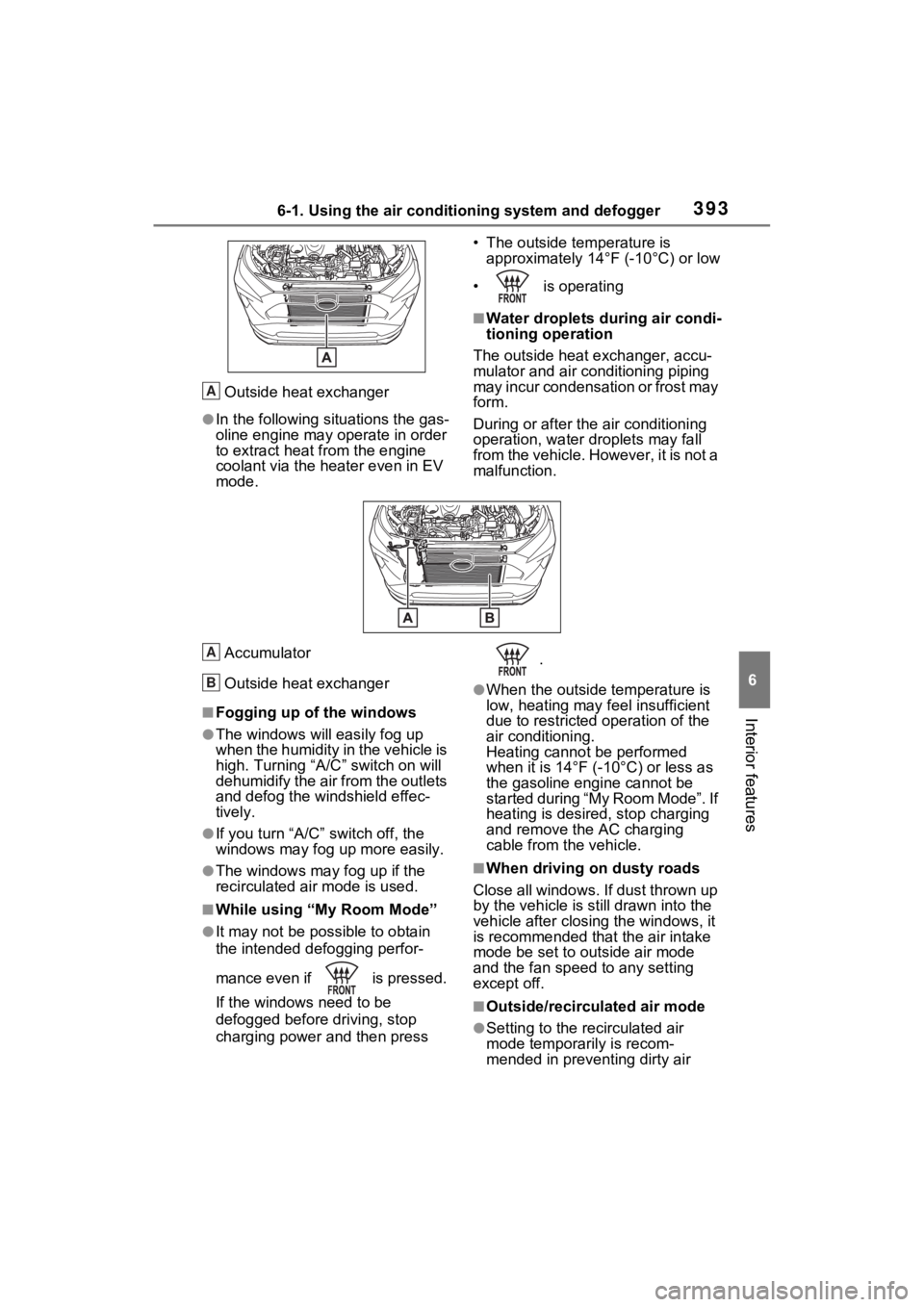
Outside heat exchanger
●In the following situations the gas-
oline engine may operate in order
to extract heat from the engine
coolant via the heater even in EV
mode.• The outside temperature is
approximately 14°F (-10°C) or low
• is operating
■Water droplets dur ing air condi-
tioning operation
The outside heat exchanger, accu-
mulator and air conditioning piping
may incur condensation or frost may
form.
During or after the air conditioning
operation, water droplets may fall
from the vehicle. However, it is not a
malfunction.
Accumulator
Outside heat exchanger
■Fogging up of the windows
●The windows will easily fog up
when the humidity in the vehicle is
high. Turning “A/C ” switch on will
dehumidify the air from the outlets
and defog the windshield effec-
tively.
●If you turn “A/C” switch off, the
windows may fog up more easily.
●The windows may fog up if the
recirculated air mode is used.
■While using “My Room Mode”
●It may not be possible to obtain
the intended defogging perfor-
mance even if is pressed.
If the windows need to be
defogged before driving, stop
charging power and then press .
●When the outside temperature is
low, heating may feel insufficient
due to restricted operation of the
air conditioning.
Heating cannot be performed
when it is 14°F (-
10°C) or less as
the gasoline engine cannot be
started during “My Room Mode”. If
heating is desired, stop charging
and remove the AC charging
cable from the vehicle.
■When driving on dusty roads
Close all windows. If dust thrown up
by the vehicle is still drawn into the
vehicle after closing the windows, it
is recommended that the air intake
mode be set to outside air mode
and the fan speed to any setting
except off.
■Outside/recirculated air mode
●Setting to the recirculated air
mode temporarily is recom-
mended in preventing dirty air
A
A
B
Page 394 of 624
3946-1. Using the air conditioning system and defogger
from entering the vehicle interior
and helping to cool the vehicle
when the outside air temperature
is high.
●Outside/recirculated air mode may
automatically switch depending on
the temperature setting or the
inside temperature.
■When the outside temperature
exceeds 75°F (24°C) and the air
conditioning system is on
●In order to reduce the air condi-
tioning power consumption, the air
conditioning system may switch to
recirculated air mode automati-
cally. This may a lso reduce fuel
consumption.
●Recirculated air mode is selected
as a default mode when the power
switch is turned to ON.
●It is possible to switch to outside
air mode at any time by pressing
the outside/recirculated air mode
switch.
■Operation of the air condition-
ing system in Eco drive mode
●In Eco drive mode, the air condi-
tioning system is controlled as fol-
lows to prioritize fuel efficiency:
• Engine speed and compressor
operation controlled to restrict
heating/cooling capacity
• Fan speed restr icted when auto-
matic mode is selected
●To improve air conditioning perfor-
mance, perform the following
operations:
• Turn off Eco drive mode ( P.372)
• Turn off Eco air conditioning mode
●When the driving mode is set to
Eco driving mode, the Eco air con-
ditioning mode will be turned on
automatically. Even in this case,
the Eco air conditioning mode can
be turned off by pressing the Eco
air conditioning mode switch.
■When the outside temperature
falls to nearly 32°F (0°C)
The dehumidification function may not operate even when “A/C” switch
is pressed.
■Ventilation and air conditioning
odors
●To let fresh air in, set the air condi-
tioning system to the outside air
mode.
●During use, various odors from
inside and outside the vehicle may
enter into and accumulate in the
air conditioning system. This may
then cause odor
to be emitted
from the vents.
●To reduce potential odors from
occurring:
• It is recommended that the air
conditioning system be set to out-
side air mode prior to turning the
vehicle off.
• The start timing of the blower may be delayed for a short period of
time immediately after the air con-
ditioning system is started in auto-
matic mode.
●When parking, the system auto-
matically switches to outside air
mode to encourage better air cir-
culation throughout the vehicle,
helping to reduce odors that occur
when starting the vehicle.
■Air conditioning filter
P.477
■Air conditioning system refrig-
erant
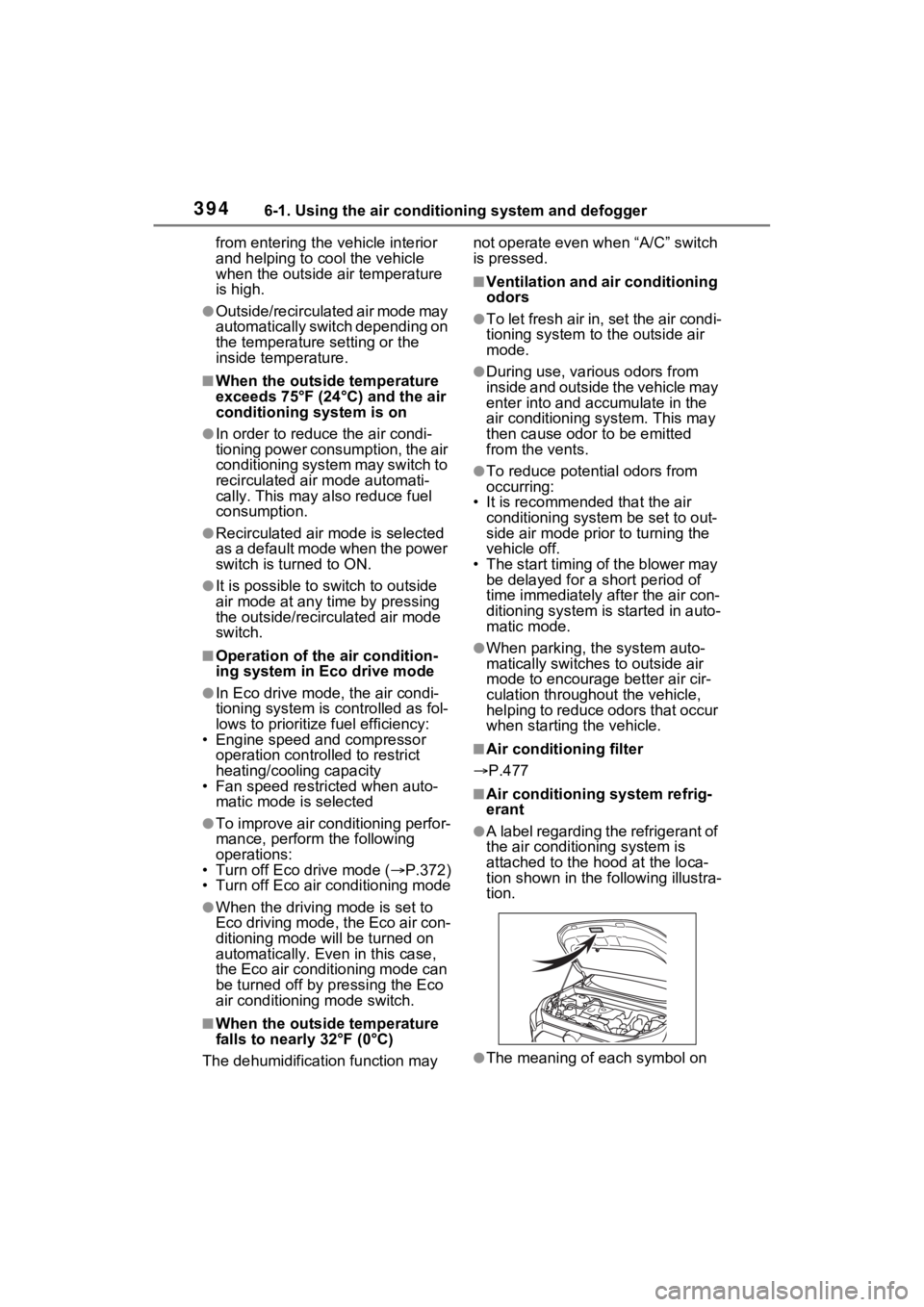
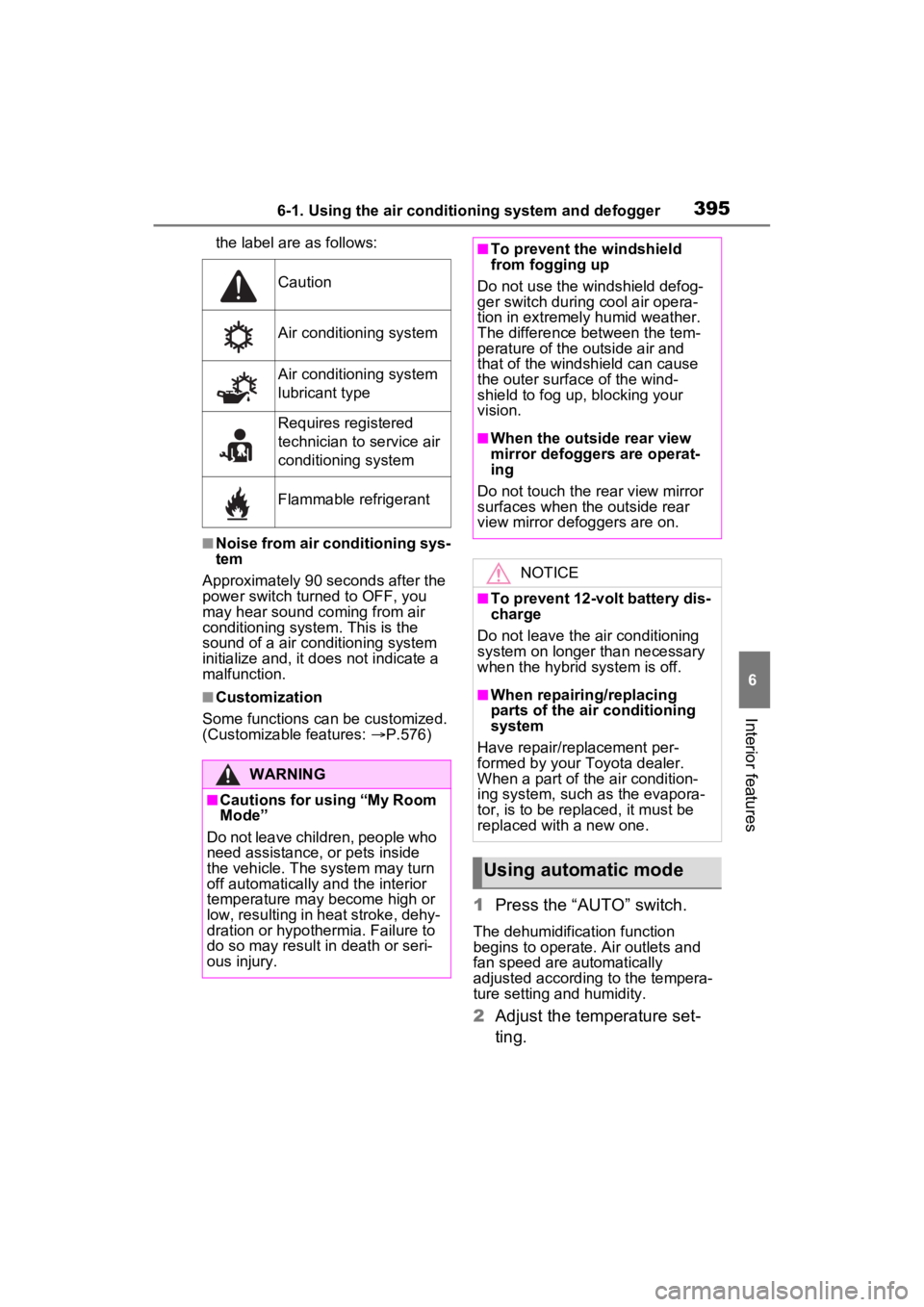
●A label regarding the refrigerant of
the air conditioning system is
attached to the h ood at the loca-
tion shown in the following illustra-
tion.
●The meaning of each symbol on
Page 395 of 624
3956-1. Using the air conditioning system and defogger
6
Interior features
the label are as follows:
■Noise from air conditioning sys-
tem
Approximately 90 seconds after the
power switch turned to OFF, you
may hear sound coming from air
conditioning system. This is the
sound of a air conditioning system
initialize and, it doe s not indicate a
malfunction.
■Customization
Some functions can be customized.
(Customizable features: P.576)
1 Press the “AUTO” switch.
The dehumidification function
begins to operate. Air outlets and
fan speed are automatically
adjusted according to the tempera-
ture setting and humidity.
2 Adjust the temperature set-
ting.
Caution
Air conditioning system
Air conditioning system
lubricant type
Requires registered
technician to service air
conditioning system
Flammable refrigerant
WARNING
■Cautions for using “My Room
Mode”
Do not leave children, people who
need assistance, or pets inside
the vehicle. The system may turn
off automatically and the interior
temperature may become high or
low, resulting in heat stroke, dehy-
dration or hypothermia. Failure to
do so may result in death or seri-
ous injury.
■To prevent the windshield
from fogging up
Do not use the windshield defog-
ger switch during cool air opera-
tion in extremely humid weather.
The difference between the tem-
perature of the outside air and
that of the windshield can cause
the outer surface of the wind-
shield to fog up, blocking your
vision.
■When the outside rear view
mirror defoggers are operat-
ing
Do not touch the rear view mirror
surfaces when the outside rear
view mirror def oggers are on.
NOTICE
■To prevent 12-volt battery dis-
charge
Do not leave the air conditioning
system on longer than necessary
when the hybrid system is off.
■When repairing/replacing
parts of the air conditioning
system
Have repair/replacement per-
formed by your To yota dealer.
When a part of the air condition-
ing system, such as the evapora-
tor, is to be repl aced, it must be
replaced with a new one.
Using automatic mode
Page 440 of 624
4407-1. Maintenance and care
7-1.Maintenance and care
Working from top to bottom,
liberally apply water to the
vehicle body, wheel wells and
underside of the vehicle to
remove any dirt and dust.
Wash the vehicle body using
a sponge or soft cloth, such
as a chamois.
For hard-to-remove marks,
use car wash soap and rinse
thoroughly with water.
Wipe away any water.
Wax the vehicle when the
waterproof coating deterio-
rates.
If water does not bead on a clean
surface, apply wax when the vehi-
cle body is cool.
■Before car washes
Check that the fuel filler door and
charging port lid on your vehicle are
closed properly.
■Automatic car washes
●Before washing the vehicle:
• Fold the mirrors
• Turn off the power back door (if
equipped) Start washing from the front of the
vehicle. Make sure to extend the
mirrors before driving.
●Brushes used in automatic car
washes may scratch the vehicle
surface, parts (wheel, etc.) and
harm your vehicle’s paint.
●Rear spoiler may not be washable
in some automatic car washes.
There may also be an increased
risk of damage to vehicle.
■High pressure car washes
As water may enter the cabin, do
not bring the nozzle tip near the
gaps around the doors or perimeter
of the windows, or spray these
areas continuously.
■Note for a smart key system
If the door handle becomes wet
while the electronic key is within the
effective range, t he door may lock
and unlock repeatedly. In that case,
follow the following correction pro-
cedures to wash the vehicle:
●Place the key in a position 6 ft. (2
m) or more separate from the
vehicle while the vehicle is being
washed. (Take care to ensure that
the key is not stolen.)
●Set the electronic key to battery-
saving mode to disable the smart
key system. ( P.218)
■Wheels and wheel ornaments
●Remove any dirt immediately by
using a neutral detergent.
●Wash detergent off with water
immediately after use.
●To protect the paint from damage,
make sure to obs erve the follow-
ing precautions.
• Do not use acidic, alkaline or abrasive detergent
• Do not use hard brushes
• Do not use detergent on the
wheels when they are hot, such
as after driving or parking in hot
weather
Cleaning a nd protect-
ing the vehicle exte-
rior
Perform the following to
protect the vehicle and
maintain it in prime condi-
tion:
Cleaning instructions