warning TOYOTA RAV4 PRIME 2022 Workshop Manual
[x] Cancel search | Manufacturer: TOYOTA, Model Year: 2022, Model line: RAV4 PRIME, Model: TOYOTA RAV4 PRIME 2022Pages: 624, PDF Size: 24.01 MB
Page 111 of 624
1112-2. Charging
2
Plug-in hybrid system
Connect to an AC 120 V out-
let (NEMA 5-15R) with a
Ground-Fault Circuit-Inter-
rupter (GFCI) and a circuit
breaker. Use of a 15A individ-
ual circuit is strongly recom-
mended to ensure AC
charging cable will operate
properly.
When charging outdoors,
make sure to connect to a
weatherproof outlet that is
certified for outdoor use.
Checking Ground-Fault Cir-
cuit-Interrupter (GFCI) opera-
tion before its use is
recommended.
WARNING
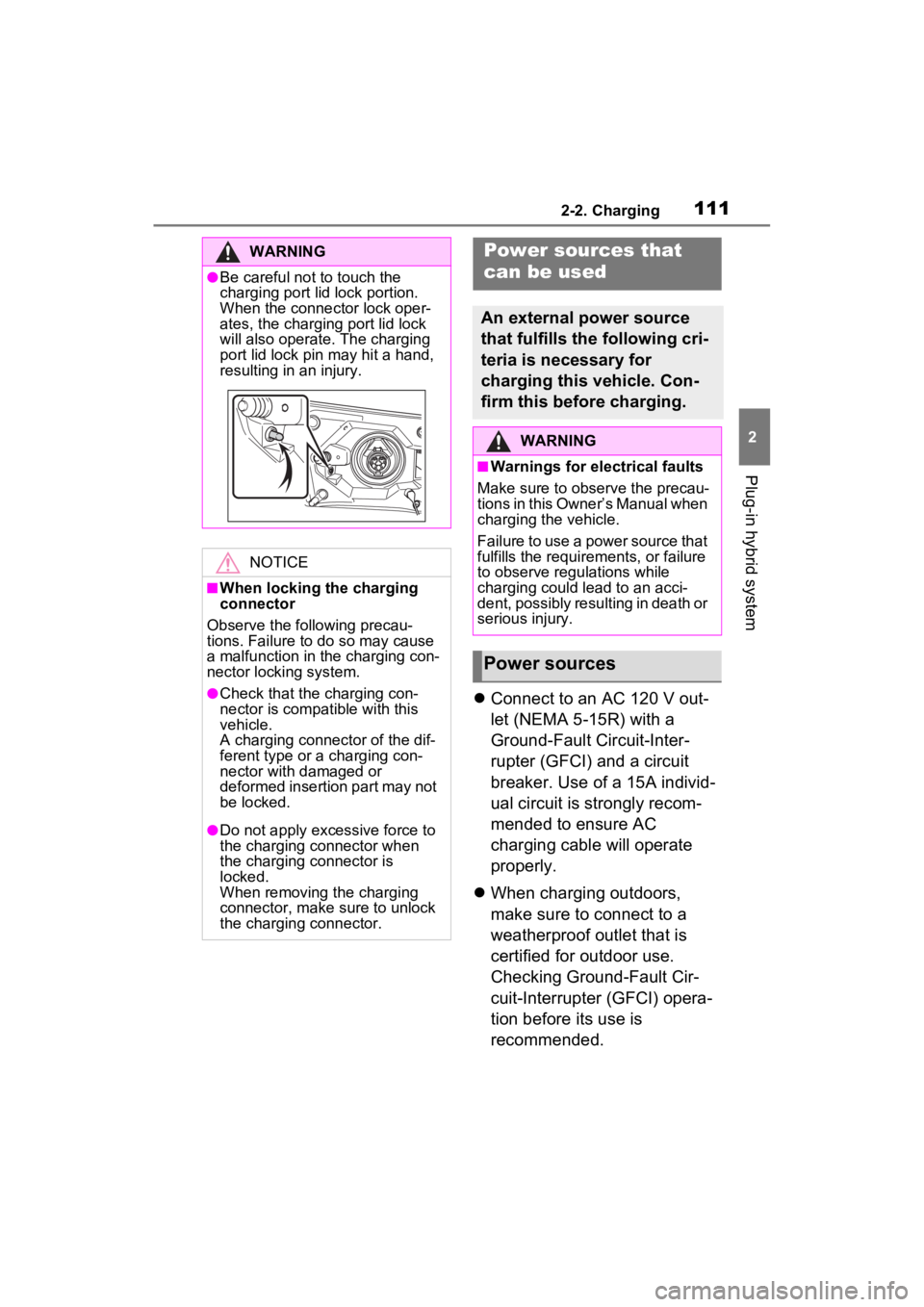
●Be careful not to touch the
charging port lid lock portion.
When the connector lock oper-
ates, the charging port lid lock
will also operate. The charging
port lid lock pin may hit a hand,
resulting in an injury.
NOTICE
■When locking the charging
connector
Observe the following precau-
tions. Failure to do so may cause
a malfunction in the charging con-
nector locking system.
●Check that the charging con-
nector is compatible with this
vehicle.
A charging connector of the dif-
ferent type or a charging con-
nector with damaged or
deformed insertion part may not
be locked.
●Do not apply excessive force to
the charging connector when
the charging connector is
locked.
When removing the charging
connector, make sure to unlock
the charging connector.
Power sources that
can be used
An external power source
that fulfills the following cri-
teria is necessary for
charging this vehicle. Con-
firm this before charging.
WARNING
■Warnings for electrical faults
Make sure to observe the precau-
tions in this Owner’s Manual when
charging the vehicle.
Failure to use a power source that
fulfills the requirements, or failure
to observe regulations while
charging could lead to an acci-
dent, possibly resulting in death or
serious injury.
Power sources
Page 113 of 624
1132-2. Charging
2
Plug-in hybrid system
WARNING
■Power sources precautions
Observe the following precau-
tions.
If you do not follow them, fire,
electrical shock or damage may
occur, possibly resulting in death
or serious injury.
●Connect to an AC 120 V outlet
(NEMA 5-15R) with a Ground-
Fault Circuit-Interrupter (GFCI)
and supplied by a circuit
breaker per your local code.
Use of a 15A individual circuit is
strongly recommended.
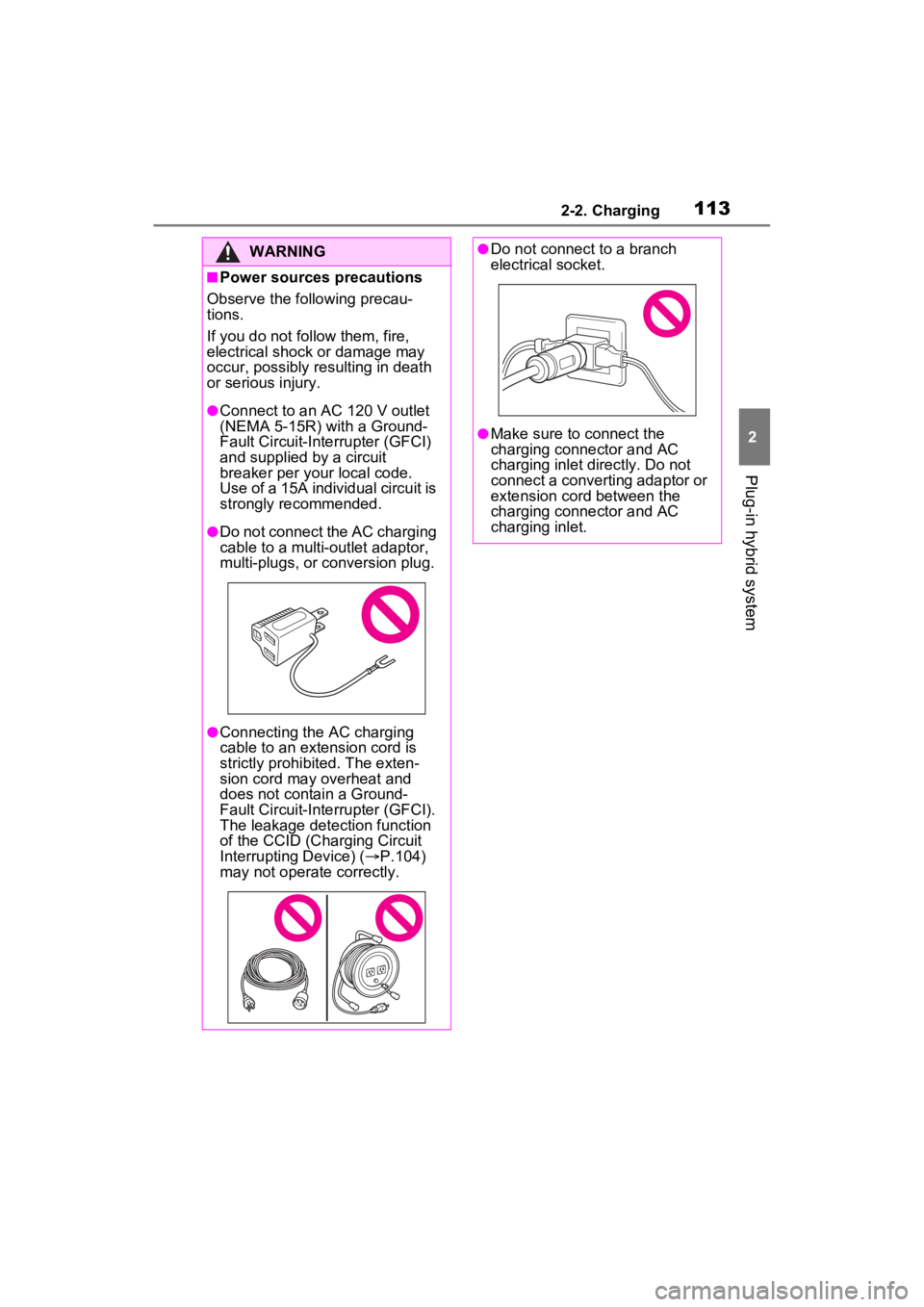
●Do not connect the AC charging
cable to a multi-outlet adaptor,
multi-plugs, or conversion plug.
●Connecting the AC charging
cable to an extension cord is
strictly prohibited. The exten-
sion cord may overheat and
does not contain a Ground-
Fault Circuit-Interrupter (GFCI).
The leakage detection function
of the CCID (Cha rging Circuit
Interrupting Device) ( P.104)
may not operate correctly.
●Do not connect to a branch
electrical socket.
●Make sure to connect the
charging connector and AC
charging inlet directly. Do not
connect a converting adaptor or
extension cord between the
charging connector and AC
charging inlet.
Page 120 of 624
1202-2. Charging
■Safety functions
●The hybrid system will not start
while the AC charging cable is
attached to the vehicle, even if the
power switch is operated.
●If the AC charging cable is con-
nected while the “READY” indica-
tor is illuminated, the hybrid
system will stop automatically and
driving will not be possible.
This vehicle has been designed
to allow charging from an exter-
nal power source using a AC
charging cable for exclusive use
with standard household AC
outlets.
However, the vehicle differs
greatly from standard household
electrical goods in the following
ways, and incorrect usage could
cause fire or electric shock, pos-
sibly leading to death or serious
injury.
The charging operation is
designed to operate at 12A
continuously for the charge
duration (up to 12 hours).
( P.114)
Charging can be conducted
outdoors.
To charge properly, follow the
procedure after reading the
explanation below. Charging is
intended to be carried out by
licensed drivers only who prop-
erly understand the charging
procedure.
Do not allow children to use
Things to know before
charging
Make sure to read the fol-
lowing precautions before
connecting the AC charging
cable to the vehicle and
charging the hybrid battery
(traction battery).
WARNING
■Caution when charging
People with implantable cardiac
pacemakers or cardiac resynchro-
nization therapy-pacemakers
should not carry out the charging
procedure. Ask someone else to
do it.
●Do not approach the charger
and AC charging cable while
charging.
Charging procedure may affect
the operation of such devices.
●Do not remain in the vehicle
during charging.
Charging procedure may affect
the operation of such devices.
●Do not enter the vehicle even to
take something out of the lug-
gage compartment.
Charging procedure may affect
the operation of such devices.
■When the AC charging cable
is connected to the vehicle
Do not operate the shift lever.
In the unlikely ev ent that the AC
charging cable has been dam-
aged, the shift position may
change from P to another position
and the vehicle could move, pos-
sibly leading to an accident.
Charging precautions
Page 125 of 624
1252-2. Charging
2
Plug-in hybrid system
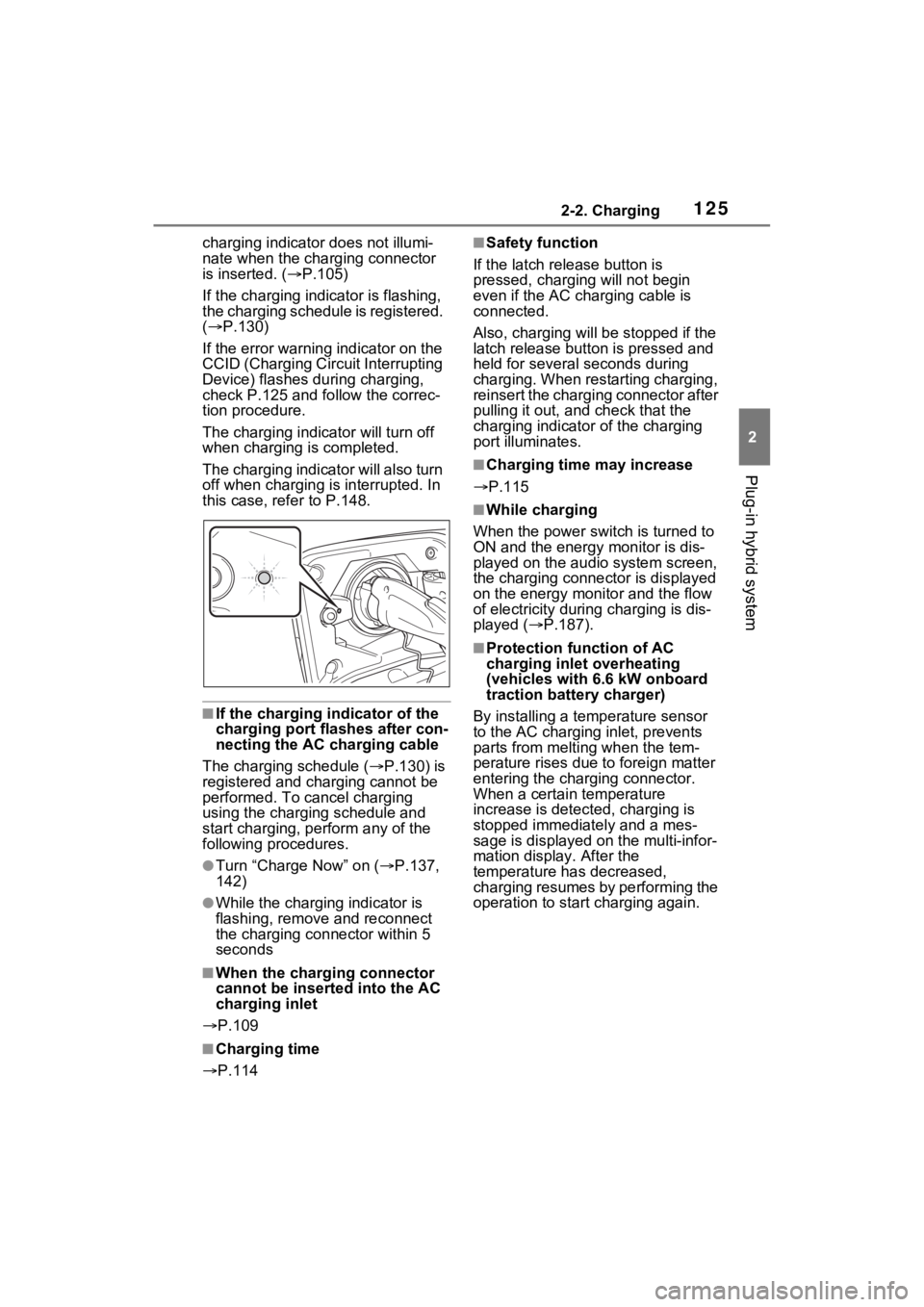
charging indicator does not illumi-
nate when the charging connector
is inserted. ( P.105)
If the charging indicator is flashing,
the charging schedule is registered.
( P.130)
If the error warning indicator on the
CCID (Charging Circuit Interrupting
Device) flashes during charging,
check P.125 and follow the correc-
tion procedure.
The charging indicator will turn off
when charging is completed.
The charging indicator will also turn
off when charging is interrupted. In
this case, refer to P.148.
■If the charging indicator of the
charging port flashes after con-
necting the AC charging cable
The charging schedule ( P.130) is
registered and charging cannot be
performed. To cancel charging
using the charging schedule and
start charging, per form any of the
following procedures.
●Turn “Charge Now” on ( P.137,
142)
●While the charging indicator is
flashing, remove and reconnect
the charging connector within 5
seconds
■When the charging connector
cannot be inserted into the AC
charging inlet
P.109
■Charging time
P.114
■Safety function
If the latch release button is
pressed, charging will not begin
even if the AC cha rging cable is
connected.
Also, charging will be stopped if the
latch release button is pressed and
held for several seconds during
charging. When restarting charging,
reinsert the charging connector after
pulling it out, and check that the
charging indicator of the charging
port illuminates.
■Charging time may increase
P.115
■While charging
When the power switch is turned to
ON and the energy monitor is dis-
played on the audio system screen,
the charging connector is displayed
on the energy monitor and the flow
of electricity during charging is dis-
played ( P.187).
■Protection function of AC
charging inlet overheating
(vehicles with 6.6 kW onboard
traction battery charger)
By installing a temp erature sensor
to the AC charging inlet, prevents
parts from melti ng when the tem-
perature rises due to foreign matter
entering the charging connector.
When a certain temperature
increase is detected, charging is
stopped immediat ely and a mes-
sage is displayed on the multi-infor-
mation display. After the
temperature has decreased,
charging resumes by performing the
operation to start charging again.
Page 126 of 624
1262-2. Charging
WARNING
■When charging
Observe the following precau-
tions.
Failure to do so may cause an
unexpected accident, resulting in
death or serious injury.
●Connect to a power source suit-
able for charging. ( P.111)
●Check that the AC charging
cable, plug and outlet are free of
foreign matter.
●Before charging, check that the
AC charging inlet is not
deformed, damaged or cor-
roded, and check that the inlet
is free of foreign matter such as
dirt, snow and ice.
If there is dirt or dust in these
areas, remove completely
before inserting the charging
connector.
●Do not get the terminals of the
AC charging inlet wet.
●Only use outlets where the plug
can be securely inserted.
●Do not bundle or wind the AC
charging cable while charging,
as doing so may result in over-
heating.
●Do not touch the terminals of
the charging connector and AC
charging inlet with a sharp metal
objects (needles etc.) or hands,
or short them with foreign
objects.
●When charging outdoors, make
sure to connect to a weather-
proof outlet for outdoor use.
Ensure the weatherproof outlet
cover closes completely. If the
weatherproof outlet cover can-
not be closed, install a weather-
proof outlet cover that will close.
●In order to stop charging at the
charging station, follow the
instructions of the charger.
●If any heat, smoke, odors, noise
or other abnormalities are
noticed during charging, stop
charging immediately.
●Do not insert the plug if the out-
let is submerge d in water or
snow.
●When charging while it is raining
or snowing, do not connect or
disconnect the plug if your
hands are wet. Also, do not get
the plug or outlet wet.
●Do not charge the vehicle
during a lightning storm.
●Prevent the AC charging cable
from being caught in the door or
back door.
●Do not let the wheels on the AC
charging cable, plug, charging
connector and CCID (Charging
Circuit Interru pting Device).
●Firmly insert the plug into the
outlet.
●Do not use an extension cord
and converting adaptor.
●Close the hood before using the
charging system. The cooling
fan may start operating sud-
denly. Touching or getting close
to rotating parts such as the fan
may cause your hands or
clothes (especially a necktie or
scarf) to becom e caught and
result in a serious injury.
●After connecting the charging
cable, confirm that it is not
wound around anything.
Page 127 of 624
1272-2. Charging
2
Plug-in hybrid system
WARNING
●If the power indicator on the
CCID (Charging Circuit Inter-
rupting Device) does not illumi-
nate after plugging the AC
charging cable into the socket-
outlet, unplug it immediately.
■If the error warning indicator
on the CCID (Charging Circuit
Interrupting Device) illumi-
nates or flashes during
charging
There may be an electrical leak-
age in the power source path, or
there may be a mal function in the
AC charging cable or CCID
(Charging Circuit Interrupting
Device). Refer to P.105 and follow
the correction p rocedure. If the
error warning indicator does not
turn off even afte r performing the
correction procedure, immediately
stop charging, remove the AC
charging cable and contact your
Toyota dealer. Continuing to
charge the vehicle in that condi-
tion may lead to unforeseen acci-
dents or serious injury.
■Onboard traction battery
charger
The onboard traction battery char-
ger is located under the rear
seats. Make sure to observe the
following precautions regarding
the onboard traction battery char-
ger. Failure to observe these pre-
cautions may result in death or
serious injury suc h as burns and
electric shocks.
●The onboard traction battery
charger is hot during charging.
Do not touch the onboard trac-
tion battery charger, as doing so
may result in burns.
●Do not disassemble, repair or
modify the onboard traction bat-
tery charger. When the onboard
traction battery charger needs
to be repaired, consult your
Toyota dealer.
NOTICE
■When charging
Do not insert the plug into the AC
charging inlet.
The AC charging inlet may be
damaged.
■Using private power genera-
tor
Do not use private power genera-
tors as a power source for
charging.
Doing so may make charging
unstable, the voltage may be
insufficient, and the error warning
indicator on the CCID (Charging
Circuit Interrupting Device) of the
AC charging cable may flash.
■Charging station
Due to the environment in which
the power equipment is located,
charging may be unstable due to
noise, the voltage may be insuffi-
cient, and the error warning indi-
cator on the CCID (Charging
Circuit Interrupting Device) of the
AC charging cable may flash.
Page 129 of 624
1292-2. Charging
2
Plug-in hybrid system
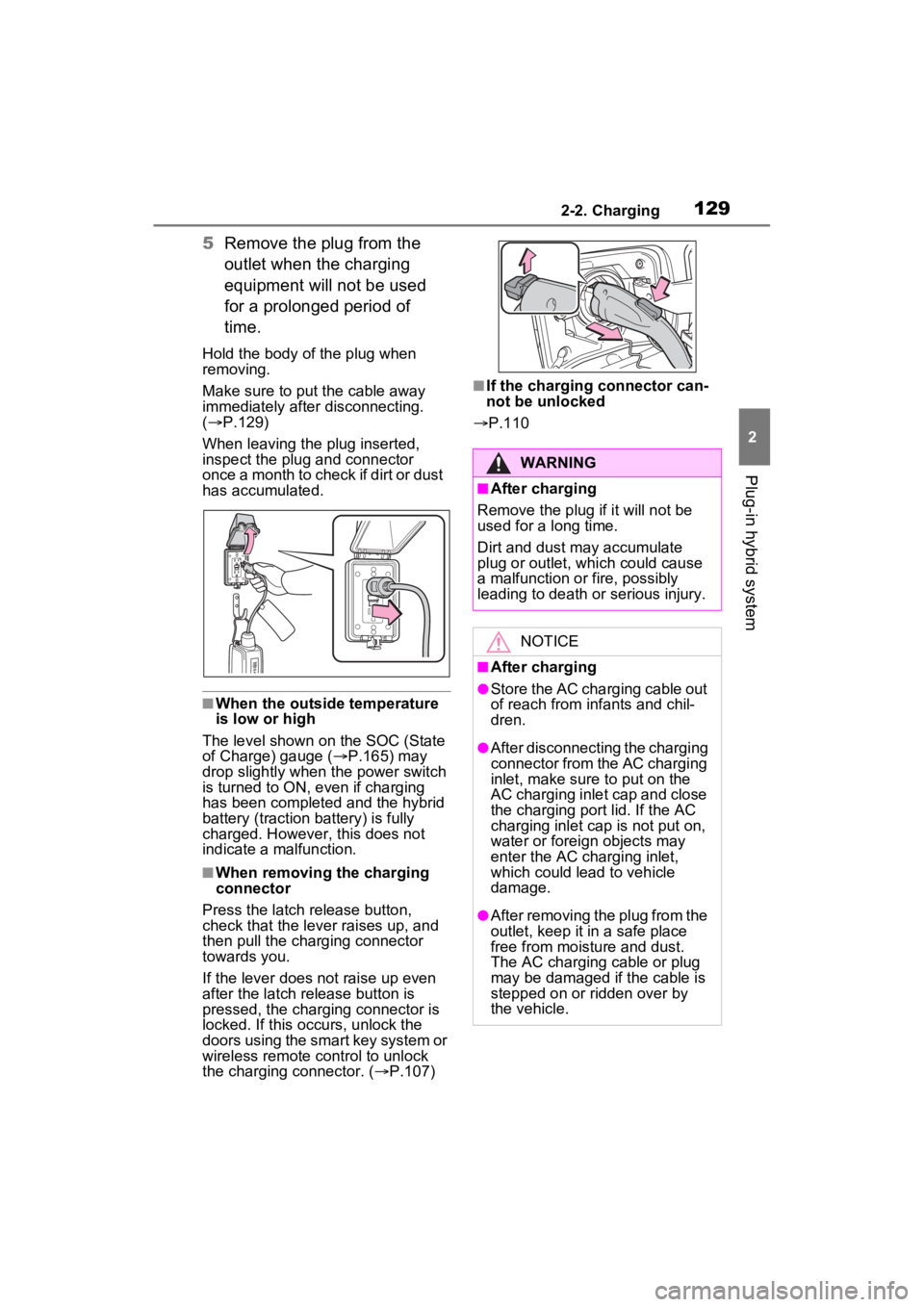
5Remove the plug from the
outlet when the charging
equipment will not be used
for a prolonged period of
time.
Hold the body of the plug when
removing.
Make sure to put the cable away
immediately afte r disconnecting.
( P.129)
When leaving the plug inserted,
inspect the plug and connector
once a month to check if dirt or dust
has accumulated.
■When the outside temperature
is low or high
The level shown on the SOC (State
of Charge) gauge ( P.165) may
drop slightly when the power switch
is turned to ON, e ven if charging
has been completed and the hybrid
battery (traction battery) is fully
charged. However, this does not
indicate a malfunction.
■When removing the charging
connector
Press the latch release button,
check that the lever raises up, and
then pull the charging connector
towards you.
If the lever does not raise up even
after the latch release button is
pressed, the charging connector is
locked. If this occurs, unlock the
doors using the smart key system or
wireless remote control to unlock
the charging connector. ( P.107)
■If the charging connector can-
not be unlocked
P.110
WARNING
■After charging
Remove the plug if it will not be
used for a long time.
Dirt and dust may accumulate
plug or outlet, which could cause
a malfunction or fire, possibly
leading to death or serious injury.
NOTICE
■After charging
●Store the AC charging cable out
of reach from infants and chil-
dren.
●After disconnecting the charging
connector from the AC charging
inlet, make sure to put on the
AC charging inlet cap and close
the charging port lid. If the AC
charging inlet cap is not put on,
water or foreign objects may
enter the AC cha rging inlet,
which could lead to vehicle
damage.
●After removing the plug from the
outlet, keep it in a safe place
free from moisture and dust.
The AC charging cable or plug
may be damaged if the cable is
stepped on or ridden over by
the vehicle.
Page 139 of 624
1392-2. Charging
2
Plug-in hybrid system
For details on how to operate the
audio system screen, refer to
“NAVIGATION AND MULTIMEDIA
SYSTEM OWNER’S MANUAL”.
Setting operations related to the
charging schedule are per-
formed on the “Charging Sched-
ule” screen.
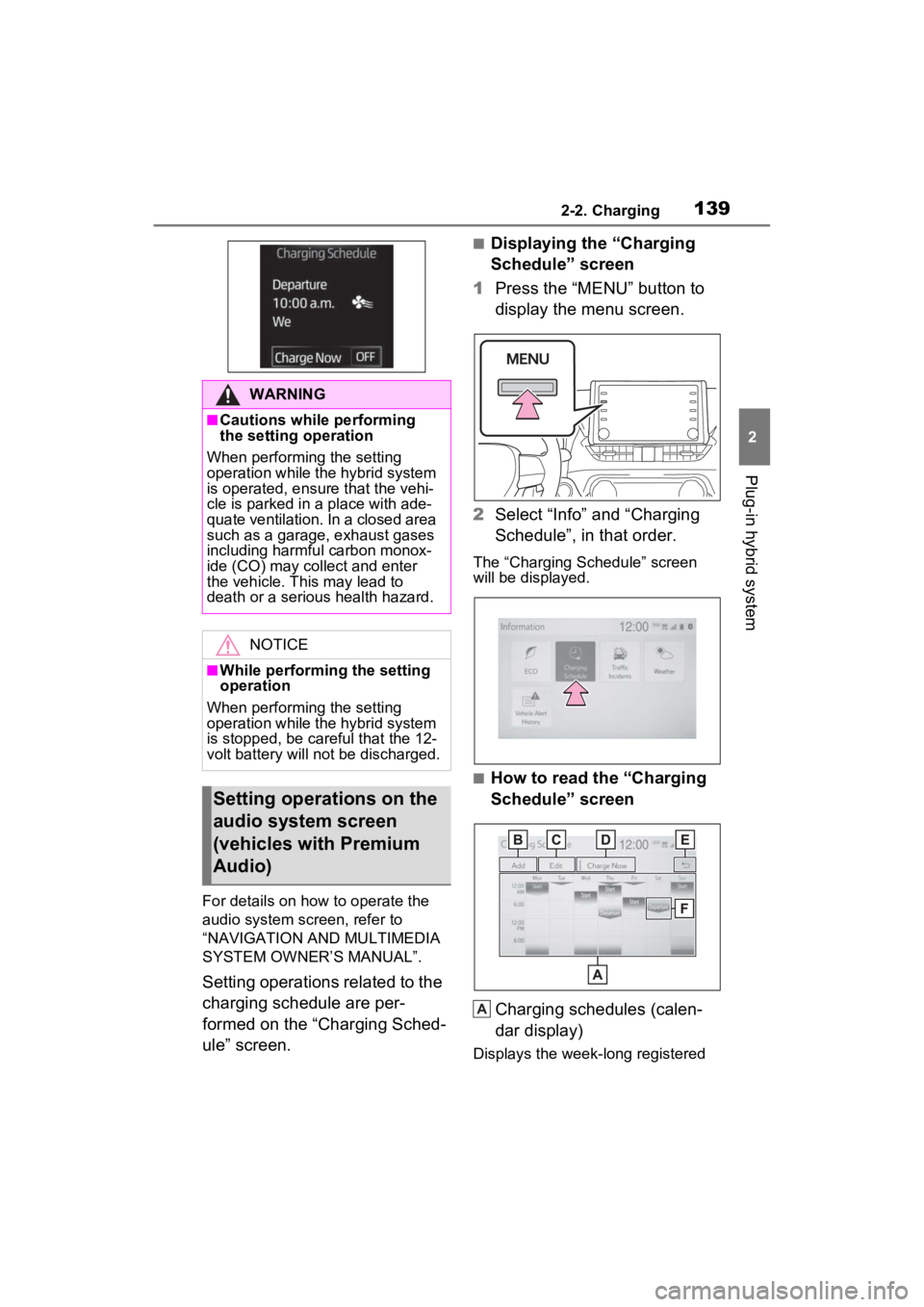
■Displaying the “Charging
Schedule” screen
1 Press the “MENU” button to
display the menu screen.
2 Select “Info” and “Charging
Schedule”, in that order.
The “Charging Schedule” screen
will be displayed.
■How to read the “Charging
Schedule” screen
Charging schedules (calen-
dar display)
Displays the week-long registered
WARNING
■Cautions while performing
the setting operation
When performing the setting
operation while the hybrid system
is operated, ensur e that the vehi-
cle is parked in a place with ade-
quate ventilation. In a closed area
such as a garage, exhaust gases
including harmful carbon monox-
ide (CO) may collect and enter
the vehicle. This may lead to
death or a seri ous health hazard.
NOTICE
■While performing the setting
operation
When performing the setting
operation while the hybrid system
is stopped, be careful that the 12-
volt battery will not be discharged.
Setting operations on the
audio system screen
(vehicles with Premium
Audio)
A
Page 144 of 624
1442-2. Charging
1Connect the AC charging
cable to the vehicle and start
charging
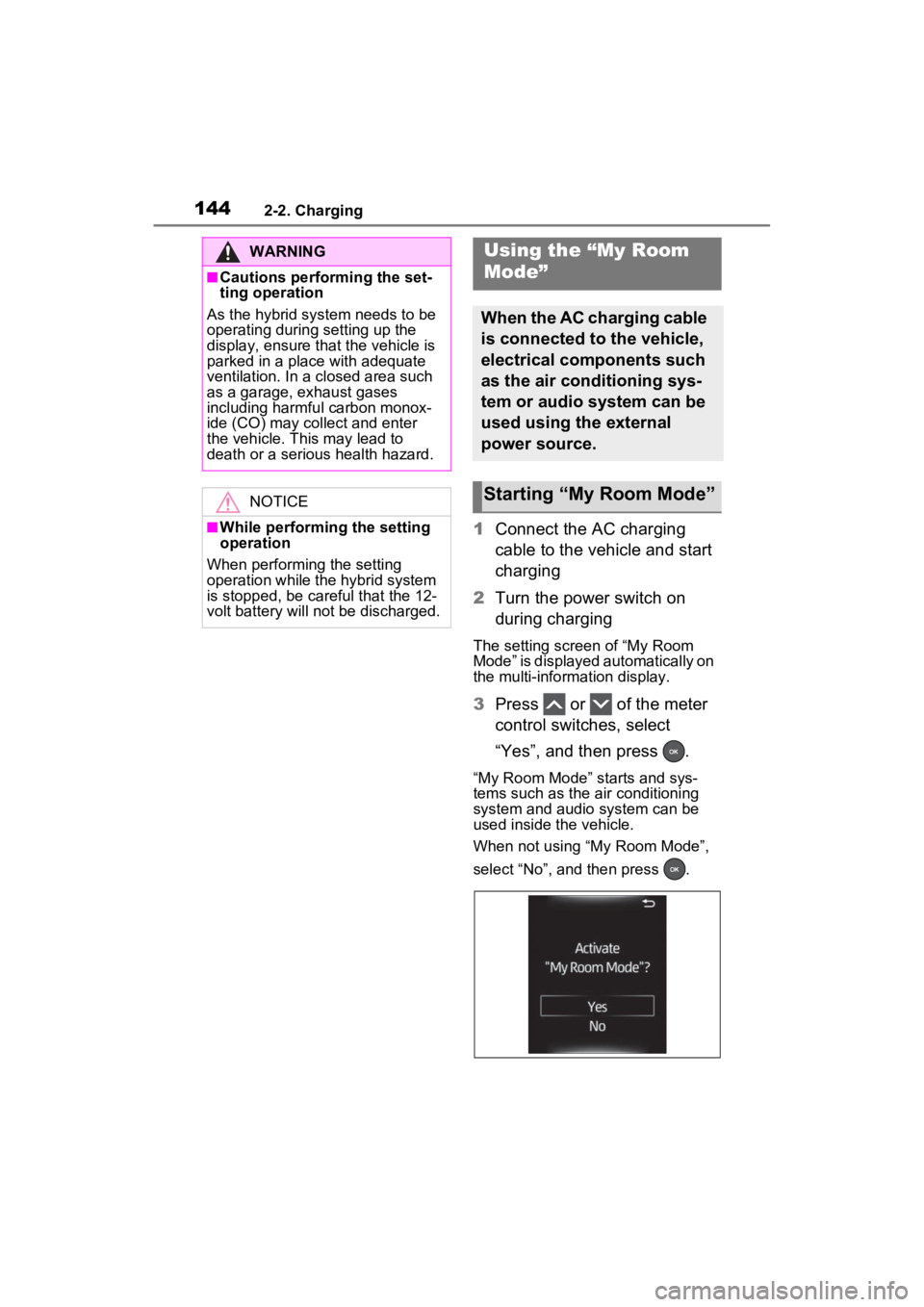
2 Turn the power switch on
during charging
The setting screen of “My Room
Mode” is displayed automatically on
the multi-information display.
3Press or of the meter
control switches, select
“Yes”, and then press .
“My Room Mode” starts and sys-
tems such as the air conditioning
system and audio system can be
used inside the vehicle.
When not using “My Room Mode”,
select “No”, and then press .
WARNING
■Cautions performing the set-
ting operation
As the hybrid system needs to be
operating during setting up the
display, ensure that the vehicle is
parked in a place with adequate
ventilation. In a closed area such
as a garage, exhaust gases
including harmful carbon monox-
ide (CO) may collect and enter
the vehicle. This may lead to
death or a seri ous health hazard.
NOTICE
■While performing the setting
operation
When performing the setting
operation while the hybrid system
is stopped, be careful that the 12-
volt battery will not be discharged.
Using the “My Room
Mode”
When the AC charging cable
is connected to the vehicle,
electrical components such
as the air conditioning sys-
tem or audio system can be
used using the external
power source.
Starting “My Room Mode”
Page 145 of 624
1452-2. Charging
2
Plug-in hybrid system
To stop “My Room Mode”, turn
the power switch off.
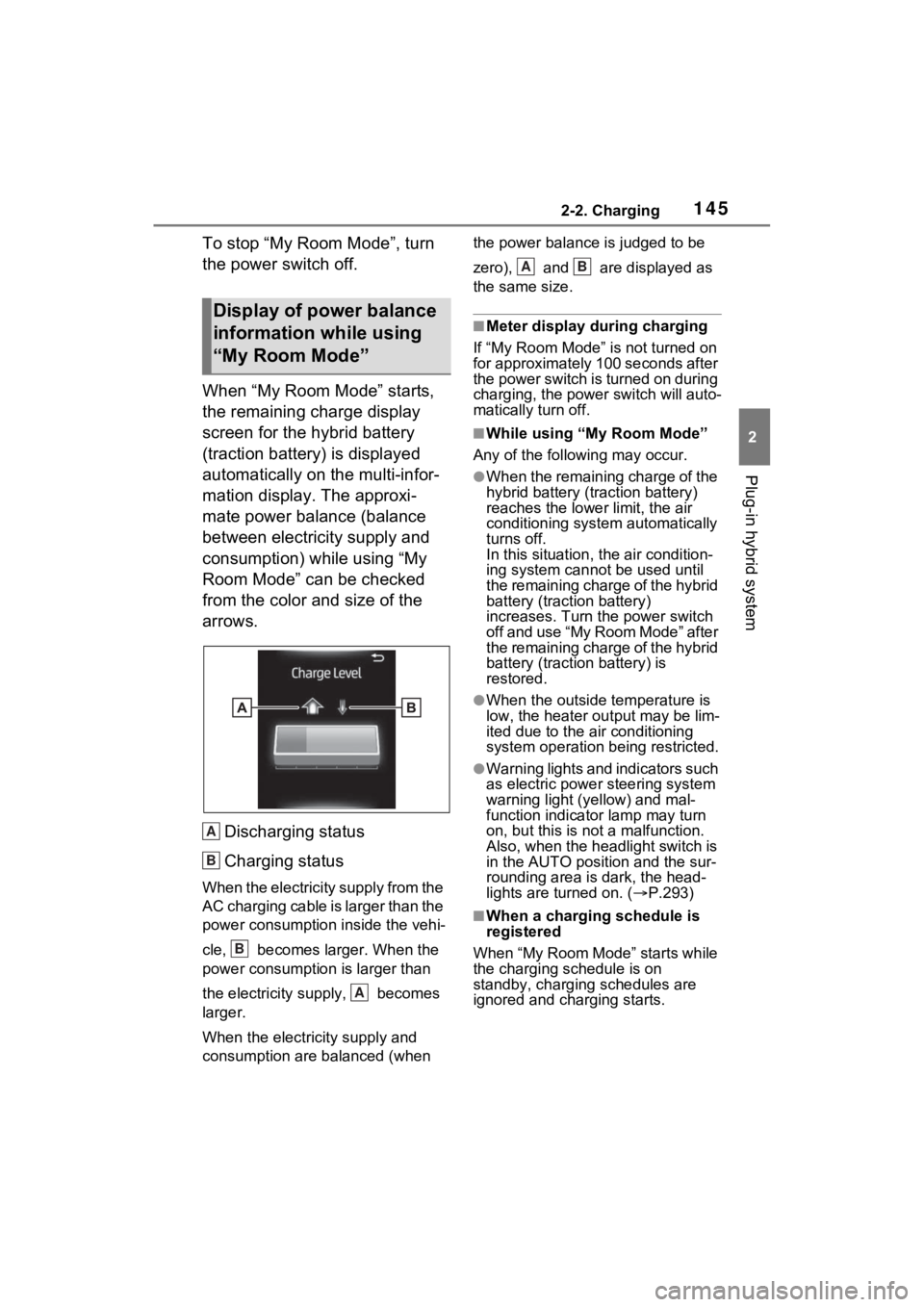
When “My Room Mode” starts,
the remaining charge display
screen for the hybrid battery
(traction battery) is displayed
automatically on the multi-infor-
mation display. The approxi-
mate power balance (balance
between electricity supply and
consumption) while using “My
Room Mode” can be checked
from the color and size of the
arrows.Discharging status
Charging status
When the electricity supply from the
AC charging cable is larger than the
power consumption inside the vehi-
cle, becomes larger. When the
power consumption is larger than
the electricity su pply, becomes
larger.
When the electricity supply and
consumption are balanced (when the power balance is judged to be
zero), and are displayed as
the same size.
■Meter display during charging
If “My Room Mode” is not turned on
for approximately 100 seconds after
the power switch is turned on during
charging, the power switch will auto-
matically turn off.
■While using “My Room Mode”
Any of the following may occur.
●When the remaining charge of the
hybrid battery (traction battery)
reaches the lowe r limit, the air
conditioning system automatically
turns off.
In this situation, the air condition-
ing system cannot be used until
the remaining charge of the hybrid
battery (traction battery)
increases. Turn the power switch
off and use “My Room Mode” after
the remaining charge of the hybrid
battery (traction battery) is
restored.
●When the outside temperature is
low, the heater ou tput may be lim-
ited due to the air conditioning
system operation being restricted.
●Warning lights and indicators such
as electric power steering system
warning light (yellow) and mal-
function indicator lamp may turn
on, but this is no t a malfunction.
Also, when the headlight switch is
in the AUTO position and the sur-
rounding area is dark, the head-
lights are turned on. ( P.293)
■When a charging schedule is
registered
When “My Room Mode” starts while
the charging schedule is on
standby, charging schedules are
ignored and charging starts.
Display of power balance
information while using
“My Room Mode”
A
B
B
A
AB