Windshield TOYOTA SEQUOIA 2008 2.G User Guide
[x] Cancel search | Manufacturer: TOYOTA, Model Year: 2008, Model line: SEQUOIA, Model: TOYOTA SEQUOIA 2008 2.GPages: 596, PDF Size: 12.93 MB
Page 180 of 596
180 2-3. Operating the lights and wipers
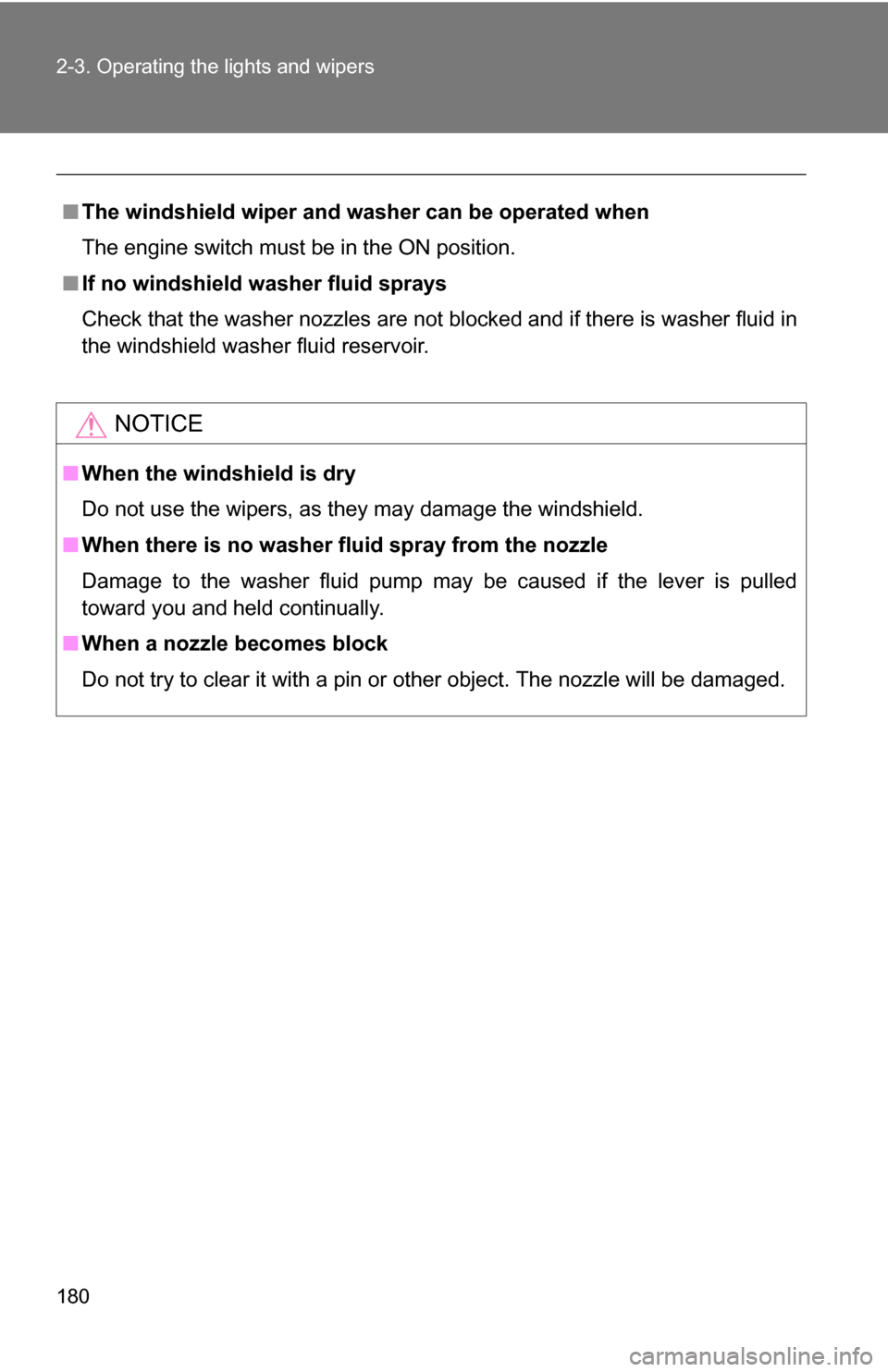
■The windshield wiper and washer can be operated when
The engine switch must be in the ON position.
■ If no windshield washer fluid sprays
Check that the washer nozzles are not blocked and if there is washer fluid in
the windshield washer fluid reservoir.
NOTICE
■When the windshield is dry
Do not use the wipers, as they may damage the windshield.
■ When there is no washer fluid spray from the nozzle
Damage to the washer fluid pump may be caused if the lever is pulled
toward you and held continually.
■ When a nozzle becomes block
Do not try to clear it with a pin or other object. The nozzle will be damaged.
Page 191 of 596
191
2-4. Using other
driving systems
2
When driving
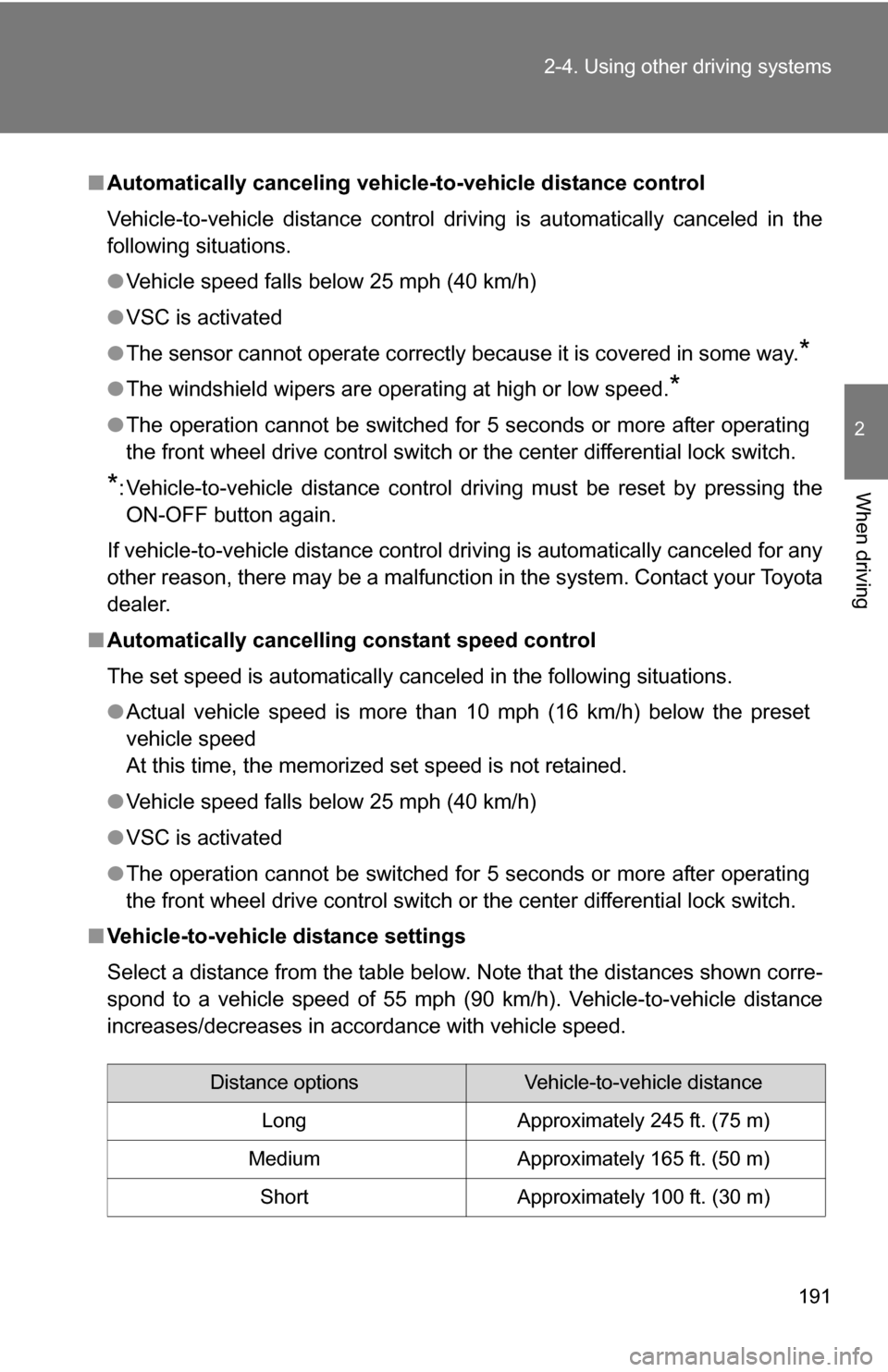
■Automatically canceling vehicle-to-vehicle distance control
Vehicle-to-vehicle distance control driving is automatically canceled in the
following situations.
●Vehicle speed falls below 25 mph (40 km/h)
● VSC is activated
● The sensor cannot operate correctly because it is covered in some way.
*
●The windshield wipers are operating at high or low speed.*
●The operation cannot be switched for 5 seconds or more after operating
the front wheel drive control switch or the center differential lock switch.
*: Vehicle-to-vehicle distance control driving must be reset by pressing the
ON-OFF button again.
If vehicle-to-vehicle distance control driving is automatically canceled for any
other reason, there may be a malfunction in the system. Contact your Toyota
dealer.
■ Automatically cancelling constant speed control
The set speed is automatically canceled in the following situations.
●Actual vehicle speed is more than 10 mph (16 km/h) below the preset
vehicle speed
At this time, the memorized set speed is not retained.
● Vehicle speed falls below 25 mph (40 km/h)
● VSC is activated
● The operation cannot be switched for 5 seconds or more after operating
the front wheel drive control switch or the center differential lock switch.
■ Vehicle-to-vehicle distance settings
Select a distance from the table below. Note that the distances shown corre-
spond to a vehicle speed of 55 mph (90 km/h). Vehicle-to-vehicle distance
increases/decreases in accordance with vehicle speed.
Distance optionsVehicle-to-vehicle distance
Long Approximately 245 ft. (75 m)
Medium Approximately 165 ft. (50 m) Short Approximately 100 ft. (30 m)
Page 229 of 596
229
2-5. Driving information
2
When driving
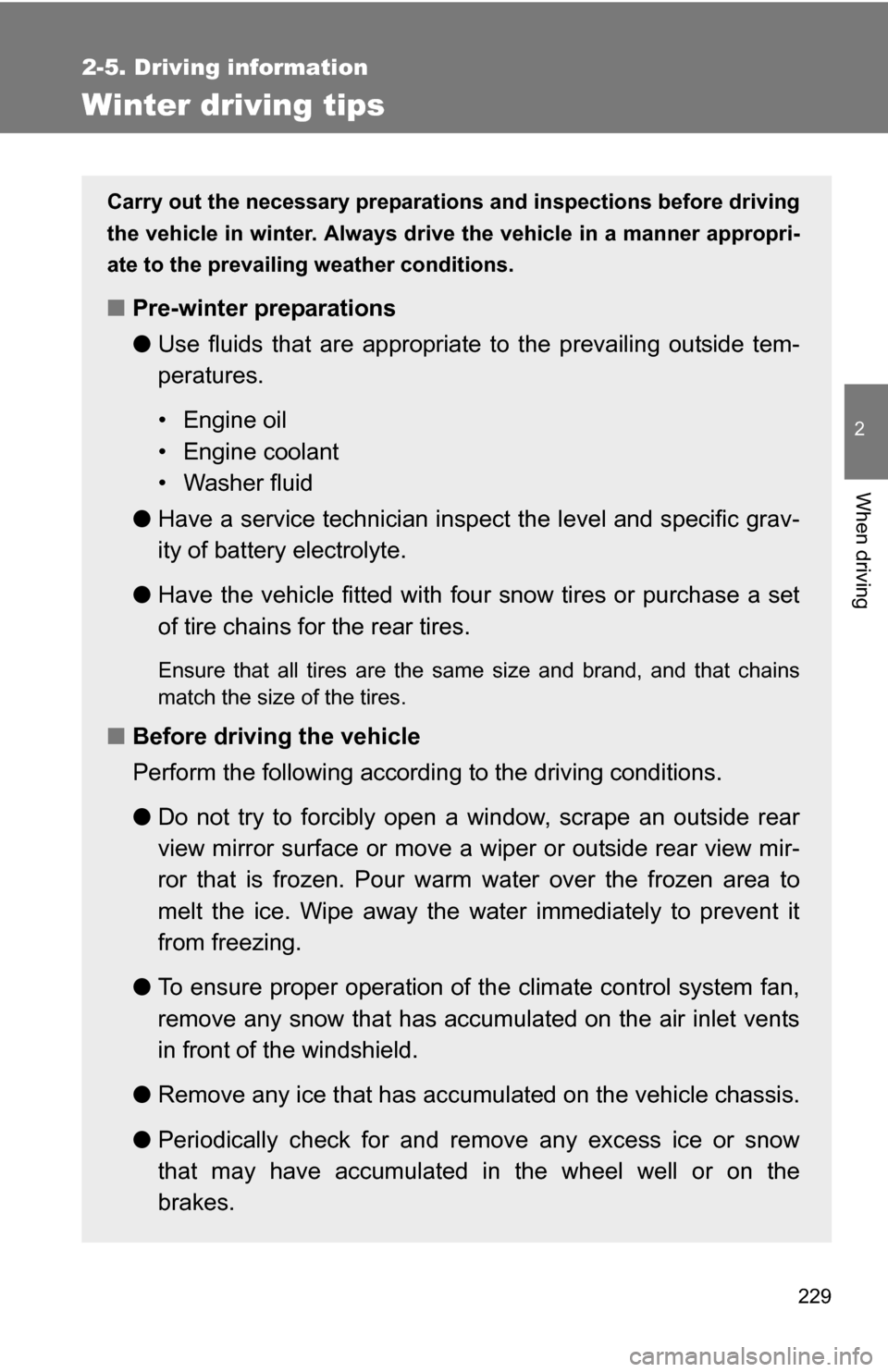
Winter driving tips
Carry out the necessary preparations and inspections before driving
the vehicle in winter. Always drive the vehicle in a manner appropri-
ate to the prevailing weather conditions.
■ Pre-winter preparations
●Use fluids that are appropriate to the prevailing outside tem-
peratures.
• Engine oil
• Engine coolant
• Washer fluid
● Have a service technician inspect the level and specific grav-
ity of battery electrolyte.
● Have the vehicle fitted with four snow tires or purchase a set
of tire chains for the rear tires.
Ensure that all tires are the same size and brand, and that chains
match the size of the tires.
■Before driving the vehicle
Perform the following according to the driving conditions.
●Do not try to forcibly open a window, scrape an outside rear
view mirror surface or move a wiper or outside rear view mir-
ror that is frozen. Pour warm water over the frozen area to
melt the ice. Wipe away the water immediately to prevent it
from freezing.
● To ensure proper operation of th e climate control system fan,
remove any snow that has accumulated on the air inlet vents
in front of the windshield.
● Remove any ice that has accumu lated on the vehicle chassis.
● Periodically check for and remove any excess ice or snow
that may have accumulated in the wheel well or on the
brakes.
Page 248 of 596
248
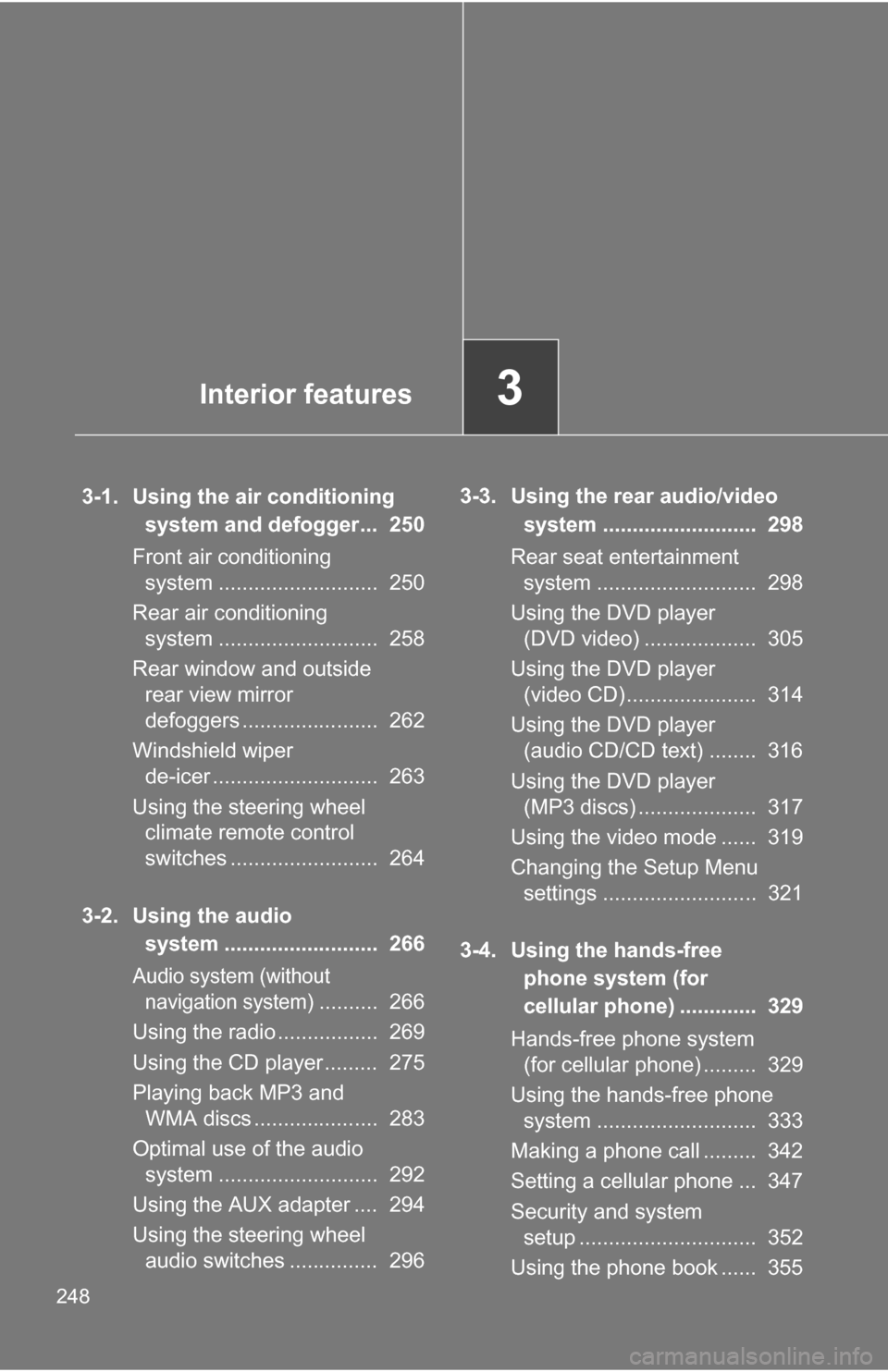
3-1. Using the air conditioning system and defogger... 250
Front air conditioning system ........................... 250
Rear air conditioning system ........................... 258
Rear window and outside rear view mirror
defoggers ....................... 262
Windshield wiper de-icer ............................ 263
Using the steering wheel climate remote control
switches ......................... 264
3-2. Using the audio system .......................... 266
Audio system (without navigation system)
.......... 266
Using the radio ................. 269
Using the CD player ......... 275
Playing back MP3 and WMA discs ..................... 283
Optimal use of the audio system ........................... 292
Using the AUX adapter .... 294
Using the steering wheel audio switches ............... 296 3-3. Using the rear audio/video
system .......................... 298
Rear seat entertainment system ........................... 298
Using the DVD player (DVD video) ................... 305
Using the DVD player (video CD)...................... 314
Using the DVD player (audio CD/CD text) ........ 316
Using the DVD player (MP3 discs) .................... 317
Using the video mode ...... 319
Changing the Setup Menu settings .......................... 321
3-4. Using the hands-free phone system (for
cellular phone) ............. 329
Hands-free phone system (for cellular phone) ......... 329
Using the hands-free phone system ........................... 333
Making a phone call ......... 342
Setting a cellular phone ... 347
Security and system setup .............................. 352
Using the phone book ...... 355
Interior features3
Page 250 of 596
250
3-1. Using the air conditioning system and defogger
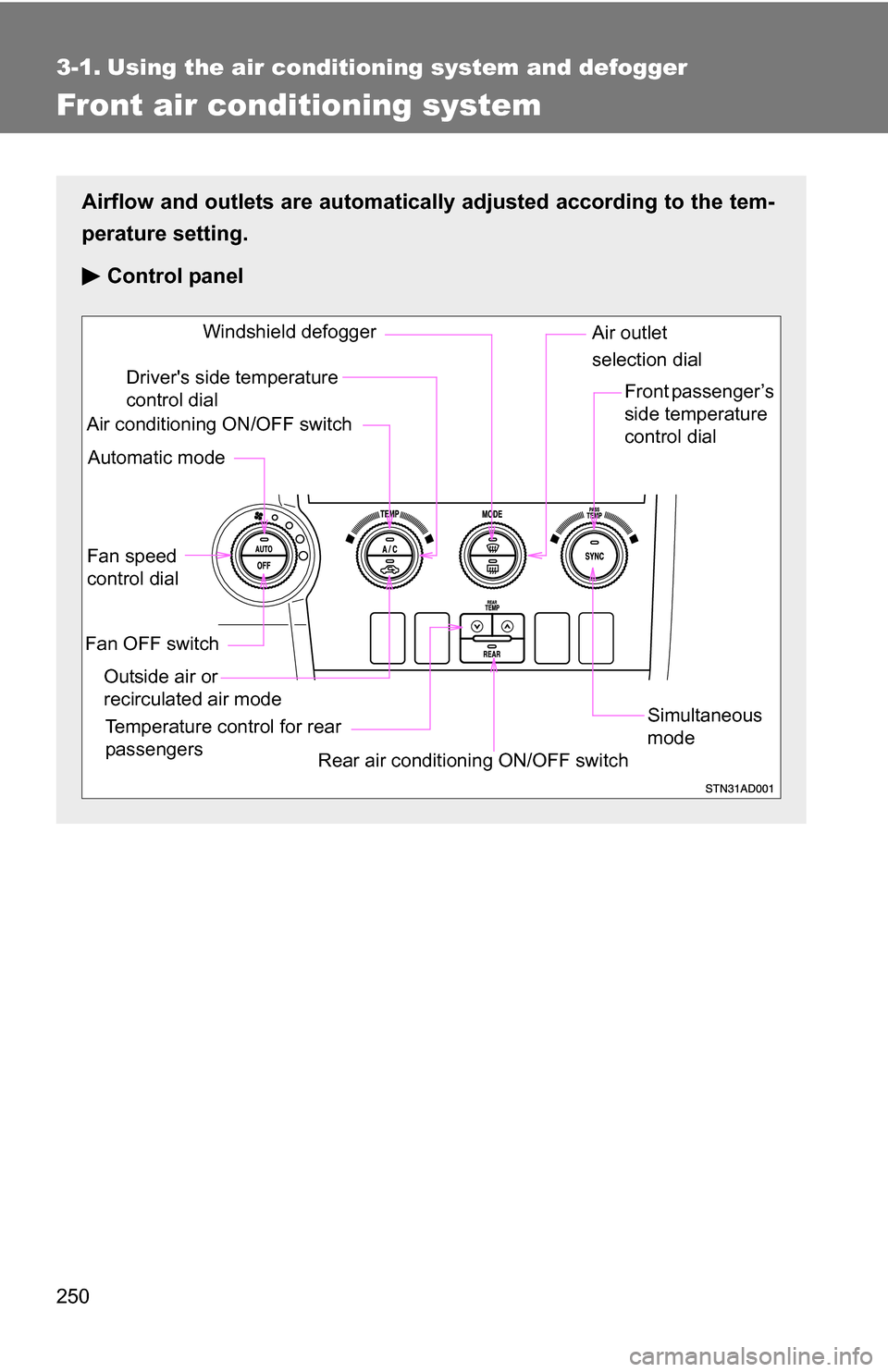
Front air conditioning system
Airflow and outlets are automatically adjusted according to the tem-
perature setting.
Control panel
Fan speed
control dial
Outside air or
recirculated air mode Front passenger’s
side temperature
control dial
Air conditioning ON/OFF switch
Simultaneous
mode
Rear air conditioning ON/OFF switch
Temperature control for rear
passengers Air outlet
selection dial
Driver's side temperature
control dial
Automatic mode Windshield defogger
Fan OFF switch
Page 255 of 596
255
3-1. Using the air conditioning system
and defogger
3
Interior features
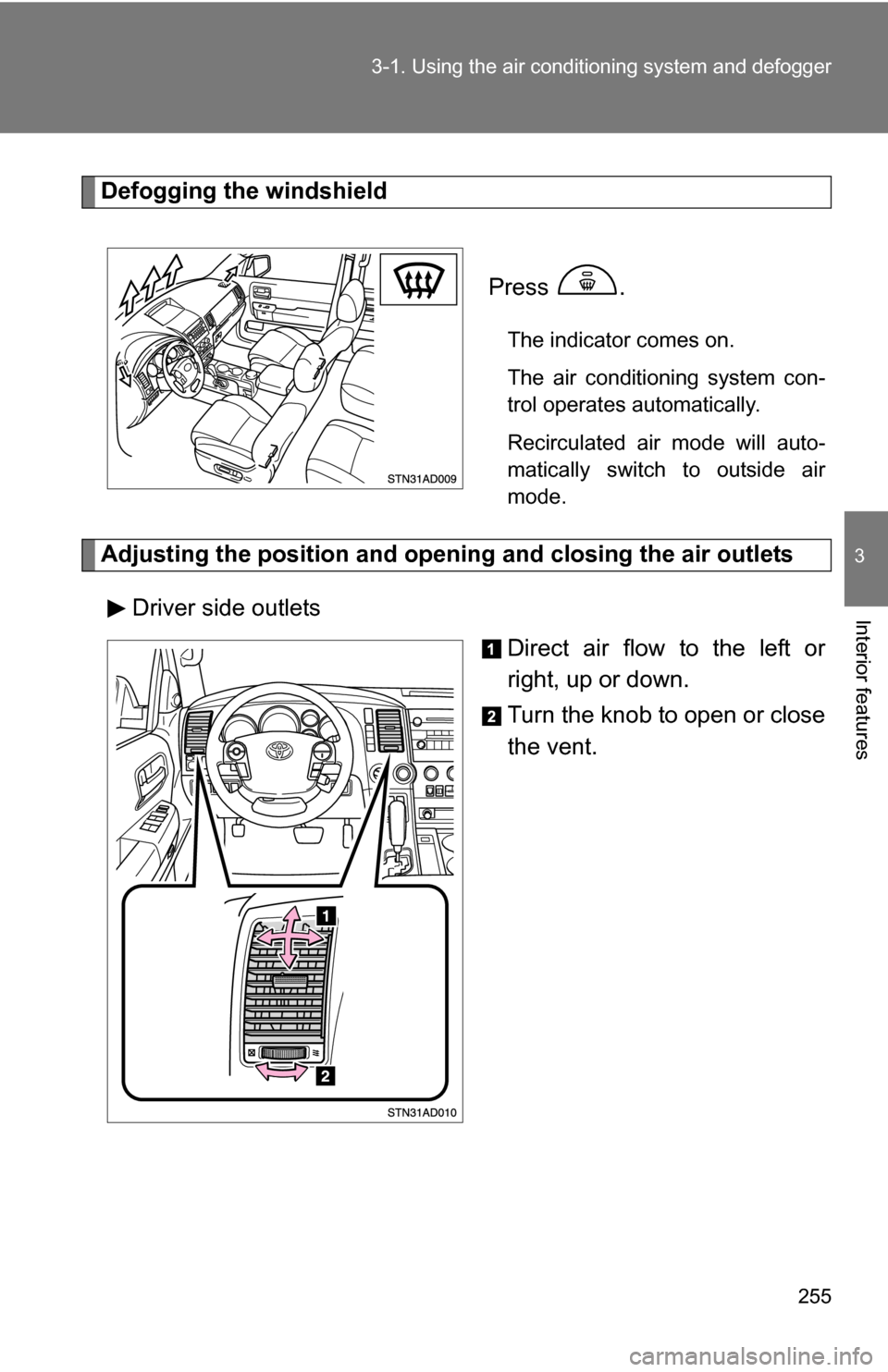
Defogging the windshield
Press
.
The indicator comes on.
The air conditioning system con-
trol operates automatically.
Recirculated air mode will auto-
matically switch to outside air
mode.
Adjusting the position and opening and closing the air outlets
Driver side outlets Direct air flow to the left or
right, up or down.
Turn the knob to open or close
the vent.
Page 257 of 596
257
3-1. Using the air conditioning system
and defogger
3
Interior features
■When outside temperature approaches 32 F (0 C)
The air conditioning system may not operate even when is pressed.
■ When the indicator on
flashes
Press
and turn off the air conditioning system before turning it on
once more. There may be a problem in the air conditioning system if the indi-
cator continues to flash. Turn the air conditioning system off and have it
inspected by your Toyota dealer.
CAUTION
■ To prevent the windshield from fogging up
Do not use during cool air operation in extremely humid weather. The
difference between the temperature of the outside air and that of the wind-
shield can cause the outer surface of the windshield to fog up, blocking your
vision.
NOTICE
■To prevent battery discharge
Do not leave the air conditioning system on longer than necessary when the
engine is stopped.
Page 263 of 596
263
3-1. Using the air conditioning system and defogger
3
Interior features
Windshield wiper de-icer (if equipped)
■The de-icer can be operated when
The engine switch is in the ON position.
CAUTION
■When the windshield wiper de-icer is on
Do not touch the glass at the lower part of the windshield or to the side of the
front pillars as the surfaces can become very hot and burn you.
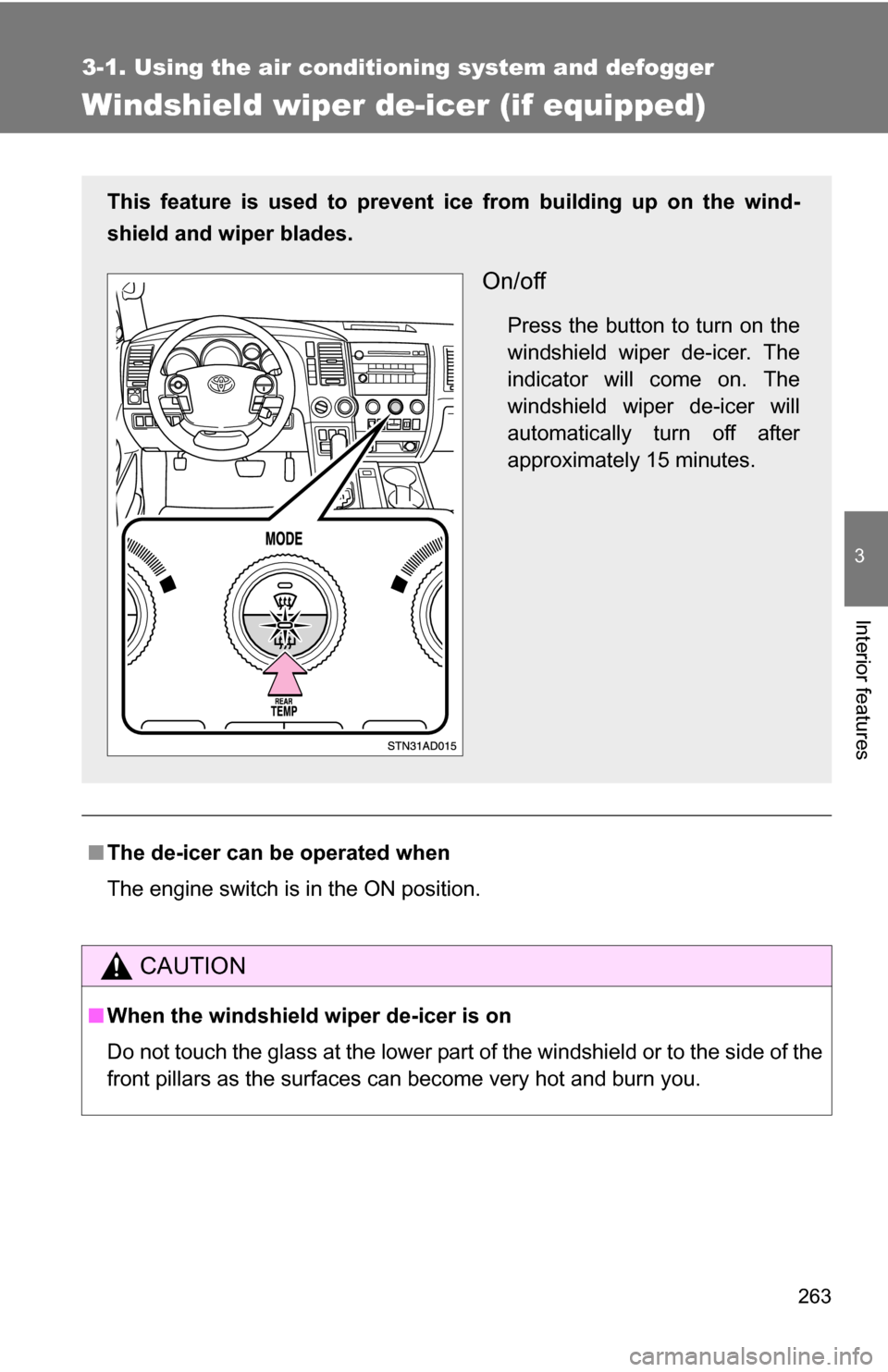
This feature is used to prevent ice from building up on the wind-
shield and wiper blades.
On/off
Press the button to turn on the
windshield wiper de-icer. The
indicator will come on. The
windshield wiper de-icer will
automatically turn off after
approximately 15 minutes.
Page 475 of 596
475
4-3. Do-it-yourself maintenance
4
Maintenance and care
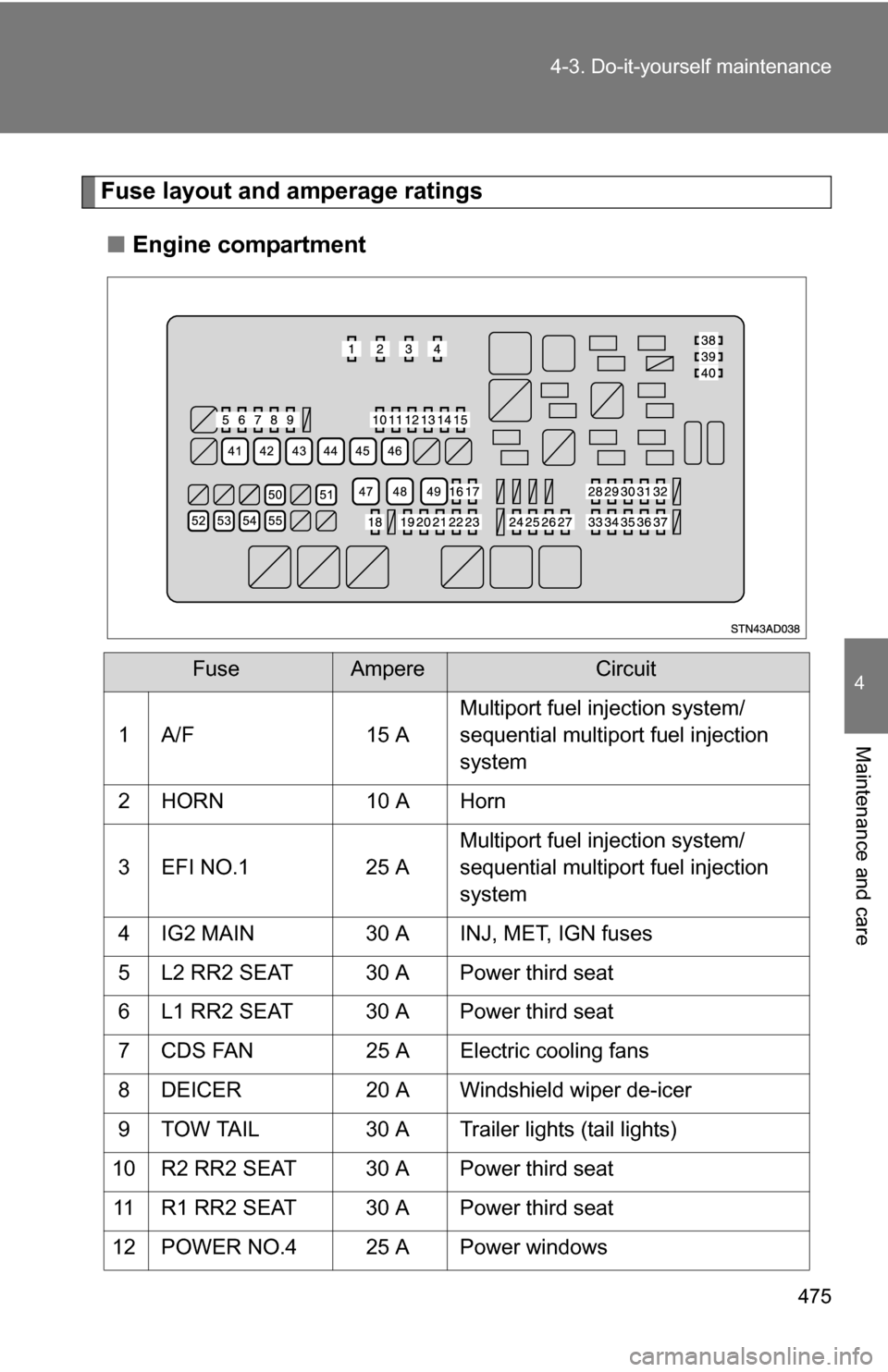
Fuse layout and amperage ratings
■ Engine compartment
FuseAmpereCircuit
1 A/F 15 A Multiport fuel injection system/
sequential multiport fuel injection
system
2 HORN 10 A Horn
3 EFI NO.1 25 A Multiport fuel injection system/
sequential multiport fuel injection
system
4 IG2 MAIN 30 A INJ, MET, IGN fuses
5 L2 RR2 SEAT 30 A Power third seat
6 L1 RR2 SEAT 30 A Power third seat
7 CDS FAN 25 A Electric cooling fans
8 DEICER 20 A Windshield wiper de-icer
9 TOW TAIL 30 A Trailer lights (tail lights)
10 R2 RR2 SEAT 30 A Power third seat 11 R1 RR2 SEAT 30 A Power third seat
12 POWER NO.4 25 A Power windows
Page 517 of 596
5
When trouble arises
517
5-2. Steps to take in an emergency
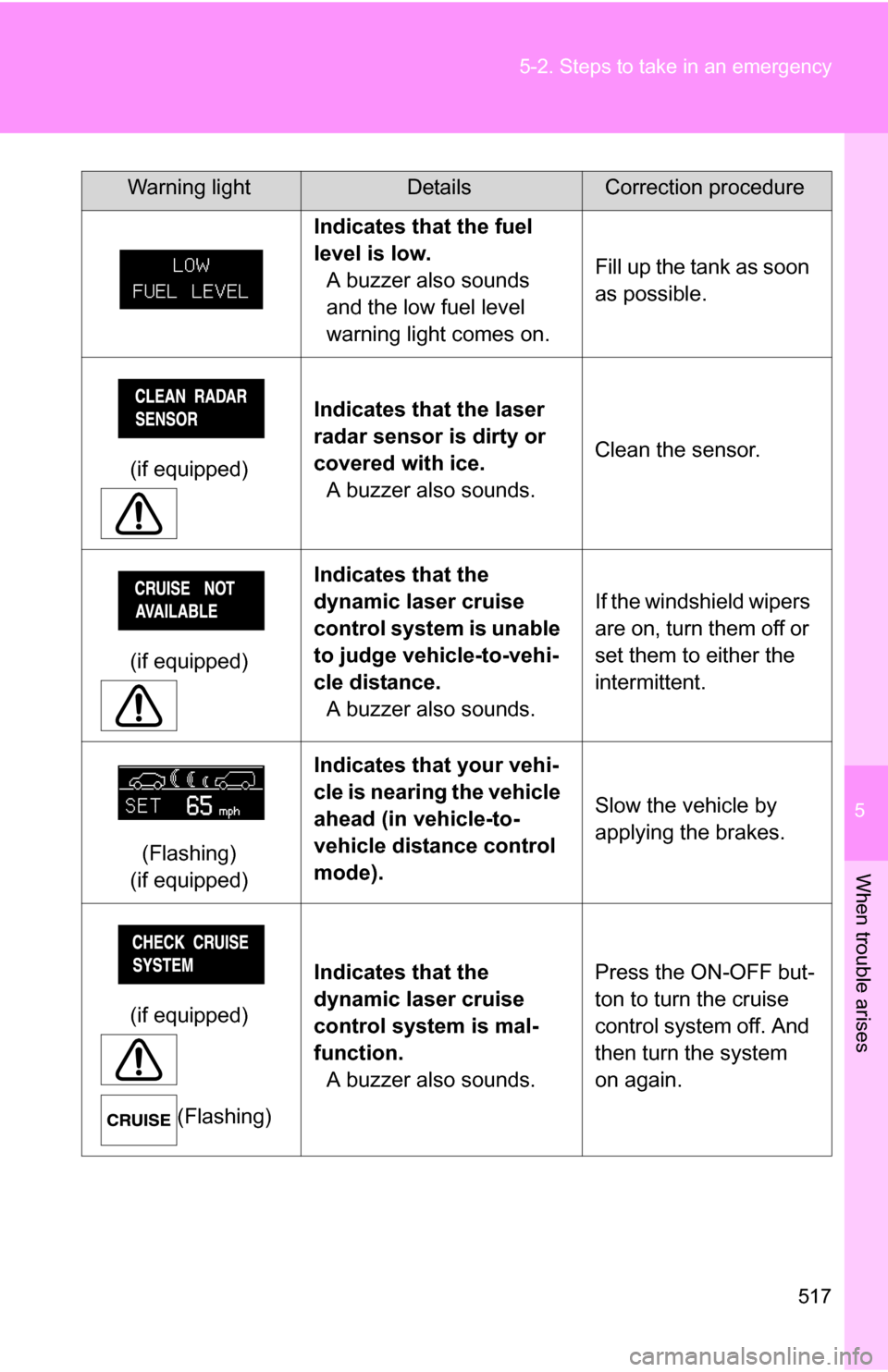
Indicates that the fuel
level is low.
A buzzer also sounds
and the low fuel level
warning light comes on. Fill up the tank as soon
as possible.
(if equipped) Indicates that the laser
radar sensor is dirty or
covered with ice.
A buzzer also sounds. Clean the sensor.
(if equipped) Indicates that the
dynamic laser cruise
control system is unable
to judge vehicle-to-vehi-
cle distance.
A buzzer also sounds. If the windshield wipers
are on, turn them off or
set them to either the
intermittent.
(Flashing)
(if equipped) Indicates that your vehi-
cle is nearing the vehicle
ahead (in vehicle-to-
vehicle distance control
mode).
Slow the vehicle by
applying the brakes.
(if equipped) (Flashing) Indicates that the
dynamic laser cruise
control system is mal-
function.
A buzzer also sounds. Press the ON-OFF but-
ton to turn the cruise
control system off. And
then turn the system
on again.
Warning lightDetailsCorrection procedure