remote control TOYOTA SEQUOIA 2008 2.G User Guide
[x] Cancel search | Manufacturer: TOYOTA, Model Year: 2008, Model line: SEQUOIA, Model: TOYOTA SEQUOIA 2008 2.GPages: 596, PDF Size: 12.93 MB
Page 37 of 596
37
1
1-2. Opening, closing and locking the doors
Before driving
Side doors
The vehicle can be locked and unlocked using the wireless remote
control, key or door lock switch.
■Wireless remote control
P. 3 3
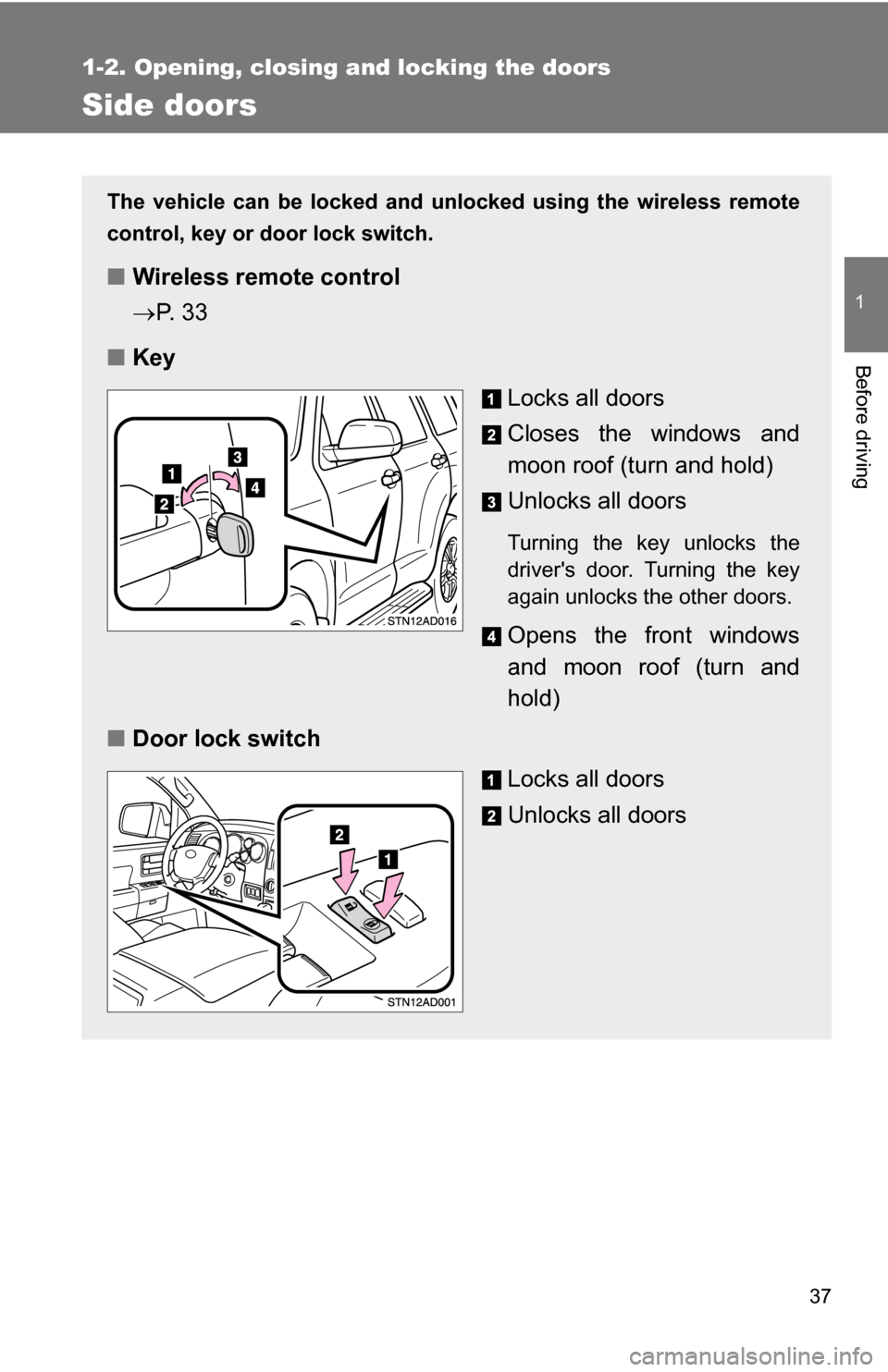
■ Key
Locks all doors
Closes the windows and
moon roof (turn and hold)
Unlocks all doors
Turning the key unlocks the
driver's door. Turning the key
again unlocks the other doors.
Opens the front windows
and moon roof (turn and
hold)
■ Door lock switch
Locks all doors
Unlocks all doors
Page 41 of 596
41
1
1-2. Opening, closing and locking the doors
Before driving
Back door
The back door can be opened using the back door opener. The back
door can be locked/unlocked using a key, wireless remote control or
door lock switch.
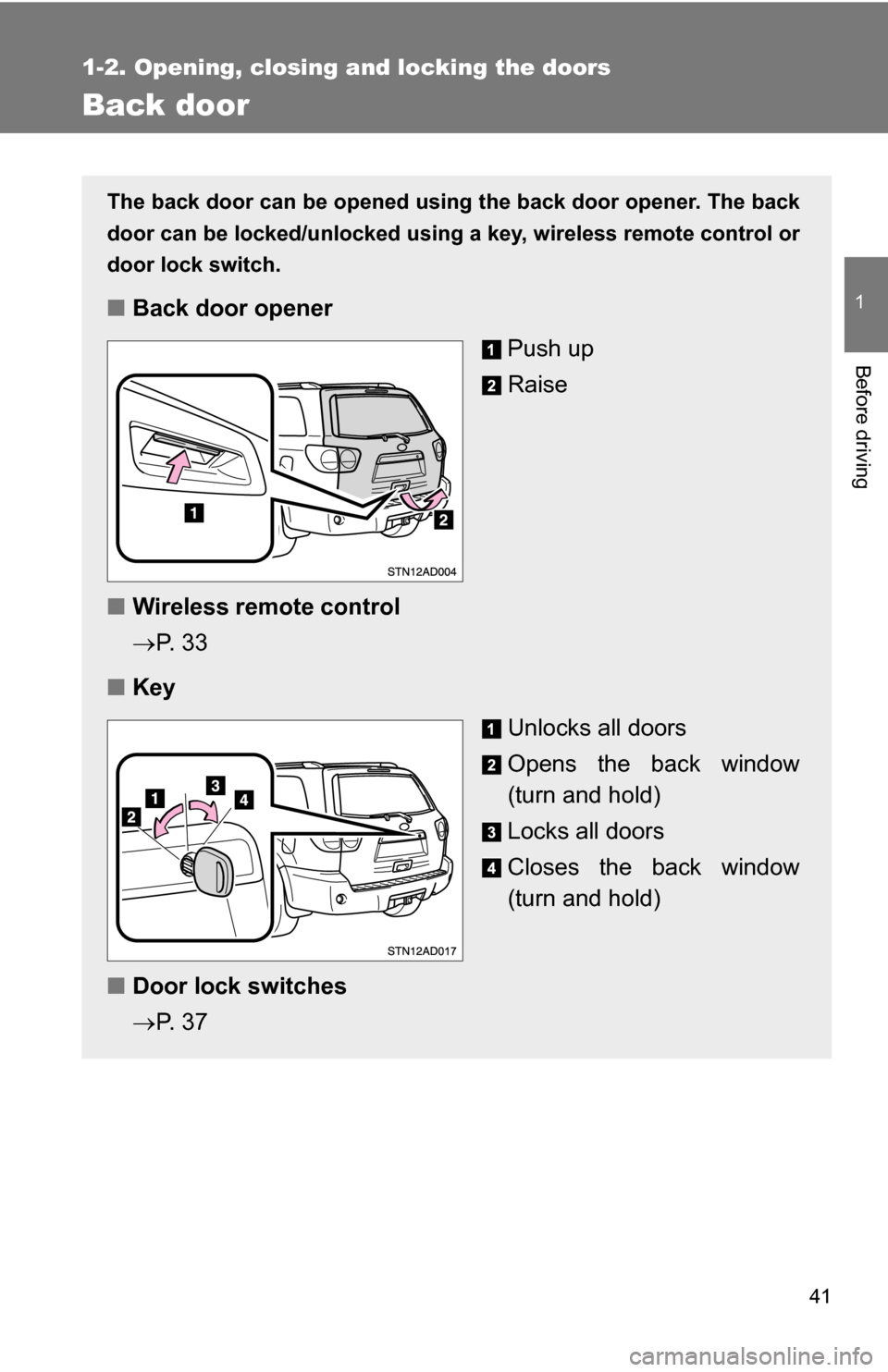
■ Back door opener
Push up
Raise
■ Wireless remote control
P. 3 3
■ Key
Unlocks all doors
Opens the back window
(turn and hold)
Locks all doors
Closes the back window
(turn and hold)
■ Door lock switches
P. 3 7
Page 42 of 596
42 1-2. Opening, closing and locking the doors
The power back door (if equipped) can be opened/closed using the
power back door switch or wireless remote control.
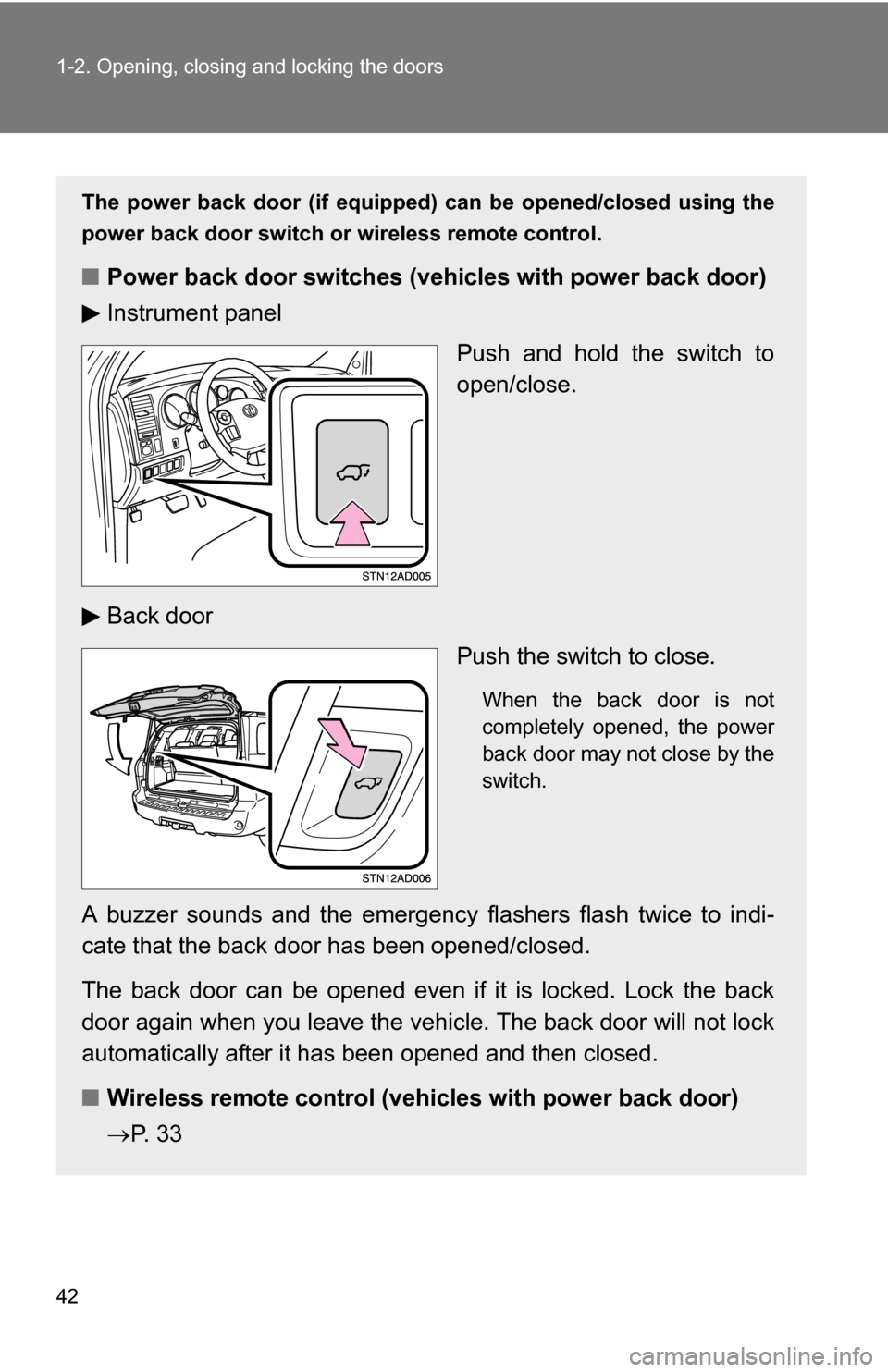
■ Power back door switch es (vehicles with power back door)
Instrument panel
Push and hold the switch to
open/close.
Back door Push the switch to close.
When the back door is not
completely opened, the power
back door may not close by the
switch.
A buzzer sounds and the emergency flashers flash twice to indi-
cate that the back door has been opened/closed.
The back door can be opened even if it is locked. Lock the back
door again when you leave the vehicle. The back door will not lock
automatically after it has been opened and then closed.
■ Wireless remote control (veh icles with power back door)
P. 3 3
Page 43 of 596
43
1-2. Opening, closing and locking the doors
1
Before driving
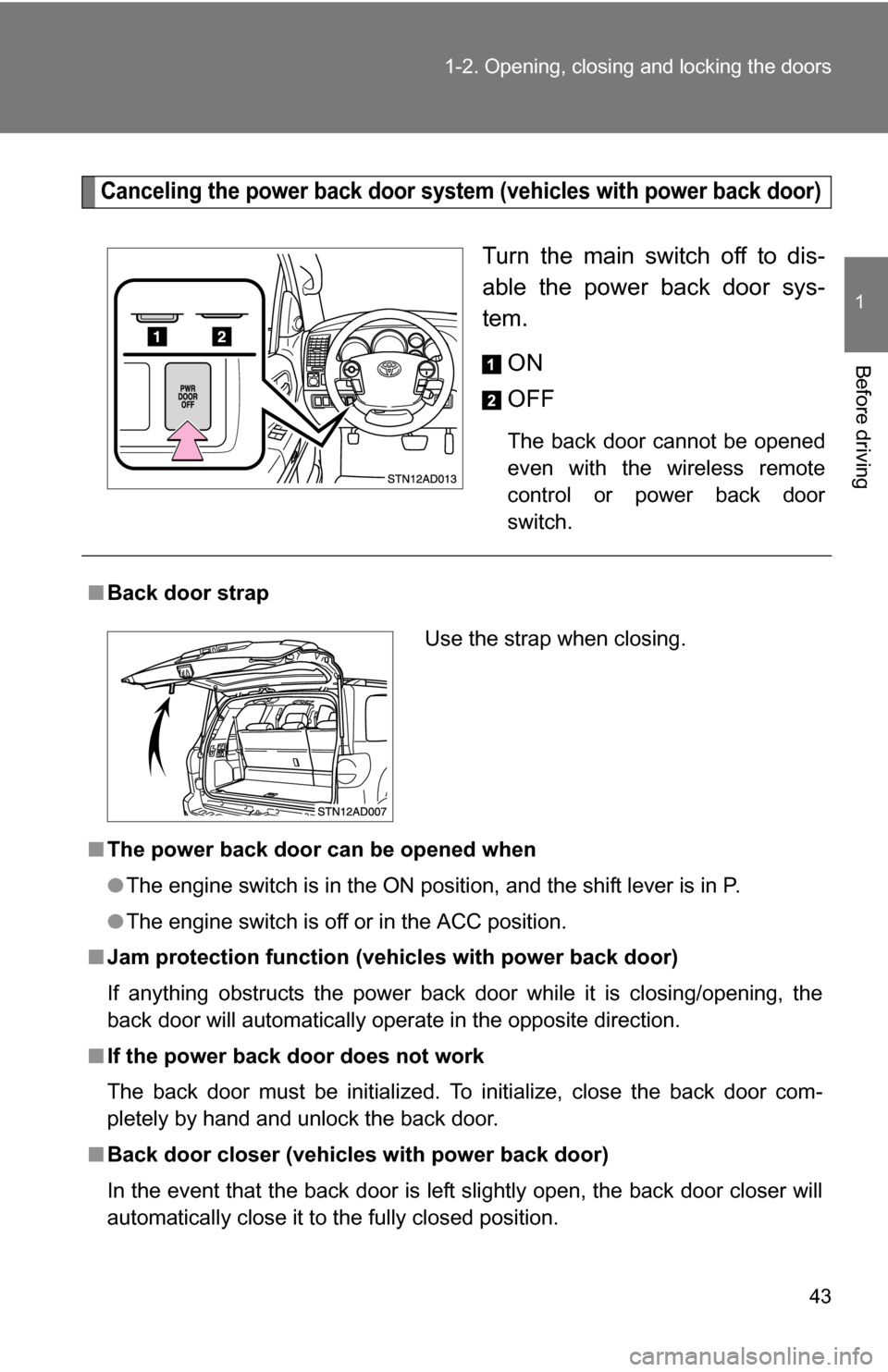
Canceling the power back door system
(vehicles with power back door)
Turn the main switch off to dis-
able the power back door sys-
tem.
ON
OFF
The back door cannot be opened
even with the wireless remote
control or power back door
switch.
■Back door strap
■ The power back door can be opened when
●The engine switch is in the ON position, and the shift lever is in P.
● The engine switch is off or in the ACC position.
■ Jam protection function (vehicles with power back door)
If anything obstructs the power back door while it is closing/opening, the
back door will automatically operate in the opposite direction.
■ If the power back door does not work
The back door must be initialized. To initialize, close the back door com-
pletely by hand and unlock the back door.
■ Back door closer (vehicl es with power back door)
In the event that the back door is left slightly open, the back door closer will
automatically close it to the fully closed position.
Use the strap when closing.
Page 60 of 596
60 1-3. Adjustable components (seats, mirrors, steering wheel)
Linking driving position memory with door unlock operation
Memorized driving positions can be recalled when you unlock the
driver’s door using the wireless remote control and open the driver’s
door.
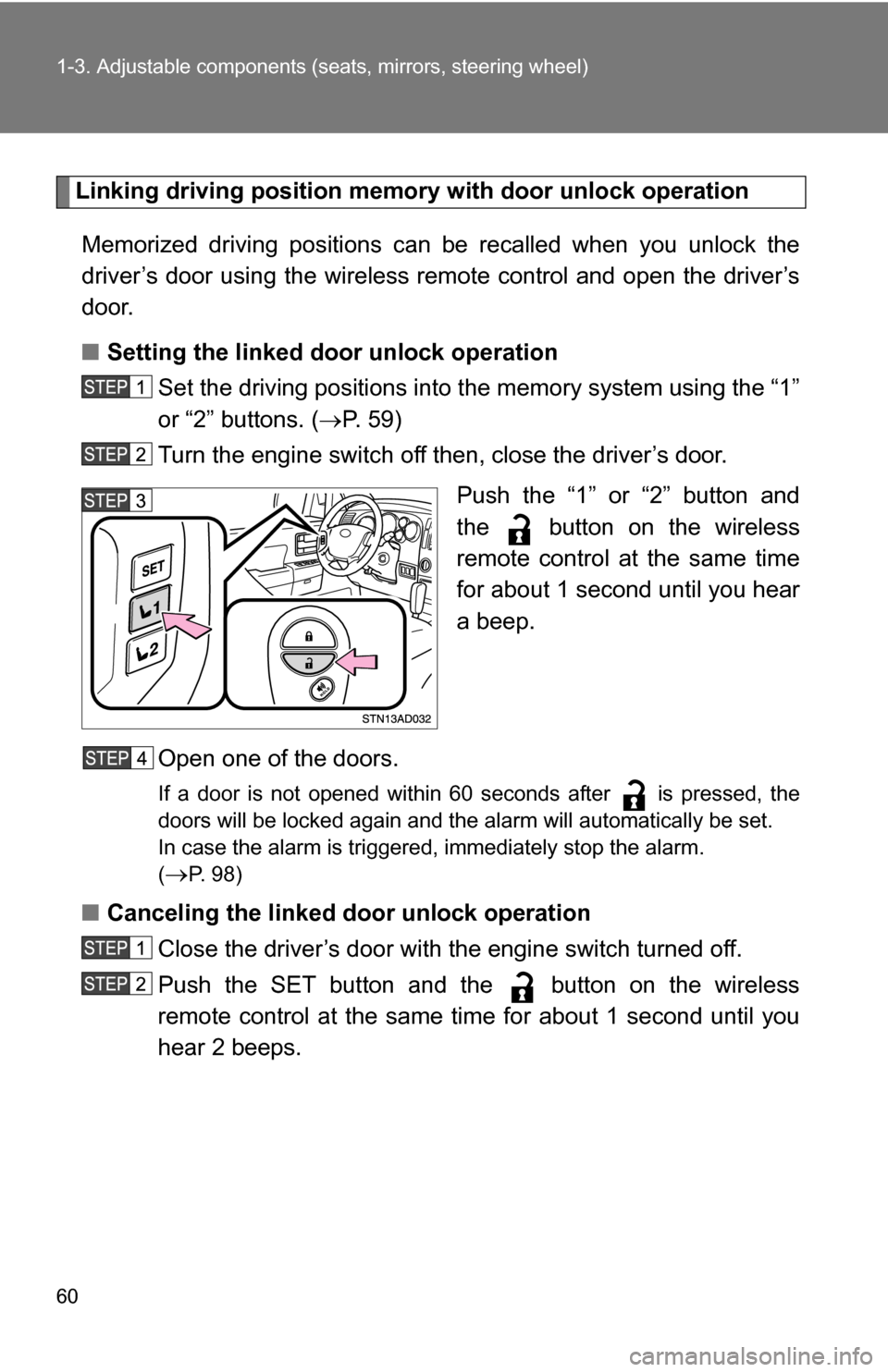
■ Setting the linked door unlock operation
Set the driving positions into the memory system using the “1”
or “2” buttons. ( P. 5 9 )
Turn the engine switch off then, close the driver’s door.
Push the “1” or “2” button and
the button on the wireless
remote control at the same time
for about 1 second until you hear
a beep.
Open one of the doors.
If a door is not opened within 60 seconds after is pressed, the
doors will be locked again and the alarm will automatically be set.
In case the alarm is triggered, immediately stop the alarm.
(
P. 98)
■ Canceling the linked door unlock operation
Close the driver’s door with the engine switch turned off.
Push the SET button and the button on the wireless
remote control at the same time for about 1 second until you
hear 2 beeps.
Page 98 of 596
98
1-6. Theft deterrent system
Alarm
The system sounds the alarm and flashes lights when forcible entry
is detected.
■ Triggering of the alarm
The alarm is triggered in the following situations.
●A locked door is unlocked or opened in any way other than
using the wireless remote control door lock function or key.
The doors will lock again automatically.
● The hood is opened while t he vehicle is locked.
● Vehicles with the glass breakage sensor (if equipped): The
side windows are tapped or broken.
● The battery is reconnected.
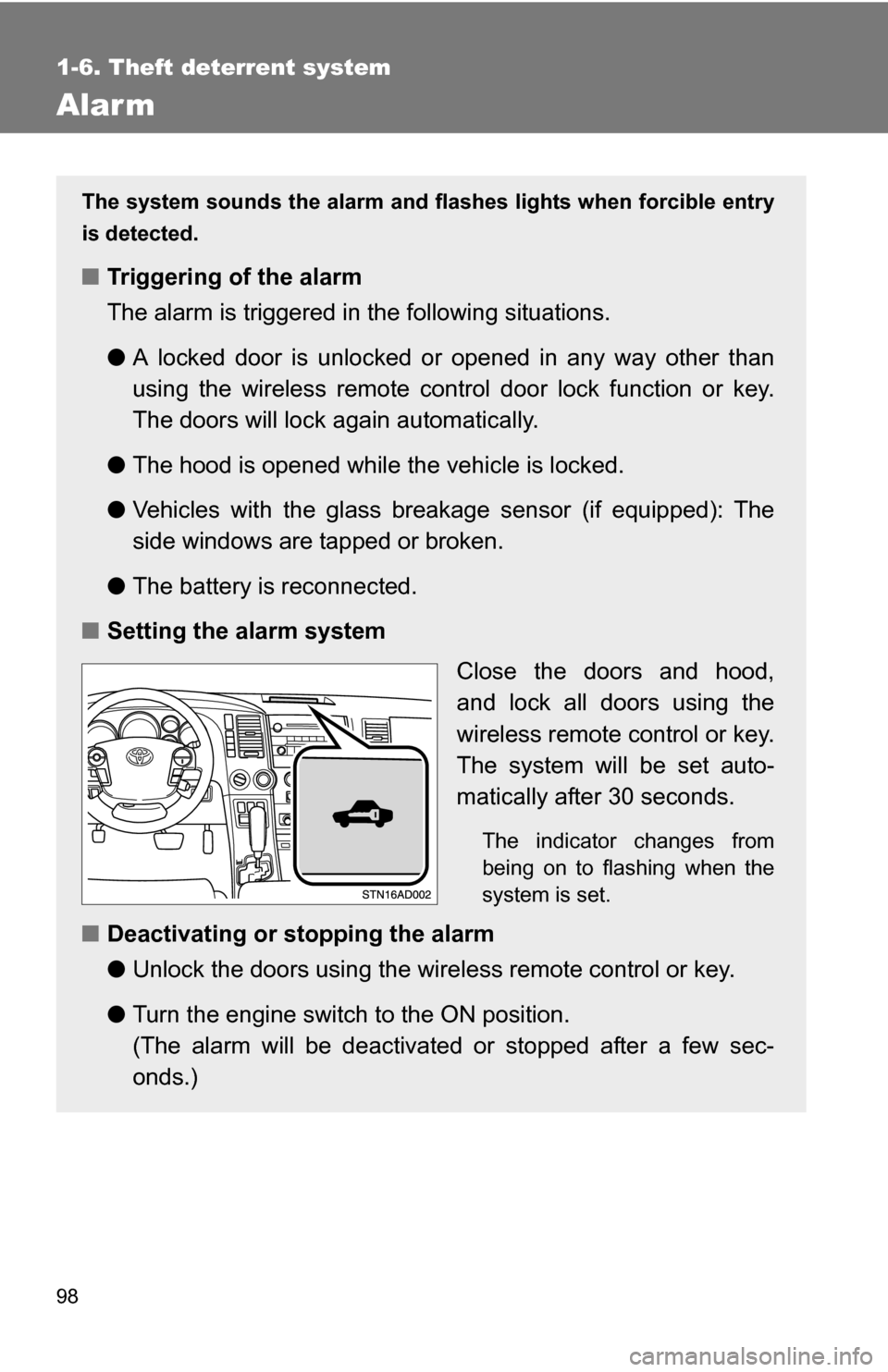
■ Setting the alarm system
Close the doors and hood,
and lock all doors using the
wireless remote control or key.
The system will be set auto-
matically after 30 seconds.
The indicator changes from
being on to flashing when the
system is set.
■Deactivating or stopping the alarm
●Unlock the doors using the wire less remote control or key.
● Turn the engine switch to the ON position.
(The alarm will be deactivated or stopped after a few sec-
onds.)
Page 176 of 596
176 2-3. Operating the lights and wipers
■Daytime running light system (if equipped)
To make your vehicle more visible to other drivers, the front turn signal lights
turn on automatically whenever the engine is started and the parking brake
is released. Daytime running lights are not designed for use at night.
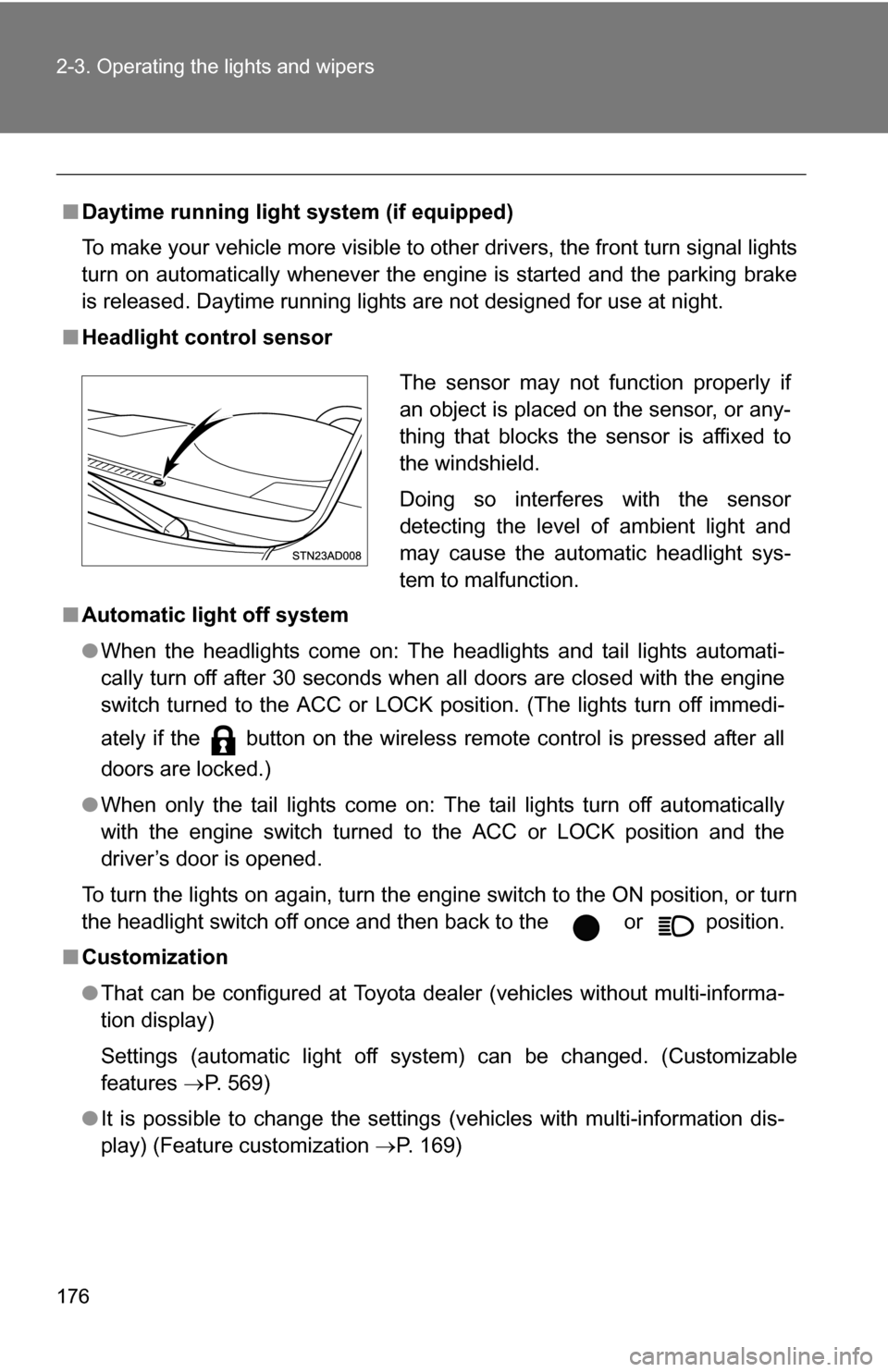
■ Headlight control sensor
■ Automatic light off system
●When the headlights come on: The headlights and tail lights automati-
cally turn off after 30 seconds when all doors are closed with the engine
switch turned to the ACC or LOCK position. (The lights turn off immedi-
ately if the button on the wireless remote control is pressed after all
doors are locked.)
● When only the tail lights come on: The tail lights turn off automatically
with the engine switch turned to the ACC or LOCK position and the
driver’s door is opened.
To turn the lights on again, turn the engine switch to the ON position, or turn
the headlight switch off once and then back to the or position.
■ Customization
●That can be configured at Toyota dealer (vehicles without multi-informa-
tion display)
Settings (automatic light off system) can be changed. (Customizable
features P. 569)
● It is possible to change the settings (vehicles with multi-information dis-
play) (Feature customization P. 169)
The sensor may not function properly if
an object is placed on the sensor, or any-
thing that blocks the sensor is affixed to
the windshield.
Doing so interferes with the sensor
detecting the level of ambient light and
may cause the automatic headlight sys-
tem to malfunction.
Page 248 of 596
248
3-1. Using the air conditioning system and defogger... 250
Front air conditioning system ........................... 250
Rear air conditioning system ........................... 258
Rear window and outside rear view mirror
defoggers ....................... 262
Windshield wiper de-icer ............................ 263
Using the steering wheel climate remote control
switches ......................... 264
3-2. Using the audio system .......................... 266
Audio system (without navigation system)
.......... 266
Using the radio ................. 269
Using the CD player ......... 275
Playing back MP3 and WMA discs ..................... 283
Optimal use of the audio system ........................... 292
Using the AUX adapter .... 294
Using the steering wheel audio switches ............... 296 3-3. Using the rear audio/video
system .......................... 298
Rear seat entertainment system ........................... 298
Using the DVD player (DVD video) ................... 305
Using the DVD player (video CD)...................... 314
Using the DVD player (audio CD/CD text) ........ 316
Using the DVD player (MP3 discs) .................... 317
Using the video mode ...... 319
Changing the Setup Menu settings .......................... 321
3-4. Using the hands-free phone system (for
cellular phone) ............. 329
Hands-free phone system (for cellular phone) ......... 329
Using the hands-free phone system ........................... 333
Making a phone call ......... 342
Setting a cellular phone ... 347
Security and system setup .............................. 352
Using the phone book ...... 355
Interior features3
Page 264 of 596
264
3-1. Using the air conditioning system and defogger
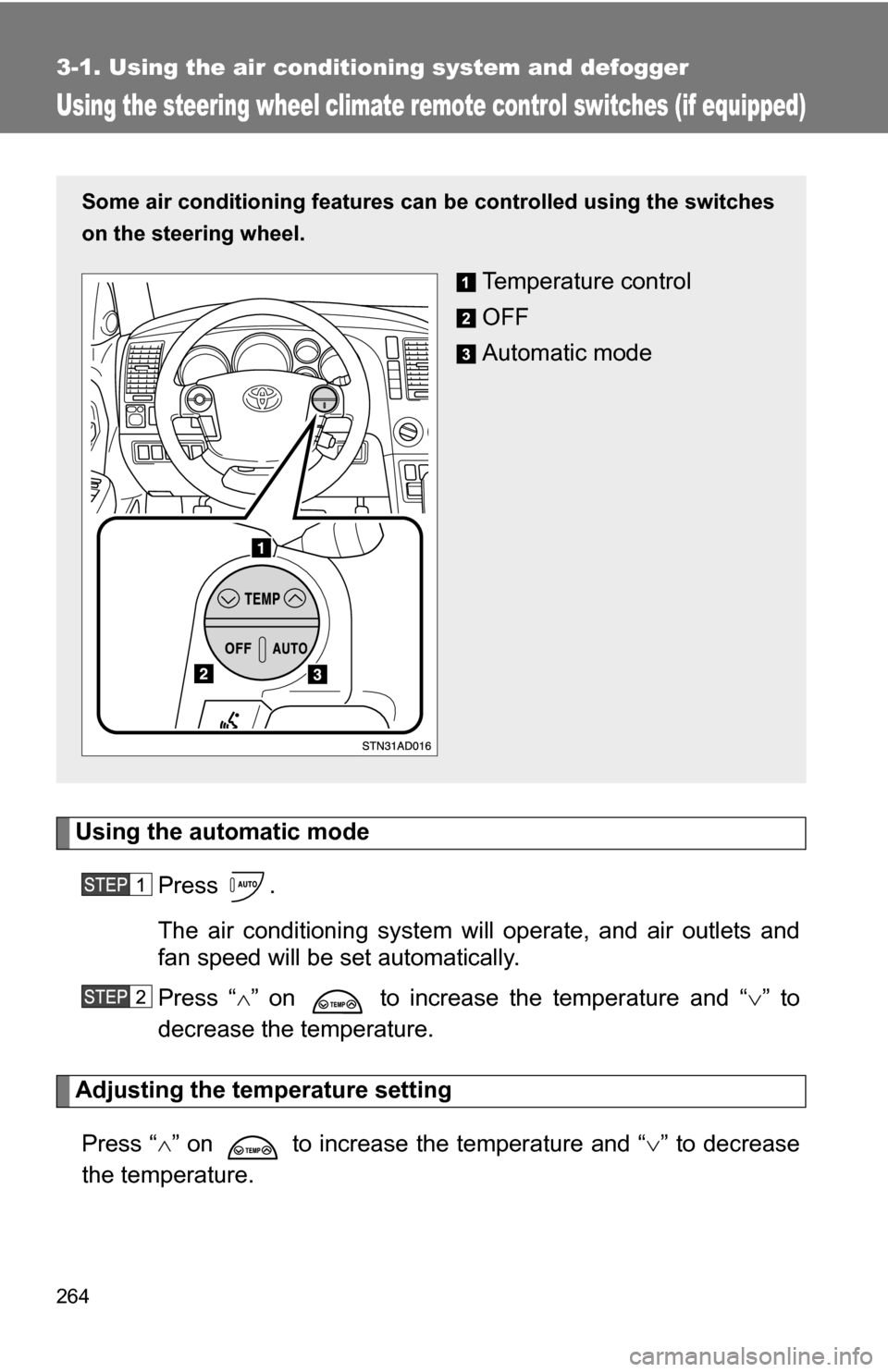
Using the steering wheel climate remote control switches (if equipped)
Using the automatic modePress .
The air conditioning system will operate, and air outlets and
fan speed will be set automatically.
Press “ ” on to increase the temperature and “ ” to
decrease the temperature.
Adjusting the temperature setting
Press “ ” on to increase the temperature and “ ” to decrease
the temperature.
Some air conditioning features can be controlled using the switches
on the steering wheel.
Temperature control
OFF
Automatic mode
Page 298 of 596
298
3-3. Using the rear audio/video system
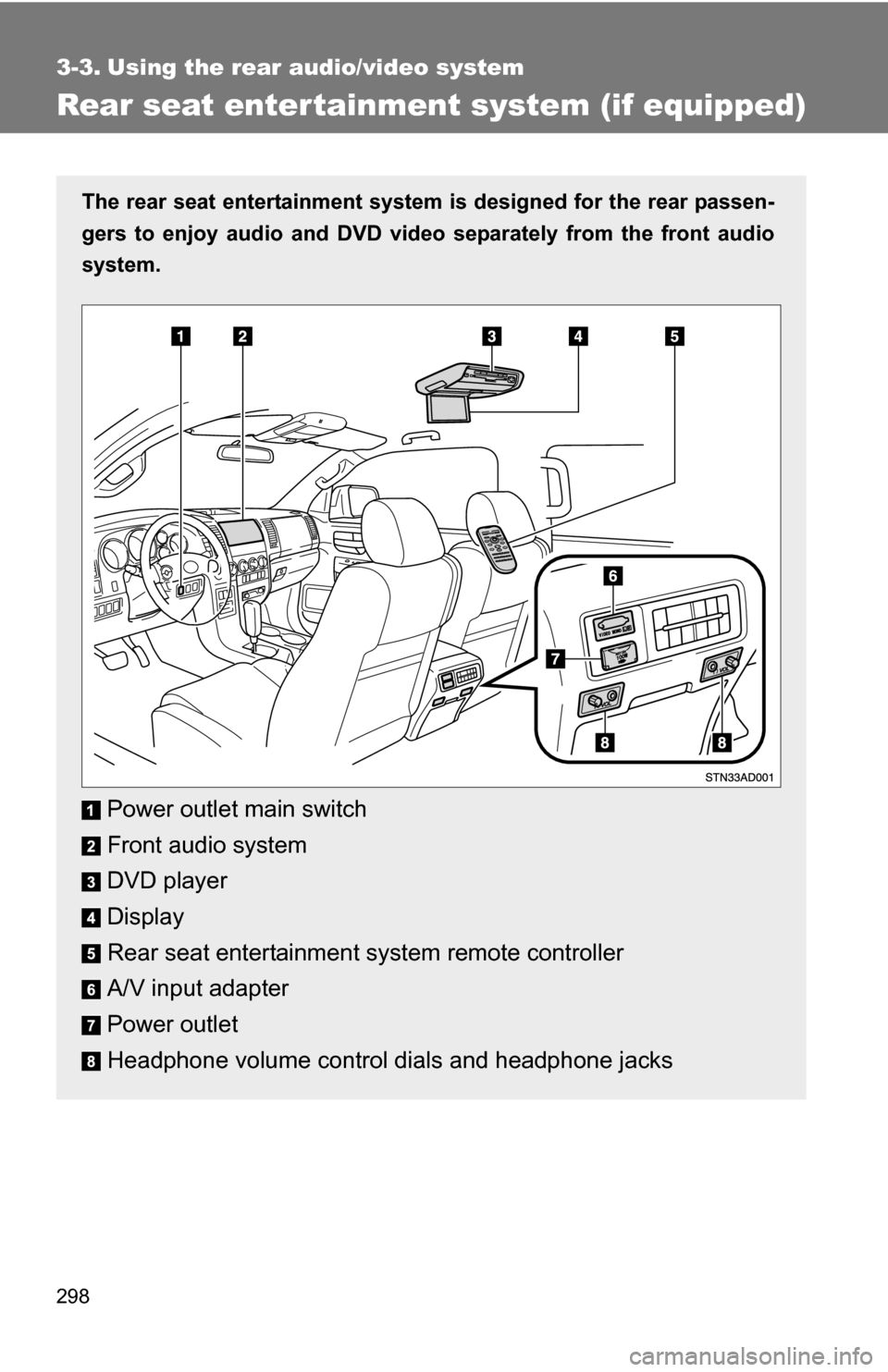
Rear seat enter tainment system (if equipped)
The rear seat entertainment system is designed for the rear passen-
gers to enjoy audio and DVD vide o separately from the front audio
system.
Power outlet main switch
Front audio system
DVD player
Display
Rear seat entertainment system remote controller
A/V input adapter
Power outlet
Headphone volume control dials and headphone jacks