warning TOYOTA SEQUOIA 2010 2.G Owner's Manual
[x] Cancel search | Manufacturer: TOYOTA, Model Year: 2010, Model line: SEQUOIA, Model: TOYOTA SEQUOIA 2010 2.GPages: 660, PDF Size: 12.29 MB
Page 197 of 660
197
2-4. Using other
driving systems
2
When driving
Driving in vehicle-to-vehicle distance control mode
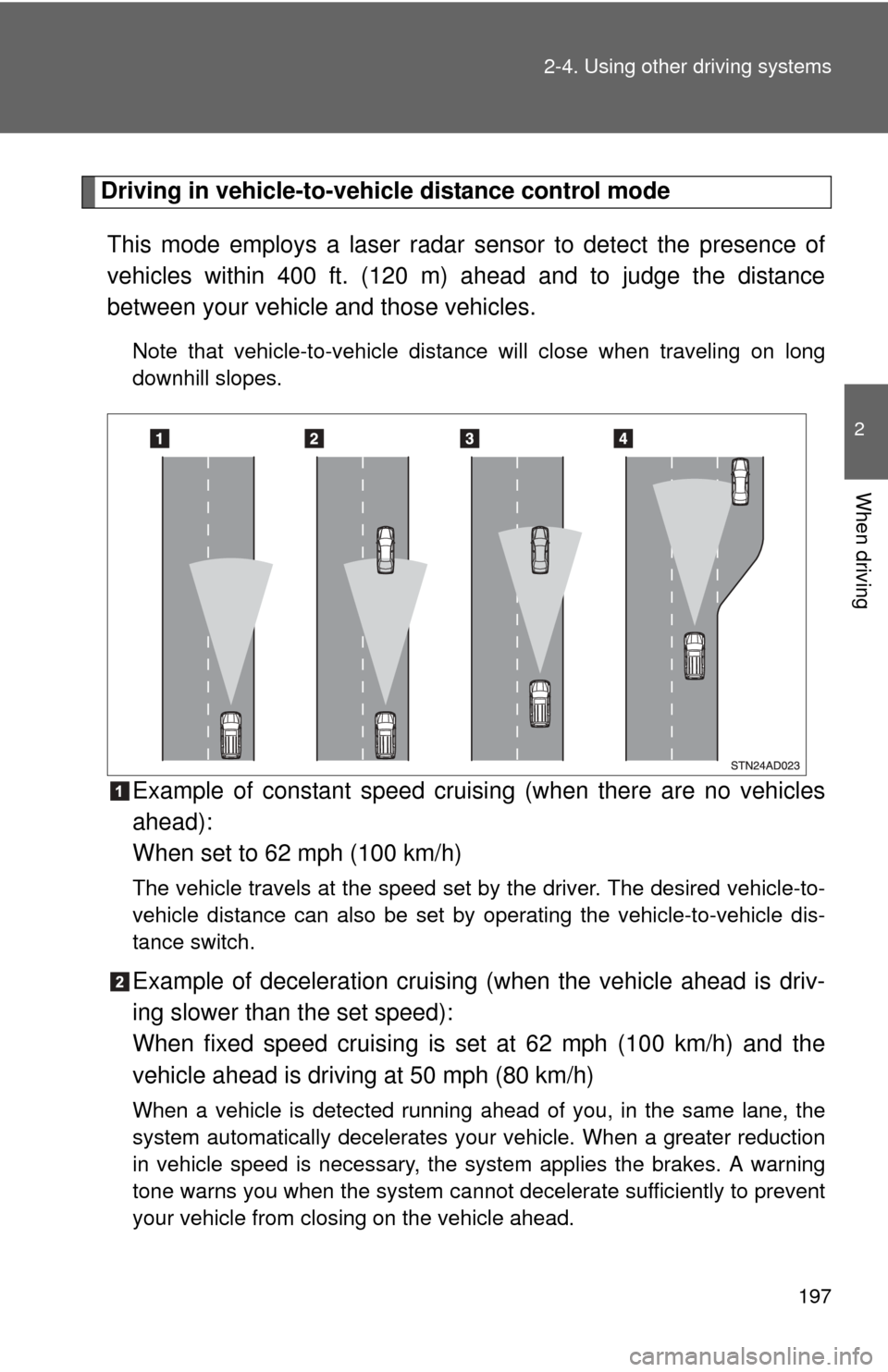
This mode employs a laser radar sensor to detect the presence of
vehicles within 400 ft. (120 m) ahead and to judge the distance
between your vehicle and those vehicles.
Note that vehicle-to-vehicle distanc e will close when traveling on long
downhill slopes.
Example of constant speed cruising (when there are no vehicles
ahead):
When set to 62 mph (100 km/h)
The vehicle travels at the speed set by the driver. The desired vehicle-to-
vehicle distance can also be set by operating the vehicle-to-vehicle dis-
tance switch.
Example of deceleration cruising (when the vehicle ahead is driv-
ing slower than the set speed):
When fixed speed cruising is set at 62 mph (100 km/h) and the
vehicle ahead is driving at 50 mph (80 km/h)
When a vehicle is detected running ahead of you, in the same lane, the
system automatically decelerates your vehicle. When a greater reduction
in vehicle speed is necessary, the system applies the brakes. A warning
tone warns you when the system cannot decelerate sufficiently to prevent
your vehicle from closing on the vehicle ahead.
Page 198 of 660
198 2-4. Using other driving systems
Example of follow-up cruising (when following a vehicle driving
slower than the set speed):
When the speed is set to 62 mph (100 km/h) and the vehicle ahead
is driving at 50 mph (80 km/h)
The system continues follow-up cruising while adjusting for changes in the
speed of the vehicle ahead in order to maintain the vehicle-to-vehicle dis-
tance set by the driver.
Example of acceleration (when there are no longer vehicles driving
slower than the set speed in the lane ahead):
When the speed is set to 62 mph (100 km/h) and the vehicle ahead
driving at 50 mph (80 km/h) is out of the lane
When the vehicle ahead of you executes a lane change, the system
slowly accelerates until the set vehicle speed is reached. The system then
returns to fixed speed cruising.
■Fine adjustment of the set speed
Adjustment of the set speed by the following speed can be made by lightly
pressing the lever up or down and releasing it.
In the constant speed control mode: Approximately 1.0 mph (1.6 km/h)
In the vehicle-to-vehicle distance control mode:U.S.A.: Approximately 5 mph (8 km/h)
Canada: Approximately 3 mph (5 km/h)
■ Dynamic laser cruise control warning lights, display and buzzers
Warning lights, display and buzzers are used to indicate a system malfunc-
tion or to alert you to the need for caution while driving. ( P. 575)
■ The dynamic laser cruise can be set when
●The shift lever is in D or the shift range position must be in between 4 and
6 in S mode.
● Vehicle speed is above approximately 27 mph (45 km/h).
■ Accelerating
The vehicle can be accelerated normally.
Page 212 of 660

212 2-4. Using other driving systems
■Display mode
The rear view monitor display mode can be adjusted when the engine switc\
h
is in the ON position and the shift lever is in R.
●To temporarily turn off the monitor when it is on.
Push the button. The indicator should turn orange.
The monitor will automatically turn on again after the ignition is turned off
and on.
● To manually turn on the monitor when it is turned off.
Push the button. The indicator should turn green.
● To select a display language (English, French, or Spanish).
Push and hold the button for 6 to 12 seconds.
The monitor should turn on and the indicator should turn green.
Push the button.
Each time the button is pushed and released, the language
will change. The warning message should flash 5 seconds after the
button is released, indicating that the change has been completed.
● To permanently disable the monitor.
Push and hold the button for 12 to 15 seconds.
The monitor will turn off and on after 6 seconds. Continue holding the
button down until the display turns back off.
The indicator should flash orange.
The monitor will not automatically turn on again after the ignition is turned
off and on.
Push the button.
Page 233 of 660
233
2-4. Using other
driving systems
2
When driving
■Shifting to 4L position
The VSC OFF indicator will come on.
If the center differential is locked, VSC is automatically turned off.
■ Power steering system operation sound
When you turn the engine switch to ON after the battery has been discon-
nected and reconnected, a sound may be heard from the engine compart-
ment.
This does not indicate a malfunction.
CAUTION
Any of the following conditions may result in an accident which could cause
death or serious injury.
■ The ABS does not opera te effectively when
● The limits of the gripping performance have been exceeded.
● The vehicle hydroplanes while driving at high speed on the wet or slick
road.
■ Stopping distance when the ABS is operating will exceed that of nor-
mal conditions
The ABS is not designed to shorten the vehicle’s stopping distance. Always
maintain a safe distance from the vehicle in front of you in the following situ-
ations.
● When driving on dirt, gravel or snow-covered roads
● When driving with tire chains
● When driving over bumps in the road
● When driving over roads with pothol es or roads with uneven roads
■ When VSC is activated
The slip indicator flashes and a warning buzzer sounds. Always drive care-
fully. Reckless driving may cause an accident. Exercise particular care when
the indicator flashes and a buzzer sounds.
■ TRAC or A-TRAC may not operate effectively when
Directional control and power may not be achievable while driving on slip-
pery road surfaces, even if TRAC or A-TRAC is operating.
Do not drive the vehicle in conditions where stability and power may be lost.
Page 248 of 660
248 2-5. Driving information
CAUTION
■Driving with snow chains
Observe the following precautions to reduce the risk of accidents.
Failing to do so may result in the vehicle being unable to be driven safely,
and may cause death or serious injury.
●Do not drive in excess of the speed limit specified for the tire chains being
used or 30 mph (50 km/h), whichever is lower.
● Avoid driving on bumpy road surfaces or over potholes.
● Avoid sudden turns and braking.
● Slow down sufficiently before entering a curve to ensure that vehicle con-
trol is maintained.
NOTICE
■Repairing or replacing snow tires
Request repairs of and obtain replac ement snow tires from Toyota deal-
ers or legitimate tire retailers.
This is because the removal and atta chment of snow tires affects the
operation of the tire pressure warning valves and transmitters.
■Fitting tire chains
The tire pressure warning valves and transmitters may not function cor-
rectly when tire chains are fitted.
Page 288 of 660
288 3-2. Using the audio system
CAUTION
■For vehicles sold in U.S.A. and Canada
●Part 15 of the FCC Rules
FCC Warning:
Any unauthorized changes or modifications to this equipment will void the
user’s authority to operate this device.
● Laser products
• Do not take this unit apart or attempt to make any changes yourself.
This is an intricate unit that uses a laser pickup to retrieve information
from the surface of compact discs. The laser is carefully shielded so
that its rays remain inside the cabinet. Therefore, never try to disas-
semble the player or alter any of its parts since you may be exposed to
laser rays and dangerous voltages.
• This product utilizes a laser. Use of controls or adjustments or performance of procedures other
than those specified herein may result in hazardous radiation expo-
sure.
NOTICE
■ To prevent battery discharge
Do not leave the audio system on longer than necessary with the engine o\
ff.
■ To avoid damaging the audio system
Take care not to spill drinks or other fluids over the audio system.
Page 338 of 660
338 3-3. Using the Bluetooth® audio system
CAUTION
■FCC WARNING
Changes or modifications in construction not expressly approved by the
party responsible for compliance could void the user’s authority to operate
the equipment.
Radio frequency exposure. This device is approved for Mobile Application
only and, to comply with applicable FCC radio frequency exposure regula-
tions, must be used with a distance of at least 7.9 in. (20 cm) between the
antenna and the body of any person at all time during use.
■ Caution while driving
Do not connect portable players or operate the controls.
NOTICE
■To prevent damage to portable players
Do not leave portable players in the vehicle. The temperature inside the
vehicle may become high, resulting in damage to the player.
Page 390 of 660
390 3-5. Using the hands-free phone system (for cellular phone)
CAUTION
■FCC WARNING
Changes or modifications in construction not expressly approved by the
party responsible for compliance could void the user’s authority to operate
the equipment.
Radio frequency exposure. This device is approved for Mobile Application
only and, to comply with applicable FCC radio frequency exposure regula-
tions, must be used with a distance of at least 7.9 in. (20 cm) between the
antenna and the body of any person at all times during use.
■ Caution while driving
Do not use a cellular phone, or connect the Bluetooth
® phone.
NOTICE
■To prevent damage to a cellular phone
Do not leave a cellular phone in the vehicle. The temperature inside may
become high resulting in damage to the phone.
Page 476 of 660
476 3-8. Other interior features
■Before programming
●Install a new battery in the remote control transmitter.
● The battery side of the remote control transmitter must be pointed away
from the HomeLink
®.
■ Certification for the garage door opener
This device complies with Part 15 of the FCC Rules and with RSS-210 of the
IC Rules.
Operation is subject to the following two conditions: (1) This device may not
cause harmful interference, and (2) this device must accept any interference
received, including interference that may cause undesired operation.
WARNING: This transmitter has been tested and complies with FCC and IC
rules. Changes or modifications not expressly approved by the party respon-
sible for compliance could void the user’s authority to operate the device.
CAUTION
■When programming a garage door or other remote control device
The garage door may operate, so ensure that people and objects are out of
danger to prevent potential harm.
■ Conforming to federal safety standards
Do not use the HomeLink
® Compatible Transceiver with any garage door
opener or device that lacks safety stop and reverse features as required by
federal safety standards.
This includes any garage door that cannot detect an obstruction object. A
door or device without these features increases the risk of death or serious
injury.
Page 488 of 660
488 4-2. Maintenance
■Allow inspection and repairs to be performed by a Toyota dealer
●Toyota technicians are well-trained specialists and are kept up to date
with the latest service information. They are well informed about the
operations of all systems on your vehicle.
● Keep a copy of the repair order. It proves that the maintenance that has
been performed is under warranty coverage. If any problem should arise
while your vehicle is under warranty, your Toyota dealer will promptly
take care of it.
CAUTION
■Warning in handling of battery
●Engine exhaust, some of its constituents, and a wide variety of automobile
components contain or emit chemicals known to the State of California to
cause cancer and birth defects and other reproductive harm. Work in a
well ventilated area.
● Oils, fuels and fluids contained in vehicles as well as waste produced by
component wear contain or emit chemicals known to the State of Califor-
nia to cause cancer and birth defects or other reproductive harm. Avoid
exposure and wash any affected area immediately.
● Battery posts, terminals and related accessories contain lead and lead
compounds which are known to cause brain damage. Wash your hands
after handling. ( P. 508)