stop start TOYOTA SEQUOIA 2011 2.G User Guide
[x] Cancel search | Manufacturer: TOYOTA, Model Year: 2011, Model line: SEQUOIA, Model: TOYOTA SEQUOIA 2011 2.GPages: 688, PDF Size: 14.76 MB
Page 236 of 688
236
2-4. Using other driving systems
Driving assist systems
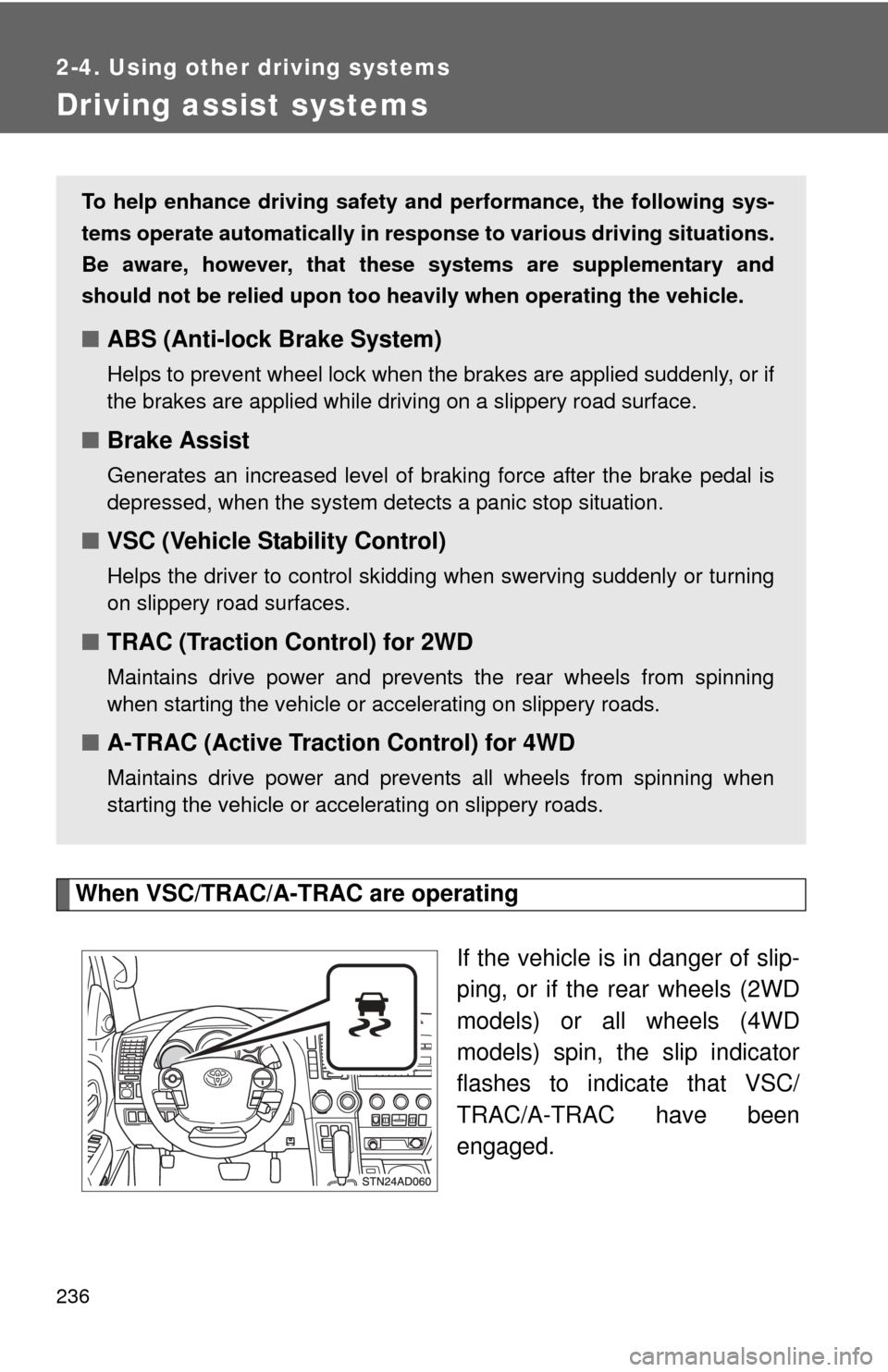
When VSC/TRAC/A-TRAC are operatingIf the vehicle is in danger of slip-
ping, or if the rear wheels (2WD
models) or all wheels (4WD
models) spin, the slip indicator
flashes to indicate that VSC/
TRAC/A-TRAC have been
engaged.
To help enhance driving safety and performance, the following sys-
tems operate automatically in res ponse to various driving situations.
Be aware, however, that these systems are supplementary and
should not be relied upon too h eavily when operating the vehicle.
■ABS (Anti-lock Brake System)
Helps to prevent wheel lock when the brakes are applied suddenly, or if
the brakes are applied while driving on a slippery road surface.
■Brake Assist
Generates an increased level of braking force after the brake pedal is
depressed, when the system detects a panic stop situation.
■VSC (Vehicle Stability Control)
Helps the driver to control skidding when swerving suddenly or turning
on slippery road surfaces.
■TRAC (Traction Control) for 2WD
Maintains drive power and prevents the rear wheels from spinning
when starting the vehicle or accelerating on slippery roads.
■A-TRAC (Active Traction Control) for 4WD
Maintains drive power and prevents all wheels from spinning when
starting the vehicle or accelerating on slippery roads.
Page 239 of 688
239
2-4. Using other
driving systems
2
When driving
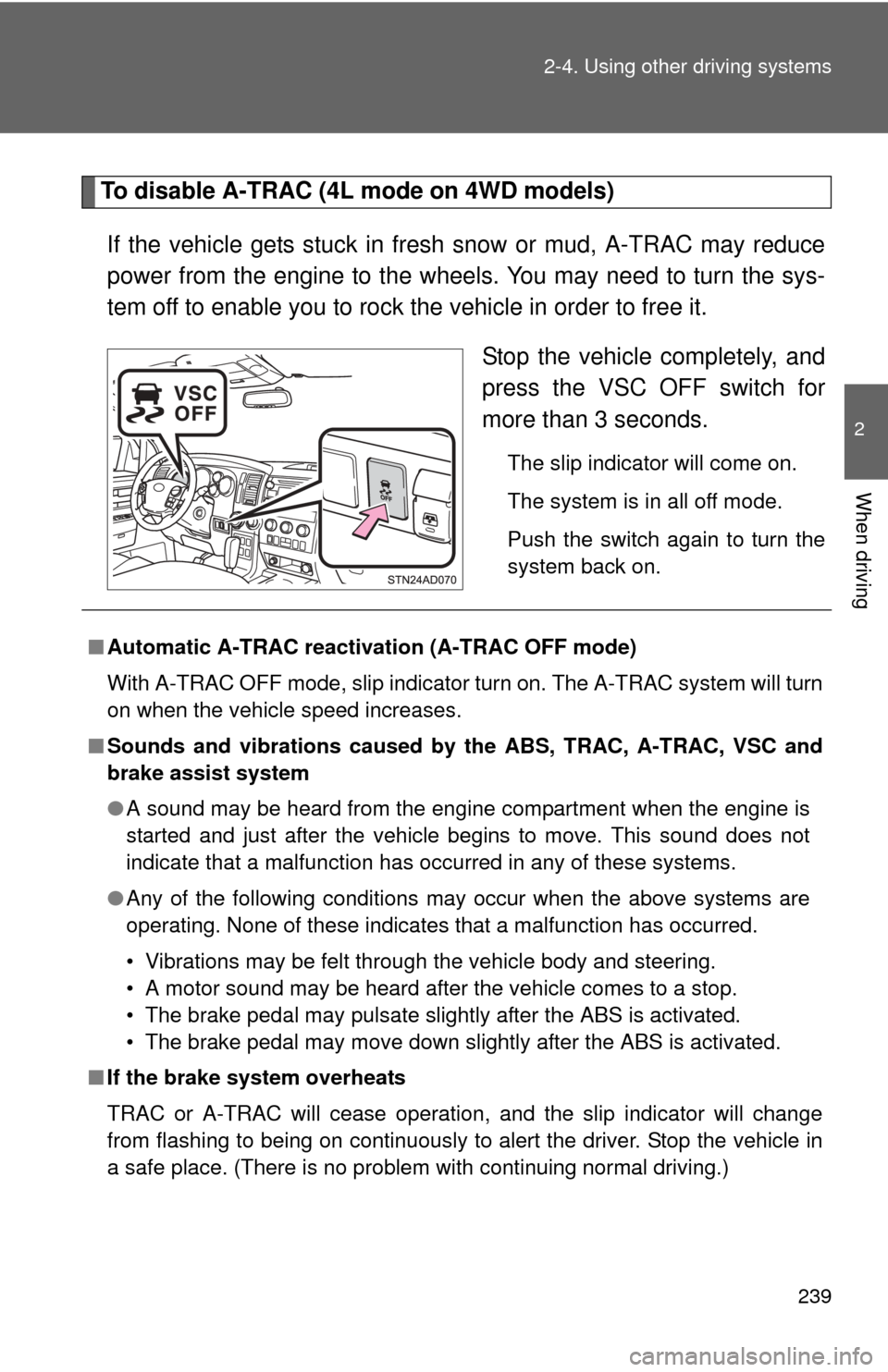
To disable A-TRAC (4L mode on 4WD models)
If the vehicle gets stuck in fresh snow or mud, A-TRAC may reduce
power from the engine to the wheels. You may need to turn the sys-
tem off to enable you to rock the vehicle in order to free it. Stop the vehicle completely, and
press the VSC OFF switch for
more than 3 seconds.
The slip indicator will come on.
The system is in all off mode.
Push the switch again to turn the
system back on.
■Automatic A-TRAC reactivat ion (A-TRAC OFF mode)
With A-TRAC OFF mode, slip indicator turn on. The A-TRAC system will turn
on when the vehicle speed increases.
■ Sounds and vibrations caused by the ABS, TRAC, A-TRAC, VSC and
brake assist system
●A sound may be heard from the engine compartment when the engine is
started and just after the vehicle begins to move. This sound does not
indicate that a malfunction has occurred in any of these systems.
● Any of the following conditions may occur when the above systems are
operating. None of these indicates that a malfunction has occurred.
• Vibrations may be felt through the vehicle body and steering.
• A motor sound may be heard after the vehicle comes to a stop.
• The brake pedal may pulsate slightly after the ABS is activated.
• The brake pedal may move down slightly after the ABS is activated.
■ If the brake system overheats
TRAC or A-TRAC will cease operation, and the slip indicator will change
from flashing to being on continuously to alert the driver. Stop the vehicle in
a safe place. (There is no problem with continuing normal driving.)
Page 250 of 688
250 2-5. Driving information
CAUTION
■Capacity and distribution
●Even if the total load of occupant’s weight and the cargo load is less
than the total load capacity, do not apply the load unevenly. Improper
loading may cause deterioration of steering or braking control which
may cause death or serious injury.
■Roof luggage carrier precautions
To use the roof rails as a roof luggag e carrier, you must fit the roof rails
with two or more genuine Toyota cross rails or their equivalent.
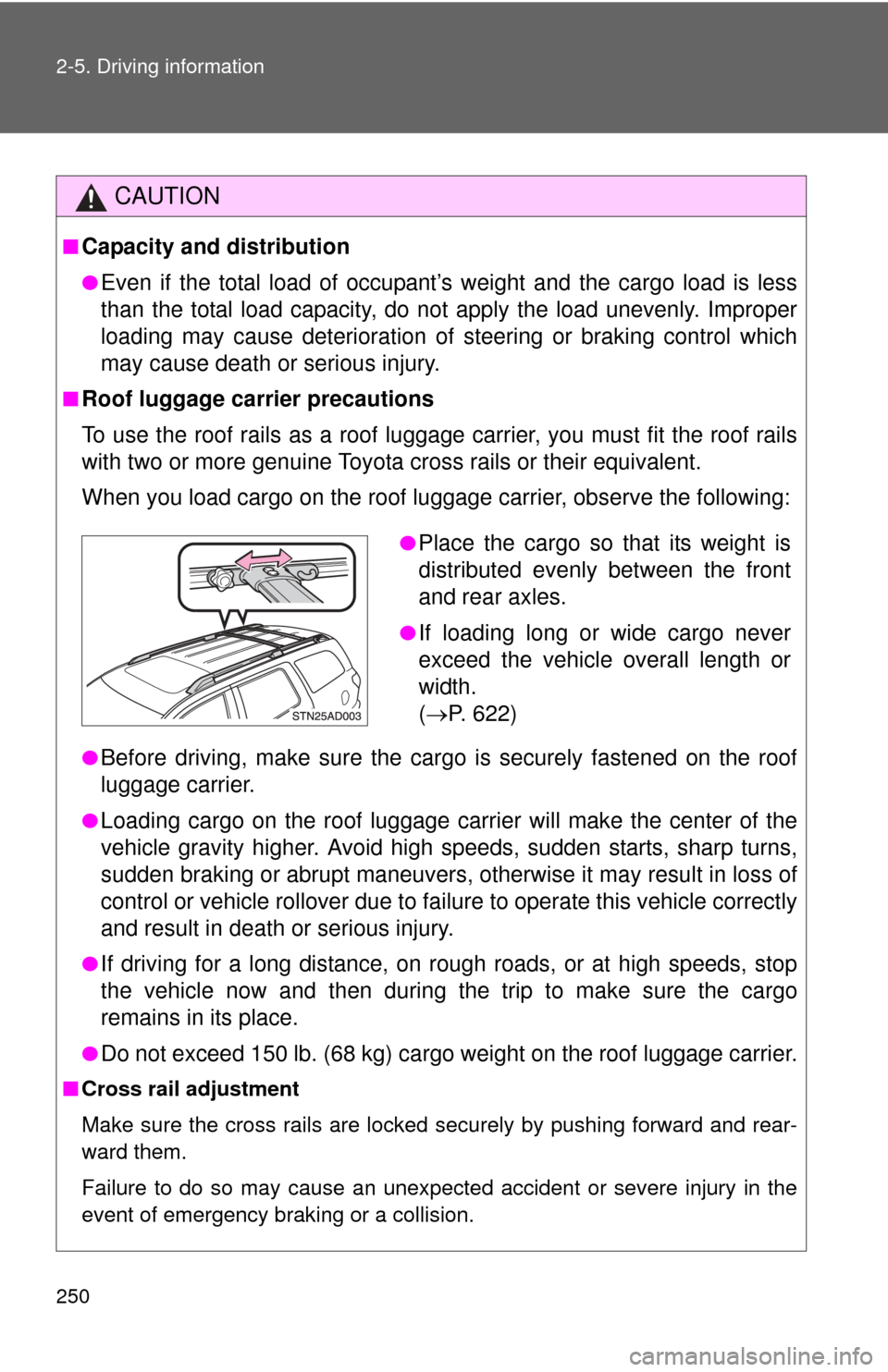
When you load cargo on the roof luggage carrier, observe the following:
●Before driving, make sure the cargo is securely fastened on the roof
luggage carrier.
●Loading cargo on the r oof luggage carrier will make the center of the
vehicle gravity higher. Avoid high speeds, sudden starts, sharp turns,
sudden braking or abrupt maneuvers, otherwise it may result in loss of
control or vehicle rollover due to failure to operate this vehicle correctly
and result in death or serious injury.
●If driving for a long distance, on rough roads, or at high speeds, stop
the vehicle now and then during the trip to make sure the cargo
remains in its place.
●Do not exceed 150 lb. (68 kg) cargo weight on the roof luggage carrier.
■ Cross rail adjustment
Make sure the cross rails are locked securely by pushing forward and rear-
ward them.
Failure to do so may cause an unexpected accident or severe injury in the
event of emergency braking or a collision.
●Place the cargo so that its weight is
distributed evenly between the front
and rear axles.
●If loading long or wide cargo never
exceed the vehicle overall length or
width.
( P. 622)
Page 269 of 688

269
2-5. Driving information
2
When driving
Trailer towing tips
Your vehicle will handle differently when towing a trailer. Help to avoid
an accident, death or serious injury, keep the following in mind when
towing:
● Speed limits for towing a trailer vary by state or province. Do not
exceed the posted towing speed limit.
● Toyota recommends that the vehicle-trailer speed limit is 65 mph
(104 km/h) on a flat, straight, dry road. Do not exceed this limit, the
posted towing speed limit or the speed limit for your trailer as set
forth in your trailer owner’s man ual, whichever is lowest. Instability
of the towing vehicle-trailer combin ation (trailer sway) increases as
speed increases. Exceeding speed limits may cause loss of con-
trol.
● Before starting out, check the trailer lights, tires and the vehicle-
trailer connections. Recheck after driving a short distance.
● Practice turning, stopping and reve rsing with the trailer attached in
an area away from traffic until you become accustomed to the feel
of the vehicle-trailer combination.
● Reversing with a trailer attached is difficult and requires practice.
Grip the bottom of the steering wheel and move your hand to the
left to move the trailer to the left. Move your hand to the right to
move the trailer to the right. (Thi s is generally opposite to reversing
without a trailer attached.) Avoid sharp or prolonged turning. Have
someone guide you when reversing to reduce the risk of an acci-
dent.
● As stopping distance is increased when towing a trailer, vehicle-to-
vehicle distance should be increased. For each 10 mph (16 km/h)
of speed, allow at least o ne vehicle and trailer length.
● Avoid sudden braking as you may skid, resulting in the trailer jack-
knifing and loss of vehicle control. This is especially true on wet or
slippery surfaces.
Page 270 of 688

270 2-5. Driving information
●Avoid jerky starts or sudden acceleration.
● Avoid jerky steering and sharp turns, and slow down before mak-
ing a turn.
● Note that when making a turn, th e trailer wheels will be closer than
the vehicle wheels to the inside of the turn. Compensate by making
a wider than normal turning radius.
● Slow down before making a turn, in crosswinds, on wet or slippery
surfaces, etc.
Increasing vehicle speed c an destabilize the trailer.
● Take care when passing other v ehicles. Passing requires consider-
able distance. After passing a vehi cle, do not forget the length of
your trailer, and be sure you hav e plenty of room before changing
lanes.
● To maintain engine braking efficiency, do not use the transmission
in D.
Transmission shift range position must be in 5 in the S mode.
● Instability happens more frequently when descending steep or long
downhill grades. Before descending, slow down and downshift. Do
not make sudden downshifts while descending steep or long down-
hill grades.
● Avoid holding the brake pedal down too long or applying the
brakes too frequently. This could cause the brakes to overheat and
result in reduced braking efficiency.
● Due to the added load of the trailer, your vehicle’s engine may
overheat on hot days (at temper atures over 85°F [30°C]) when
driving up a long or steep grade. If the engine coolant temperature
gauge indicates overheating, immediately turn off the air condition-
ing (if in use), pull your vehicle off the road and stop in a safe spot.
( P. 615)
Page 271 of 688

271
2-5. Driving information
2
When driving
●
Always place wheel blocks under both the vehicle’s and the
trailer’s wheels when parking. Ap ply the parking brake firmly, and
put the transmission in P. Avoid pa rking on a slope, but if unavoid-
able, do so only after performing the following:
Apply the brakes and keep them applied.
Have someone place wheel blo cks under both the vehicle’s
and trailer’s wheels.
When the wheel blocks are in pl ace, release the brakes slowly
until the blocks absorb the load.
Apply the parking brake firmly.
Shift into P and turn off the engine.
● When restarting after parking on a slope:
With the transmission in P, start the engine. Be sure to keep
the brake pedal pressed.
Shift into D or R (if reversing).
Release the parking brake and brake pedal, and slowly pull or
back away from the wheel blocks. Stop and apply the brakes.
Have someone retrieve the blocks.
Page 287 of 688
287
3-1. Using the air conditioning system
and defogger
3
Interior features
■When outside temperature approaches 32 F (0 C)
The air conditioning system may not operate even when is pressed.
■ When the indicator on
flashes
Press
and turn off the air conditioning system before turning it on
once more. There may be a problem in the air conditioning system if the indi-
cator continues to flash. Turn the air conditioning system off and have it
inspected by your Toyota dealer.
■ Air conditioning odors
●During use, various odors from inside and outside the vehicle may enter
into and accumulate in the air conditioning system. This may then cause
odor to be emitted from the vents.
● To reduce potential odors from occurring:
• It is recommended that the air conditioning system be set to outside air
mode prior to turning the vehicle off.
• The start timing of the blower may be delayed for a short period of time immediately after the air conditioning system is started in automatic
mode.
CAUTION
■ To prevent the windshield from fogging up
Do not use during cool air operation in extremely humid weather. The
difference between the temperature of the outside air and that of the wind-
shield can cause the outer surface of the windshield to fog up, blocking your
vision.
NOTICE
■To prevent battery discharge
Do not leave the air conditioning system on longer than necessary when the
engine is stopped.
Page 375 of 688
375
3-4. Using the rear audio/video system
3
Interior features
NOTICE
■
Cleaning the screen
Wipe the screen with a dry soft cloth.
If the screen is wiped with a rough cloth, the surface of the screen may be
scratched.
■ To prevent damage to the remote controller
●Keep the remote controller away from direct sunlight, heat and high
humidity.
● Do not drop or knock the remote controller against hard objects.
● Do not sit on or place heavy objects on the remote controller.
■ DVD player
Never try to disassemble or oil any part of the DVD player. Do not insert any-
thing other than a disc into the slot.
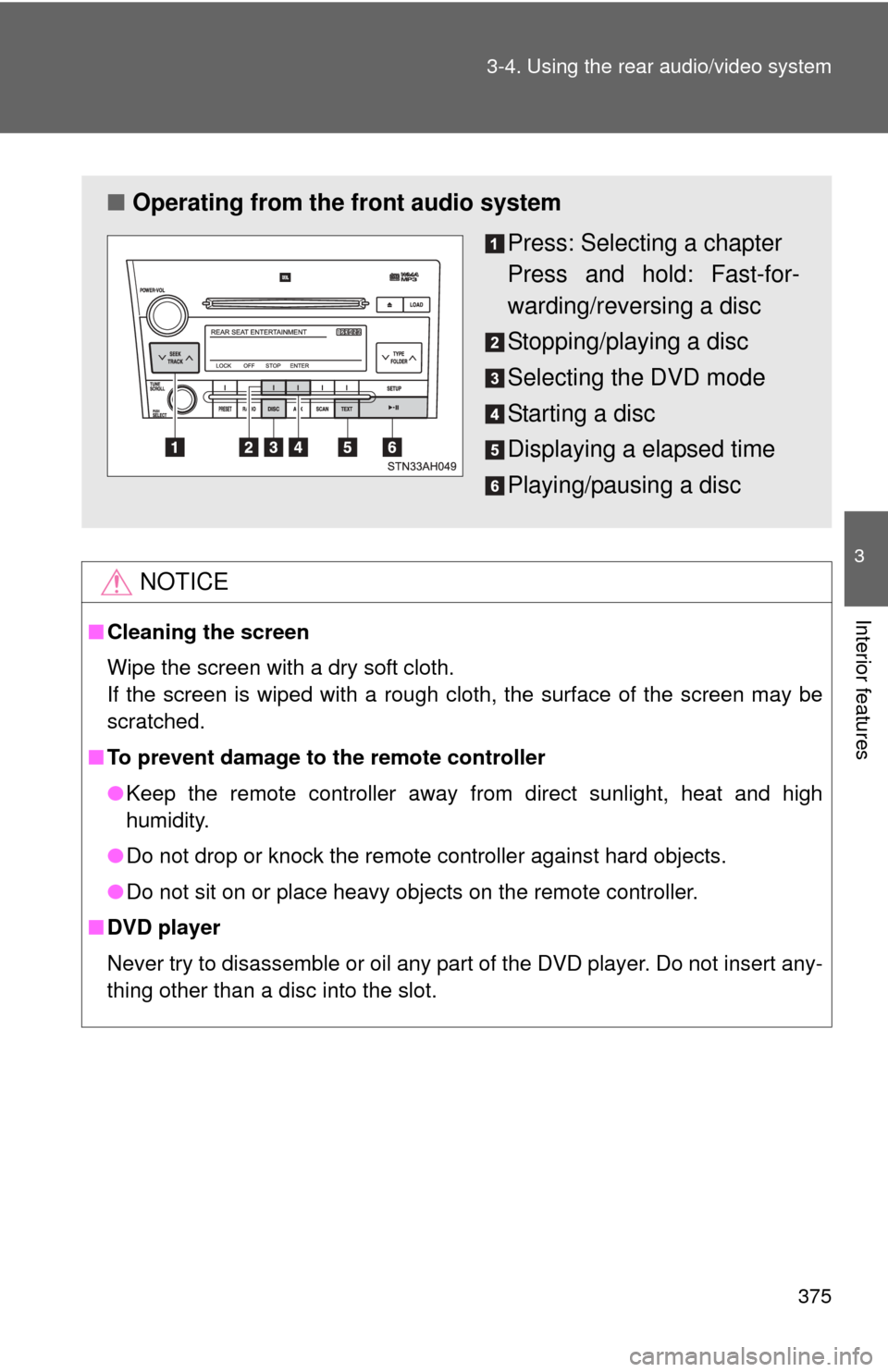
■ Operating from the front audio system
Press: Selecting a chapter
Press and hold: Fast-for-
warding/reversing a disc
Stopping/playing a disc
Selecting the DVD mode
Starting a disc
Displaying a elapsed time
Playing/pausing a disc
Page 383 of 688
383
3-4. Using the rear audio/video system
3
Interior features
Selecting a disc menu number
Select
to display the disc menu number search screen.
Select the disc menu number, and press or to input it.
Select to return to the previous screen.
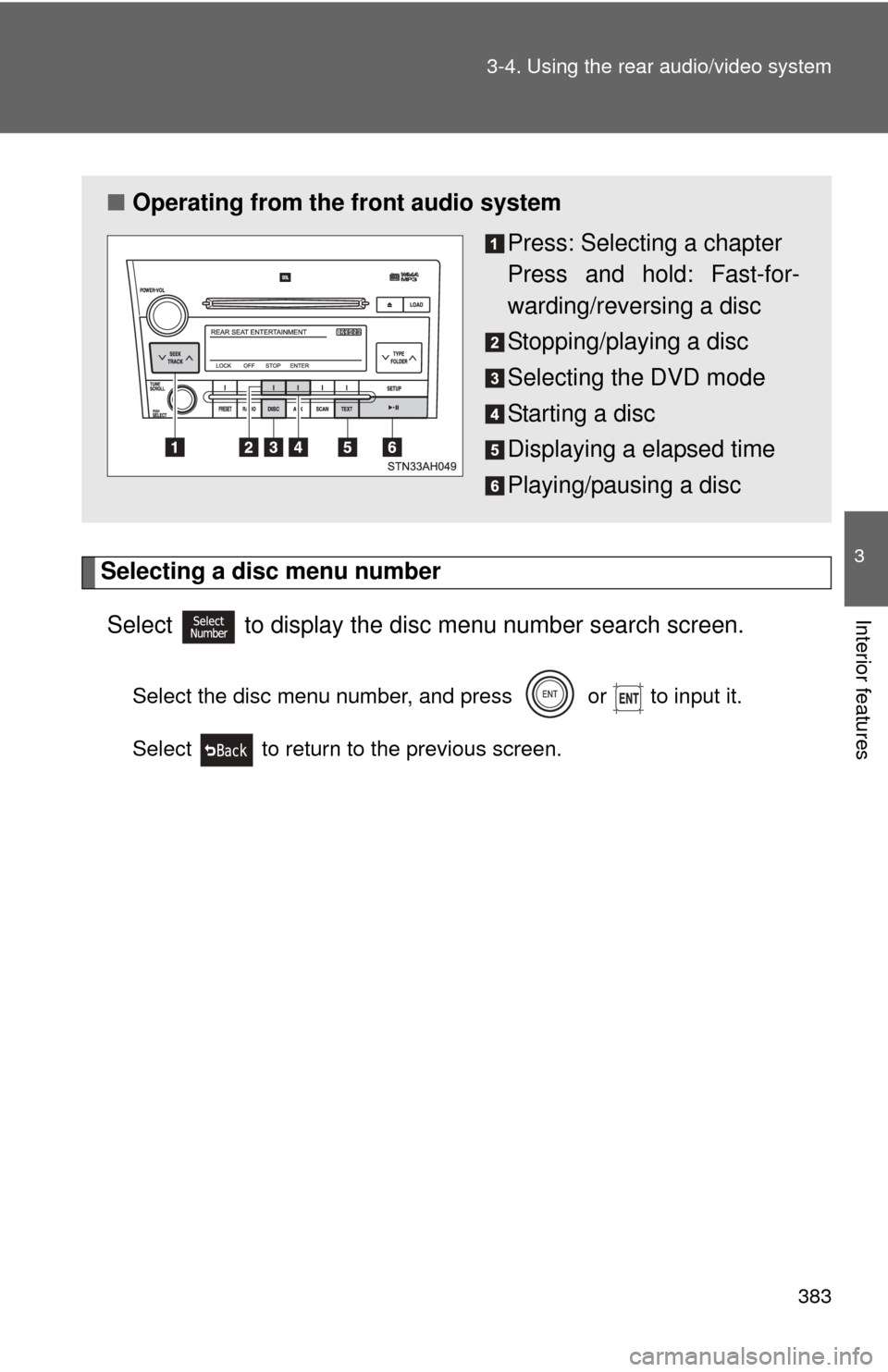
■ Operating from the front audio system
Press: Selecting a chapter
Press and hold: Fast-for-
warding/reversing a disc
Stopping/playing a disc
Selecting the DVD mode
Starting a disc
Displaying a elapsed time
Playing/pausing a disc
Page 551 of 688
551
4-3. Do-it-yourself maintenance
4
Maintenance and care
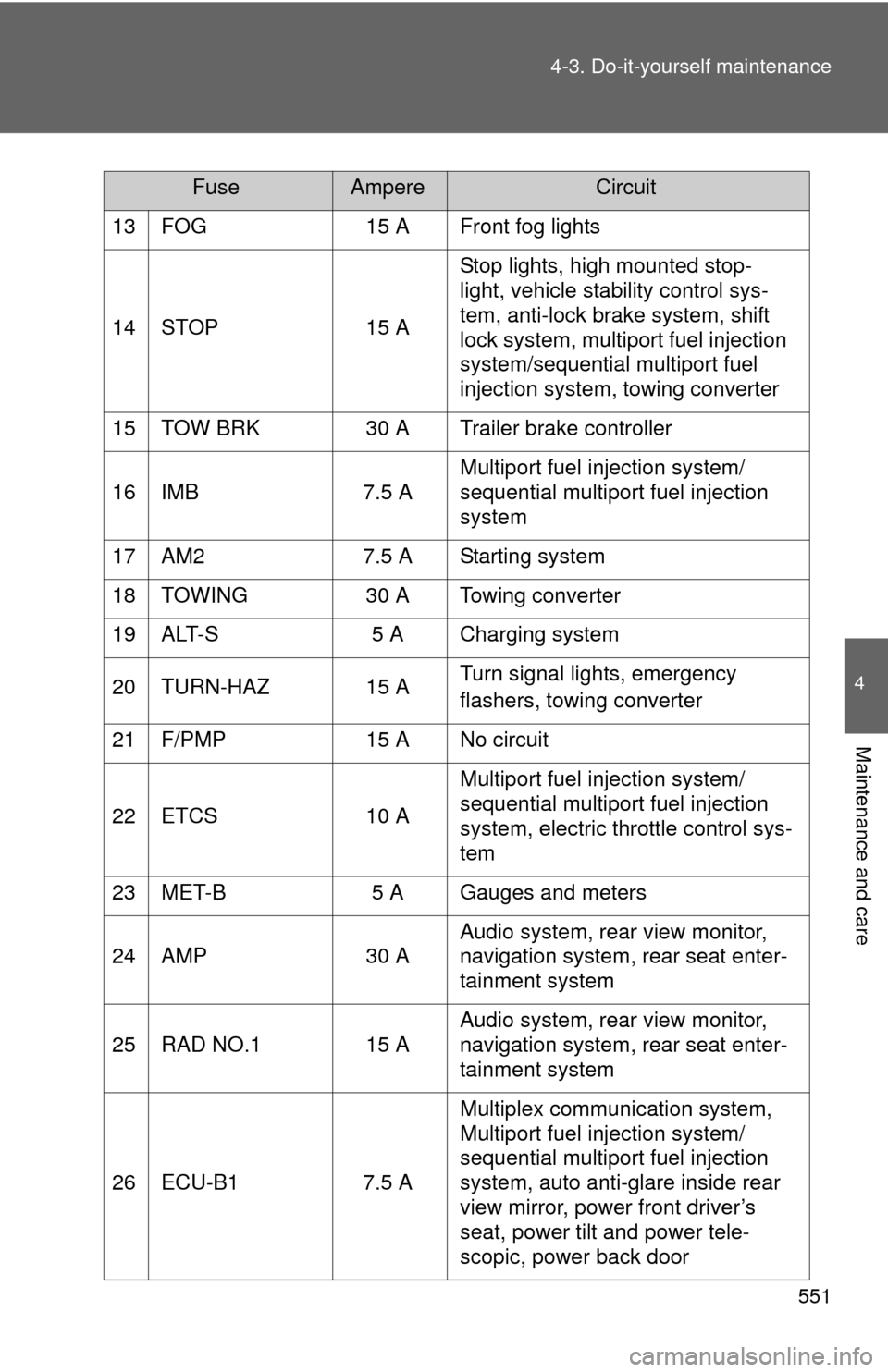
13 FOG
15 A Front fog lights
14 STOP 15 AStop lights, high mounted stop-
light, vehicle stability control sys-
tem, anti-lock brake system, shift
lock system, multiport fuel injection
system/sequential multiport fuel
injection system, towing converter
15 TOW BRK 30 A Trailer brake controller
16 IMB 7.5 AMultiport fuel injection system/
sequential multiport fuel injection
system
17 AM2 7.5 A Starting system
18 TOWING 30 A Towing converter
19 ALT-S 5 A Charging system
20 TURN-HAZ 15 A Turn signal lights, emergency
flashers, towing converter
21 F/PMP 15 A No circuit
22 ETCS 10 AMultiport fuel injection system/
sequential multiport fuel injection
system, electric throttle control sys-
tem
23 MET-B 5 A Gauges and meters
24 AMP 30 AAudio system, rear view monitor,
navigation system, rear seat enter-
tainment system
25 RAD NO.1 15 A Audio system, rear view monitor,
navigation system, rear seat enter-
tainment system
26 ECU-B1 7.5 AMultiplex communication system,
Multiport fuel injection system/
sequential multiport fuel injection
system, auto anti-glare inside rear
view mirror, power front driver’s
seat, power tilt and power tele-
scopic, power back door
FuseAmpereCircuit