check engine TOYOTA SEQUOIA 2011 2.G Owner's Manual
[x] Cancel search | Manufacturer: TOYOTA, Model Year: 2011, Model line: SEQUOIA, Model: TOYOTA SEQUOIA 2011 2.GPages: 688, PDF Size: 14.76 MB
Page 253 of 688
253
2-5. Driving information
2
When driving
Winter driving tips
Carry out the necessary preparations and inspections before driving
the vehicle in winter. Always drive the vehicle in a manner appropri-
ate to the prevailing weather conditions.
■ Pre-winter preparations
●Use fluids that are appropriate to the prevailing outside tem-
peratures.
• Engine oil
• Engine coolant
• Washer fluid
● Have a service technician inspect the level and specific grav-
ity of battery electrolyte.
● Have the vehicle fitted with four snow tires or purchase a set
of tire chains for the rear tires.
Ensure that all tires are the same size and brand, and that chains
match the size of the tires.
■Before driving the vehicle
Perform the following according to the driving conditions.
●Do not try to forcibly open a window, scrape an outside rear
view mirror surface or move a wiper or outside rear view mir-
ror that is frozen. Pour warm water over the frozen area to
melt the ice. Wipe away the water immediately to prevent it
from freezing.
● To ensure proper operation of th e climate control system fan,
remove any snow that has accumulated on the air inlet vents
in front of the windshield.
● Remove any ice that has accumu lated on the vehicle chassis.
● Periodically check for and remove any excess ice or snow
that may have accumulated in the wheel well or on the
brakes.
Page 267 of 688
267
2-5. Driving information
2
When driving
Connecting and disconnecting
a trailer (vehicles with
electronically modulated air suspension)
If a height control system is install ed in your vehicle, you have to con-
nect and disconnect your trailer more carefully.
● Connecting
Set the height control of elec tronically modulated air suspen-
sion to N mode.
Turn off the engine, or set the electronically modulated air
suspension system to MAN. (manual).
Connect the trailer.
Turn the engine switch to the START position and start the
engine.
Press the height control mode select switch to cancel the
MAN. (manual) condition that was set on . Check that
the MAN. indicator turns off.
Set the height control of elec tronically modulated air suspen-
sion to N mode.
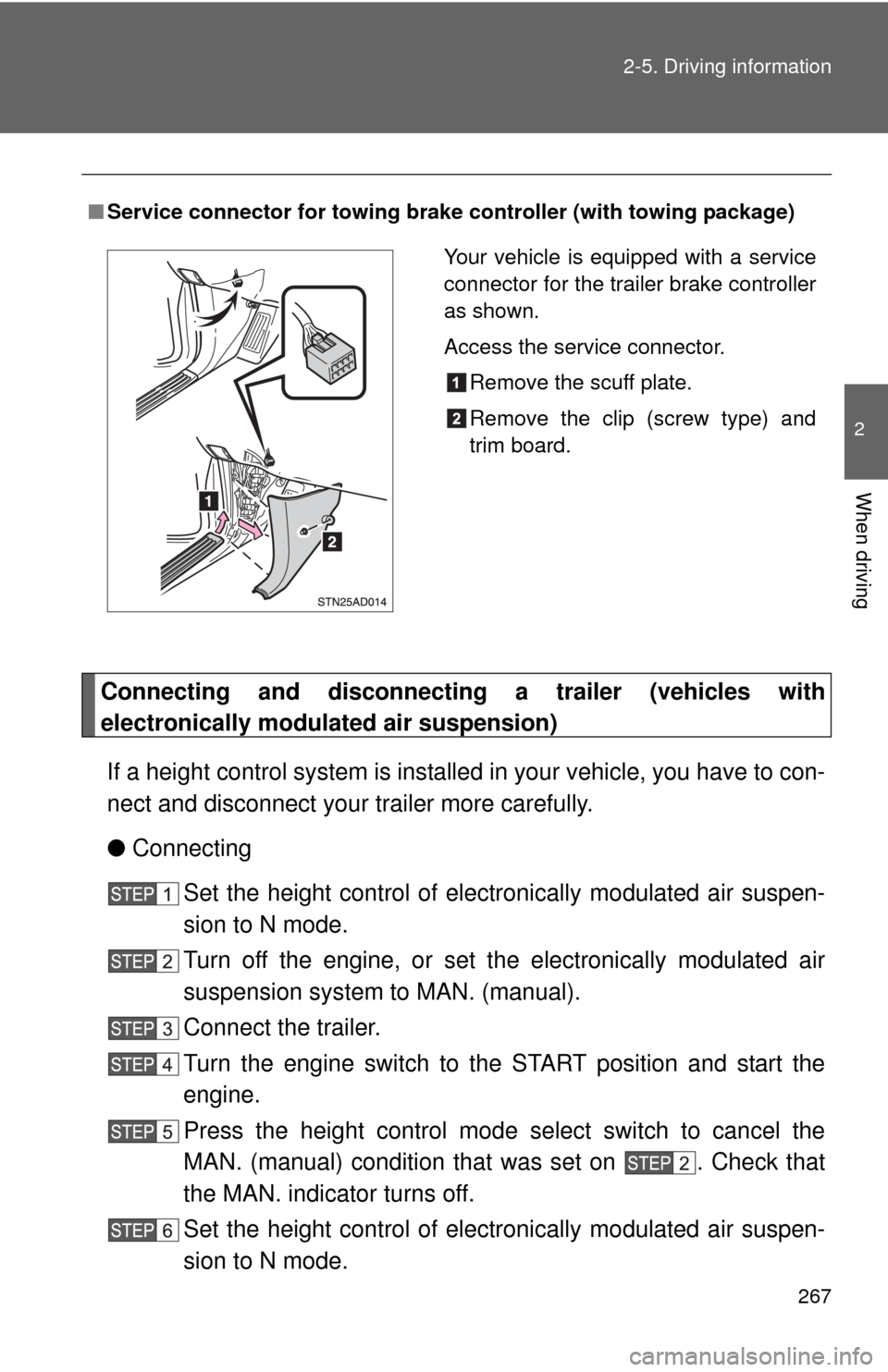
■ Service connector for towing br ake controller (with towing package)
Your vehicle is equipped with a service
connector for the trailer brake controller
as shown.
Access the service connector.
Remove the scuff plate.
Remove the clip (screw type) and
trim board.
Page 268 of 688
268 2-5. Driving information
●Disconnecting
Set the height control of elec tronically modulated air suspen-
sion to N mode.
Set the electronically modulate d air suspension system to
MAN. (manual).
Turn off the engine.
Set the supporting leg of the trailer on the ground and raise
the hitch by 4 in. (100 mm).
Turn the engine switch to the START position and start the
engine.
Press the height control mode select switch to cancel the
MAN. (manual) condition that was set on . Check that
the MAN. indicator turns off.
Wait until vehicle height is stabilized.
Make sure the hitch is disconne cted. If the hitch does not dis-
connect, raise the hitch higher and repeat steps 2 through 7.
Move the vehicle forward in LO mode where the hitch does
not touch anything in N mode.
Set the height control of elec tronically modulated air suspen-
sion to N mode.
Page 273 of 688
273
2-5. Driving information
2
When driving
■
AVS (adaptive variable suspension system) (if equipped)
The suspension can be switched for improvement in driveability. ( P. 228)
■ Break-in schedule
If your vehicle is new or equipped with any new power train components
(such as an engine, transmission, differential or wheel bearing), Toyota rec-
ommends that you do not tow a trailer until the vehicle has been driven \
for
over 500 miles (800 km).
After the vehicle has been driven for over 500 miles (800 km), you can s\
tart
towing. However, for the next 500 miles (800 km), drive the vehicle at a
speed of less than 50 mph (80 km/h) when towing a trailer, and avoid full
throttle acceleration.
■ Maintenance
●If you tow a trailer, your vehicle will require more frequent maintenance
due to the additional load. (See “Owner’s Warranty Information Booklet”
or “Scheduled Maintenance Guide/Owner’s Manual Supplement”.)
● Retighten the fixing bolts of the towing ball and bracket after approxi-
mately 600 miles (1000 km) of trailer towing.
■ If trailer sway occurs
One or more factors (crosswinds, passing vehicles, rough roads, etc.) can
adversely affect handling of your vehicle and trailer, causing instability.
●If trailer swaying occurs:
• Firmly grip the steering wheel. Steer straight ahead.
Do not try to control trailer swaying by turning the steering wheel.
• Begin releasing the accelerator pedal immediately but very gradually to reduce speed.
Do not increase speed. Do not apply vehicle brakes.
If you make no extreme correction with the steering or brakes, your vehicle
and trailer should stabilize.
● After the trailer swaying has stopped:
• Stop in a safe place. Get all occupants out of the vehicle.
• Check the tires of the vehicle and the trailer.
• Check the load in the trailer.
Make sure the load has not shifted.
Make sure the tongue weight is appropriate, if possible.
• Check the load in the vehicle. Make sure the vehicle is not overloaded after occupants get in.
Page 368 of 688
368 3-4. Using the rear audio/video system
■The rear seat entertainmen t system can be used when
The engine switch is in the ACC or ON position.
■ Discs that can be used
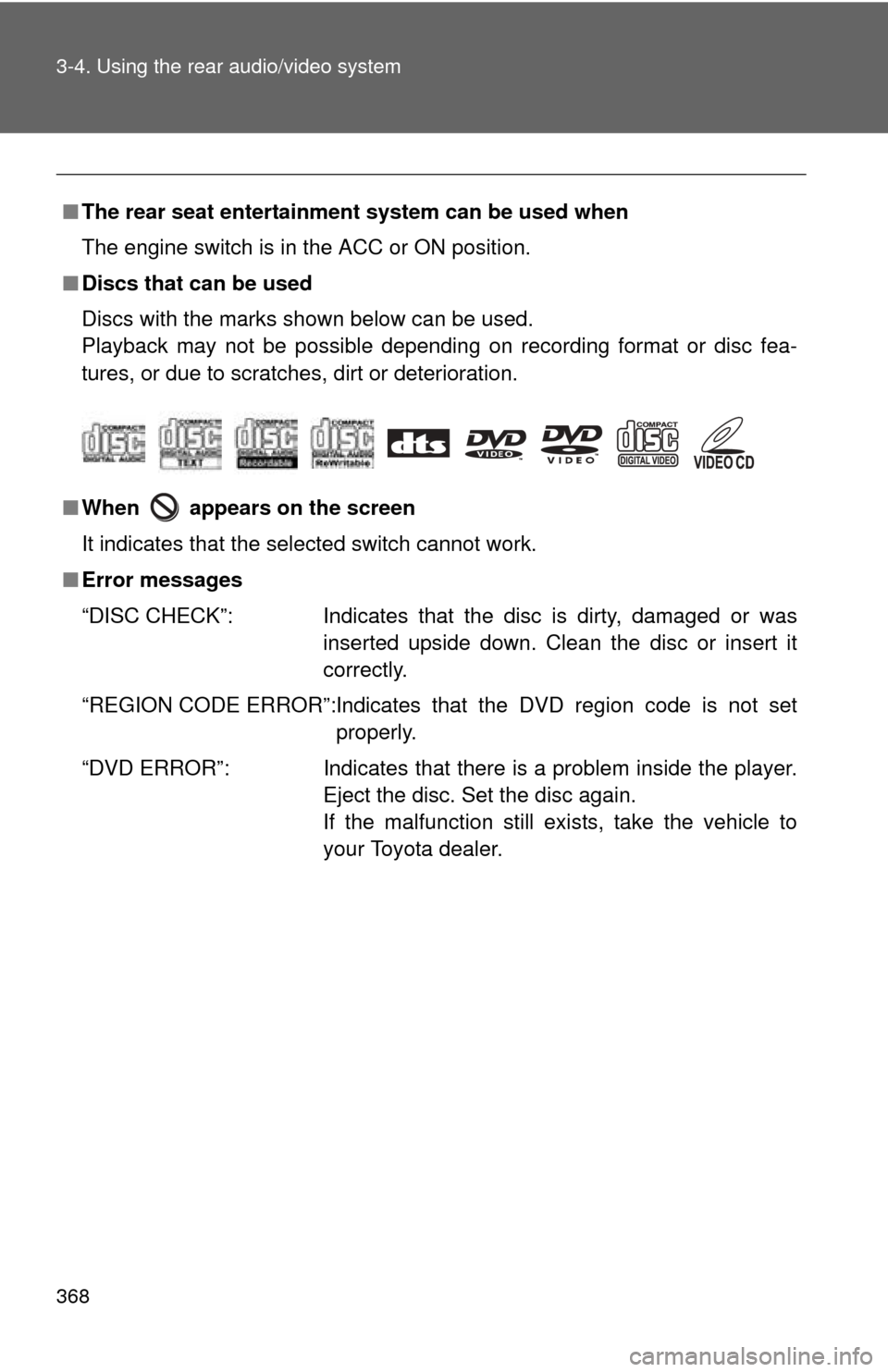
Discs with the marks shown below can be used.
Playback may not be possible depending on recording format or disc fea-
tures, or due to scratches, dirt or deterioration.
■ When appears on the screen
It indicates that the selected switch cannot work.
■ Error messages
“DISC CHECK”: Indicates that the disc is dirty, damaged or was
inserted upside down. Clean the disc or insert it
correctly.
“REGION CODE ERROR”:Indicates that the DVD region code is not set properly.
“DVD ERROR”: Indicates that there is a problem inside the player.
Eject the disc. Set the disc again.
If the malfunction still exists, take the vehicle to
your Toyota dealer.
Page 479 of 688
479
3-8. Other interior features
3
Interior features
CAUTION
■
Before driving
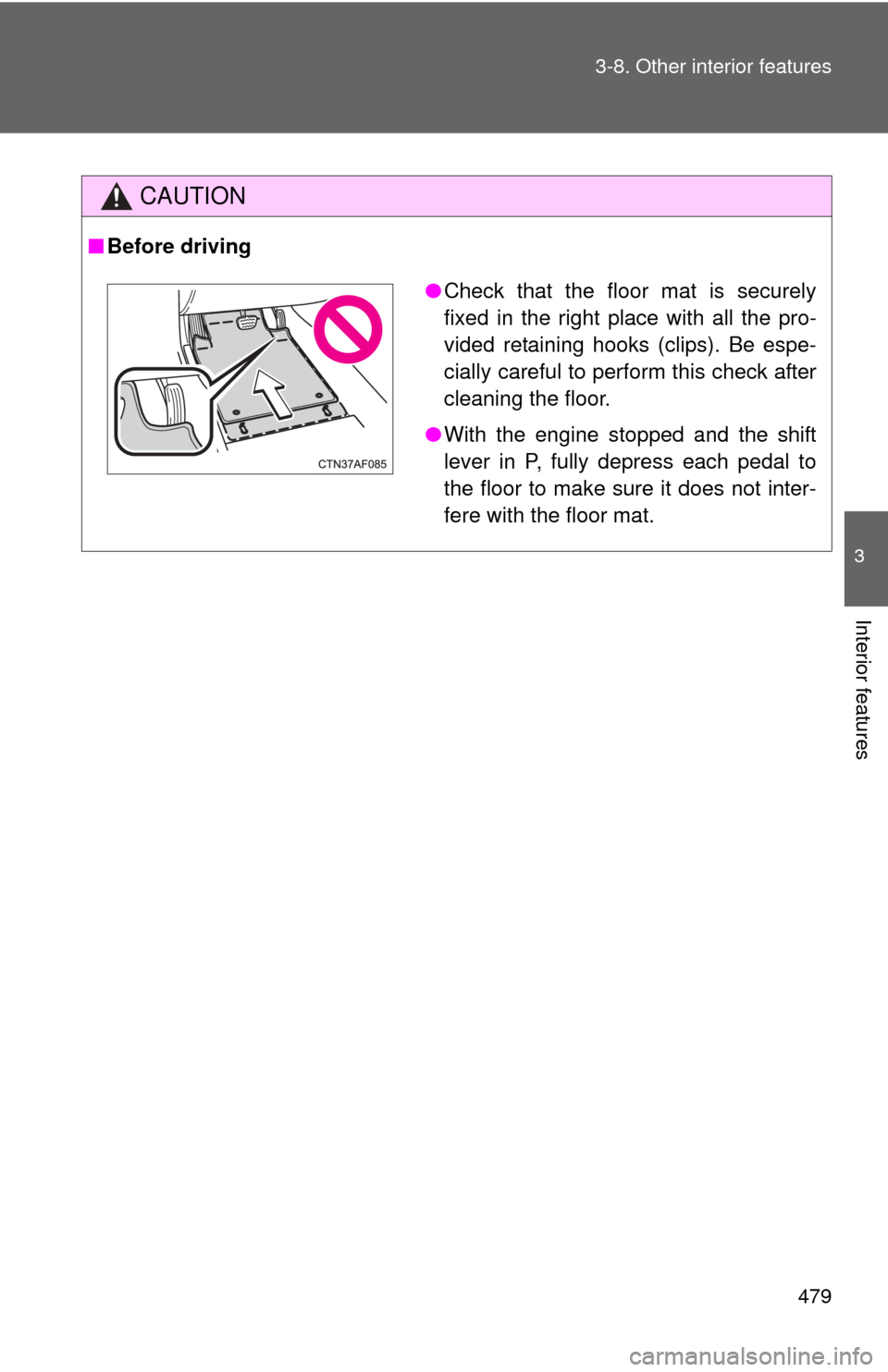
●Check that the floor mat is securely
fixed in the right place with all the pro-
vided retaining hooks (clips). Be espe-
cially careful to perform this check after
cleaning the floor.
● With the engine stopped and the shift
lever in P, fully depress each pedal to
the floor to make sure it does not inter-
fere with the floor mat.
Page 497 of 688
Maintenance and care4
497
4-1. Maintenance and careCleaning and protecting the vehicle exterior ......... 498
Cleaning and protecting the vehicle interior .......... 500
4-2. Maintenance Maintenance requirements .................. 503
General maintenance....... 505
Emission inspection and maintenance (I/M)
programs........................ 508
4-3. Do-it-yourself maintenance Do-it-yourself service precautions .................... 509
Hood ................................ 513
Engine compartment ........ 514
Tires ................................. 529
Tire inflation pressure ...... 536
Wheels ............................. 540
Air conditioning filter......... 542
Wireless remote control battery ............................ 545
Checking and replacing fuses .............................. 547
Light bulbs........................ 558
Page 505 of 688
505
4-2. Maintenance
4
Maintenance and care
General maintenance
Engine compartment
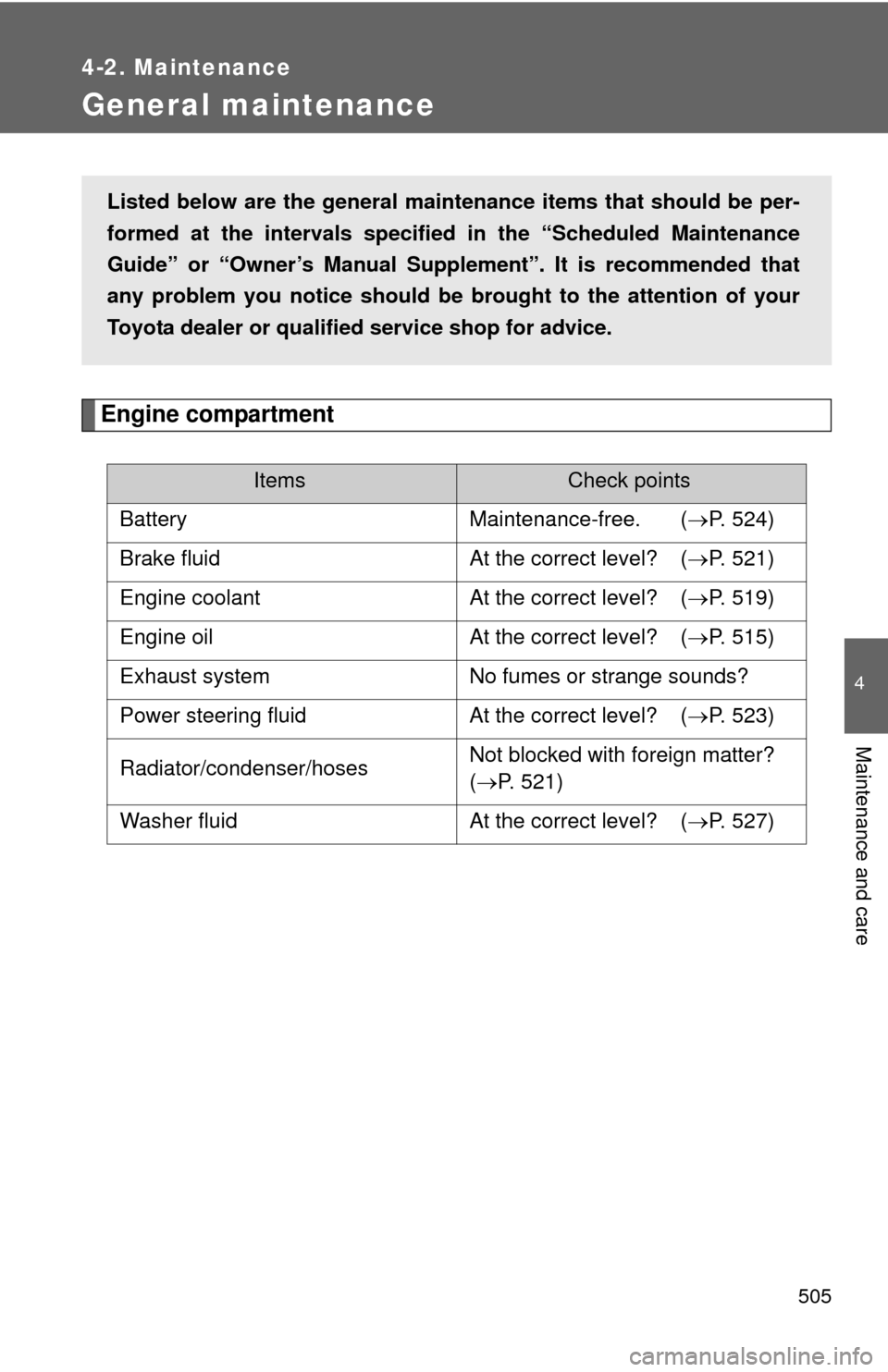
ItemsCheck points
Battery Maintenance-free. (P. 524)
Brake fluid At the correct level? (P. 521)
Engine coolant At the correct level? (P. 519)
Engine oil At the correct level? (P. 515)
Exhaust system No fumes or strange sounds?
Power steering fluid At the correct level? (P. 523)
Radiator/condenser/hoses Not blocked with foreign matter?
(
P. 521)
Washer fluid At the correct level? (P. 527)
Listed below are the general maintenance items that should be per-
formed at the intervals specified in the “Scheduled Maintenance
Guide” or “Owner’s Manual Supp lement”. It is recommended that
any problem you notice should be brought to the attention of your
Toyota dealer or qualified service shop for advice.
Page 507 of 688
507
4-2. Maintenance
4
Maintenance and care
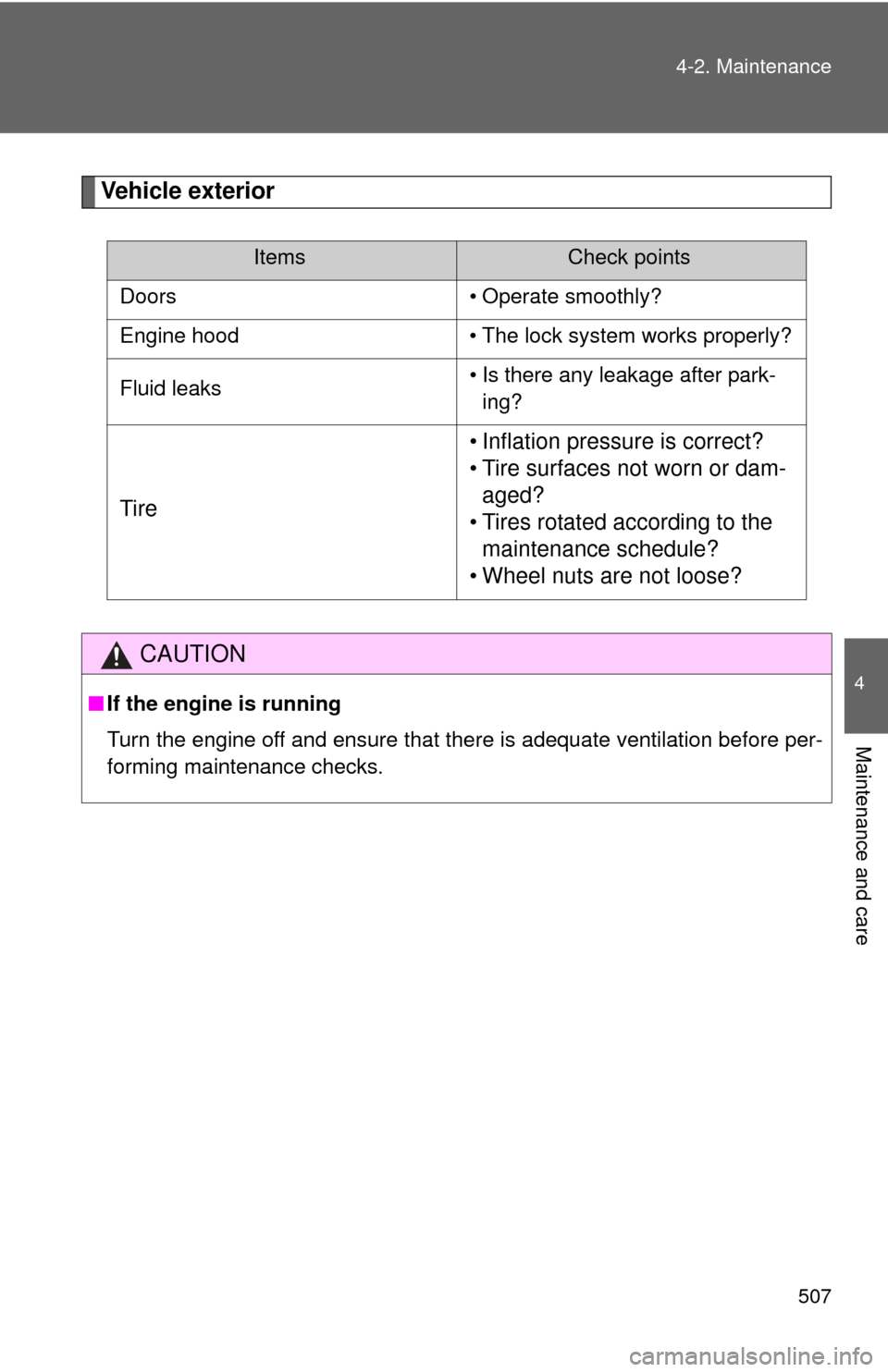
Vehicle exterior
ItemsCheck points
Doors • Operate smoothly?
Engine hood • The lock system works properly?
Fluid leaks • Is there any leakage after park-
ing?
Tire • Inflation pressure is correct?
• Tire surfaces not worn or dam-
aged?
• Tires rotated according to the maintenance schedule?
• Wheel nuts are not loose?
CAUTION
■ If the engine is running
Turn the engine off and ensure that there is adequate ventilation before per-
forming maintenance checks.
Page 515 of 688
515
4-3. Do-it-yourself maintenance
4
Maintenance and care
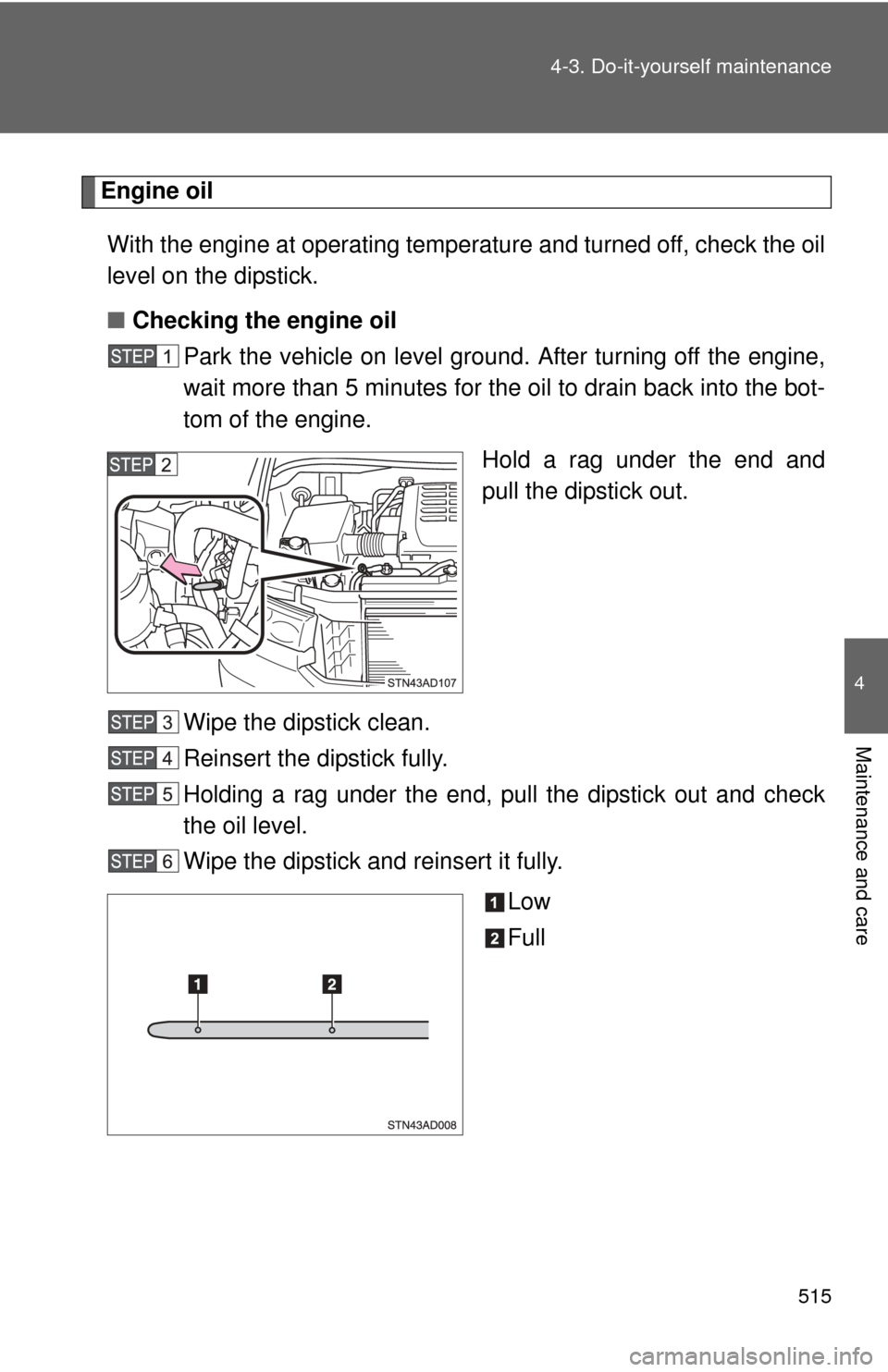
Engine oil
With the engine at operating temperature and turned off, check the oil
level on the dipstick.
■ Checking the engine oil
Park the vehicle on level gro und. After turning off the engine,
wait more than 5 minutes for the oil to drain back into the bot-
tom of the engine.
Hold a rag under the end and
pull the dipstick out.
Wipe the dipstick clean.
Reinsert the dipstick fully.
Holding a rag under the end, pull the dipstick out and check
the oil level.
Wipe the dipstick and reinsert it fully. Low
Full