ESP TOYOTA SEQUOIA 2011 2.G Owner's Guide
[x] Cancel search | Manufacturer: TOYOTA, Model Year: 2011, Model line: SEQUOIA, Model: TOYOTA SEQUOIA 2011 2.GPages: 688, PDF Size: 14.76 MB
Page 340 of 688
340 3-2. Using the audio system
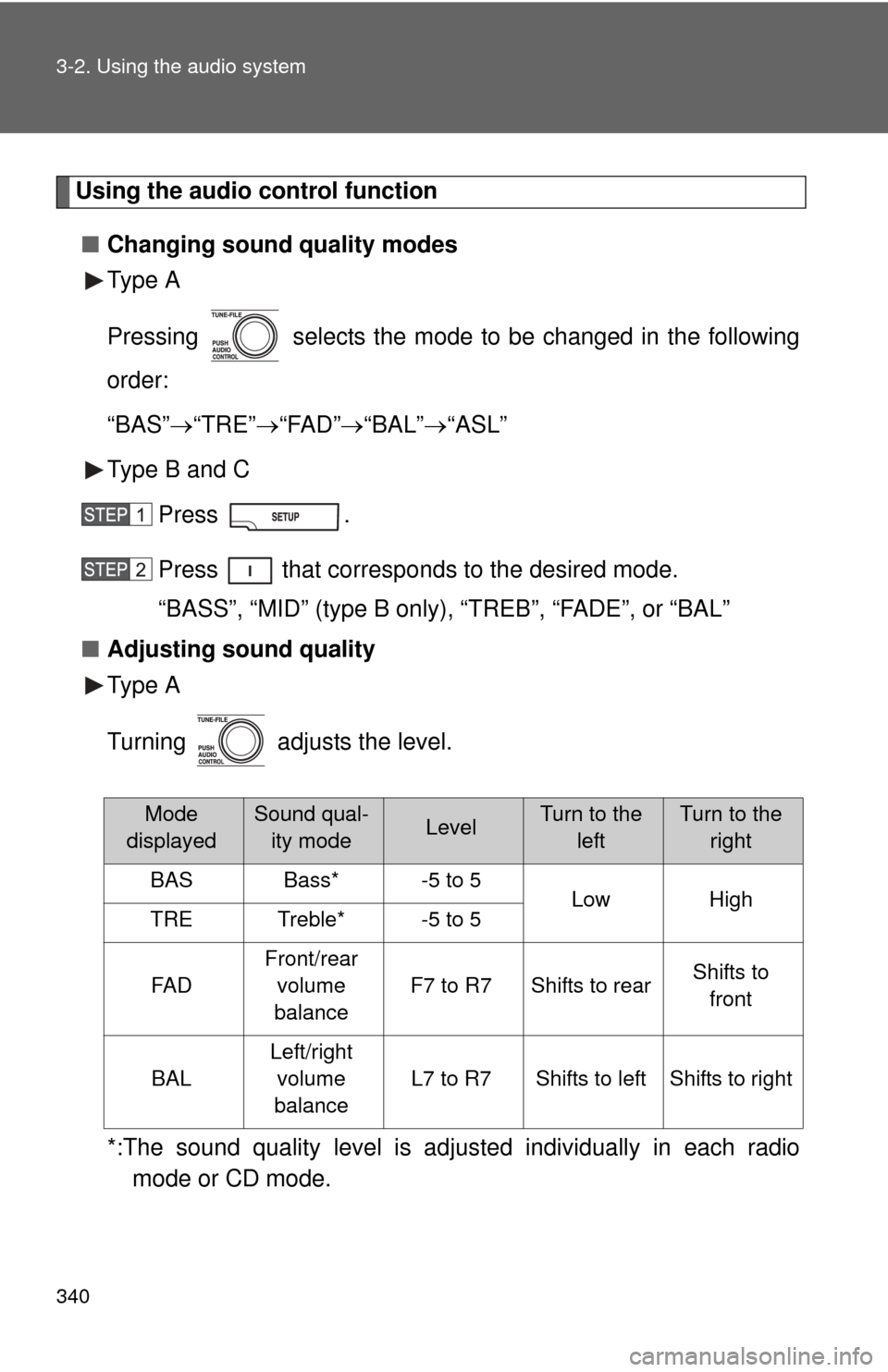
Using the audio control function■ Changing sound quality modes
Type A
Pressing selects the mode to be changed in the following
order:
“BAS” “TRE” “FAD” “BAL” “ASL”
Type B and C
Press .
Press that corresponds to the desired mode.
“BASS”, “MID” (type B only), “TREB”, “FADE”, or “BAL”
■ Adjusting sound quality
Type A
Turning adjusts the level.
*:The sound quality level is adjusted individually in each radio
mode or CD mode.
Mode
displayedSound qual- ity modeLevelTurn to the leftTurn to the right
BASBass*-5 to 5LowHighTRETreble*-5 to 5
FA D
Front/rear
volume
balance
F7 to R7Shifts to rearShifts to front
BAL
Left/right volume
balance
L7 to R7Shifts to leftShifts to right
Page 342 of 688
342 3-2. Using the audio system
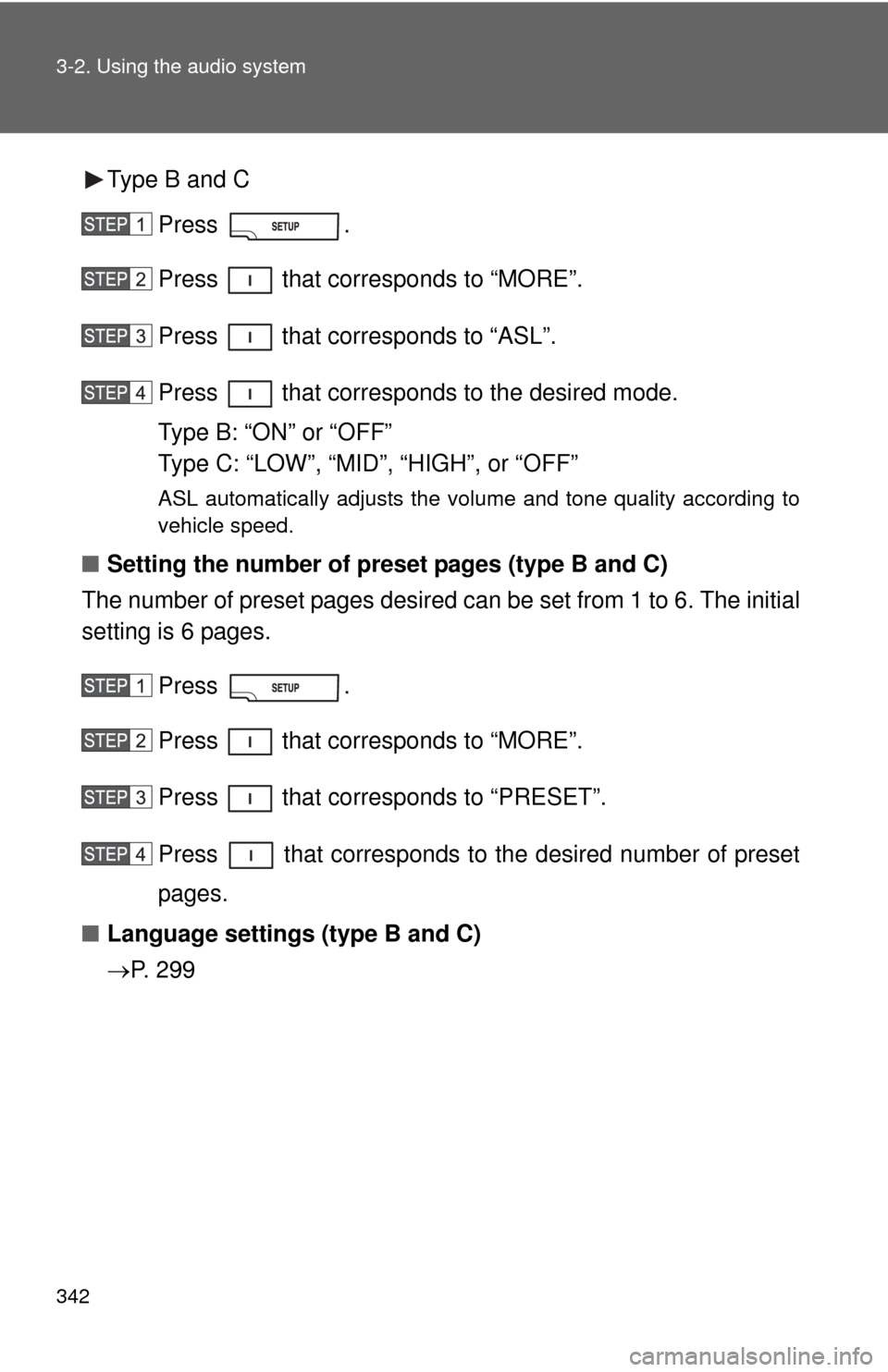
Type B and CPress .
Press that corresponds to “MORE”.
Press that corresponds to “ASL”.
Press that corresponds to the desired mode.
Type B: “ON” or “OFF”
Type C: “LOW”, “MID”, “HIGH”, or “OFF”
ASL automatically adjusts the volume and tone quality according to
vehicle speed.
■Setting the number of preset pages (type B and C)
The number of preset pages desired c an be set from 1 to 6. The initial
setting is 6 pages.
Press .
Press that corresponds to “MORE”.
Press that corresponds to “PRESET”.
Press that corresponds to the desired number of preset
pages.
■ Language settings (type B and C)
P. 2 9 9
Page 349 of 688
349
3-3. Using the Bluetooth
® audio system
3
Interior features
■
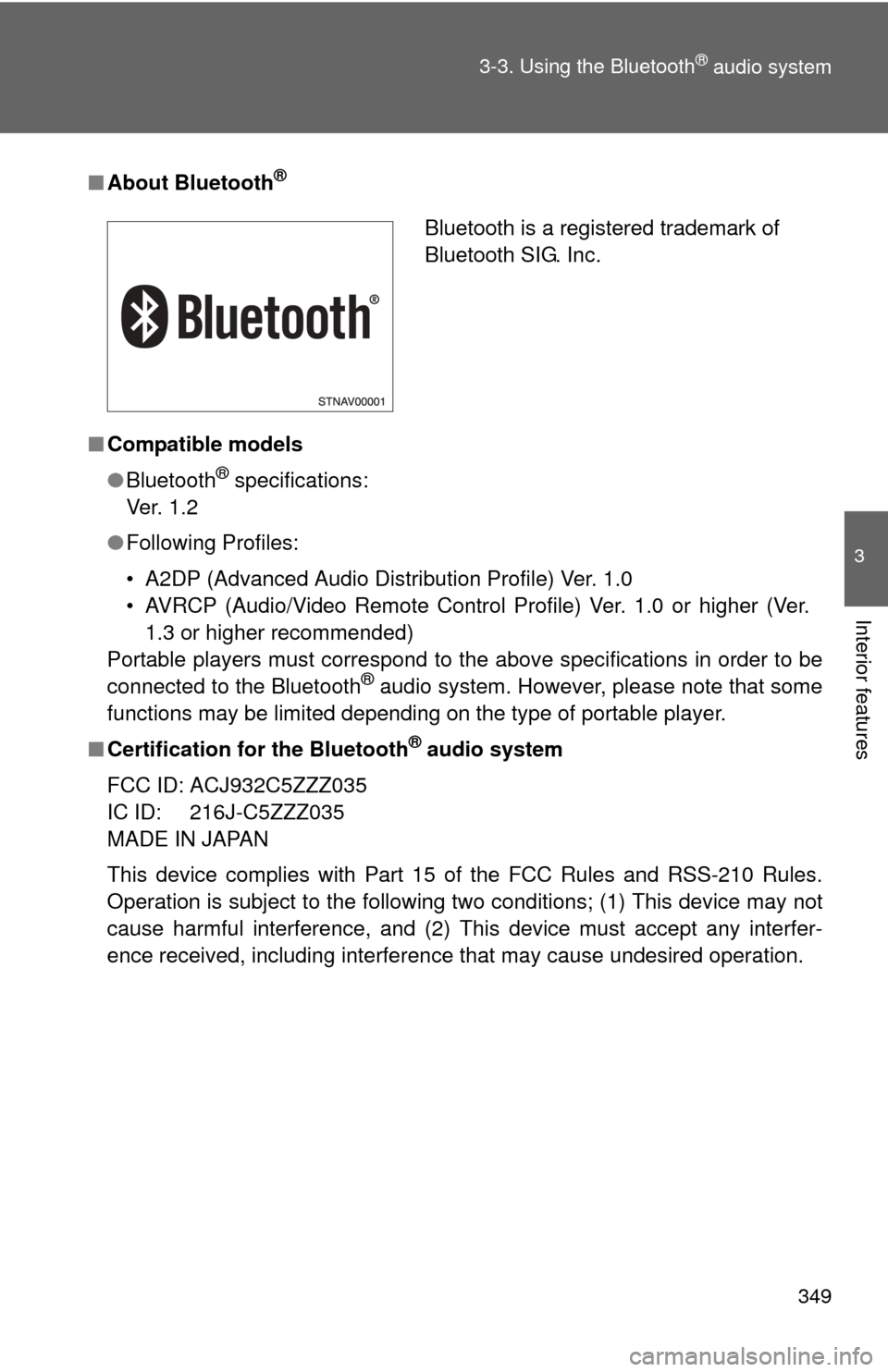
About Bluetooth®
■Compatible models
●Bluetooth
® specifications:
Ve r. 1 . 2
● Following Profiles:
• A2DP (Advanced Audio Distribution Profile) Ver. 1.0
• AVRCP (Audio/Video Remote Control Profile) Ver. 1.0 or higher (Ver.
1.3 or higher recommended)
Portable players must correspond to the above specifications in order to be
connected to the Bluetooth
® audio system. However, please note that some
functions may be limited depending on the type of portable player.
■ Certification for the Bluetooth
® audio system
FCC ID: ACJ932C5ZZZ035
IC ID: 216J-C5ZZZ035
MADE IN JAPAN
This device complies with Part 15 of the FCC Rules and RSS-210 Rules.
Operation is subject to the following two conditions; (1) This device may not
cause harmful interference, and (2) This device must accept any interfer-
ence received, including interference that may cause undesired operation.
Bluetooth is a registered trademark of
Bluetooth SIG. Inc.
Page 350 of 688
350 3-3. Using the Bluetooth
® audio system
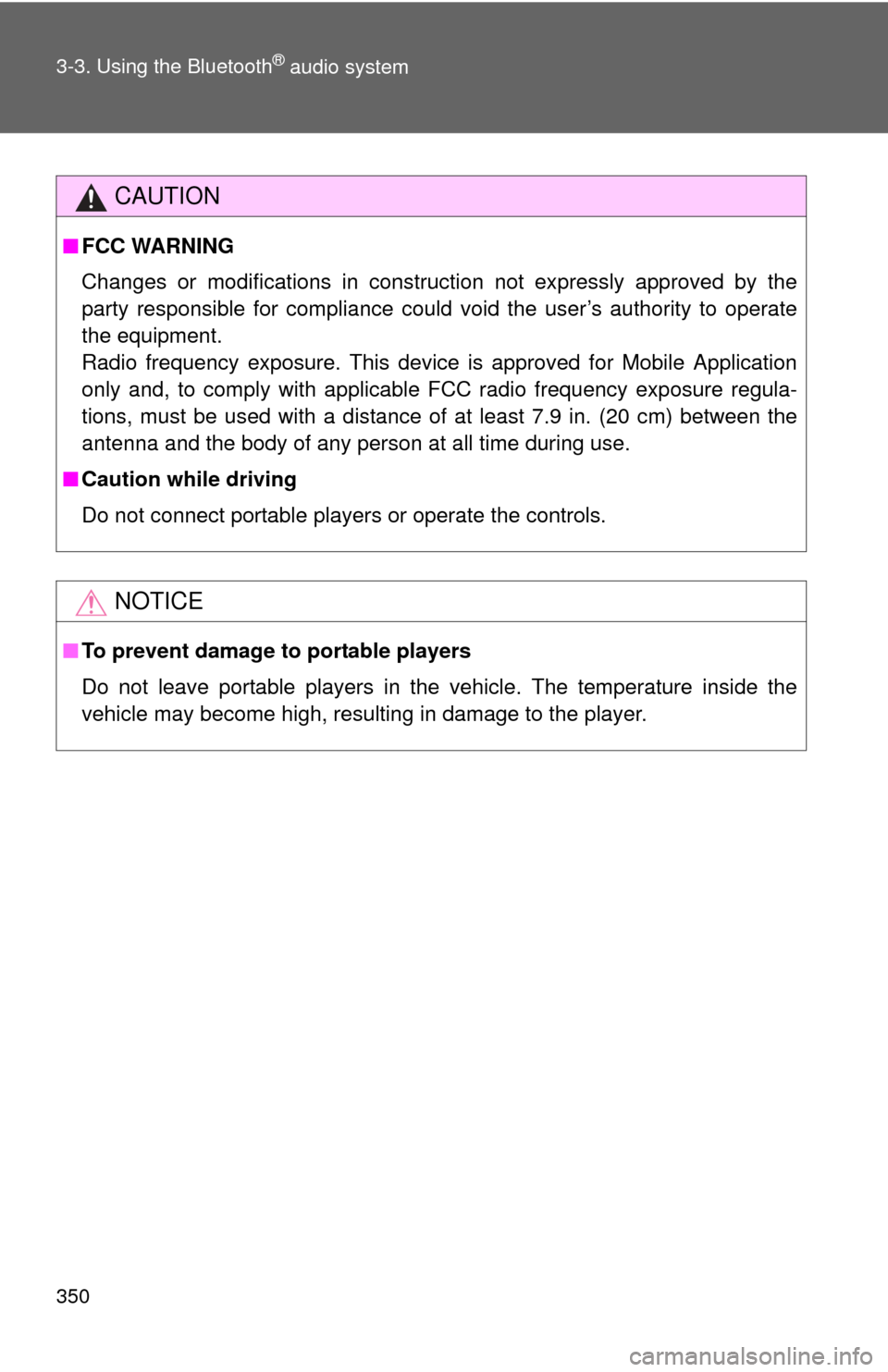
CAUTION
■FCC WARNING
Changes or modifications in construction not expressly approved by the
party responsible for compliance could void the user’s authority to operate
the equipment.
Radio frequency exposure. This device is approved for Mobile Application
only and, to comply with applicable FCC radio frequency exposure regula-
tions, must be used with a distance of at least 7.9 in. (20 cm) between the
antenna and the body of any person at all time during use.
■ Caution while driving
Do not connect portable players or operate the controls.
NOTICE
■To prevent damage to portable players
Do not leave portable players in the vehicle. The temperature inside the
vehicle may become high, resulting in damage to the player.
Page 353 of 688
353
3-3. Using the Bluetooth
® audio system
3
Interior features
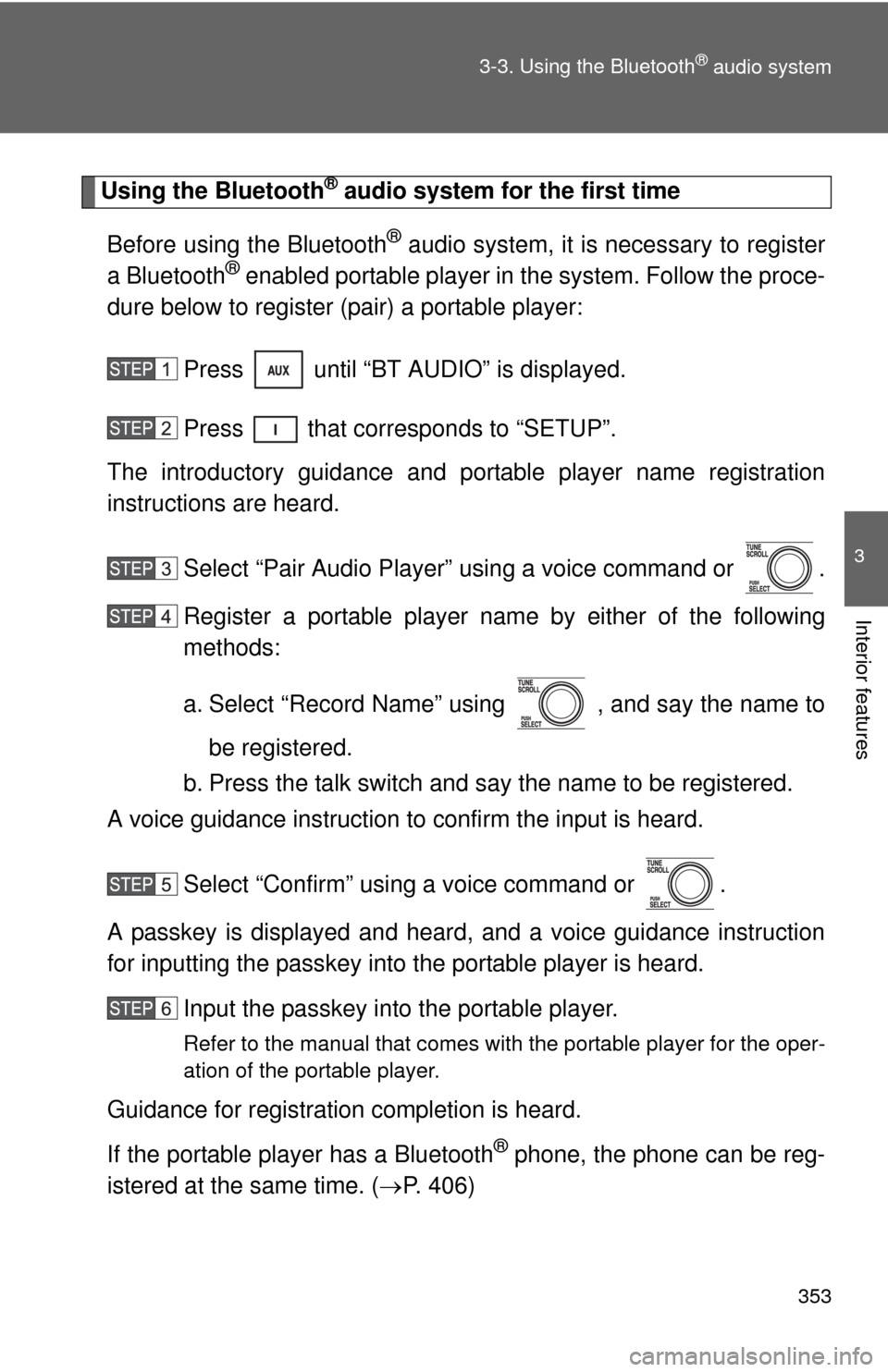
Using the Bluetooth® audio system for the first time
Before using the Bluetooth
® audio system, it is necessary to register
a Bluetooth® enabled portable player in the system. Follow the proce-
dure below to register (pair) a portable player:
Press until “BT AUDIO” is displayed.
Press that corresponds to “SETUP”.
The introductory guidance and port able player name registration
instructions are heard.
Select “Pair Audio Player” using a voice command or .
Register a portable player nam e by either of the following
methods:
a. Select “Record Name” using , and say the name to
be registered.
b. Press the talk switch and say the name to be registered.
A voice guidance instruction to confirm the input is heard.
Select “Confirm” using a voice command or .
A passkey is displayed and heard, and a voice guidance instruction
for inputting the passkey into the portable player is heard. Input the passkey into the portable player.
Refer to the manual that comes with the portable player for the oper-
ation of the portable player.
Guidance for registration completion is heard.
If the portable player has a Bluetooth
® phone, the phone can be reg-
istered at the same time. ( P. 406)
Page 358 of 688
358
3-3. Using the Bluetooth® audio system
Setting up a Bluetooth® enabled por table player
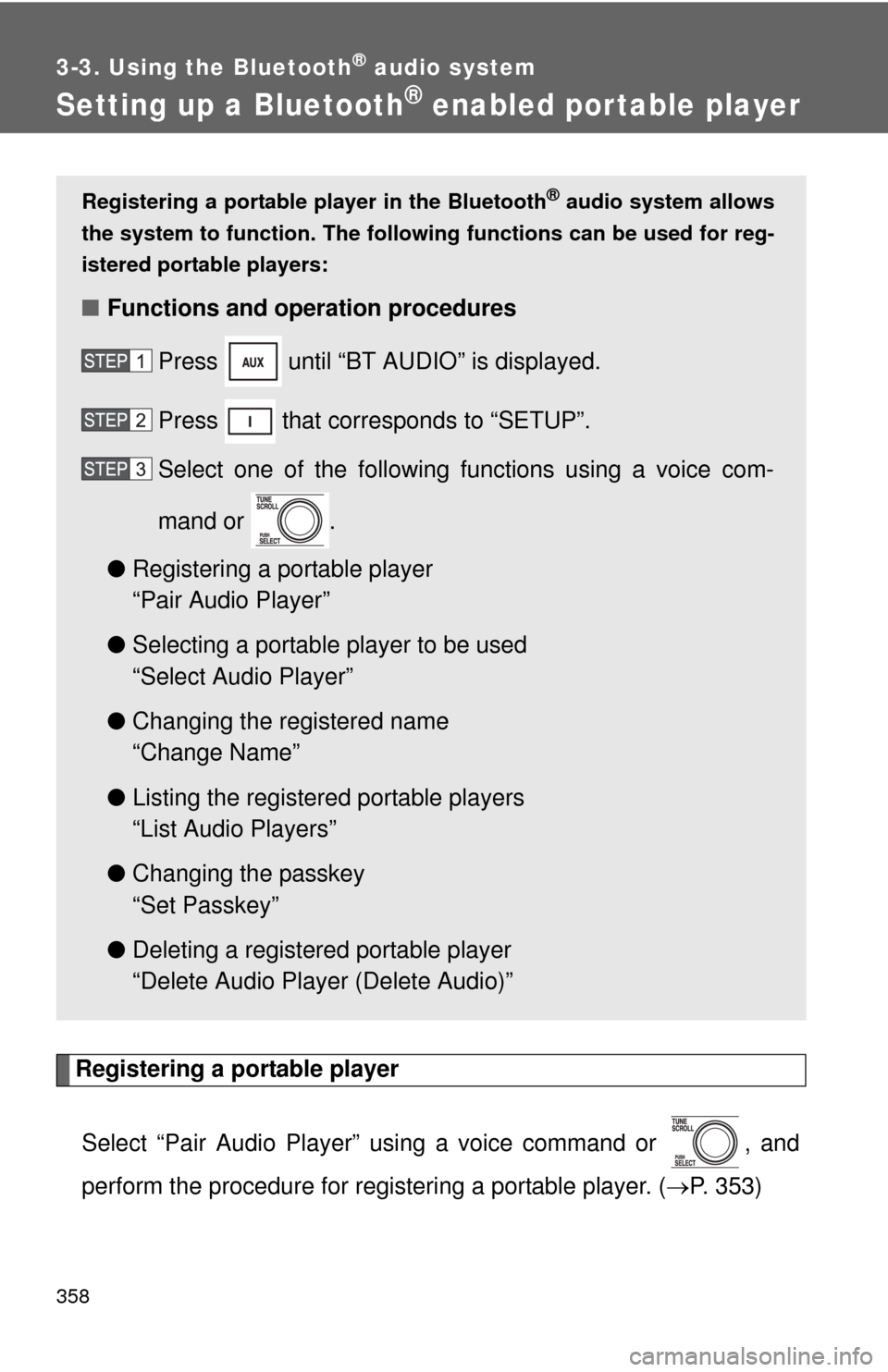
Registering a portable playerSelect “Pair Audio Player” using a voice command or , and
perform the procedure for registering a portable player. ( P. 353)
Registering a portable player in the Bluetooth® audio system allows
the system to function. The followin g functions can be used for reg-
istered portable players:
■ Functions and operation procedures
Press until “BT AUDIO” is displayed.
Press that corresponds to “SETUP”.
Select one of the following functions using a voice com-
mand or .
● Registering a portable player
“Pair Audio Player”
● Selecting a portable player to be used
“Select Audio Player”
● Changing the registered name
“Change Name”
● Listing the registered portable players
“List Audio Players”
● Changing the passkey
“Set Passkey”
● Deleting a registered portable player
“Delete Audio Player (Delete Audio)”
Page 366 of 688
366 3-4. Using the rear audio/video system
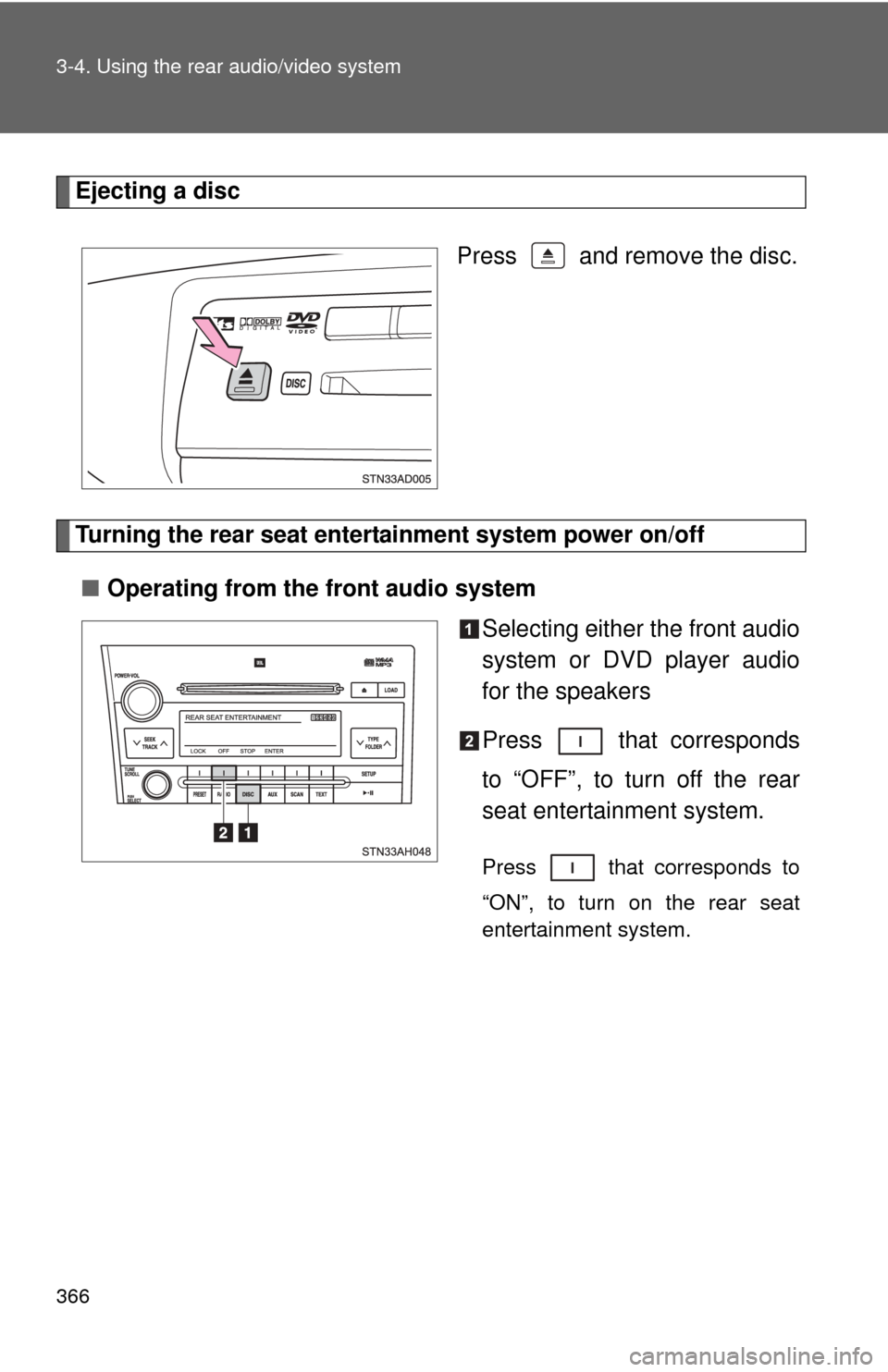
Ejecting a discPress and remove the disc.
Turning the rear seat entertainment system power on/off■ Operating from the front audio system
Selecting either the front audio
system or DVD player audio
for the speakers
Press that corresponds
to “OFF”, to turn off the rear
seat entertainment system.
Press that corresponds to
“ON”, to turn on the rear seat
entertainment system.
Page 396 of 688
396 3-4. Using the rear audio/video system
■To initialize the password
Press on the remote controller or unit ten times when the Enter Personal
Code screen is displayed.
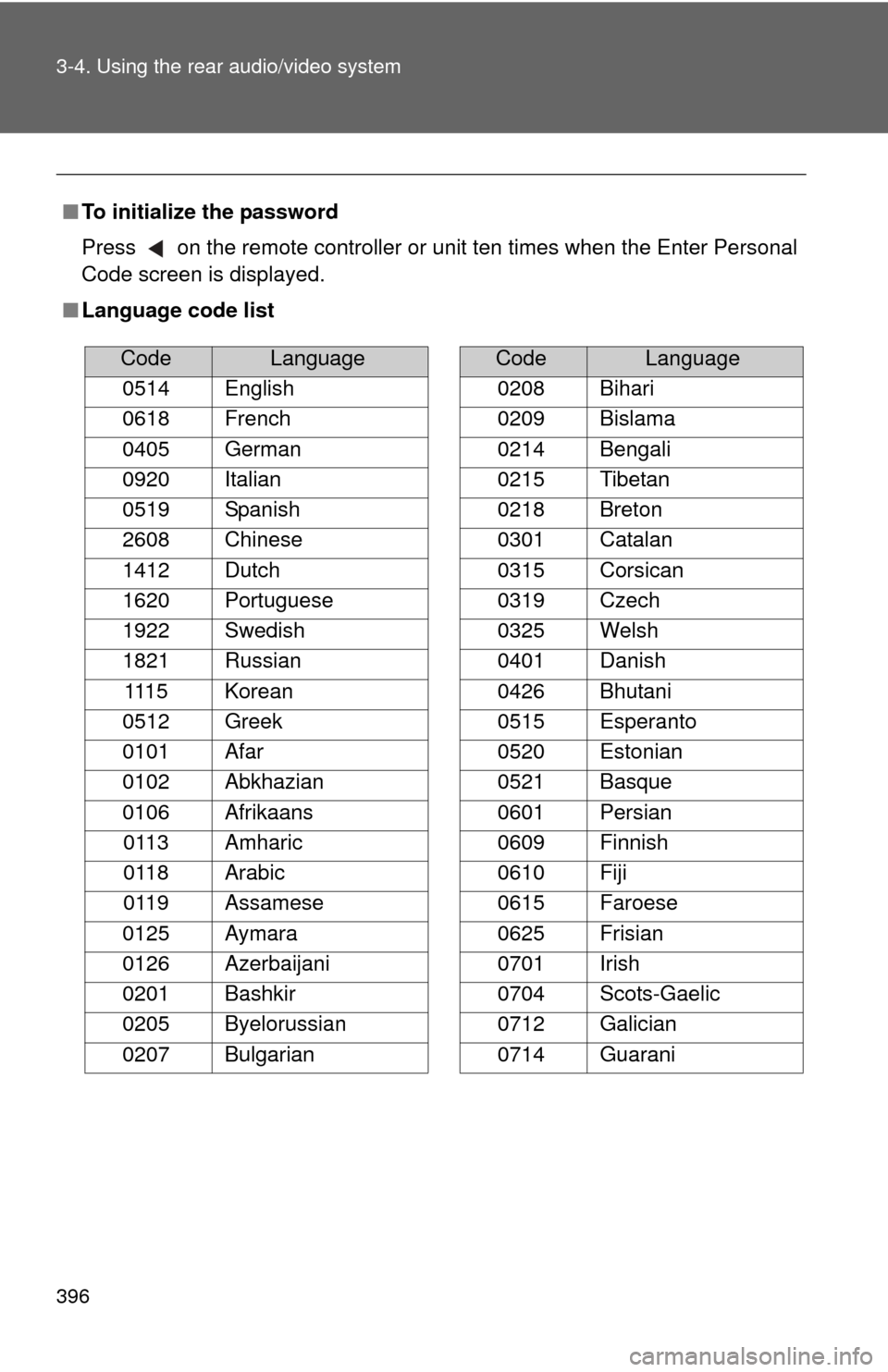
■ Language code list
CodeLanguage
0514 English
0618 French
0405 German
0920 Italian
0519 Spanish
2608 Chinese
1412 Dutch
1620 Portuguese
1922 Swedish
1821 Russian 1115 Korean
0512 Greek
0101 Afar
0102 Abkhazian
0106 Afrikaans 0113 Amharic
0118 Arabic
0119 Assamese
0125 Aymara
0126 Azerbaijani
0201 Bashkir
0205 Byelorussian
0207 Bulgarian
0208 Bihari
0209 Bislama
0214 Bengali
0215 Tibetan
0218 Breton
0301 Catalan
0315 Corsican
0319 Czech
0325 Welsh
0401 Danish
0426 Bhutani
0515 Esperanto
0520 Estonian
0521 Basque
0601 Persian
0609 Finnish
0610 Fiji
0615 Faroese
0625 Frisian
0701 Irish
0704 Scots-Gaelic
0712 Galician
0714 Guarani
CodeLanguage
Page 402 of 688
402 3-5. Using the hands-free phone system (for cellular phone)
CAUTION
■FCC WARNING
Changes or modifications in construction not expressly approved by the
party responsible for compliance could void the user’s authority to operate
the equipment.
Radio frequency exposure. This device is approved for Mobile Application
only and, to comply with applicable FCC radio frequency exposure regula-
tions, must be used with a distance of at least 7.9 in. (20 cm) between the
antenna and the body of any person at all times during use.
■ Caution while driving
Do not use a cellular phone, or connect the Bluetooth
® phone.
NOTICE
■To prevent damage to a cellular phone
Do not leave a cellular phone in the vehicle. The temperature inside may
become high resulting in damage to the phone.
Page 470 of 688
470 3-8. Other interior features
■The seat heaters can be used when
The engine switch is in the ON position.
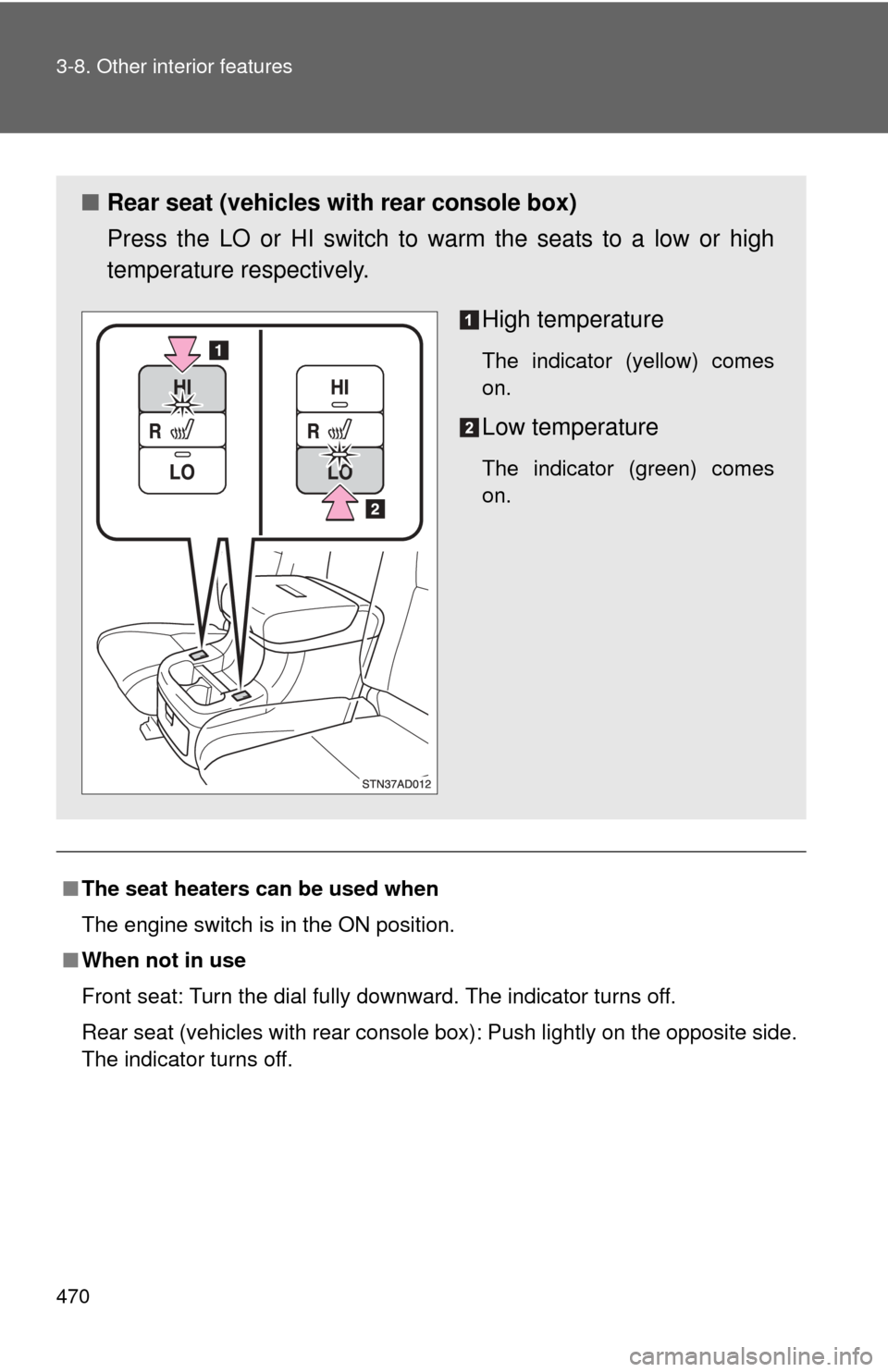
■ When not in use
Front seat: Turn the dial fully downward. The indicator turns off.
Rear seat (vehicles with rear console box): Push lightly on the opposite side.
The indicator turns off.
■ Rear seat (vehicles with rear console box)
Press the LO or HI switch to warm the seats to a low or high
temperature respectively.
High temperature
The indicator (yellow) comes
on.
Low temperature
The indicator (green) comes
on.