wheel TOYOTA SEQUOIA 2011 2.G Repair Manual
[x] Cancel search | Manufacturer: TOYOTA, Model Year: 2011, Model line: SEQUOIA, Model: TOYOTA SEQUOIA 2011 2.GPages: 688, PDF Size: 14.76 MB
Page 166 of 688
166
2-1. Driving procedures
Hor n
■After adjusting the steering wheel (veh icles with manual tilt and tele-
scopic steering)
Make sure that the steering wheel is securely locked.
The horn may not sound if the steering wheel is not securely locked.
( P. 81)
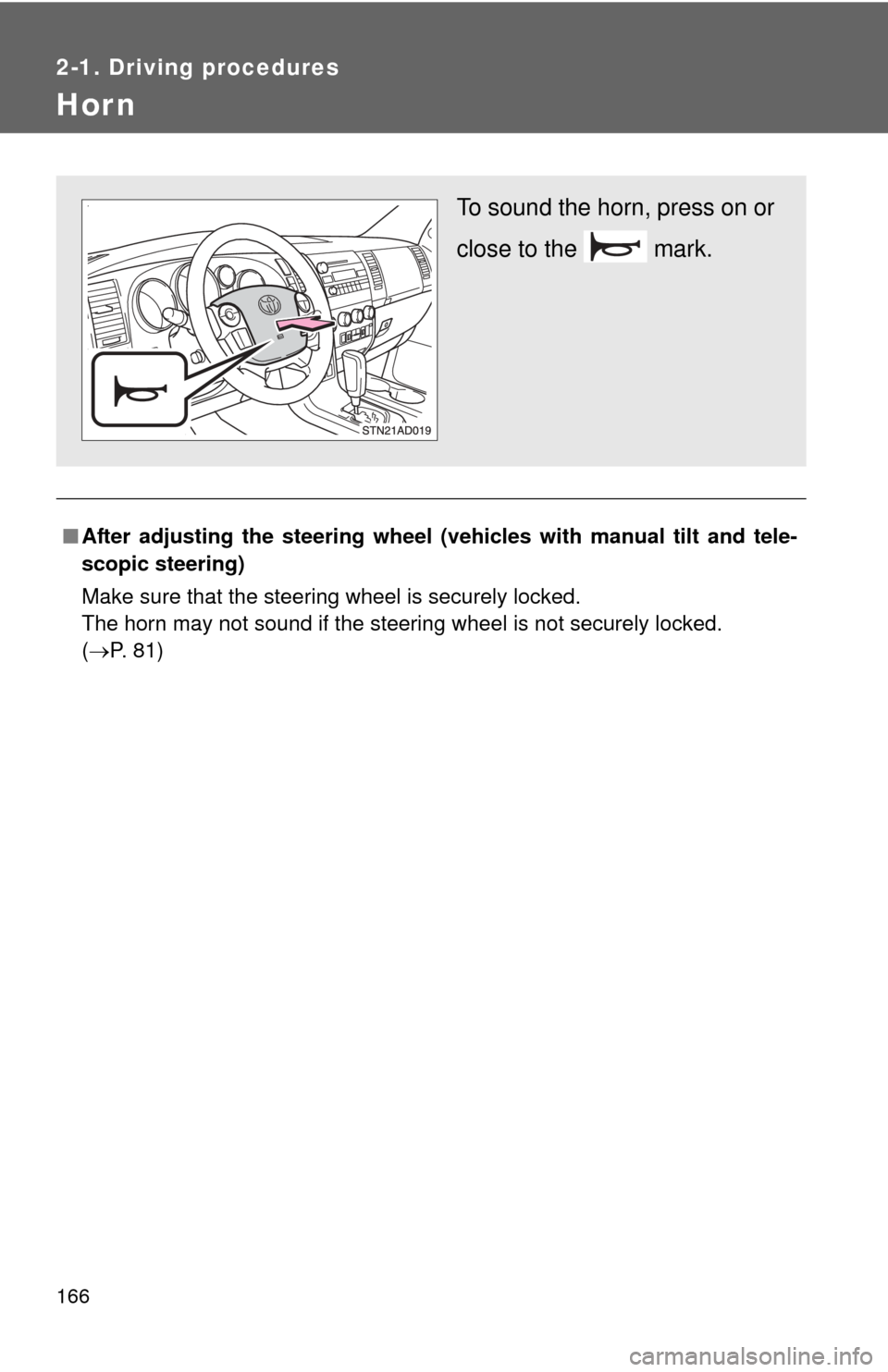
To sound the horn, press on or
close to the mark.
Page 197 of 688
197
2-4. Using other
driving systems
2
When driving
■Automatic cruise control cancellation
The set speed is automatically canceled in any of the following situations.
●Actual vehicle speed falls more than approximately 10 mph (16 km/h)
below the preset vehicle speed.
At this time, the memorized set speed is not retained.
● Actual vehicle speed is below approximately 25 mph (40 km/h).
● VSC is activated.
● The operation cannot be switched for 5 seconds or more after operating
the front wheel drive control switch or the center differential lock switch.
■ If the cruise control indicator flashes
Press the ON-OFF button to turn the cruise control off, and then reactivate
the system.
If the cruise control speed cannot be set or if the cruise control cancels
immediately after being activated, there may be a malfunction in the cruise
control system. Have the vehicle inspected by your Toyota dealer.
CAUTION
■To avoid operating the cruise control by mistake
Keep the ON-OFF button off when not in use.
■ Situations unsuitable for cruise control
Do not use cruise control in any of the following situations.
Doing so may result in control of the vehicle being lost and could cause an
accident resulting in death or serious injury.
●In heavy traffic
● On roads with sharp bends
● On winding roads
● On slippery roads, such as those covered with rain, ice or snow
● On steep hills
Vehicle speed may exceed the set speed when driving down a steep hill
● When your vehicle is towing anything
Page 204 of 688
204 2-4. Using other driving systems
■Automatically canceling vehicle-to-vehicle distance control
Vehicle-to-vehicle distance control driving is automatically canceled in the
following situations.
●Vehicle speed falls below approximately 25 mph (40 km/h)
● VSC is activated
● The sensor cannot operate correctly because it is covered in some way.
*
●The windshield wipers are operating at high or low speed.*
●The operation cannot be switched for 5 seconds or more after operating
the front wheel drive control switch or the center differential lock switch.
*: Vehicle-to-vehicle distance control driving must be reset by pressing the
ON-OFF button again.
If vehicle-to-vehicle distance control dr iving is automatically canceled for any
other reason, there may be a malfunction in the system. Contact your Toyota
dealer.
■ Automatically canceling constant speed control
The set speed is automatically canceled in the following situations.
●Actual vehicle speed is more than approximately 10 mph (16 km/h)
below the preset vehicle speed
At this time, the memorized set speed is not retained.
● Vehicle speed falls below approximately 25 mph (40 km/h)
● VSC is activated
● The operation cannot be switched for 5 seconds or more after operating
the front wheel drive control switch or the center differential lock switch.
■ Vehicle-to-vehicle distance settings
Select a distance from the table below. Note that the distances shown corre-
spond to a vehicle speed of 55 mph (90 km/h). Vehicle-to-vehicle distance
increases/decreases in accordance with vehicle speed.
Distance optionsVehicle-to-vehicle distance
Long Approximately 245 ft. (75 m)
Medium Approximately 165 ft. (50 m)
Short Approximately 100 ft. (30 m)
Page 207 of 688
207
2-4. Using other
driving systems
2
When driving
CAUTION
■When the laser radar sensor may not be correctly detecting the vehicle
ahead
●There is an obstruction (protective film, sticker, etc.) on the reflectors on
the vehicle ahead, or reflectors are not installed on the vehicle ahead or
are damaged.
● Heavy luggage in the luggage compartment or rear seats is causing the
nose of your vehicle to tilt up.
● Vehicles that cut in suddenly
● Vehicles traveling at low speeds
● Vehicles that are not moving
● Vehicles with small rear ends (trailers with no load on board etc.)
● Motorcycles traveling in the same lane
■ Conditions under which the vehicle -to-vehicle distance control may
not function correctly
Apply the brakes as necessary in the following conditions as the laser radar
sensor may not be able to correctly detect vehicles ahead, and an accident
may result.
● When water or snow thrown up by the surrounding vehicles hinders the
functioning of the sensor
● When your vehicle is pointing upwards (caused by a heavy load in the lug-
gage compartment, etc.)
● When the road curves or when the lanes are narrow
● When steering wheel operation or your position in the lane is unstable
● When the vehicle ahead of you decelerates suddenly
● When towing a trailer
Page 221 of 688

221
2-4. Using other
driving systems
2
When driving
■Flicker effect
When the camera is used under fluorescent lights, sodium lights, mercury
lights, etc., the lights and the illuminated areas may appear to flicker.
CAUTION
■When using the rear view monitor system
Observe the following precautions to avoid an accident that could result in
death or serious injuries.
●Never depend solely on the rear view monitor system when reversing.
● Always check visually and with the mirrors to confirm your intended path is
clear.
● Always check the vehicle surroundi ng area, because the guide lines are
estimates of distance and location.
● The guide lines are assistant lines and do not change even if the steering
wheel is turned.
● Depicted distances between objects and flat surfaces differ from actual
distances.
● Do not use the system if back door is open.
■ Conditions which may affect the rear view monitor system
● If the back of the vehicle has been hit, the camera’s position and mounting
angle may have changed. Have the vehicle inspected by your Toyota
dealer.
● Rapid temperature changes, such as when hot water is poured on the
vehicle in cold weather, may cause the system to function abnormally.
● If the camera lens is dirty, it cannot transmit a clear image. Rinse with
water and wipe with a soft cloth. If extremely dirty, wash with a mild
cleanser and rinse.
● The displayed image may be darker and moving images may be slightly
distorted when the system is cold.
■ Caution while dr iving in reverse
Do not change modes while the vehicle is moving.
Page 228 of 688
228
2-4. Using other driving systems
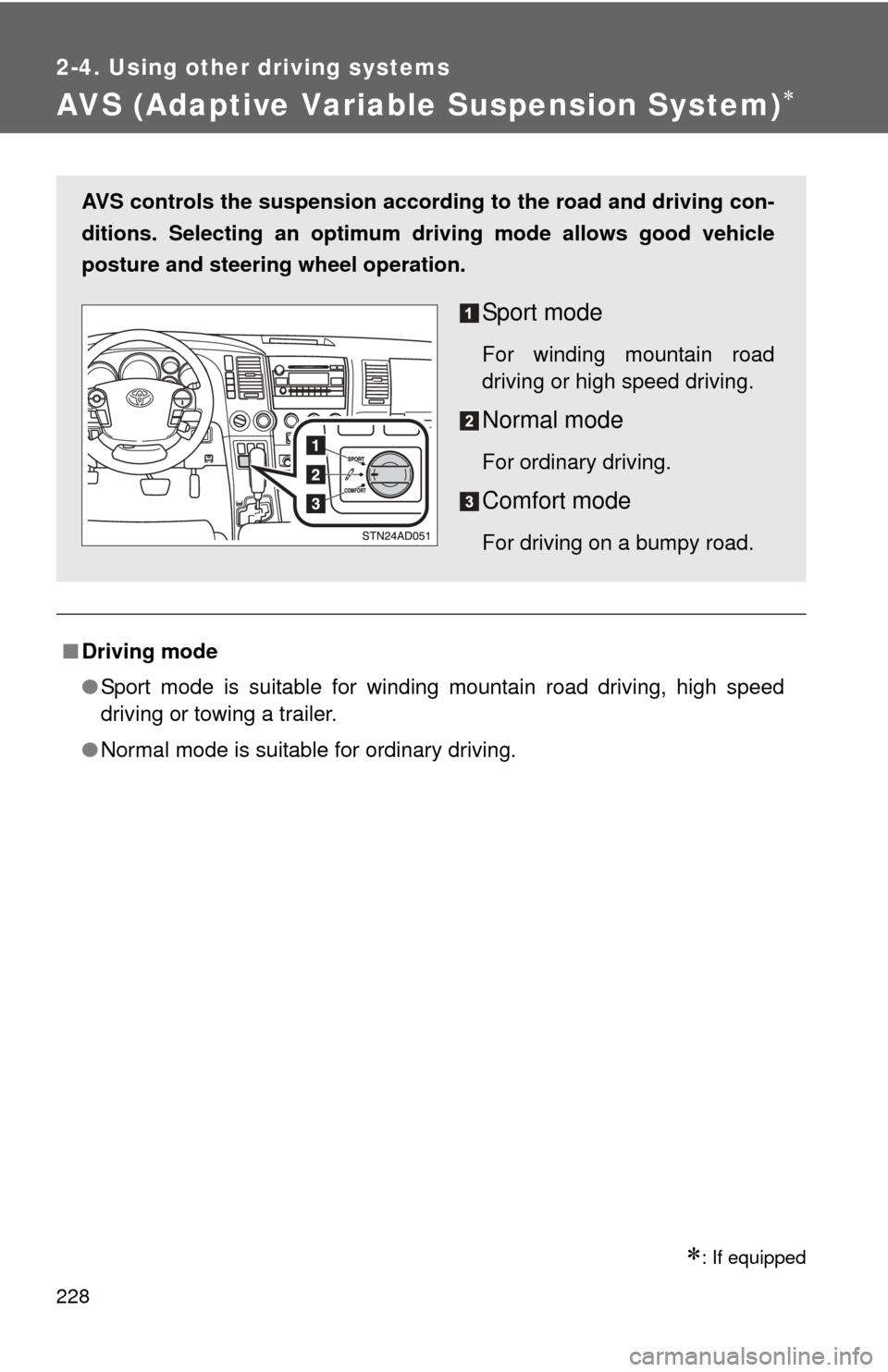
AVS (Adaptive Variable Suspension System)
: If equipped
■Driving mode
●Sport mode is suitable for winding mountain road driving, high speed
driving or towing a trailer.
● Normal mode is suitable for ordinary driving.
AVS controls the suspension accord ing to the road and driving con-
ditions. Selecting an optimum driving mode allows good vehicle
posture and steering wheel operation.
Sport mode
For winding mountain road
driving or high speed driving.
Normal mode
For ordinary driving.
Comfort mode
For driving on a bumpy road.
Page 229 of 688
229
2-4. Using other driving systems
2
When driving
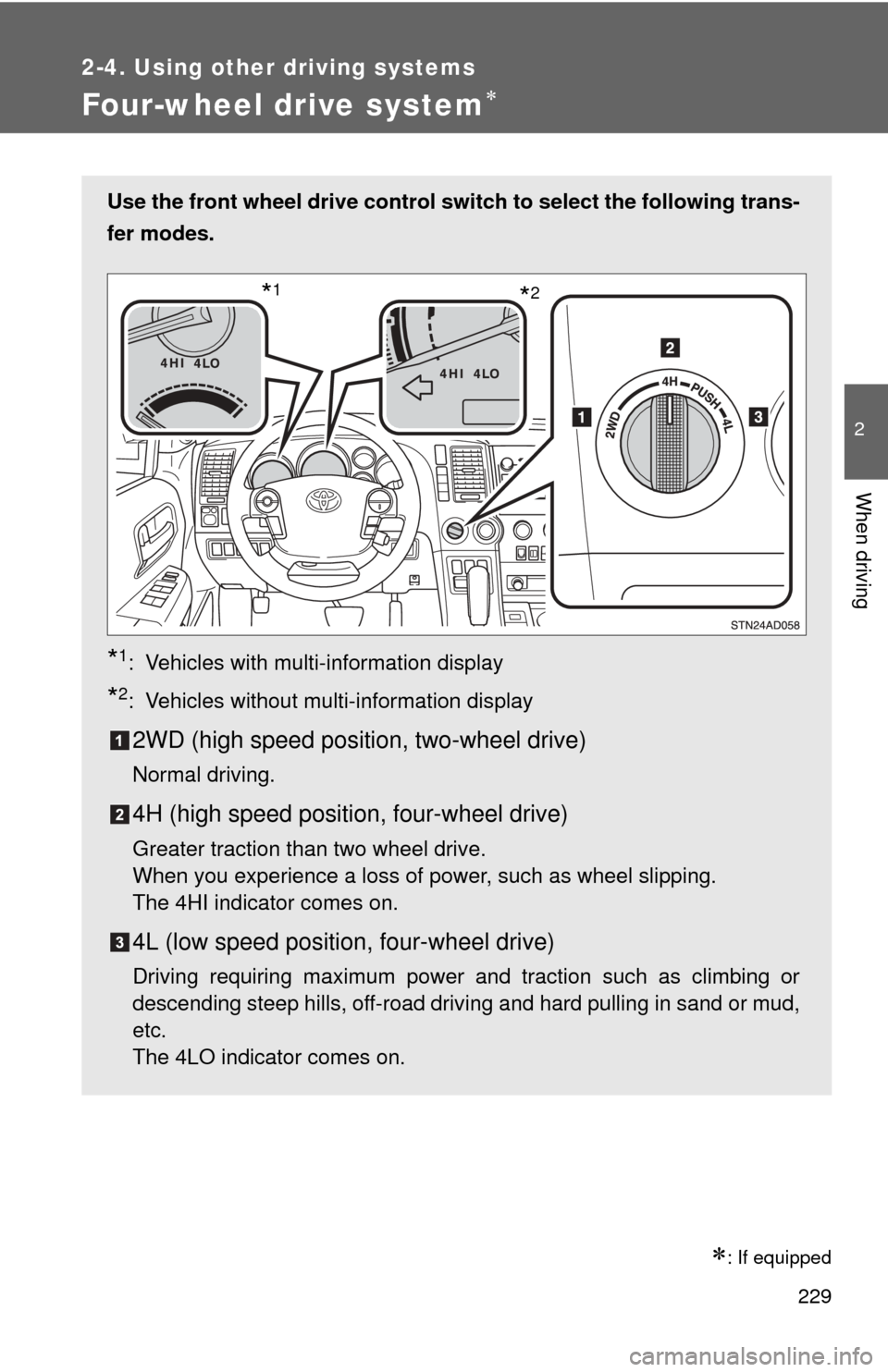
Four-wheel drive system
: If equipped
Use the front wheel drive control switch to select the following trans-
fer modes.
*1: Vehicles with multi-information display
*2: Vehicles without multi-information display
2WD (high speed position, two-wheel drive)
Normal driving.
4H (high speed position, four-wheel drive)
Greater traction than two wheel drive.
When you experience a loss of power, such as wheel slipping.
The 4HI indicator comes on.
4L (low speed position, four-wheel drive)
Driving requiring maximum power and traction such as climbing or
descending steep hills, off-road driving and hard pulling in sand or mud,
etc.
The 4LO indicator comes on.
*2*1
Page 230 of 688
230 2-4. Using other driving systems
Shifting between 4H and 4L■ Shifting from 4H to 4L
Stop the vehicle completely.
Shift the shift lever to N.
Push and turn the front wheel dr ive control switch fully clock-
wise.
Maintain this condition until the 4LO indicator turns on.
■ Shifting from 4L to 4H
Stop the vehicle completely.
Shift the shift lever to N.
Turn the front wheel drive cont rol switch fully counterclock-
wise.
Maintain this condition until the 4LO indicator turns off.
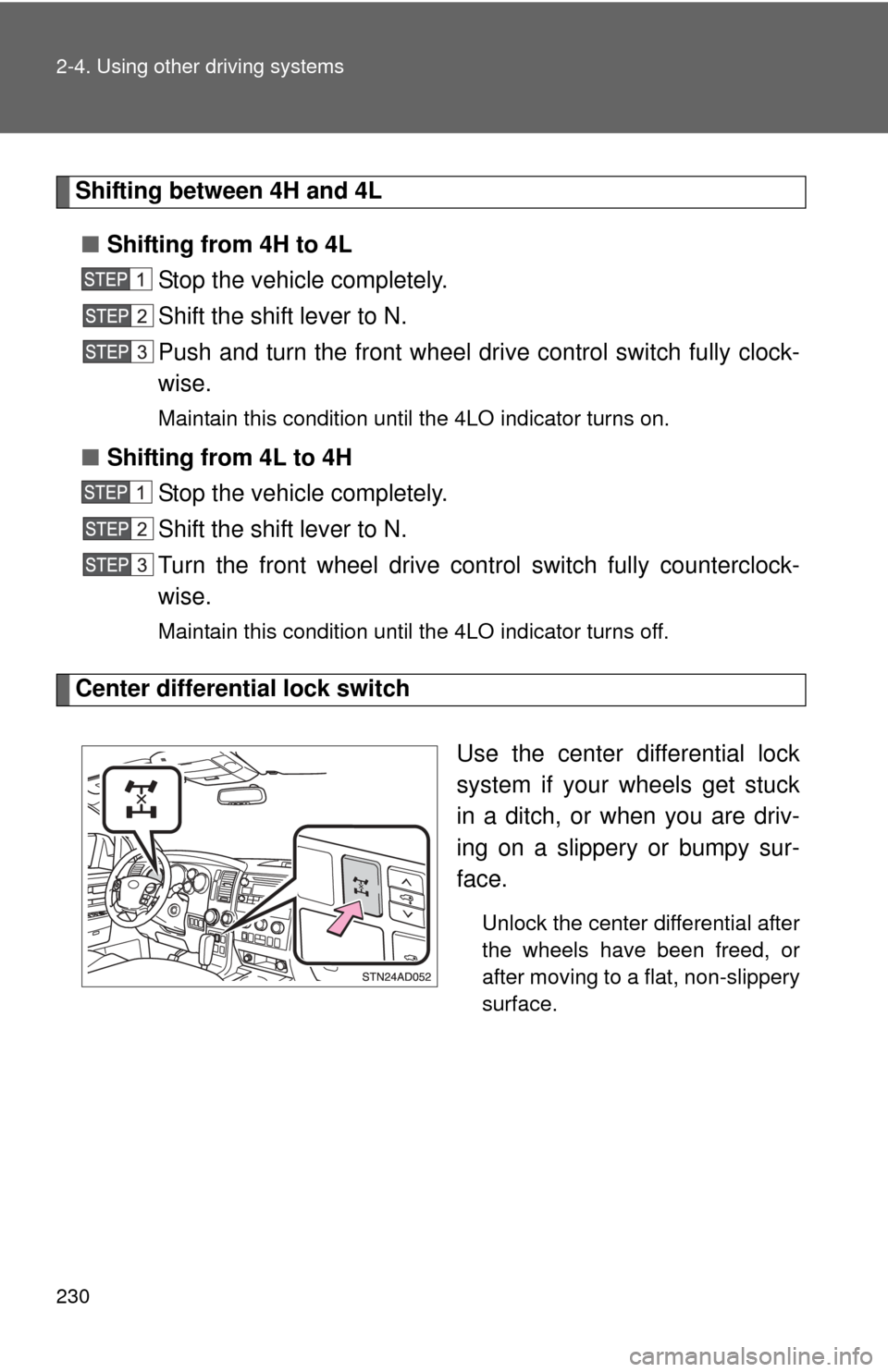
Center differential lock switch
Use the center differential lock
system if your wheels get stuck
in a ditch, or when you are driv-
ing on a slippery or bumpy sur-
face.
Unlock the center differential after
the wheels have been freed, or
after moving to a flat, non-slippery
surface.
Page 231 of 688

231
2-4. Using other
driving systems
2
When driving
■Shifting between 2WD and 4H
●Reduce your speed to less than 62 mph (100 km/h) and set the front
wheel drive control switch between 2WD and 4H.
When the ambient temperature is 5.0° F (-15°C) or lower, shifting from
2WD to 4H cannot be performed with the vehicle speed above 43 mph (70
km/h).
● If the 4HI indicator does not go off when you shift from 4H to 2WD, drive
straight ahead while accelerating or decelerating, or drive in reverse.
■ Four-wheel drive usage frequency
You should drive in four-wheel drive for at least 10 miles (16 km) each
month.
This will assure that the front drive components are lubricated.
■ The center differential lock switch can be operated when
●The front wheel drive control switch is in the 4H or 4L position.
● The vehicle speed is less than 62 mph (100 km/h)
■ Center differential lock system
●When the front wheel drive control switch is in the 4L position and the
center differential is locked, the VSC is automatically turned off.
● When the front wheel drive control switch is turned to the 2WD position,
the center differential is automatically unlocked.
● If the operation is not completed, the center differential lock indicator
blinks. If the indicator does not go off when unlocking the center differen-
tial, drive straight ahead while accelerating or decelerating, or drive \
in
reverse.
Page 232 of 688

232 2-4. Using other driving systems
■If the 4LO indicator, 4HI indicator or the center differential lock indica-
tor blinks
● If the 4LO indicator continues to blink when shifting between 4H and 4L,
stop the vehicle completely, move the shift lever to N and operate the
switch again.
● If the shift lever is moved before the 4LO indicator turns on/off, the trans-
fer mode may not be shifted completely. The transfer mode disengages
both the front and rear driveshafts from the powertrain and allows the
vehicle to move regardless of the shift position. (At this time, the indicator
blinks and the buzzer sounds.)
Therefore, the vehicle is free to roll even if the automatic transmission is in
P. You or someone else could be seriously injured. You must complete the
shifting of the transfer mode.
To complete the shifting, stop the vehicle completely, return the shift lever
to N, and confirm that the shift was completed (The indicator turns on/off).
● If the engine coolant temperature is too low, transfer mode may not be
able to shift. When the engine is warmer, turn the switch again.
If the 4LO indicator, 4HI indicator or the center differential lock indicator con-
tinues to blink even after attempting the above, there may be a malfunction
in the engine, the brake system or the four-wheel drive system. In this case,
you may not be able to shift between 2WD and 4H, 4H and 4L, and the cen-
ter differential lock may not be operable. Have the vehicle inspected by your
Toyota dealer immediately.
■ Shifting to 4L position
The VSC OFF indicator will come on.
If the center differential is locked, VSC is automatically turned off.