turn signal TOYOTA SEQUOIA 2011 2.G Owners Manual
[x] Cancel search | Manufacturer: TOYOTA, Model Year: 2011, Model line: SEQUOIA, Model: TOYOTA SEQUOIA 2011 2.GPages: 688, PDF Size: 14.76 MB
Page 2 of 688

TABLE OF CONTENTSIndex
2
1-1. Key informationKeys ..................................... 32
1-2. Opening, closing and locking the doors
Wireless remote control ....... 33
Side doors ............................ 37
Back door ............................. 42
1-3. Adjustable components (seats, mirrors, steering
wheel)
Front seats ........................... 50
Rear seats ............................ 54
Driving position memory (driver’s seat) ..................... 64
Head restraints ..................... 67
Seat belts ............................. 71
Steering wheel (manually adjustable type) .................. 81
Steering wheel (power-adjustable type)...... 82
Anti-glare inside rear view mirror .................................. 83
Outside rear view mirrors ..... 86
Roof luggage carrier............. 90
1-4. Opening and closing the windows and moon roof
Power windows .................... 92
Power back window ............. 94
Moon roof ............................. 96 1-5. Refueling
Opening the fuel tank cap..... 99
1-6. Theft deterrent system Engine immobilizer system .............................. 104
Alarm .................................. 106
1-7. Safety information Correct driving posture ....... 109
SRS airbags ....................... 111
Front passenger occupant classification system ......... 124
Child restraint systems ....... 129
Installing child restraints ..... 133
2-1. Driving procedures Driving the vehicle .............. 148
Engine (ignition) switch....... 157
Automatic transmission ...... 160
Turn signal lever ................. 164
Parking brake ..................... 165
Horn .................................... 166
2-2. Instrument cluster Gauges and meters ............ 167
Indicators and warning lights ................................. 172
Multi-information display ..... 177
Accessory meter ................. 183
1Before driving
2When driving
Page 8 of 688
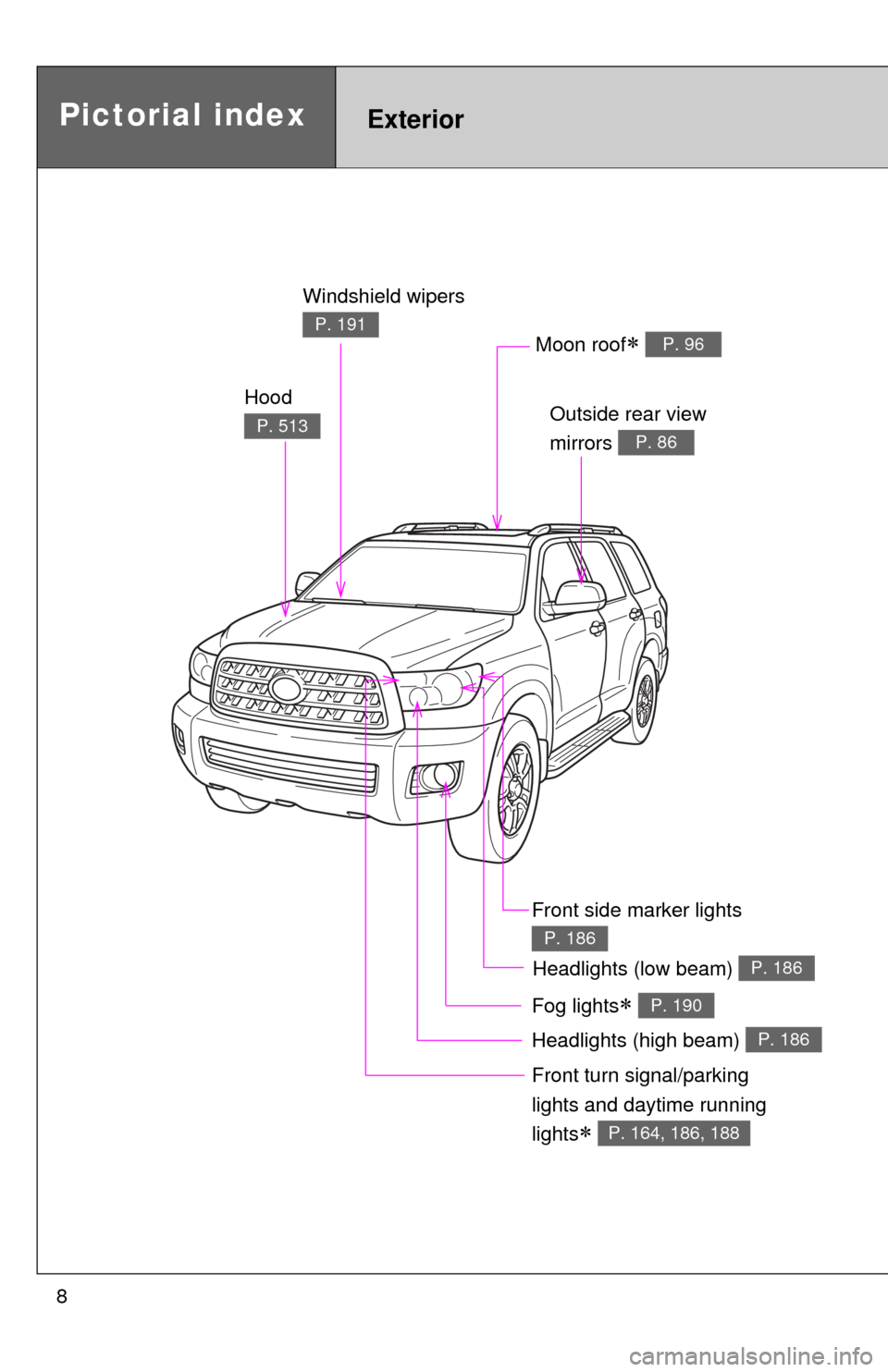
8
Headlights (high beam) P. 186
Pictorial indexExterior
Hood
P. 513
Windshield wipers
P. 191
Outside rear view
mirrors
P. 86
Front turn signal/parking
lights and daytime running
lights
P. 164, 186, 188
Moon roof P. 96
Fog lights P. 190
Headlights (low beam) P. 186
Front side marker lights
P. 186
Page 9 of 688
9
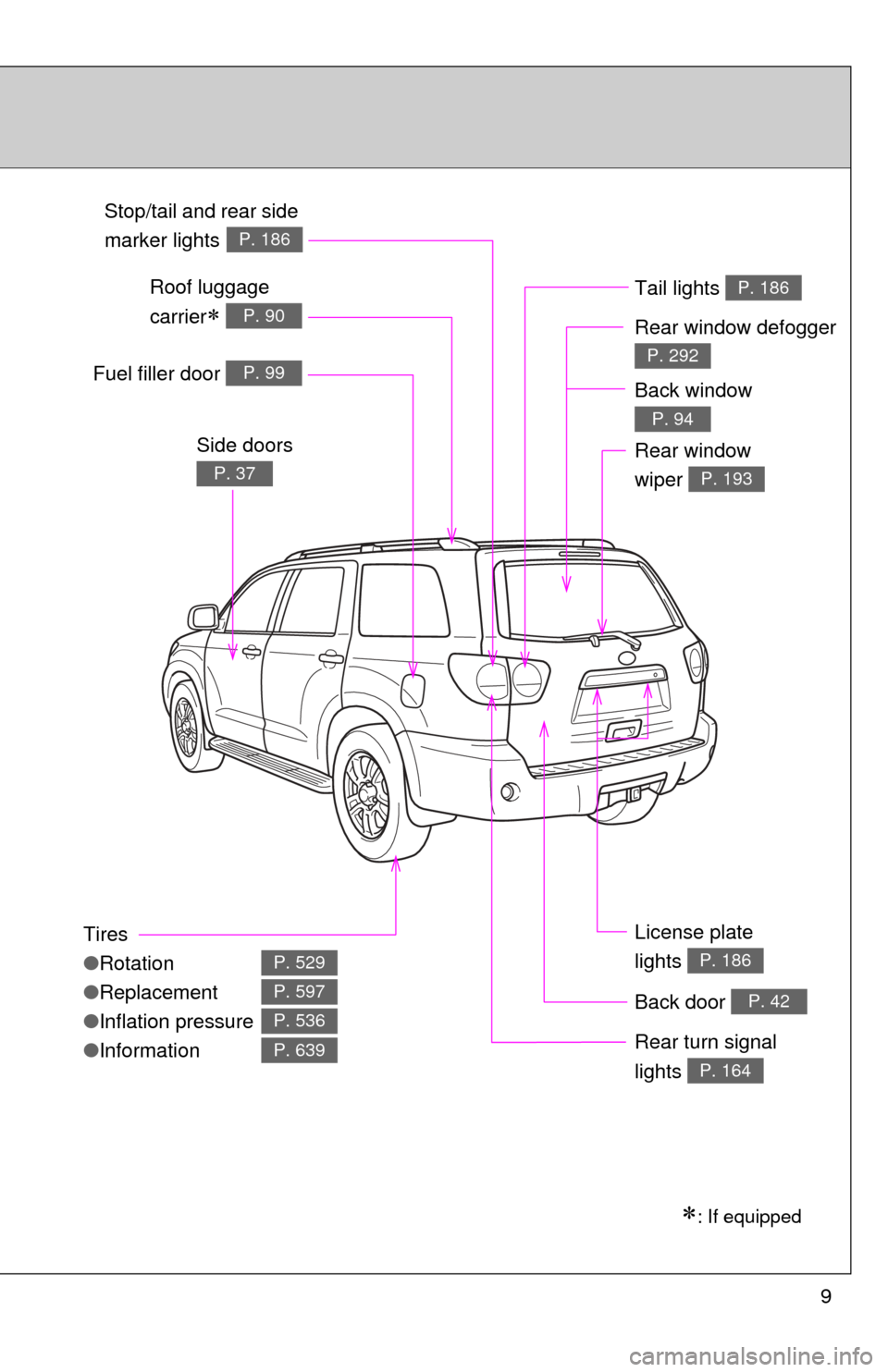
Tires
●Rotation
● Replacement
● Inflation pressure
● Information
P. 529
P. 597
P. 536
P. 639
Fuel filler door P. 99
Rear turn signal
lights
P. 164
Stop/tail and rear side
marker lights
P. 186
Side doors
P. 37
: If equipped
Back door P. 42
License plate
lights
P. 186
Tail lights P. 186
Rear window defogger
P. 292
Rear window
wiper
P. 193
Roof luggage
carrier
P. 90
Back window
P. 94
Page 18 of 688
18
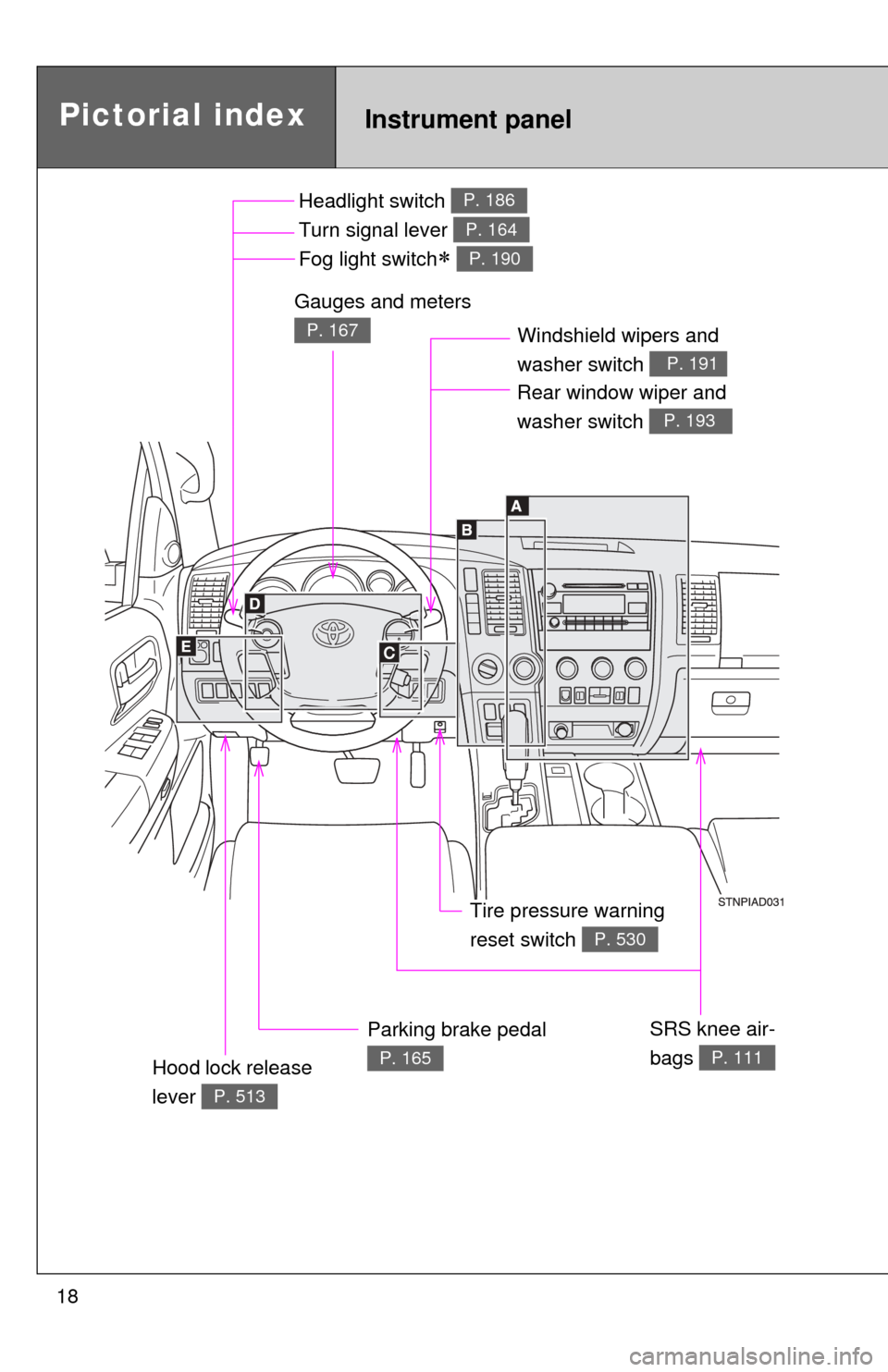
Pictorial indexInstrument panel
Headlight switch
Turn signal lever
Fog light switch
P. 186
P. 164
P. 190
Windshield wipers and
washer switch
P. 191
Parking brake pedal
P. 165
Gauges and meters
P. 167
Hood lock release
lever
P. 513
Tire pressure warning
reset switch
P. 530
Rear window wiper and
washer switch
P. 193
SRS knee air-
bags
P. 111
Page 64 of 688
64
1-3. Adjustable components (seats, mirrors, steering wheel)
Driving position memor y (driver’s seat)
: If equipped
Your preferred driving position (the position of the driver’s seat,
steering wheel and outside rear view mirrors) can be entered into the
computer’s memory and recalle d with the touch of a button.
Two different driving positions can be entered into memory.
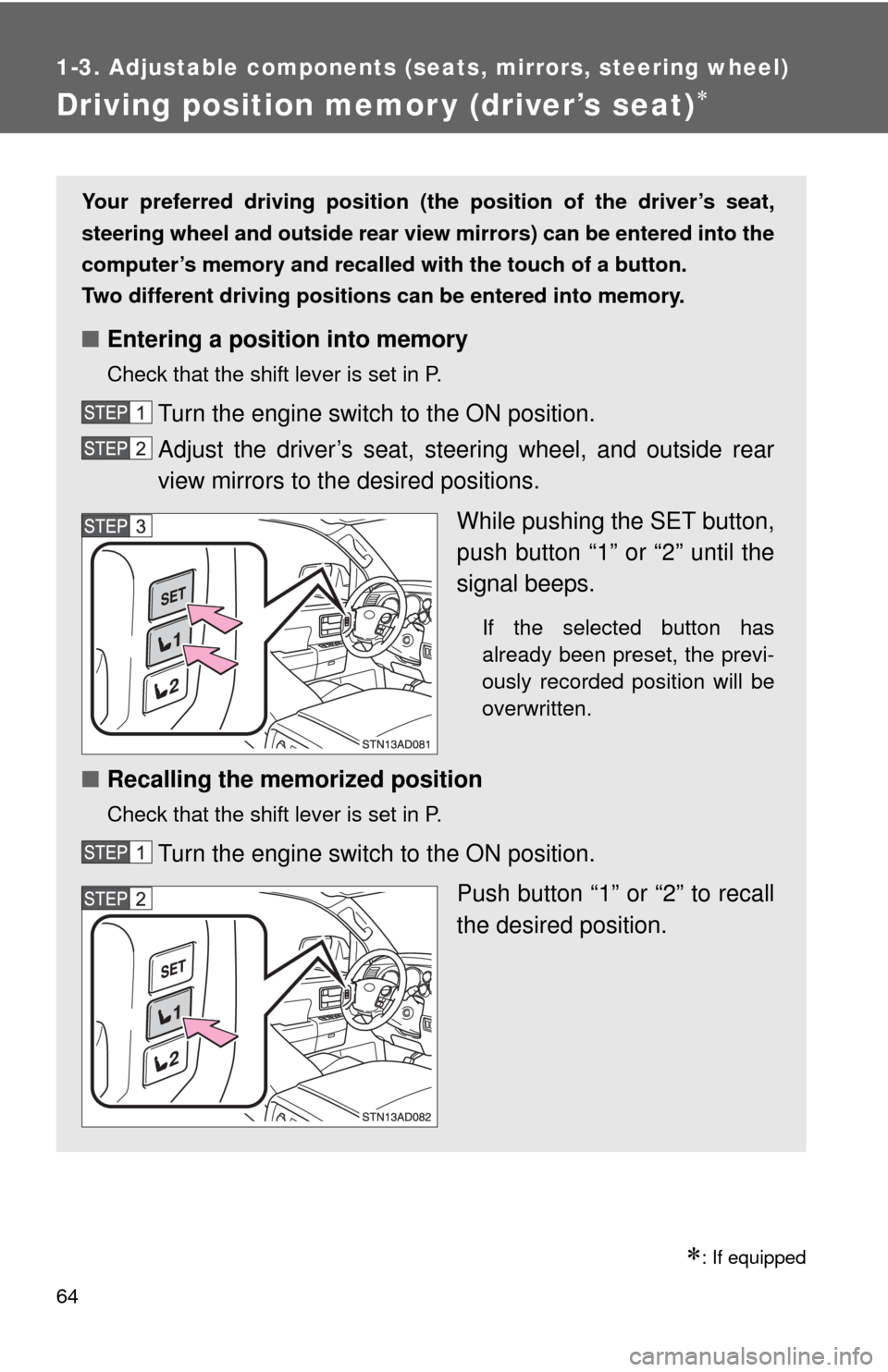
■ Entering a position into memory
Check that the shift lever is set in P.
Turn the engine switch to the ON position.
Adjust the driver’s seat, steering wheel, and outside rear
view mirrors to the desired positions.
While pushing the SET button,
push button “1” or “2” until the
signal beeps.
If the selected button has
already been preset, the previ-
ously recorded position will be
overwritten.
■Recalling the memorized position
Check that the shift lever is set in P.
Turn the engine switch to the ON position.
Push button “1” or “2” to recall
the desired position.
Page 147 of 688
When driving2
147
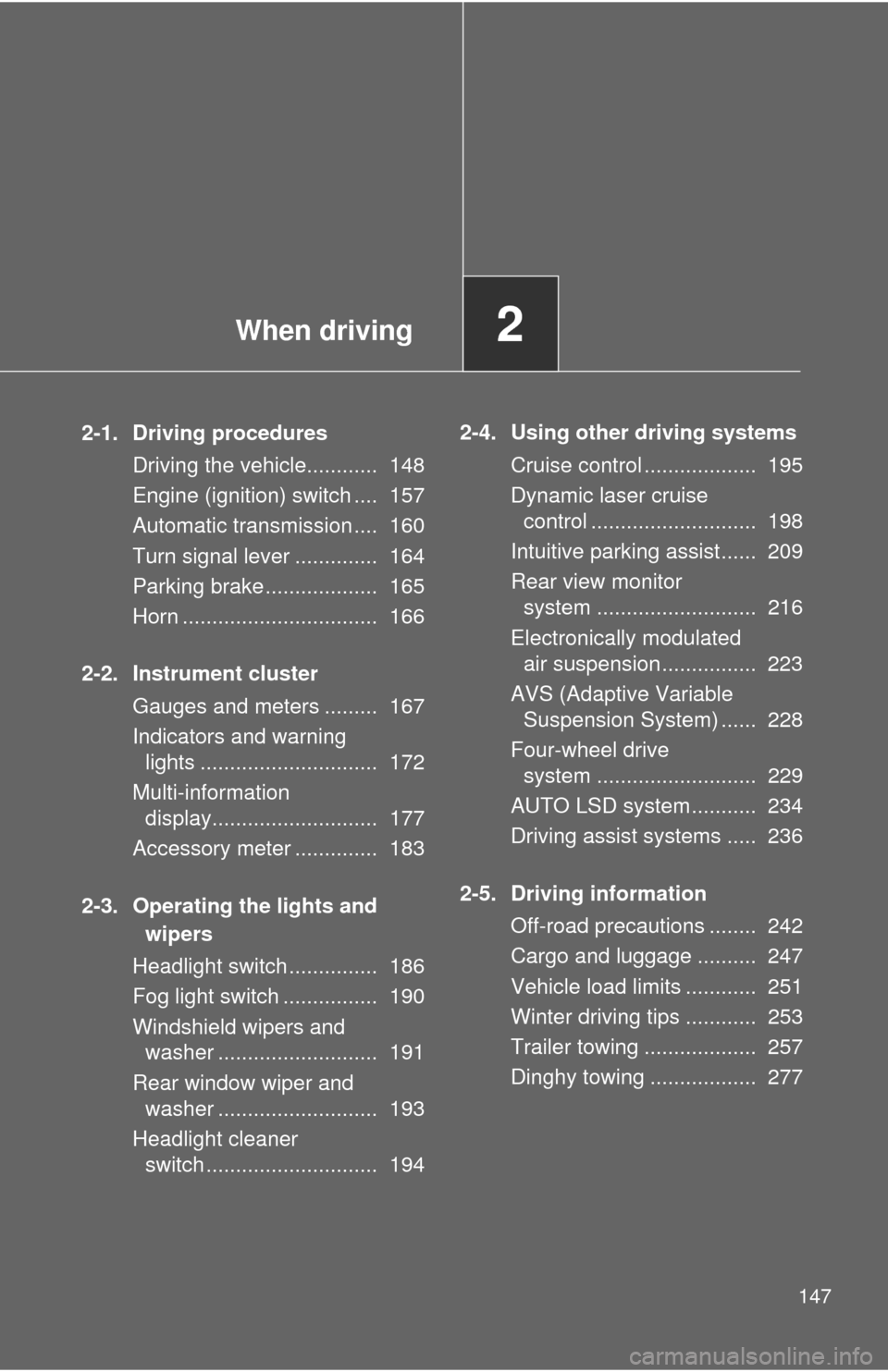
2-1. Driving proceduresDriving the vehicle............ 148
Engine (ignition) switch .... 157
Automatic transmission .... 160
Turn signal lever .............. 164
Parking brake ................... 165
Horn ................................. 166
2-2. Instrument cluster Gauges and meters ......... 167
Indicators and warninglights .............................. 172
Multi-information display............................ 177
Accessory meter .............. 183
2-3. Operating the lights and wipers
Headlight switch ............... 186
Fog light switch ................ 190
Windshield wipers and washer ........................... 191
Rear window wiper and washer ........................... 193
Headlight cleaner switch ............................. 194 2-4. Using other driving systems
Cruise control ................... 195
Dynamic laser cruisecontrol ............................ 198
Intuitive parking assist...... 209
Rear view monitor system ........................... 216
Electronically modulated air suspension ................ 223
AVS (Adaptive Variable Suspension System) ...... 228
Four-wheel drive system ........................... 229
AUTO LSD system........... 234
Driving assist systems ..... 236
2-5. Driving information Off-road precautions ........ 242
Cargo and luggage .......... 247
Vehicle load limits ............ 251
Winter driving tips ............ 253
Trailer towing ................... 257
Dinghy towing .................. 277
Page 164 of 688

164
2-1. Driving procedures
Tur n signal lever
■Turn signals can be operated when
The engine switch is in the ON position.
■ If the indicators flash faster than usual
Check that a light bulb in the front or rear turn signal lights has not burned
out.
Right turn
Left turn
Move and hold the lever
partway to signal a lane
change.
The right hand signal will flash
until you release the lever.
Move and hold the lever
partway to signal a lane
change.
The left hand signal will flash
until you release the lever.
Page 174 of 688
174 2-2. Instrument cluster
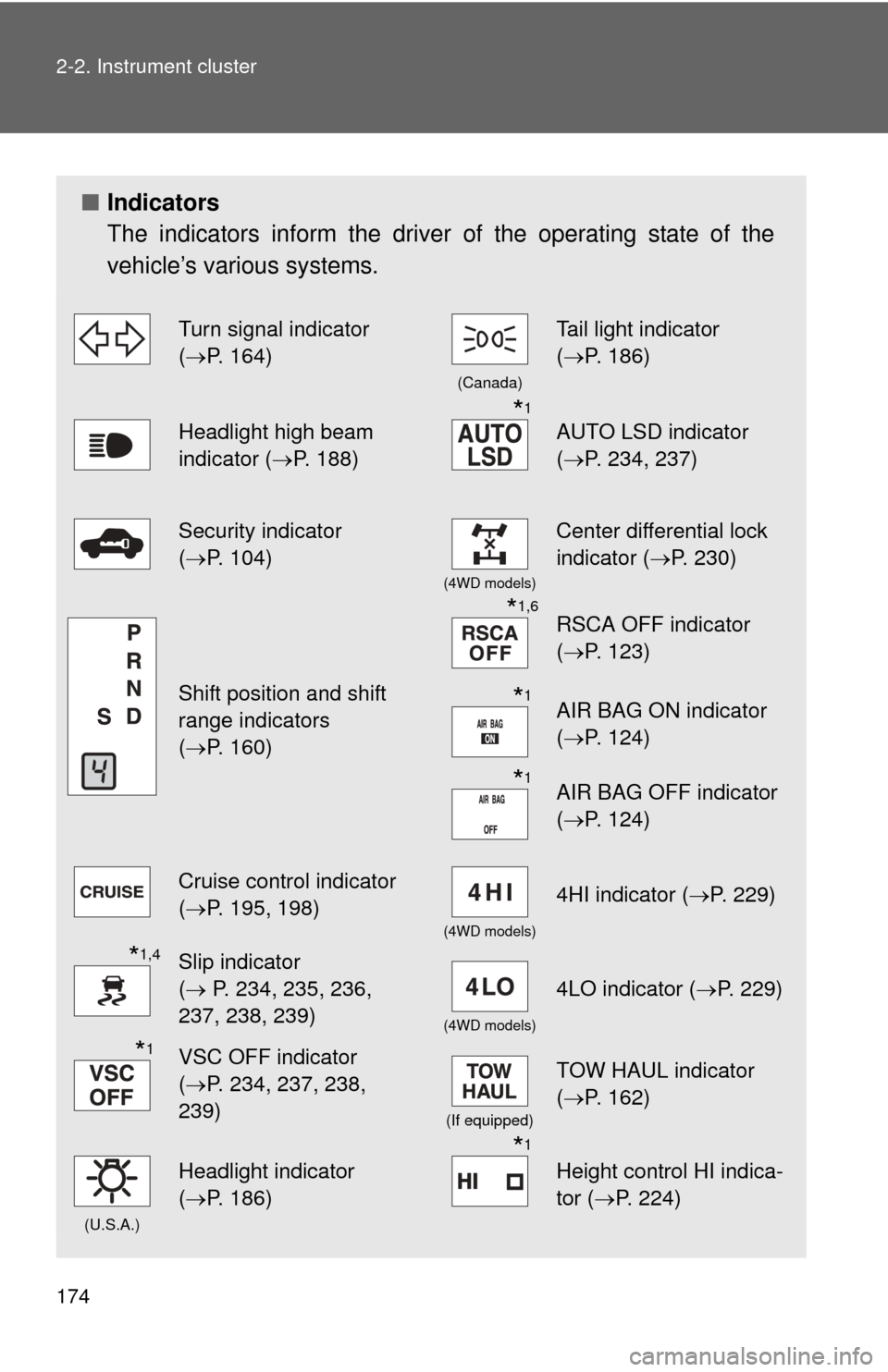
■Indicators
The indicators inform the driver of the operating state of the
vehicle’s various systems.
Turn signal indicator
(P. 164)
(Canada)
Tail light indicator
( P. 186)
Headlight high beam
indicator ( P. 188)*1
AUTO LSD indicator
(P. 234, 237)
Security indicator
(P. 104)
(4WD models)
Center differential lock
indicator ( P. 230)
Shift position and shift
range indicators
(P. 160)
*1,6RSCA OFF indicator
( P. 123)
*1AIR BAG ON indicator
(P. 124)
*1AIR BAG OFF indicator
(P. 124)
Cruise control indicator
(P. 195, 198)
(4WD models)
4HI indicator ( P. 229)
*1,4Slip indicator
( P. 234, 235, 236,
237, 238, 239)
(4WD models)
4LO indicator ( P. 229)
*1VSC OFF indicator
(P. 234, 237, 238,
239)
(If equipped)
TOW HAUL indicator
( P. 162)
(U.S.A.)
Headlight indicator
(P. 186)*1
Height control HI indica-
tor (P. 224)
Page 188 of 688
188 2-3. Operating the lights and wipers
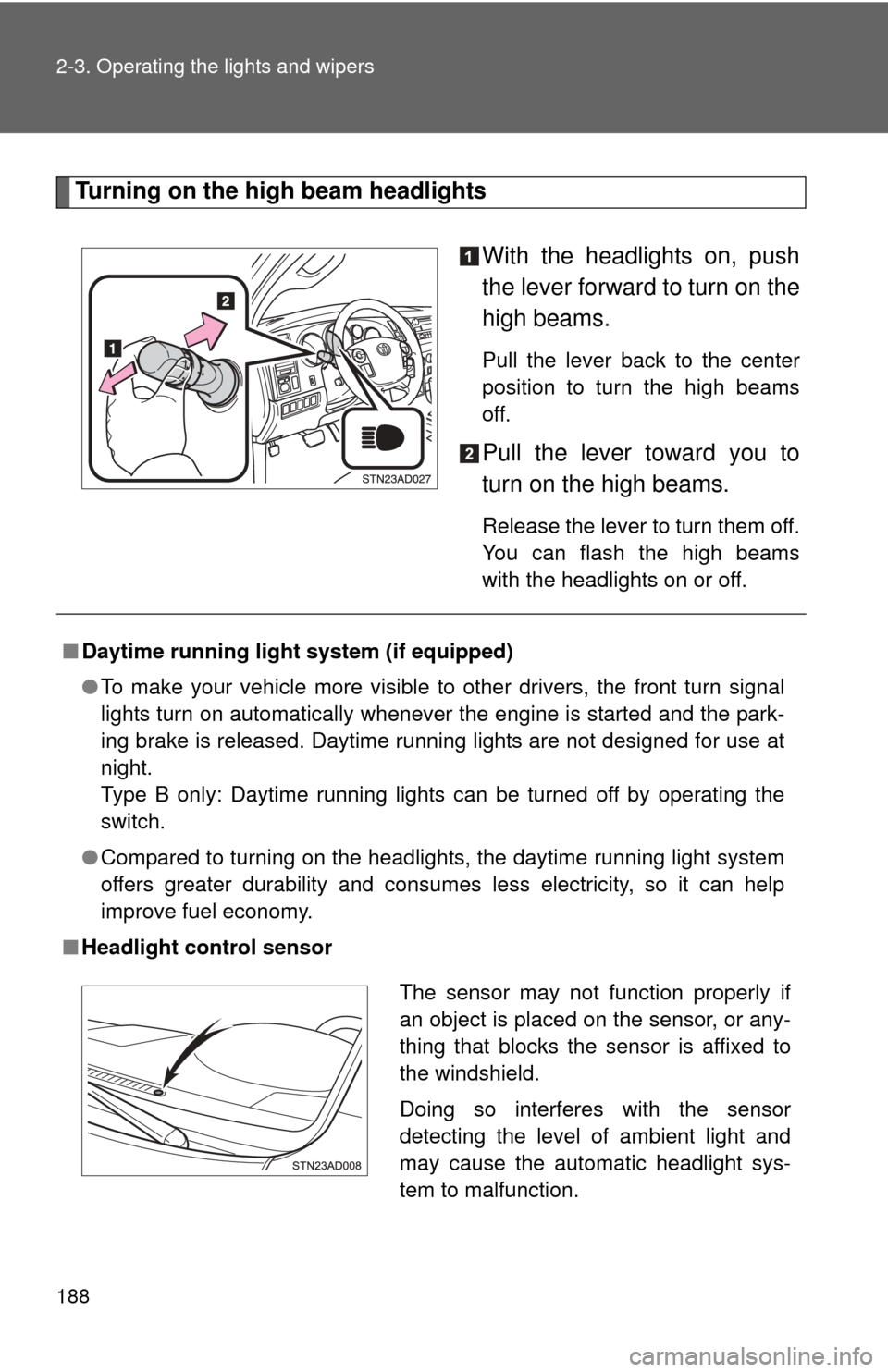
Turning on the high beam headlightsWith the headlights on, push
the lever forward to turn on the
high beams.
Pull the lever back to the center
position to turn the high beams
off.
Pull the lever toward you to
turn on the high beams.
Release the lever to turn them off.
You can flash the high beams
with the headlights on or off.
■Daytime running light system (if equipped)
●To make your vehicle more visible to other drivers, the front turn signal
lights turn on automatically whenever the engine is started and the park-
ing brake is released. Daytime running lights are not designed for use at
night.
Type B only: Daytime running lights can be turned off by operating the
switch.
● Compared to turning on the headlights, the daytime running light system
offers greater durability and consumes less electricity, so it can help
improve fuel economy.
■ Headlight control sensor
The sensor may not function properly if
an object is placed on the sensor, or any-
thing that blocks the sensor is affixed to
the windshield.
Doing so interferes with the sensor
detecting the level of ambient light and
may cause the automatic headlight sys-
tem to malfunction.
Page 307 of 688
307
3-2. Using the audio system
3
Interior features
■
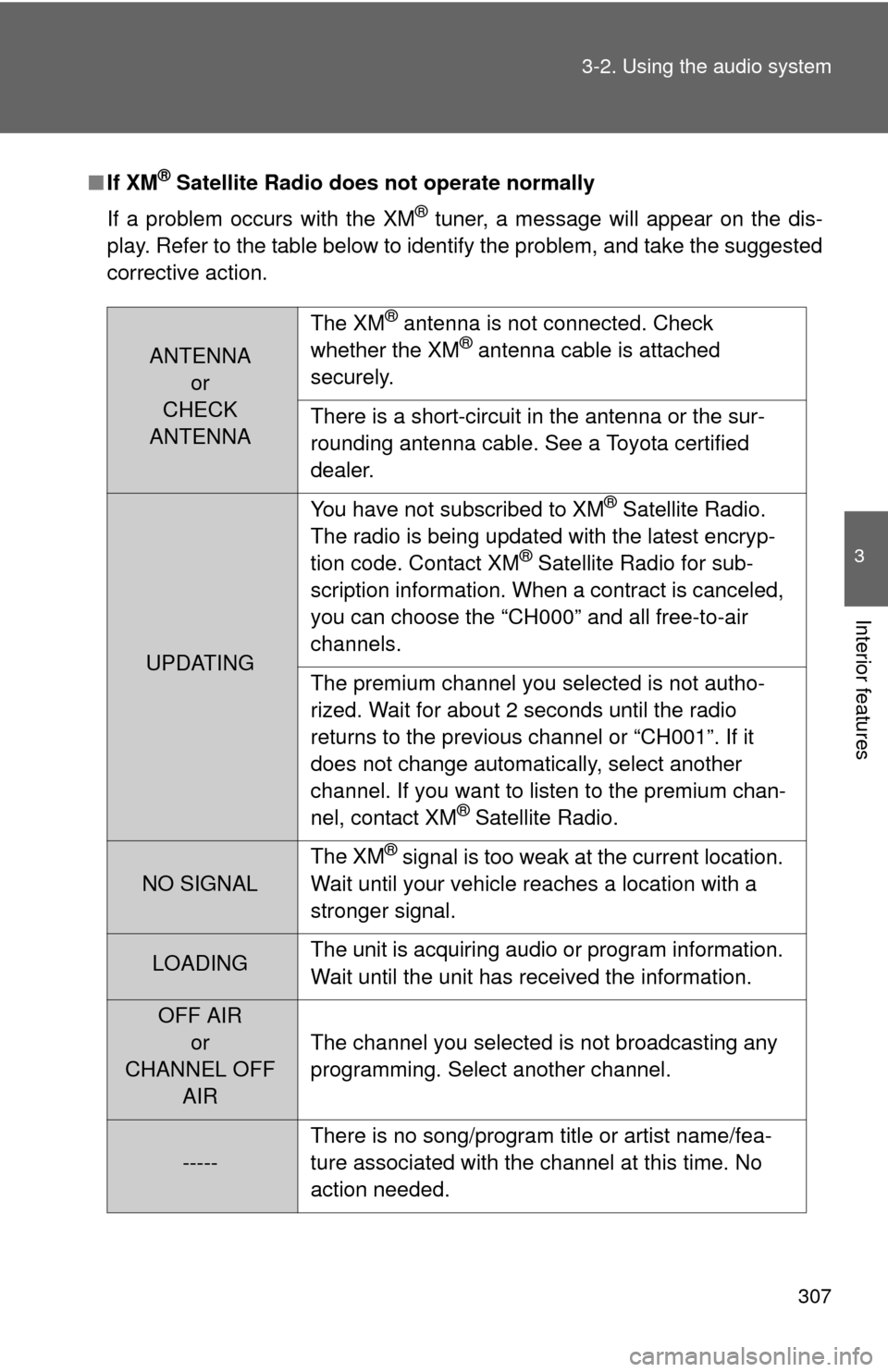
If XM® Satellite Radio does not operate normally
If a problem occurs with the XM
® tuner, a message will appear on the dis-
play. Refer to the table below to identify the problem, and take the suggested
corrective action.
ANTENNA or
CHECK
ANTENNA The XM
® antenna is not connected. Check
whether the XM® antenna cable is attached
securely.
There is a short-circuit in the antenna or the sur-
rounding antenna cable. See a Toyota certified
dealer.
UPDATING You have not subscribed to XM
® Satellite Radio.
The radio is being updated with the latest encryp-
tion code. Contact XM
® Satellite Radio for sub-
scription information. When a contract is canceled,
you can choose the “CH000” and all free-to-air
channels.
The premium channel you selected is not autho-
rized. Wait for about 2 seconds until the radio
returns to the previous channel or “CH001”. If it
does not change automatically, select another
channel. If you want to listen to the premium chan-
nel, contact XM
® Satellite Radio.
NO SIGNAL The XM
® signal is too weak at the current location.
Wait until your vehicle reaches a location with a
stronger signal.
LOADING The unit is acquiring audio or program information.
Wait until the unit has received the information.
OFF AIR
or
CHANNEL OFF AIR The channel you selected is not broadcasting any
programming. Select another channel.
-----
There is no song/program title or artist name/fea-
ture associated with the channel at this time. No
action needed.