USB TOYOTA SEQUOIA 2012 2.G User Guide
[x] Cancel search | Manufacturer: TOYOTA, Model Year: 2012, Model line: SEQUOIA, Model: TOYOTA SEQUOIA 2012 2.GPages: 708, PDF Size: 15.12 MB
Page 365 of 708
365
3-2. Using the audio system
3
Interior features
Using the steering wheel audio switches
: If equipped
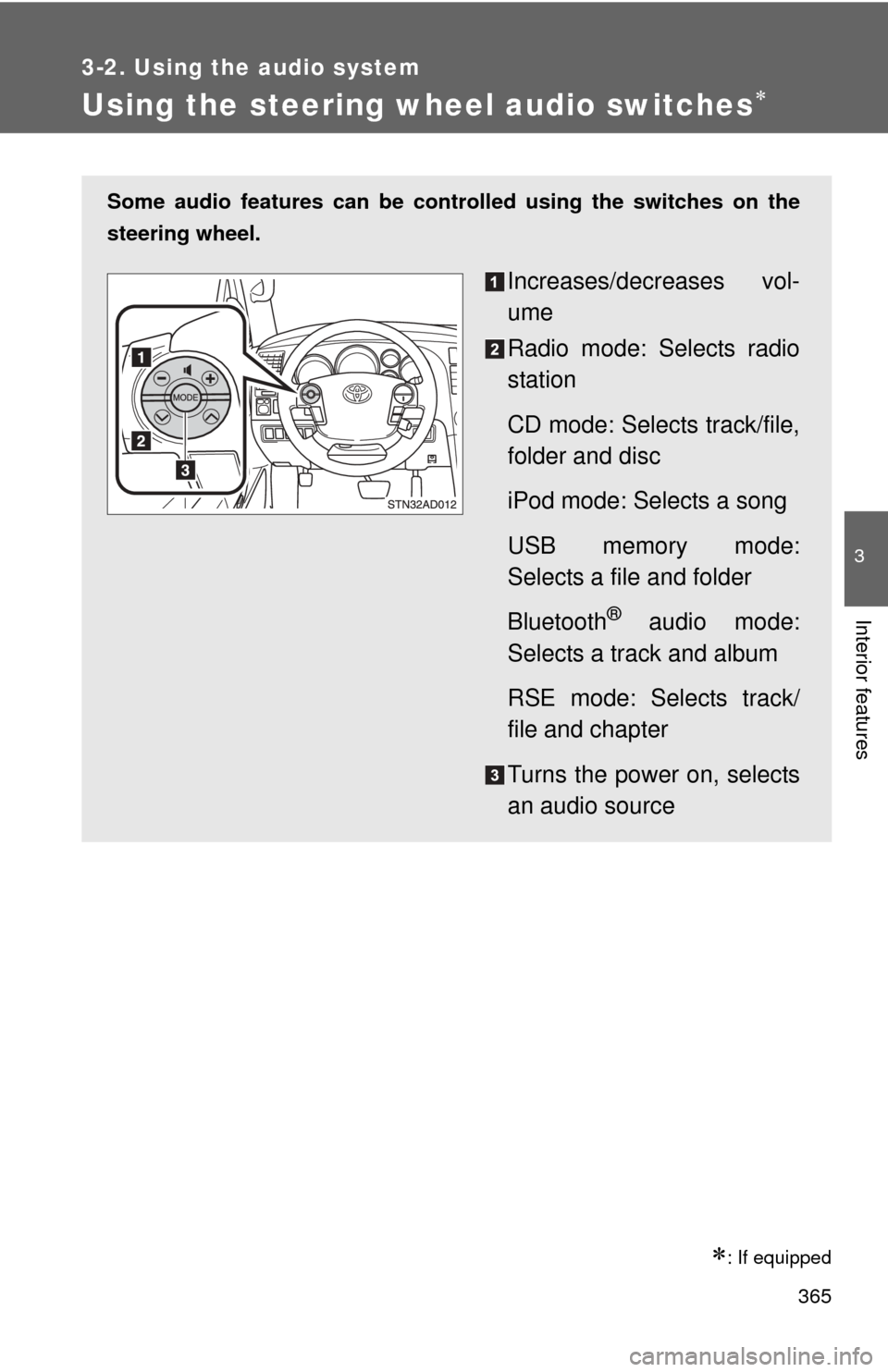
Some audio features can be controlled using the switches on the
steering wheel.
Increases/decreases vol-
ume
Radio mode: Selects radio
station
CD mode: Selects track/file,
folder and disc
iPod mode: Selects a song
USB memory mode:
Selects a file and folder
Bluetooth
® audio mode:
Selects a track and album
RSE mode: Selects track/
file and chapter
Turns the power on, selects
an audio source
Page 366 of 708
366 3-2. Using the audio system
Turning the power onPress when the audio system is turned off.
The audio system can be turned off by holding the switch down until you
hear a beep.
Changing the audio sourcePress when the audio system is turned on. The audio source
changes as follows each time the switch is pressed.
If no discs are inserted in the player, that mode will be skipped.
Type B:
FM SAT CD changer RSE*Bluetooth® audio AUX
USB/iPodAM
Type C:
FM SAT CDBluetooth® audio AUXUSB/iPodAM
*: Vehicles with rear seat entertainment system
Adjusting the volume
Press “+” on to increase the volume and “-” to decrease the
volume.
Press and hold the switch to continue increasing or decreasing the vol-
ume.
Selecting a radio station Press to select the radio mode.
Press “” or “ ” on to select a radio station.
To scan for receivable stations, press and hold “ ” or “ ” on
until you hear a beep.
Page 367 of 708
367
3-2. Using the audio system
3
Interior features
Selecting a track/file or song
Press to select the CD, iPod, USB memory, Bluetooth
®
audio or RSE mode.
Press “” or “ ” on to select the desired track/file or
song.
Selecting a folder or album
Press to select the CD, USB memory or Bluetooth
® audio
mode.
Press and hold “ ” or “ ” on until you hear a beep.
Selecting a disc in the CD player (type B only)
Press to select the CD mode.
Press and hold “ ” or “ ” on until you hear a beep.
Selecting a track/file or chapter (vehicles with rear seat entertainment system)
Press to select the RSE mode.
Press “” or “ ” on to select the desired track/file or
chapter.
CAUTION
■ To reduce the risk of an accident
Exercise care when operating the audio switches on the steering wheel.
Page 696 of 708
696
Alphabetical index
Alphabetical index
A/C ..................................... 300, 308
ABS ........................................... 254
Active traction control ............. 254
Adaptive variable suspension system .................................... 246
Air conditioning filter............... 563
Air conditioning system Air conditioning filter .............. 563
Front air conditioning system ................................ 300
Rear air conditioning system ................................ 308
Airbags
Airbag operating conditions............................ 117
Airbag precautions for your
child .................................... 121
Airbag warning light............... 604
Curtain shield airbag operating conditions............ 117
Curtain shield airbag precautions ......................... 121
Front passenger occupant classification system ........... 127
General airbag
precautions ......................... 121
Locations of airbags .............. 114
Modification and disposal of airbags ................................ 125
Proper driving posture ........................ 112, 121
Side airbag operating conditions............................ 117
Side airbag precautions ........ 121
SRS airbags .......................... 114
Alarm ......................................... 109
Antenna..................................... 326
Anti-lock brake system............ 254
Armrest ..................................... 494
Ashtrays.................................... 480
A-TRAC ..................................... 254
Audio input ............................... 363 Audio system
A/V input port ........................ 409
Antenna................................. 326
Audio input ............................ 363
Audio visual input .................. 409
AUX port ............................... 363
CD player/changer ................ 329
DVD player............................ 392
iPod ....................................... 346
MP3/WMA disc ..................... 338
Optimal use ........................... 359
Portable music player ........... 363
Radio..................................... 321
Rear seat entertainment system ................................ 384
Steering wheel audio
switch.................................. 365
Type ...................................... 317
USB memory......................... 352
Audio visual input.................... 409
AUTO LSD system ................... 252
Automatic light control system .................................... 193
Automatic transmission .......................... 162
AUX port ................................... 363
Auxiliary box ............................ 473
A/V input port ........................... 409
AVS ........................................... 246
Back-up lights Replacing light bulbs ............. 580
Wattage................................. 655
Back door
Back door ................................ 42
Wireless remote control .......... 33
Back window ........................... 96
Battery Checking ............................... 544
If the vehicle has discharged battery................................. 634
Preparing and checking before winter ....................... 272A
B