fuel TOYOTA SEQUOIA 2012 2.G User Guide
[x] Cancel search | Manufacturer: TOYOTA, Model Year: 2012, Model line: SEQUOIA, Model: TOYOTA SEQUOIA 2012 2.GPages: 708, PDF Size: 15.12 MB
Page 105 of 708
105
1-5. Refueling
1
Before driving
CAUTION
■
Refueling the vehicle
Observe the following precautions while refueling the vehicle.
Failure to do so may result in death or serious injury.
●Touch the vehicle or some other metal surface to discharge any static
electricity.
Sparks resulting from discharging static electricity may cause the fuel
vapors to ignite.
● Always hold the grips on the fuel tank cap and turn it slowly to remove it.
A whooshing sound may be heard when the fuel tank cap is loosened.
Wait until the sound cannot be heard before fully removing the cap.
In hot weather, pressurized fuel may spray out of the filler neck and cause
injury.
● Do not allow anyone that has not discharged static electricity from their
bodies to come close to an open fuel tank.
● Do not inhale vaporized fuel.
Fuel contains substances that are harmful if inhaled.
● Do not smoke while refueling the vehicle.
Doing so may cause the fuel to ignite and cause a fire.
● Do not return to the vehicle or touch any person or object that is statically
charged.
This may cause static electricity to build up, resulting in a possible ignition
hazard.
■ When replacing the fuel cap
Do not use anything but a genuine Toyota fuel tank cap designed for your
vehicle. Doing so may cause a fire or other incident which may result in
death or serious injury.
Page 106 of 708

106 1-5. Refueling
NOTICE
■Refueling
Do not spill fuel during refueling.
Doing so may damage the vehicle, such as causing the exhaust systems to
operate abnormally or damaging fuel s ystem components or the vehicle’s
painted surface.
■ To prevent damage to the fuel filler door
Do not apply excessive force.
■ E85 fuel
E85 fuel can be used only in flex-fuel vehicles. Do not add E85 fuel to a gas-
oline-engine vehicle.
Filling a gasoline-engine vehicle with E85 will have a negative impact on
starting and driving performance and will cause damage to the fuel system
components.
Page 151 of 708

151
2-1. Driving procedures
2
When driving
■
Driving in the rain
●Drive carefully when it is raining, because visibility will be reduced, the
windows may become fogged-up, and the road will be slippery.
● Drive carefully when it starts to rain, because the road surface will be
especially slippery.
● Refrain from high speeds when driving on an expressway in the rain,
because there may be a layer of water between the tires and the road
surface, preventing the steering and brakes from operating properly.
■ Breaking in your new Toyota
To extend the life of the vehicle, the following precautions are recommended
to observe:
●For the first 200 miles (300 km):
Avoid sudden stops.
● For the first 500 miles (800 km):
Do not tow a trailer.
● For the first 1000 miles (1600 km):
• Do not drive at extremely high speeds.
• Avoid sudden acceleration.
• Do not drive continuously in the low gears.
• Do not drive at a constant speed for extended periods.
■ Drum-in disc type parking brake system
Your vehicle has a drum-in-disc type parking brake system. This type of
brake system needs bedding-down of the brake shoes periodically or when-
ever the parking brake shoes and/or drum are replaced. Have your Toyota
dealer perform the bedding down.
■ Operating your vehicle in a foreign country
Comply with the relevant vehicle registration laws and confirm the availability
of the correct fuel. ( P. 648)
■ When turning off the engine
In cold climates, or following repeated short trips, emission system operating
sounds may continue for a short time after the engine is turned off. This is
not a malfunction, and helps to ensure optimal performance of the emission
system.
Page 162 of 708
162
2-1. Driving procedures
Automatic transmission
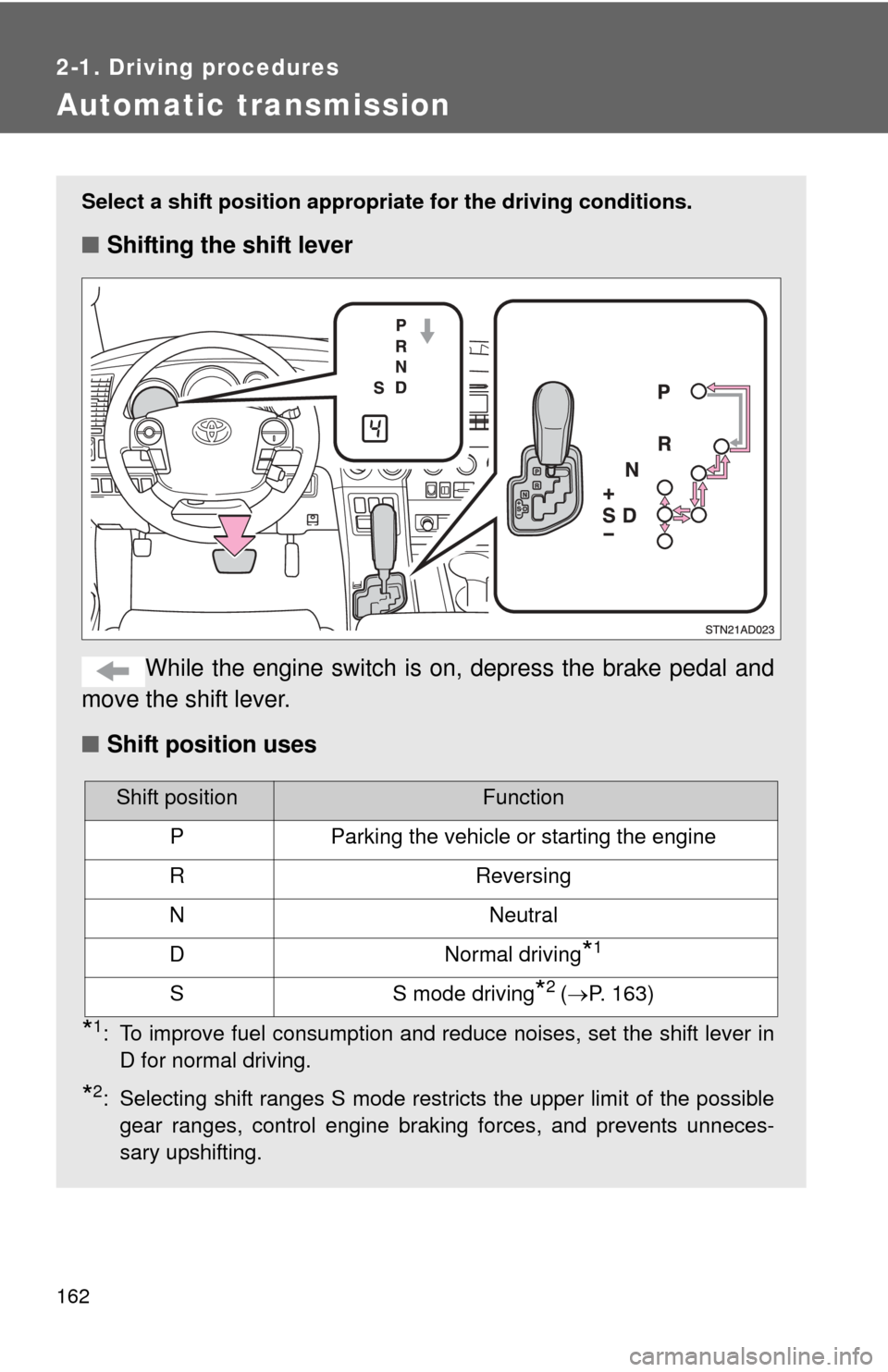
Select a shift position appropriate for the driving conditions.
■Shifting the shift lever
While the engine switch is on, depress the brake pedal and
move the shift lever.
■ Shift position uses
*1: To improve fuel consumption and reduce noises, set the shift lever in
D for normal driving.
*2: Selecting shift ranges S mode restricts the upper limit of the possiblegear ranges, control engine braking forces, and prevents unneces-
sary upshifting.
Shift positionFunction
PParking the vehicle or starting the engine
RReversing
NNeutral
DNormal driving*1
SS mode driving*2 (P. 163)
Page 169 of 708
169
2
When driving
2-2. Instrument cluster
Gauges and meters
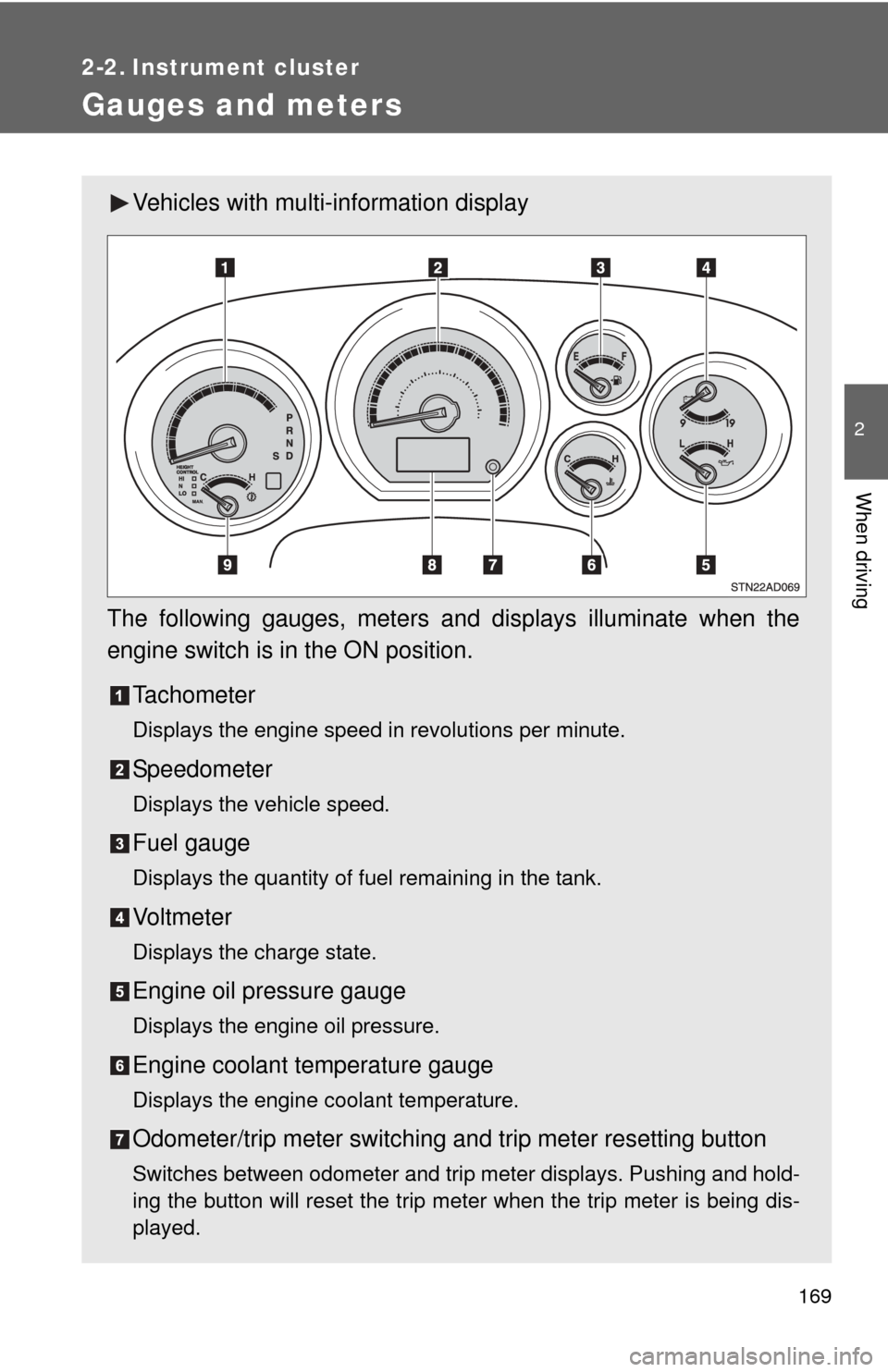
Vehicles with multi-information display
The following gauges, meters and displays illuminate when the
engine switch is in the ON position. Tachometer
Displays the engine speed in revolutions per minute.
Speedometer
Displays the vehicle speed.
Fuel gauge
Displays the quantity of fuel remaining in the tank.
Vo l t m e t e r
Displays the charge state.
Engine oil pressure gauge
Displays the engine oil pressure.
Engine coolant temperature gauge
Displays the engine coolant temperature.
Odometer/trip meter switching and trip meter resetting button
Switches between odometer and trip meter displays. Pushing and hold-
ing the button will reset the trip meter when the trip meter is being dis-
played.
Page 171 of 708
171
2-2. Instrument cluster
2
When driving
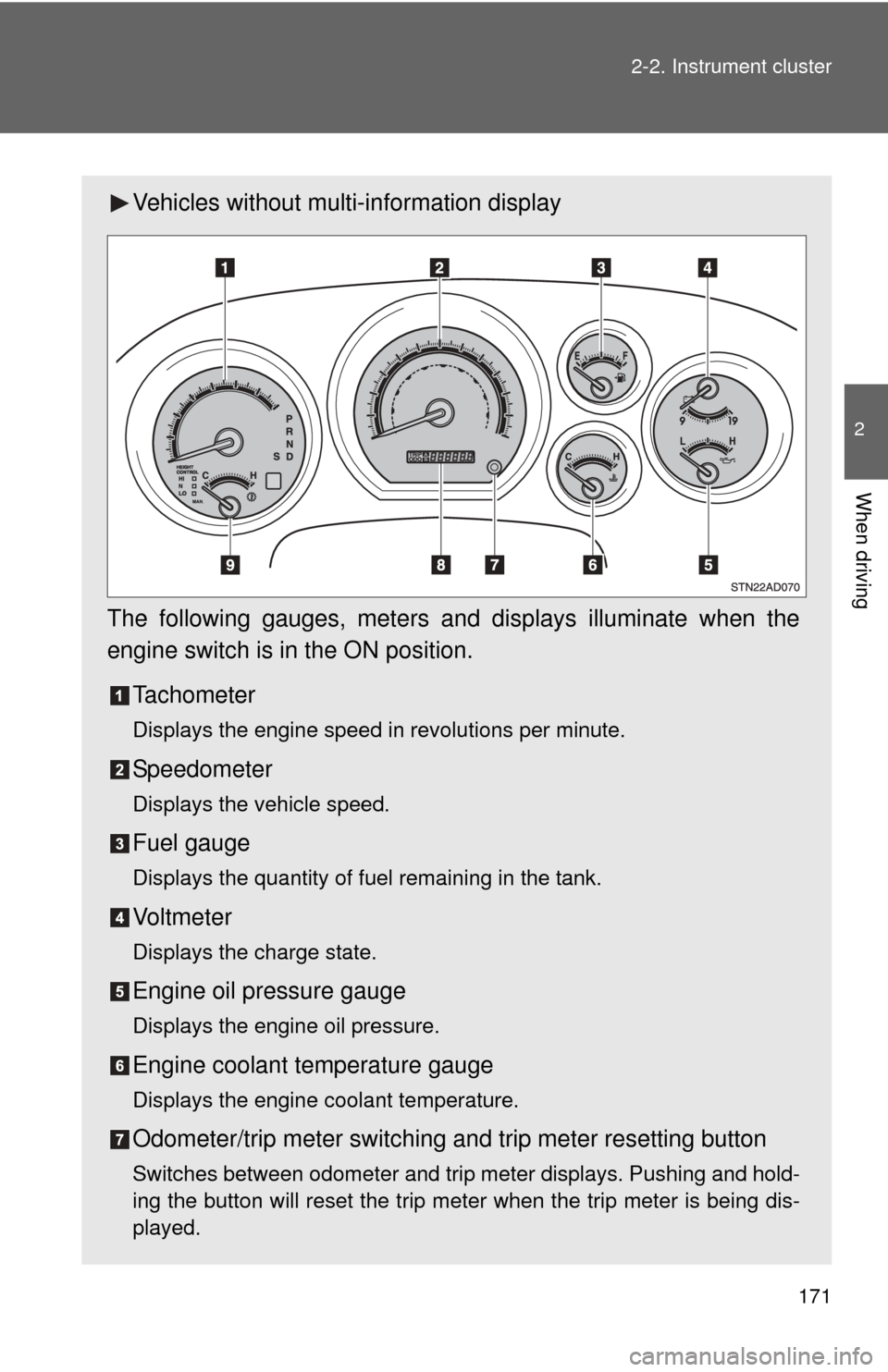
Vehicles without multi-information display
The following gauges, meters and displays illuminate when the
engine switch is in the ON position. Tachometer
Displays the engine speed in revolutions per minute.
Speedometer
Displays the vehicle speed.
Fuel gauge
Displays the quantity of fuel remaining in the tank.
Vo l t m e t e r
Displays the charge state.
Engine oil pressure gauge
Displays the engine oil pressure.
Engine coolant temperature gauge
Displays the engine coolant temperature.
Odometer/trip meter switching and trip meter resetting button
Switches between odometer and trip meter displays. Pushing and hold-
ing the button will reset the trip meter when the trip meter is being dis-
played.
Page 179 of 708
179
2-2. Instrument cluster
2
When driving
Multi-information display
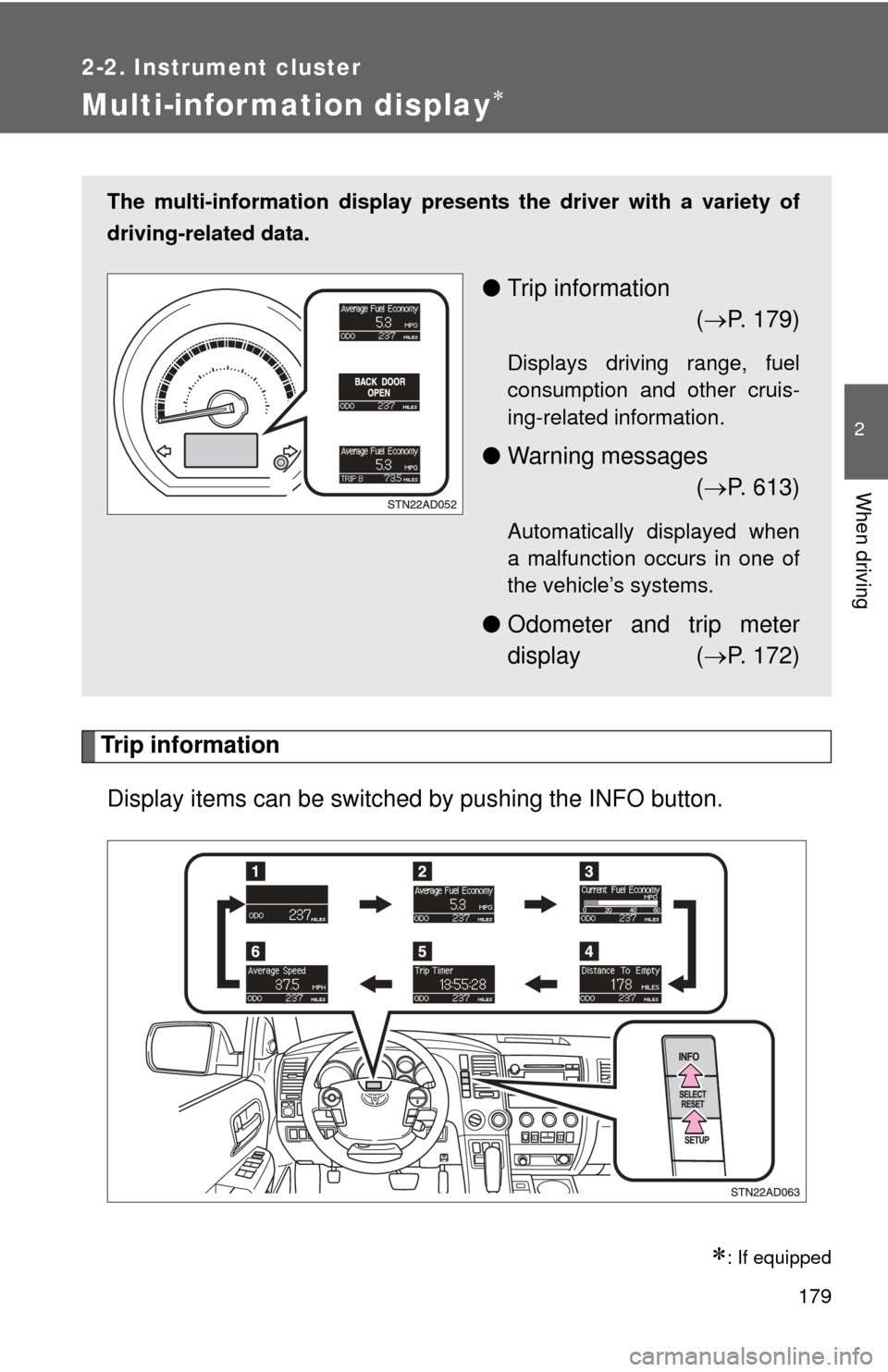
Trip informationDisplay items can be switched by pushing the INFO button.
: If equipped
The multi-information display presen ts the driver with a variety of
driving-related data.
● Trip information
( P. 179)
Displays driving range, fuel
consumption and other cruis-
ing-related information.
● Warning messages
( P. 613)
Automatically displayed when
a malfunction occurs in one of
the vehicle’s systems.
● Odometer and trip meter
display ( P. 172)
Page 180 of 708
180 2-2. Instrument cluster
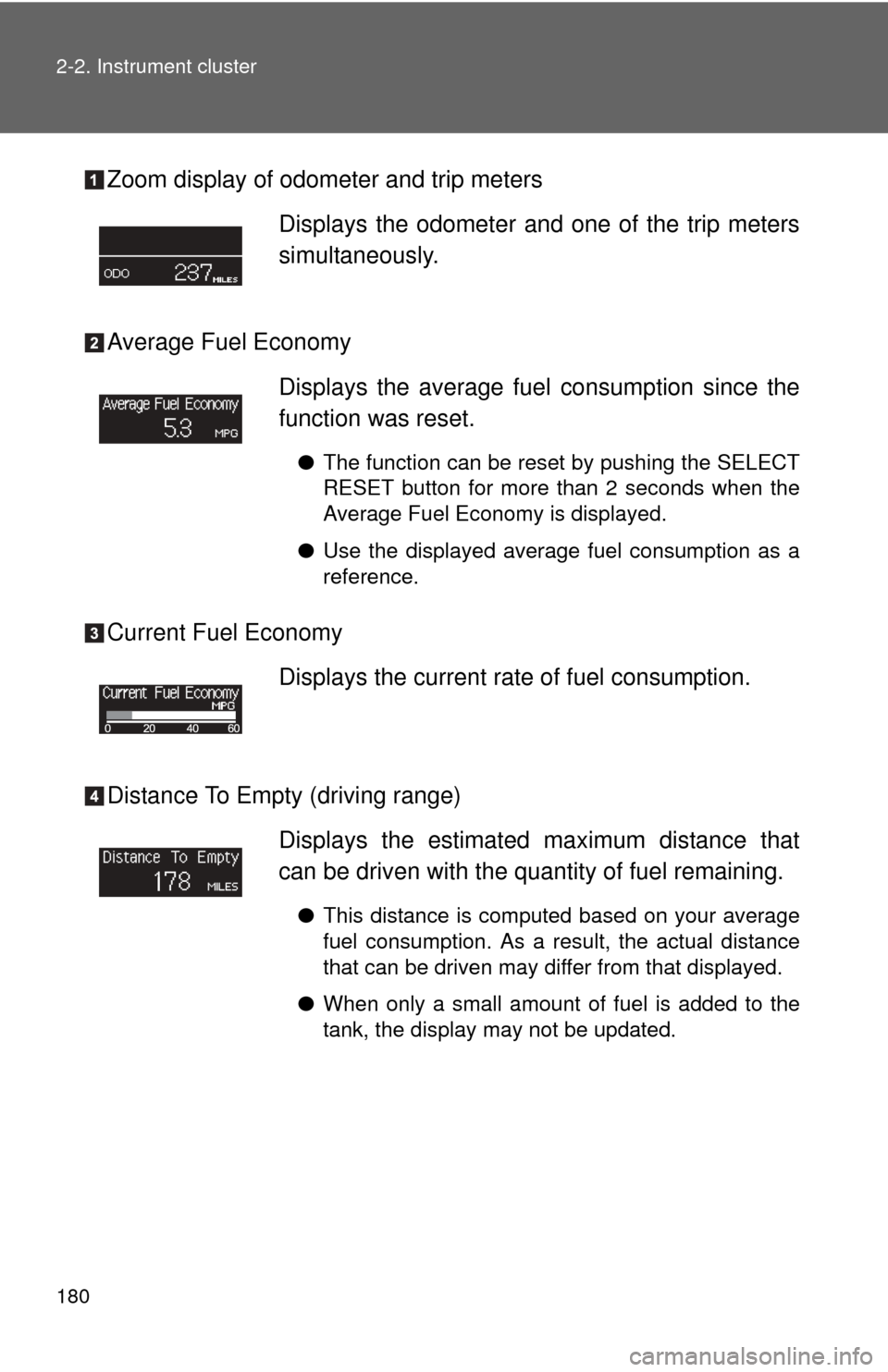
Zoom display of odometer and trip meters
Average Fuel Economy
Current Fuel Economy
Distance To Empty (driving range)Displays the odometer and one of the trip meters
simultaneously.
Displays the average fuel
consumption since the
function was reset.
● The function can be reset by pushing the SELECT
RESET button for more than 2 seconds when the
Average Fuel Economy is displayed.
● Use the displayed average fuel consumption as a
reference.
Displays the current rate of fuel consumption.
Displays the estimated maximum distance that
can be driven with the quantity of fuel remaining.
●This distance is computed based on your average
fuel consumption. As a result, the actual distance
that can be driven may differ from that displayed.
● When only a small amount of fuel is added to the
tank, the display may not be updated.
Page 184 of 708
184 2-2. Instrument cluster
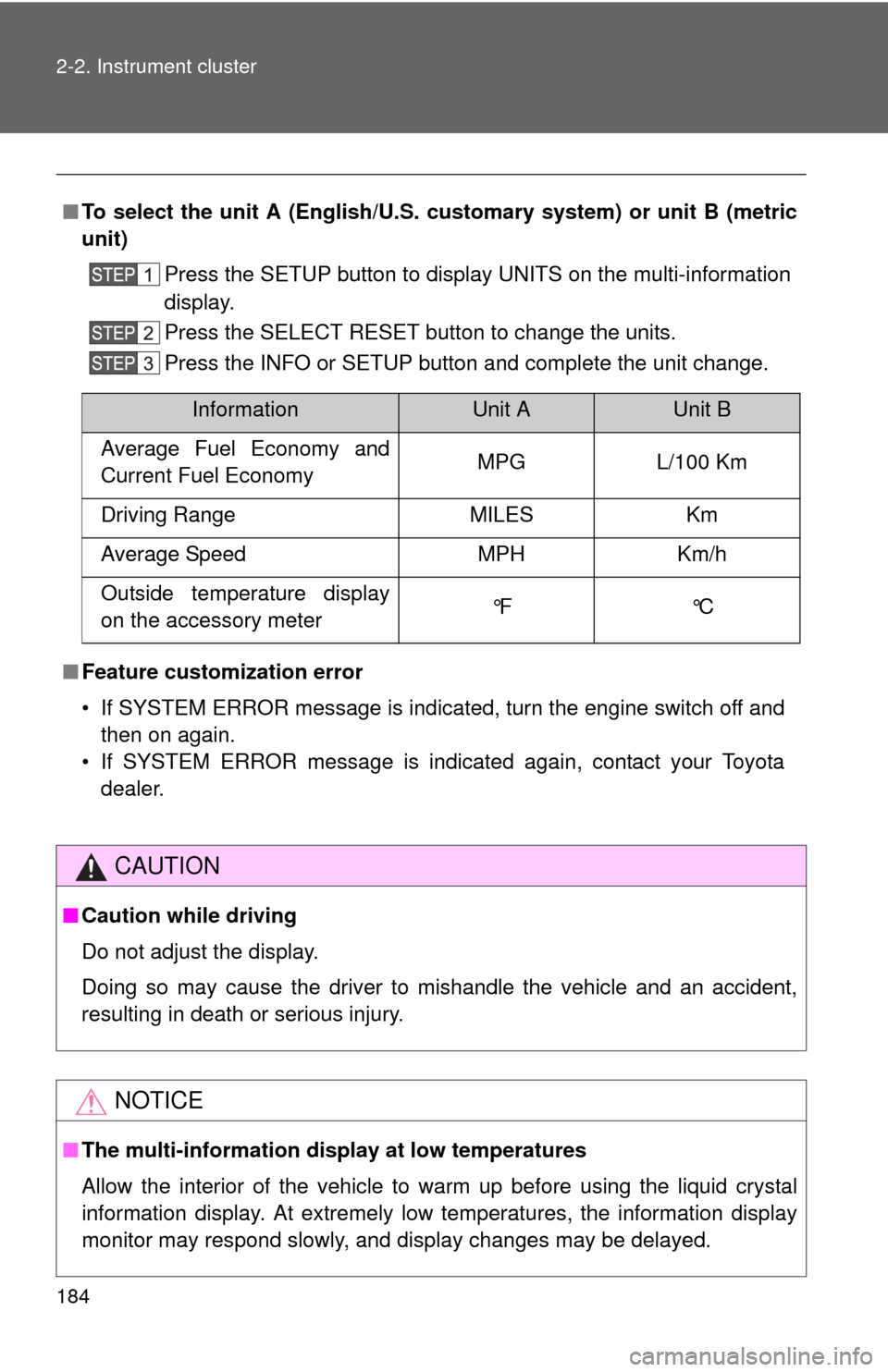
■To select the unit A (English/U.S. customary system) or unit B (metric
unit)
Press the SETUP button to display UNITS on the multi-information
display.
Press the SELECT RESET button to change the units.
Press the INFO or SETUP button and complete the unit change.
■ Feature custom ization error
• If SYSTEM ERROR message is indicated, turn the engine switch off and then on again.
• If SYSTEM ERROR message is indicated again, contact your Toyota dealer.
CAUTION
■Caution while driving
Do not adjust the display.
Doing so may cause the driver to mishandle the vehicle and an accident,
resulting in death or serious injury.
NOTICE
■The multi-information disp lay at low temperatures
Allow the interior of the vehicle to warm up before using the liquid crystal
information display. At extremely low temperatures, the information display
monitor may respond slowly, and display changes may be delayed.
InformationUnit AUnit B
Average Fuel Economy and
Current Fuel Economy MPG L/100 Km
Driving Range MILES Km
Average Speed MPH Km/h
Outside temperature display
on the accessory meter °F °C
Page 186 of 708
186 2-2. Instrument cluster
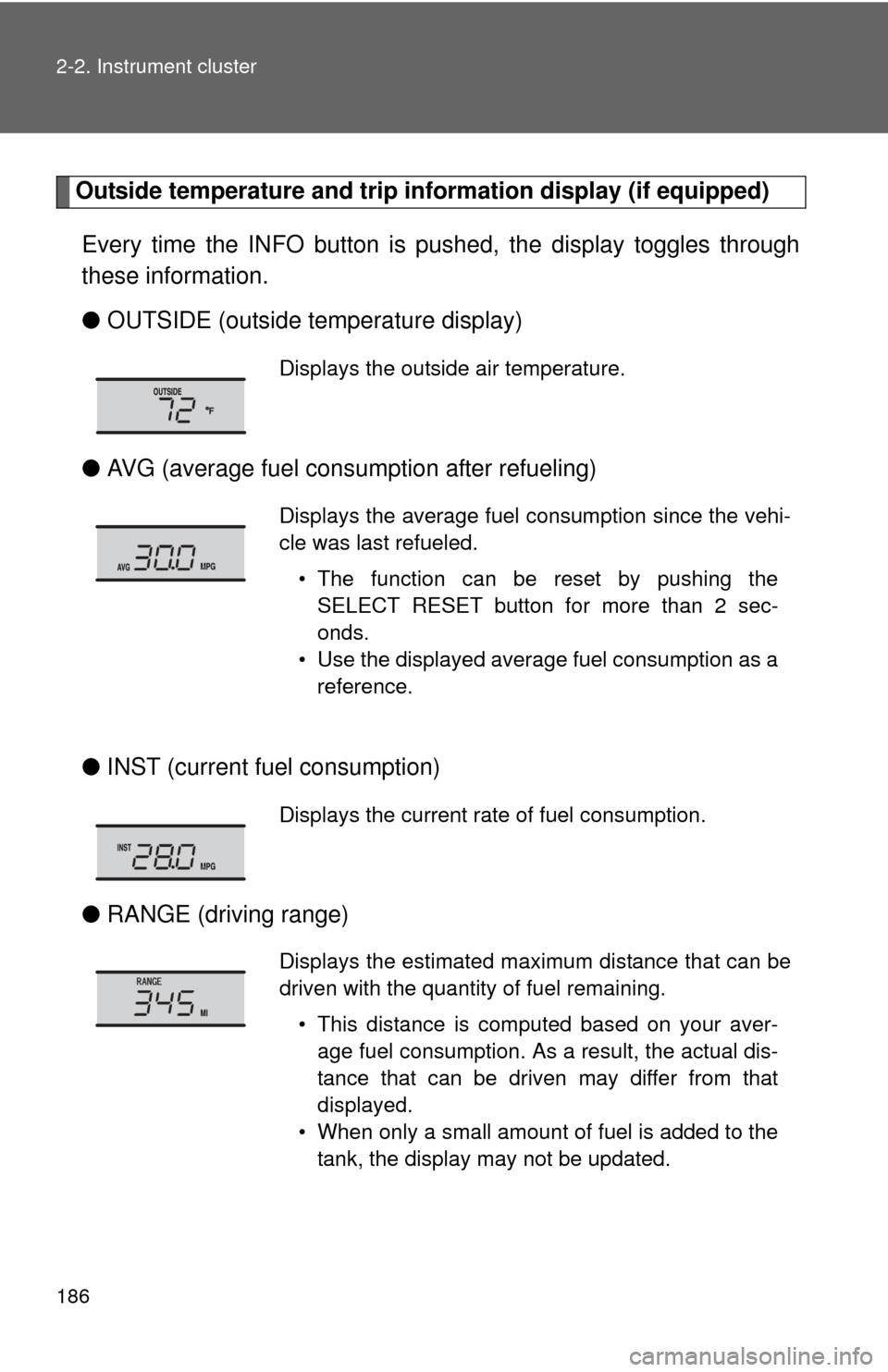
Outside temperature and trip information display (if equipped)
Every time the INFO button is pushed, the display toggles through
these information.
● OUTSIDE (outside temperature display)
● AVG (average fuel consumption after refueling)
● INST (current fu el consumption)
● RANGE (driving range)
Displays the outside air temperature.
Displays the average fuel consumption since the vehi-
cle was last refueled.
• The function can be reset by pushing theSELECT RESET button for more than 2 sec-
onds.
• Use the displayed average fuel consumption as a reference.
Displays the current rate of fuel consumption.
Displays the estimated maximum distance that can be
driven with the quantity of fuel remaining.
• This distance is computed based on your aver-age fuel consumption. As a result, the actual dis-
tance that can be driven may differ from that
displayed.
• When only a small amount of fuel is added to the tank, the display may not be updated.