key TOYOTA SEQUOIA 2012 2.G Owner's Manual
[x] Cancel search | Manufacturer: TOYOTA, Model Year: 2012, Model line: SEQUOIA, Model: TOYOTA SEQUOIA 2012 2.GPages: 708, PDF Size: 15.12 MB
Page 111 of 708

111
1-6. Theft deterrent system
1
Before driving
■
Alarm-operated door lock
●When the alarm is operating, the doors are locked automatically to pre-
vent intruders.
● Do not leave the key inside the vehicle when the alarm is operating, and
make sure the key is not inside the vehicle when recharging or replacing
the battery.
NOTICE
■To ensure the system operates correctly
Do not modify or remove the system. If modified or removed, the proper
operation of the system cannot be guaranteed.
Page 124 of 708
124 1-7. Safety information
CAUTION
■SRS airbag precautions
●If the vinyl cover is put on the area where the SRS knee airbags will
deploy, be sure to remove it.
● Do not use seat accessories which cover the parts where the SRS side
airbags inflate as they may interfer e with inflation of the SRS airbags.
● Do not strike or apply significant levels of force to the area of the SRS air-
bag components ( P. 115).
Doing so can cause the SRS airbags to malfunction.
● Do not touch any of the component parts immediately after the SRS air-
bags have deployed (inflated) as they may be hot.
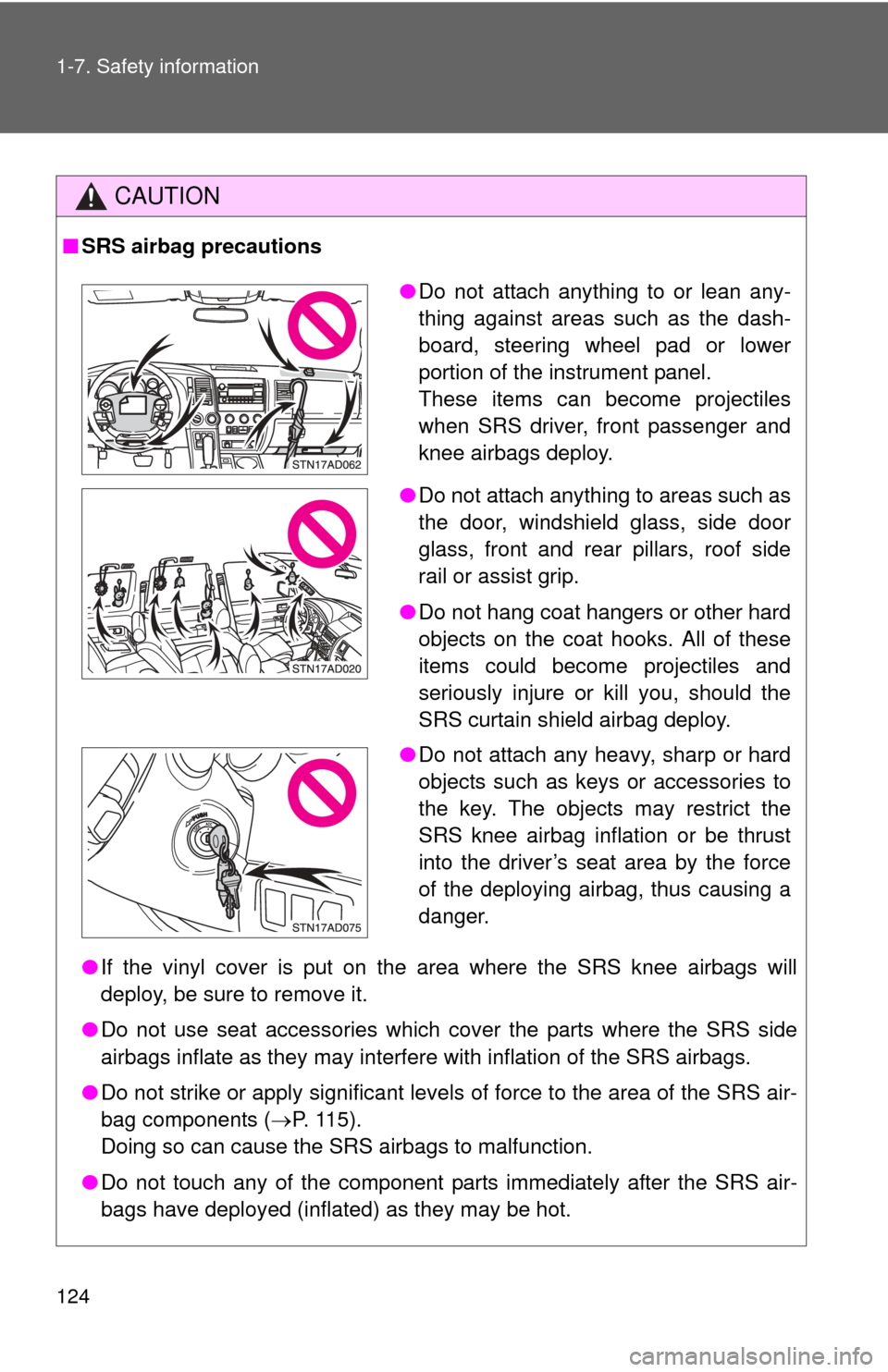
●Do not attach anything to or lean any-
thing against areas such as the dash-
board, steering wheel pad or lower
portion of the instrument panel.
These items can become projectiles
when SRS driver, front passenger and
knee airbags deploy.
● Do not attach anything to areas such as
the door, windshield glass, side door
glass, front and rear pillars, roof side
rail or assist grip.
● Do not hang coat hangers or other hard
objects on the coat hooks. All of these
items could become projectiles and
seriously injure or kill you, should the
SRS curtain shield airbag deploy.
● Do not attach any heavy, sharp or hard
objects such as keys or accessories to
the key. The objects may restrict the
SRS knee airbag inflation or be thrust
into the driver’s seat area by the force
of the deploying airbag, thus causing a
danger.
Page 150 of 708
150
2-1. Driving procedures
Driving the vehicle
Starting on a steep uphillWith the brake pedal depressed, firmly set the parking brake
and shift the shift lever to D.
Gently depress the accelerator pedal.
Release the parking brake.
The following procedures should be observed to ensure safe driv-
ing.
■ Starting the engine ( P. 159)
■ Driving
With the brake pedal depressed, shift the shift lever to D. ( P. 162)
Release the parking brake. ( P. 167)
Gradually release the brake pedal and gently depress the
accelerator pedal to accelerate the vehicle.
■ Stopping
With the shift lever in D, depress the brake pedal.
If necessary, set the parking brake.
When the vehicle is stopped for an extended period of time, shift
the shift lever to P or N. ( P. 162)
■Parking the vehicle
With the shift lever in D, depress the brake pedal.
Set the parking brake. ( P. 167)
Shift the shift lever to P. ( P. 162)
When parking on a hill, if necessary, block the wheels.
Turn the engine switch off to stop the engine.
Lock the door, making sure that you have the key on your
person.
Page 159 of 708
159
2-1. Driving procedures
2
When driving
Engine (ignition) switch
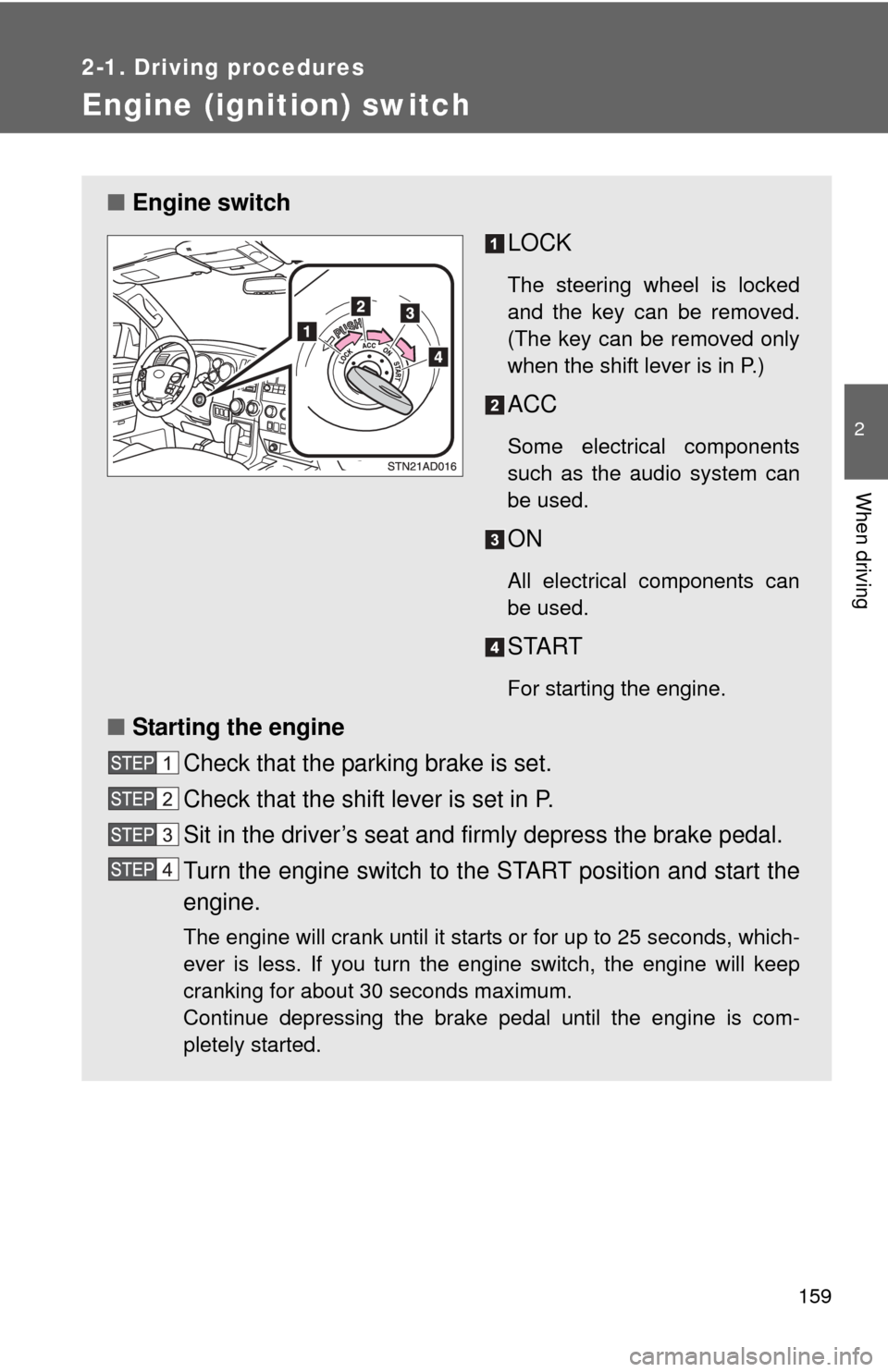
■Engine switch
LOCK
The steering wheel is locked
and the key can be removed.
(The key can be removed only
when the shift lever is in P.)
ACC
Some electrical components
such as the audio system can
be used.
ON
All electrical components can
be used.
START
For starting the engine.
■Starting the engine
Check that the parking brake is set.
Check that the shift lever is set in P.
Sit in the driver’s seat and firmly depress the brake pedal.
Turn the engine switch to the START position and start the
engine.
The engine will crank until it starts or for up to 25 seconds, which-
ever is less. If you turn the engine switch, the engine will keep
cranking for about 30 seconds maximum.
Continue depressing the brake pedal until the engine is com-
pletely started.
Page 160 of 708
160 2-1. Driving procedures
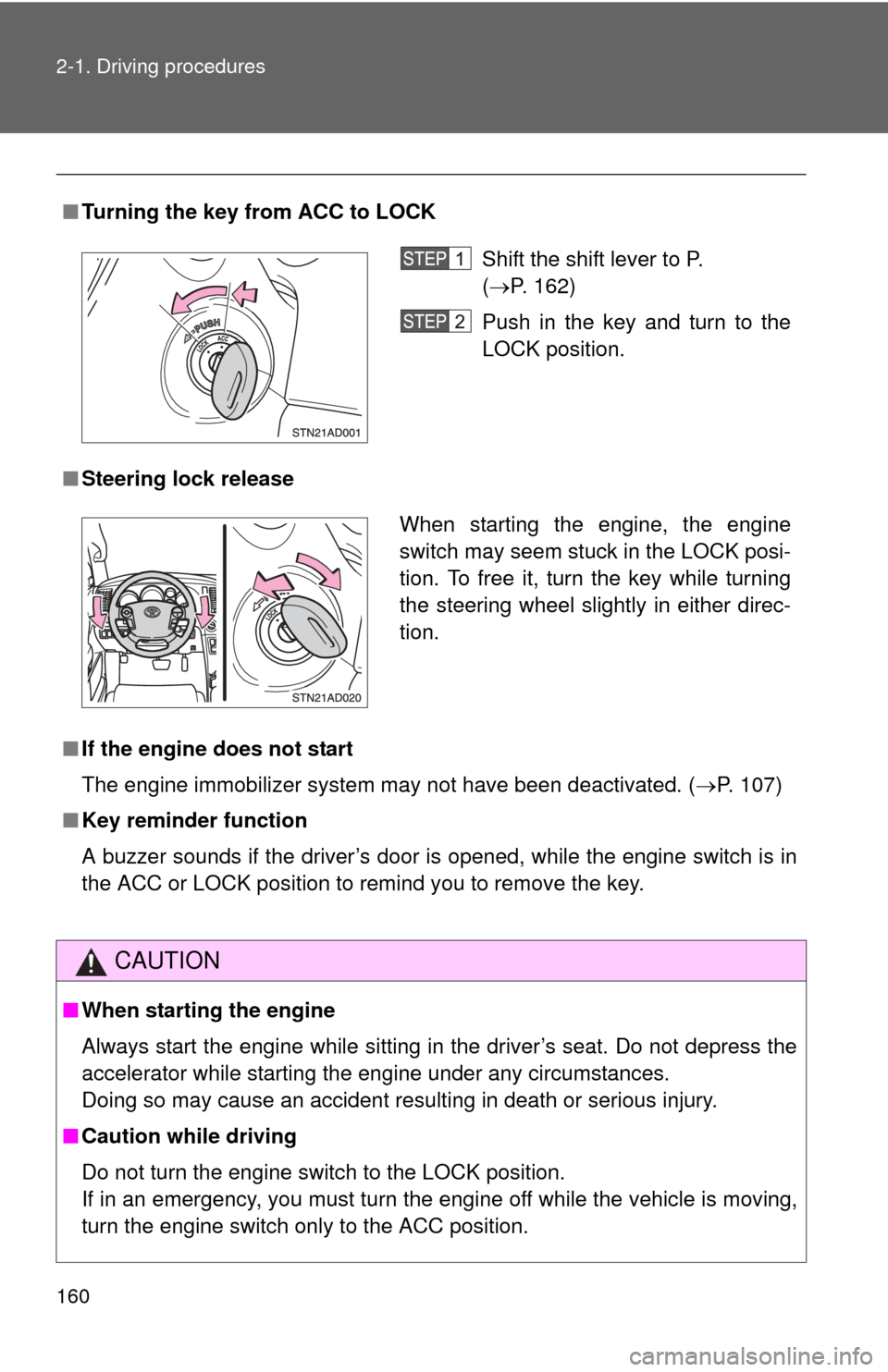
■Turning the key from ACC to LOCK
■ Steering lock release
■ If the engine does not start
The engine immobilizer system may not have been deactivated. ( P. 107)
■ Key reminder function
A buzzer sounds if the driver’s door is opened, while the engine switch is in
the ACC or LOCK position to remind you to remove the key.
CAUTION
■When starting the engine
Always start the engine while sitting in the driver’s seat. Do not depress the
accelerator while starting the engine under any circumstances.
Doing so may cause an accident resulting in death or serious injury.
■ Caution while driving
Do not turn the engine switch to the LOCK position.
If in an emergency, you must turn the engine off while the vehicle is moving,
turn the engine switch only to the ACC position.
Shift the shift lever to P.
(P. 162)
Push in the key and turn to the
LOCK position.
When starting the engine, the engine
switch may seem stuck in the LOCK posi-
tion. To free it, turn the key while turning
the steering wheel slightly in either direc-
tion.
Page 182 of 708
182 2-2. Instrument cluster
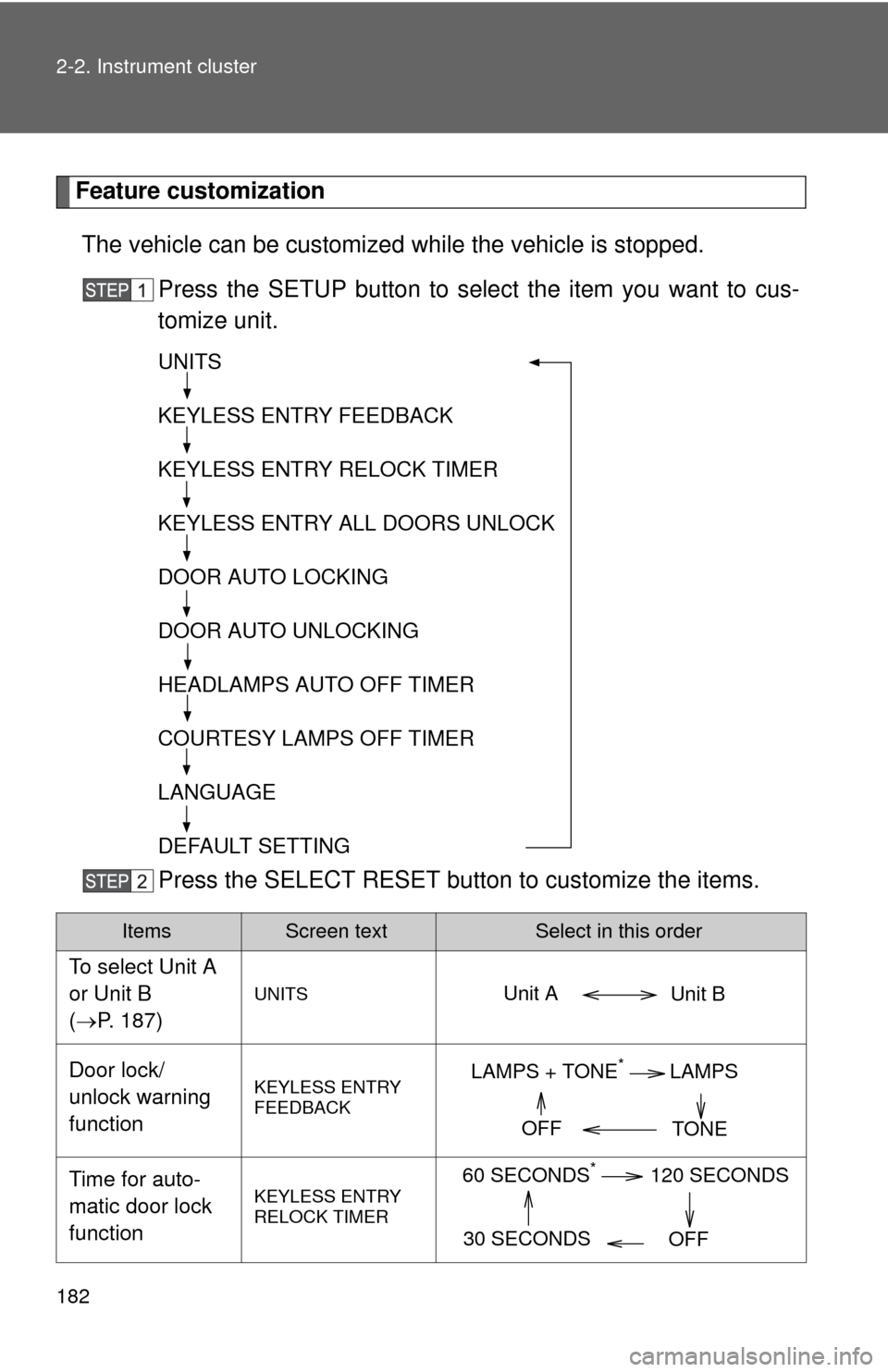
Feature customizationThe vehicle can be customized while the vehicle is stopped.
Press the SETUP button to select the item you want to cus-
tomize unit.
Press the SELECT RESET butt on to customize the items.
ItemsScreen textSelect in this order
To select Unit A
or Unit B
(P. 187)
UNITS
Door lock/
unlock warning
functionKEYLESS ENTRY
FEEDBACK
Time for auto-
matic door lock
functionKEYLESS ENTRY
RELOCK TIMER
UNITS
KEYLESS ENTRY FEEDBACK
KEYLESS ENTRY RELOCK TIMER
KEYLESS ENTRY ALL DOORS UNLOCK
DOOR AUTO LOCKING
DOOR AUTO UNLOCKING
HEADLAMPS AUTO OFF TIMER
COURTESY LAMPS OFF TIMER
LANGUAGE
DEFAULT SETTING
Unit B
Unit A
LAMPS + TONE*LAMPS
TONE
OFF
60 SECONDS*120 SECONDS
30 SECONDS OFF
Page 183 of 708

183
2-2. Instrument cluster
2
When driving
*: Default setting
After customize is complete, press the SETUP button to set
the selected item.
If the customization fails, the previously setting will be displayed.
If no button is pressed for 10 seconds, the display change to normal
display.
Double switch
operation to
unlock all the
doors
KEYLESS ENTRY
ALL DOORS
UNLOCK
Automatic door
locking functionDOOR AUTO
LOCKING
Automatic door
unlocking func-
tionDOOR AUTO
UNLOCKING
Time period
before lights
turn off (if a door
is opened and
closed, and
engine switch is
in ACC or
LOCK)
HEADLAMPS AUTO
OFF TIMER
Time period
before lights
turn offCOURTESY LAMPS
OFF TIMER
Selecting the
languageLANGUAGE
Reset to default
settingHOLD RESET
TO RESTORE
DEFAULT SETTINGS
ItemsScreen textSelect in this order
2 PRESSES*1 PRESS
SHIFT OUT
OF PARK
ABOVE 12 MPH*
(20 km/h)
OFF
SHIFT TO PARK*DRIVER DOOR
OPEN
OFF
30 SECONDS*60 SECONDS
90 SECONDS
0 SECONDS
15 SECONDS*30 SECONDS
8 SECONDS
ENGLISH*FRENCH
SPANISH
Page 373 of 708
373
3-3. Using the Bluetooth® audio system
3
Interior features
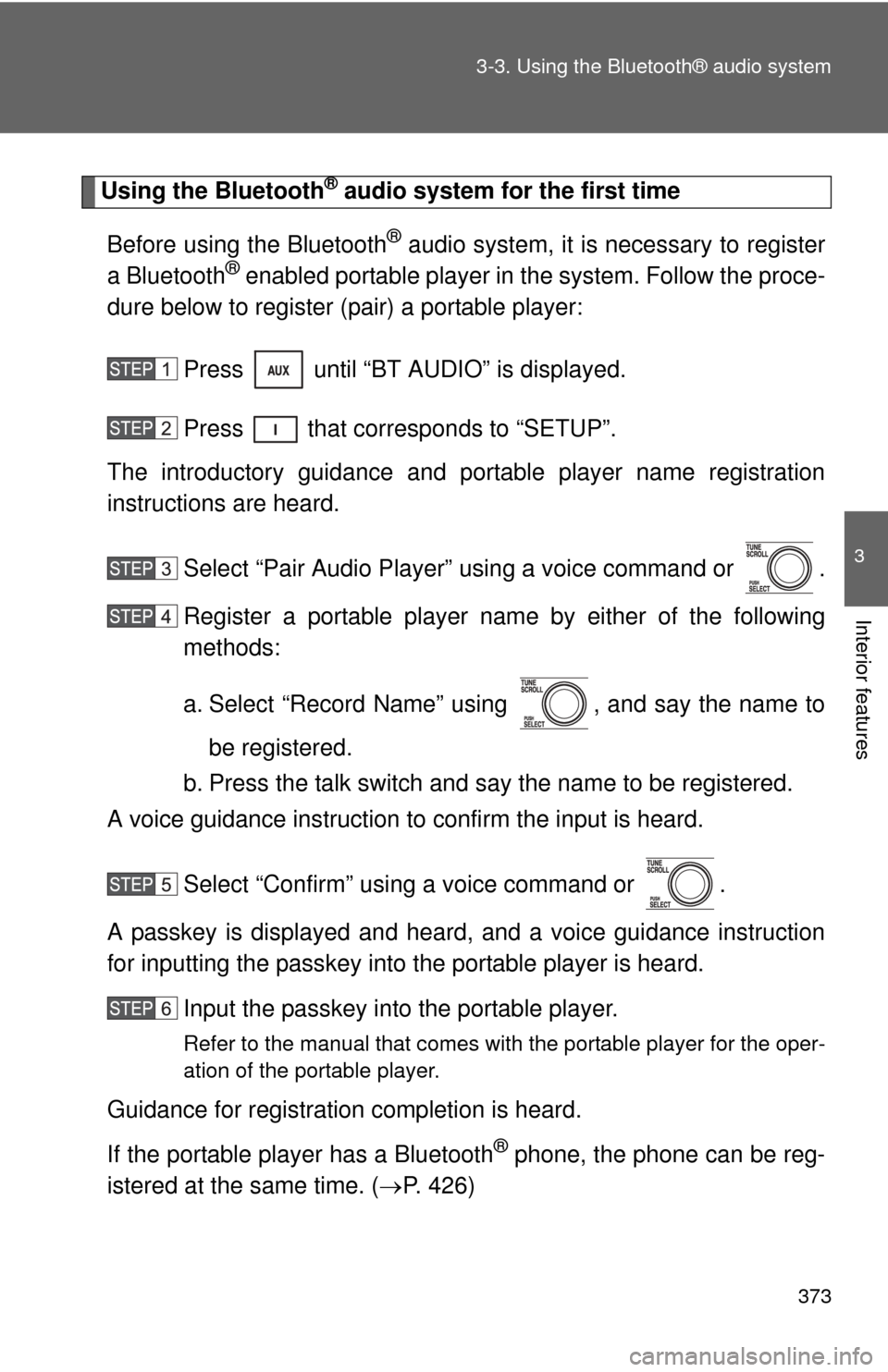
Using the Bluetooth® audio system for the first time
Before using the Bluetooth
® audio system, it is necessary to register
a Bluetooth® enabled portable player in the system. Follow the proce-
dure below to register (pair) a portable player:
Press until “BT AUDIO” is displayed.
Press that corresponds to “SETUP”.
The introductory guidance and port able player name registration
instructions are heard.
Select “Pair Audio Player” using a voice command or .
Register a portable player nam e by either of the following
methods:
a. Select “Record Name” using , and say the name to
be registered.
b. Press the talk switch and say the name to be registered.
A voice guidance instruction to confirm the input is heard.
Select “Confirm” using a voice command or .
A passkey is displayed and heard, and a voice guidance instruction
for inputting the passkey into the portable player is heard. Input the passkey into the portable player.
Refer to the manual that comes with the portable player for the oper-
ation of the portable player.
Guidance for registration completion is heard.
If the portable player has a Bluetooth
® phone, the phone can be reg-
istered at the same time. ( P. 426)
Page 374 of 708

374 3-3. Using the Bluetooth® audio system
Menu list of the Bluetooth® audio system
■ Normal operation
“BT•A Setup” can be canceled by pres sing the on-hook switch or saying
the voice comm and, “Cancel”.
First menuSecond
menuThird menuOperation detail
“Setup” “BT
•A
Setup” “Pair Audio
Player”
Registering a portable player
“Select Audio
Player” Selecting a portable player to
be used
“Change Name” Changing the registered
name of a portable player
“List Audio Players”Listing the registered porta-
ble players
“Set Passkey” Changing the passkey
“Delete Audio” Deleting a registered porta-
ble player
“Sys-
tem
Setup”
“Guidance Volume”Setting voice guidance vol-
ume
“Device Name” Displaying the Bluetooth
®
device address and name
“Initialize” Initializing the system
Page 375 of 708
375
3-3. Using the Bluetooth® audio system
3
Interior features
■
When using a voice command
For numbers, say a combination of single digits from zero to nine.
Say the command correctly and clearly.
■ The system may not recognize your voice in the following situations:
●When driving on rough roads
● When driving at high speeds
● When air is blowing out of the vents onto the microphone
● When the air conditioning fan emits a loud noise
■ Operations that cannot be performed while driving
●Operating the system with
● Registering a portable player to the system
■ Changing the passkey
P. 381