alarm TOYOTA SEQUOIA 2012 2.G Owners Manual
[x] Cancel search | Manufacturer: TOYOTA, Model Year: 2012, Model line: SEQUOIA, Model: TOYOTA SEQUOIA 2012 2.GPages: 708, PDF Size: 15.12 MB
Page 2 of 708

TABLE OF CONTENTSIndex
2
1-1. Key informationKeys ..................................... 32
1-2. Opening, closing and locking the doors
Wireless remote control ....... 33
Side doors ............................ 37
Back door ............................. 42
1-3. Adjustable components (seats, mirrors, steering
wheel)
Front seats ........................... 50
Rear seats ............................ 54
Driving position memory (driver’s seat) ..................... 65
Head restraints ..................... 68
Seat belts ............................. 72
Steering wheel (manually adjustable type) .................. 82
Steering wheel (power-adjustable type)...... 83
Anti-glare inside rear view mirror.......................... 84
Outside rear view mirrors ..... 87
Roof luggage carrier............. 91
1-4. Opening and closing the windows and moon roof
Power windows .................... 93
Power back window ............. 96
Moon roof ............................. 99 1-5. Refueling
Opening the fuel tank cap... 102
1-6. Theft deterrent system Engine immobilizer system .............................. 107
Alarm .................................. 109
1-7. Safety information Correct driving posture ....... 112
SRS airbags ....................... 114
Front passenger occupant classification system ......... 127
Child restraint systems ....... 132
Installing child restraints ..... 136
2-1. Driving procedures Driving the vehicle .............. 150
Engine (ignition) switch....... 159
Automatic transmission ...... 162
Turn signal lever ................. 166
Parking brake ..................... 167
Horn .................................... 168
2-2. Instrument cluster Gauges and meters ............ 169
Indicators and warning lights ................................. 174
Multi-information display ..... 179
Accessory meter ................. 185
1Before driving
2When driving
Page 31 of 708
Before driving1
31
1-1. Key informationKeys ................................... 32
1-2. Opening, closing and locking the doors
Wireless remote control ..... 33
Side doors .......................... 37
Back door ........................... 42
1-3. Adjustable components (seats, mirrors, steering
wheel)
Front seats ......................... 50
Rear seats.......................... 54
Driving position memory (driver’s seat) ................... 65
Head restraints................... 68
Seat belts ........................... 72
Steering wheel (manually adjustable type) ............... 82
Steering wheel (power-adjustable type) ... 83
Anti-glare inside rear view mirror ............................... 84
Outside rear view mirrors ... 87
Roof luggage carrier .......... 91 1-4. Opening and closing the
windows and moon roof
Power windows .................. 93
Power back window ........... 96
Moon roof ........................... 99
1-5. Refueling Opening the fuel tank cap ................................. 102
1-6. Theft deterrent system Engine immobilizer system ........................... 107
Alarm................................ 109
1-7. Safety information Correct driving posture..... 112
SRS airbags ..................... 114
Front passenger occupant classification system ...... 127
Child restraint systems..... 132
Installing child restraints... 136
Page 33 of 708
33
1
Before driving
1-2. Opening, closing and locking the doors
Wireless remote control
■Operation signals
Doors: A buzzer sounds and the emergency flashers flash to indicate that
the doors have been locked/unlocked. (Locked: Once; Unlocked:
Twice)
Back door: A buzzer sounds and the emergency flashers flash twice to indicate that the back door has been opened/closed.
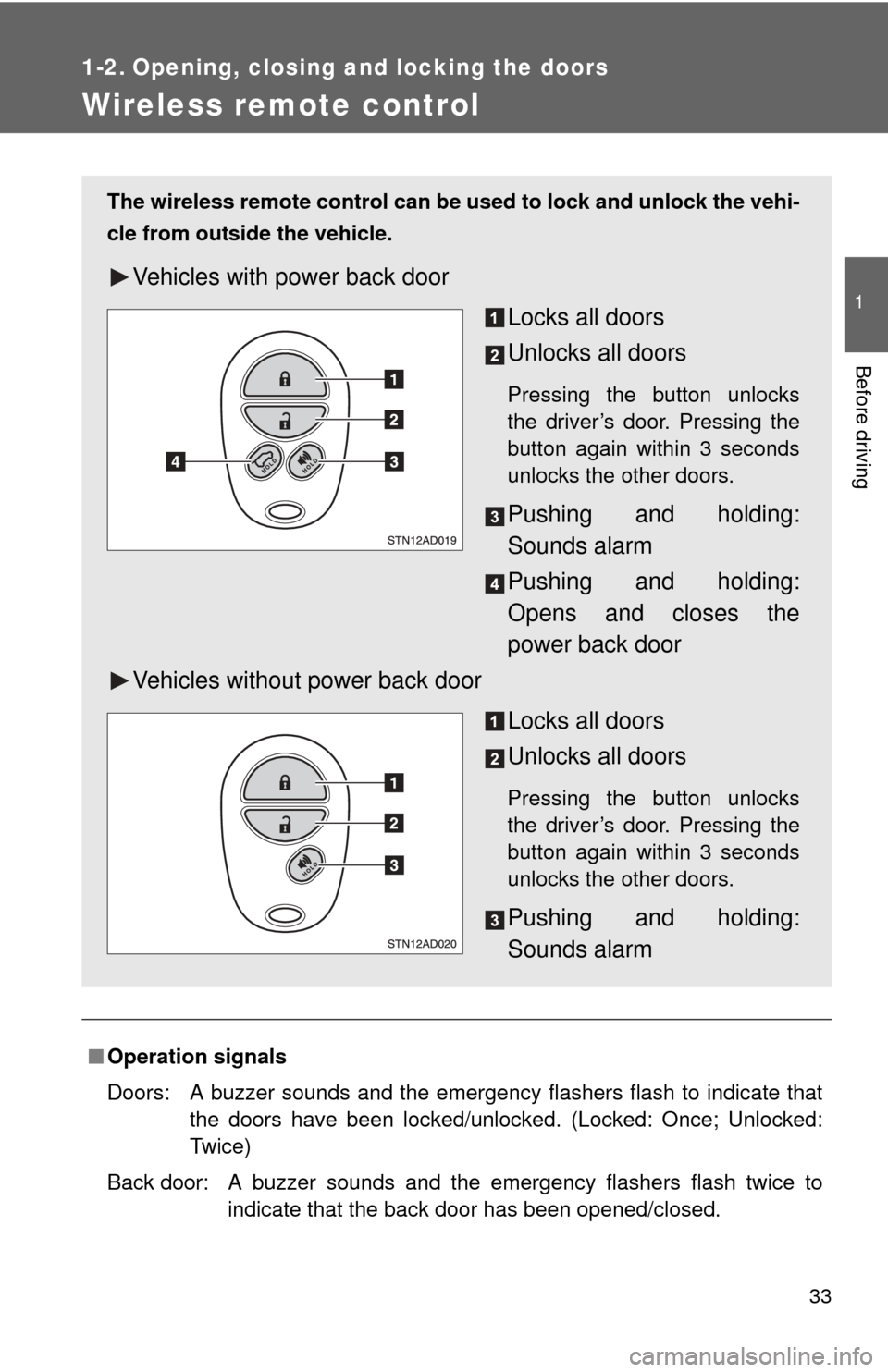
The wireless remote control can be used to lock and unlock the vehi-
cle from outside the vehicle.
Vehicles with power back door
Locks all doors
Unlocks all doors
Pressing the button unlocks
the driver’s door. Pressing the
button again within 3 seconds
unlocks the other doors.
Pushing and holding:
Sounds alarm
Pushing and holding:
Opens and closes the
power back door
Vehicles without power back door
Locks all doors
Unlocks all doors
Pressing the button unlocks
the driver’s door. Pressing the
button again within 3 seconds
unlocks the other doors.
Pushing and holding:
Sounds alarm
Page 34 of 708
34 1-2. Opening, closing and locking the doors
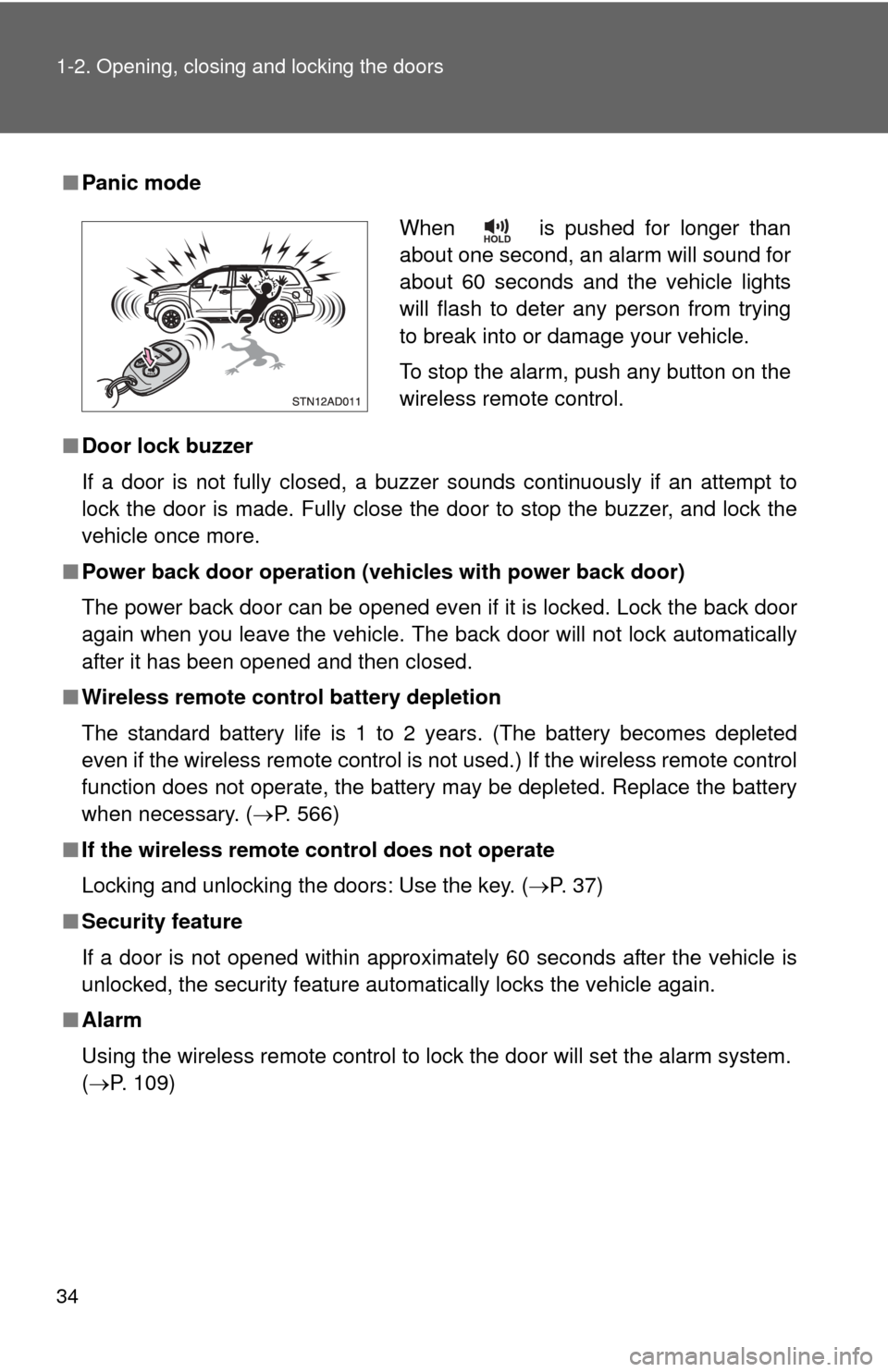
■Panic mode
■ Door lock buzzer
If a door is not fully closed, a buzzer sounds continuously if an attempt to
lock the door is made. Fully close the door to stop the buzzer, and lock the
vehicle once more.
■ Power back door operation (veh icles with power back door)
The power back door can be opened even if it is locked. Lock the back door
again when you leave the vehicle. The back door will not lock automatically
after it has been opened and then closed.
■ Wireless remote control battery depletion
The standard battery life is 1 to 2 years. (The battery becomes depleted
even if the wireless remote control is not used.) If the wireless remot\
e control
function does not operate, the battery may be depleted. Replace the battery
when necessary. ( P. 566)
■ If the wireless remote control does not operate
Locking and unlocking the doors: Use the key. ( P. 37)
■ Security feature
If a door is not opened within approximately 60 seconds after the vehicle is
unlocked, the security feature automatically locks the vehicle again.
■ Alarm
Using the wireless remote control to lock the door will set the alarm sy\
stem.
(P. 109)
When is pushed for longer than
about one second, an alarm will sound for
about 60 seconds and the vehicle lights
will flash to deter any person from trying
to break into or damage your vehicle.
To stop the alarm, push any button on the
wireless remote control.
Page 66 of 708
66 1-3. Adjustable components (seats, mirrors, steering wheel)
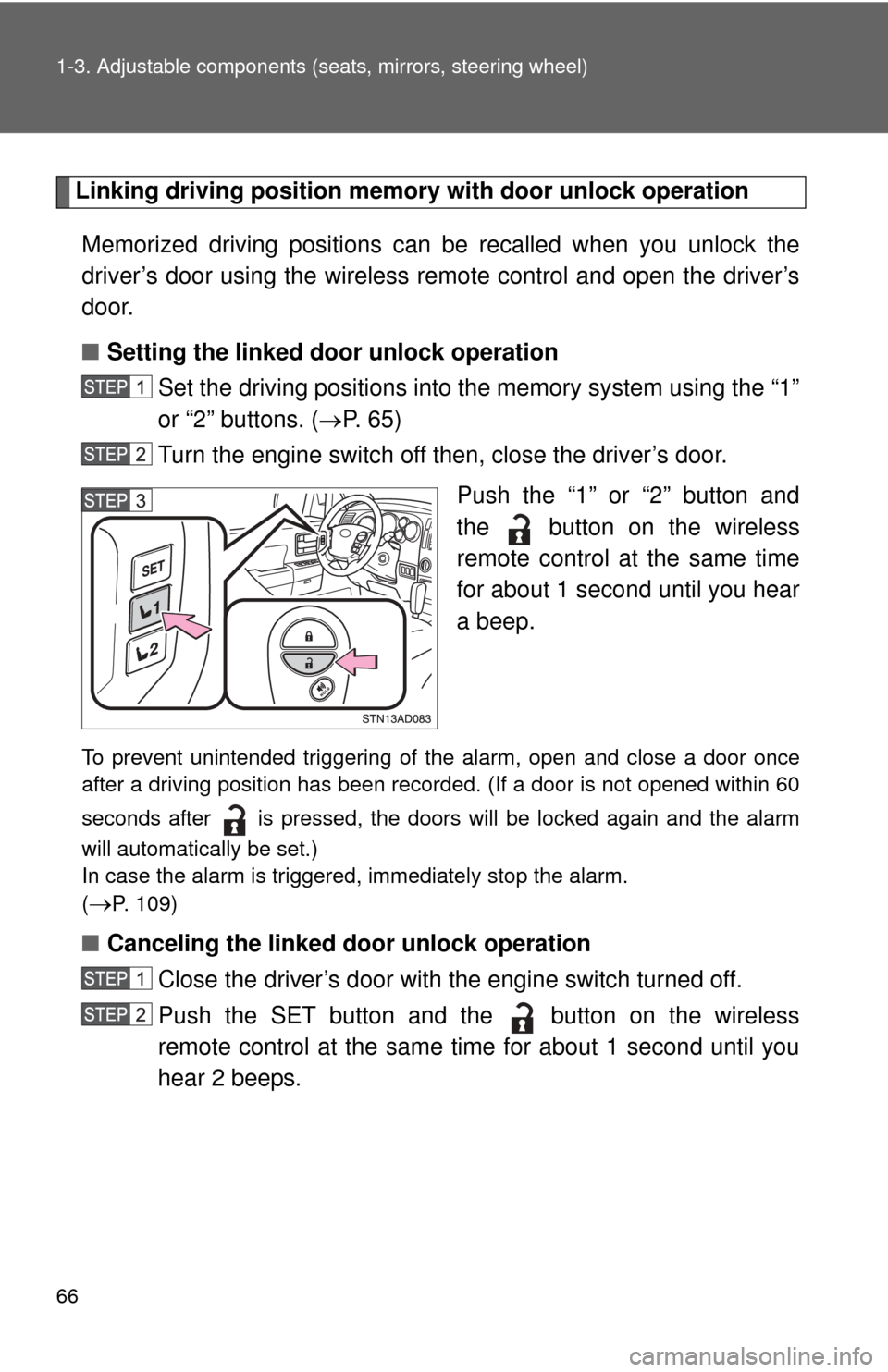
Linking driving position memory with door unlock operation
Memorized driving positions can be recalled when you unlock the
driver’s door using the wireless remote control and open the driver’s
door.
■ Setting the linked door unlock operation
Set the driving positions into the memory system using the “1”
or “2” buttons. ( P. 6 5 )
Turn the engine switch off then, close the driver’s door.
Push the “1” or “2” button and
the button on the wireless
remote control at the same time
for about 1 second until you hear
a beep.
To prevent unintended triggering of the alarm, open and close a door once
after a driving position has been recorded. (If a door is not opened within 60
seconds after is pressed, the doors will be locked again and the alarm
will automatically be set.)
In case the alarm is triggered, immediately stop the alarm.
(
P. 109)
■Canceling the linked door unlock operation
Close the driver’s door with the engine switch turned off.
Push the SET button and the button on the wireless
remote control at the same time for about 1 second until you
hear 2 beeps.
Page 101 of 708
101
1-4. Opening and closing the windows and moon roof
1
Before driving
■
Sunshade
The sunshade can be opened and closed manually. However, the sunshade
will open automatically when the moon roof is opened.
■ Moon roof open reminder function
An alarm will sound when the driver’s door is opened with the moon roof not
fully closed and the engine switch off.
■ Customization that can be co nfigured at Toyota dealer
Settings (e.g. moon roof) can be changed.
(Customizable features P. 672)
CAUTION
■Opening the moon roof
Observe the following precautions.
Failing to do so may cause death or serious injury.
●Do not allow any passengers to put their hands or heads outside the vehi-
cle while it is moving.
● Do not sit on top of the moon roof.
■ Closing the moon roof
Observe the following precautions.
Failing to do so may result in death or serious injury.
●Check to make sure that all passengers do not have any part of their bod-
ies in a position where they could be caught when the moon roof is being
operated.
● Do not allow children to operate the moon roof.
Closing the moon roof on someone can cause death or serious injury.
■ Jam protection function
●Never try jamming any part of your body to activate the jam protection
function intentionally.
● The jam protection function may not work if something gets caught just
before the moon roof fully closes.
Page 109 of 708
109
1
1-6. Theft deterrent system
Before driving
Alarm
The system sounds the alarm and flashes lights when forcible entry
is detected.
■ Triggering of the alarm
The alarm is triggered in the fo llowing situations when the alarm
is set.
● A locked door is unlocked or opened in any way other than
using the wireless remote control door lock function or key.
The doors will lock again automatically.
● The hood is opened.
● Vehicles with the glass breakage sensor (if equipped): The
side windows are tapped or broken.
● The battery is reconnected.
■ Setting the alarm system
Close the doors and hood,
and lock all the doors. The
system will be set automati-
cally after 30 seconds.
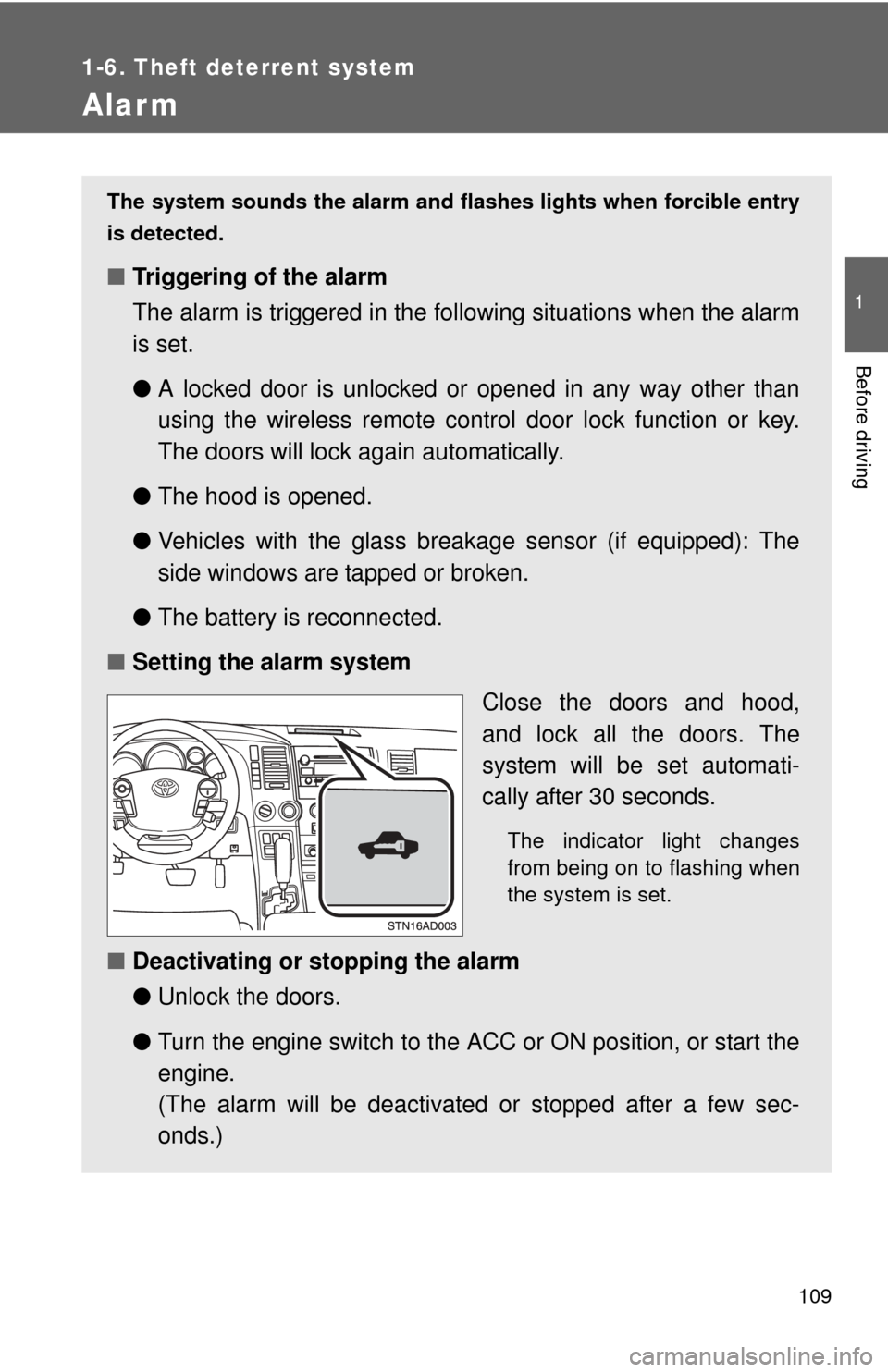
The indicator light changes
from being on to flashing when
the system is set.
■Deactivating or stopping the alarm
●Unlock the doors.
● Turn the engine switch to the ACC or ON position, or start the
engine.
(The alarm will be deactivated or stopped after a few sec-
onds.)
Page 110 of 708
110 1-6. Theft deterrent system
■System maintenance
The vehicle has a maintenance-free type alarm system.
■ Items to check before locking the vehicle
To prevent unexpected triggering of the alarm and vehicle theft, make sure
of the following.
●Nobody is in the vehicle.
● The windows and moon roof are closed before the alarm is set.
● No valuables or other personal items are left in the vehicle.
■ Triggering of the alarm
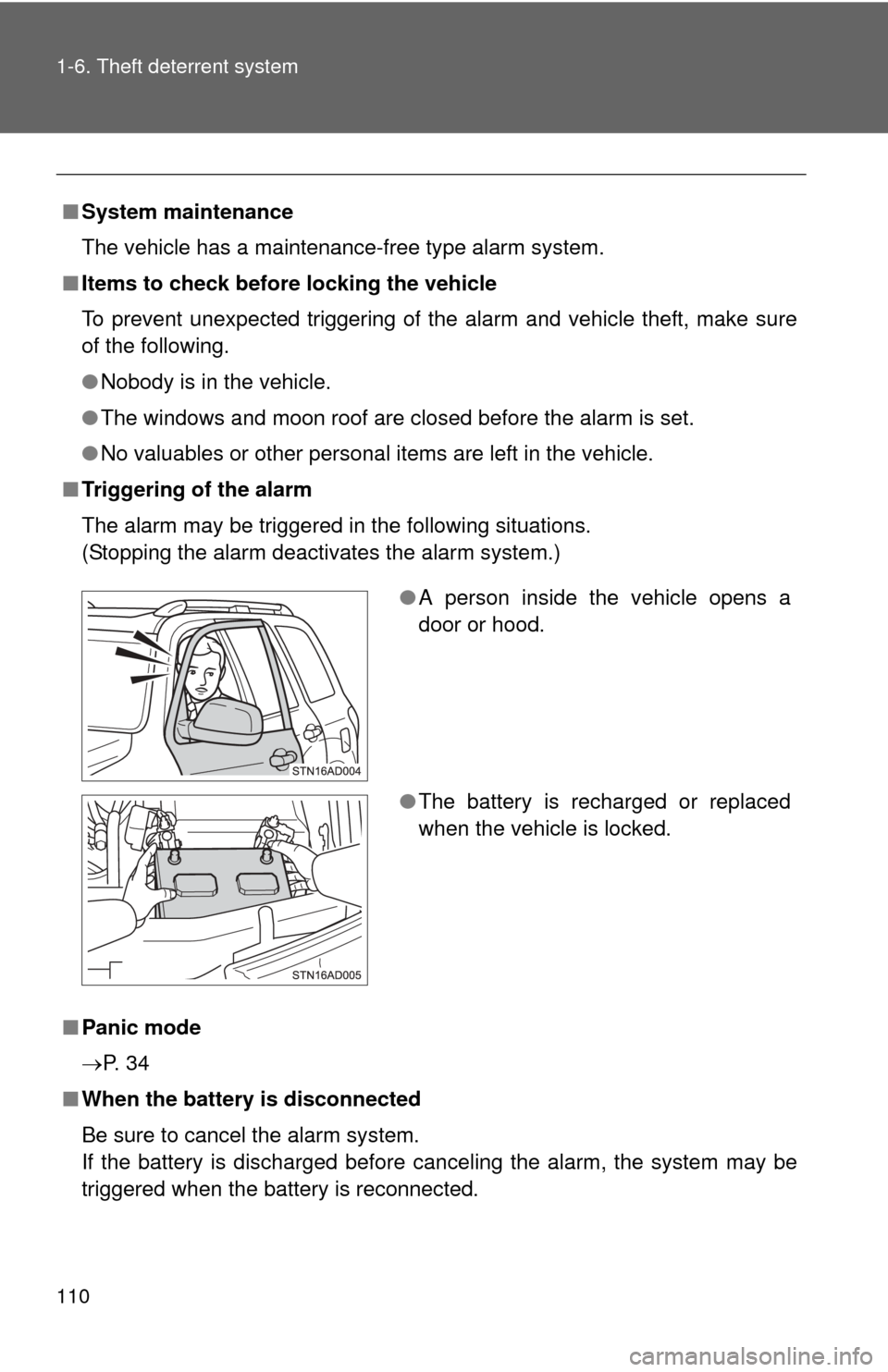
The alarm may be triggered in the following situations.
(Stopping the alarm deactivates the alarm system.)
■ Panic mode
P. 3 4
■ When the battery is disconnected
Be sure to cancel the alarm system.
If the battery is discharged before canceling the alarm, the system may be
triggered when the battery is reconnected.
●A person inside the vehicle opens a
door or hood.
● The battery is recharged or replaced
when the vehicle is locked.
Page 111 of 708

111
1-6. Theft deterrent system
1
Before driving
■
Alarm-operated door lock
●When the alarm is operating, the doors are locked automatically to pre-
vent intruders.
● Do not leave the key inside the vehicle when the alarm is operating, and
make sure the key is not inside the vehicle when recharging or replacing
the battery.
NOTICE
■To ensure the system operates correctly
Do not modify or remove the system. If modified or removed, the proper
operation of the system cannot be guaranteed.
Page 696 of 708

696
Alphabetical index
Alphabetical index
A/C ..................................... 300, 308
ABS ........................................... 254
Active traction control ............. 254
Adaptive variable suspension system .................................... 246
Air conditioning filter............... 563
Air conditioning system Air conditioning filter .............. 563
Front air conditioning system ................................ 300
Rear air conditioning system ................................ 308
Airbags
Airbag operating conditions............................ 117
Airbag precautions for your
child .................................... 121
Airbag warning light............... 604
Curtain shield airbag operating conditions............ 117
Curtain shield airbag precautions ......................... 121
Front passenger occupant classification system ........... 127
General airbag
precautions ......................... 121
Locations of airbags .............. 114
Modification and disposal of airbags ................................ 125
Proper driving posture ........................ 112, 121
Side airbag operating conditions............................ 117
Side airbag precautions ........ 121
SRS airbags .......................... 114
Alarm ......................................... 109
Antenna..................................... 326
Anti-lock brake system............ 254
Armrest ..................................... 494
Ashtrays.................................... 480
A-TRAC ..................................... 254
Audio input ............................... 363 Audio system
A/V input port ........................ 409
Antenna................................. 326
Audio input ............................ 363
Audio visual input .................. 409
AUX port ............................... 363
CD player/changer ................ 329
DVD player............................ 392
iPod ....................................... 346
MP3/WMA disc ..................... 338
Optimal use ........................... 359
Portable music player ........... 363
Radio..................................... 321
Rear seat entertainment system ................................ 384
Steering wheel audio
switch.................................. 365
Type ...................................... 317
USB memory......................... 352
Audio visual input.................... 409
AUTO LSD system ................... 252
Automatic light control system .................................... 193
Automatic transmission .......................... 162
AUX port ................................... 363
Auxiliary box ............................ 473
A/V input port ........................... 409
AVS ........................................... 246
Back-up lights Replacing light bulbs ............. 580
Wattage................................. 655
Back door
Back door ................................ 42
Wireless remote control .......... 33
Back window ........................... 96
Battery Checking ............................... 544
If the vehicle has discharged battery................................. 634
Preparing and checking before winter ....................... 272A
B