lock TOYOTA SEQUOIA 2013 2.G Owners Manual
[x] Cancel search | Manufacturer: TOYOTA, Model Year: 2013, Model line: SEQUOIA, Model: TOYOTA SEQUOIA 2013 2.GPages: 740, PDF Size: 15.34 MB
Page 652 of 740
652 5-2. Steps to take in an emergency
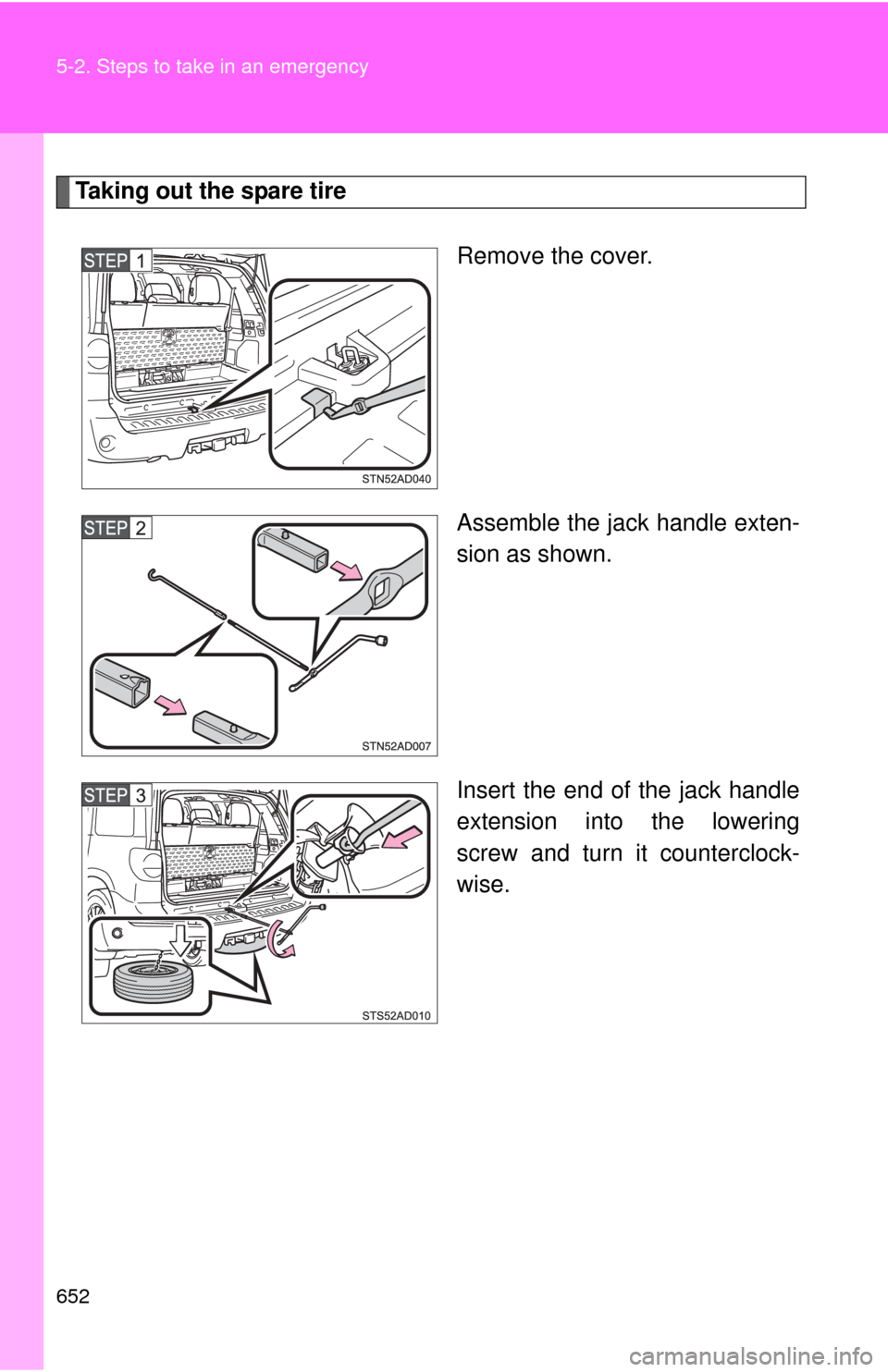
Taking out the spare tireRemove the cover.
Assemble the jack handle exten-
sion as shown.
Insert the end of the jack handle
extension into the lowering
screw and turn it counterclock-
wise.
Page 661 of 740
5
When trouble arises
661
5-2. Steps to take in an emergency
If the engine will not star t
If the engine still does not start after following the correct starting
procedure ( P. 159) or releasing the steering lock (P. 160), confirm
the following points.
■ The engine will not start even when the starter motor oper-
ates normally.
One of the following may be the cause of the problem.
●There may not be sufficient fuel in the vehicle’s tank.
Refuel the vehicle. ( P. 102)
Flex-fuel vehicles: The type of fuel may be different. When
refueling, add the same type of fuel, if available.
After adding a different type of fuel, the engine may run
roughly and driving performance may be reduced for a while
when the engine is first started. In this case, wait until the
engine runs normally.
● The engine may be flooded.
Try to restart the engine once more following correct starting
procedures.
● There may be a malfunction in the engine immobilizer system.
( P. 107)
■ The starter motor turns over slowly, the interior lights and
headlights are dim, or the horn does not sound or sounds at
a low volume.
One of the following may be the cause of the problem.
●The battery may be discharged. ( P. 665)
● The battery terminal connec tions may be loose or corroded.
Page 663 of 740
5
When trouble arises
663
5-2. Steps to take in an emergency
If the shift lever cannot be shifted from P
If the shift lever cannot be shifted with your foot on the brake, there
may be a problem with the shift lock system (a system to prevent
accidental operation of the shift lever). Have the vehicle inspected by
your Toyota dealer immediately.
The following steps may be used as an emergency measure to
ensure that the shift lever can be shifted.
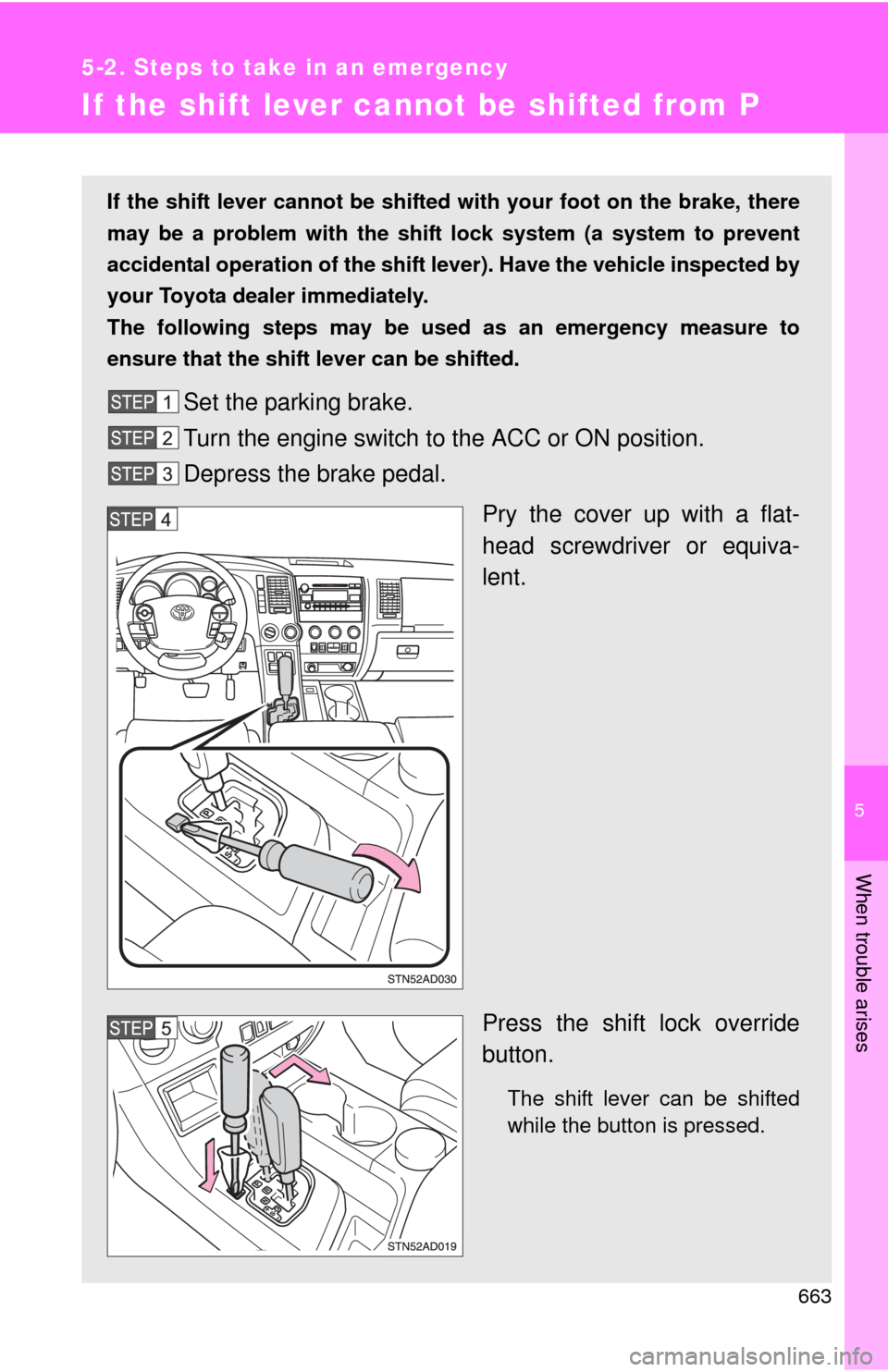
Set the parking brake.
Turn the engine switch to the ACC or ON position.
Depress the brake pedal.
Pry the cover up with a flat-
head screwdriver or equiva-
lent.
Press the shift lock override
button.
The shift lever can be shifted
while the button is pressed.
Page 666 of 740
666 5-2. Steps to take in an emergency
■Starting the engine when the battery is discharged
The engine cannot be started by push-starting.
■ Avoiding a discharged battery
●Turn off the headlights and the audio system while the engine is turned
off.
● Turn off any unnecessary electrical components when the vehicle is run-
ning at a low speed for an extended period, such as in heavy traffic, etc.
■ When the battery is removed or discharged
●Flex-fuel vehicles: The information recorded in the computer will be
cleared, which may cause the engine to run roughly and reduce driving
performance for a while when the engine is first started. In this case, wait
until the engine runs normally.
If the vehicle is running on E85, the engine may stall. In this case, restart
the engine, repeatedly if necessary.
● Make sure that the key is not inside the vehicle when recharging or
replacing the battery. The key may be locked in the vehicle if the alarm is
activated. ( P. 110)
■ Charging the battery
The electricity stored in the battery will discharge gradually even when the
vehicle is not in use, due to natural discharge and the draining effects of cer-
tain electrical appliances. If the vehicle is left for a long time, the battery may
discharge, and the engine may be unable to start. (The battery recharges
automatically during driving.)
Once the vehicle’s engine has started, remove the jumper
cables in the exact reverse order in which they were con-
nected.
Once the engine starts, have the vehicle checked at your Toyota
dealer as soon as possible.
Page 673 of 740

5
When trouble arises
673
5-2. Steps to take in an emergency
CAUTION
■
If the engine has to be turned off while driving
●Power assist for the brakes and steering wheel will be lost, making the
brake pedal harder to depress and the steering wheel heavier to turn.
Decelerate as much as possible before turning off the engine.
● Never attempt to remove the key, as doing so will lock the steering wheel.
Page 683 of 740
683
6-1. Specifications
6
Vehicle specifications
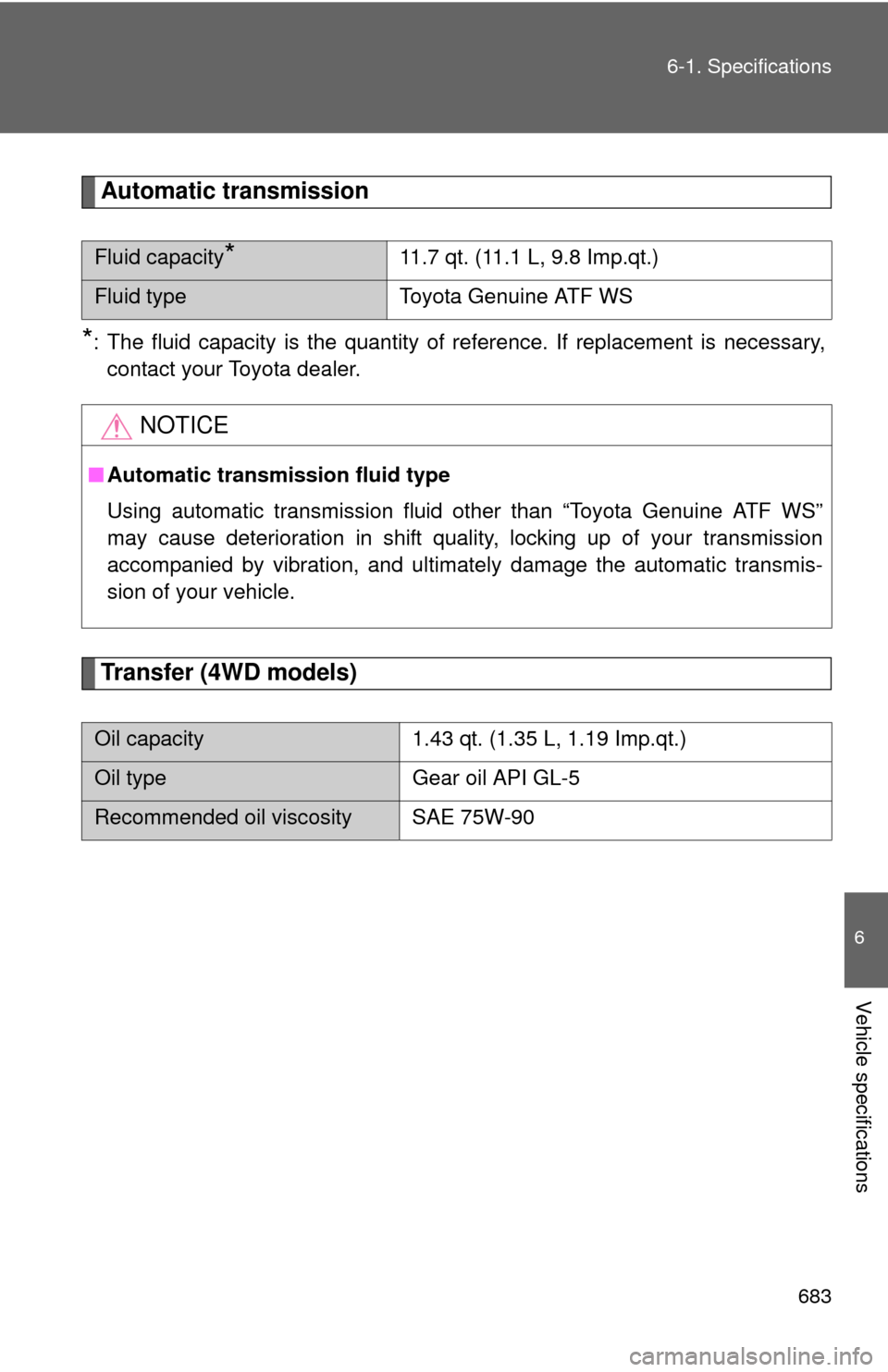
Automatic transmission
*: The fluid capacity is the quantity of reference. If replacement is necessary,
contact your Toyota dealer.
Transfer (4WD models)
Fluid capacity*11.7 qt. (11.1 L, 9.8 Imp.qt.)
Fluid type Toyota Genuine ATF WS
NOTICE
■Automatic transmission fluid type
Using automatic transmission fluid other than “Toyota Genuine ATF WS”
may cause deterioration in shift quality, locking up of your transmission
accompanied by vibration, and ultimately damage the automatic transmis-
sion of your vehicle.
Oil capacity 1.43 qt. (1.35 L, 1.19 Imp.qt.)
Oil typeGear oil API GL-5
Recommended oil viscosity SAE 75W-90
Page 703 of 740
703
6
Vehicle specifications
6-2. Customization
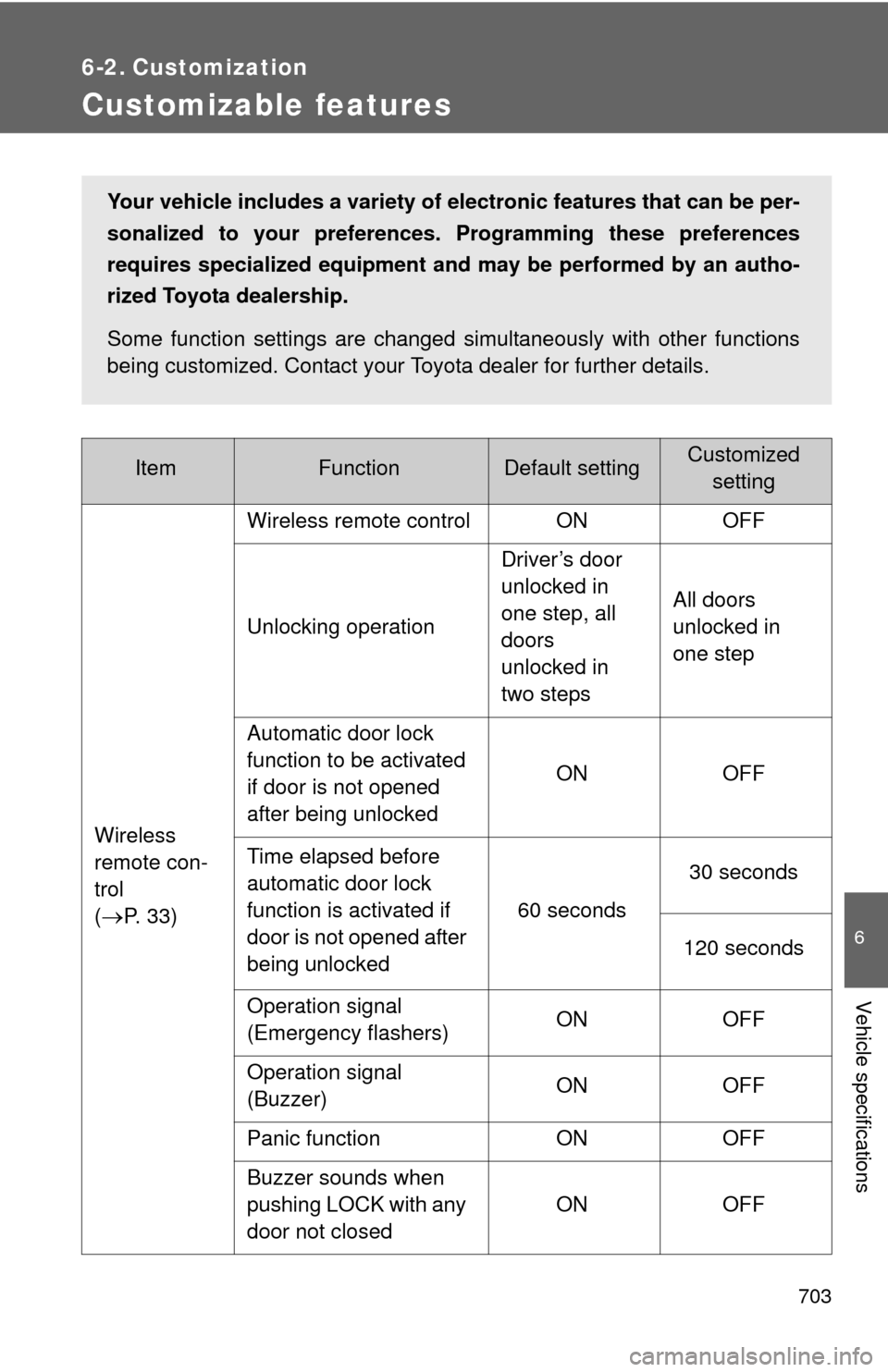
Customizable features
ItemFunctionDefault settingCustomizedsetting
Wireless
remote con-
trol
(
P. 3 3 ) Wireless remote control ON OFF
Unlocking operation
Driver’s door
unlocked in
one step, all
doors
unlocked in
two stepsAll doors
unlocked in
one step
Automatic door lock
function to be activated
if door is not opened
after being unlocked ON OFF
Time elapsed before
automatic door lock
function is activated if
door is not opened after
being unlocked 60 seconds
30 seconds
120 seconds
Operation signal
(Emergency flashers) ON OFF
Operation signal
(Buzzer) ON OFF
Panic function ON OFF
Buzzer sounds when
pushing LOCK with any
door not closed ON OFF
Your vehicle includes a variety of electronic features that can be per-
sonalized to your preferences.
Programming these preferences
requires specialized equipment and may be performed by an autho-
rized Toyota dealership.
Some function settings are changed simultaneously with other functions
being customized. Contact your Toyota dealer for further details.
Page 704 of 740

704 6-2. Customization
*: It is possible to select them only when the power back door operation with theopen/close switch is made impossible when the door is locked.
Wireless
remote con-
trol
(
P. 33)
Power back door oper-
ation
Push and holdPush twice*
One short push*
Power back
door
( P. 42) Switch operation Push and hold One short push
Wireless remote control
linked operation
ON OFF
Operation signal vol-
ume OFF ON
Operation when door
locks Possible Impossible
Time elapsed before
back door closing func-
tion is activated when
pushing switch in the
luggage compartment 1.5 seconds
0 seconds
1 seconds
2 seconds
Door lock
( P. 37) Speed-detecting auto-
matic door lock function
ON
OFF
Opening driver’s door
unlocks all doors. OFF
ON
Shifting gears to “P”
unlocks all doors. ON
OFF
Shifting gears to posi-
tion other than “P” locks
all doors. OFF
ON
ItemFunctionDefault settingCustomized
setting
Page 705 of 740

705
6-2. Customization
6
Vehicle specifications
ItemFunctionDefault settingCustomized
setting
Door lock
( P. 37) Unlocking using a key Driver’s door
unlocked in
one step, all
doors
unlocked in
two stepsAll doors
unlocked in
one step
Power
windows
( P. 93) Door key linked opera-
tion
Open and closeOpen only
Close only OFF
Moon roof
( P. 99) Door key linked opera-
tion
Open and closeOpen only
Close only OFF
Linked operation of
components when door
key is used Slide only Tilt only
Automatic
light off
system
( P. 188) Light sensor sensitivity Level 3 Level 1 to 5
Time elapsed before
headlights automati-
cally turn off after doors
are closed
30 seconds
0 seconds
60 seconds
90 seconds
Back
window
( P. 96) Linked back door key
operation
Open and closeOpen only
Close only
Sensitivity of jam pro-
tection function Level 1 Level 2 to 4
Rear window
wiper and
washer
( P. 200) Washer linkage wiper
control
ON
OFF
Drip prevention function ON OFF
Page 706 of 740

706 6-2. Customization
Illumination
(
P. 478)Time elapsed before
lights turn off
15 seconds7.5 seconds
30 seconds
Operation after the
engine is off ON OFF
Operation when the
doors are unlocked ON OFF
Seat Belt
Reminder
Buzzer
(
P. 635) Vehicle speed linked
seat belt reminder
buzzer
ON OFF
ItemFunctionDefault settingCustomized
setting