mirror TOYOTA SEQUOIA 2013 2.G Workshop Manual
[x] Cancel search | Manufacturer: TOYOTA, Model Year: 2013, Model line: SEQUOIA, Model: TOYOTA SEQUOIA 2013 2.GPages: 740, PDF Size: 15.34 MB
Page 90 of 740

90 1-3. Adjustable components (seats, mirrors, steering wheel)
NOTICE
■If ice should jam the mirror
Do not operate the control or scrape the mirror face. Use a spray de-icer to
free the mirror.
Page 91 of 740
91
1
1-3. Adjustable components (seats, mirrors, steering wheel)
Before driving
Roof luggage carrier
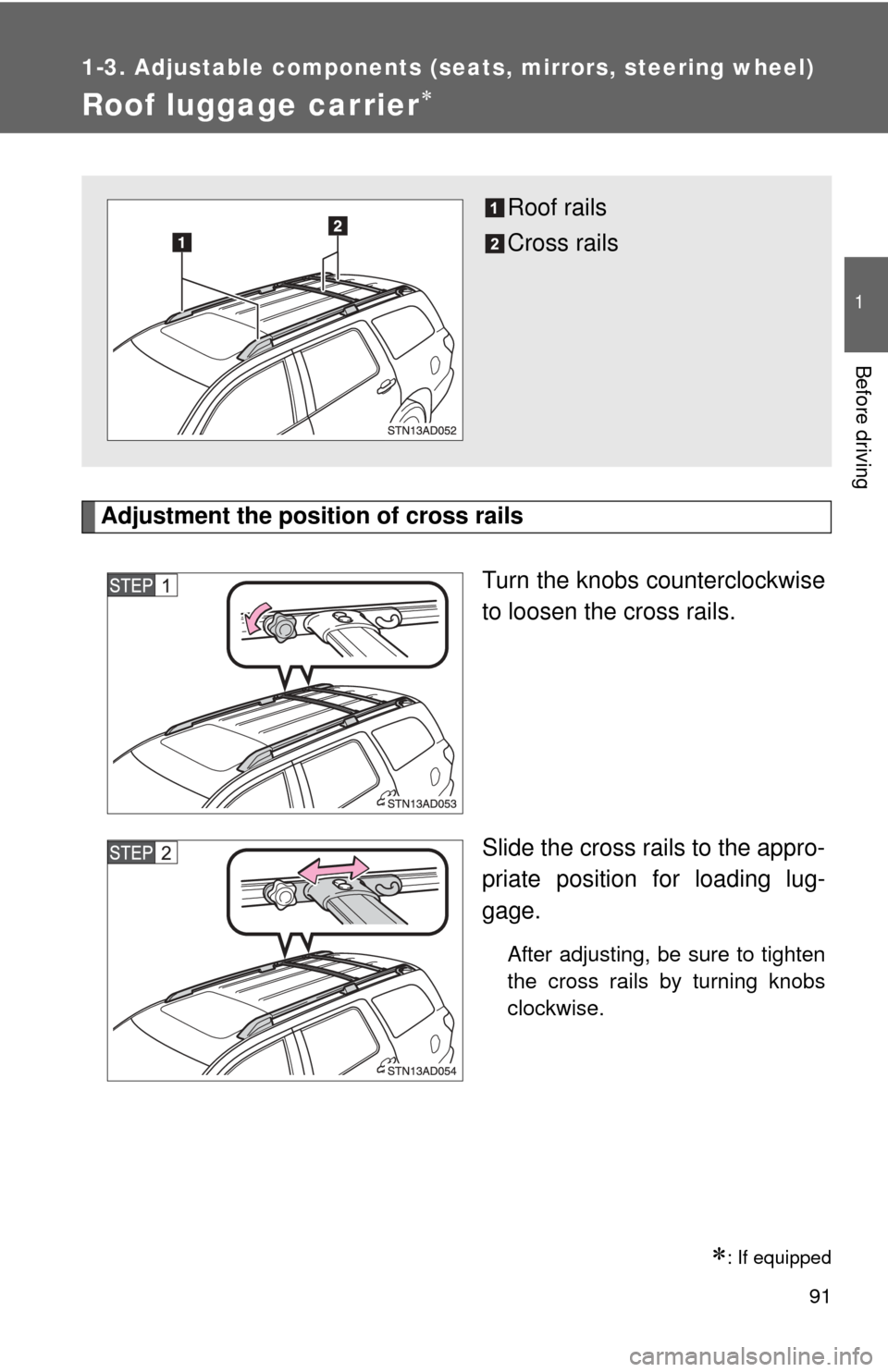
Adjustment the position of cross railsTurn the knobs counterclockwise
to loosen the cross rails.
Slide the cross rails to the appro-
priate position for loading lug-
gage.
After adjusting, be sure to tighten
the cross rails by turning knobs
clockwise.
: If equipped
Roof rails
Cross rails
Page 92 of 740
92 1-3. Adjustable components (seats, mirrors, steering wheel)
CAUTION
■Cross rail adjustment
Make sure the cross rails are locked securely by applying pressure forward
and rearward.
Failure to do so may cause an accident, death or serious injury in the event
of emergency braking or a collision.
■ When loading cargo
Observe the following precautions:
●Place the cargo so that its weight is distributed evenly between the front
and rear axles.
● If loading long or wide cargo, never exceed the vehicle overall length or
width. ( P. 676)
● Before driving, make sure the cargo is securely fastened to the roof lug-
gage carrier.
● Loading cargo on the roof luggage carrier will raise the vehicle’s center of
gravity. Avoid high speeds, sudden starts, sharp turns, sudden braking or
abrupt maneuvers, otherwise unexpected loss of control or vehicle rollover
may occur.
● If driving for a long distance, on rough roads, or at high speeds, stop the
vehicle occasionally during the trip to make sure the cargo remains
securely fastened.
● Do not exceed 150 lb. (68 kg) cargo weight on the roof luggage carrier.
NOTICE
■When loading the luggage
Be careful not to scratch the surface of the moon roof.
Page 153 of 740

153
2-1. Driving procedures
2
When driving
CAUTION
■
When driving the vehicle
●Do not shift the shift lever to D while the vehicle is moving backward.
Doing so can damage the transmission and may result in a loss of vehicle\
control.
● Moving the shift lever to N while the vehicle is moving will disengage the
engine from the transmission. Engine braking is not available when N is
selected.
● During normal driving, do not turn off the engine. Turning the engine off
while driving will not cause loss of steering or braking control, but the
power assist to these systems will be lost. This will make it more difficult to
steer and brake, so you should pull over and stop the vehicle as soon as it
is safe to do so.
However, in the event of an emergency, such as if it becomes impossible
to stop the vehicle in the normal way: P. 672
● Use engine braking (downshift) to maintain a safe speed when driving
down a steep hill.
Using the brakes continuously may cause the brakes to overheat and lose
effectiveness. ( P. 162)
● When stopped on an inclined surface, use the brake pedal and parking
brake to prevent the vehicle from rolling backward or forward and causing
an accident.
● Do not adjust the position of the steering wheel, the seat, or the inside or
outside rear view mirrors while driving.
Doing so may result in a loss of vehicle control that can cause accidents
that may result in death or serious injury.
● Always check that all passengers’ arms, heads or other parts of their bod-
ies are not outside the vehicle, as this may result in death or serious injury.
● Do not drive in excess of the speed limit. Even if the legal speed limit per-
mits it, do not drive over 85 mph (140 km/h) unless your vehicle has high-
speed capability tires. Driving over 85 mph (140 km/h) may result in tire
failure, loss of control and possible injury. Be sure to consult a tire dealer
to determine whether the tires on your vehicle are high-speed capability
tires or not before driving at such speeds.
Page 175 of 740
![TOYOTA SEQUOIA 2013 2.G Workshop Manual 175
2-2. Instrument cluster
2
When driving
Center panel
Outside rear view mirrors [vehicles with BSM (Blind Spot Moni-
tor)]](/img/14/6770/w960_6770-174.png "TOYOTA SEQUOIA 2013 2.G Workshop Manual 175
2-2. Instrument cluster
2
When driving
Center panel
Outside rear view mirrors [vehicles with BSM (Blind Spot Moni-
tor)]")
175
2-2. Instrument cluster
2
When driving
Center panel
Outside rear view mirrors [vehicles with BSM (Blind Spot Moni-
tor)]
Page 176 of 740
176 2-2. Instrument cluster
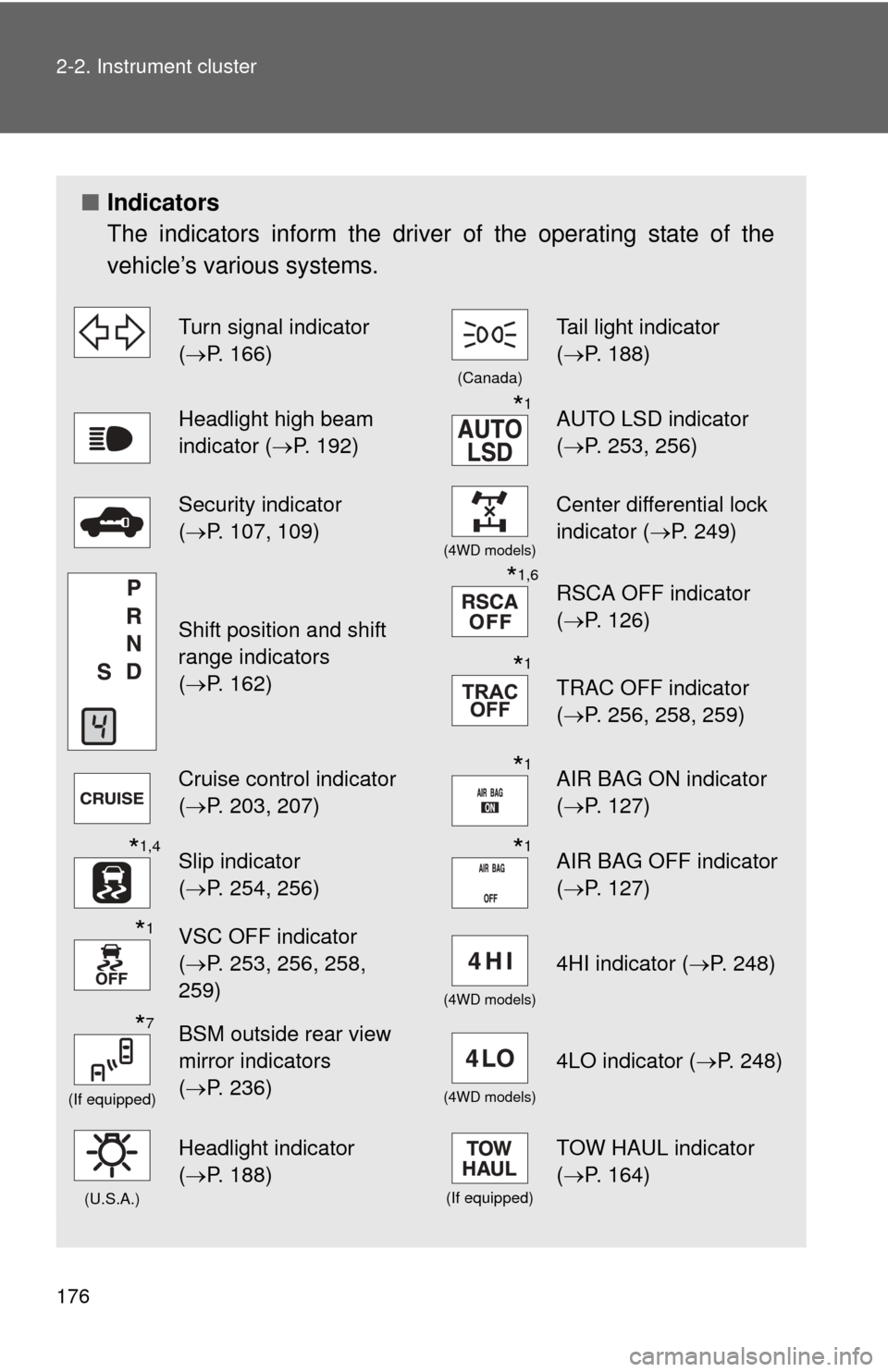
■Indicators
The indicators inform the driver of the operating state of the
vehicle’s various systems.
Turn signal indicator
(P. 166)
(Canada)
Tail light indicator
( P. 188)
Headlight high beam
indicator ( P. 192)*1AUTO LSD indicator
(P. 253, 256)
Security indicator
(P. 107, 109)
(4WD models)
Center differential lock
indicator ( P. 249)
Shift position and shift
range indicators
(P. 162)
*1,6RSCA OFF indicator
( P. 126)
*1
TRAC OFF indicator
(P. 256, 258, 259)
Cruise control indicator
(P. 203, 207)*1AIR BAG ON indicator
( P. 127)
*1,4Slip indicator
(P. 254, 256)*1AIR BAG OFF indicator
( P. 127)
*1VSC OFF indicator
(P. 253, 256, 258,
259)
(4WD models)
4HI indicator ( P. 248)
*7
(If equipped)
BSM outside rear view
mirror indicators
(P. 236)
(4WD models)
4LO indicator ( P. 248)
(U.S.A.)
Headlight indicator
(P. 188)
(If equipped)
TOW HAUL indicator
( P. 164)
Page 178 of 740
178 2-2. Instrument cluster
CAUTION
■If a safety system warning light does not come on
Should a safety system light such as ABS and the SRS airbag warning light
not come on when you start the engine, this could mean that these systems
are not available to help protect you in an accident, which could result in
death or serious injury. Have the vehicle inspected by your Toyota dealer
immediately if this occurs.
*7: In order to confirm operation, the BSM outside rear view mirror indi- cators illuminate in the following situations:
• When the engine switch is turned to the ON position while the BSM main switch is set to ON.
• When the BSM main switch is set to ON while the engine switch is in the ON position.
If the system is functioning correctly, the BSM outside rear view mirror
indicators will turn off after a few seconds.
If the BSM outside rear view mirror indicators do not illuminate or do
not turn off, there may be a malfunction with the system.
If this occurs, have the vehicle inspected by your Toyota dealer.
Page 228 of 740
228
2-4. Using other driving systems
Rear view monitor system
: If equipped
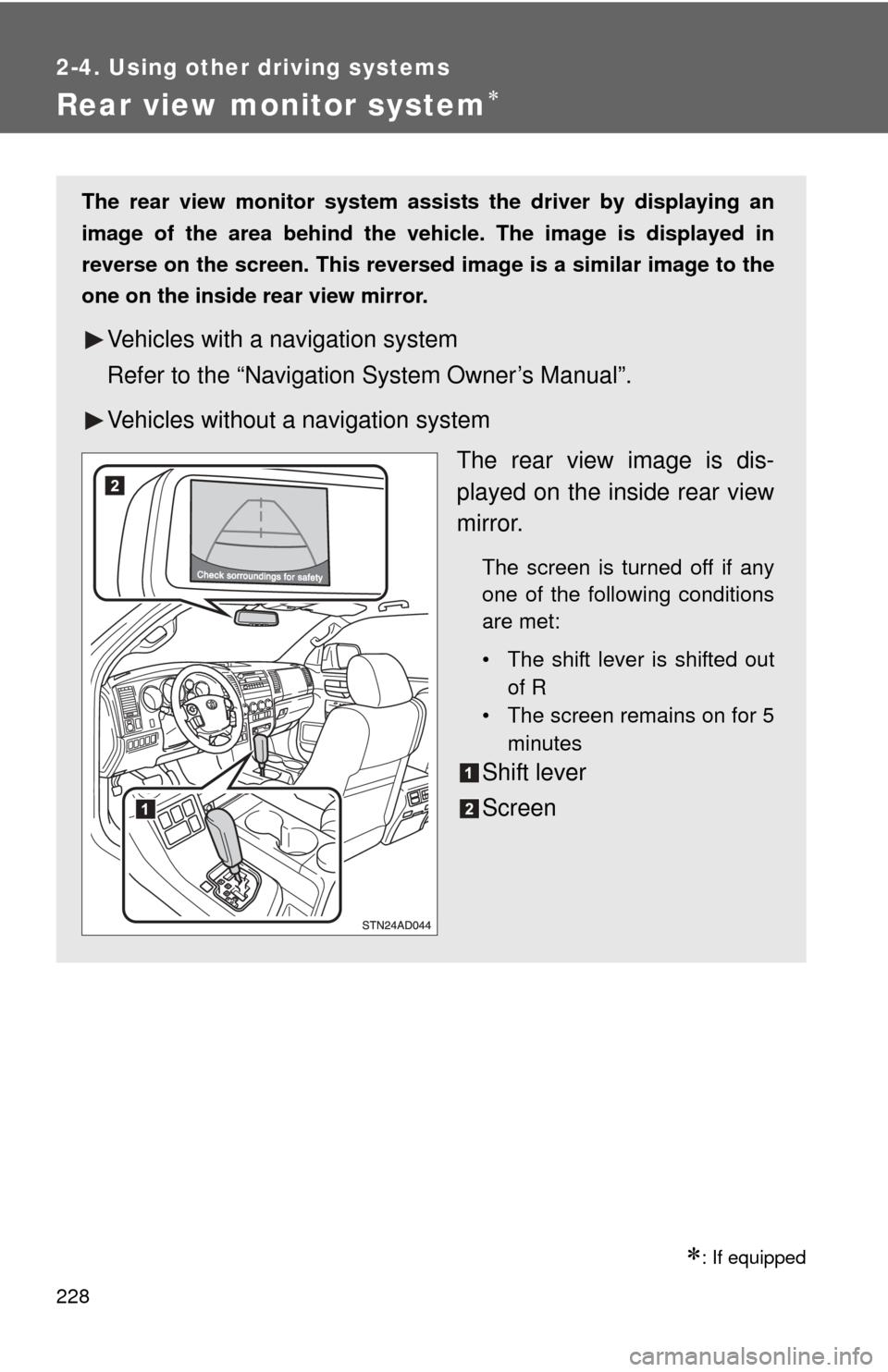
The rear view monitor system assists the driver by displaying an
image of the area behind the vehicle. The image is displayed in
reverse on the screen. This reversed im age is a similar image to the
one on the inside rear view mirror.
Vehicles with a navigation system
Refer to the “Navigation System Owner’s Manual”.
Vehicles without a navigation system
The rear view image is dis-
played on the inside rear view
mirror.
The screen is turned off if any
one of the following conditions
are met:
• The shift lever is shifted outof R
• The screen remains on for 5
minutes
Shift lever
Screen
Page 233 of 740
233
2-4. Using other
driving systems
2
When driving
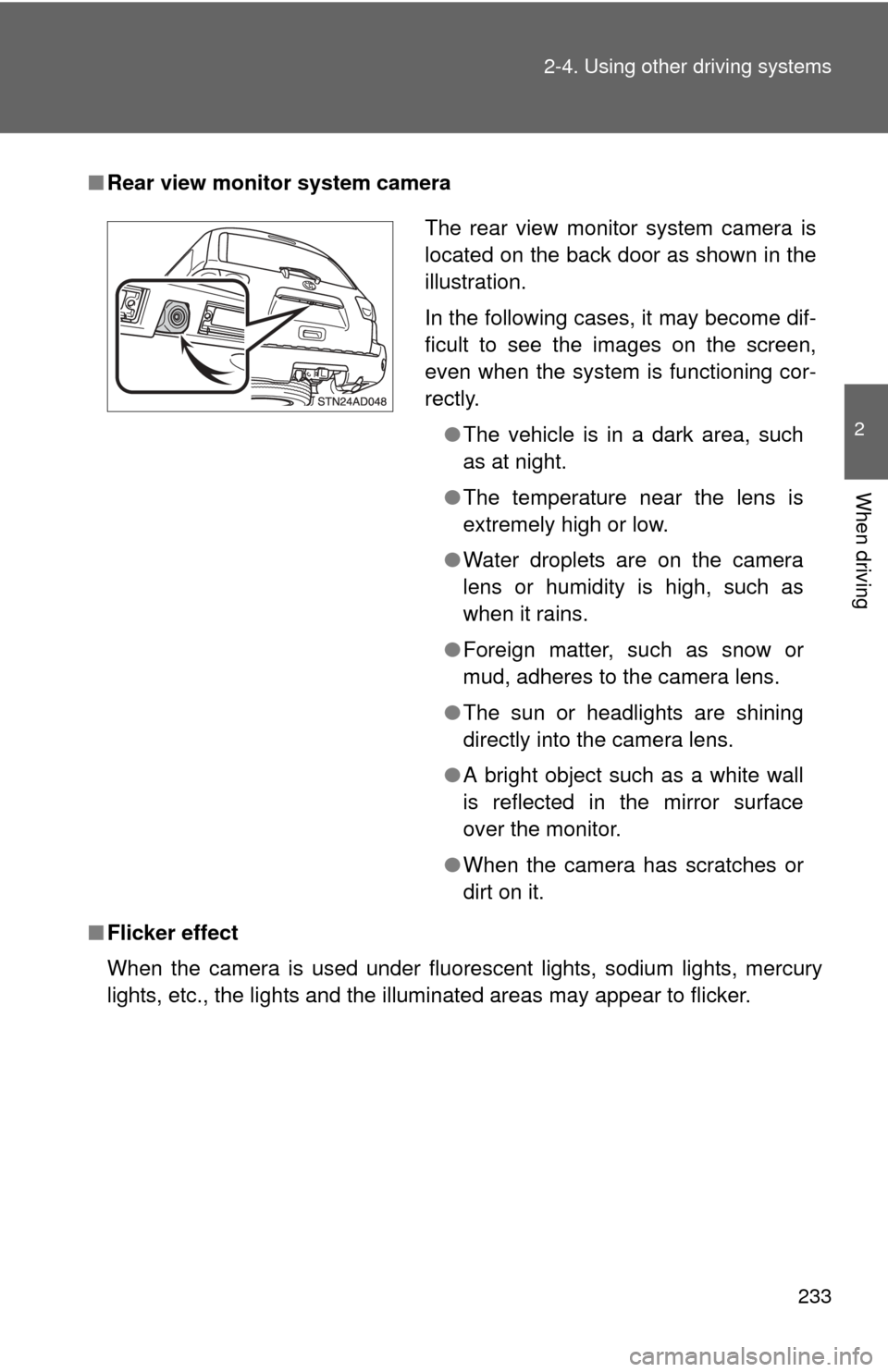
■Rear view monitor system camera
■ Flicker effect
When the camera is used under fluorescent lights, sodium lights, mercury
lights, etc., the lights and the illuminated areas may appear to flicker.
The rear view monitor system camera is
located on the back door as shown in the
illustration.
In the following cases, it may become dif-
ficult to see the images on the screen,
even when the system is functioning cor-
rectly.
●The vehicle is in a dark area, such
as at night.
● The temperature near the lens is
extremely high or low.
● Water droplets are on the camera
lens or humidity is high, such as
when it rains.
● Foreign matter, such as snow or
mud, adheres to the camera lens.
● The sun or headlights are shining
directly into the camera lens.
● A bright object such as a white wall
is reflected in the mirror surface
over the monitor.
● When the camera has scratches or
dirt on it.
Page 234 of 740
234 2-4. Using other driving systems
CAUTION
■When using the rear view monitor system
Observe the following precautions to avoid an accident that could result in
death or serious injuries.
● Never depend solely on the rear view monitor system when reversing.
● Always check visually and with the mirrors to confirm your intended path is
clear.
● Always check the vehicle surroundi ng area, because the guide lines are
estimates of distance and location.
● The guide lines are assistant lines and do not change even if the steering
wheel is turned.
● Depicted distances between objects and flat surfaces differ from actual
distances.
● Do not use the system if back door is open.
■ Conditions which may affect the rear view monitor system
● If the back of the vehicle has been hit, the camera’s position and mounting
angle may have changed. Have the vehicle inspected by your Toyota
dealer.
● Rapid temperature changes, such as when hot water is poured on the
vehicle in cold weather, may cause the system to function abnormally.
● If the camera lens is dirty, it cannot transmit a clear image. Rinse with
water and wipe with a soft cloth. If extremely dirty, wash with a mild
cleanser and rinse.
● The displayed image may be darker and moving images may be slightly
distorted when the system is cold.
■ Caution while driving in reverse
Do not change modes while the vehicle is moving.