language TOYOTA SEQUOIA 2013 2.G Owners Manual
[x] Cancel search | Manufacturer: TOYOTA, Model Year: 2013, Model line: SEQUOIA, Model: TOYOTA SEQUOIA 2013 2.GPages: 740, PDF Size: 15.34 MB
Page 182 of 740
182 2-2. Instrument cluster
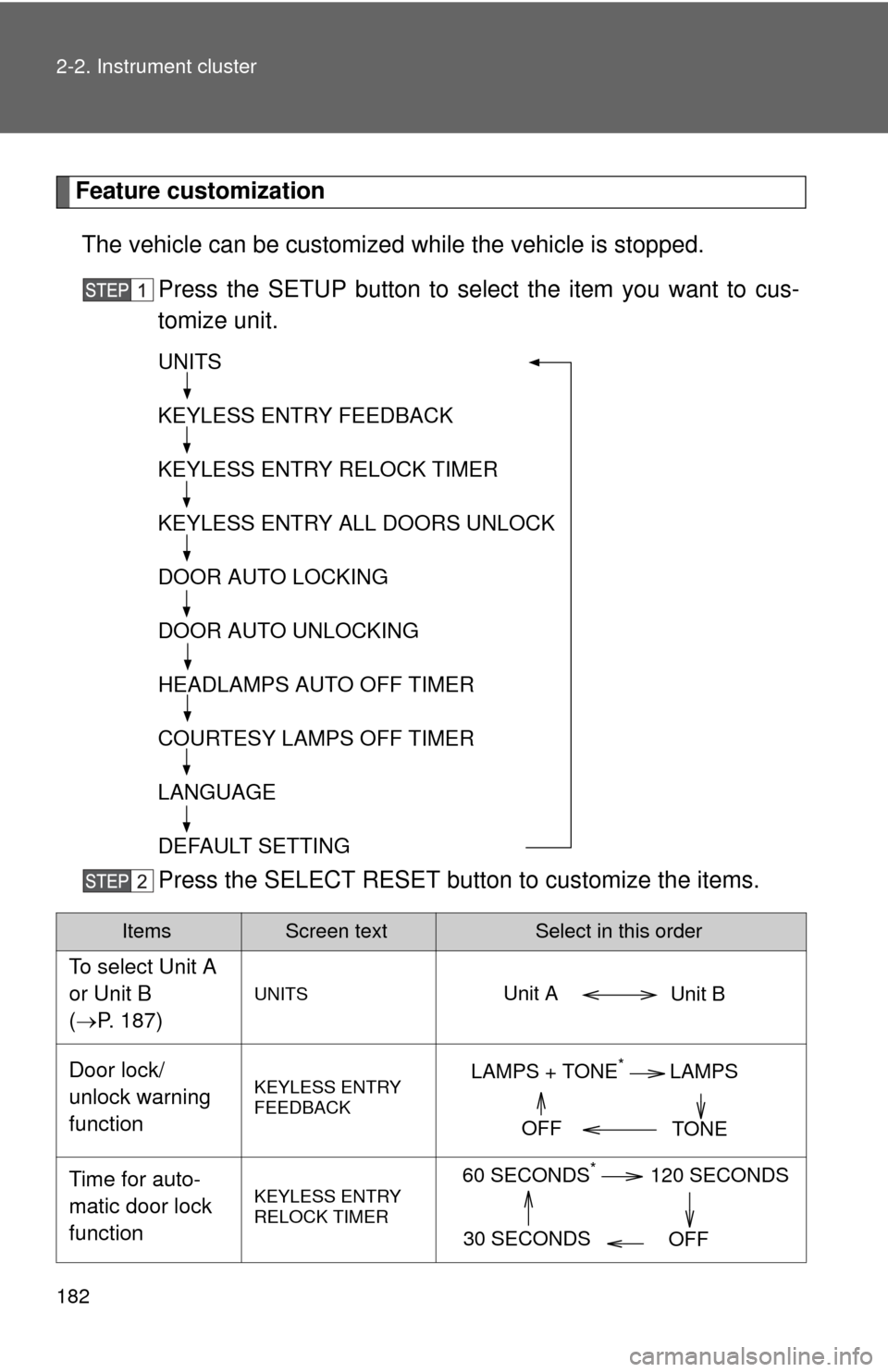
Feature customizationThe vehicle can be customized while the vehicle is stopped.
Press the SETUP button to select the item you want to cus-
tomize unit.
Press the SELECT RESET butt on to customize the items.
ItemsScreen textSelect in this order
To select Unit A
or Unit B
(P. 187)
UNITS
Door lock/
unlock warning
functionKEYLESS ENTRY
FEEDBACK
Time for auto-
matic door lock
functionKEYLESS ENTRY
RELOCK TIMER
UNITS
KEYLESS ENTRY FEEDBACK
KEYLESS ENTRY RELOCK TIMER
KEYLESS ENTRY ALL DOORS UNLOCK
DOOR AUTO LOCKING
DOOR AUTO UNLOCKING
HEADLAMPS AUTO OFF TIMER
COURTESY LAMPS OFF TIMER
LANGUAGE
DEFAULT SETTING
Unit B
Unit A
LAMPS + TONE*LAMPS
TONE
OFF
60 SECONDS*120 SECONDS
30 SECONDS OFF
Page 183 of 740
183
2-2. Instrument cluster
2
When driving
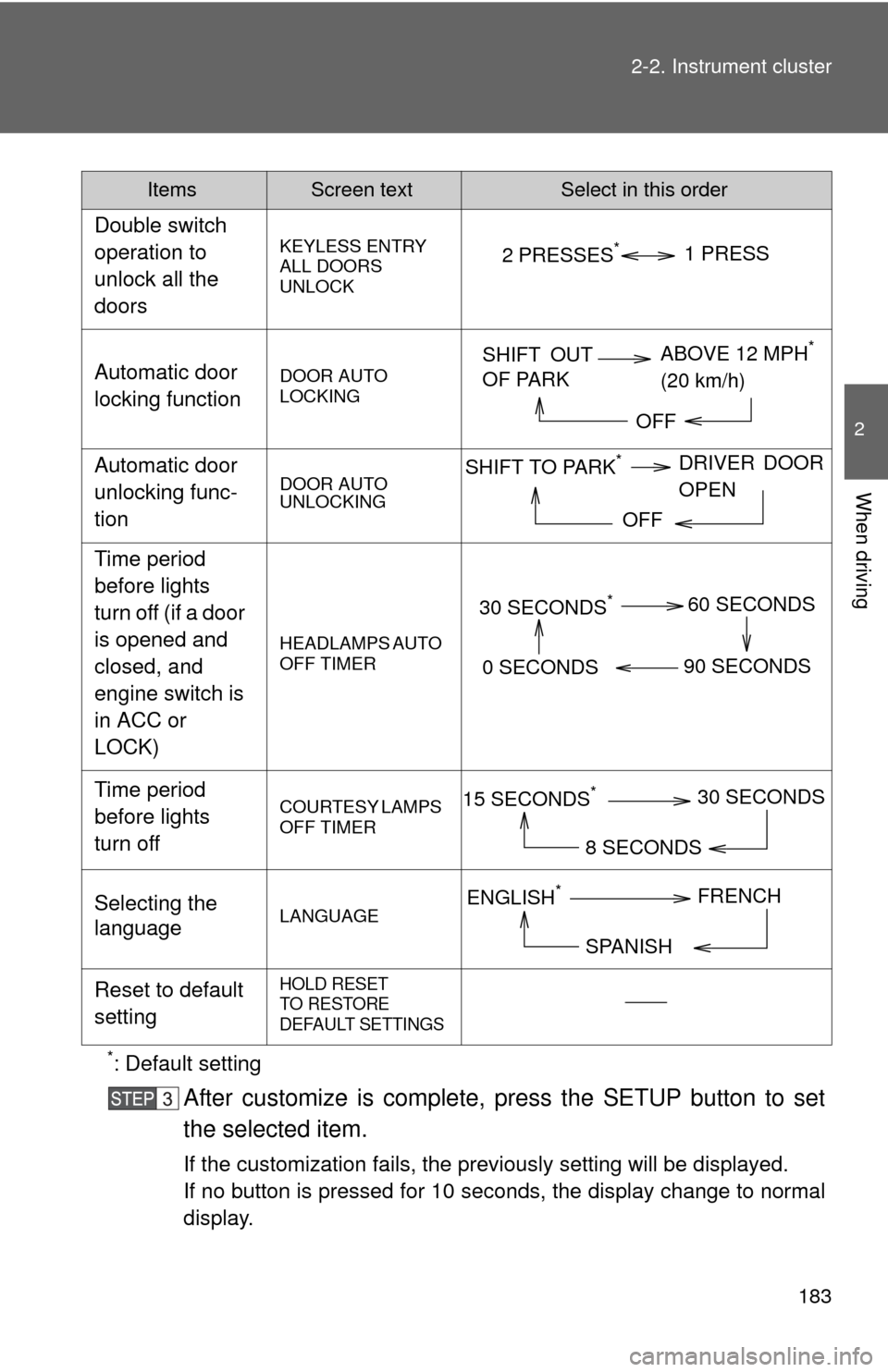
*: Default setting
After customize is complete, press the SETUP button to set
the selected item.
If the customization fails, the previously setting will be displayed.
If no button is pressed for 10 seconds, the display change to normal
display.
Double switch
operation to
unlock all the
doors
KEYLESS ENTRY
ALL DOORS
UNLOCK
Automatic door
locking functionDOOR AUTO
LOCKING
Automatic door
unlocking func-
tionDOOR AUTO
UNLOCKING
Time period
before lights
turn off (if a door
is opened and
closed, and
engine switch is
in ACC or
LOCK)
HEADLAMPS AUTO
OFF TIMER
Time period
before lights
turn offCOURTESY LAMPS
OFF TIMER
Selecting the
languageLANGUAGE
Reset to default
settingHOLD RESET
TO RESTORE
DEFAULT SETTINGS
ItemsScreen textSelect in this order
2 PRESSES*1 PRESS
SHIFT OUT
OF PARK
ABOVE 12 MPH*
(20 km/h)
OFF
SHIFT TO PARK*DRIVER DOOR
OPEN
OFF
30 SECONDS*60 SECONDS
90 SECONDS
0 SECONDS
15 SECONDS*30 SECONDS
8 SECONDS
ENGLISH*FRENCH
SPANISH
Page 229 of 740
229
2-4. Using other
driving systems
2
When driving
■The rear view monitor system can be operated when
The shift lever is in R and the engine switch is ON.
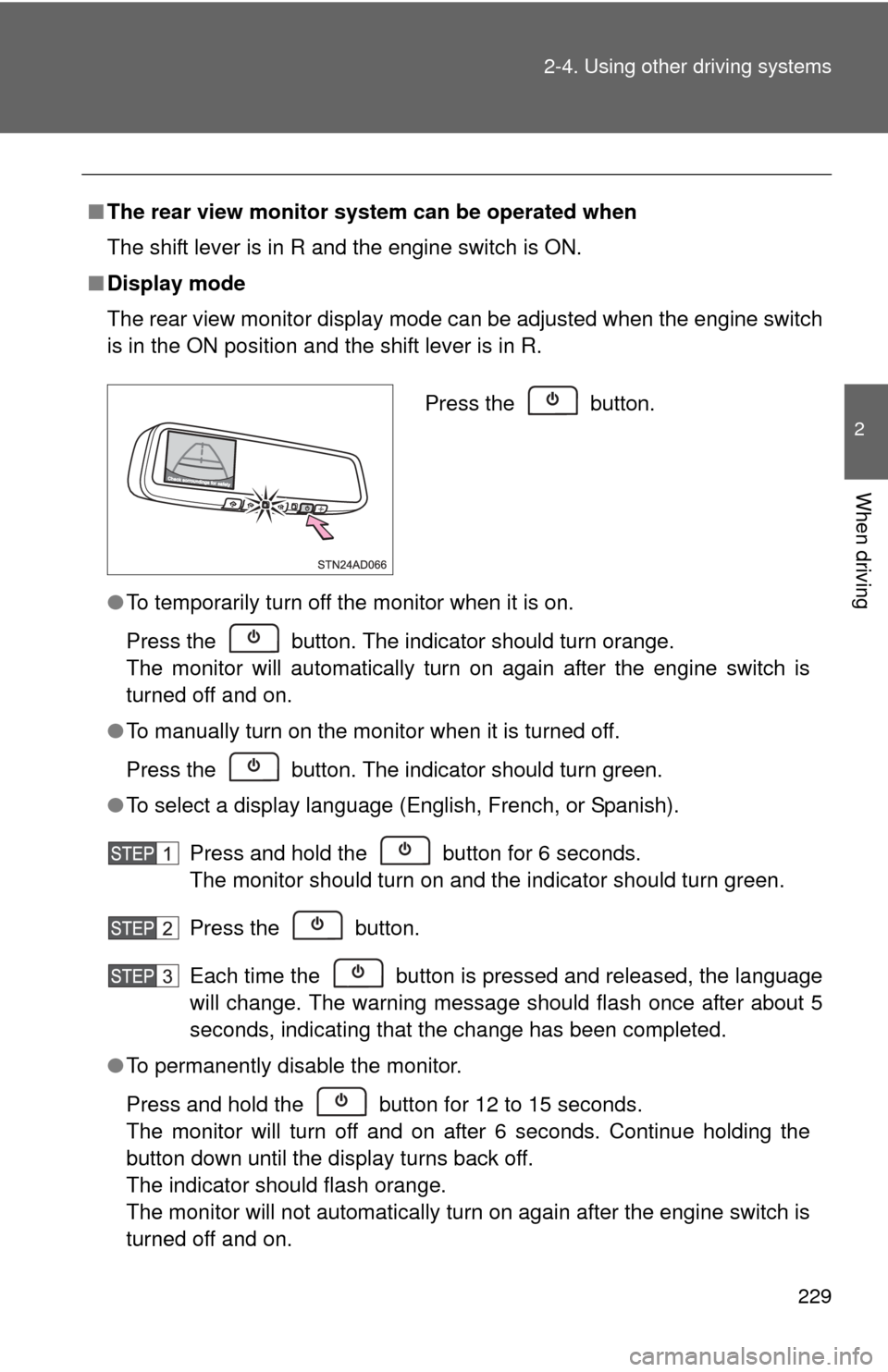
■ Display mode
The rear view monitor display mode can be adjusted when the engine switch
is in the ON position and the shift lever is in R.
●To temporarily turn off the monitor when it is on.
Press the button. The indicator should turn orange.
The monitor will automatically turn on again after the engine switch is
turned off and on.
● To manually turn on the monitor when it is turned off.
Press the button. The indicator should turn green.
● To select a display language (English, French, or Spanish).
Press and hold the button for 6 seconds.
The monitor should turn on and the indicator should turn green.
Press the button.
Each time the button is pressed and released, the language
will change. The warning message should flash once after about 5
seconds, indicating that the change has been completed.
● To permanently disable the monitor.
Press and hold the button for 12 to 15 seconds.
The monitor will turn off and on after 6 seconds. Continue holding the
button down until the display turns back off.
The indicator should flash orange.
The monitor will not automatically turn on again after the engine switch is
turned off and on.
Press the button.
Page 321 of 740
321
3-2. Using the audio system
3
Interior features
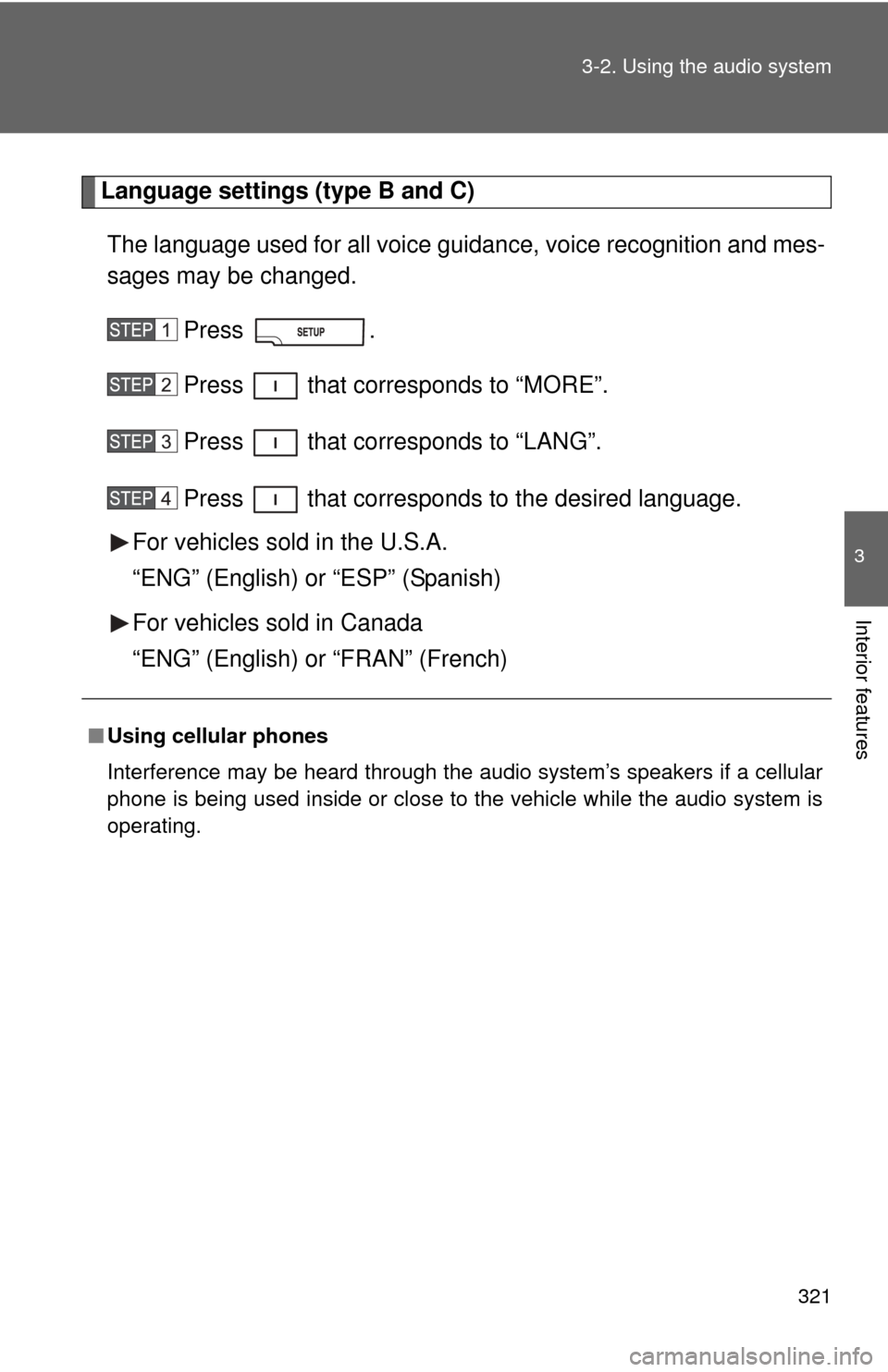
Language settings (type B and C)
The language used for all voice guidance, voice recognition and mes-
sages may be changed.
Press .
Press that corresponds to “MORE”.
Press that corresponds to “LANG”.
Press that corresponds to the desired language.
For vehicles sold in the U.S.A.
“ENG” (English) or “ESP” (Spanish)
For vehicles sold in Canada
“ENG” (English) or “FRAN” (French)
■ Using cellular phones
Interference may be heard through the audio system’s speakers if a cellular
phone is being used inside or close to the vehicle while the audio syste\
m is
operating.
Page 365 of 740
365
3-2. Using the audio system
3
Interior features
Type B and C
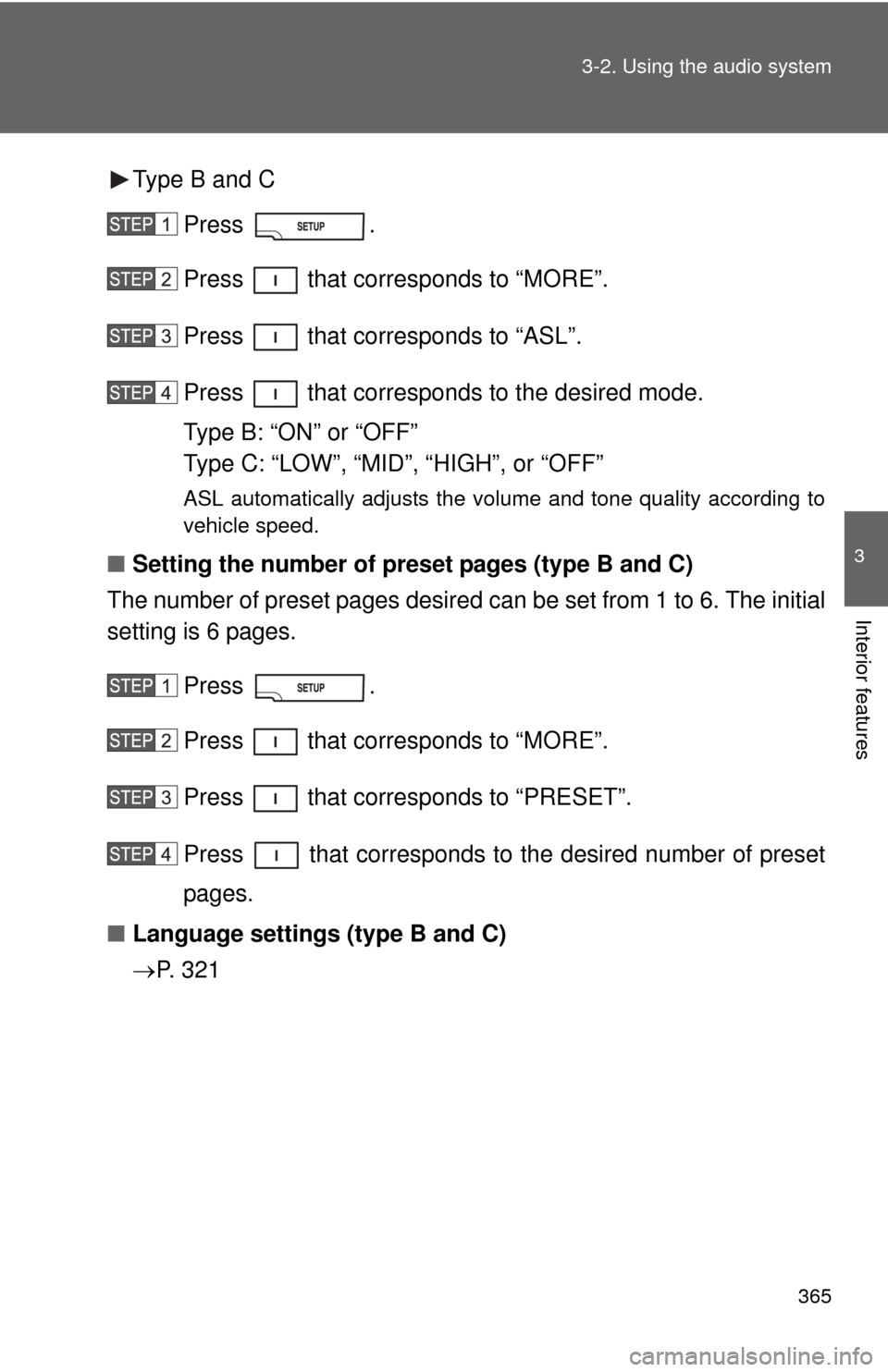
Press .
Press that corresponds to “MORE”.
Press that corresponds to “ASL”.
Press that corresponds to the desired mode.
Type B: “ON” or “OFF”
Type C: “LOW”, “MID”, “HIGH”, or “OFF”
ASL automatically adjusts the volume and tone quality according to
vehicle speed.
■Setting the number of preset pages (type B and C)
The number of preset pages desired c an be set from 1 to 6. The initial
setting is 6 pages.
Press .
Press that corresponds to “MORE”.
Press that corresponds to “PRESET”.
Press that corresponds to the desired number of preset
pages.
■ Language settings (type B and C)
P. 3 2 1
Page 414 of 740
414 3-4. Using the rear seat entertainment system
■Changing the subtitle language
The subtitle language can be chang ed for discs with multiple subti-
tle languages.
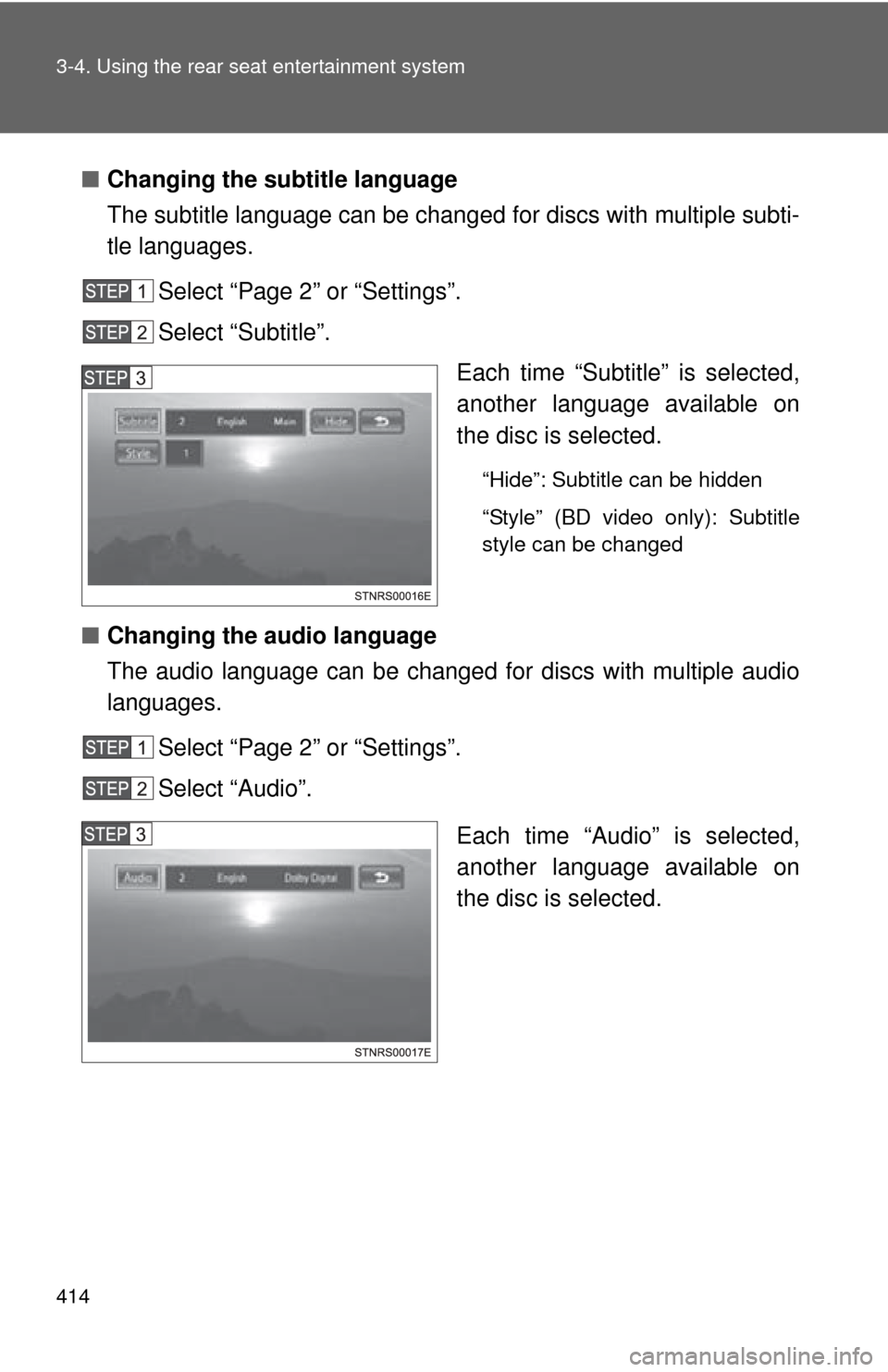
Select “Page 2” or “Settings”.
Select “Subtitle”. Each time “Subtitle” is selected,
another language available on
the disc is selected.
“Hide”: Subtitle can be hidden
“Style” (BD video only): Subtitle
style can be changed
■Changing the audio language
The audio language can be changed for discs with multiple audio
languages.
Select “Page 2” or “Settings”.
Select “Audio”.
Each time “Audio” is selected,
another language available on
the disc is selected.
Page 419 of 740
419
3-4. Using the rear seat entertainment system
3
Interior features
●
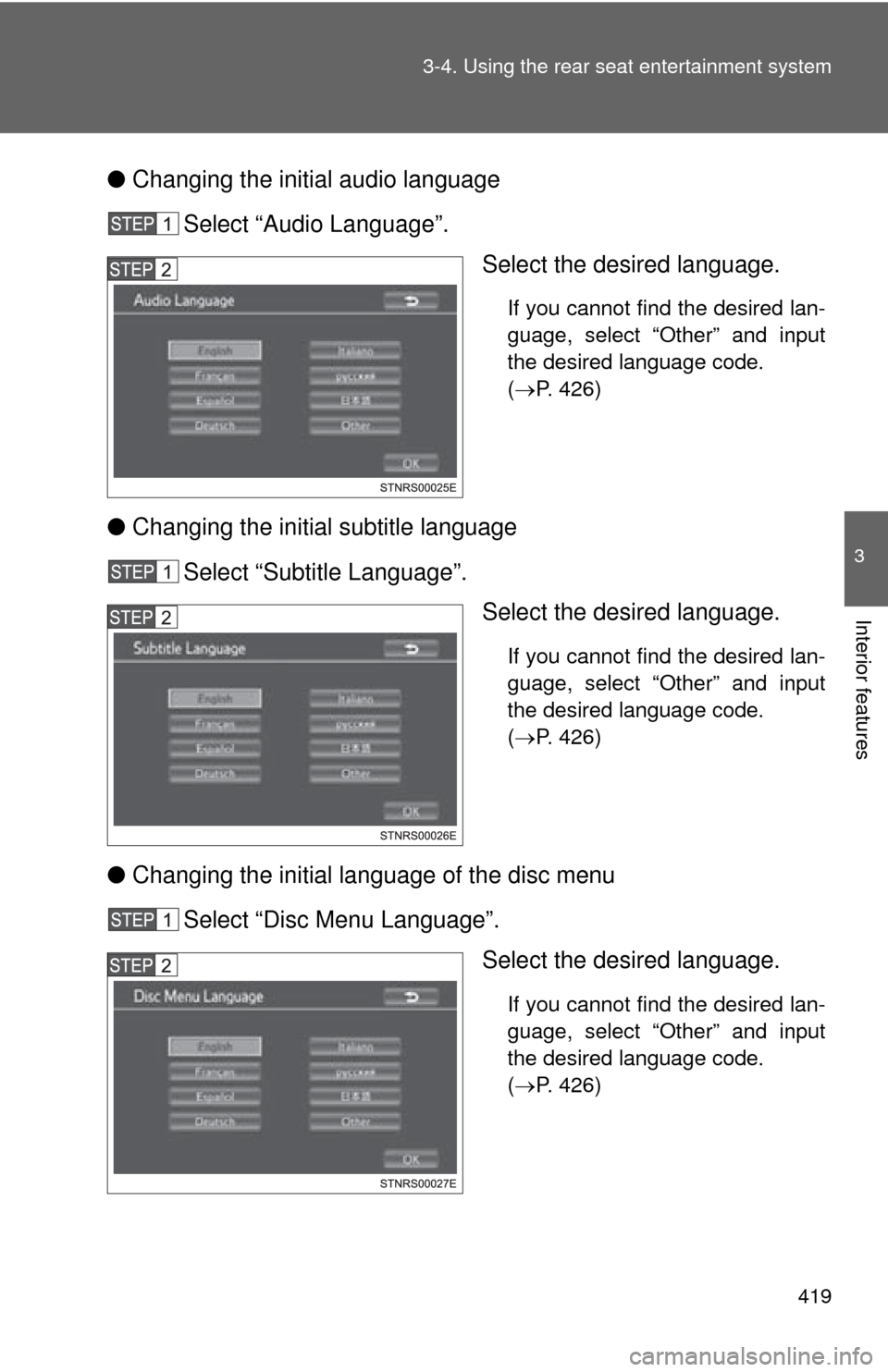
Changing the initial audio language
Select “Audio Language”. Select the desired language.
If you cannot find the desired lan-
guage, select “Other” and input
the desired language code.
(P. 426)
● Changing the initial subtitle language
Select “Subtitle Language”. Select the desired language.
If you cannot find the desired lan-
guage, select “Other” and input
the desired language code.
(P. 426)
● Changing the initial language of the disc menu
Select “Disc Menu Language”. Select the desired language.
If you cannot find the desired lan-
guage, select “Other” and input
the desired language code.
(P. 426)
Page 423 of 740
423
3-4. Using the rear seat entertainment system
3
Interior features
●
When storing content on BD-R, BD-RE, DVD-R or DVD-RW discs, they
must be finalized using a recorder. Discs that are not finalized cannot be
played by this system.
● Discs that are recorded with multi session cannot be played by this sys-
tem.
● BD-Live™ is not supported.
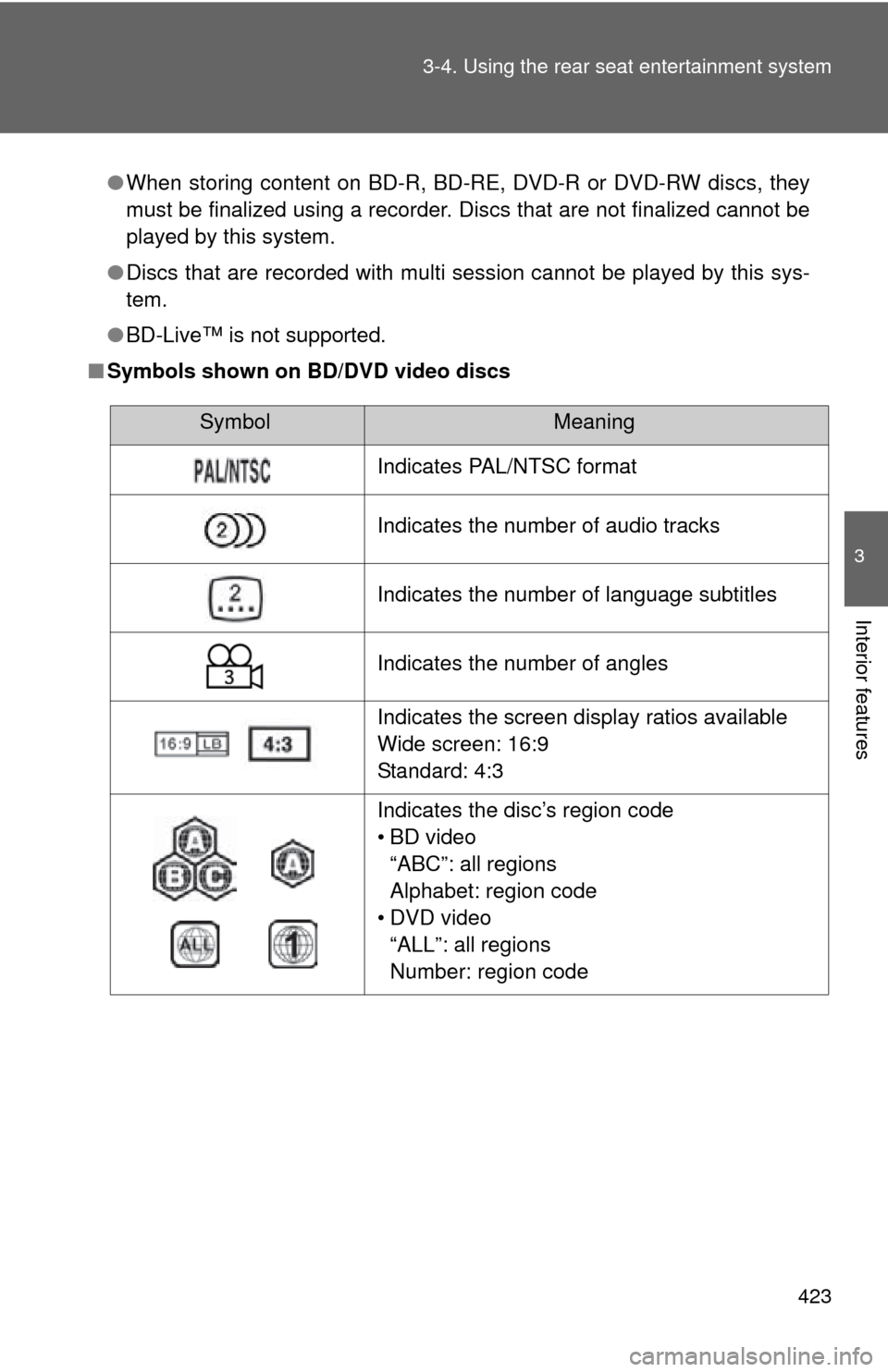
■ Symbols shown on BD/DVD video discs
SymbolMeaning
Indicates PAL/NTSC format
Indicates the number of audio tracks
Indicates the number of language subtitles
Indicates the number of angles
Indicates the screen display ratios available
Wide screen: 16:9
Standard: 4:3
Indicates the disc’s region code
• BD video
“ABC”: all regions
Alphabet: region code
• DVD video “ALL”: all regions
Number: region code
Page 424 of 740
424 3-4. Using the rear seat entertainment system
■BD/DVD video disc information
●Parental controls
This feature limits what can be viewed in conformity with the level of
restrictions of the country. The level of restrictions varies depending on the
BD/DVD video disc. Some BD/DVD video discs cannot be played at all, or
violent scenes are skipped or replaced with other scenes.
• DVD video
Level 1: DVD video discs for children can be played.
Level 2 - 7: DVD video discs for children and G-rated movies can be
played.
Level 8: All types of DVD video discs can be played.
• BD video Parental controls of BD videos can be set up by inputting an age. If the
target age of BD video exceeds the age restriction that was set up, then
playback will not be possible.
● Multi-angle feature
You can enjoy the same scene from different angles.
● Multi-language option
You can select the subtitle and audio languages.
● Region codes
The region codes are provided on BD /DVD players and BD/DVD discs. If
the BD/DVD disc does not have the same region code as the BD/DVD
player, you cannot play the disc on the player.
● Title and chapter
Video and audio programs stored in BD/DVD video discs are divided into
parts by title and chapter.
Title: The largest unit of the video and audio programs stored on BD/DVD
video discs. Usually, one movie, one album, or one audio program is
assigned as a title.
Chapter: A title comprises of one or more chapters.
Page 426 of 740
426 3-4. Using the rear seat entertainment system
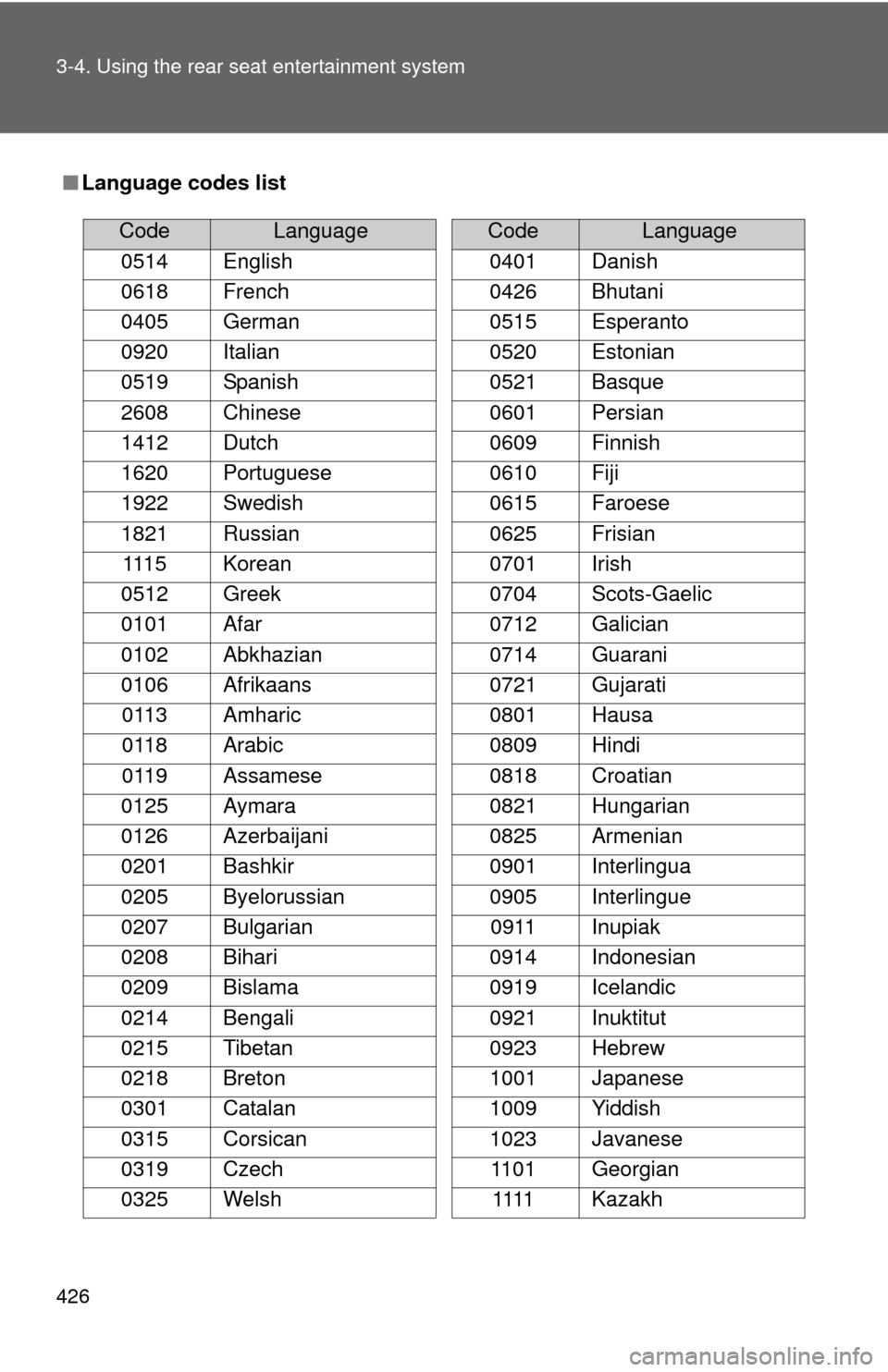
■Language codes list
CodeLanguage
0514 English
0618 French
0405 German
0920 Italian
0519 Spanish
2608 Chinese
1412 Dutch
1620 Portuguese
1922 Swedish
1821 Russian 1115 Korean
0512 Greek
0101 Afar
0102 Abkhazian
0106 Afrikaans 0113 Amharic
0118 Arabic
0119 Assamese
0125 Aymara
0126 Azerbaijani
0201 Bashkir
0205 Byelorussian
0207 Bulgarian
0208 Bihari
0209 Bislama
0214 Bengali
0215 Tibetan
0218 Breton
0301 Catalan
0315 Corsican
0319 Czech
0325 Welsh
0401 Danish
0426 Bhutani
0515 Esperanto
0520 Estonian
0521 Basque
0601 Persian
0609 Finnish
0610 Fiji
0615 Faroese
0625 Frisian
0701 Irish
0704 Scots-Gaelic
0712 Galician
0714 Guarani
0721 Gujarati
0801 Hausa
0809 Hindi
0818 Croatian
0821 Hungarian
0825 Armenian
0901 Interlingua
0905 Interlingue 0911 Inupiak
0914 Indonesian
0919 Icelandic
0921 Inuktitut
0923 Hebrew
1001 Japanese
1009 Yiddish
1023 Javanese 1101 Georgian 1111 Kazakh
CodeLanguage