engine TOYOTA SEQUOIA 2014 2.G Owners Manual
[x] Cancel search | Manufacturer: TOYOTA, Model Year: 2014, Model line: SEQUOIA, Model: TOYOTA SEQUOIA 2014 2.GPages: 668, PDF Size: 13.86 MB
Page 297 of 668
297
2-5. Driving information
2
When driving
■
Break-in schedule
If your vehicle is new or equipped with any new power train components
(such as an engine, transmission, differential or wheel bearing), Toyota rec-
ommends that you do not tow a trailer until the vehicle has been driven \
for
over 500 miles (800 km).
After the vehicle has been driven for over 500 miles (800 km), you can s\
tart
towing. However, for the next 500 miles (800 km), drive the vehicle at a
speed of less than 50 mph (80 km/h) when towing a trailer, and avoid full
throttle acceleration.
■ Maintenance
●If you tow a trailer, your vehicle will require more frequent maintenance
due to the additional load. (See “Owner’s Warranty Information Booklet”
or “Scheduled Maintenance Guide/Owner’s Manual Supplement”.)
● Retighten the fixing bolts of the towing ball and bracket after approxi-
mately 600 miles (1000 km) of trailer towing.
■ If trailer sway occurs
One or more factors (crosswinds, passing vehicles, rough roads, etc.) can
adversely affect handling of your vehicle and trailer, causing instability.
●If trailer swaying occurs:
• Firmly grip the steering wheel. Steer straight ahead.
Do not try to control trailer swaying by turning the steering wheel.
• Begin releasing the accelerator pedal immediately but very gradually to reduce speed.
Do not increase speed. Do not apply vehicle brakes.
If you make no extreme correction with the steering or brakes, your vehicle
and trailer should stabilize. (if enabled, Trailer Sway Control can also help to
stabilize the vehicle and trailer.)
● After the trailer swaying has stopped:
• Stop in a safe place. Get all occupants out of the vehicle.
• Check the tires of the vehicle and the trailer.
• Check the load in the trailer.
Make sure the load has not shifted.
Make sure the tongue weight is appropriate, if possible.
• Check the load in the vehicle. Make sure the vehicle is not overloaded after occupants get in.
Page 311 of 668
311
3-1. Using the air conditioning system
and defogger
3
Interior features
■When the outside temperature exceeds 75 F (24C) and the air condi-
tioning system is on
● In order to reduce the air conditioning power consumption, the air condi-
tioning system may switch to recirculated air mode automatically. This
may also reduce fuel consumption.
● Recirculated air mode is selected as a default mode when the engine
switch is in the ON position.
● It is possible to switch to outside air mode at any time by pressing
.
■ Window defogger feature
Recirculated air mode may automatically switch to outside air mode in situa-
tions where the windows need to be defogged.
■ When outside temperature approaches 32 F (0 C)
The air conditioning system may not operate even when is pressed.
■ When the indicator on
flashes
Press
and turn off the air conditioning system before turning it on
once more. There may be a problem in the air conditioning system if the indi-
cator continues to flash. Turn the air conditioning system off and have it
inspected by your Toyota dealer.
■ Air conditioning odors
●During use, various odors from inside and outside the vehicle may enter
into and accumulate in the air conditioning system. This may then cause
odor to be emitted from the vents.
● To reduce potential odors from occurring:
• It is recommended that the air conditioning system be set to outside air
mode prior to turning the vehicle off.
• The start timing of the blower may be delayed for a short period of time immediately after the air conditioning system is started in automatic
mode.
Page 312 of 668
312 3-1. Using the air conditioning system and defogger
CAUTION
■To prevent the windshield from fogging up
Do not use during cool air operation in extremely humid weather. The
difference between the temperature of the outside air and that of the wind-
shield can cause the outer surface of the windshield to fog up, blocking your
vision.
NOTICE
■To prevent battery discharge
Do not leave the air conditioning system on longer than necessary when the
engine is stopped.
Page 316 of 668
316 3-1. Using the air conditioning system and defogger
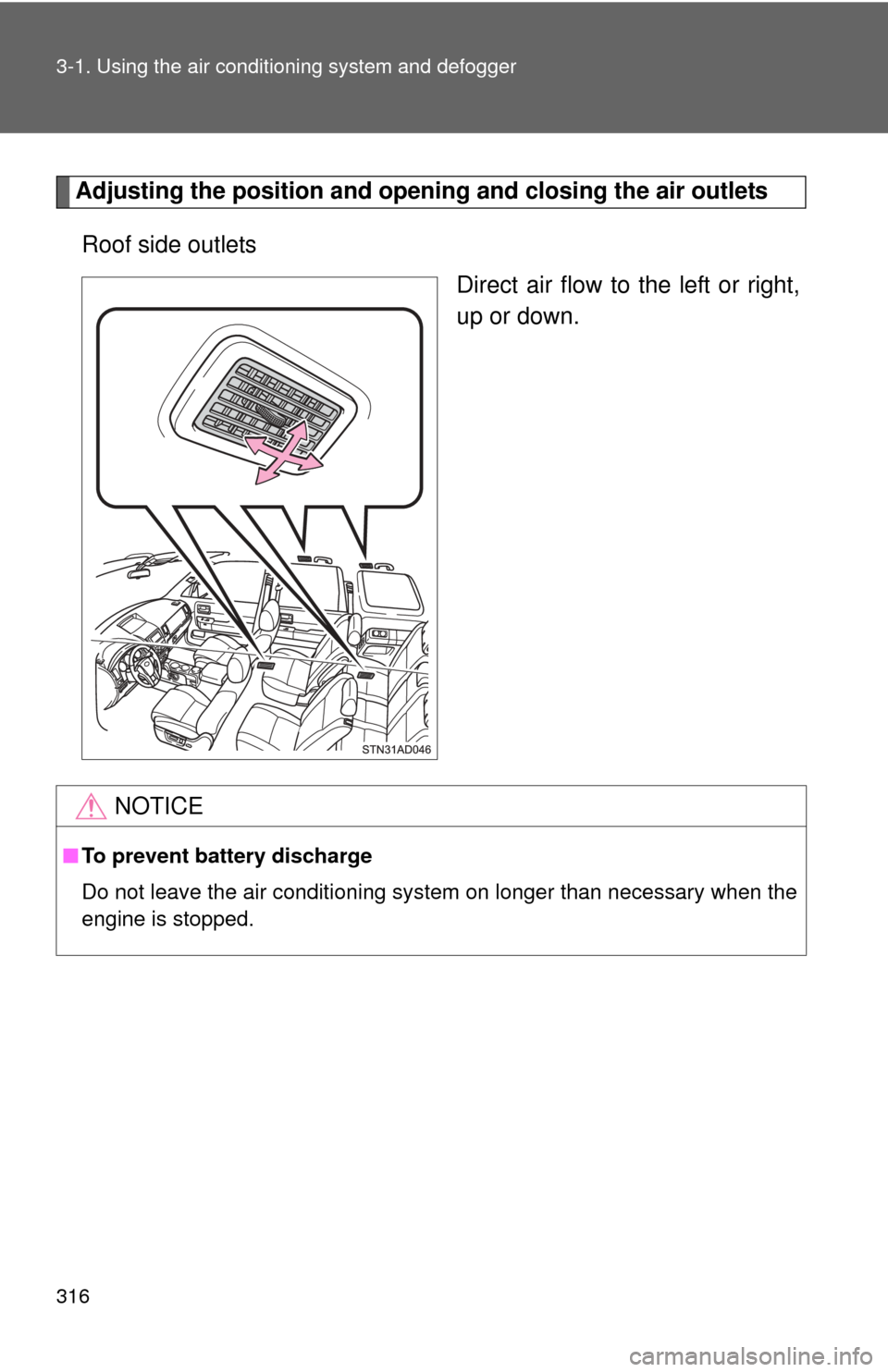
Adjusting the position and openi ng and closing the air outlets
Roof side outlets Direct air flow to the left or right,
up or down.
NOTICE
■To prevent battery discharge
Do not leave the air conditioning system on longer than necessary when the
engine is stopped.
Page 317 of 668
317
3-1. Using the air conditioning system and defogger
3
Interior features
Rear window and outside rear view mirror defoggers
: If equipped
■The rear window and outside rear vi ew mirror defoggers can be oper-
ated when
● The engine switch is in the ON position.
● The back window is completely closed.
■ Outside rear view mirror defoggers (vehicles with outside rear view
mirror defoggers)
Turning the rear window defogger on will turn the outside rear view mirror
defoggers on.
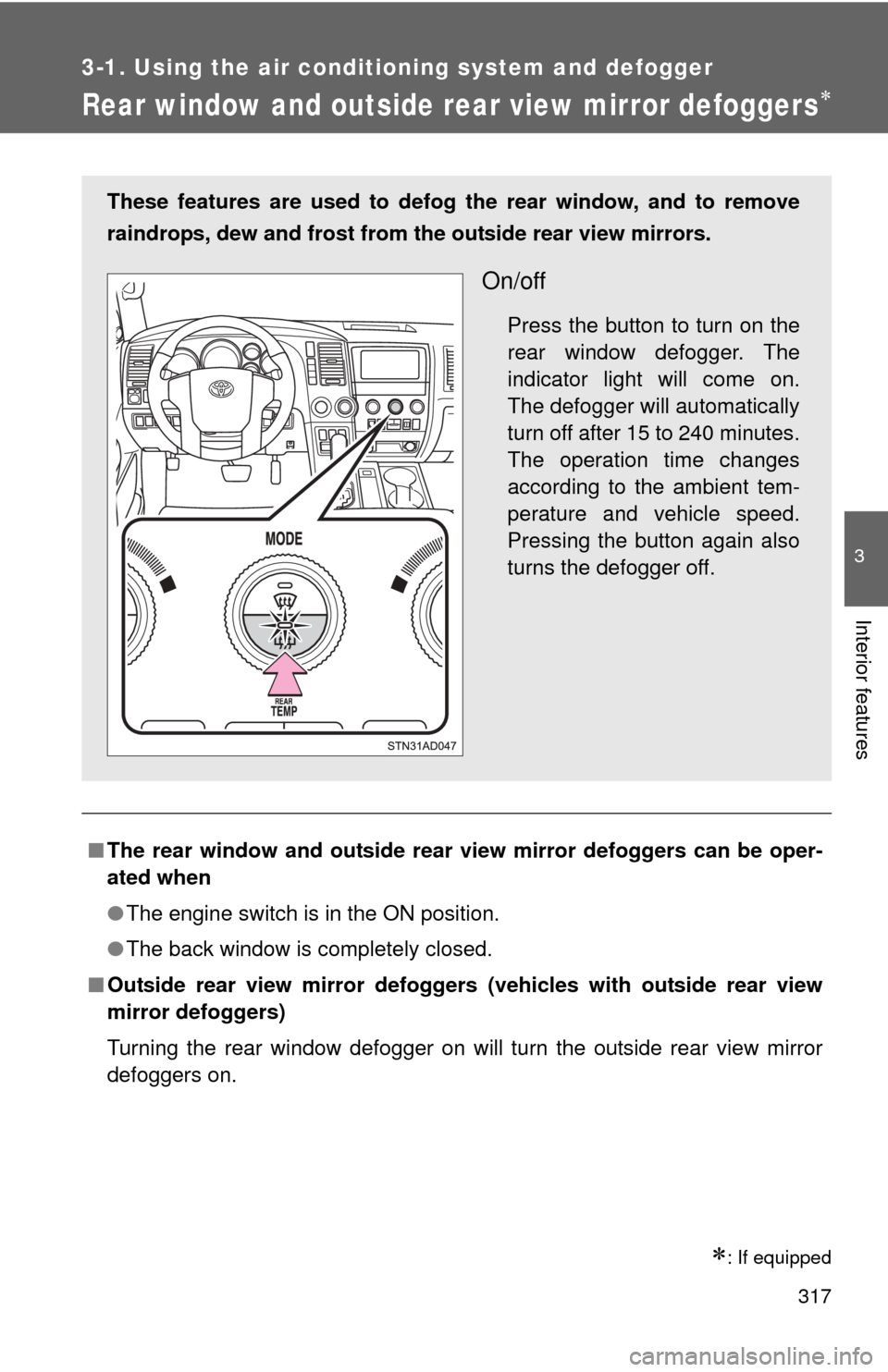
These features are used to defog the rear window, and to remove
raindrops, dew and frost from the outside rear view mirrors.
On/off
Press the button to turn on the
rear window defogger. The
indicator light will come on.
The defogger will automatically
turn off after 15 to 240 minutes.
The operation time changes
according to the ambient tem-
perature and vehicle speed.
Pressing the button again also
turns the defogger off.
Page 319 of 668
319
3-1. Using the air conditioning system and defogger
3
Interior features
Windshield wiper de-icer
: If equipped
■The de-icer can be operated when
●The engine switch is in the ON position.
● The back window is completely closed.
CAUTION
■When the windshield wiper de-icer is on
Do not touch the glass at the lower part of the windshield or to the side of the
front pillars as the surfaces can become very hot and burn you.
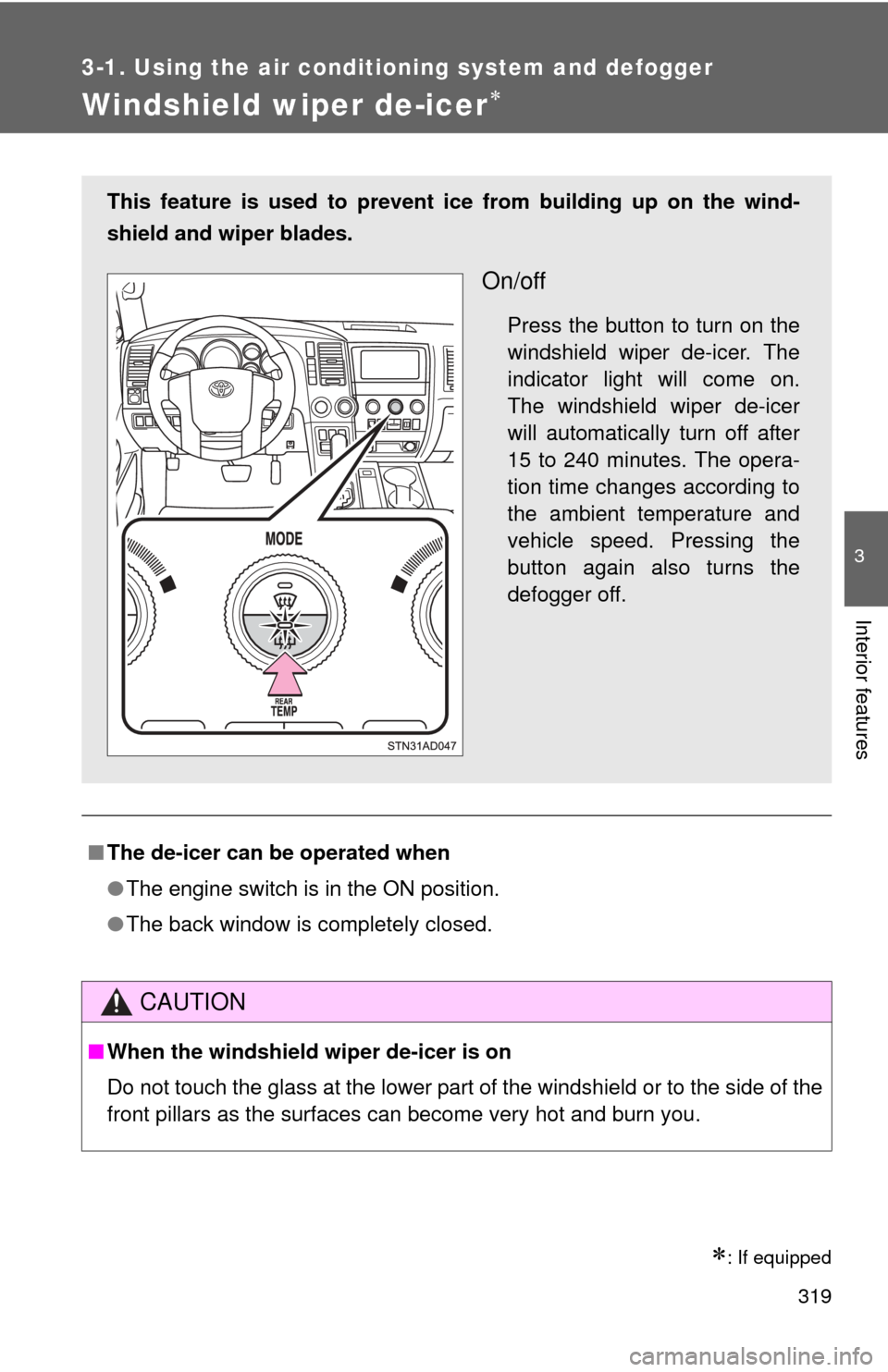
This feature is used to prevent ice from building up on the wind-
shield and wiper blades.
On/off
Press the button to turn on the
windshield wiper de-icer. The
indicator light will come on.
The windshield wiper de-icer
will automatically turn off after
15 to 240 minutes. The opera-
tion time changes according to
the ambient temperature and
vehicle speed. Pressing the
button again also turns the
defogger off.
Page 325 of 668

325
3-2. Using the multimedia system
3
Interior features
NOTICE
■
To avoid damaging the touch screen
●To prevent damaging the screen, lightly touch the screen buttons with your
finger.
● Do not use objects other than your finger to touch the screen.
● Wipe off fingerprints using a glass cleaning cloth. Do not use chemical
cleaners to clean the screen, as they may damage the touch screen.
■ To prevent battery discharge
Do not leave the multimedia system on longer than necessary when the
engine is off.
■ To avoid damaging the multimedia system
Take care not to spill drinks or ot her fluids on the multimedia system.
Page 363 of 668
363
3-2. Using the multimedia system
3
Interior features
Connecting a Bluetooth® device
Up to 5 Bluetooth
® devices (Phones (HFP) and audio players (AVP))
can be registered.
If more than 1 Bluetooth
® device has been registered, select which
device to connect to.
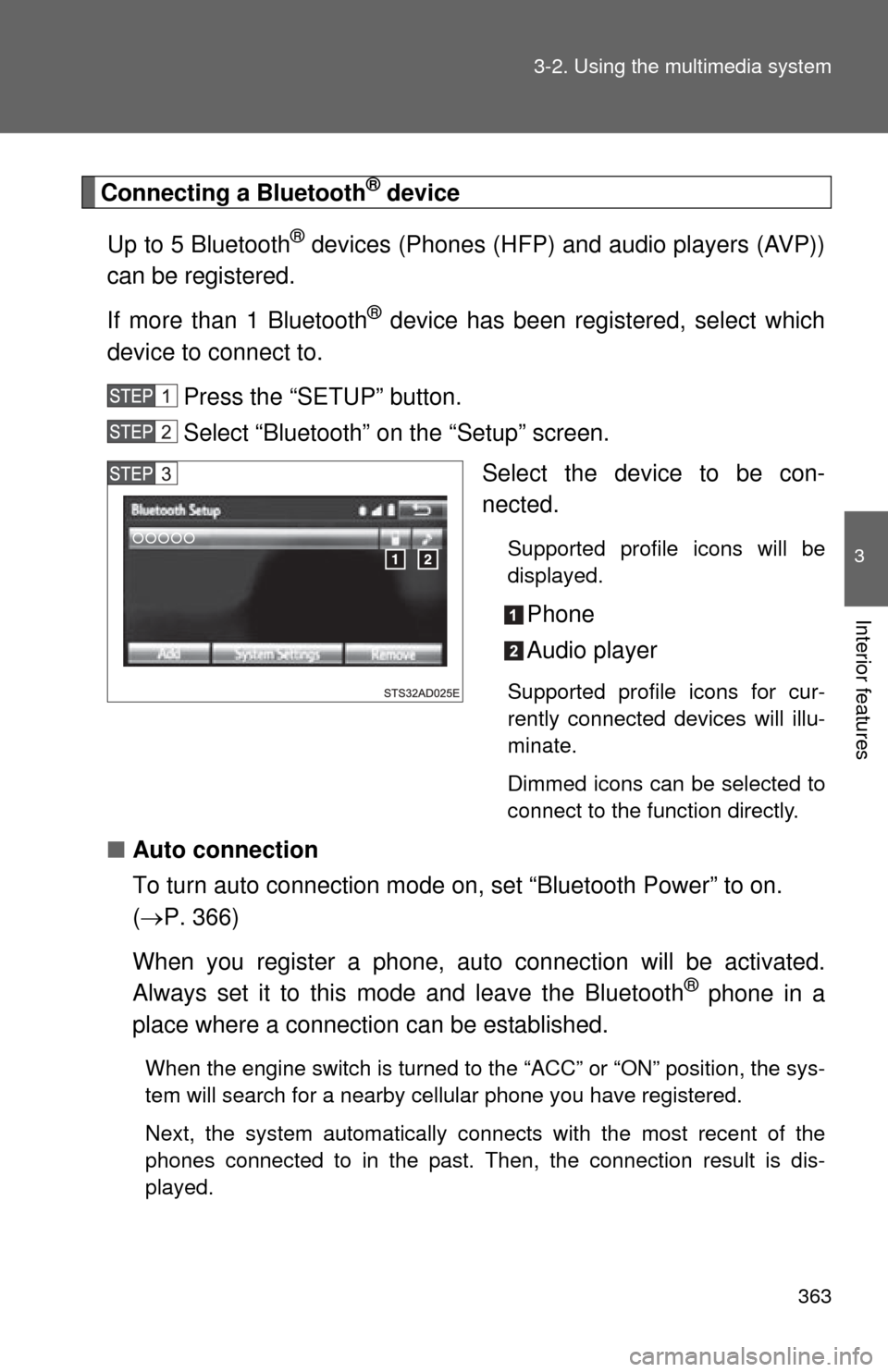
Press the “SETUP” button.
Select “Bluetooth” on the “Setup” screen. Select the device to be con-
nected.
Supported profile icons will be
displayed.
Phone
Audio player
Supported profile icons for cur-
rently connected devices will illu-
minate.
Dimmed icons can be selected to
connect to the function directly.
■Auto connection
To turn auto connection mode on, set “Bluetooth Power” to on.
( P. 366)
When you register a phone, au to connection will be activated.
Always set it to this mode and leave the Bluetooth
® phone in a
place where a connection can be established.
When the engine switch is turned to the “ACC” or “ON” position, the sys-
tem will search for a nearby cellular phone you have registered.
Next, the system automatically connects with the most recent of the
phones connected to in the past. Then, the connection result is dis-
played.
Page 364 of 668
364 3-2. Using the multimedia system
■Manual connection
When auto connection has failed or “Bluetooth Power” is turned
off, you must connect the Bluetooth
® device manually.
Follow the steps in “Connecting a Bluetooth
® device” from
“STEP 1”. ( P. 363)
■ Connecting a Bluetooth
® audio player
Registering an additional device
Select “Select Device” on the “Bluetooth Audio” screen.
For more information: P. 3 6 1
Selecting a registered device Select “Select Device” on the “Bluetooth Audio” screen.
For more information: P. 3 6 3
■Reconnecting a Bluetooth® phone
If the system cannot connect due to poor signal strength with the engine
switch in the “ACC” or “ON” position, the system will automatically attempt to
reconnect.
If the phone is turned off, the system will not attempt to reconnect. In this
case, the connection must be made manually, or the phone must be rese-
lected.
Page 377 of 668
377
3-2. Using the multimedia system
3
Interior features
■
Reconnecting the portable audio player
If the portable audio player is disconnected due to poor reception when the
engine switch is in the “ACC” or “ON” position, the system automatically
reconnects the portable audio player.
If you have switched off the portable audio player yourself, follow the instruc-
tions below to reconnect:
●Select the portable audio player again
● Enter the portable audio player
■ When you sell your car
Be sure to delete your personal data. ( P. 329)
CAUTION
■FCC WARNING
Changes or modifications not expressly approved by the party responsible
for compliance could void the user’s authority to operate the equipment.
Radio frequency radiation exposure information:
This equipment complies with FCC radiation exposure limits set forth for an
uncontrolled environment.
This equipment should be installed and operated with minimum distance of
7.9 in. (20 cm) between the radiator and your body.
This transmitter must not be co-located operating in conjuction with any
other antenna or transmitter.
■ While driving
Do not use the portable audio player, cellular phone or connect a device to
the Bluetooth
® system.