ESP TOYOTA SEQUOIA 2014 2.G Owner's Guide
[x] Cancel search | Manufacturer: TOYOTA, Model Year: 2014, Model line: SEQUOIA, Model: TOYOTA SEQUOIA 2014 2.GPages: 668, PDF Size: 13.86 MB
Page 377 of 668
377
3-2. Using the multimedia system
3
Interior features
■
Reconnecting the portable audio player
If the portable audio player is disconnected due to poor reception when the
engine switch is in the “ACC” or “ON” position, the system automatically
reconnects the portable audio player.
If you have switched off the portable audio player yourself, follow the instruc-
tions below to reconnect:
●Select the portable audio player again
● Enter the portable audio player
■ When you sell your car
Be sure to delete your personal data. ( P. 329)
CAUTION
■FCC WARNING
Changes or modifications not expressly approved by the party responsible
for compliance could void the user’s authority to operate the equipment.
Radio frequency radiation exposure information:
This equipment complies with FCC radiation exposure limits set forth for an
uncontrolled environment.
This equipment should be installed and operated with minimum distance of
7.9 in. (20 cm) between the radiator and your body.
This transmitter must not be co-located operating in conjuction with any
other antenna or transmitter.
■ While driving
Do not use the portable audio player, cellular phone or connect a device to
the Bluetooth
® system.
Page 392 of 668

392 3-2. Using the multimedia system
■Replying to a message
Display the “Messa ge Inbox” screen. (P. 390)
Select the desired message from the list.
Select “Quick Message”.
Select the desired message.
Select “Send”.
● Editing quick reply message
This operation cannot be performed while driving. Select “Quick Message”.
Select corresponding to the desired message to edit.
Select “OK” when editing is completed.
■Check the messages
●Depending on the type of Bluetooth
® phone being connected, it may be
necessary to perform additional steps on the phone.
● Messages are displayed in the appropriate connected Bluetooth
®
phone’s registered mail address folder.
Select the tab of the desired folder to be displayed.
● Only received messages on the connected Bluetooth
® phone can be dis-
played.
● The text of the message is not displayed while driving.
● When “Automatic Message Readout” is set to on, messages will be auto-
matically read out. ( P. 403)
● Turn the “PWR VOL” knob to adjust the message read out volume.
● The message read out function is available even while driving.
Page 393 of 668
393
3-2. Using the multimedia system
3
Interior features
■
Calling the message sender
Calls can be made to an e-mail/SMS/MMS message sender’s
phone number.
Display the “Messa ge Inbox” screen. (P. 390)
Select the desired message.
Select .
Check that the “Call” screen is displayed.
● Calling from a number within a message
Calls can be made to a number identified in a message’s text area.
Display the “Messa ge Inbox” screen. (P. 390)
Select the desired message.
Select the text area.
Select corresponding to the desired number.
Check that the “Call” screen is displayed.
● Calling from the incoming message screen
P. 3 8 9
Page 399 of 668

399
3-2. Using the multimedia system
3
Interior features
■
Registering a new contact to the contact list
New contact data can be registered. Up to 4 numbers per person
can be registered. For PBAP compatible Bluetooth
® phones, this
function is available when “Autom atic Contact/History Transfer” is
set to off. ( P. 396)
Select “New Contact”.
Enter the name and select “OK”.
Enter the phone number and select “OK”.
Select the phone type for the phone number.
To add another number to this contact, select “Yes”.
● Registering a new contact in a different way (From the “Call His-
tory” screen)
Display the phone screen. ( P. 380)
Select the “Call History” tab and select a contact not yet regis-
tered in the contact list.
Select “Add to Contacts”.
Follow the steps in “Registering a new contact to the contact
list” from “STEP 3”. ( P. 399)
■ Editing the contact data
For PBAP compatible Bluetooth
® phones, this function is available
when “Automatic Contact/History Transfer” is set to off. ( P. 396)
Select “Edit Contact”.
Select the desired contact.
Select corresponding to the desired name or number.
For editing the name Follow the steps in “Registering a new contact to the contact
list” from “STEP 3”. ( P. 399)
For editing the number Follow the steps in “Registering a new contact to the contact
list” from “STEP 4”. ( P. 399)
Page 407 of 668
407
3-3. Using the interior lights
3
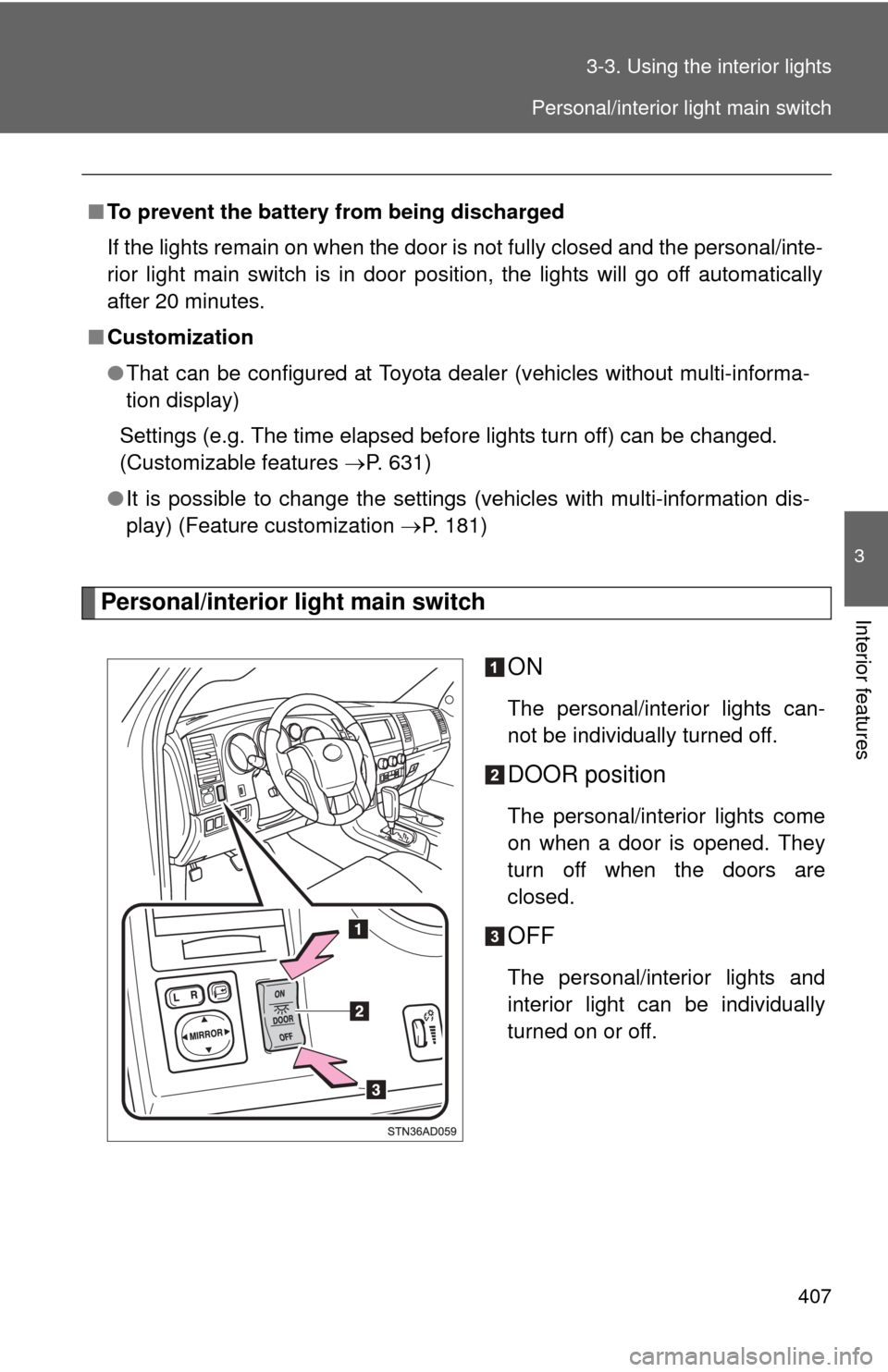
Interior featuresPersonal/interior light main switch
ON
The personal/interior lights can-
not be individually turned off.
DOOR position
The personal/interior lights come
on when a door is opened. They
turn off when the doors are
closed.
OFF
The personal/interior lights and
interior light can be individually
turned on or off.
■
To prevent the battery from being discharged
If the lights remain on when the door is not fully closed and the personal/inte-
rior light main switch is in door position, the lights will go off automatically
after 20 minutes.
■ Customization
●That can be configured at Toyota dealer (vehicles without multi-informa-
tion display)
Settings (e.g. The time elapsed before lights turn off) can be changed.
(Customizable features P. 631)
● It is possible to change the settings (vehicles with multi-information dis-
play) (Feature customization P. 181)
Personal/interior light main switch
Page 448 of 668
448 3-5. Other interior features
■The seat heaters can be used when
The engine switch is in the ON position.
■ When not in use
Front seat: Turn the dial fully downward. The indicator turns off.
Rear seat (vehicles with rear console box): Push lightly on the opposite side.
The indicator turns off.
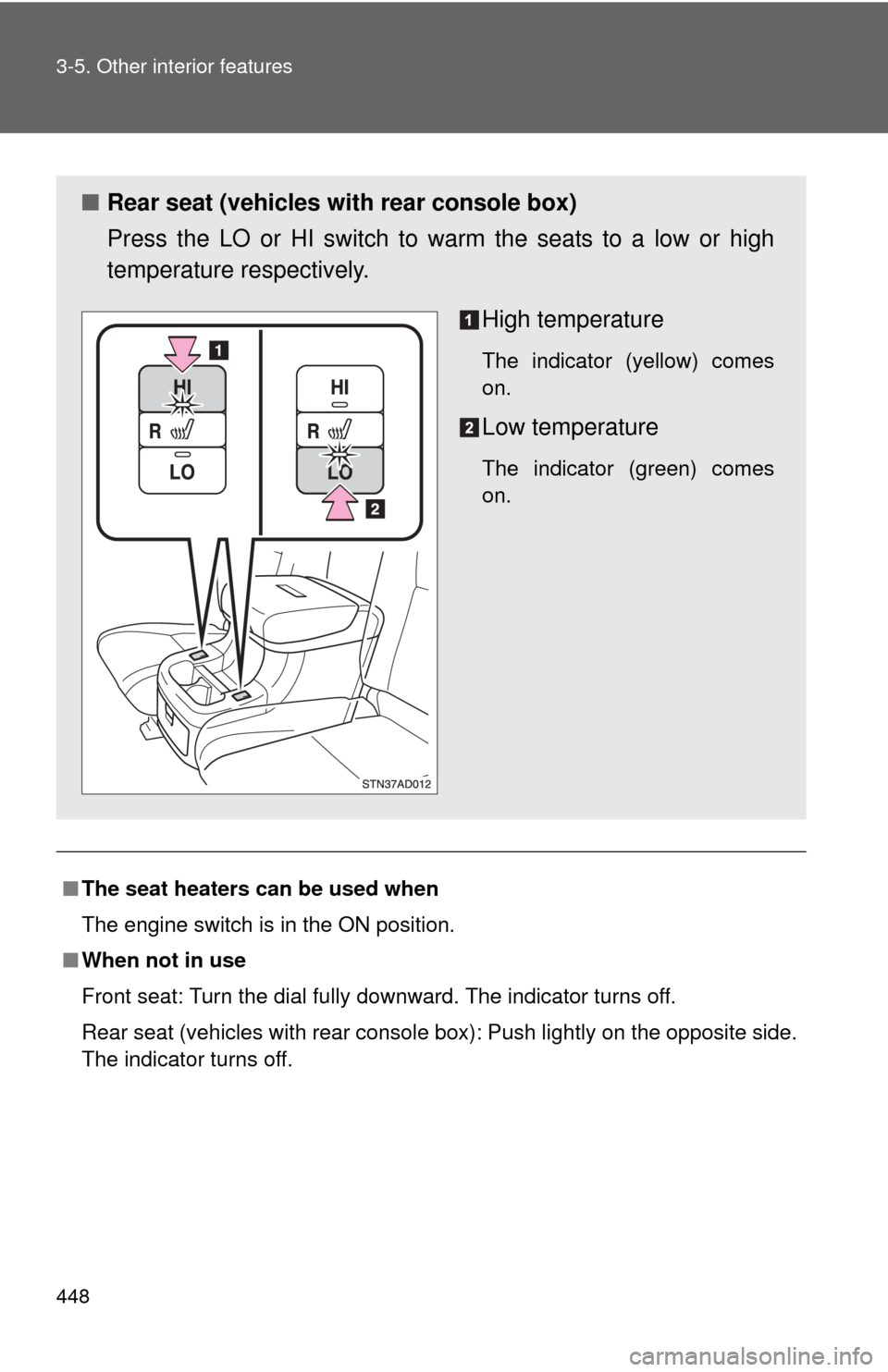
■ Rear seat (vehicles with rear console box)
Press the LO or HI switch to warm the seats to a low or high
temperature respectively.
High temperature
The indicator (yellow) comes
on.
Low temperature
The indicator (green) comes
on.
Page 458 of 668
458 3-5. Other interior features
CAUTION
Observe the following precautions.
Failure to do so may cause the driver’s floor mat to slip, possibly interfering
with the pedals while driving. An unexpectedly high speed may result or it may
become difficult to stop the vehicle, leading to a serious accident.
■When installing the driver’s floor mat
●Do not use floor mats designed for other models or different model year
vehicles, even if they are Toyota Genuine floor mats.
● Only use floor mats designed for the driver’s seat.
● Always install the floor mat securely using the retaining hooks (clips) pro-
vided.
● Do not use two or more floor mats on top of each other.
● Do not place the floor mat bottom-side up or upside-down.
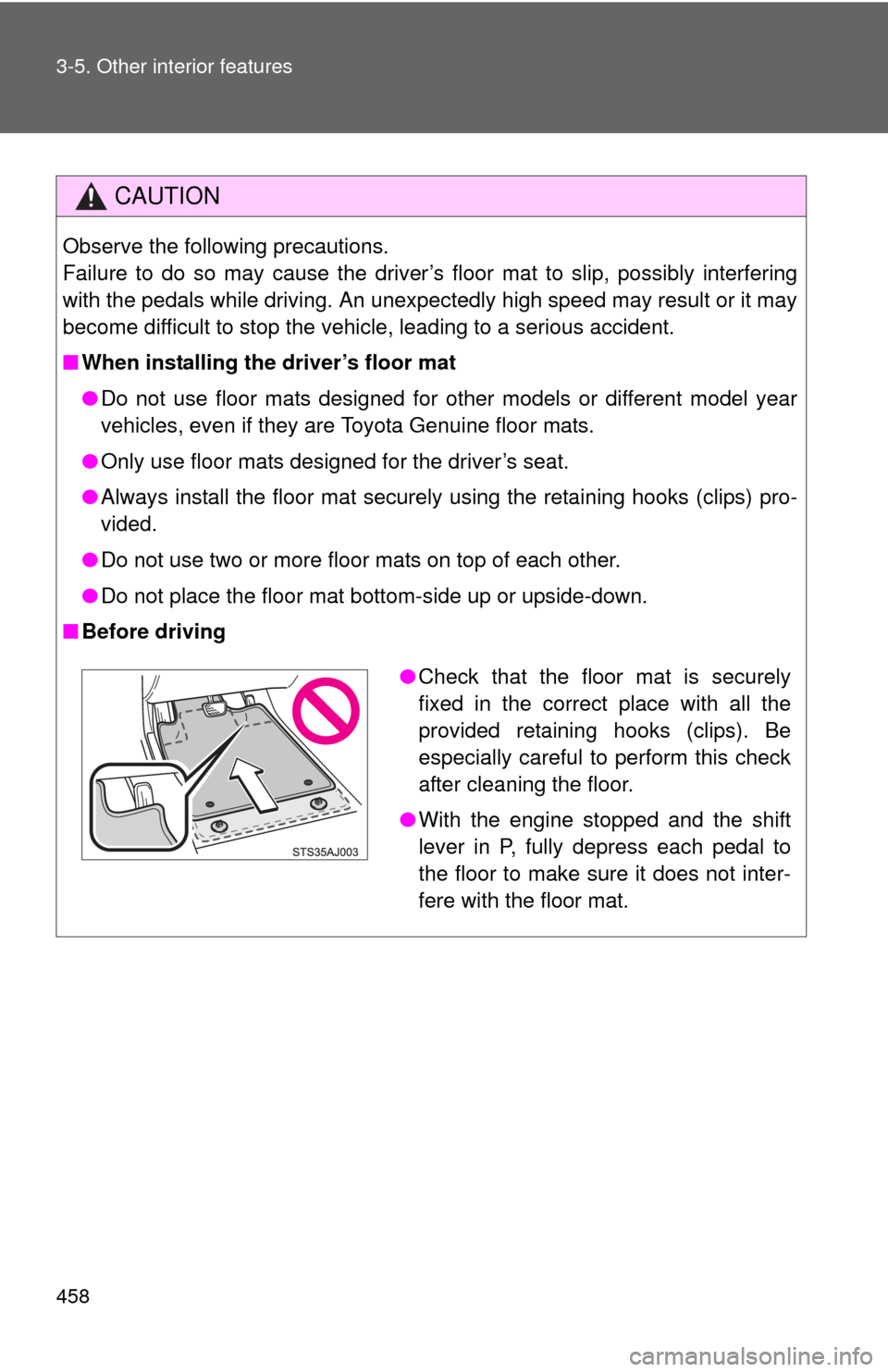
■ Before driving
●Check that the floor mat is securely
fixed in the correct place with all the
provided retaining hooks (clips). Be
especially careful to perform this check
after cleaning the floor.
● With the engine stopped and the shift
lever in P, fully depress each pedal to
the floor to make sure it does not inter-
fere with the floor mat.
Page 468 of 668
468 3-5. Other interior features
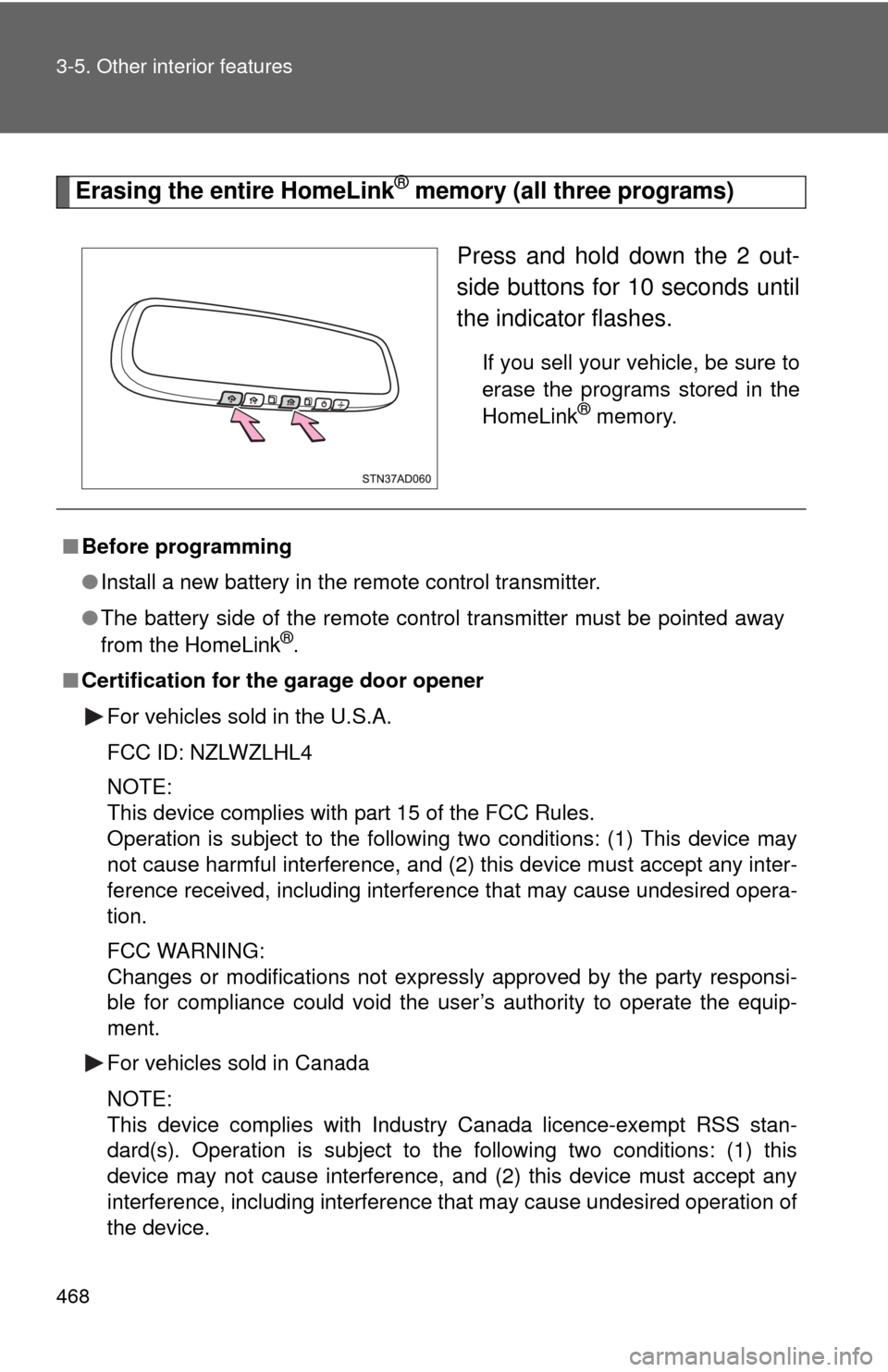
Erasing the entire HomeLink® memory (all three programs)Press and hold down the 2 out-
side buttons for 10 seconds until
the indicator flashes.
If you sell your vehicle, be sure to
erase the programs stored in the
HomeLink
® memory.
■Before programming
●Install a new battery in the remote control transmitter.
● The battery side of the remote control transmitter must be pointed away
from the HomeLink
®.
■ Certification for the garage door opener
For vehicles sold in the U.S.A.
FCC ID: NZLWZLHL4
NOTE:
This device complies with part 15 of the FCC Rules.
Operation is subject to the following two conditions: (1) This device may
not cause harmful interference, and (2) this device must accept any inter-
ference received, including interference that may cause undesired opera-
tion.
FCC WARNING:
Changes or modifications not expressly approved by the party responsi-
ble for compliance could void the user’s authority to operate the equip-
ment.
For vehicles sold in Canada
NOTE:
This device complies with Industry Canada licence-exempt RSS stan-
dard(s). Operation is subject to the following two conditions: (1) this
device may not cause interference, and (2) this device must accept any
interference, including interference that may cause undesired operation of
the device.
Page 479 of 668
479
4-1. Maintenance and care
4
Maintenance and care
■
Caring for leather areas
Toyota recommends cleaning the interior of the vehicle at least twice a year
to maintain the quality of the vehicle’s interior.
■ Shampooing the carpets
There are several commercial foaming-type cleaners available. Use a
sponge or brush to apply the foam. Rub in overlapping circles. Do not apply
water. Excellent results are obtained when keeping the carpet as dry as pos-
sible.
■ Seat belts
Clean with mild soap and lukewarm water using a cloth or sponge. Also
check the belts periodically for excessive wear, fraying or cuts.
CAUTION
■Water in the vehicle
●Do not splash or spill liquid in the vehicle. Doing so may cause the electri-
cal components etc. to malfunction or catch fire.
● Do not get any of the SRS components or wiring in the vehicle interior wet.
( P. 113)
Electrical malfunction may cause the airbags to deploy or not function
properly, resulting in death or severe injury.
■ Cleaning the interior (esp ecially instrument panel)
Do not use polish wax or polish cleaner. The instrument panel may reflect off
the windshield, obstructing the driver’s view and leading to an accident,
resulting in death or serious injury.
Page 480 of 668
480 4-1. Maintenance and care
NOTICE
■Cleaning detergents
●Do not use organic substances such as benzene or gasoline, acidic or
alkaline solutions, dye, bleach or other detergent. Doing so may discolor
the vehicle interior or cause streaks or damage to painted surfaces.
● Do not use polish wax or polish cleaner. The instrument panel’s or other
interior part’s painted surface may be damaged.
■ Preventing damage to leather surfaces
Observe the following precautions to avoid damage to and deterioration o\
f
leather surfaces.
●Remove any dust or dirt on leather surfaces immediately.
● Do not expose the vehicle to direct sunlight for extended periods of time.
Park the vehicle in the shade, especially during summer.
● Do not place items made of vinyl or plastic, or that contain wax on the
upholstery, as they may stick to the leather surface if the vehicle interior
heats up significantly.
■ Water on the floor
Do not wash the vehicle floor with water.
Vehicle systems such as the audio system may be damaged if water comes
into contact with electrical components under the floor of the vehicle, and
may also cause the body to rust.
■ Cleaning the inside of the back window and the rear quarter windows
●Do not use glass cleaner to clean the back window and the rear quarter
windows, as this may cause damage to the rear window defogger heater
wires or antennas. Use a cloth dampened with lukewarm water to gently
wipe the window clean. Wipe the window in strokes running parallel to the
heater wires.
● Be careful not to scratch or damage the heater wires or antennas.