TOYOTA SEQUOIA 2015 2.G Owners Manual
SEQUOIA 2015 2.G
TOYOTA
TOYOTA
https://www.carmanualsonline.info/img/14/6778/w960_6778-0.png
TOYOTA SEQUOIA 2015 2.G Owners Manual
Page 425 of 664
425
3-4. Using the
storage features
3
Interior features
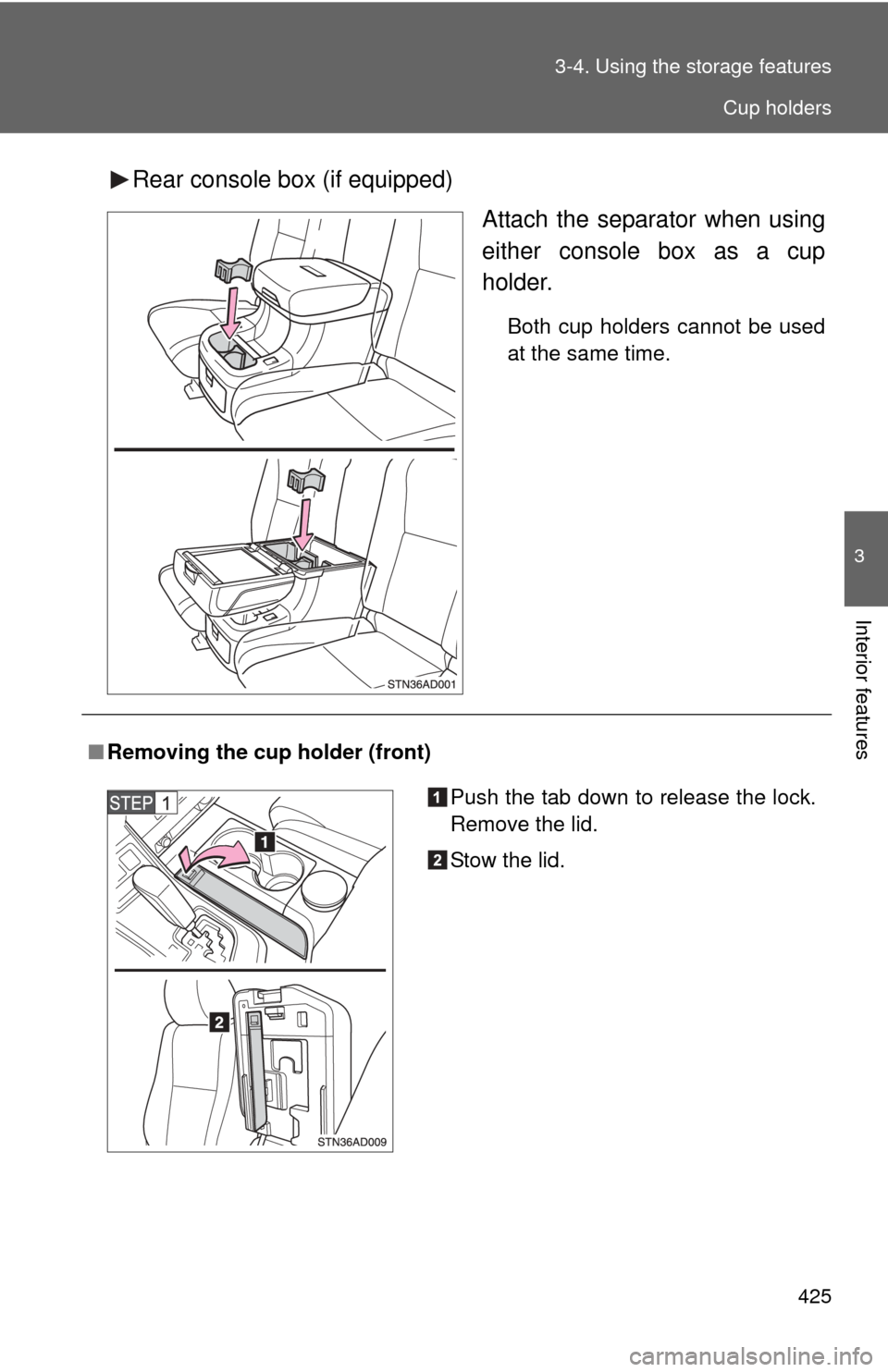
Rear console box (if equipped)
Attach the separator when using
either console box as a cup
holder.
Both cup holders cannot be used
at the same time.
■Removing the cup holder (front)
Push the tab down to release the lock.
Remove the lid.
Stow the lid.
Cup holders
Page 430 of 664
430 3-4. Using the storage features
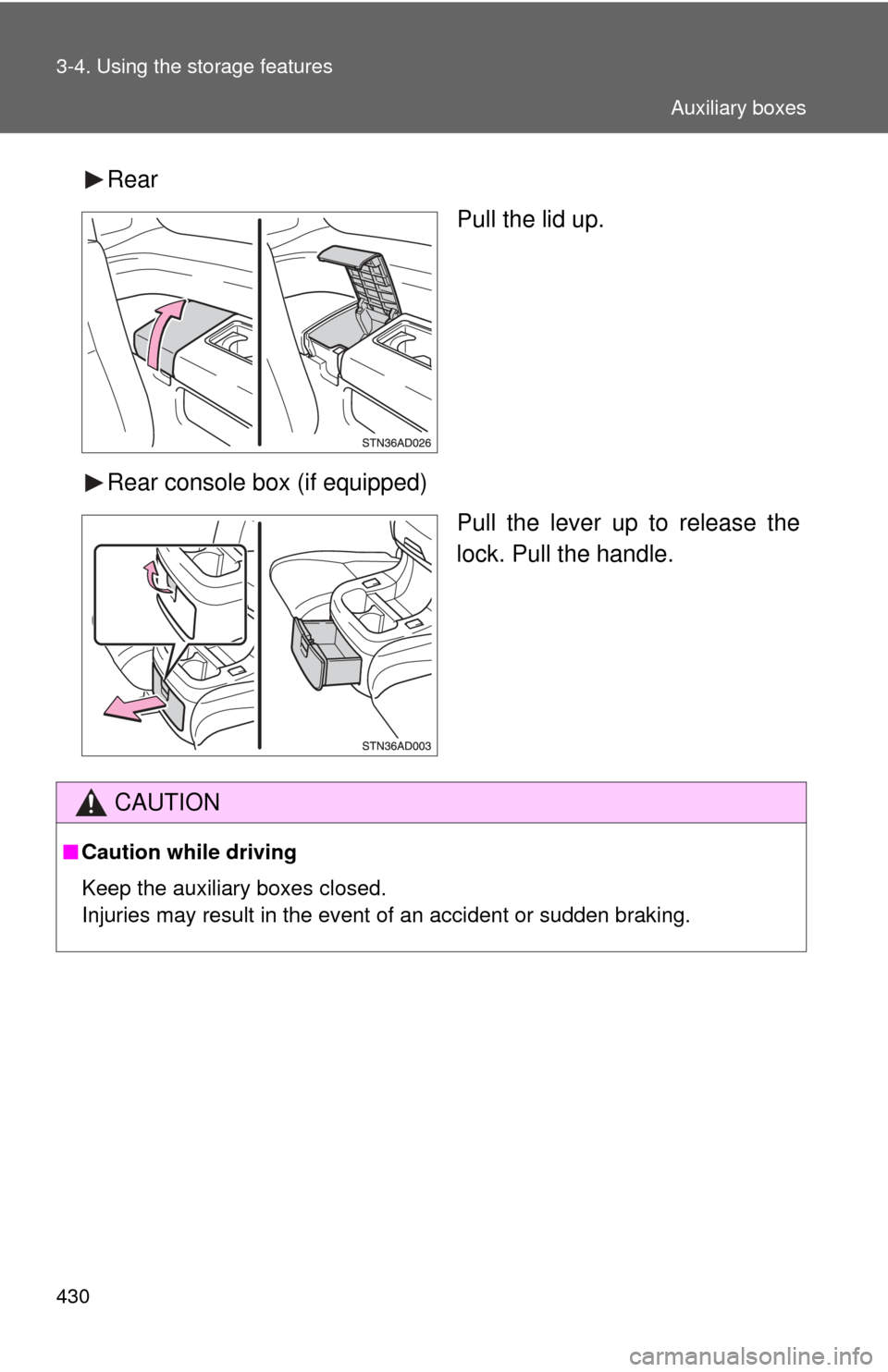
RearPull the lid up.
Rear console box (if equipped) Pull the lever up to release the
lock. Pull the handle.
CAUTION
■Caution while driving
Keep the auxiliary boxes closed.
Injuries may result in the event of an accident or sudden braking.
Auxiliary boxes
Page 433 of 664
433
3-5. Other interior features
3
Interior features
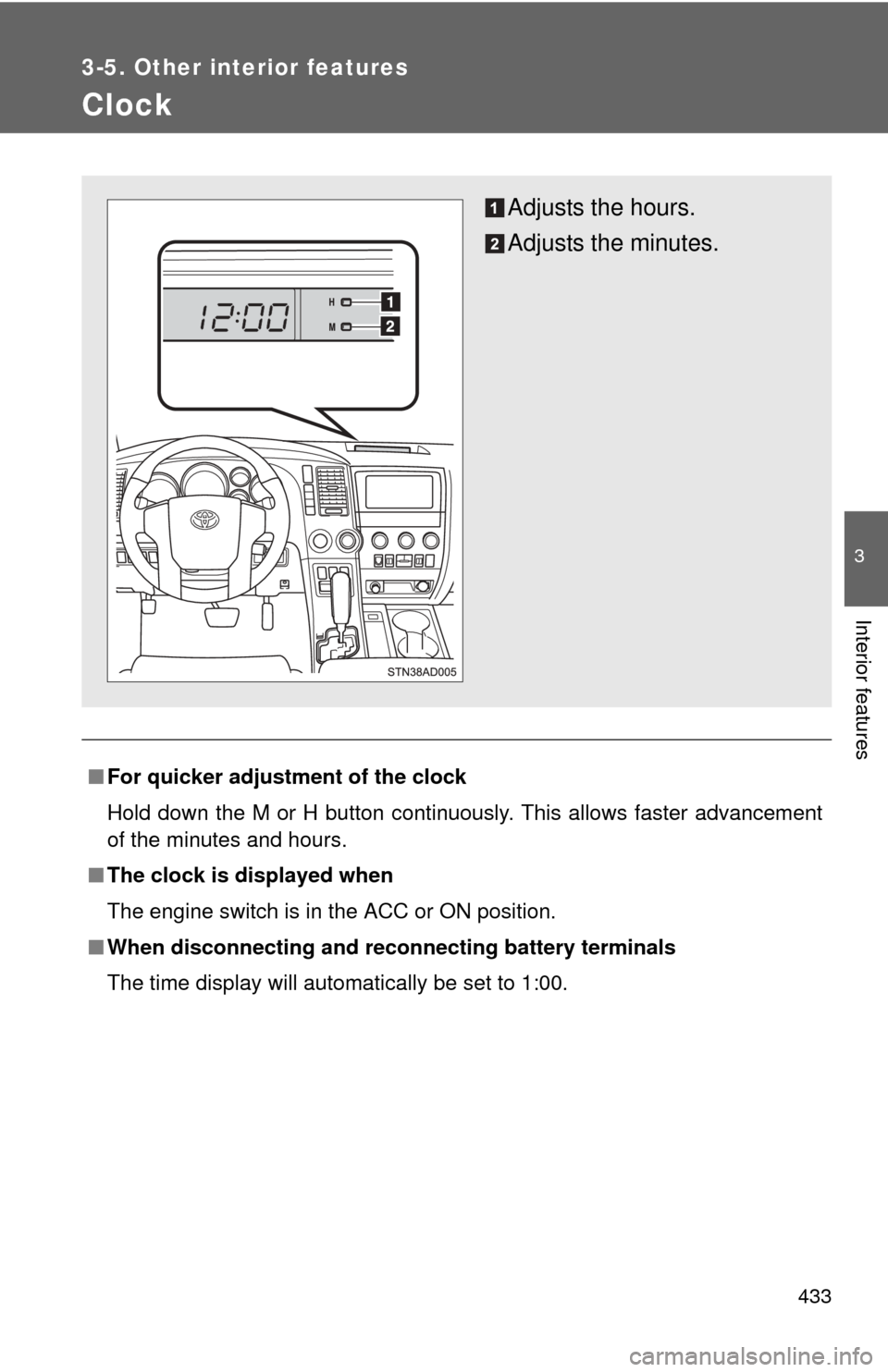
Clock
■For quicker adjustme nt of the clock
Hold down the M or H button continuously. This allows faster advancement
of the minutes and hours.
■ The clock is displayed when
The engine switch is in the ACC or ON position.
■ When disconnecting and reco nnecting battery terminals
The time display will automatically be set to 1:00.
Adjusts the hours.
Adjusts the minutes.
Page 440 of 664
440 3-5. Other interior features
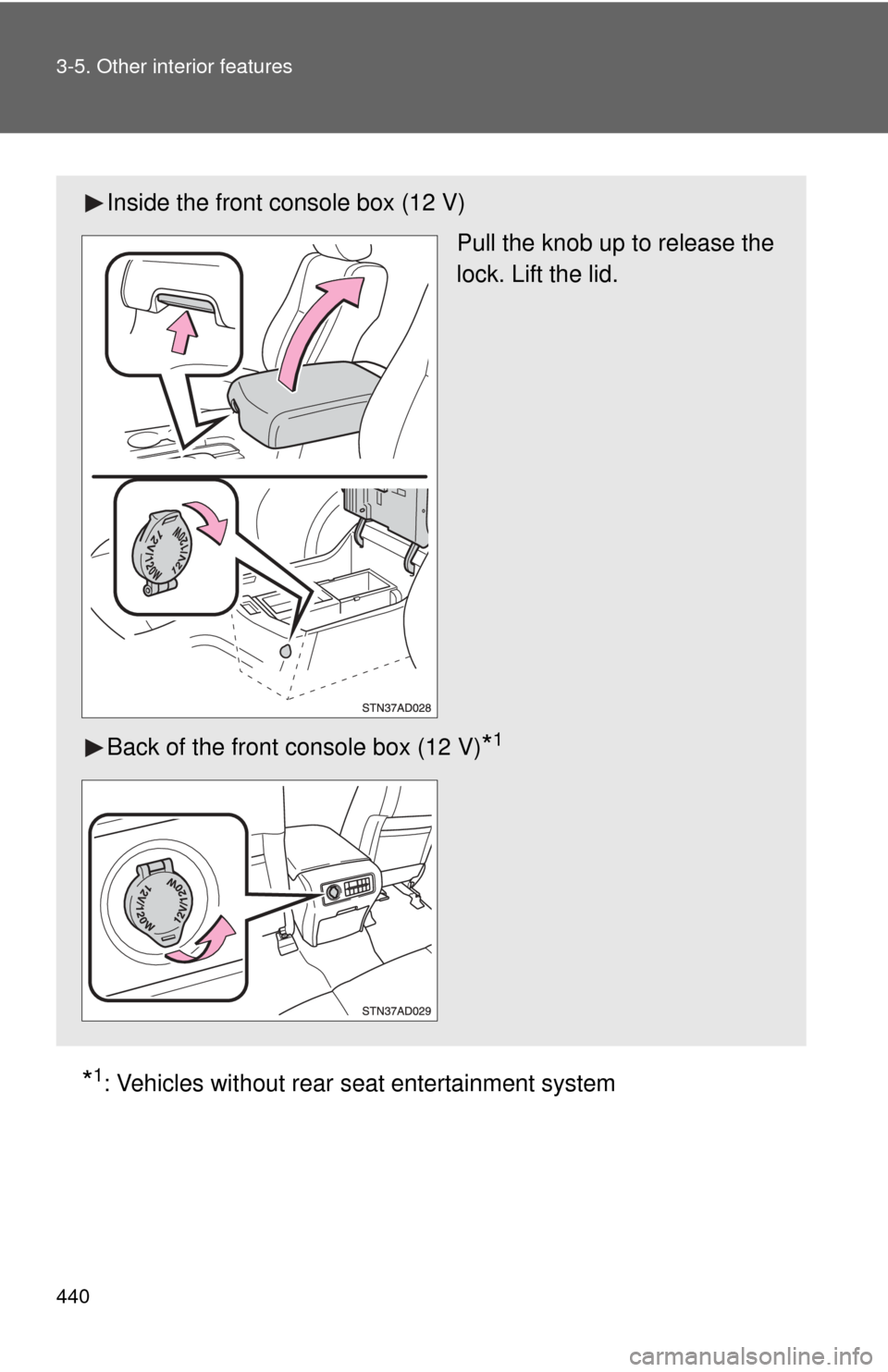
*1: Vehicles without rear seat entertainment system
Inside the front console box (12 V)
Pull the knob up to release the
lock. Lift the lid.
Back of the front console box (12 V)
*1
Page 450 of 664
450
3-5. Other interior features
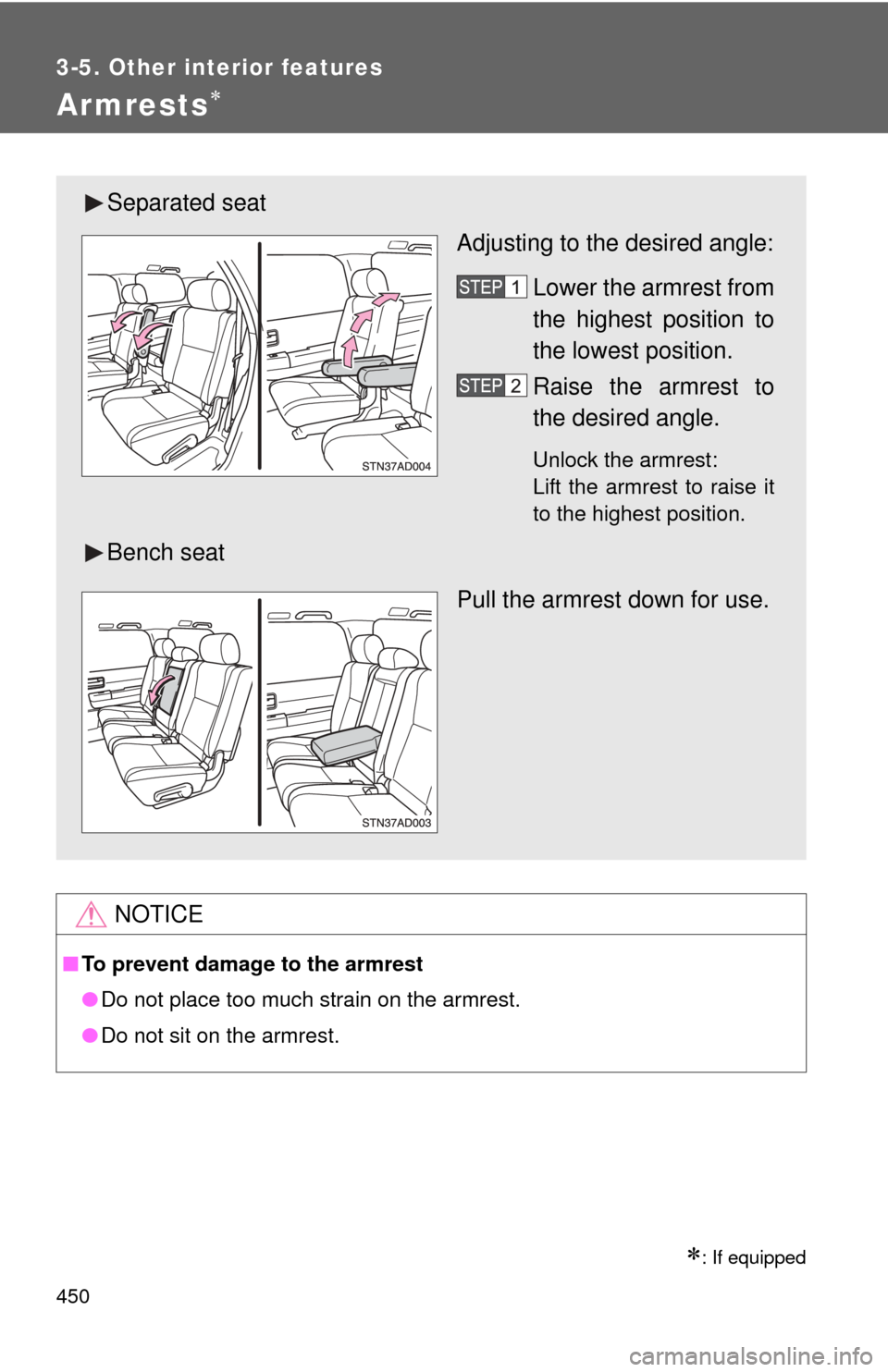
Armrests
: If equipped
NOTICE
■To prevent damage to the armrest
●Do not place too much strain on the armrest.
● Do not sit on the armrest.
Separated seat
Adjusting to the desired angle:
Lower the armrest from
the highest position to
the lowest position.
Raise the armrest to
the desired angle.
Unlock the armrest:
Lift the armrest to raise it
to the highest position.
Bench seat
Pull the armrest down for use.
Page 461 of 664
461
3-5. Other interior features
3
Interior features
Garage door opener
The garage door opener (HomeLink® Universal Transceiver) is manufac-
tured under license from HomeLink®.
Programming the HomeLink® (for U.S.A. owners)
The HomeLink
® compatible transceiver in your vehicle has 3 buttons
which can be programmed to operate 3 different devices. Refer to the
programming method below appropriate for the device.
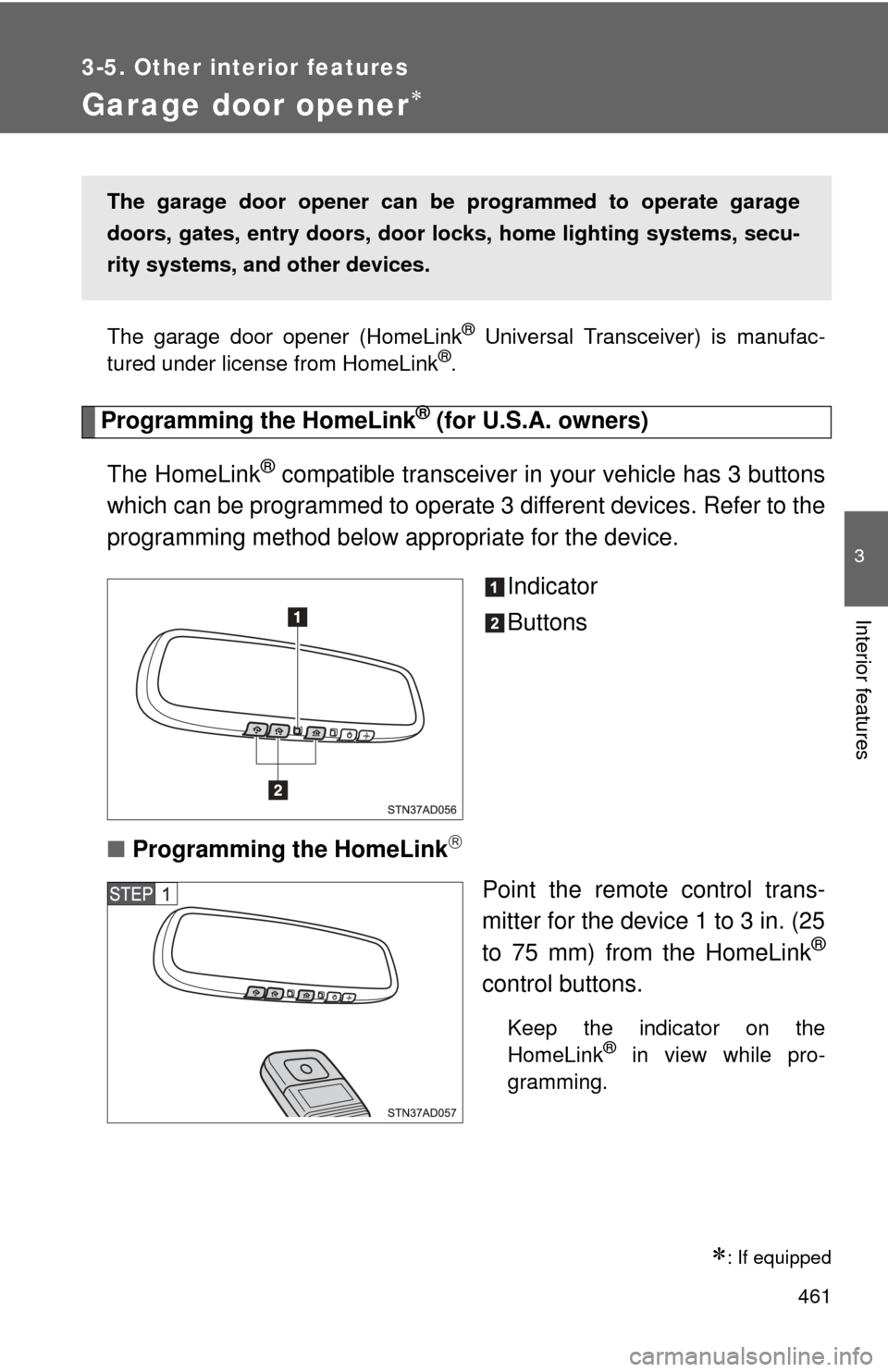
Indicator
Buttons
■ Programming the HomeLink
Point the remote control trans-
mitter for the device 1 to 3 in. (25
to 75 mm) from the HomeLink
®
control buttons.
Keep the indicator on the
HomeLink® in view while pro-
gramming.
: If equipped
The garage door opener can be programmed to operate garage
doors, gates, entry do ors, door locks, home lighting systems, secu-
rity systems, and other devices.
Page 464 of 664
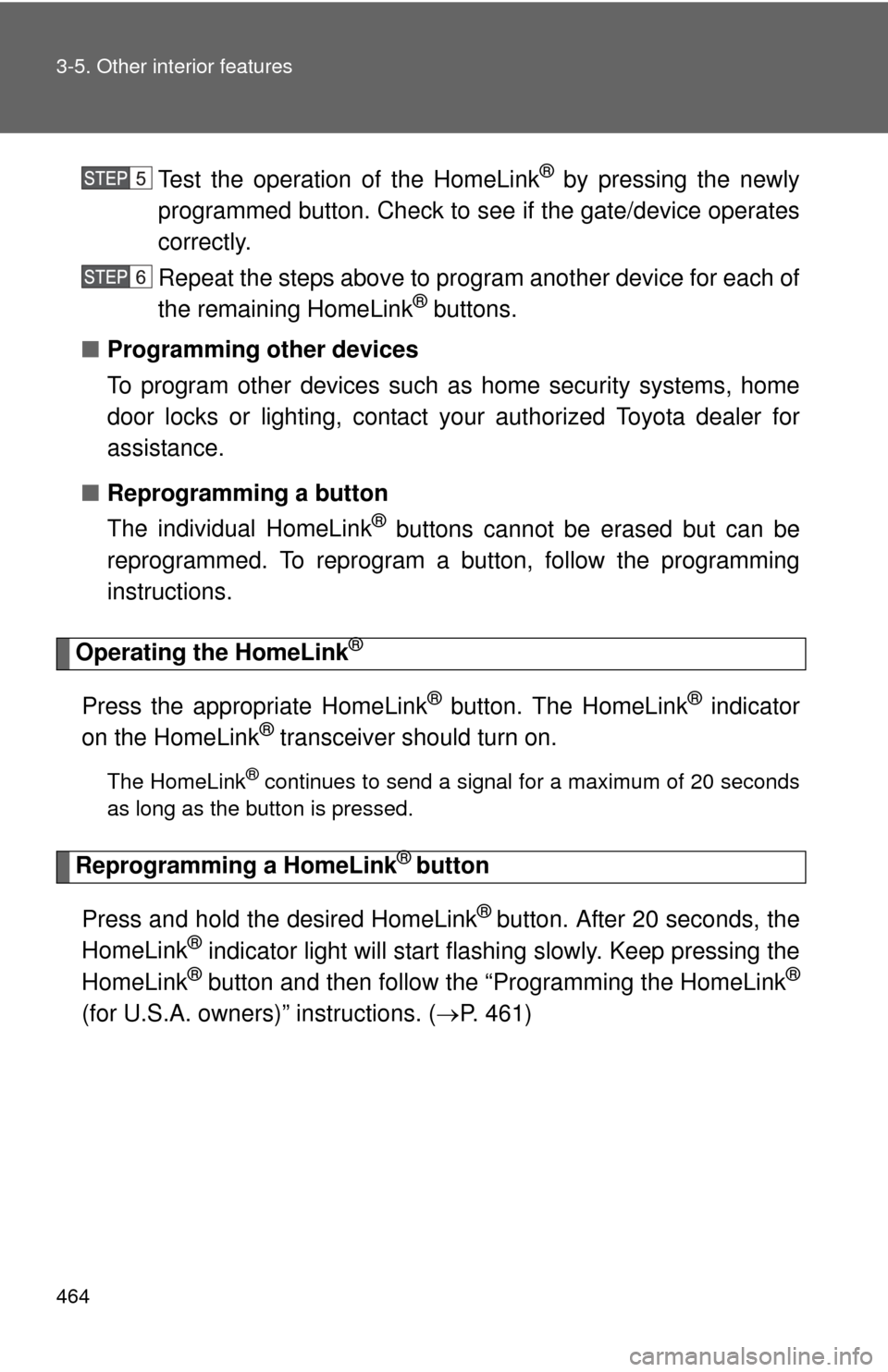
464 3-5. Other interior features
Test the operation of the HomeLink® by pressing the newly
programmed button. Check to se e if the gate/device operates
correctly.
Repeat the steps above to program another device for each of
the remaining HomeLink
® buttons.
■ Programming other devices
To program other devices such as home security systems, home
door locks or lighting, contact your authorized Toyota dealer for
assistance.
■ Reprogramming a button
The individual HomeLink
® buttons cannot be erased but can be
reprogrammed. To reprogram a button, follow the programming
instructions.
Operating the HomeLink®
Press the appropriate HomeLink® button. The HomeLink® indicator
on the HomeLink® transceiver should turn on.
The HomeLink® continues to send a signal for a maximum of 20 seconds
as long as the button is pressed.
Reprogramming a HomeLink® button
Press and hold the desired HomeLink
® button. After 20 seconds, the
HomeLink® indicator light will start flashing slowly. Keep pressing the
HomeLink® button and then follow the “Programming the HomeLink®
(for U.S.A. owners)” instructions. ( P. 461)
Page 469 of 664
469
3-5. Other interior features
3
Interior features
■
Deviation calibration
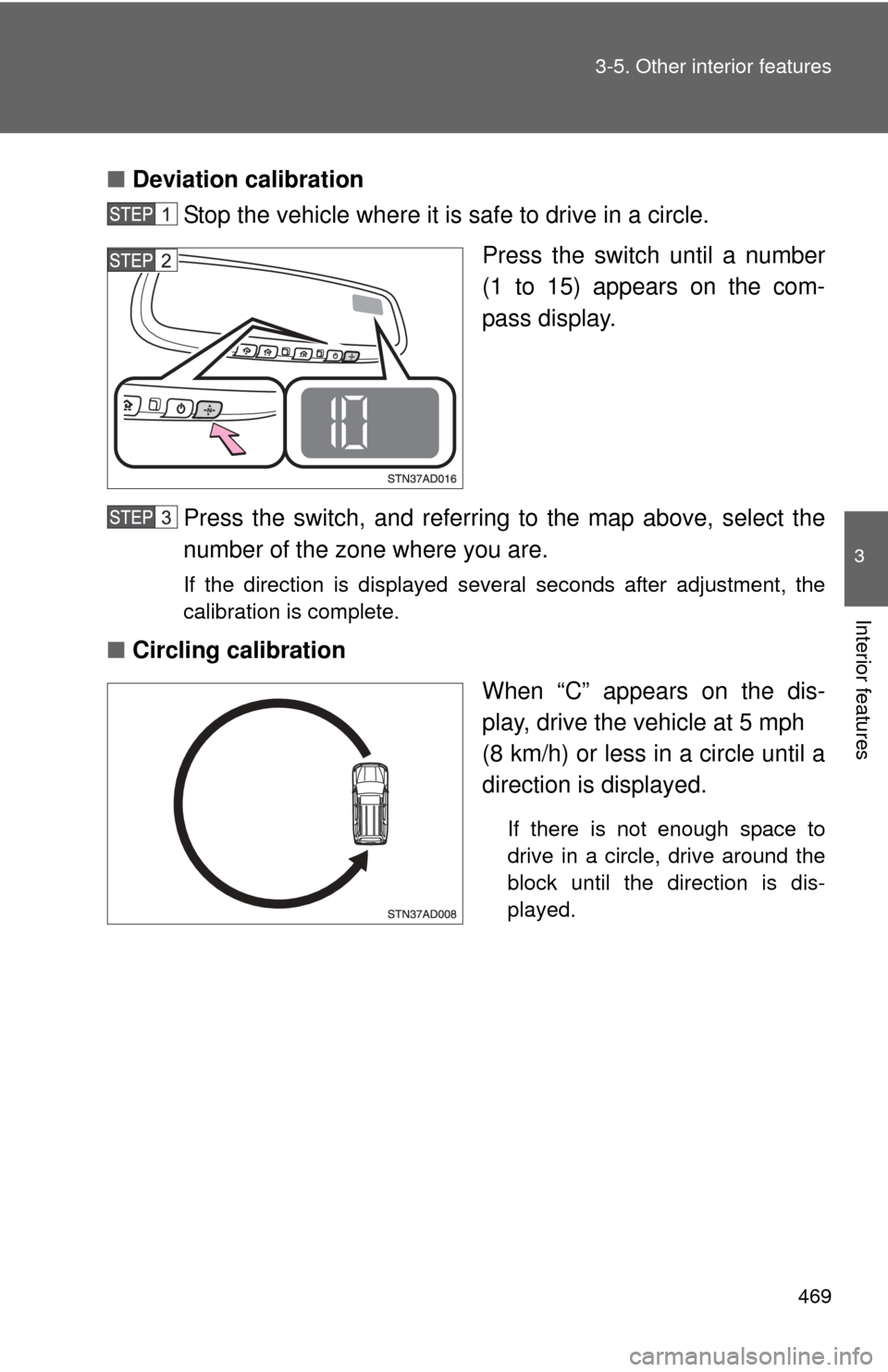
Stop the vehicle where it is safe to drive in a circle.
Press the switch until a number
(1 to 15) appears on the com-
pass display.
Press the switch, and referring to the map above, select the
number of the zone where you are.
If the direction is displayed several seconds after adjustment, the
calibration is complete.
■ Circling calibration
When “C” appears on the dis-
play, drive the vehicle at 5 mph
(8 km/h) or less in a circle until a
direction is displayed.
If there is not enough space to
drive in a circle, drive around the
block until the direction is dis-
played.
Page 480 of 664
480
4-2. Maintenance
General maintenance
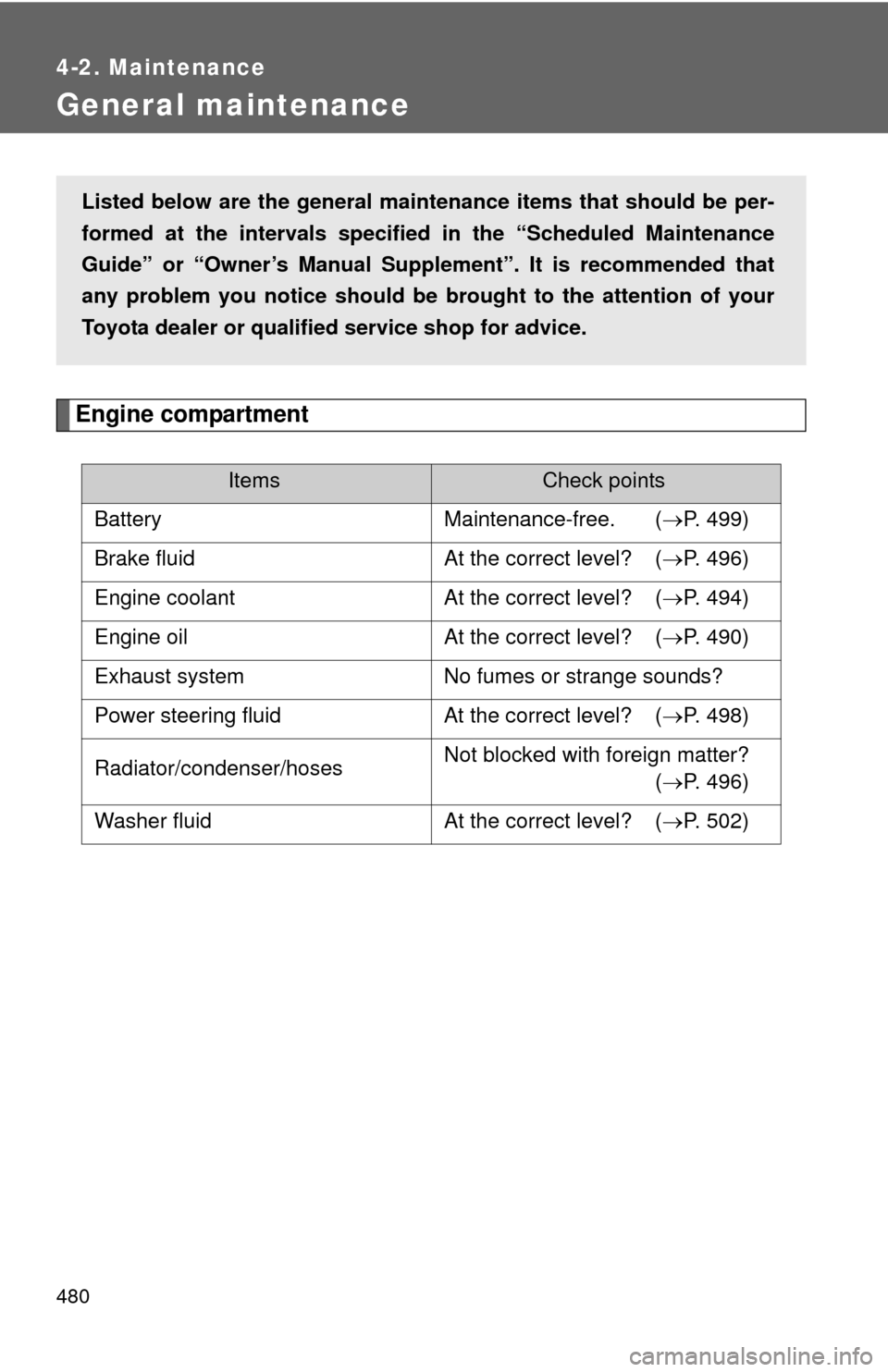
Engine compartment
ItemsCheck points
Battery Maintenance-free. ( P. 499)
Brake fluid At the correct level? ( P. 496)
Engine coolant At the correct level? ( P. 494)
Engine oil At the correct level? ( P. 490)
Exhaust system No fumes or strange sounds?
Power steering fluid At the correct level? ( P. 498)
Radiator/condenser/hoses Not blocked with foreign matter?
(P. 496)
Washer fluid At the correct level? (P. 502)
Listed below are the general maintenance items that should be per-
formed at the intervals specified in the “Scheduled Maintenance
Guide” or “Owner’s Manual Supp lement”. It is recommended that
any problem you notice should be brought to the attention of your
Toyota dealer or qualified service shop for advice.
Page 481 of 664
481
4-2. Maintenance
4
Maintenance and care
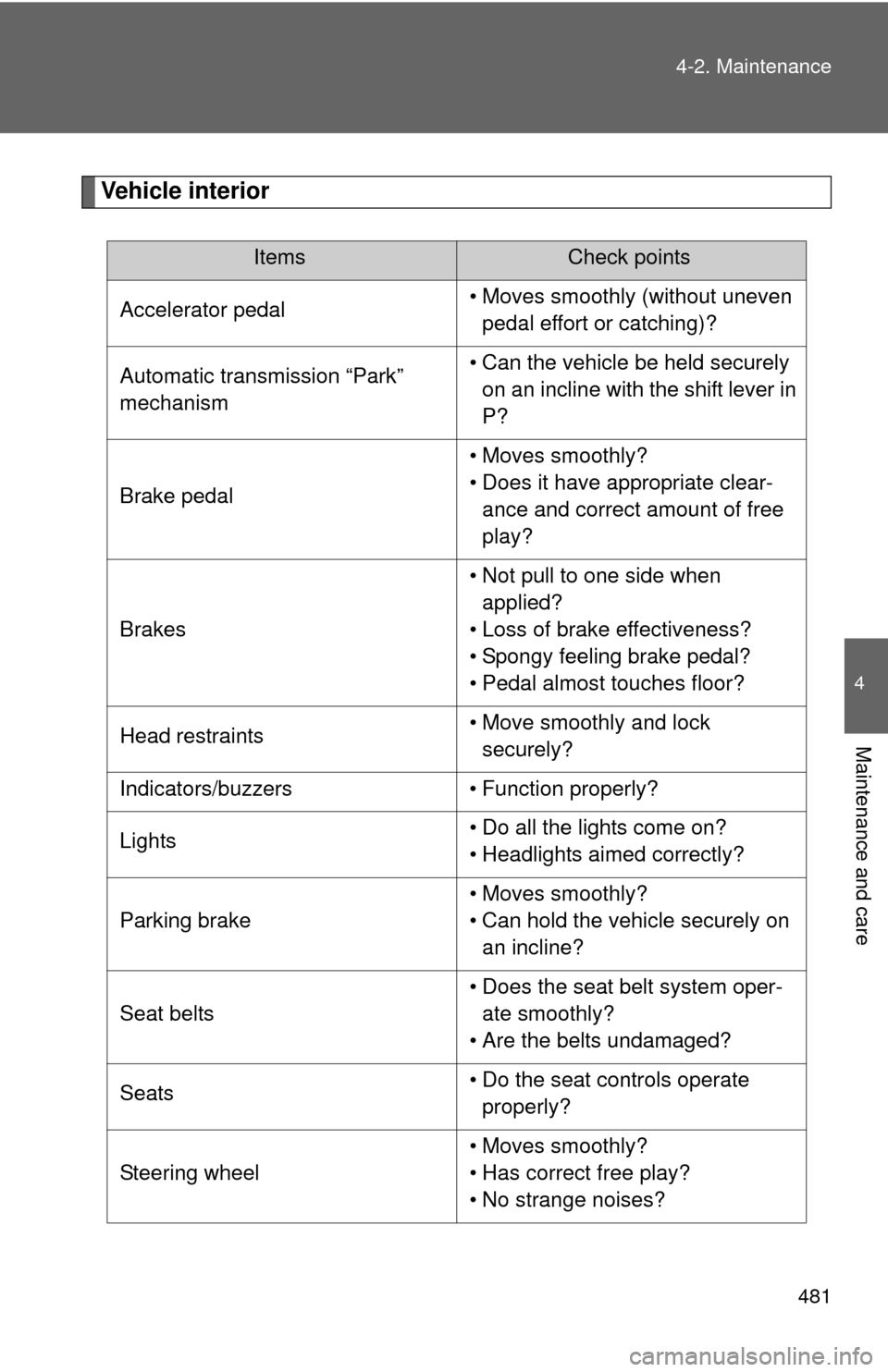
Vehicle interior
ItemsCheck points
Accelerator pedal • Moves smoothly (without uneven
pedal effort or catching)?
Automatic transmission “Park”
mechanism • Can the vehicle be held securely
on an incline with the shift lever in
P?
Brake pedal • Moves smoothly?
• Does it have appropriate clear-
ance and correct amount of free
play?
Brakes • Not pull to one side when
applied?
• Loss of brake effectiveness?
• Spongy feeling brake pedal?
• Pedal almost touches floor?
Head restraints • Move smoothly and lock
securely?
Indicators/buzzers • Function properly?
Lights • Do all the lights come on?
• Headlights aimed correctly?
Parking brake • Moves smoothly?
• Can hold the vehicle securely on
an incline?
Seat belts • Does the seat belt system oper-
ate smoothly?
• Are the belts undamaged?
Seats • Do the seat controls operate
properly?
Steering wheel • Moves smoothly?
• Has correct free play?
• No strange noises?