AUX TOYOTA SEQUOIA 2015 2.G User Guide
[x] Cancel search | Manufacturer: TOYOTA, Model Year: 2015, Model line: SEQUOIA, Model: TOYOTA SEQUOIA 2015 2.GPages: 664, PDF Size: 13.16 MB
Page 301 of 664
301
3-3. Using the interior lightsInterior lights list ............... 404
• Personal/interior light main switch .................... 405
• Personal/interior lights ... 406
• Interior light .................... 407
3-4. Using the storage features List of storage features .... 408
• Glove boxes ................... 409
• Coin holder .................... 410
• Front console box .......... 411
• Card holder .................... 414
• Map holder ..................... 415
• Pen holder ..................... 417
• Tissue pocket................. 418
• Rear console box ........... 419
• Overhead console.......... 422
• Cup holders ................... 424
• Bottle holders ................. 428
• Auxiliary boxes............... 429 3-5. Other interior features
Sun visors ........................ 431
Vanity mirrors ................... 432
Clock ................................ 433
Outside temperature display............................ 434
Portable ashtray ............... 436
Cigarette lighter................ 437
Conversation mirror ......... 438
Power outlets ................... 439
Seat heaters..................... 445
Seat heaters and ventilators ...................... 448
Armrests........................... 450
Rear side sunshades ....... 451
Assist grips....................... 453
Floor mat .......................... 454
Luggage compartment features .......................... 456
Garage door opener......... 461
Compass .......................... 467
Page 324 of 664
324
3-2. Using the multimedia system
USB por t/AUX por t
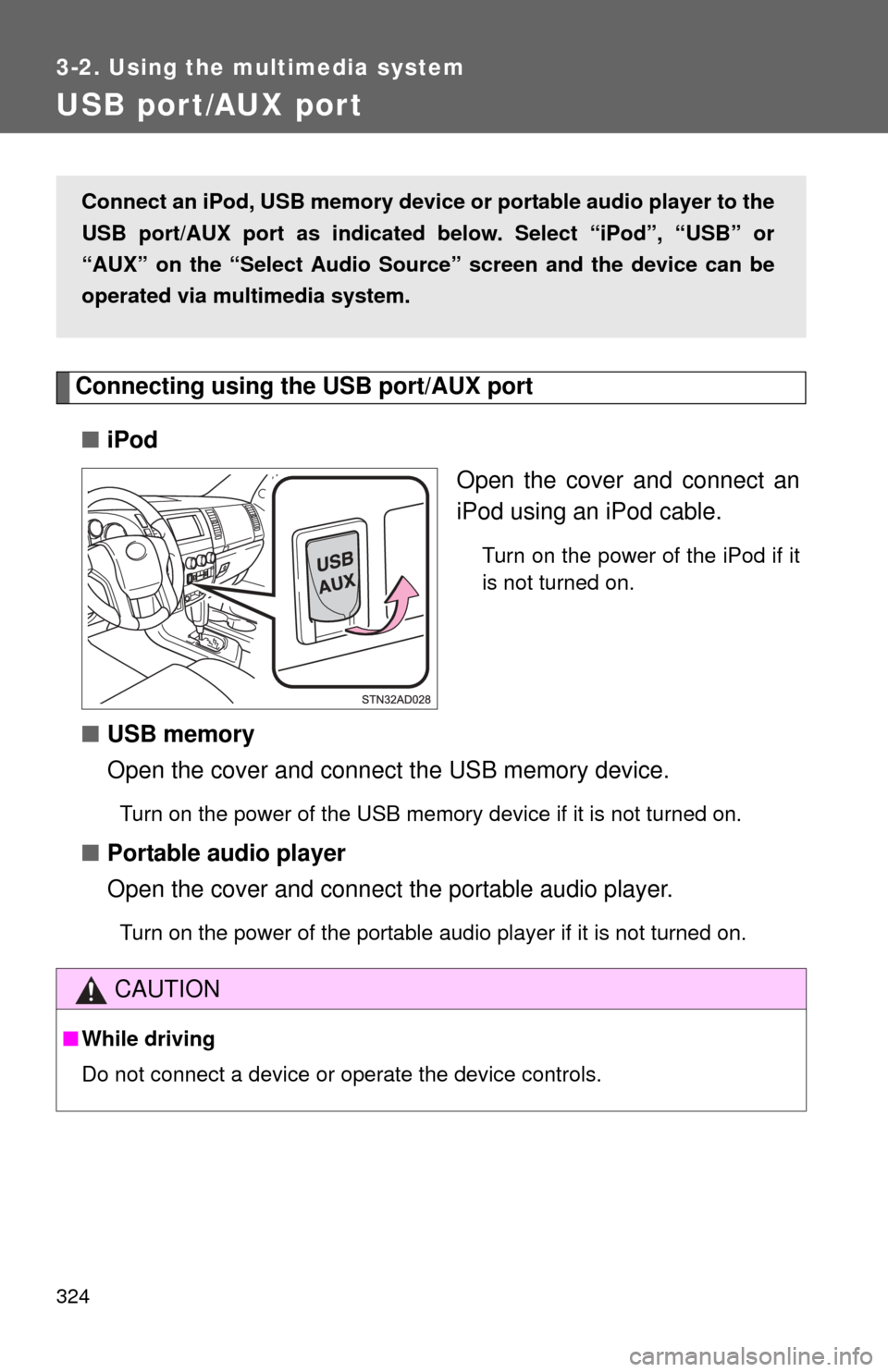
Connecting using the USB port/AUX port■ iPod
Open the cover and connect an
iPod using an iPod cable.
Turn on the power of the iPod if it
is not turned on.
■USB memory
Open the cover and connect the USB memory device.
Turn on the power of the USB memory device if it is not turned on.
■Portable audio player
Open the cover and connect the portable audio player.
Turn on the power of the portable audio player if it is not turned on.
Connect an iPod, USB memory device or portable audio player to the
USB port/AUX port as indicated below. Select “iPod”, “USB” or
“AUX” on the “Select Audio Sour ce” screen and the device can be
operated via multimedia system.
CAUTION
■ While driving
Do not connect a device or operate the device controls.
Page 354 of 664
354
3-2. Using the multimedia system
Using the AUX por t
Connecting a portable audio player P. 3 2 4
■Operating portable audio players c onnected to the multimedia system
The volume can be adjusted using the vehicle’s audio controls. All other
adjustments must be made on the portable audio player itself.
■ When using a portable audio player connected to the power outlet
Noise may occur during playback. Use the power source of the portable
audio player.
CAUTION
■ While driving
Do not connect a portable audio player or operate the device controls.
To use the AUX port, connect a po rtable player, then select “AUX” on
the “Select Audio Source” screen.
Page 408 of 664
408
3-4. Using the storage features
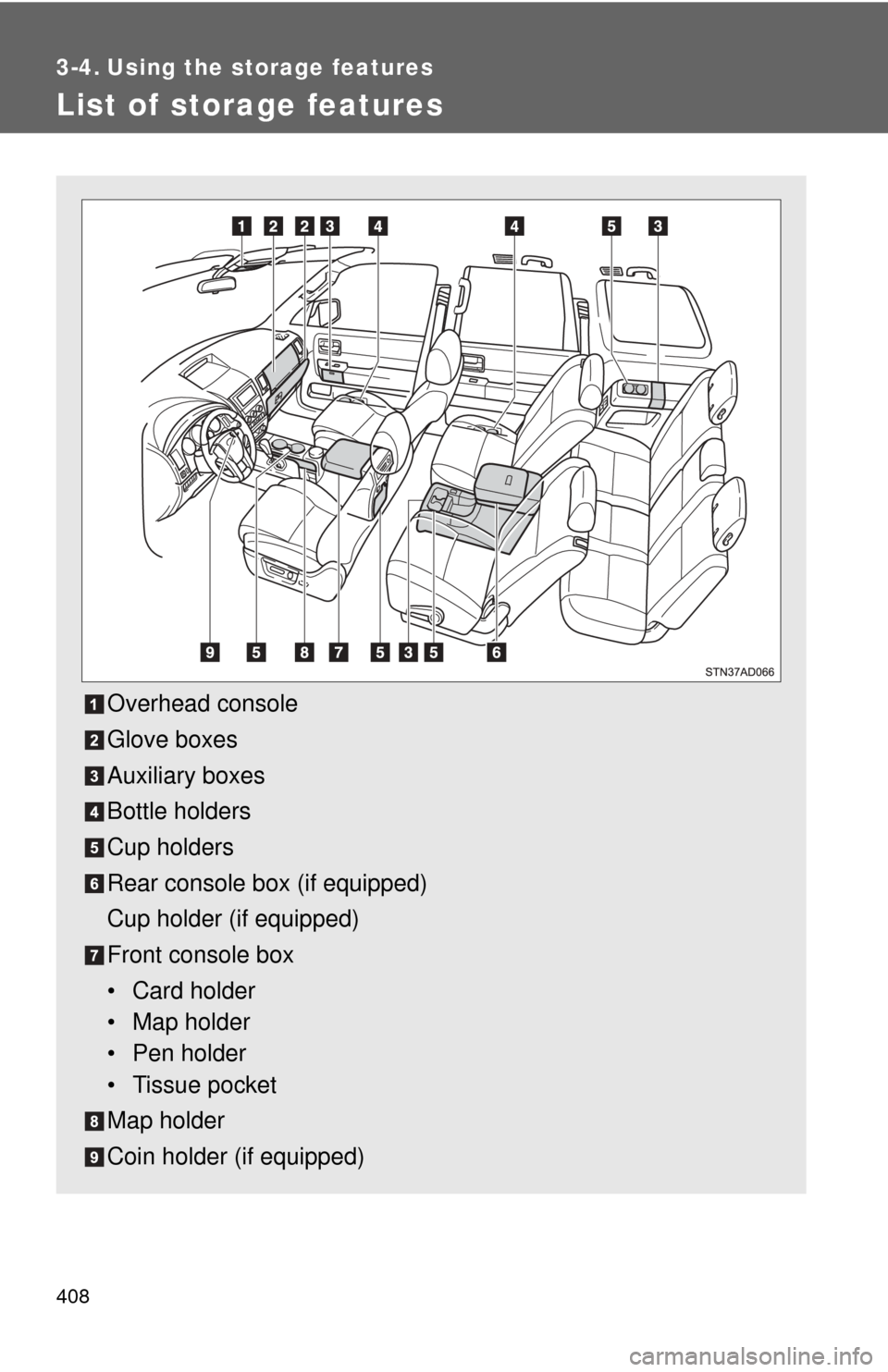
List of storage features
Overhead console
Glove boxes
Auxiliary boxes
Bottle holders
Cup holders
Rear console box (if equipped)
Cup holder (if equipped)
Front console box
• Card holder
• Map holder
• Pen holder
• Tissue pocket
Map holder
Coin holder (if equipped)
Page 429 of 664
429
3-4. Using the
storage features
3
Interior features
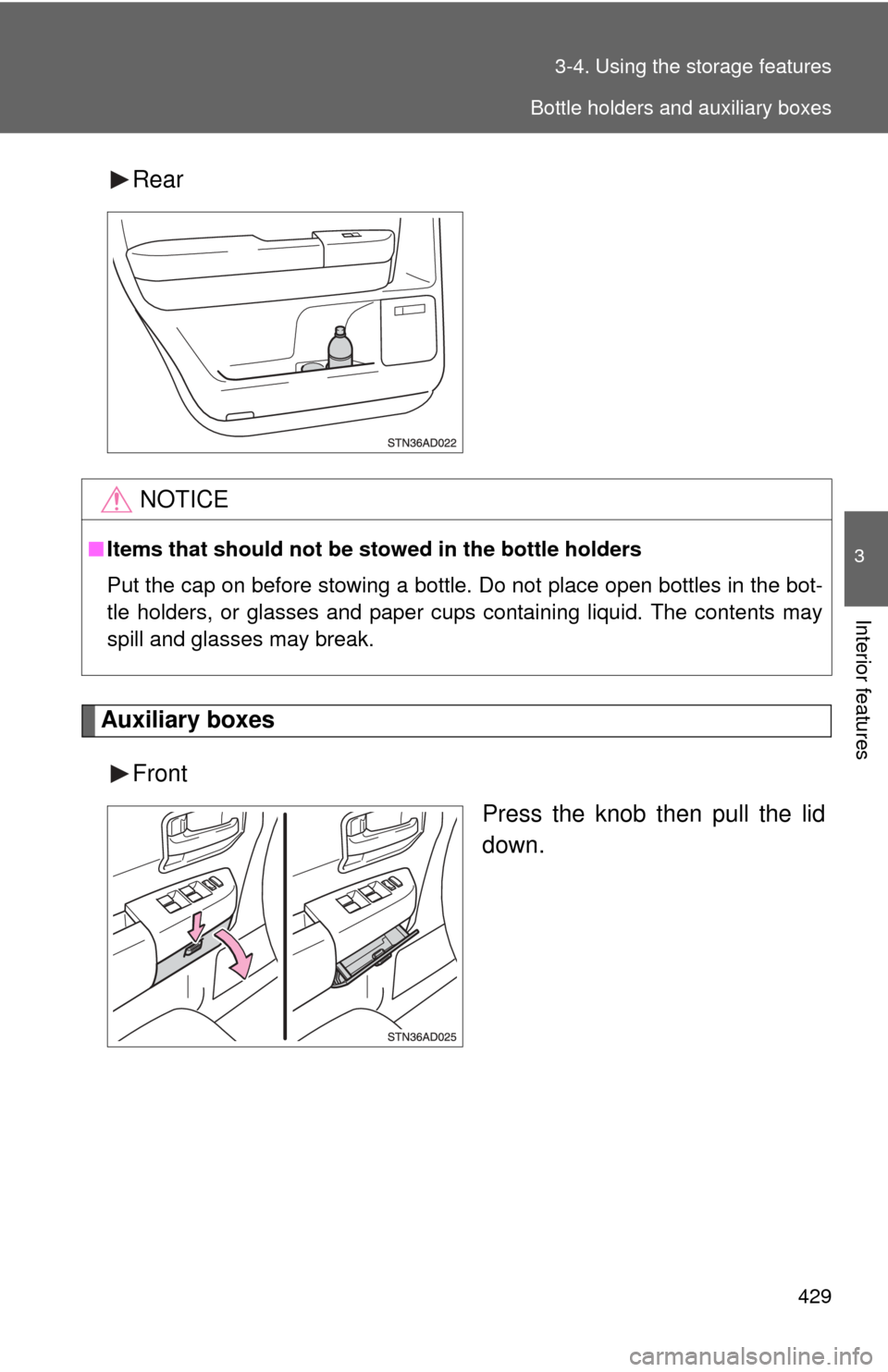
Rear
Auxiliary boxes
Front Press the knob then pull the lid
down.
NOTICE
■Items that should not be stowed in the bottle holders
Put the cap on before stowing a bottle. Do not place open bottles in the bot-
tle holders, or glasses and paper cups containing liquid. The contents may
spill and glasses may break.
Bottle holders and auxiliary boxes
Page 430 of 664
430 3-4. Using the storage features
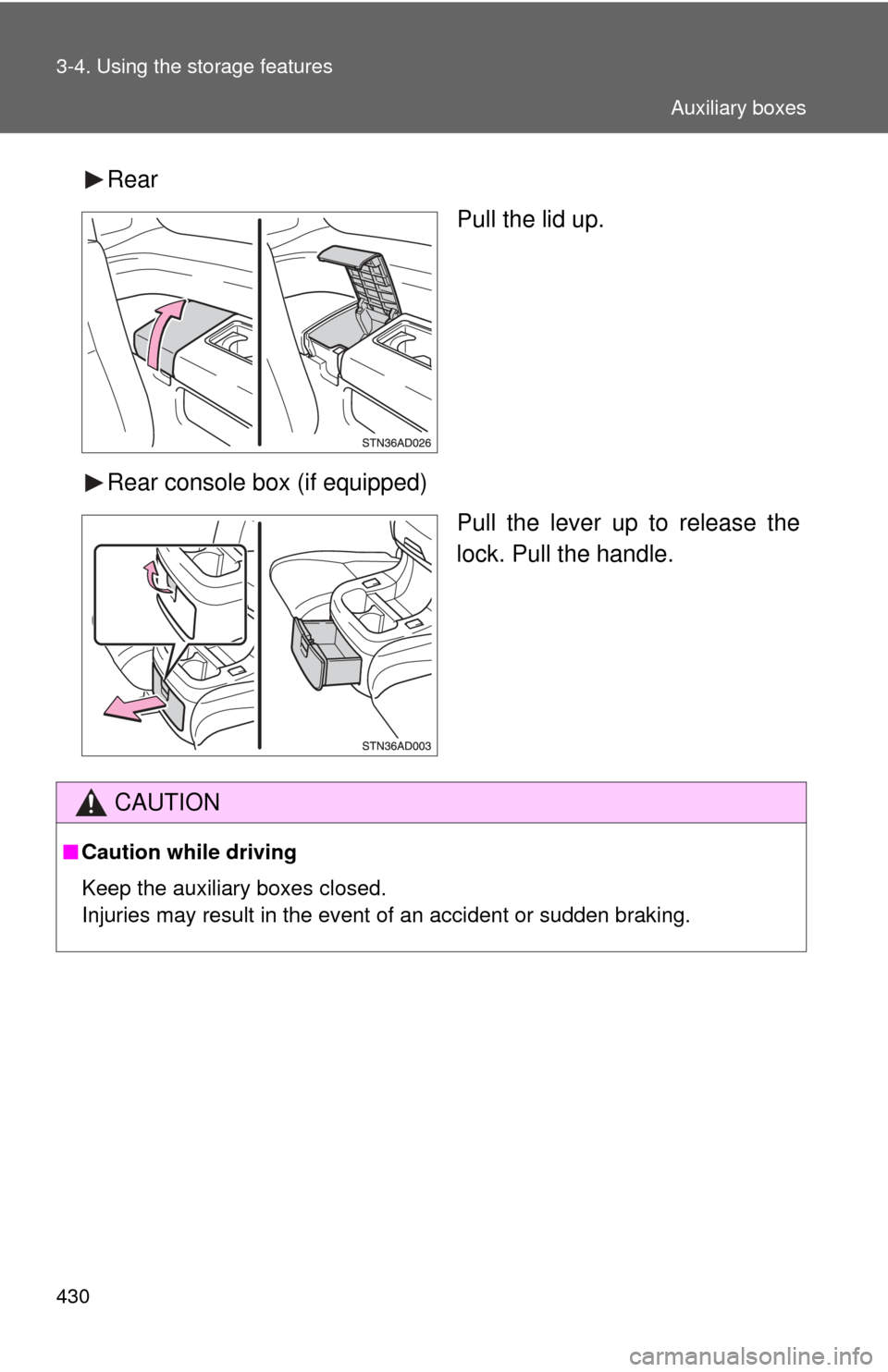
RearPull the lid up.
Rear console box (if equipped) Pull the lever up to release the
lock. Pull the handle.
CAUTION
■Caution while driving
Keep the auxiliary boxes closed.
Injuries may result in the event of an accident or sudden braking.
Auxiliary boxes
Page 459 of 664
459
3-5. Other interior features
3
Interior features
■
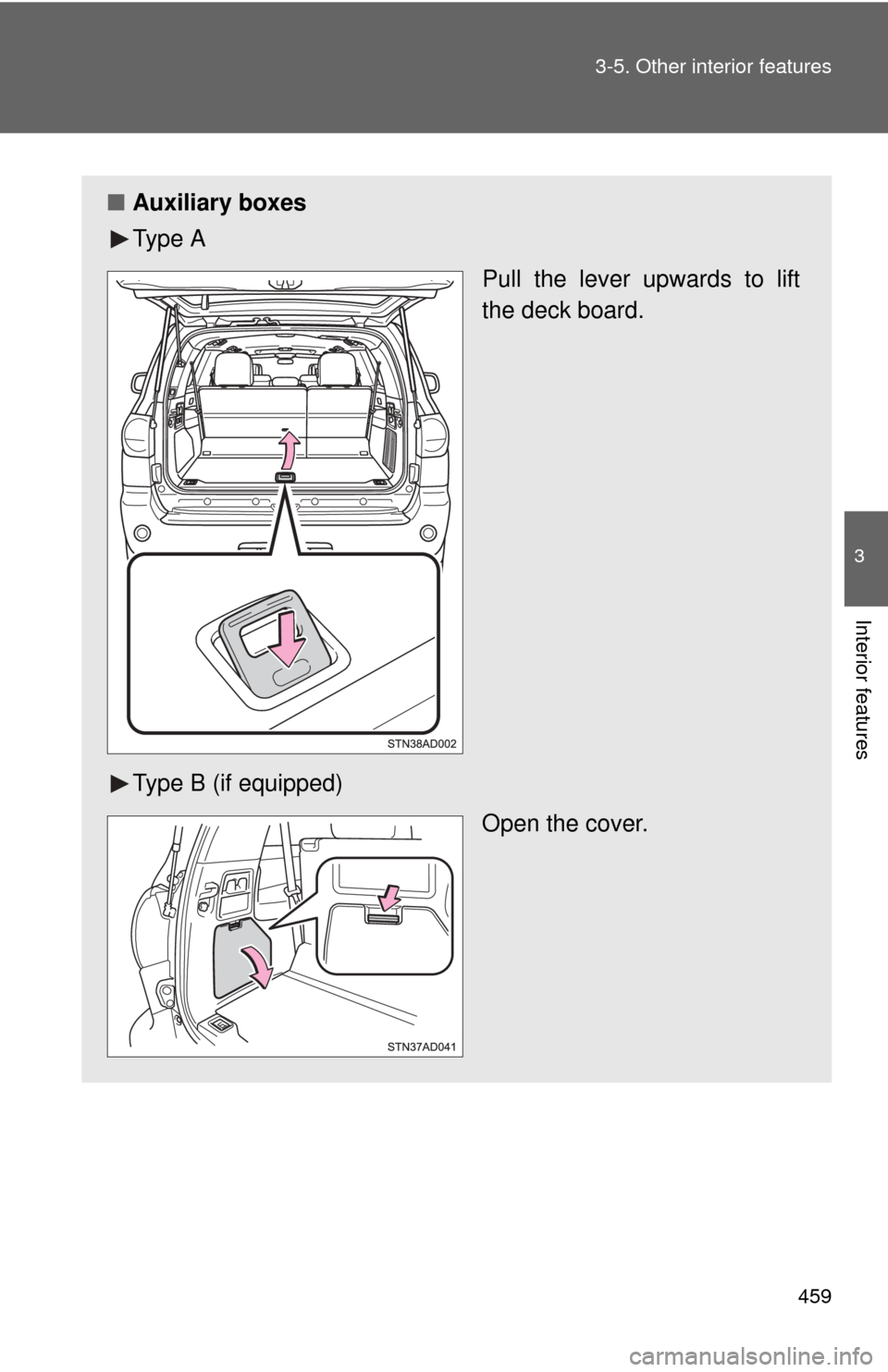
Auxiliary boxes
Ty p e A
Pull the lever upwards to lift
the deck board.
Type B (if equipped) Open the cover.
Page 460 of 664

460 3-5. Other interior features
CAUTION
■When the tie-down hooks are not in use
To avoid injury, always return the tie-down hooks to their retracted positions
when they are not in use.
■ Caution while driving
Keep the auxiliary box closed. Injuries may result in the event of an accident
or sudden braking.
Page 650 of 664

650
Alphabetical index
Alphabetical index
A/C ..................................... 302, 311
AAC disc ................................... 336
ABS ........................................... 255
Active traction control ............. 255
Adaptive variable suspension system .................................... 247
Air conditioning filter............... 518
Air conditioning system
Air conditioning filter .............. 518
Front air conditioning system ................................ 302
Rear air conditioning system ................................ 311
Airbags Airbag operating conditions............................ 114
Airbag precautions for your child .................................... 118
Airbag warning light............... 558
Curtain shield airbag
operating conditions............ 114
Curtain shield airbag
precautions ......................... 118
Front passenger occupant classification system ........... 123
General airbag precautions ......................... 118
Locations of airbags .............. 111
Modification and disposal of
airbags ................................ 122
Proper driving
posture ........................ 109, 118
Side airbag operating conditions............................ 114
Side airbag precautions ........ 118
SRS airbags .......................... 111
Alarm ......................................... 106
Antenna..................................... 335
Anti-lock brake system............ 255
Armrest ..................................... 450
Ashtrays.................................... 436 Assist grips .............................. 453
A-TRAC ..................................... 255
Audio input ............................... 324
Audio system
A/V input port
*
Antenna................................. 335
Audio input ............................ 324
Audio visual input
*
AUX port ............................... 354
Blu-ray Disc™
*
CD player .............................. 336
DVD disc
*
DVD player*
iPod ....................................... 343
MP3/WMA/AAC disc ............. 336
Portable music player ........... 354
Radio..................................... 334
Rear seat entertainment system
*
Steering wheel audio switch*
Type ...................................... 318
USB memory......................... 349
Audio visual input
*
AUTO LSD system ................... 253
Automatic light control system .................................... 190
Automatic transmission .......................... 159
AUX port ................................... 324
Auxiliary box ............................ 429
A/V input port
*
AVS ........................................... 247
Back-up lights Replacing light bulbs ............. 535
Wattage................................. 610
Back door
Back door ................................ 40
Back window ........................... 93
Wireless remote control .......... 31
A
B
Page 664 of 664
664
GAS STATION INFORMATION
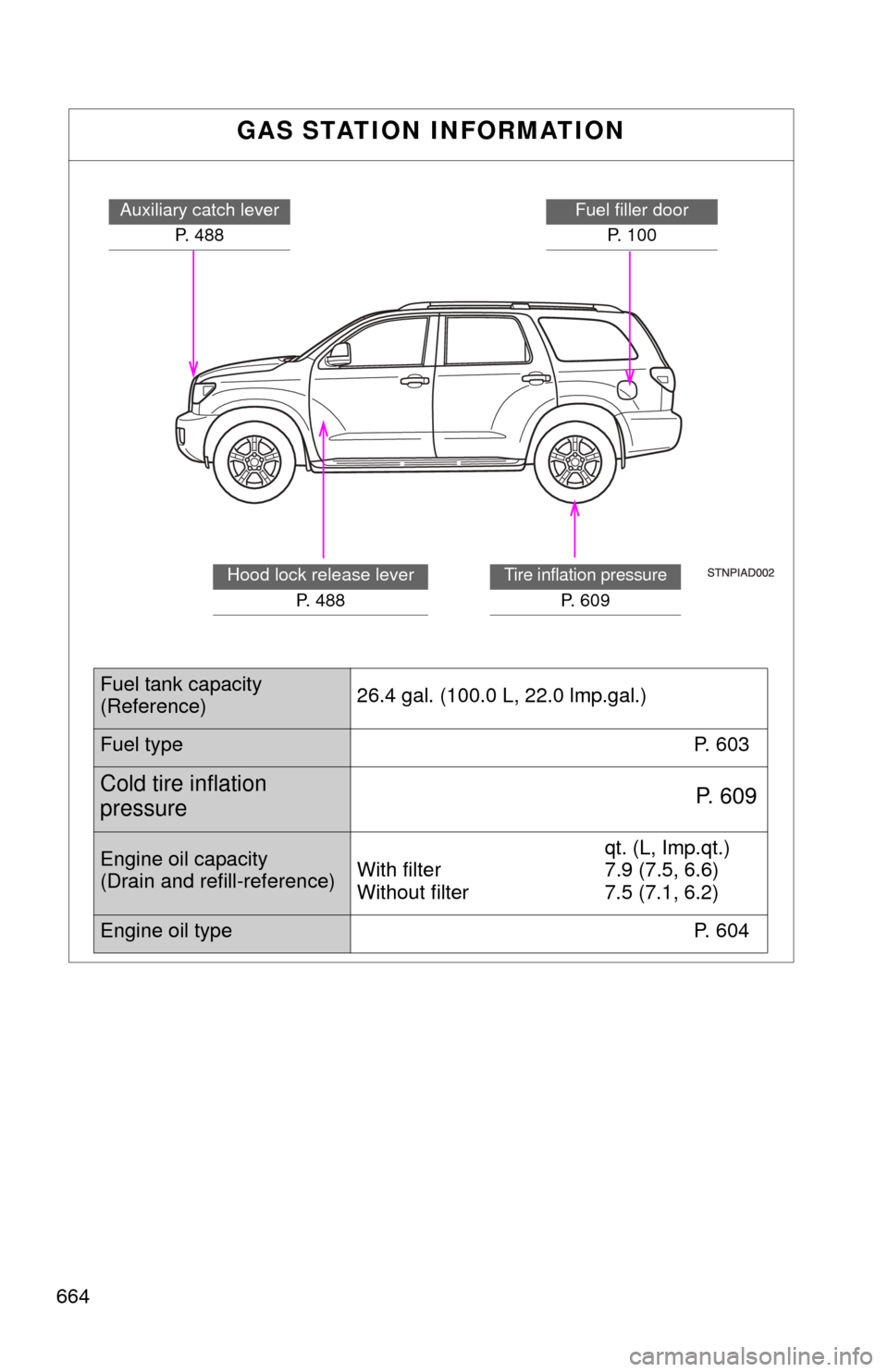
Auxiliary catch leverP. 488Fuel filler doorP. 100
Tire inflation pressure
P. 6 0 9
Hood lock release lever P. 488
Fuel tank capacity
(Reference) 26.4 gal. (100.0 L, 22.0 lmp.gal.)
Fuel type
P. 603
Cold tire inflation
pressureP. 6 0 9
Engine oil capacity
(Drain and refill-reference)qt. (L, Imp.qt.)
With filter 7.9 (7.5, 6.6)
Without filter 7.5 (7.1, 6.2)
Engine oil type P. 604